- Why is no score displayed?
- Does the module fix vulnerabilities automatically?
- Are reports sent to an AI service?
- What happens when upgrading from the first version?
- Can I delete a report?
- Does an audit run automatically every night?
PrestaShop security audits: reading reports and tracking corrections
Want to know which store security issues deserve attention and give your developer concrete evidence? Security Audit Pro organises checks, evidence and follow-up in the back office. This guide explains how to read a report without treating a suspicion as a confirmed vulnerability.
What is the audit useful for?
After installing a module, review known advisories and file indicators. After an intervention, recheck the relevant finding. Agencies can keep reports per store and share useful observations with their technical team. Eight categories organise the findings; they do not mean exhaustive coverage of every attack.
View Security Audit Pro and licence options
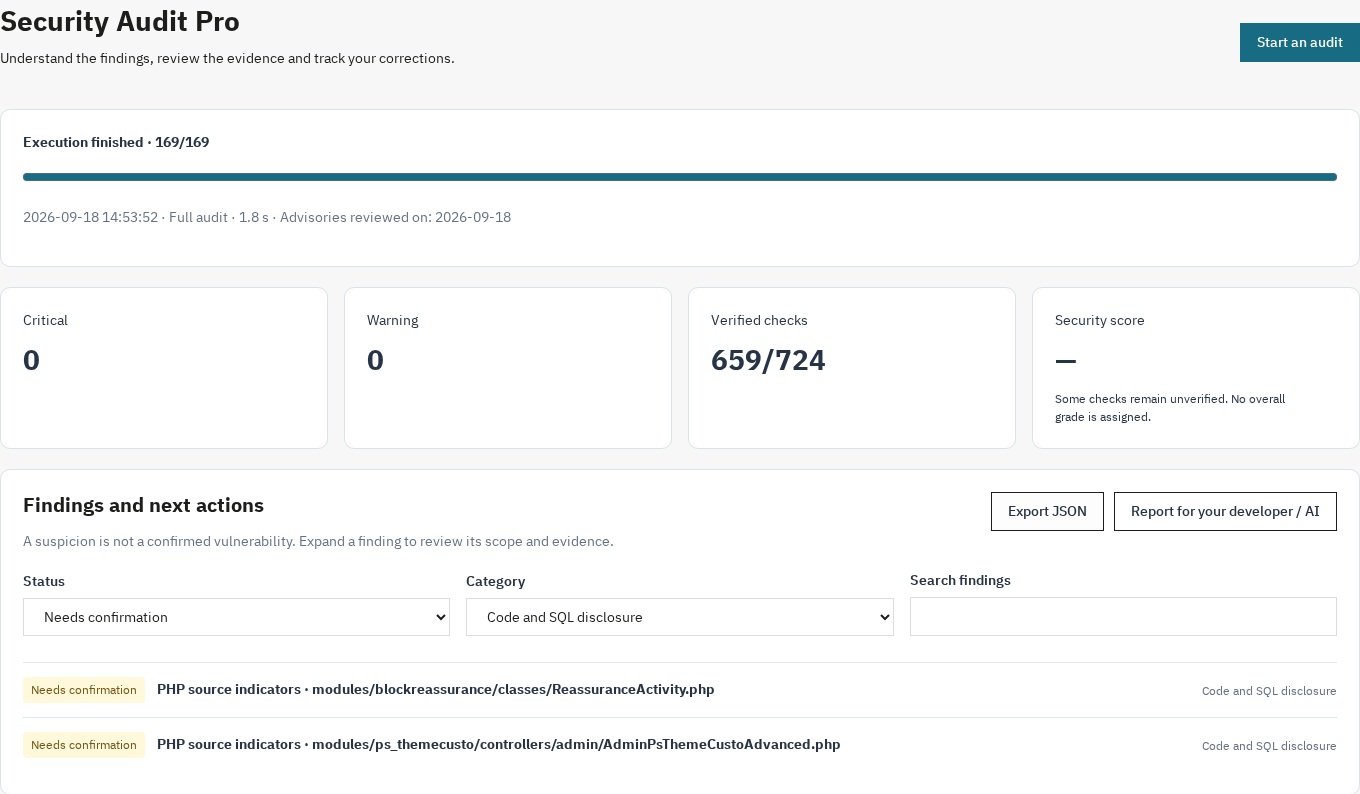
Follow progress and distinguish findings from checks that still need verification.
Install and open the module
- Download the ZIP for your PrestaShop version from your customer account.
- In Modules → Module Manager, choose Upload a module and select the ZIP.
- Search for Security Audit, click Configure and enter your licence when prompted. No extra sidebar menu is added.
- In multistore, select one store. Start an audit and follow its progress; Pause, Resume and Cancel remain available.
- If interrupted, reload the page, restore your session if necessary and resume the saved report.
Read results without false certainty
Start with confirmed issues and their severity, then investigate suspicions. Open a finding for its explanation, scope, evidence and recommendation. Filter by category or search for a file. An unverified check or an error is never treated as a pass; a blocked network response cannot provide reassuring evidence.
For example, an HTTP200 response to a sensitive-file probe might be a custom error page, so the report asks for confirmation. Similarly, a call found in a PHP file does not establish that an injection is exploitable.
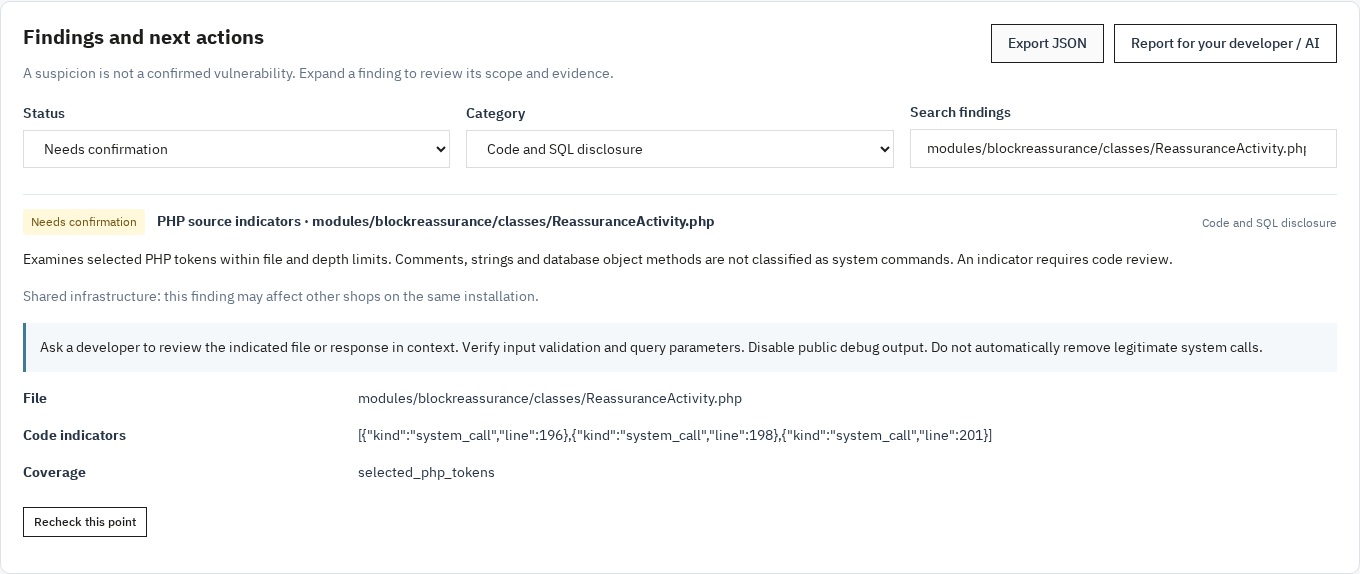
Open a finding to inspect evidence, read the recommendation and recheck that point.
Track a correction
Open the relevant finding, have its recommendation reviewed and use the targeted recheck. Compare two reports from the same store: groups distinguish new, persistent, resolved and unverified findings. A check missing from the second report does not prove a fix. Export JSON or text when a developer or AI assistant needs to help.
Requirements and limitations
PrestaShop 1.7.8, 8.2 or later, 9.1 or later (8.0, 8.1 and 9.0 not supported); PHP 7.4 minimum, compatible with your store version; JSON, PDO, mbstring, cURL and OpenSSL extensions. The module runs in the back office. HTTP probes must reach the configured store: access protection, hosting or a firewall can leave some checks unverified.
The bundled catalogue includes its date and sources, not every existing advisory. File analysis is bounded and reports when limits are reached. CSRF, IDOR and effective file-execution protections need additional investigation. The module does not replace a penetration test, block attacks or apply fixes.
Frequently asked questions
Why is no score displayed?
A grade requires a finished audit with verified applicable checks. When some coverage is unknown, the dashboard shows coverage and findings instead of an overall grade.
Does the module fix vulnerabilities automatically?
No. The text report can help your developer or AI assistant prepare changes that must be reviewed and tested before application.
Are reports sent to an AI service?
No. Reports are stored in the shop; you decide whether to export and share them. The licensed edition contacts the licence service for activation and validation.
What happens when upgrading from the first version?
Settings and old reports are retained. Archives with an unknown originating store remain available to the superadministrator, without displaying raw details, and are not included in comparisons.
Can I delete a report?
Yes, with the required permissions. A running audit must be cancelled first. Uninstalling the module deletes its history after the native warning.
Does an audit run automatically every night?
No. Audits are started from the back office. Scheduling and automatic alerts are not included.
Support and choosing your offer
Use the product page to choose the offered plan, site allowance and support terms. Contact WePresta through your customer account with questions. Do not include passwords or keys in a support request.
View Security Audit Pro and licence options
Version history
Version 2.0.1
Fixes
- Activate your license from the module configuration page on PrestaShop 9: the form no longer shows “Invalid form token”.
Version 2.0.0
- Pause an audit, resume after interruption or cancel it.
- Distinguish confirmed issues, suspicions, unverified checks and errors.
- See an overall grade only when the checks support its calculation.
- Review dated security advisories and sources for covered core and module versions.
- Compare findings between two reports and recheck a specific point.
- Keep separate history per store and redacted JSON or text exports.
- Open the module through Module Manager without a sidebar entry.
- Read the interface and reports in French, English, Spanish, Italian or Polish.
- Use bounded checks and lighter installation archives.
Version 1.0.0
- Initial security-audit version and check categories.
- Security-score calculation.
- Text export for assisted analysis.
- Interactive administration interface.
The descriptions below clarify the historical feature scope: text export assists analysis and does not apply automatic fixes.