
Dynamic contact form by subject - Module PrestaShop
PrestaShop Dynamic Contact Form Module: Qualify Your Customer Support Requests with Conditional Logic
Dynamic Contact Form for PrestaShop lets you build one contact form per subject, with conditional fields, validation and GDPR consent. Each request creates a native customer service thread, reaches the right team (copy, blind copy, a recipient chosen by an answer) and is kept in a table that you can filter and export to CSV. Multi-store, multilingual, JSON export, anti-spam protection.
Compatible with PrestaShop 1.7.8, 8.0+ and 9.0+ (PHP 7.4 minimum).
Everything you need, nothing you don't.
Dynamic contact forms for PrestaShop 1.7.8, 8.0+ and 9.0+: conditional fields, routing by subject and by answer, requests you can export.
Fields that follow the answers
A field appears only when the answer to another one calls for it, in the browser and on the server.
Routing by subject and by answer
Each request reaches the right team, in copy or instead of the usual address.
GDPR consent built in
A consent box with your text, the date kept with the request, export and erasure with the GDPR module.
Checks on every field
E-mail, web address, phone, number or your own pattern, with a clear message next to the field.
Requests kept and exportable
Answers in a table with filters and files, a CSV export and a conversation in customer service.
One form per subject
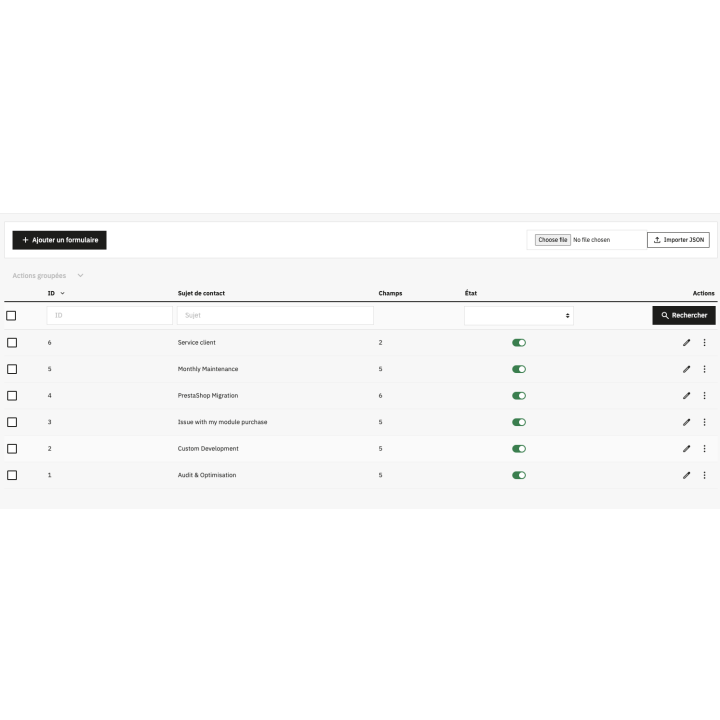
A different form for each type of request, with nine field types and a file field that works.
They use it every day.
description Full description expand_more
Revolutionize Your Customer Service: Smart and 100% Custom Contact Forms
The native PrestaShop contact form is often too rigid to meet the specific needs of your business. Dynamic Contact Form breaks these limitations by allowing you to create tailor-made forms for each contact subject (customer service, quotes, technical support, partnerships). Offer your customers a modern communication interface that qualifies their requests before they even reach your inbox, and get every message to the right team.
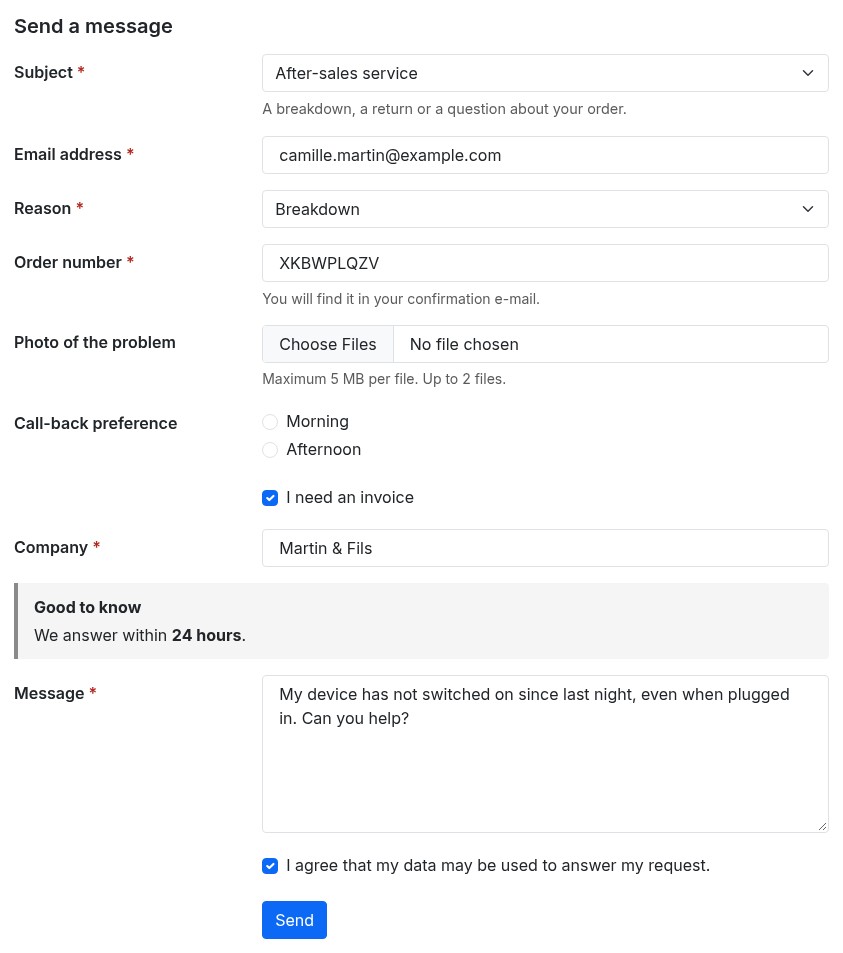
Dynamic forms with conditional logic
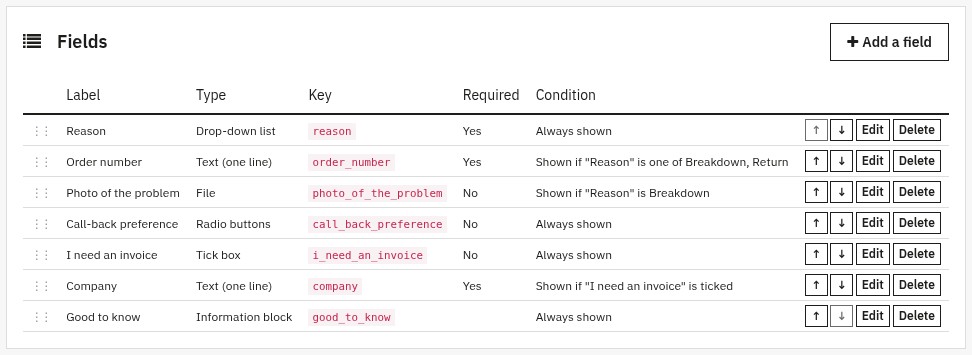
No longer overwhelm your customers with unnecessary fields. Thanks to intelligent conditional logic, your form adapts in real time to the user's responses. A "Company" field only appears if the "I need an invoice" box is checked; the order number and the photo of the problem only appear for a breakdown. The browser and the server apply the same rules.
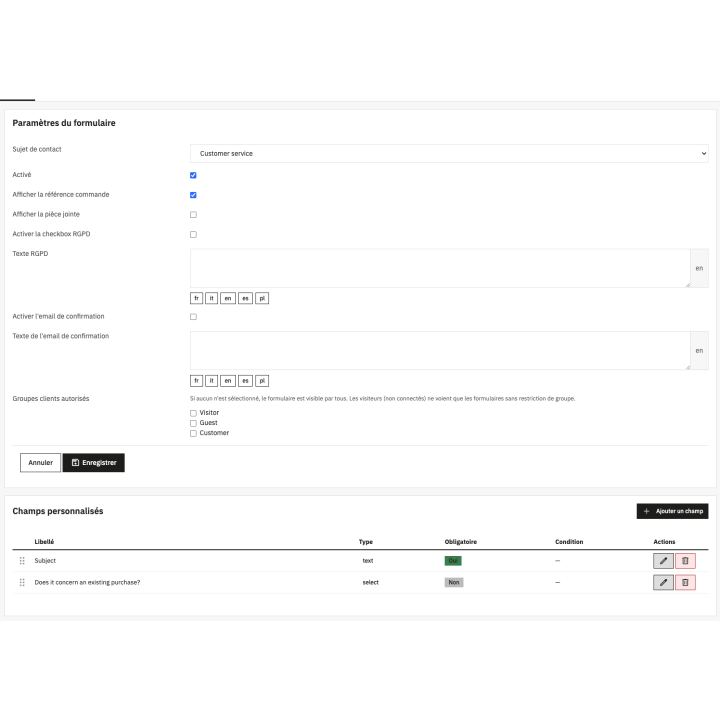
- 9 versatile field types: one-line text, text area, drop-down list, radio buttons, several tick boxes, tick box, date, file and information block.
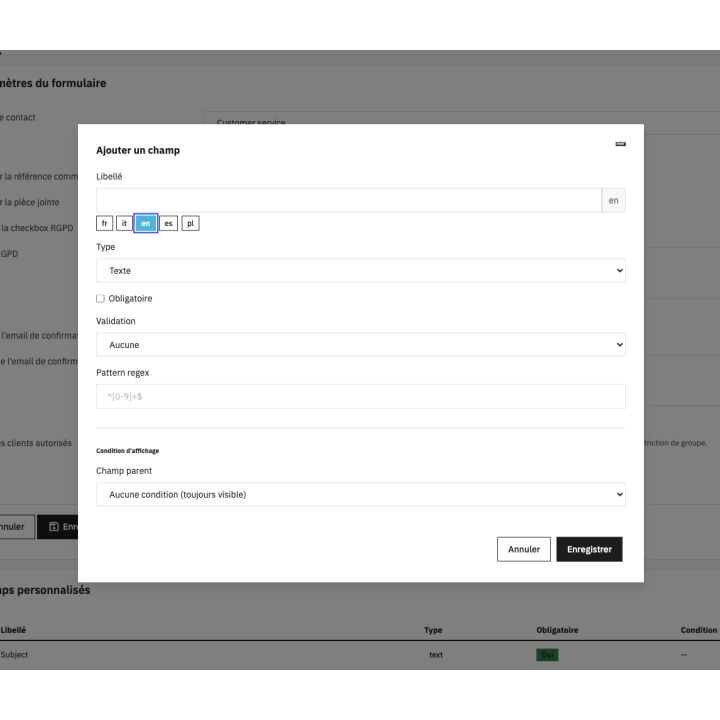
- Display conditions: Show or hide fields based on previous choices (is one of, is none of, is ticked, equals, contains) for a smooth user experience (UX).
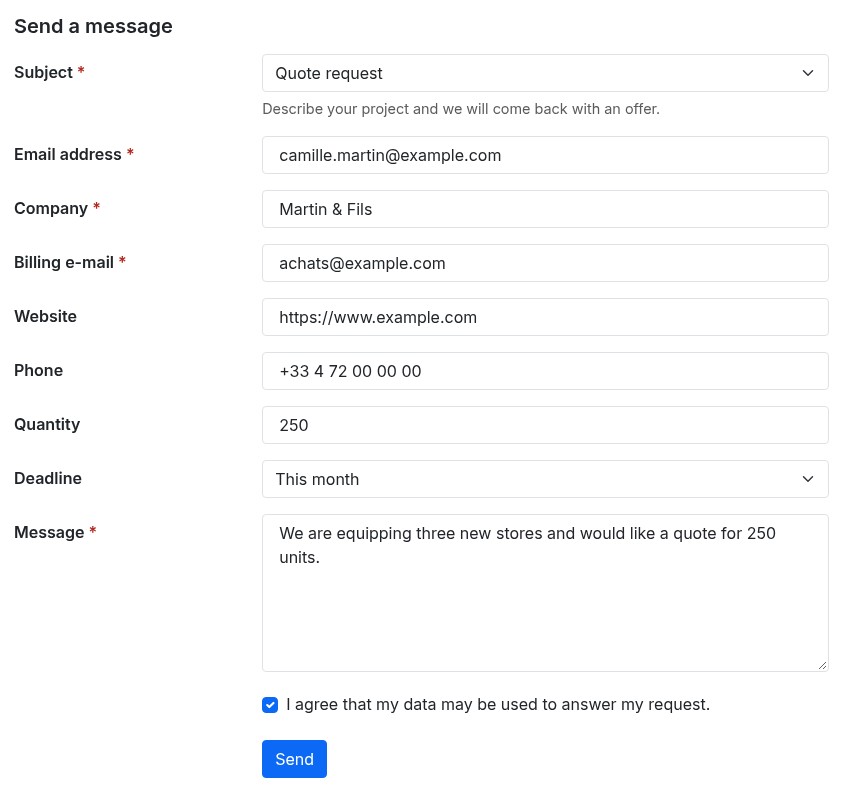
- Advanced validations: Control input (e-mail, web address, phone, number or your own pattern) to receive clean and usable data, with a clear message next to the field and without losing what the customer typed.
- A file field that works: you choose the file types, the size and the number of files; the files are kept outside the public folder of the shop.
- Placeholder and help text under each field, in every language of the shop.
GDPR compliance and built-in automation
Security and compliance are at the core of the module. Each form can include a customizable GDPR checkbox to ensure user consent; the date of the consent is kept with the request, and the official GDPR module can export or erase it. Save time in your daily management: the module creates a discussion thread directly in your native PrestaShop customer service and sends the request to the right people.
- Routing: the address of the subject, plus a copy and a blind copy for each form, and a recipient chosen by the answer to a list (a return goes to the returns team, a breakdown is also copied to the support).
- Acknowledgement to the customer: a personalized e-mail with your own subject and text in each language, which never repeats the free message of the customer.
- Reply in the same thread: a customer who answers from your e-mail continues the same conversation of the customer service.
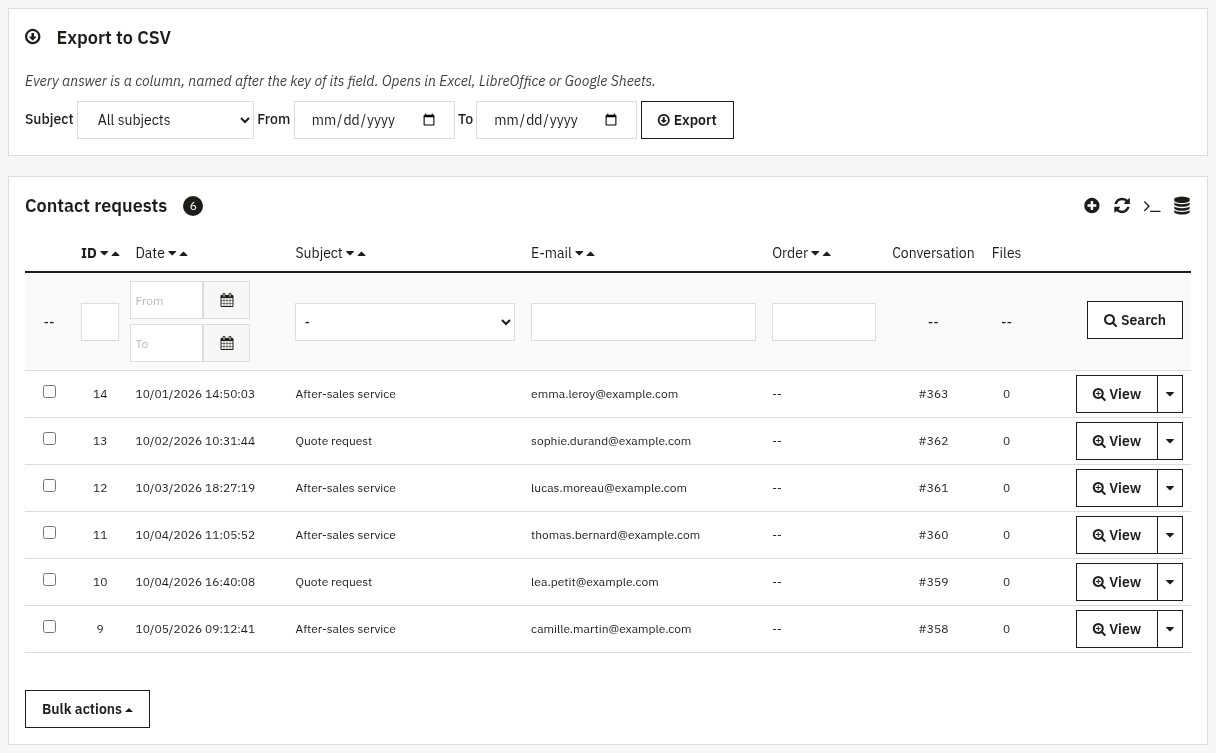
Requests you can follow and export
Every request is also kept in a table in the back office. Filter it by subject, date or e-mail, read the answers, download the files, and export everything to CSV (one column per field) for Excel, LibreOffice or Google Sheets. Requests can be deleted automatically after the number of days you choose.
Total flexibility: Multi-store, Multilingual and JSON Export
Whether you manage a single store or an international network, this module adapts perfectly. Restrict form visibility by customer groups (a members-only subject, a "pro quote" form) and benefit from full multilingual support: labels, answers, help texts, consent and e-mails exist in every language of the shop. Each shop has its own forms. For agencies and developers, the JSON Export/Import feature allows you to deploy your form configurations from one store to another in a single click; an imported form arrives switched off, so you check it before it goes live.
Optimized security and performance
Rest easy with built-in anti-spam protection: a limit of requests per hour for each address and each e-mail, a shortest filling time, a limit of links in a message, a hidden trap field and a security token, plus an optional Cloudflare Turnstile or Google reCAPTCHA with your own keys. Uploaded files are inspected and never opened in the browser. Without slowing down your website, Dynamic Contact Form effectively replaces the native system to deliver a professional, secure experience fully optimized for your SEO: the forms of the contact page are loaded in a few grouped queries, whatever the number of fields.
Easy to install, wide compatibility
The module works with PrestaShop 1.7.8, 8.0+ and 9.0+ and needs PHP 7.4 or later; PrestaShop 1.7.7 and earlier are not supported. It overrides no class of the shop and works with the themes shipped with PrestaShop and their child themes.
- Standard installation from the Module Manager, with an archive of about 340 KB.
- The native contact form is switched off at installation and switched back on if you uninstall the module.
- Subjects without a form show a simple form, and the contact page keeps a simple form if the license is not active.
- Administration in French, English, Spanish, Italian and Polish.
- Complete documentation and technical support according to your plan.
Ready to qualify your customer requests? Install Dynamic Contact Form, create the form of your first subject and let the answers drive the fields. Read the full documentation.
Why choose us?
See how we compare to the most common alternatives on the market.
| Feature | WePresta | Addons |
|---|---|---|
| payments Transparent pricing | check_circle | cancel |
| update Lifetime updates included | check_circle | cancel |
| support_agent Direct developer support | check_circle | cancel |
| verified PS 1.7, 8 & 9 compatible | check_circle | help_outline |
| code Standardized clean code | check_circle | cancel |
| storefront Multi-store ready | check_circle | help_outline |
| money_off No hidden renewal fees | check_circle | cancel |
Discover the module in images.
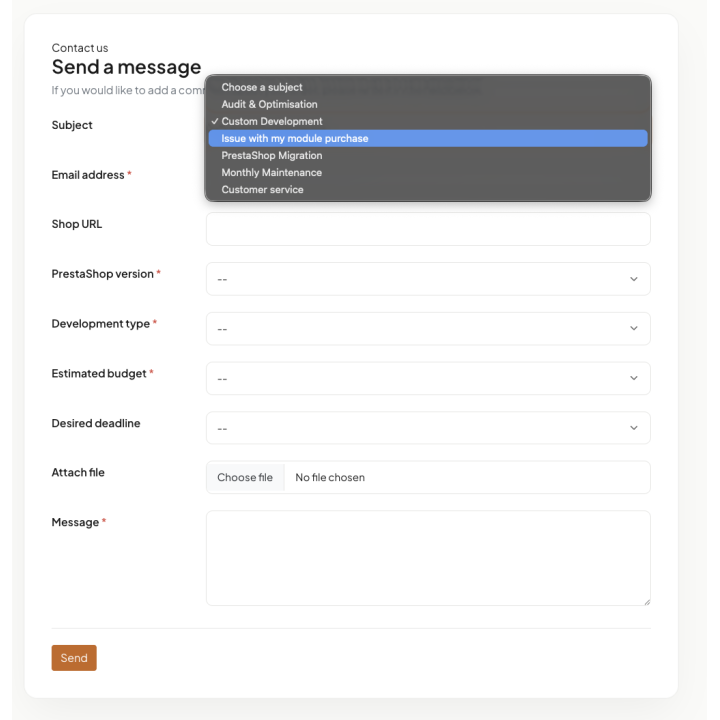
One contact form per subject: fields appear according to the answers
Another subject, another form: quote request with e-mail, web address, phone and number checks
The same form on a phone: fields adapted to the subject, clear messages
Form editor: every field with its type, its key and its condition written as a sentence
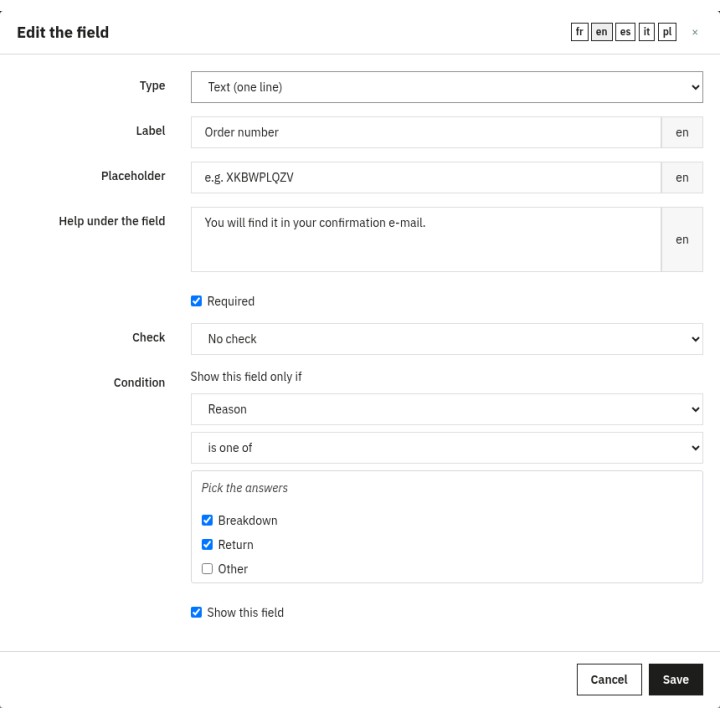
Edit a field: type, texts, check and condition
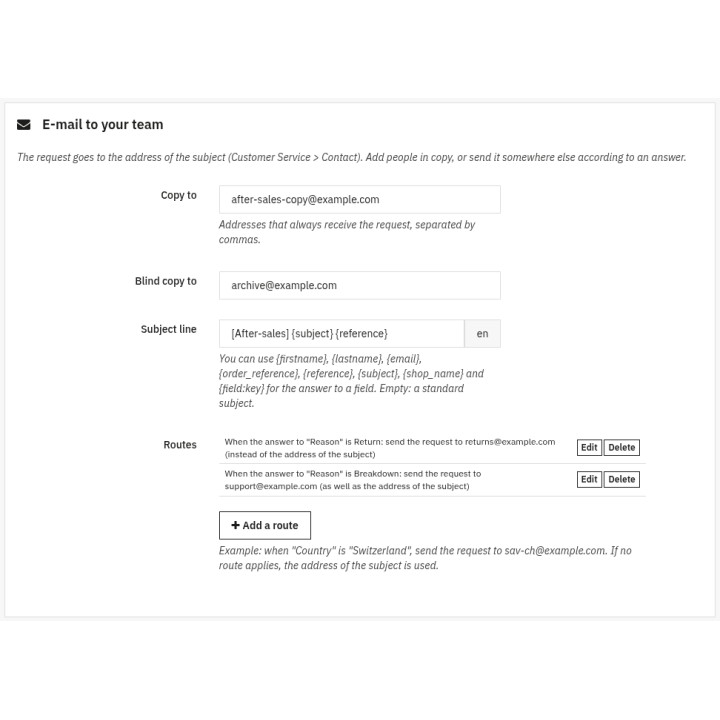
Send each request to the right team
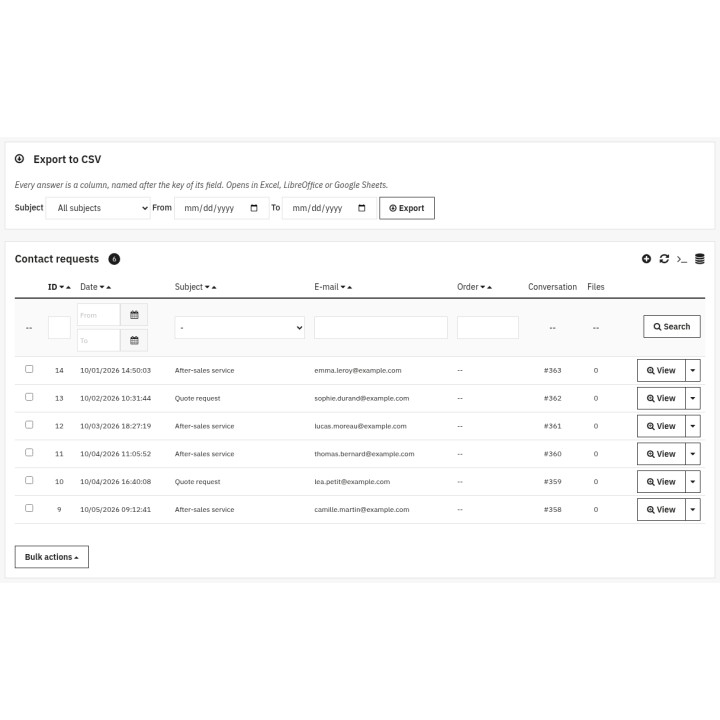
Requests kept in a table and exported to CSV
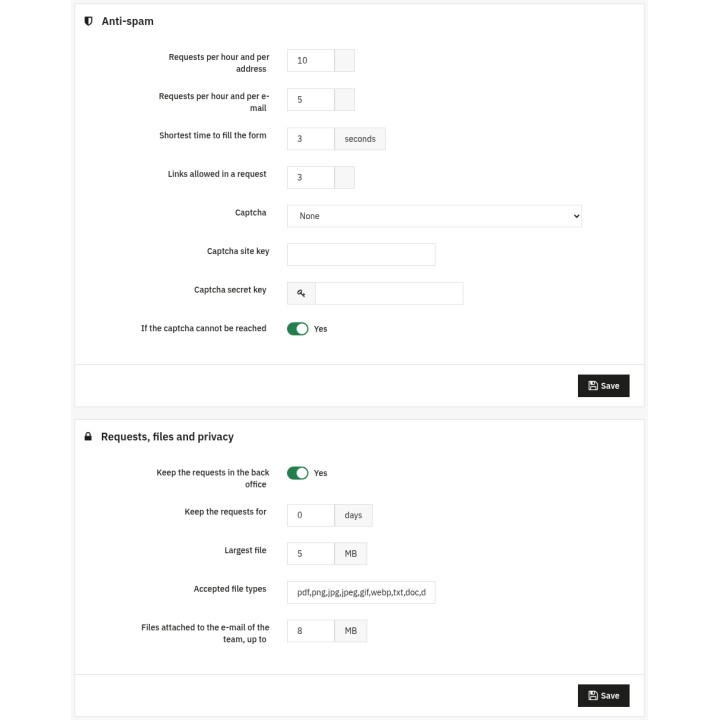
Anti-spam, retention and privacy settings
FAQ
Find answers to frequently asked questions about this module
Join +32 merchants using this module
5-minute installation · Full documentation included