- Deposit then balance
- Instalments without fees
- Automatic charge or payment link
- What your customers see
- Track and manage payments
- Reminders and e-mails
- Synchronization with orders
- What is the purpose of deposit (partial payment) with Stripe?
- How to define the deposit amount (percentage or fixed amount)?
- Can we target products, categories, or the entire store?
- Can the deposit be optional or mandatory (pre-orders)?
- How does the customer see "to pay today" vs "to pay later"?
- How is the balance collected (automatic charge, secure payment link)?
- Are email reminders automatic? What is the role of CRON?
- Is there a dashboard to track deposits, balances, and delays?
- What happens if the customer doesn't pay the balance on time?
- Compatibility, prerequisites, and limits: PayPal, PrestaShop versions, SSL
- Is payment in instalments a credit?
- Can my customers change their card or pay early?
- How do I update from version 1.0?
Deposits and instalments without fees with Stripe on PrestaShop
Selling expensive, made-to-measure or pre-order items holds customers back if they have to pay everything at once. Stripe deposits & partial payments lets your customers pay a deposit when they order and the balance later, or pay their order in instalments without fees. Payments go through Stripe: the module collects the first payment, charges or requests the next ones, reminds your customers and shows you what is left to collect.
This guide explains how the module works, how to install it and connect it to Stripe, and how to use it day to day.
Key highlights:
- Two plans: a deposit (percentage or fixed amount) then the balance, or 2 to 12 equal payments without fees
- A balance due when you decide: a few days after the order, on a fixed date or at shipping
- Automatic charges of the next payments by card or SEPA Direct Debit, or payment with a secure link
- Informed customers: plan shown from the product page, schedule in their account, e-mails at each step
- Complete tracking: amounts to collect, late payments, refunds and the history of each schedule
Discover the module and its plans
Presentation
The module adds to your shop a Stripe payment method that splits the payment of an order. You set rules: which products are concerned, which plan they are offered and when the rest must be paid. At the checkout, the customer sees the matching option, for example “Pay a deposit of €35.36 now” or “Pay in 3 instalments (€63.39 today)”, with the full schedule, shipping included.
The first payment is made on Stripe's payment page; the order is created as soon as Stripe confirms it, even if the customer closes the page. The next payments are then charged automatically or paid with a link, depending on the rule. The module is designed for merchants who sell expensive products, made-to-measure items, pre-orders, travel or services, and who want to collect a first amount at the order without handling bank transfers or cheques by hand.
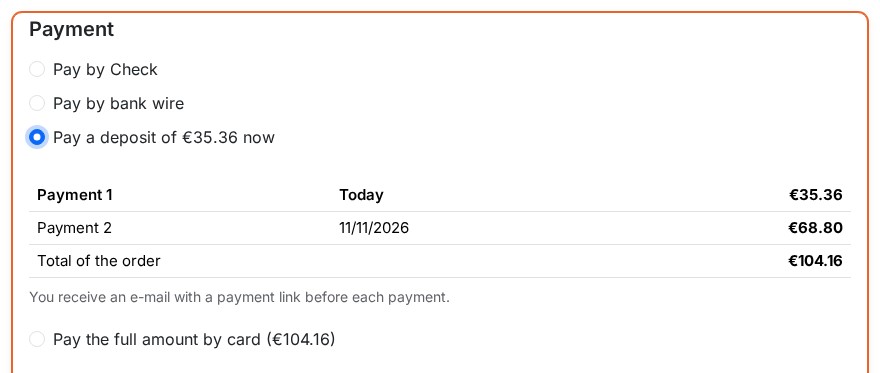 The deposit to pay today and the balance, shipping included
Features
Deposit then balance
The deposit is a percentage of the price (for example 30%) or a fixed amount per unit (for example €50, converted for other currencies). The balance is due:
- a few days after the order, for example 30 days;
- on a fixed date, useful for a pre-order whose delivery date you know;
- when the order reaches a state you choose, for example “Ready to ship”: the balance is then charged, or the payment link sent, when you change the state.
Shipping is paid with the first or the last payment, as set in the settings, and discounts are deducted. Products excluded from a rule are paid in full with the first payment.
Instalments without fees
A rule can also offer 2 to 12 equal payments, spaced by a number of days or months, for example three payments 25 days apart. The first one is paid at the order; the last one takes the rounding difference so that the total is exact. The module adds no interest and no fees. A longest plan allowed, 50 days after the order by default, refuses the rules whose last payment would come later (see the FAQ on consumer credit).
Automatic charge or payment link
- Automatic charge: the card or SEPA mandate used for the first payment is saved by Stripe and charged on each due date. The customer agrees at the checkout, with the consent text shown under the schedule. If the bank refuses the payment or asks for a confirmation, the customer receives a payment link, and the module tries again after the number of days you choose. A SEPA Direct Debit stays “being confirmed” until the bank answers.
- Payment link: without automatic charges, the customer receives before each payment an e-mail with a secure link from your shop. The link opens a Stripe payment page at the current amount and can only be used once. It also works for customers without an account.
The payment methods offered are those switched on in your Stripe account (cards, Apple Pay, Google Pay, SEPA Direct Debit, Bancontact and more), or cards only if you prefer. For a plan charged automatically, Stripe only shows the methods that can be charged again later.
What your customers see
The plan appears on the product page and in the cart for every visitor, in the price and date formats of your shop. A text of your choice can go with the plan at the checkout, for example your cancellation terms.
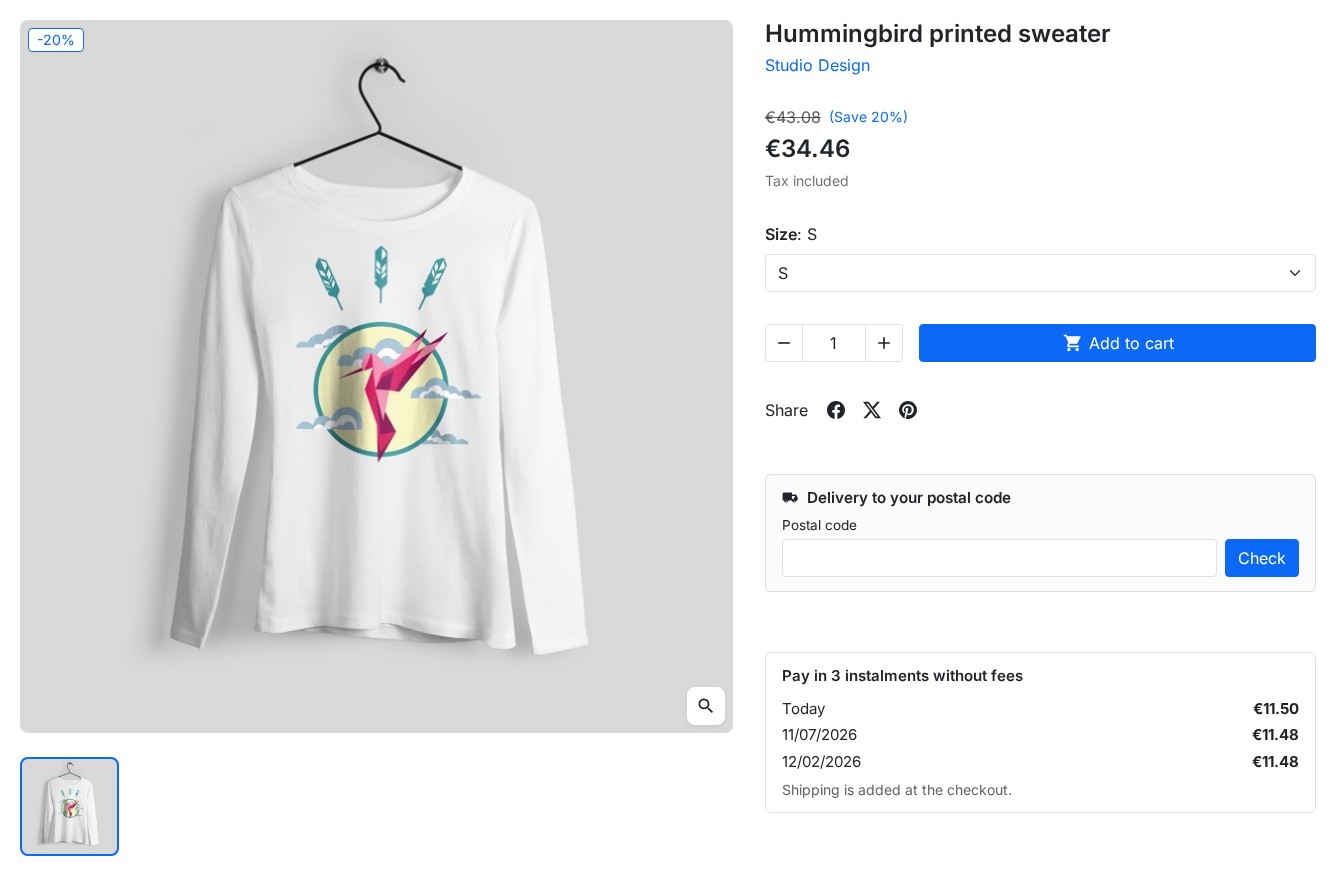 The plan on the product page, for every visitor
After the order, customers find their schedule on the confirmation page, in the details of their order and in My payments, in their account. There they can pay the next payment early and change the card or account used for automatic charges, on a secure Stripe page. Customers without an account reach the same page with the link in their e-mails.
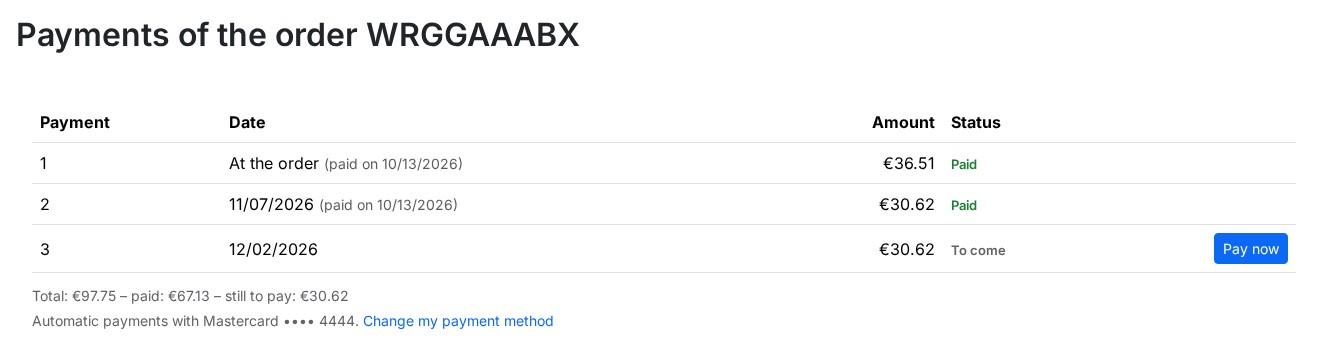 The payments of an order, with the next one payable right away
Track and manage payments
The Payments page shows three indicators: what is left to collect, the late amounts and the automatic charges of the next seven days. The list of deposits and payment plans can be filtered by order, customer, plan, status or date, and exported as CSV.
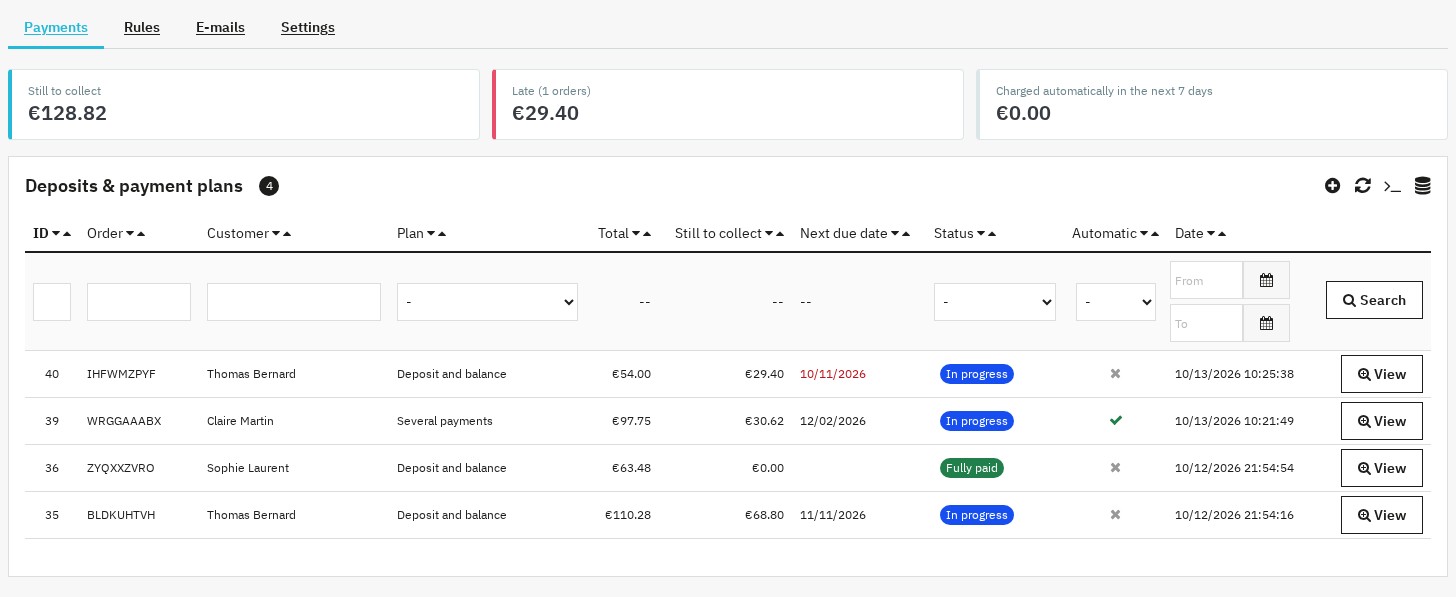 What is left to collect, late payments and upcoming charges
The page of a schedule shows each payment with its due date, amount, status and details (payment date, link to the payment in Stripe, attempts). Depending on the status, you can:
- charge now an automatic payment;
- send the payment link to the customer;
- move the due date;
- record a payment received outside Stripe (bank transfer, cheque, cash);
- refund a payment, in full or in part;
- send the schedule to the customer or stop the schedule, with or without cancelling the order.
The history traces the payments, the e-mails sent and each action. A summary of the schedule, with a link to it, also appears on the order page.
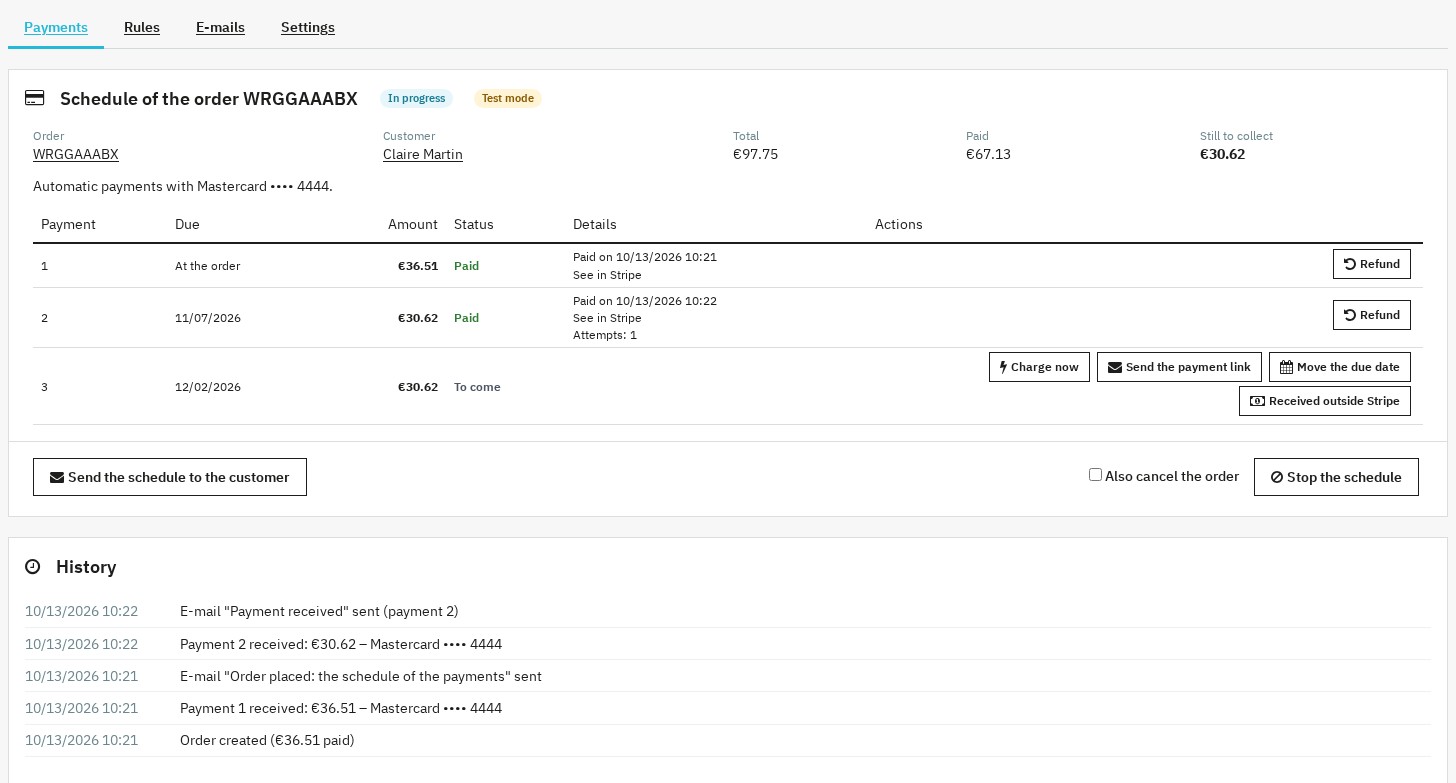 A schedule and its actions: charge, remind, reschedule, refund
Reminders and e-mails
The scheduled task sends a reminder a few days before each due date (for an automatic charge, the e-mail announces it), then late payment notices that are spaced out and limited in number. You receive an alert for payments to check, disputes and refused charges, and a daily summary of late payments.
The module sends twelve e-mails: schedule at the order, reminder before a payment by link, notice before an automatic charge, payment due now, late payment, payment received, order fully paid, automatic charge refused, confirmation asked by the bank, refund made, schedule changed after an edit of the order, and the alert meant for you. Each e-mail can be edited in every language, with its variables, a preview and a test send; you can switch off those you do not need. The layout is the one of your shop's e-mails.
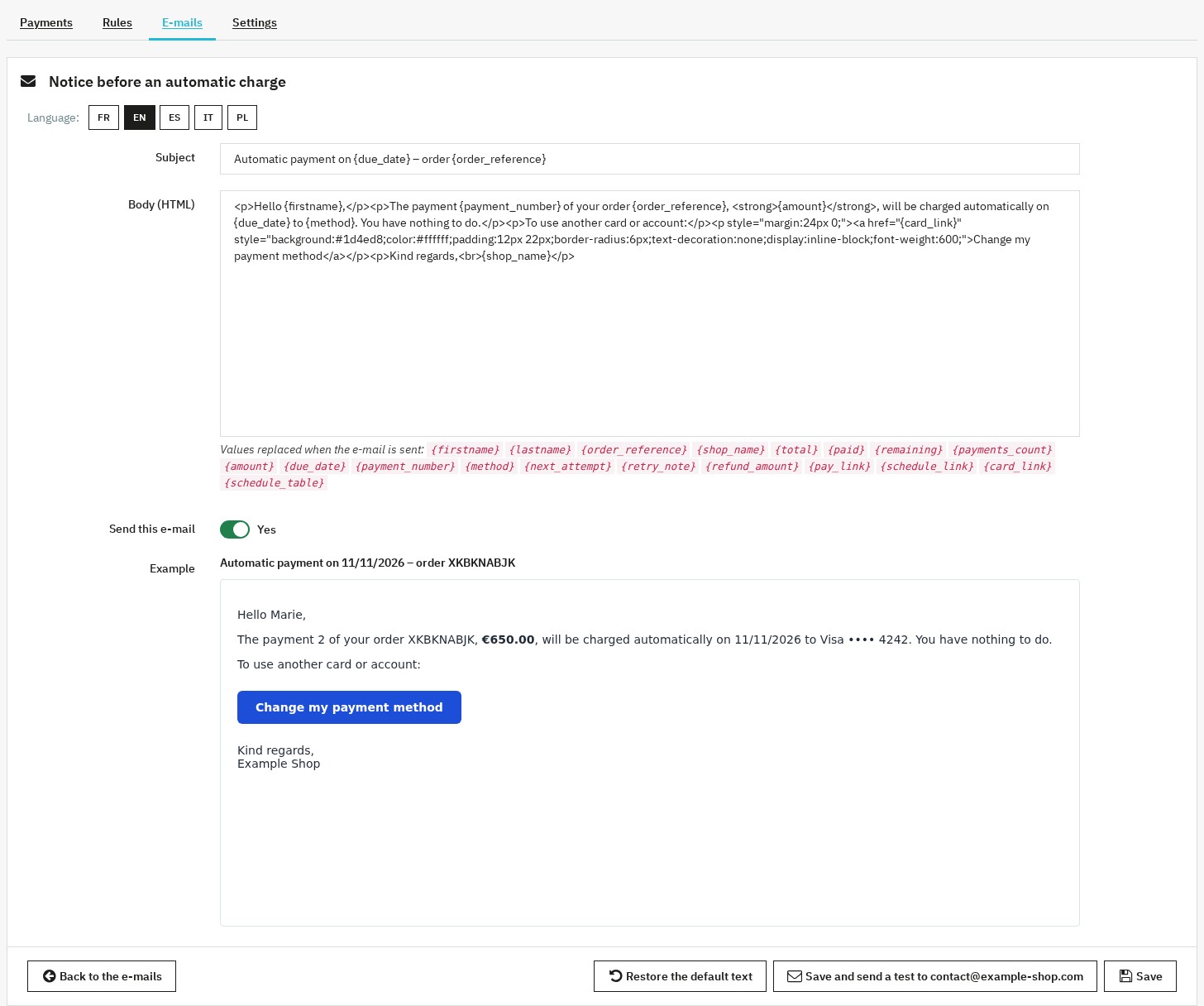 An e-mail you can edit in every language, with its preview
Synchronization with orders
- Order states: “Partially paid – payments scheduled”, “Fully paid (payment schedule)”, “Payment overdue” and “Payment being confirmed (Stripe)” are applied once, with their history and e-mails. The overdue state is only given to a partially paid order: a state you chose yourself is never replaced.
- Order edited in the back office: the remaining payments are recalculated and the customer is informed.
- Order cancelled: links, automatic charges and reminders stop.
- Payment accepted given by you to the order: the remaining payments are considered paid outside Stripe.
- Refund or dispute made in Stripe: it appears in the schedule and you receive an alert.
Installation
- Download the module from your customer account.
- In your back office, go to Modules > Module Manager and click Upload a module.
- Select the ZIP file; PrestaShop installs the module and its order states.
- Click Configure and enter your license key. The module pages then open from the Modules > Deposits & payment plans menu (WePresta > Deposits & payment plans on PrestaShop 9), with four tabs: Payments, Rules, E-mails and Settings.
Getting started
- Stripe key: in Settings > Stripe account, choose the Test mode, paste your test secret key (Stripe dashboard > Developers > API keys,
sk_test_…) and click Test the connection. - Webhook: in Stripe, go to Developers > Webhooks > Add an endpoint. Paste the webhook address copied from the settings and select the nine events listed under this address. Then paste the signing secret of the webhook (
whsec_…) in the settings. - Scheduled task: copy the address of the scheduled task from the settings and call it every hour, or at least once a day, from the cron of your server or host.
- First rule: in Rules, create for example a 30% deposit on all products with the balance 30 days after the order, or a payment in 3 instalments 25 days apart with automatic charges. The example of the form shows the amounts before you save.
- Test order: place an order with a Stripe test card, for example
4242 4242 4242 4242, then open its schedule in Payments. - Live mode: enter your live secret key (
sk_live_…), create the webhook of the live mode with its own signing secret, then choose the Live mode.
The Health of the integration panel, at the top of the settings, checks each point: key of the mode in use, connection to Stripe, webhook secret, webhooks received, last run of the scheduled task, order states, HTTPS and active rules.
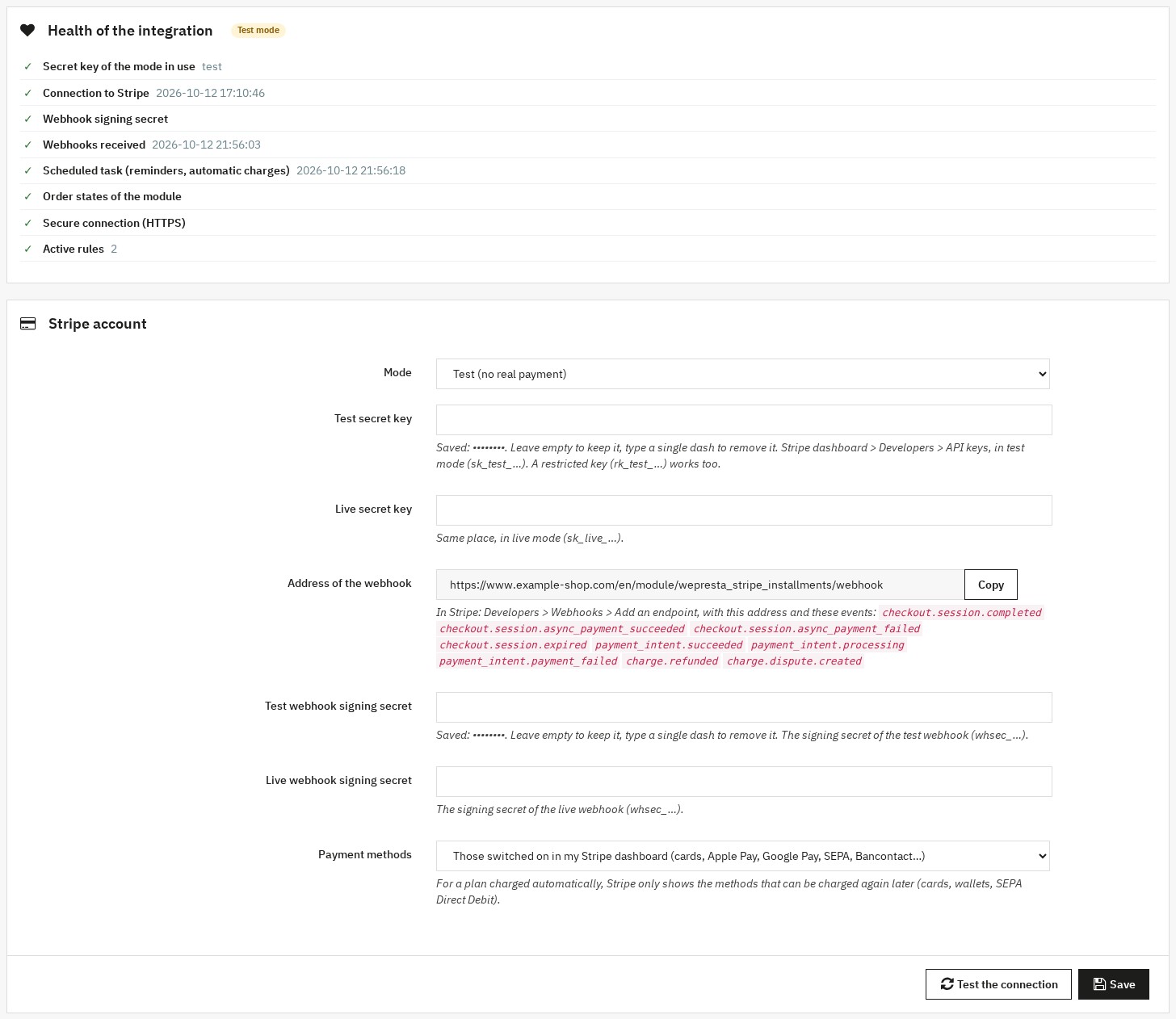 The state of the integration and the connection to Stripe
Setting up the rules
Each rule combines:
- Products: all products, the products of some categories or some products, searched by name or reference, and excluded products;
- Plan: a deposit then the balance, or several equal payments;
- Automatic charge of the next payments, or payment by link;
- Offer: the customer may also pay the whole order at once, or the plan is the only way to pay with this module (your other payment modules stay available);
- Order amount minimum and maximum;
- Priority: when several rules cover a product, the most precise one wins (product, then category, then all products), then the highest priority.
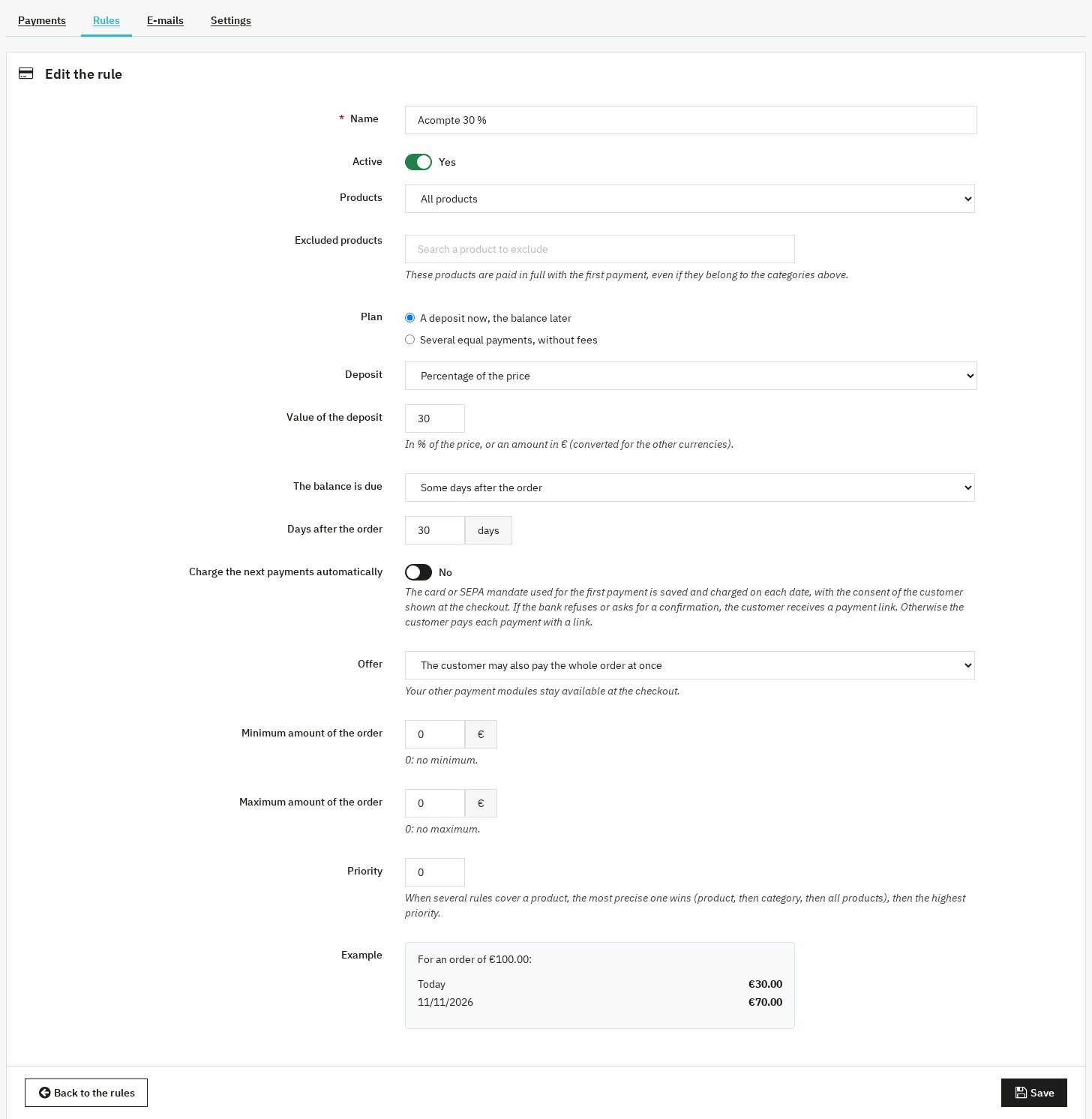 A deposit rule and the example of its amounts
Settings
- Stripe account: test or live mode, secret keys and webhook signing secrets (saved masked), payment methods offered.
- Checkout: also offer to pay the whole order by card, offer the plans to guests, shipping paid with the first or the last payment, time to pay on Stripe (30 minutes to 24 hours), text shown under the plan, longest plan allowed (50 days by default).
- Reminders and automatic charges: days of the reminder before a payment, interval and maximum number of late payment notices, days of the new attempts after a refused charge, alerts and the address that receives them.
- Display: plan on the product page and in the cart.
- Order states: the states used by the module, which you can replace with your own.
- Scheduled task: address to call, detailed log in the PrestaShop logs (no card or secret is ever written there), new address if needed.
Prerequisites
- PrestaShop 1.7.8, 8.0+ or 9.0+
- PHP 7.4 or later, with the cURL extension
- A Stripe account
- HTTPS on the shop: Stripe only sends its webhooks over HTTPS
- A scheduled task (cron) for reminders and automatic charges
- Interface, e-mails and order states in French, English, Spanish, Italian and Polish
Updating from version 1.0
Install version 2.0 over version 1.0 from the module manager. Your rules, settings, Stripe keys and order states are kept. Each deposit in progress becomes a schedule of two payments, and the balance payment links already sent stay valid. Then add to the webhook of your Stripe account the events listed in the settings, and check the Health of the integration panel.
FAQ
What is the purpose of deposit (partial payment) with Stripe?
A deposit lets your customers pay only part of the amount when they order and the balance later. It works especially well for high-end products, made-to-measure items and pre-orders, where paying everything upfront holds buyers back. You collect a first amount at the order, and the module takes care of the balance: automatic charge or payment link, reminders and tracking. The module also offers payment in equal instalments without fees.
How to define the deposit amount (percentage or fixed amount)?
The deposit is a percentage of the price (for example 30%) or a fixed amount per unit (for example €50, converted for other currencies). A percentage follows the price of expensive products; a fixed amount works well as a booking fee. The rule form shows the example of the amounts for an order of €100. Shipping is paid with the first or the last payment, as you choose, and discounts are deducted.
Can we target products, categories, or the entire store?
Yes: a rule applies to all products, to the products of some categories or to some products, which you search by name or reference. You can exclude products, which are then paid in full with the first payment, and limit a rule to a minimum or maximum order amount. When several rules cover a product, the most precise one wins (product, then category, then all products), then the highest priority.
Can the deposit be optional or mandatory (pre-orders)?
A rule offers its plan with the option to pay the whole order at once, or as the only way to pay with this module. Your other payment modules stay available at the checkout: to require the deposit, reserve the products concerned for this module. For a pre-order, the balance can be due on a fixed date or when the order reaches a state you choose, such as “Ready to ship”.
How does the customer see "to pay today" vs "to pay later"?
The plan appears on the product page and in the cart for every visitor, for example “Pay in 3 instalments without fees” with the dates and amounts. At the checkout, the option shows the amount of the day and the full schedule, shipping included. Customers then find their payments on the confirmation page, in the details of their order and in “My payments”.
How is the balance collected (automatic charge, secure payment link)?
With automatic charges, the card or SEPA mandate of the first payment is saved by Stripe and charged on each due date, with the customer's consent shown at the checkout. If the bank refuses or asks for a confirmation, the customer receives a payment link and the module tries again according to your settings. Without automatic charges, the customer pays each payment with a secure link from your shop, which opens a Stripe payment page at the current amount and can only be used once.
Are email reminders automatic? What is the role of CRON?
Yes. A scheduled task (CRON), called every hour or at least once a day, sends the reminder a few days before each due date, makes the automatic charges, sends late payment notices that are spaced out and limited in number, and sends you a daily summary of late payments. The module's twelve e-mails can be edited in every language, with a preview and a test send. The “Health of the integration” panel shows the last run of the task.
Is there a dashboard to track deposits, balances, and delays?
Yes: the “Deposits & payment plans” page shows what is left to collect, the late amounts and the automatic charges of the next seven days, then the list of schedules with filters and CSV export. From a schedule you can charge now, send the payment link, move a due date, record a payment received outside Stripe, refund a payment or stop the schedule. A summary also appears on the order page.
What happens if the customer doesn't pay the balance on time?
The module sends late payment notices according to your settings and gives the order the “Payment overdue” state if it was partially paid; a state you chose yourself is never replaced. You receive an alert, then you decide: send a new link, move the due date, record a payment received another way or stop the schedule, with or without cancelling the order.
Compatibility, prerequisites, and limits: PayPal, PrestaShop versions, SSL
The module works with PrestaShop 1.7.8, 8.0+ and 9.0+, with PHP 7.4 minimum. You need a Stripe account, HTTPS on the shop (Stripe sends its notifications over HTTPS) and a scheduled task. Payments go through Stripe, not PayPal; the payment methods offered are those switched on in your Stripe account (cards, Apple Pay, Google Pay, SEPA Direct Debit, Bancontact and more).
Is payment in instalments a credit?
The module adds no interest and no fees and involves no credit provider: you grant the schedule yourself, and it is collected on your Stripe account. A deferred payment may still fall under consumer credit rules depending on its length and your country. In the European Union, from 20 November 2026, Directive (EU) 2023/2225 only excludes a deferred payment without interest or fees granted directly by the seller if it is paid within 50 days of delivery (14 days if your business is not an SME). A deposit whose balance is paid before shipping defers no payment after delivery. By default, the module refuses the plans whose last payment comes more than 50 days after the order; change this limit only after checking the law that applies to your shop.
Can my customers change their card or pay early?
Yes. From “My payments” or the link in their e-mails, your customers see their schedule, pay the next payment early and change the card or account used for automatic charges, on a secure Stripe page. Customers without an account use the links they receive by e-mail.
How do I update from version 1.0?
Install version 2.0 over version 1.0 from the module manager. Your rules, settings, Stripe keys and order states are kept; each deposit in progress becomes a schedule of two payments, and the payment links already sent stay valid. Then add to the webhook of your Stripe account the events listed in the settings and check the “Health of the integration” panel.
Support
For any help, contact us from your WePresta customer area or by e-mail at mail@wepresta.shop, according to the support option of your plan.
Changelog
Version 2.0.0
New
- Offer payment in instalments without fees: 2 to 12 equal payments, spaced by days or months.
- Limit the length of the plans: 50 days after the order by default.
- Charge the next payments automatically to the card or SEPA mandate of the first payment, with the customer's consent shown at the checkout.
- Make the balance due a few days after the order, on a fixed date for a pre-order, or when the order reaches a state you choose such as “Ready to ship”.
- Your customers pay each payment with a secure link from your shop, even without a customer account.
- Your customers follow their payments in “My payments”, pay a payment early and change their payment method.
- Record a payment received outside Stripe, by bank transfer, cheque or cash, and move a due date.
- Refund each payment, in full or in part, from the schedule.
- Find the schedule and its actions from the order page.
- Offer the payment methods switched on in your Stripe account: cards, Apple Pay, Google Pay, SEPA Direct Debit, Bancontact and more.
- Edit twelve e-mails in every language, with a preview and a test send.
- Check the connection to Stripe, the webhook and the scheduled task in the “Health of the integration” panel.
- Export the list of schedules as CSV.
- Export and erase your customers' personal data with the official GDPR module of PrestaShop.
Improvements
- The deposit and the payments take shipping and discounts into account; shipping is paid with the first or the last payment, as you choose.
- The balance payment link opens a Stripe page at the current amount and can only be used once.
- The order is created even if the customer closes the page after paying.
- Each payment has its own reminder, then late payment notices that are spaced out and limited; you receive a daily summary of late payments.
- An order edited in the back office updates the remaining payments and informs the customer.
- A cancelled order stops the links, the automatic charges and the reminders.
- Refunds and disputes made in Stripe appear in the schedule, with an alert.
- The plan appears on the product page and in the cart for every visitor, in the price and date formats of the shop.
- Amounts follow the decimals of each currency, and fixed amounts are converted into the customer's currency.
- The interface, the e-mails and the order states exist in French, English, Spanish, Italian and Polish.
- Secret keys are masked in the back office.
- Without an active license, payments in progress, automatic charges and links continue; only new plans are no longer offered.
- The module works with PrestaShop 1.7.8, 8.0+ and 9.0+ and PHP 7.4 or later.
Fixes
- “Pay the full amount” collects the whole order, without a balance link or reminder.
- A Stripe payment only validates its own cart, for the expected amount.
- A balance link can no longer be paid twice.
- Cancelling on the Stripe page brings the customer back to the choice of the payment method.
- Each order state is applied once, with its history and e-mails, and the order counts in your statistics.
- The deposit payment appears in the payments of the order.
- A cancelled order is no longer reminded or set back to late.
- Reminders and late payment notices no longer share the same counter.
- The module no longer writes a log in its folder; the one of version 1.0 is deleted by the update.
After the update: your rules, settings, Stripe keys and order states are kept, each deposit in progress becomes a schedule of two payments, and the links already sent stay valid. Add to the webhook of your Stripe account the events listed in the settings, then check the “Health of the integration” panel.
Version 1.0.0
- Initial version
