
Cache Pro — Full Page Cache with Brotli, Warm-Up & AJAX - Module PrestaShop
PrestaShop Cache Pro Module: Speed Up Your Store with Full Page Cache
- Full page cache: stored pages are sent before PrestaShop builds them, with no database query from the module
- Customers and visitors with a cart always get normal, exact pages; one copy per language, currency and device
- Precise purge: a product, price, promotion or stock change clears only the pages concerned
- Pre-load, Test my cache and a dashboard: hit rate, speed-up, skipped visits, latest purges
- Gzip and Brotli pre-compression, exclusions, scheduled-task address and token-protected API
- Compatible with PrestaShop 1.7.8, 8.0+ and 9.1+ (PHP 7.4 minimum)
Everything you need, nothing you don't.
Full page cache with precise purge, pre-load and pre-compressed pages.
Stored pages, sent first
A stored page is sent before PrestaShop builds the page, with no database query from the module.
Cache pre-load (warm-up)
Visit your pages in advance from the dashboard or a scheduled task, before your visitors arrive.
Gzip and Brotli pre-compression
Pages are compressed once when stored: Gzip, and Brotli when your server has the extension.
Precise purge
Only the pages concerned are cleared when you edit a product, a price, a promotion or a stock level.
Separate mobile and desktop cache
Each shop, language, currency and device (desktop or mobile) has its own stored copy.
Performance dashboard
Test in one click, then follow the hit rate, the speed-up and the reasons why visits skipped the cache.
They use it every day.
description Full description expand_more
Why is your PrestaShop store slow?
Every time a visitor loads a page, PrestaShop runs the full stack: framework initialization, database connection, hundreds of SQL queries, Smarty template compilation, hook execution for every installed module, and finally HTML generation. On a store with dozens of modules and thousands of products, this cycle takes hundreds of milliseconds to several seconds per page, and it is repeated for every visitor even though most pages are identical for everybody.
During that time, your visitor waits. Google also factors page speed into its ranking through Core Web Vitals, meaning a slow store hurts both your conversion rate and your SEO.
The solution: Full Page Cache
Cache Pro saves the final HTML output of each page the first time it's generated, then serves that stored copy to every subsequent visitor. It is sent before PrestaShop starts building the page: the server no longer has to generate the page again, it simply reads a file and sends it. The result:
- A much lower server response time (TTFB) on stored pages
- No database query from the module on stored pages, and a fraction of the queries of a generated page
- A lighter server: more visitors served with the same resources
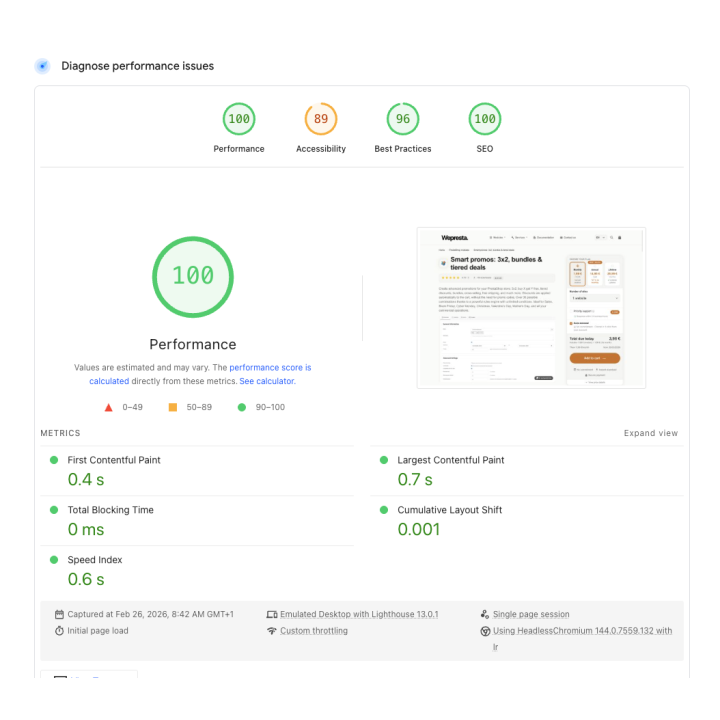
- A better starting point for Core Web Vitals and Google PageSpeed scores
What makes Cache Pro different
Brotli & Gzip pre-compression
Every stored page is compressed once, at save time, in Gzip and, when your server has the PHP Brotli extension, in Brotli as well. When a visitor requests a page, Cache Pro serves the best format the browser accepts, based on its Accept-Encoding header. Brotli usually produces smaller files than Gzip, which helps most on mobile connections. Unlike on-the-fly compression, pre-compression adds no compression work at serve time.
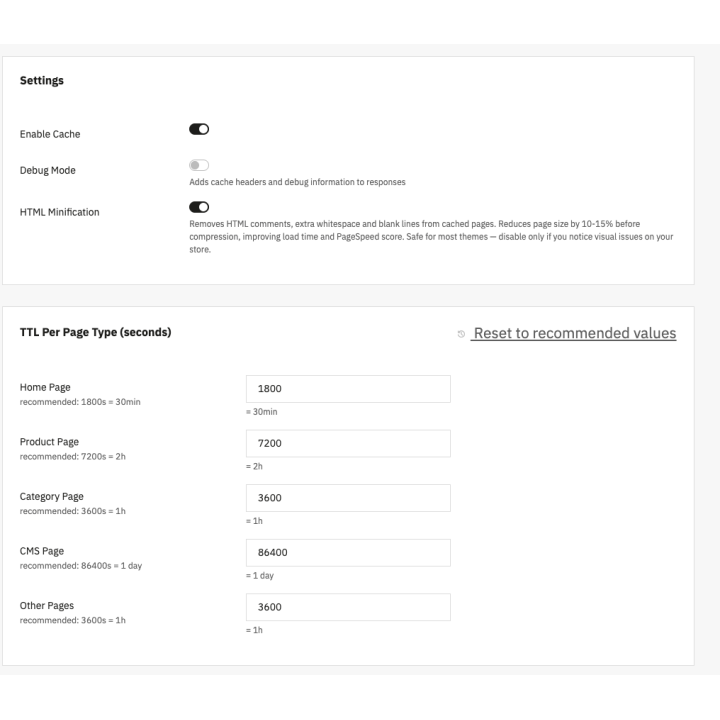
HTML minification
Before compression, Cache Pro can strip HTML comments and the spaces between tags from the stored copy. Scripts, styles and text are untouched, and you can disable it with one click if a theme does not like it.
AJAX dynamic blocks (hole punching)
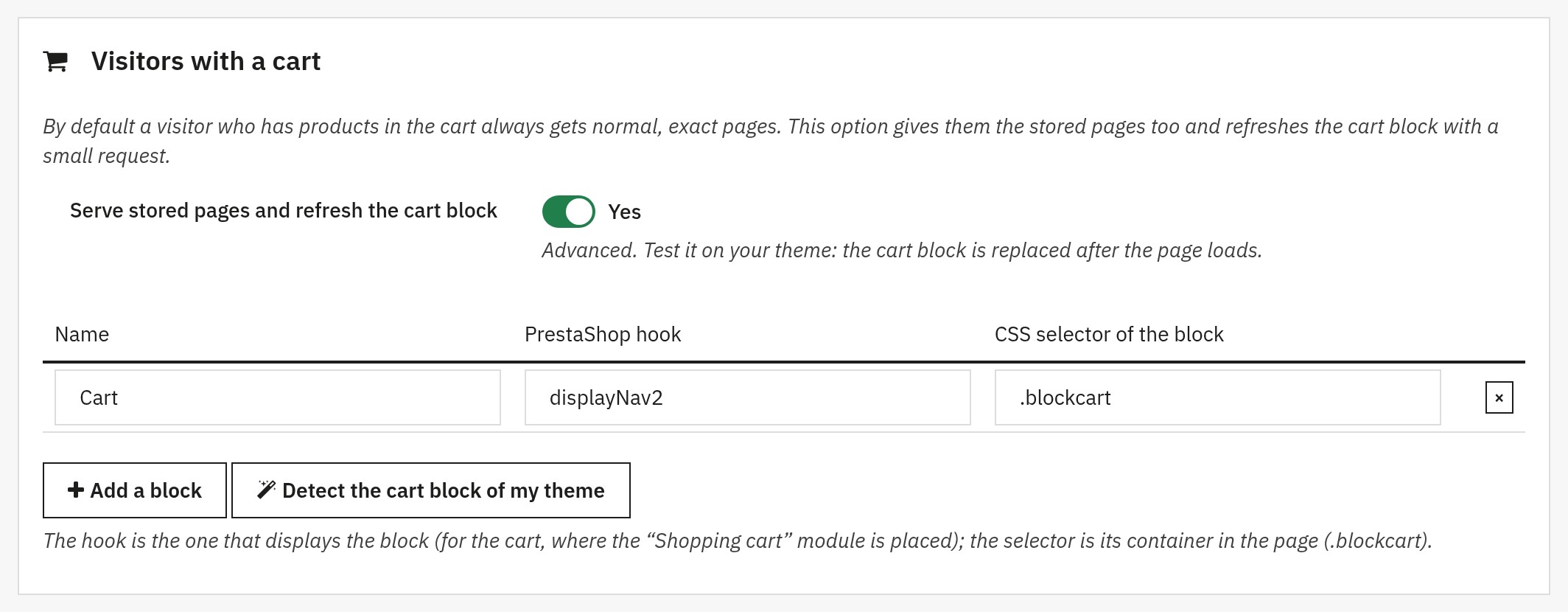
A full page cache must never show a page built for somebody else: visitor-specific elements like the shopping cart would be frozen in the stored HTML. That is why logged-in customers and visitors with a cart always get normal, exact pages built by PrestaShop by default: the cart, the totals and the account are never frozen or shared.
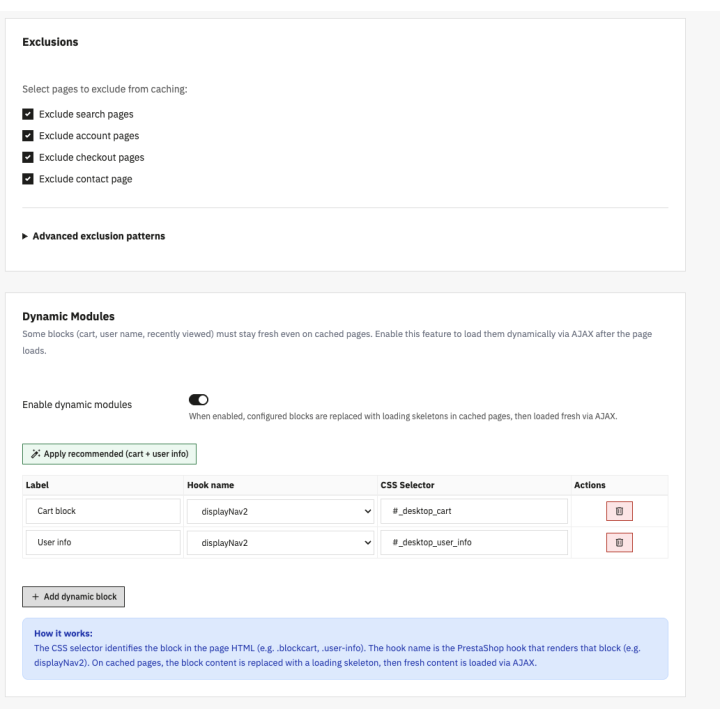
Prefer to give visitors with a cart the stored pages too? Cache Pro takes a smarter approach: an advanced option sends the stored page, then refreshes the cart block with a light AJAX request once the page has loaded, so the cart always shows current data. A button detects the cart block of the Classic and Hummingbird themes; for another theme, enter the hook and the CSS selector of the block. The page of such a visitor is never stored.
Smart auto-invalidation
You should never have to clear the cache manually after editing your store. Cache Pro listens to PrestaShop's core events and automatically purges only the pages concerned when you:
- Edit, add or delete a product, a combination, an image, a brand or a supplier (its own pages and the listings that show it)
- Change a price, add or remove a specific price or promotion, or change a stock level, including through an order (the pages that show the product)
- Edit a category, a CMS page, a currency, a tax or a language, move a module or change your theme (the whole shop is refreshed)
A page that shows a promotion which starts or ends later is stored only until that moment, so a scheduled promotion appears and ends on time. Purges also work when the cache is switched off, so a page can never come back outdated.
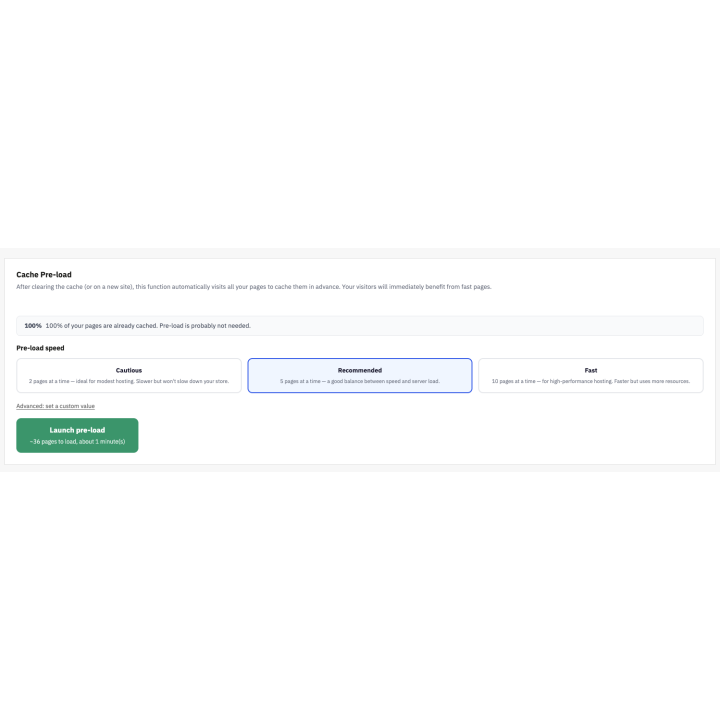
Cache warm-up
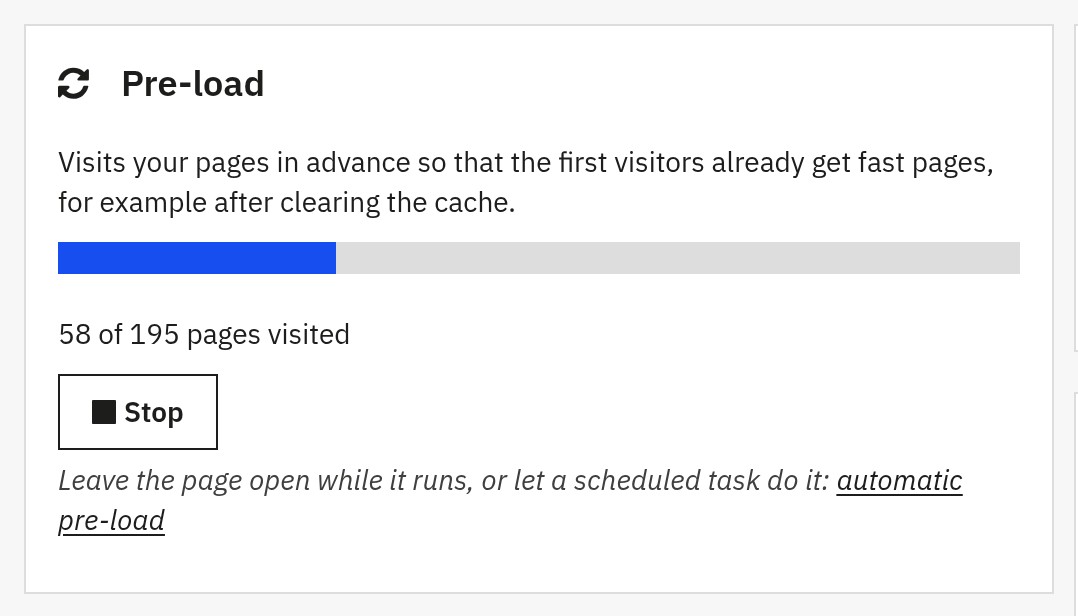
After a full purge or a fresh install, the cache is empty and the first visitors to each page experience normal load times. Cache Pro's built-in warm-up, called pre-load in the module, solves this by pre-visiting your pages, filling the cache before any real visitor arrives: home page, categories, best sales, new products, brands, suppliers, products and CMS pages, in every language and, if you wish, in the mobile version. It uses your sitemap or your product catalog.
- Four speeds, from 2 to 20 pages at a time, to suit your hosting
- Real-time progress bar with the number of pages visited
- Start it from the dashboard or from a scheduled task (cron), without any open page
- HTTP authentication supported for password-protected staging sites
Context separation: shop, language, currency and device
PrestaShop pages change based on the visitor's context. Cache Pro keeps a separate copy for each:
- Language: French visitors see French, English visitors see English
- Currency: prices display in EUR, USD or CHF depending on the selection
- Shop: multistore setups have their own settings, stored pages, statistics and warm-up
- Device: mobile and desktop versions are stored separately
- Address: pages 2, 3… and sort orders of a category have their own copy, while tracking parameters (utm, gclid, fbclid…) share the copy of the normal address
- Cookies you choose: for example cookie consent, when it changes the page
A Swiss visitor browsing in CHF will never receive the stored page of a visitor in EUR.
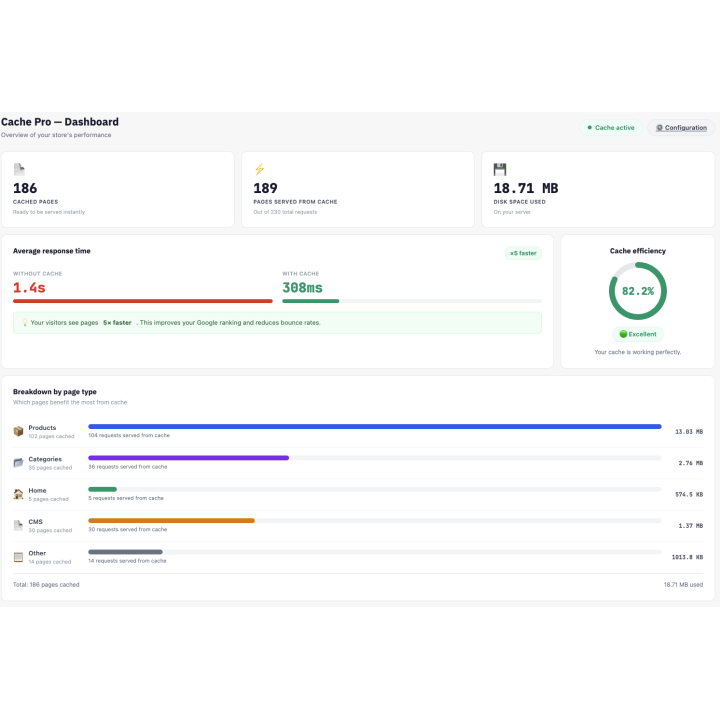
Visual performance dashboard
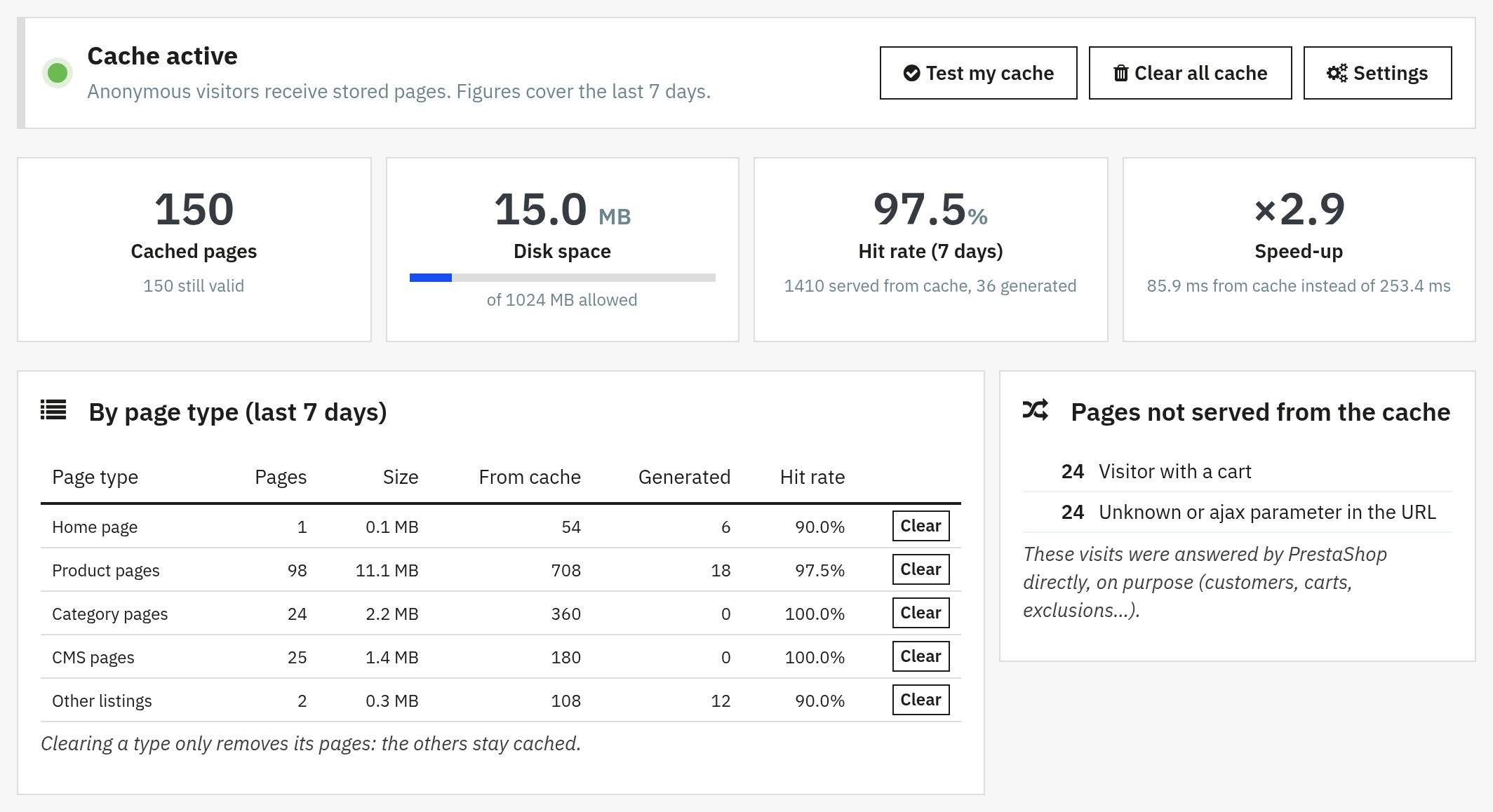
Cache Pro includes a clean, beginner-friendly dashboard that shows you what the cache is doing, with no technical knowledge required:
- Test my cache: visits your home page twice and tells you in seconds whether the cache works, with both response times
- Hit rate and speed-up: the share of visits served from the cache, and the response time from the cache compared with a generated page
- Breakdown by page type: which pages benefit the most (products, categories, home, CMS…), with a chart per day
- Skipped visits: the reasons why some visits did not use the cache (customer, cart, exclusion, unknown parameter…)
- Health checks: cache folder, license, PHP, compression, cURL, maintenance, other cache modules, currencies, theme, disk space
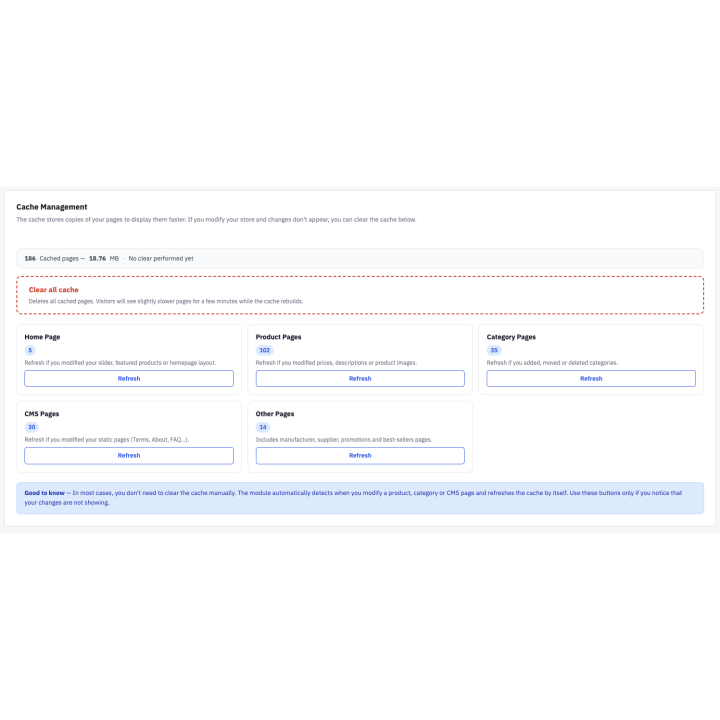
Easy selective purge
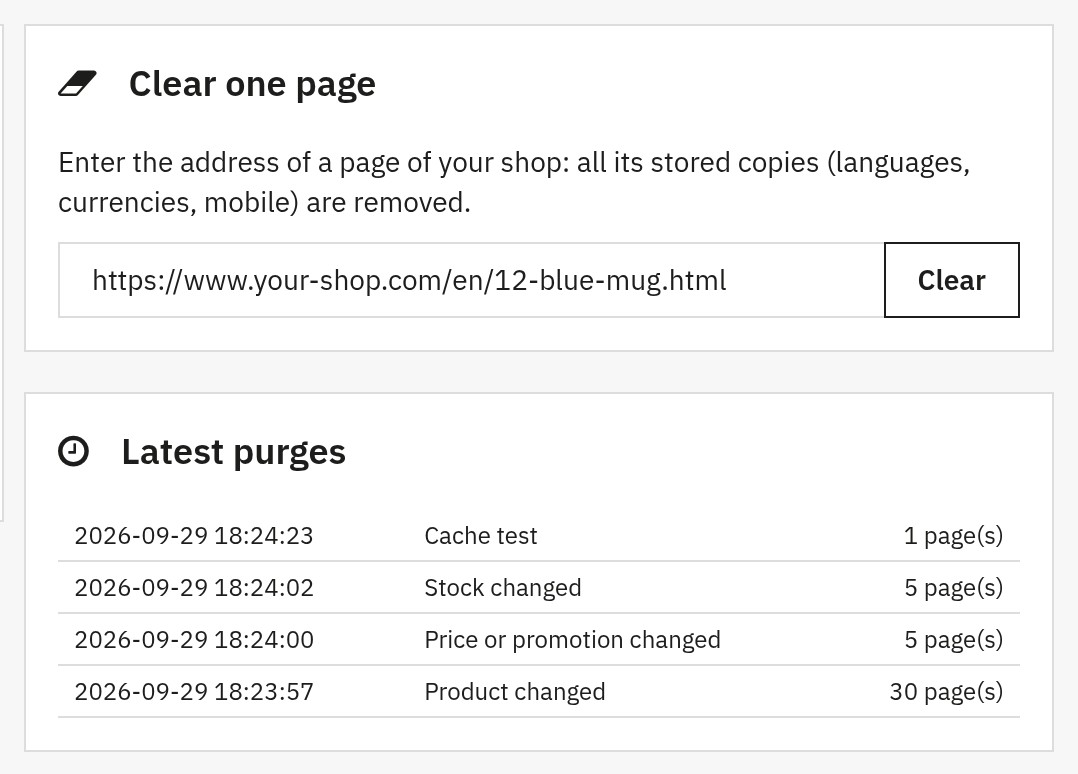
Need to refresh specific pages? Clear everything, one type of page (with the number of stored pages and a plain-language explanation of when to do it), or one page from its address. A confirmation dialog protects the full clear, the latest purges are listed with their cause, and the warm-up can refill the cache right after.
API and scheduled task for external tools
Sync your store with an ERP, PIM or deployment pipeline? Cache Pro gives you an address protected by a secret token: a cron job cleans the cache and runs the warm-up, and your tools can purge everything, a page type, a product, a category, a CMS page, a brand, a supplier or an address, start the warm-up and read the statistics, all from a simple HTTP request.
Full feature list
- Full page cache served from the earliest PrestaShop hook (
actionDispatcher), before the page is built - Stored copy per shop, address, language, currency and device (desktop or mobile), plus the cookies you choose
- Logged-in customers, visitors with a cart, forms and Ajax requests answered by PrestaShop; optional cart block refresh for visitors with a cart (Classic and Hummingbird presets)
- Smart auto-invalidation on product, combination, price, promotion, stock, image, brand and supplier changes; whole-shop refresh for categories, CMS pages, currencies, taxes, languages, modules and theme
- Pages never kept beyond the next start or end of a scheduled promotion
- Gzip pre-compression, Brotli when the PHP extension is available, optional HTML minification
- Expired page served while one visitor regenerates it (5 minutes at most); pages written completely or not at all
- Cache warm-up from the sitemap or the catalog, in every language, with a mobile option, from the dashboard or a scheduled task
- Test my cache, performance dashboard, reasons for skipped visits, latest purges and health checks
- Configurable lifetime per page type with recommended defaults, and a size limit with removal of the oldest pages
- Exclusions by page type, URL (text, wildcards, regular expressions), IP address or range, cookie, product, category and CMS page
- Selective purge: everything, a page type or one address
- Scheduled-task address and token-protected API (purge, warm-up, statistics)
- Diagnostic headers (
X-WP-Cache: HIT, MISS or BYPASS) - Full multistore, multilanguage and multicurrency support
- Compatible with Classic, Hummingbird and third-party themes
- Works on shared, VPS, dedicated and cloud hosting, with no server setup beyond the nginx rule that blocks direct downloads of the cache folder
Who is Cache Pro for?
- Store owners with 100 to 10,000+ products who want faster pages without technical complexity
- SEO-focused merchants looking to improve Core Web Vitals and Google PageSpeed scores
- Stores on shared hosting that need to reduce server load and handle more traffic
- Agencies managing multiple PrestaShop stores who need a reliable cache that their tools can drive from an API
Compatibility, requirements and support
Compatible with PrestaShop 1.7.8, 8.0+ and 9.1+, with PHP 7.4 minimum, the cURL and zlib extensions and a cache folder the module can write to. PrestaShop 1.7.7 and earlier, and 9.0, are not supported. One archive fits all these versions. The interface is available in French, English, Spanish, Italian and Polish. Keep only one full page cache module at a time.
Support is provided from your WePresta customer area or by email at mail@wepresta.shop, depending on the support option of your plan. Read the full documentation
Why choose us?
See how we compare to the most common alternatives on the market.
| Feature | WePresta | Addons |
|---|---|---|
| payments Transparent pricing | check_circle | cancel |
| update Lifetime updates included | check_circle | cancel |
| support_agent Direct developer support | check_circle | cancel |
| verified PS 1.7, 8 & 9 compatible | check_circle | help_outline |
| code Standardized clean code | check_circle | cancel |
| storefront Multi-store ready | check_circle | help_outline |
| money_off No hidden renewal fees | check_circle | cancel |
Discover the module in images.
Cache Pro, full page cache module for PrestaShop
Dashboard: stored pages, hit rate, speed-up and the reasons why some visits skipped the cache
Test my cache: two visits to your home page and their response times, in one click
Precise purge: clear one page from its address and follow the latest purges with their cause
Pre-load: visit your pages in every language before your visitors arrive, with a progress bar
Visitors with a cart: serve stored pages and refresh the cart block once the page has loaded
FAQ
Find answers to frequently asked questions about this module
Join +9 merchants using this module
5-minute installation · Full documentation included