- One form for a new customer
- The signed-in customer: everything is already filled in
- Changes are applied without going back through the steps
- Layout: all sections open or accordion
- On a phone
- Pick-up point carriers and payment modules
- Hints while typing and address suggestions
- A shorter form
- Design
- Test mode
- Diagnostic
- Technical
- Test before opening to all customers
- A shop with a single carrier
- A checkout without distractions
- A payment method already ticked
- A shop in France
- What is Express Checkout for, and who is it for?
- What does a one-page checkout change for my customers?
- Does the page reload during the checkout?
- What does a new customer without an account see?
- Which themes are supported?
- Do my payment and carrier modules keep working?
- Does the module change files of PrestaShop?
- Can I try it without my customers seeing the new checkout?
- How do I go back to the standard checkout?
- What happens to what is typed in the address suggestions?
- What happens to version 1.0.0 when I update?
- Which versions of PrestaShop and PHP are supported?
- The standard checkout is shown instead of the one-page checkout
- My theme is not one of the themes shipped with PrestaShop
- A pick-up point carrier does not move on
- A payment method does not update when the amount changes
- The colors or the style do not change after an update
- Another module changes the checkout
- The preview link does not work
- The address suggestions do not appear
One-page checkout for PrestaShop: Express Checkout — configuration and guide
Express Checkout replaces the multi-step PrestaShop checkout with a one-page checkout: contact details, address, shipping and payment are visible together, with no “Continue” click from step to step. The module builds on your shop’s own checkout and theme: your payment and carrier modules, the terms and conditions window and the look of your theme keep working.
This guide explains how to install the module, try it without exposing your customers, set the layout and the options, and solve the common cases.
Highlights:
- A new customer fills one form (contact details and address), then sees the carriers and the payment
- Changing the address or the carrier, adding a voucher or a message updates the sections and the order summary, without going back through the steps
- All sections open or accordion layout, with a summary of each completed section and an Edit link
- Test mode: try the new checkout with your IP address or a private preview link before opening it to all your customers
- Diagnostic in the back office: versions, theme, hooks, related modules, last problem, and a Copy for the support button
- Options: no choice when there is a single carrier, focused checkout, payment method ticked at the start, optional fields folded, hints while typing, address suggestions
- No class override: the module works next to a module that overrides the checkout and with the “Disable all overrides” option
- PrestaShop 1.7.8, 8.0+ and 9.0+; PHP 7.4 minimum; themes shipped with PrestaShop
- Interface in French, English, Spanish, Italian and Polish
Overview
The native PrestaShop checkout has four steps: personal information, addresses, shipping method, payment. Each one needs a click on Continue and a new page, and the customer only sees the shipping costs after several screens. With Express Checkout, everything is on the same page:
- The Personal information, Addresses, Shipping method and Payment sections are shown together. The ones that cannot be used yet show their title, greyed out, so the customer sees what comes next.
- A new customer fills in the contact details and the address in one form and clicks Continue once: the carriers, the costs and the payment appear.
- A signed-in customer finds the sections already completed. They change the address or the carrier, add a voucher or a message without going back through the steps: the summary and the sections concerned are updated.
- When the amount or the payment methods change, the payment section is drawn again once, so that the payment modules start from the right amount.
The module contains no checkout rule: PrestaShop and your theme draw every section and validate every form, as in the standard checkout. Express Checkout removes the clicks between the steps. If a section cannot be computed, the standard checkout is used for that request and the Diagnostic keeps the cause.
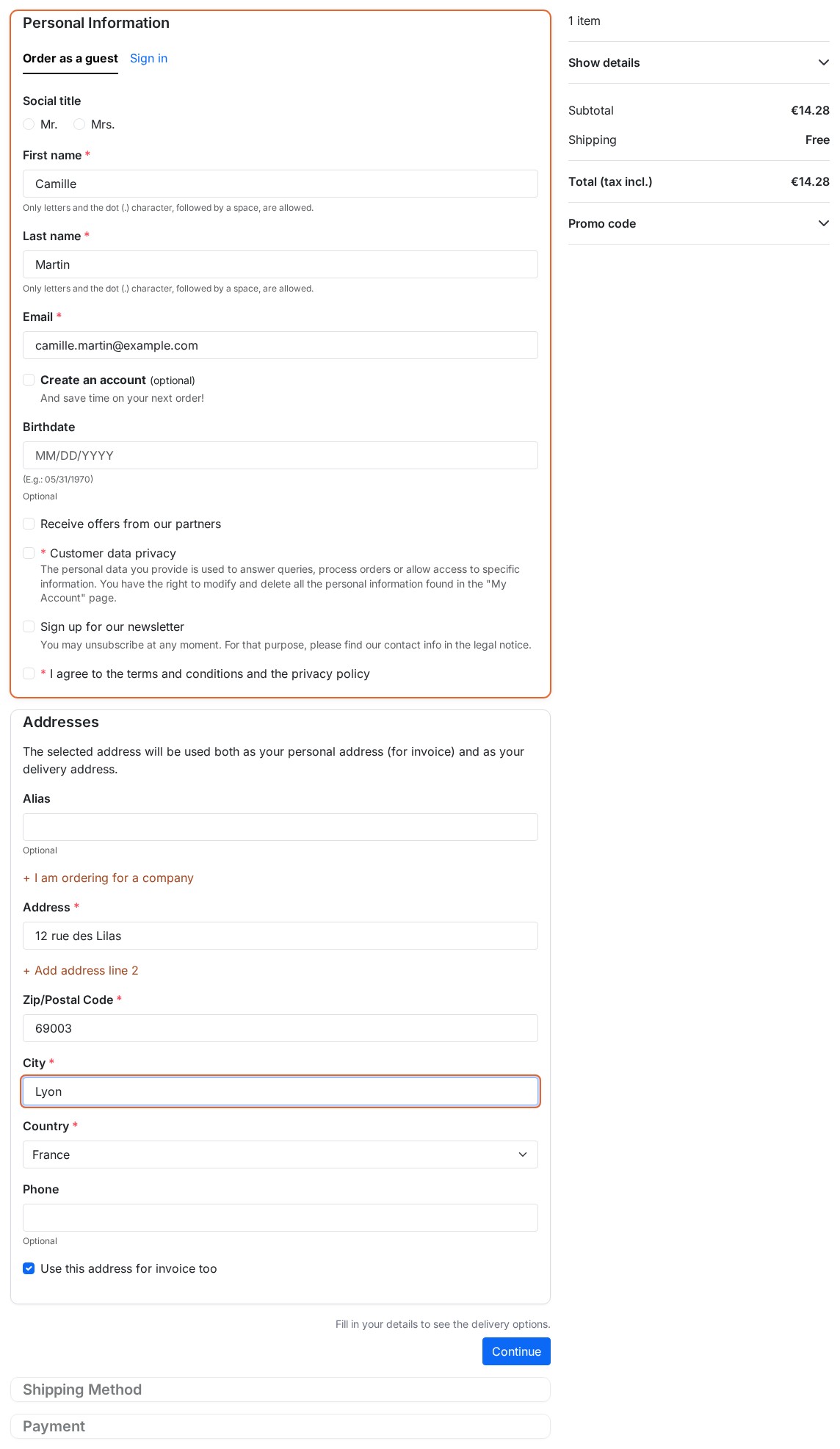 One form for a new customer
Features
One form for a new customer
The customer types their first and last name once: the address takes them over. A single Continue button sends the contact details and then the address; the page is drawn again with the carriers, the costs and the payment. The consent boxes added by your modules (GDPR, terms, newsletter) stay in the contact details form.
- The customer can create an account (with a password) or order as a guest, as in PrestaShop; if guest checkout is off in the shop, the form asks for the password.
- An e-mail that is already registered, a password that is too weak or a refused address bring the customer back to the form, with the PrestaShop message, without losing what was typed.
- The Sign in button stays visible: a customer who already has an account signs in without leaving the checkout page, and the cart follows.
The signed-in customer: everything is already filled in
Saved addresses appear as cards; choosing an address confirms it. Shipping is complete as soon as an available carrier is chosen, and the payment waits for the customer. A billing address that differs from the delivery address is possible, as in the standard checkout.
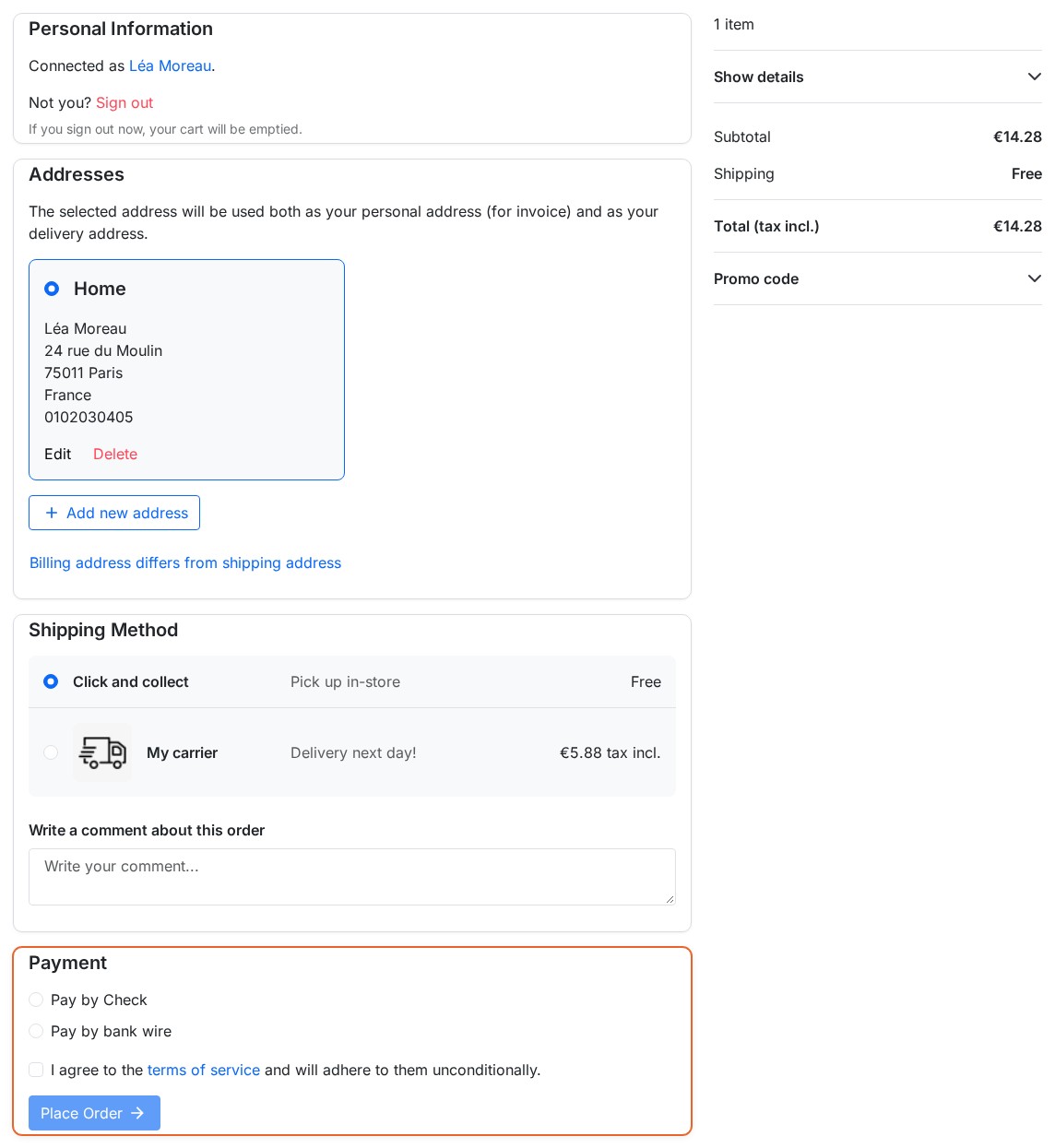 Shipping and payment on the same page
Changes are applied without going back through the steps
A change of address (including in another country), carrier, voucher or order message is saved, then the module reads the page that PrestaShop displays and updates the states, the summary and the sections concerned. If the total or the payment methods changed, the page is loaded once more: a payment method that starts from the amount of the page starts again with the right amount. The order message and the gift message are saved as soon as the field is left.
Layout: all sections open or accordion
- All sections open: the customer sees the whole checkout at once.
- Accordion (one section at a time): only the section to work on is open; for a new customer, the contact details and the address are open together because they are one form. A completed section is folded with its summary (name and e-mail, address, carrier and price) and an Edit link. The keyboard works: titles are reached with Tab and opened with Enter or Space.
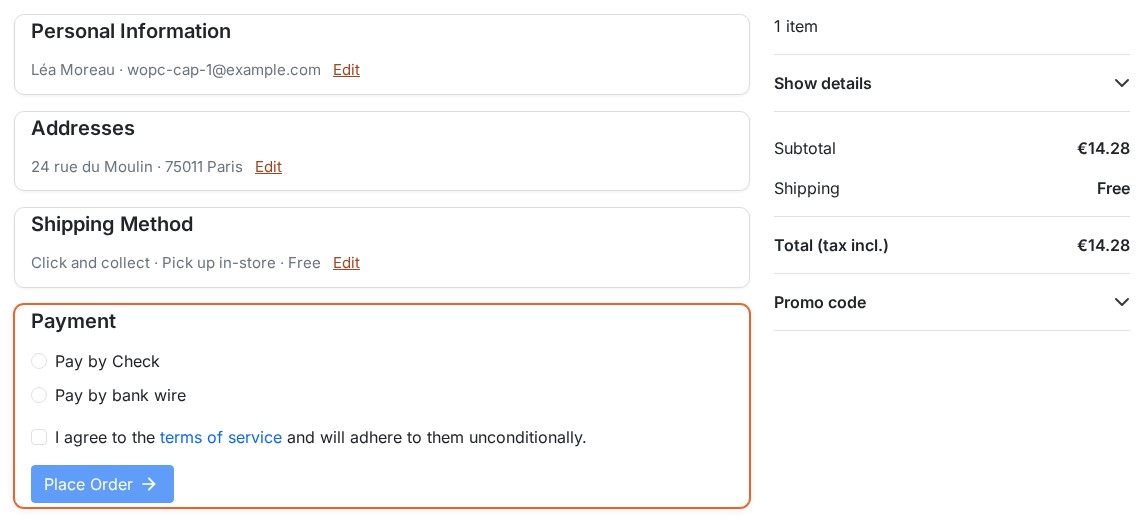 Accordion layout with summaries
On a phone
The order summary folds under a bar that keeps the total visible; a tap opens it. On a computer it stays fixed next to the sections.
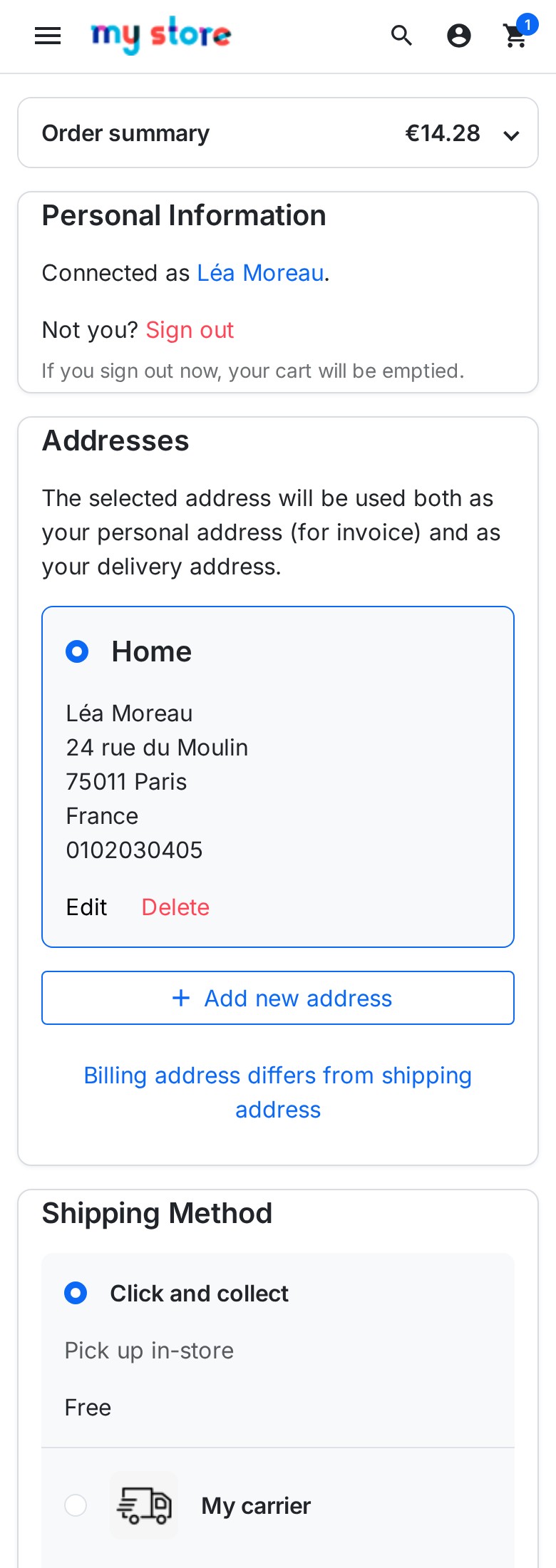 Order summary folded on a phone
Pick-up point carriers and payment modules
- A carrier whose module confirms the shipping step itself (choosing a pick-up point, for example) keeps the Continue button of the Shipping section: the payment stays locked until the module validates.
- A payment method that has its own button keeps it: the “Place order” button of the shop is not shown next to it.
- A payment method that starts from the amount of the page is drawn again when the amount changes.
- The terms and conditions open in the window of the theme, and the header, the footer and the notifications stay those of the theme.
Hints while typing and address suggestions
- Hints while the forms are filled: a frequent typo in the e-mail domain (“gmial.com”) is flagged with the correction one click away, and a postal code that does not fit the format of the country is flagged. The shop checks everything again when the form is sent.
- Address suggestions: for France, the public address register suggests addresses while typing (no key); with Google Places you use your own key. Choosing a suggestion fills in the address, the postal code, the city and the country. Off by default.
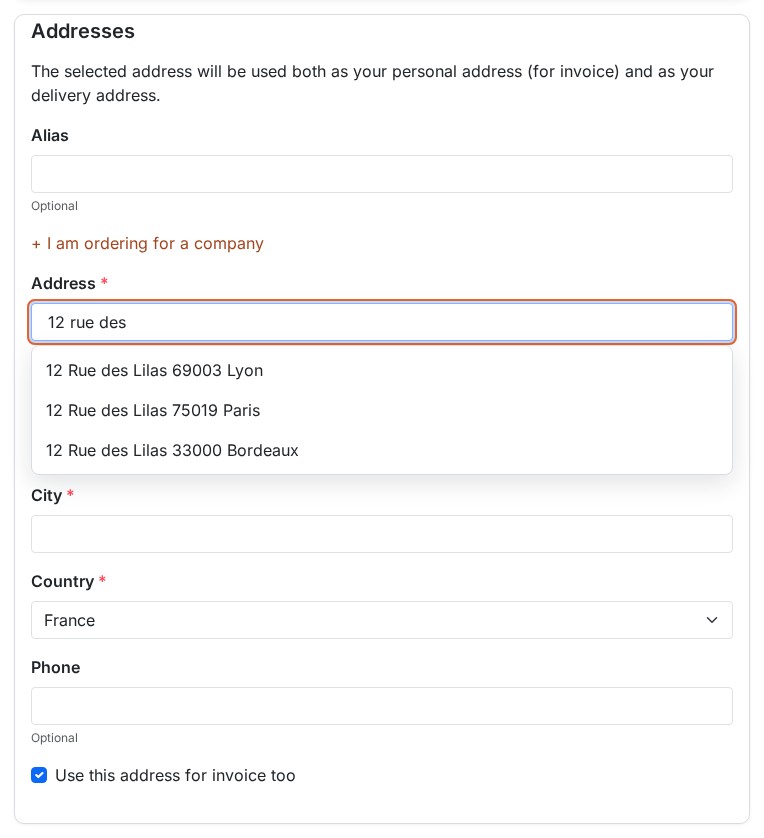 Address suggestions while typing
A shorter form
The Fold the optional address fields option hides the address line 2, the company and the VAT number behind a link; they open when they are filled in, refused or required for the country.
Design
Accent color, Card or Flat style, animations, reassurance block, fixed order summary (computer) or collapsible one (phone) and custom CSS (added to the checkout page only, cleaned before it is printed).
Test mode
In Test mode, only visitors whose IP address is in the list, or who open the preview link of the settings page, see the one-page checkout; your customers keep the standard checkout. You place real orders with your payment and carrier modules before opening to everybody. The link is private and is valid for eight hours in the browser that opens it.
Diagnostic
The settings page lists what matters to the support: PrestaShop, PHP and module versions, theme and detected markup, checkout template, hooks, modules on the same hooks, carriers that confirm their own step, payment methods, caches, and the last problem recorded. Copy for the support puts this report (without personal data or secrets) on the clipboard.
Technical
- The module overrides no class of PrestaShop. It replaces the checkout process through the
actionCheckoutRenderhook and extends the checkout template of your theme. - It works with the Disable all overrides option and next to a module that overrides the checkout itself.
- Two small files (a style sheet and a script) are loaded on the checkout page, and a third script only when one of the form helpers is switched on; the module archive is smaller than 200 KB.
- In a browser too old for the script of the module, the buttons of the shop stay and the order can still be placed.
Requirements
- PrestaShop: 1.7.8, 8.0+ or 9.0+. PrestaShop 1.7.7 and earlier are not supported.
- PHP: 7.4 minimum, with the
curl,jsonandmbstringextensions. - Theme: a theme shipped with PrestaShop, or a child theme that keeps the standard checkout page (the
checkout_processblock). A theme whose checkout page is fully customized shows the standard checkout; the Diagnostic says so. - Page cache: the checkout page must never be cached (it is not with the usual cache modules).
Installation
Method 1 — from the back office (recommended)
- Download the archive from your WePresta customer area
- Go to Modules > Module Manager
- Click Upload a module and select the ZIP archive
- Wait for the installation to finish, then click Configure and activate your license
Method 2 — by FTP
- Unzip the archive
- Upload the
wepresta_onepagecheckout/folder to/modules/ - In the back office: Modules > Module Manager, search for “Express Checkout” and click Install, then Configure
What the installation does
- Registers four hooks and a menu entry; it creates no table and changes no file of the shop
- Initial settings: one-page checkout on for everybody, all sections open, card style, section summaries and hints on; the optional features (single carrier, focused checkout, payment method ticked at the start, folded fields, address suggestions) off
- If the installation fails, what it had created is removed
Updating from version 1.0.0
- Your settings (layout, style, animations, color, reassurance, summary, custom CSS) are kept; “Enable one-page checkout” becomes the mode On for everybody or Off (standard checkout)
- The
CheckoutProcessoverride installed by 1.0.0 is removed from the shop. If you modified it by hand, the module leaves it and the Diagnostic tells you - The files of 1.0.0 that are no longer used (development tools and libraries) are deleted: the archive goes from several dozen MB to less than 200 KB
- If the CSS and JavaScript of the theme are combined, clear the PrestaShop cache after the update
Settings
Open Modules > Module Manager > Express Checkout > Configure. The page has three panels — Checkout, Checkout options and Design — followed by the Diagnostic.
First setup in five minutes
- In One-page checkout, choose Test: only for the addresses and the link below and save.
- Open the Preview link in a browser, add a product to the cart and place a test order: you see the one-page checkout, your customers see the standard one.
- Check your carriers and your payment methods, on a computer and on a phone.
- Switch back to On for everybody.
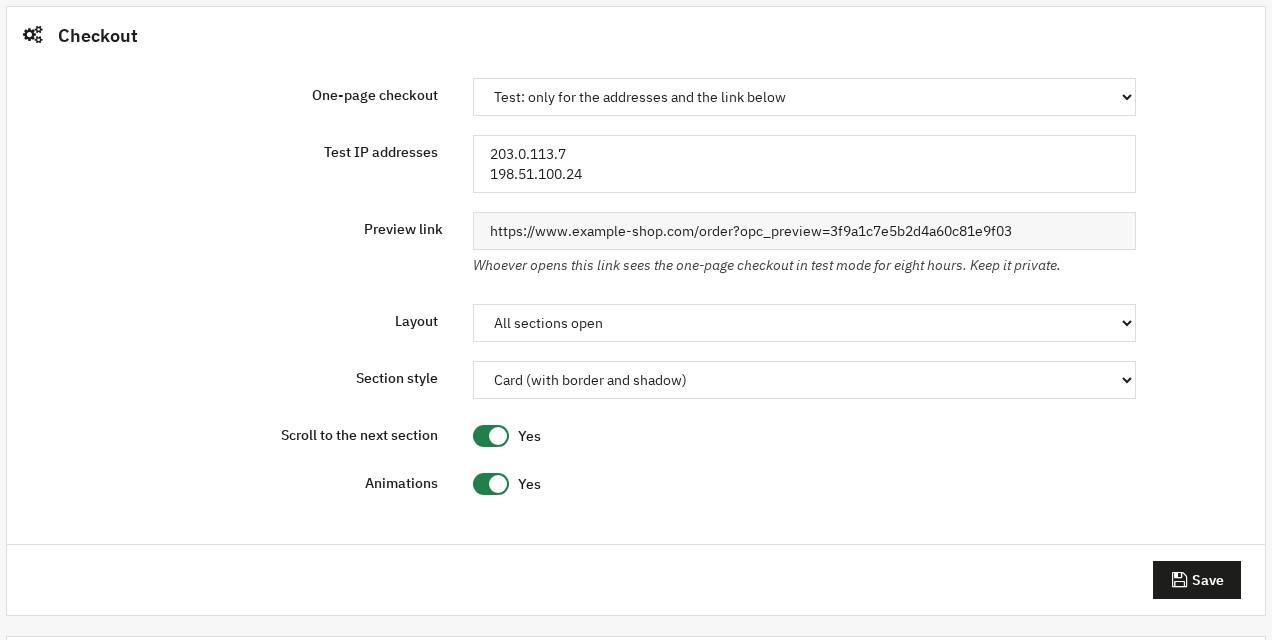 Mode, layout and preview link
Checkout panel
- One-page checkout: On for everybody, Test or Off (standard checkout).
- Test IP addresses: one address per line; your current address is shown.
- Preview link: keep it private.
- Layout: All sections open or Accordion (one section at a time).
- Section style: Card (with border and shadow) or Flat (no border).
- Scroll to the next section: after a section is completed, the page scrolls to the next one that needs the customer.
- Animations.
Checkout options panel
- Summaries of the completed sections: with the accordion, a folded section shows what the customer gave and an Edit link.
- No choice when there is a single carrier: the carrier stays visible as information; the order comment and the gift wrapping stay.
- Focused checkout: replaces the header and the footer of the theme with the logo, a link back to the cart and the terms. A theme that already has a focused checkout is left as it is.
- Payment method ticked at the start: none, Automatic when there is only one, or a payment module of your shop. The customer can still choose another one.
- Fold the optional address fields.
- Hints while the forms are filled.
- Address suggestions: None, France: public address register (no key) or Google Places (your own key), with the Google Places key that you create in your Google Cloud account and restrict to your domain.
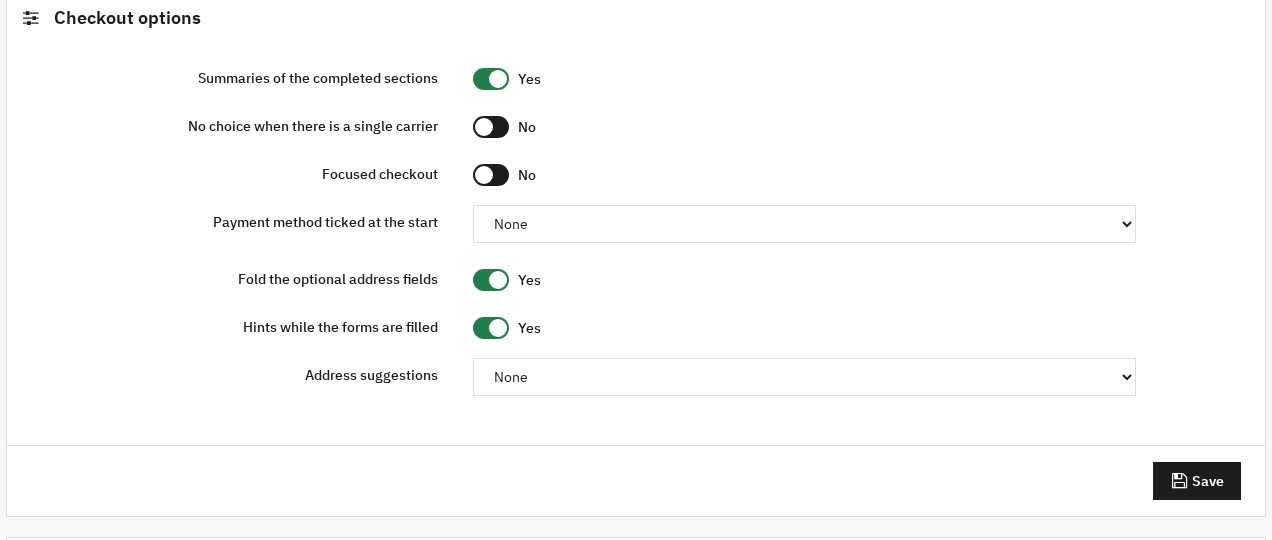 Checkout options
Design panel
Accent color, Reassurance block (content of the displayReassurance hook), Sticky order summary (desktop), Collapsible order summary (mobile) and Custom CSS.
License
After the installation, Configure shows the activation form: enter the license key and the license secret available in your WePresta customer area. The license can be deactivated on a domain from the same page. When a subscription expires, a grace period of seven days avoids any interruption; then the module switches itself off and the standard checkout comes back, until the license is renewed: opening this page recognizes the renewal, with no new activation.
Common use cases
Test before opening to all customers
Choose the Test mode, open the preview link, place a test order with your real payment method, then switch to On for everybody. To go back to the standard checkout at any time, choose Off (standard checkout): nothing else to do.
A shop with a single carrier
Switch on No choice when there is a single carrier: the Shipping section is complete at once, the carrier stays displayed and the customer writes their message if they wish.
A checkout without distractions
Switch on Focused checkout: no menu or exit links during the checkout, only the logo, a link back to the cart and the terms.
A payment method already ticked
Choose it in Payment method ticked at the start, or Automatic when there is only one: the payment form is already open when the customer arrives.
A shop in France
Switch on the Address suggestions with the public address register: the customer types “12 rue de la…”, chooses, and the address, the postal code and the city are filled in. What the customer types in the address field is sent to the chosen service: mention it in your privacy policy.
FAQ
What is Express Checkout for, and who is it for?
Express Checkout replaces the multi-step PrestaShop checkout with a one-page checkout: personal information, address, shipping and payment are visible together. It is meant for shops that want a shorter checkout without changing theme or payment and carrier modules, and that want to try it safely before opening it to all their customers.
What does a one-page checkout change for my customers?
A new customer fills in a single form (contact details and address) and then sees the carriers and the payment. A signed-in customer finds their sections already filled in. In both cases there is no “Continue” click from step to step. The module removes those clicks; it does not promise a conversion rate: measure the effect on your shop with the test mode and then your analytics tool.
Does the page reload during the checkout?
A change of address, carrier, voucher or message updates the sections and the summary without going back through the steps. When the amount or the payment methods change, the payment section is drawn again once (the page reloads), so that payment modules that start from the amount of the page start again with the right amount.
What does a new customer without an account see?
A single form: first name, last name, e-mail, optionally a password to create an account, then the address. The first and last name are typed once. One Continue button sends both forms; the page is drawn again with the carriers, the costs and the payment. If the e-mail is already registered or something is refused, the customer comes back to the form with the PrestaShop message.
Which themes are supported?
The themes shipped with PrestaShop and their child themes. The module extends the checkout template of your theme and only replaces the block that holds the steps: the header, the footer, the terms and conditions window and the notifications stay those of the theme. If the checkout page of the theme is fully customized, the standard checkout is kept and the Diagnostic says so.
Do my payment and carrier modules keep working?
Those that follow the standard PrestaShop mechanisms do. A carrier whose module confirms the shipping itself (choosing a pick-up point) keeps the Continue button of the Shipping section and blocks the payment until it validates. A payment method that has its own button keeps it: the “Place order” button of the shop is not shown next to it. Try your modules with the test mode before opening to everybody.
Does the module change files of PrestaShop?
No. It overrides no class: it replaces the checkout process through the actionCheckoutRender hook and extends the checkout template of the theme. It works with the “Disable all overrides” option and next to a module that overrides the checkout itself. When you uninstall it, the standard checkout comes back as it was.
Can I try it without my customers seeing the new checkout?
Yes. Choose the Test mode: only visitors whose IP address is in the list, or who open the preview link of the settings page, see the one-page checkout. You place real orders with your modules before switching to On for everybody.
How do I go back to the standard checkout?
Choose Off (standard checkout) on the settings page: the checkout of your shop is immediately the PrestaShop one. You can also deactivate or uninstall the module.
What happens to what is typed in the address suggestions?
The suggestions are off by default. If you switch them on, what the customer types in the address field is sent to the service you chose: the French public address register (no key, for addresses in France) or Google Places with your own key. Mention it in your privacy policy. Nothing is sent until the customer has typed at least three characters.
What happens to version 1.0.0 when I update?
Your layout, style, color, summary and CSS settings are kept; the CheckoutProcess override installed by 1.0.0 is removed from the shop, along with the files that are no longer used. If you had modified that override by hand, the module leaves it and the Diagnostic tells you. Then clear the PrestaShop cache if the CSS and JavaScript of the theme are combined.
Which versions of PrestaShop and PHP are supported?
PrestaShop 1.7.8, 8.0+ and 9.0+, with PHP 7.4 minimum. PrestaShop 1.7.7 and earlier are not supported. The module comes in a single archive smaller than 200 KB.
Troubleshooting
The standard checkout is shown instead of the one-page checkout
Check in this order: the mode (Test: are you in the list, or did you open the link?); the Diagnostic (checkout template of the theme, registered hooks, Last problem); the page cache (the checkout page must not be cached); another module that replaces the checkout process with its own class (the Diagnostic says so).
My theme is not one of the themes shipped with PrestaShop
If the checkout page of the theme keeps the checkout_process block, the module plugs into it. Otherwise the standard checkout is shown and the Diagnostic explains why: the module does not try to guess a template it does not know.
A pick-up point carrier does not move on
Its section keeps the Continue button: the customer must choose their pick-up point, then click. As long as the carrier module refuses the step, the payment stays locked, as in the standard checkout.
A payment method does not update when the amount changes
The payment section is drawn again when the amount or the payment methods change. A payment module that keeps the amount in its own scripts and does not start again when the page loads must be fixed by its publisher; the Test mode lets you check it safely.
The colors or the style do not change after an update
Clear the PrestaShop cache (combined CSS and JavaScript), then reload the checkout page with Ctrl + F5.
Another module changes the checkout
The module works next to a module that overrides CheckoutProcess. If another module replaces the process with its own class, the standard checkout is used and the Diagnostic names the class.
The preview link does not work
It is bound to the shop and to its cookie key: copy it from the settings page of the same shop and open it in the browser you want to test with. It only shows the one-page checkout (nothing confidential); to stop depending on it, switch to On for everybody or to Off (standard checkout).
The address suggestions do not appear
They only appear from three characters, for France with the public register, and with a valid key for Google Places. Check that your content security policy allows the chosen service.
Changelog
Version 2.0.0
New features
- The module works on PrestaShop 1.7.8, 8.0+ and 9.0+, with PHP 7.4 minimum, in a single archive smaller than 200 KB.
- A new customer fills in the contact details and the address in one form, with one button; the carriers and the payment appear afterwards.
- A change of address, carrier, voucher or message updates the page without going back through the steps.
- The payment section is drawn again only once when the amount or the payment methods change.
- Test mode: try the one-page checkout with your IP address or a private preview link before opening it to all your customers.
- A diagnostic in the back office: versions, theme, hooks, related modules, last problem, and a button to copy the report for the support.
- An accordion layout with the summary of the completed sections and an Edit link.
- An option to offer no choice when the shop has a single carrier.
- A focused checkout option: header and footer reduced to the logo, the link back to the cart and the terms.
- An option to tick a payment method at the start, or automatically when there is only one.
- An option to fold the address line 2, the company and the VAT number.
- Help while typing: a correction suggested for a mistyped e-mail domain and a warning for a postal code that does not fit the country.
- Address suggestions with the French public address register or Google Places (your own key).
- Carriers whose module confirms the shipping itself, such as a pick-up point, keep the Continue button and block the payment until they validate.
- The settings page is translated into French, English, Spanish, Italian and Polish.
Improvements
- The module no longer overrides any class of PrestaShop: no more conflict with another module that changes the checkout, and it works with “Disable all overrides”.
- The header, the footer, the terms and conditions window and the notifications of your theme are kept.
- On a phone, the summary folds under a bar that keeps the total visible.
- The archive goes from 27.6 MB to less than 200 KB, with no development tool or needless library.
- A renewed license is recognized when you open the settings page, with no new activation.
- If the installation fails, what it had created is removed.
Fixes
- A change of address is saved immediately: the order goes to the address shown, and the carriers, the taxes and the total follow.
- The Shipping step is no longer considered complete at the first display: the payment waits for a valid carrier.
- The terms and conditions link opens the window of the theme again.
- The order message and the gift message are saved as soon as the field is left.
- The Sign in button is visible again in the checkout.
- A payment method that has its own button is no longer shown next to the “Place order” button of the shop.
- A billing address that differs from the delivery address is no longer overwritten by the delivery address.
- The sections can be used with the keyboard and the section that holds an error opens.
After the update: your layout, style, color, summary and CSS settings are kept, the override of version 1.0.0 is removed and the unused files are deleted. If the CSS and JavaScript of the theme are combined, clear the PrestaShop cache.
Version 1.0.0
- Initial release: the steps of the order displayed on one page.
- Settings for the layout (all sections open or accordion), the section style, the accent color, the animations and a custom CSS.
- Order summary that stays in view on computers.
Support
For any help, contact us through your WePresta customer area or by e-mail at mail@wepresta.shop, depending on the support option of your plan.
Before writing to us, prepare:
- the PrestaShop and PHP versions
- the Diagnostic report (Copy for the support button)
- the theme in use and the payment and carrier modules concerned
- screenshots of the checkout page
