- A crawl that follows the bot
- 124 checks in 19 families
- A fix plan that empties itself
- 404 log and redirects
- Addresses without identifiers, robots.txt and RSS feed
- Dashboard, exports and client report
- Scheduled crawls, multistore and rights
- Does the module change my pages or my content?
- Do I need a Google account or an API key?
- Does the module measure Core Web Vitals?
- How long does a crawl take?
- Does the module work on multistore?
- Can PrestaShop overwrite robots.txt?
- What happens if the license expires?
- Are my redirects and robots.txt kept on uninstall?
- Does the module generate meta tags or structured data?
- Which languages are available?
Complete SEO audit for your PrestaShop store: errors, broken links and fix plan
A broken link does not announce itself. Neither does a canonical tag pointing to an address that no longer exists. Between product pages, categories, brands, CMS pages and blog posts, a PrestaShop store soon holds hundreds of addresses, and the mistakes that hold search engines back hide in the page source, not on the screen.
SEO errors crawls the store like a search engine bot, ranks every issue by severity and impact, then helps you fix it from the same back office: 404 log, redirects, addresses without identifiers, robots.txt, RSS feed. The fix plan empties crawl after crawl, and the client report shows what is left.
The module finds and fixes; you decide the order. No page, meta tag or text is rewritten automatically.
Highlights:
- The crawl: home page, sitemap, internal links and catalog, in served HTML, one crawl per shop and language
- The checks: 124 points in 19 families, each with the page and the element concerned
- The fix plan: severity, impact, effort, status, notes and history, prioritized by traffic
- The fixes: 404 log, redirects, addresses without identifiers and robots.txt
- The sharing: dashboard, CSV and JSON exports, printable client report, scheduled crawls
Discover the module and its plans
Presentation
SEO on a store is not only a matter of keywords. It also comes down to technical details: a page that answers with a 404, two addresses showing the same content, a canonical tag aimed at an obsolete address, a duplicated title, an image without alternative text, a robots.txt that blocks a useful category. None of this shows up in the back office, and finding it by hand means reading the source of every page.
The module takes that work over. It crawls the store by following links, the way a bot would, and records every issue with its severity, its address and the element concerned. The findings are then filed in a single fix plan, next to the tools that solve the most common causes: 404s, redirects, addresses without identifiers and robots.txt.
It is built for merchants who want to know what is wrong without opening the browser console, for agencies that audit a store before fixing it, and for owners of several shops who need follow-up per shop and language. No external account and no API key are required.
The module does not write to your pages. It adds no CSS or JavaScript file to the storefront; addresses without identifiers replace PrestaShop’s own addresses, and redirects are served before the page is rendered.
Features
A crawl that follows the bot
The crawl starts from the home page, the sitemap, internal links and the catalog. It reads the HTML as served, without running JavaScript, so content added in the browser is not seen — which is what a bot receives. Redirects are not followed during the crawl, so they can be reported. Only pages on the store’s own hosts are crawled, and private or reserved addresses are refused; external links are only checked when that option is enabled.
One crawl is made per shop and language, with a dated history and a comparison with the previous one: what is new, fixed, still present or back. A crawl can be paused, resumed or cancelled, and the module picks up where it stopped. Without a scheduled task, the crawl advances while the module page stays open.
124 checks in 19 families
Every issue belongs to a family, so the plan can be read by theme rather than as one long list:
- Links and redirects: broken links, chains and loops.
- External links: broken or unreachable outgoing links.
- Indexability: tags and headers that keep a page out of the index.
- Canonical URLs and variants: duplicate addresses, parameters, case and trailing slash.
- HTTPS and domain: mixed content, HTTP references, ports and duplicate hosts.
- Titles, descriptions and headings: length, uniqueness and presence.
- Duplicate and thin content: similarity between pages and content that is too short.
- Images: alternative texts and image attributes.
- Structured data: JSON-LD.
- Social tags: Open Graph and Twitter Cards.
- Hreflang and languages: language alternates, codes and return links.
- Sitemap: presence, consistency and addresses.
- robots.txt: rules and blocks.
- HTML performance indicators: page weight and element counts, not Core Web Vitals.
- Internal linking: internal links and the way pages connect.
- Content and readability: sentences, paragraphs and keywords.
- 404 log: addresses still requested and not handled.
- Redirect rules: loops, chains and missing targets.
- RSS feed: feed validity.
Thresholds are set in the configuration: title and description length, similarity between two pages, and the word count below which a page counts as thin.
A fix plan that empties itself
Each issue gets a severity — critical, important or minor —, an impact, an effort, the page and the element concerned, a status (to fix, in progress, fixed, ignored), notes and a history. The priority score grows with the traffic of the page, imported from a Search Console CSV export, so errors on the most visited pages come first.
The plan filters by severity, family, status and page. An issue can be ignored, and ignore rules keep it from coming back at every crawl. The next crawl checks the fix: an issue that has disappeared moves to fixed, and an issue that returns reopens.
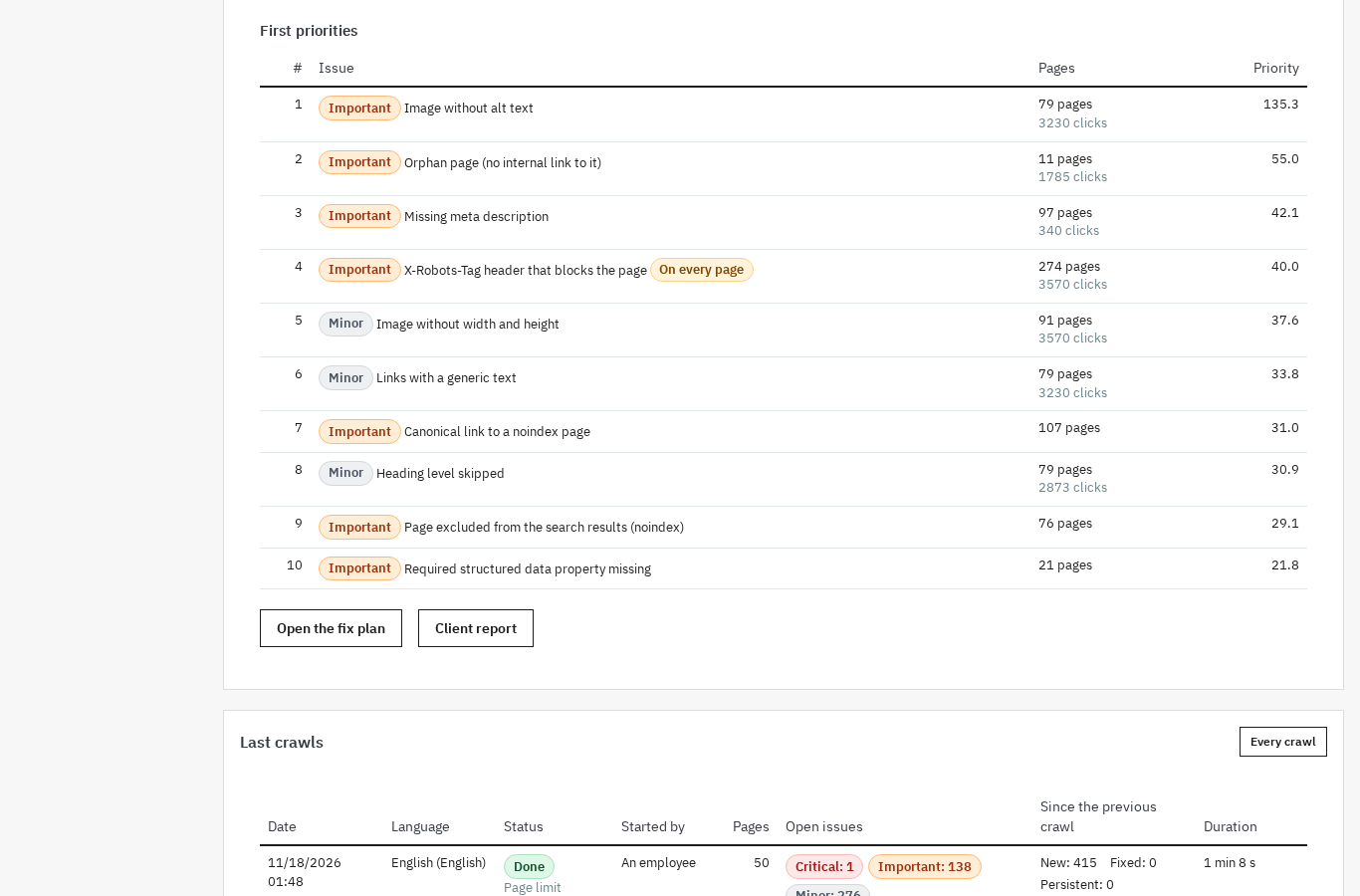 Errors ranked by priority, with severity, number of pages and clicks for each page
404 log and redirects
The 404 log records requested addresses that do not exist, without keeping the visitor’s IP address, and suggests a nearby page for each address. A redirect takes one click from the log; an address with no useful target can be ignored.
The redirect manager accepts exact rules and regular expressions, in 301, 302 or 303, with priorities and loop and chain checks. Rules can be imported and exported as CSV and are served before the page is rendered.
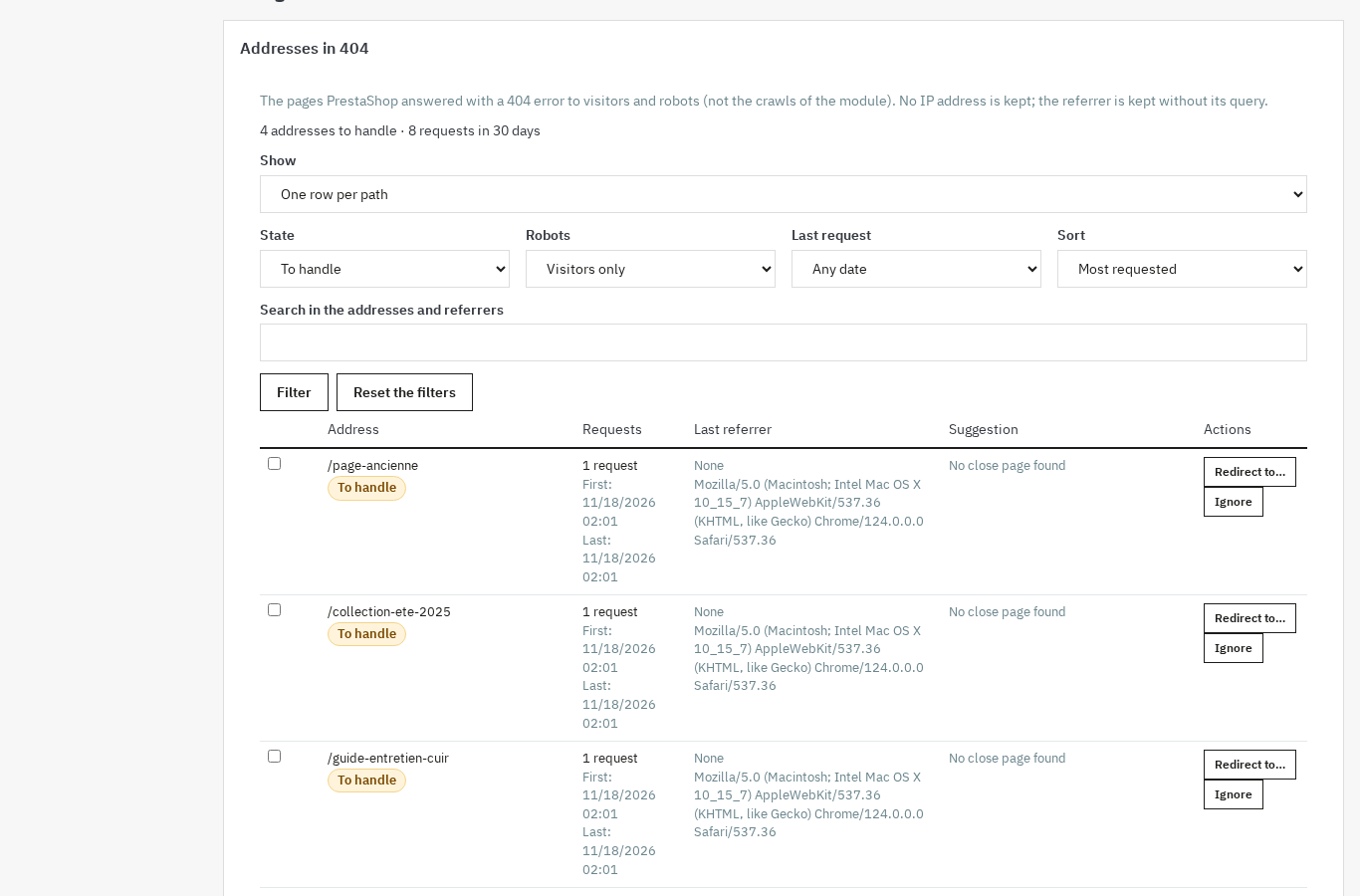 404 addresses become useful redirects in a few clicks
Addresses without identifiers, robots.txt and RSS feed
For products, categories, brands and CMS pages, the module offers addresses without identifiers, easier to read for visitors and search engines. A dry run shows collisions before applying, a live check verifies the result, old addresses answer with a 301 and a restore puts the original address configuration back; robots.txt is not restored.
The robots.txt editor shows a preview, tests an address against the rules, keeps versions and restores a previous one. The file is shared by all shops: if PrestaShop regenerates it, the module detects it and offers to restore your version.
The RSS feed publishes new content per language, with a cache header and a 304 answer for visitors who have nothing new to read. It starts disabled.
Dashboard, exports and client report
The dashboard sums up the latest crawl of each language: counts by severity and by family, first priorities, the evolution of the last twelve crawls and alerts. Issues export to CSV or JSON.
The client report is generated in the report language, with your logo, and can be printed or saved as PDF. It covers the summary, open issues by severity, the table by family and the priorities.
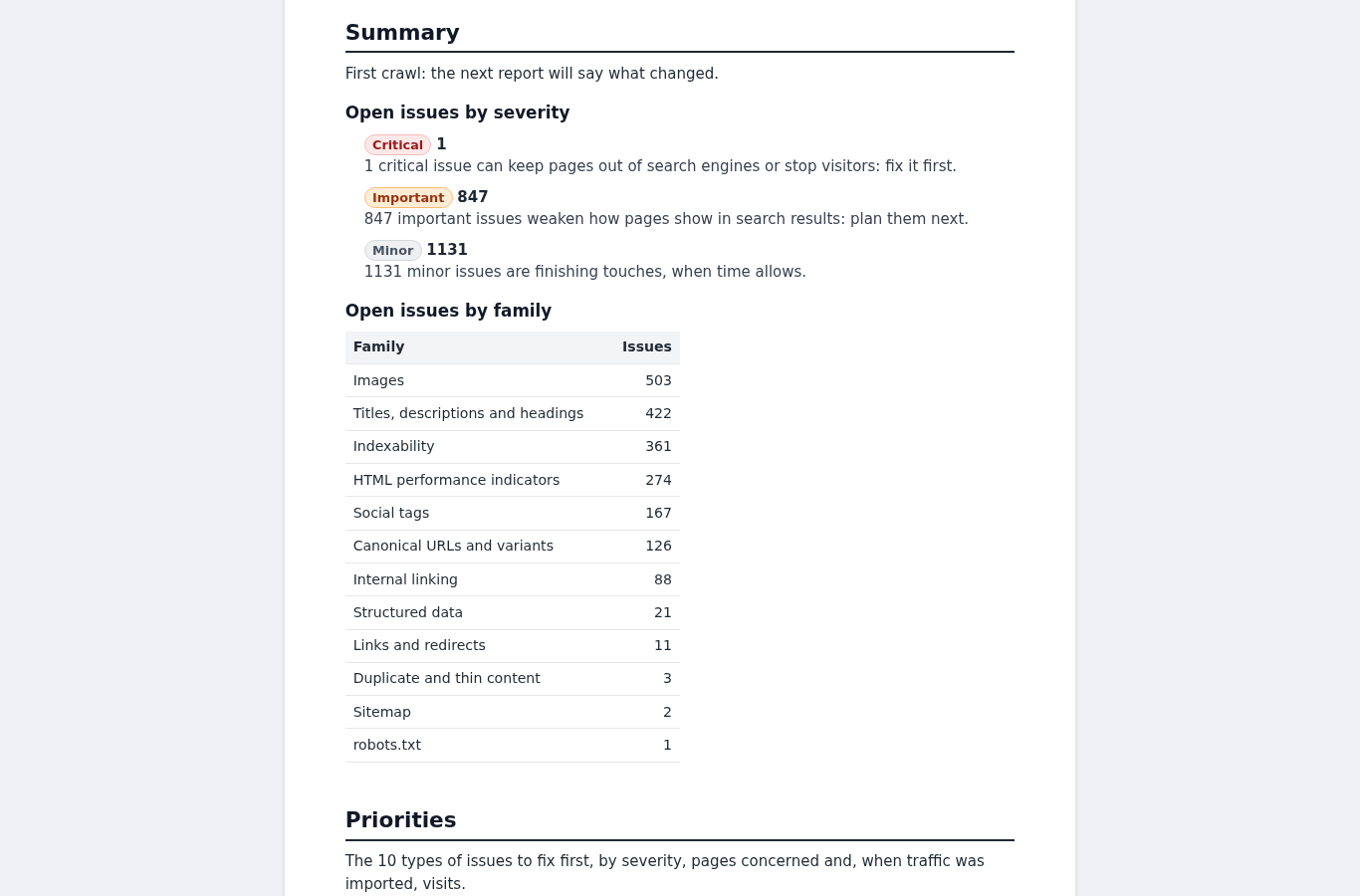 The client report sums up issues by severity and by family, ready to print
Scheduled crawls, multistore and rights
A scheduled task runs crawls every day, every week or every month, in the shop time zone, and sends the report by e-mail. The task token and the HTTP credentials of a protected shop are never shown again in clear text.
On multistore, every shop and every language has its own crawl, history and settings; the shops of a group can be compared in a dedicated view. Three rights separate viewing, managing and data access, and every action is checked on the server.
Installation
- Download the module archive and install it from Modules > Module Manager, or drop the
wepresta_seo_auditfolder into the store’smodulesdirectory. - Install the module. Installation creates the module tables and its menu entry.
- Open the configuration page and activate your license. Without a valid license, the module disables itself and serves neither redirects nor the 404 log.
- Open the module from the Modules menu or, depending on your version, from the WePresta menu.
The module adds no CSS or JavaScript file to the storefront. It serves redirects, addresses without identifiers, the 404 log and the RSS feed from the store, without changing the theme.
First configuration
- Status: check the license and enable the module.
- Crawl: choose the depth, the page cap, the delay between requests, the timeout and the concurrency. The defaults crawl up to 2,000 pages, with 250 ms between requests and two simultaneous requests.
- Thresholds: adjust title and description length, the similarity rate and the word count below which a page is considered thin.
- Run a first crawl from the Crawl page. Follow its progress, then open the fix plan.
- Traffic: import a Search Console CSV export to rank priorities by clicks. The expected headers are pre-filled.
- Schedule: enable a daily, weekly or monthly crawl and the e-mail report. Without a scheduled task, the crawl only continues while the module page stays open.
The configuration page also groups the 404 log, Redirects, RSS feed, Client report and Data sections. The 404 log and redirects are enabled by default; the RSS feed is disabled.
Daily use
In the morning. Open the dashboard: the priorities of the latest crawl are ranked by score. Start with critical issues and pages that receive clicks.
After a catalog update. Run a new crawl. The comparison with the previous one shows what is new, what is fixed and what is back; the plan updates without losing statuses or notes.
When an address goes down. The 404 log reports it with a suggested target. Create the redirect, then check that it is served.
For a client. Generate the client report in their language, with your logo, and print it or save it as PDF. It shows issues by severity and by family, not just a list of pages.
On multistore. Each shop has its own crawls and settings. The comparison view puts the shops of a group side by side.
Use cases
A store changing its theme or its addresses. A redesign moves categories and product pages. The crawl reports 404s and broken links, the redirect manager takes over the old addresses and addresses without identifiers make the new ones easier to read.
A large catalog. Thousands of product pages produce duplicated titles, images without alternative text and descriptions that are too short. The plan groups these issues by family and severity, and ignore rules avoid handling by hand what is accepted on purpose.
An agency or a consultant. The dated crawl, the comparison and the client report document the initial state, the fixes and what remains. The report is generated in the client’s language.
A multilingual, multistore business. Each language has its own crawl and its own addresses. The comparison between shops shows where the same errors come back.
Requirements and limits
- PrestaShop 1.7.8, 8.2+ and 9.0+; versions 8.0 and 8.1 are not supported. PHP 7.4 or later.
- The crawl reads served HTML, without JavaScript. Content and links added in the browser are not seen.
- With the default settings, expect about 1,000 pages in 10 to 20 minutes; the default cap is 2,000 pages per crawl. Without a scheduled task, the crawl advances only while the module page stays open.
- Performance indicators are computed from the HTML, not from Core Web Vitals.
- External links are not checked by default; the option exists, but it makes the crawl longer and leaves the store’s domain. Only the store’s own hosts are crawled.
- The module generates no meta tags, structured data or sitemap, and does not rewrite alternative texts: it checks them and tells you what to fix.
- robots.txt is shared by all shops. PrestaShop can regenerate it from its own tool; the module detects the overwrite and offers to restore your version, but cannot prevent it.
- Without a valid license, the module disables itself: redirects are no longer served, the 404 log stops, addresses without identifiers revert to PrestaShop’s format and the RSS feed answers with a 404. Data is kept and everything comes back when the license is validated.
- On uninstall, data is removed if you tick the dedicated option;
PS_ROUTE_*rows set aside are put back and robots.txt is left untouched.
FAQ
Does the module change my pages or my content?
No. It reads the HTML as served and never writes to pages, product sheets or categories. Its only writes concern the 404 log, redirect rules, address configuration, robots.txt and the RSS feed; no page is modified. No meta tag and no text is rewritten automatically.
Do I need a Google account or an API key?
No. No external account and no API key are required. Traffic prioritization uses a Search Console CSV export that you import; the expected headers are pre-filled.
Does the module measure Core Web Vitals?
No. The HTML performance family looks at what the page contains and how heavy it is, not at Google’s field data. Core Web Vitals and real speed need a dedicated tool; the module does point out heavy pages and heavy elements.
How long does a crawl take?
With the default settings, expect about 1,000 pages in 10 to 20 minutes, within the default cap of 2,000 pages. Without a scheduled task, the crawl continues while the module page stays open; with the scheduled task, it runs in the background. The delay between requests and the concurrency are settings.
Does the module work on multistore?
Yes. One crawl is made per shop and language, with its own history and comparison. The shops of a group can be compared in a dedicated view, and crawl settings belong to each shop.
Can PrestaShop overwrite robots.txt?
Yes. The file is shared by all shops, and PrestaShop’s generation tool can rewrite it. The module detects the overwrite and offers to restore the last saved version; it cannot prevent the regeneration.
What happens if the license expires?
The module disables itself in the shops concerned: redirects are no longer served, the 404 log stops, addresses without identifiers revert to PrestaShop’s format and the RSS feed answers with a 404. Tables, settings and data stay in place, and everything comes back when the license is validated.
Are my redirects and robots.txt kept on uninstall?
PS_ROUTE_* rows set aside are put back and robots.txt is left untouched. The module’s tables and settings are removed only if you tick the delete-data option; otherwise they stay in place.
Does the module generate meta tags or structured data?
No. It checks the existing tags and reports what is missing, but generates no titles, descriptions, JSON-LD or sitemap. Companion modules from the same range, such as SEO Meta Automator and Schema Pro, cover that generation.
Which languages are available?
The interface, the fix plan and the e-mail report exist in French, English, Spanish, Italian and Polish. The client report is generated in the report language, and a multilingual shop gets one crawl per language.
Support
For any help, contact us from your customer area or by e-mail at mail@wepresta.shop, depending on the support option of your plan.
Before writing to us, prepare:
- the PrestaShop and PHP version;
- the module version;
- the address concerned or the screen name;
- a screenshot and the exact message.
Changelog
Version 1.0.0
- Crawls the store like a bot: home page, sitemap, internal links and catalog, in served HTML, without JavaScript.
- Runs one crawl per shop and language, with a dated history and a comparison: new issues, fixed, persistent, reopened.
- Checks 124 SEO points in 19 families, with the page and the element concerned.
- Files issues in a fix plan with severity, impact, effort, status, notes and history, and checks the fix at the next crawl.
- Prioritizes the plan with traffic imported from a Search Console CSV export.
- Records 404s without an IP address, suggests a target and creates the redirect in one click.
- Handles exact and regular-expression redirects, in 301, 302 or 303, with priorities, loop and chain checks, CSV import and export.
- Offers addresses without identifiers for products, categories, brands and CMS pages, with a dry run, collision checks, 301 from old addresses and restore.
- Edits robots.txt with a tester, preview, versions and restore.
- Publishes an RSS feed of new content per language.
- Shows a dashboard, CSV and JSON exports and a printable client report in the report language.
- Schedules crawls every day, every week or every month, with the report by e-mail.
- Handles multistore, shop comparison and per-employee rights.
- Provides the interface in five languages.

Related articles
SEO audit for PrestaShop: 404 errors, broken links and a fix plan
SEO errors crawls the store in served HTML, ranks issues by severity and traffic, then fixes the 404s, redirects, addresses and robots.txt.