Magic Login - Passwordless Sign-in and Google Sign-in - Module PrestaShop

PrestaShop Magic Login Module: Stop Cart Abandonment with 1-Click Passwordless Login

+111 downloads โ˜… โ˜… โ˜… โ˜… โ˜… 4.81 / 5 Version 2.0.0 1.7.8 8.0+ 9.0+ 5 languages ๐Ÿ‡ซ๐Ÿ‡ท FR ๐Ÿ‡ฌ๐Ÿ‡ง EN ๐Ÿ‡ฎ๐Ÿ‡น IT ๐Ÿ‡ช๐Ÿ‡ธ ES ๐Ÿ‡ต๐Ÿ‡ฑ PL
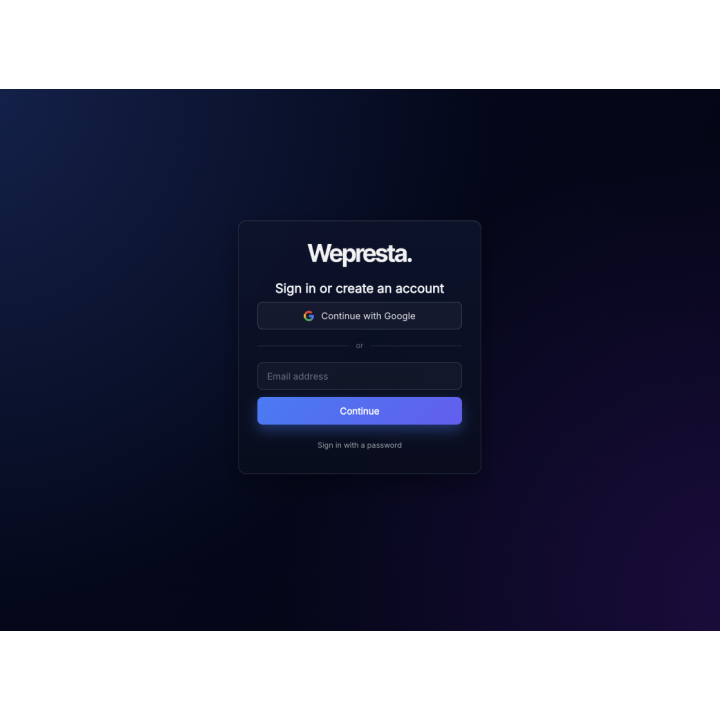
  • Sign in or create an account with an e-mail address only: a 6-digit code, a one-click link or Google
  • Replaces the login page of your shop and the sign-in step of the cart, with an option to order without an account
  • Accounts created like the native registration: first and last name, consents of your shop, welcome e-mail
  • Limits, a token for each visitor, statistics without any e-mail address, a test e-mail and a diagnostic
  • Your colour, your texts in each language and your picture; works next to Social Login
  • Compatible with PrestaShop 1.7.8, 8.0+ and 9.0+ (PHP 7.4 minimum)
Not sure yet? Try it free for 24 hours โ€” no credit card required.
Features

Everything you need, nothing you don't.

Passwordless sign-in for PrestaShop 1.7.8, 8.0+ and 9.0+: e-mail code, one-click link and Google, with the path from the cart to the order and the consents of your shop.

A code or a one-click link

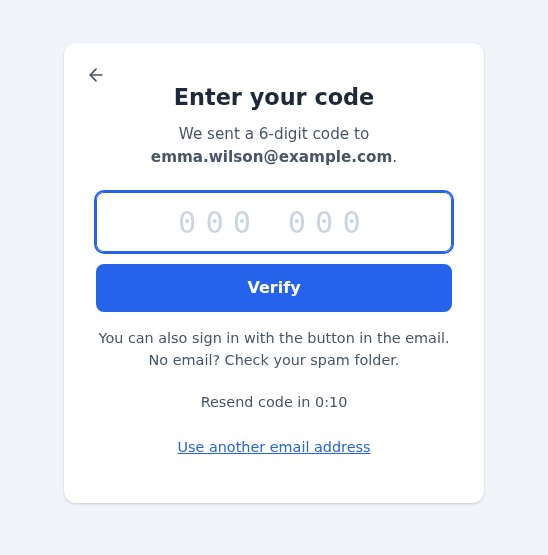
The customer types a 6-digit code or presses the button of the e-mail: no password to remember.

Google in one click

The official Google button: the token is checked on your server and the account is found or created.

Accounts like the native registration

Name, the consents of your shop, the welcome e-mail and the hooks of your other modules, as for any registration.

Protected sign-in

Limits per code, address and visitor, a token for each visitor, return pages limited to your shop, no e-mail address in the statistics.

A smooth path to the order

From the cart the customer signs in and comes back to their order, or orders without an account if you allow it.

Light and quick to set up

An archive of about 310 KB, nothing loaded on the pages that do not need it, a test e-mail and a diagnostic to check your settings.

Customer reviews

They use it every day.

5 out of 5 · 4.81 reviews

"Been using it for 6 months now, zero issues."

JL Jessica L.

"Najlepszy moduล‚ jaki znalazล‚em. Wart kaลผdej zล‚otรณwki."

JR Jakub R.

"Super easy to configure, even for non-developers."

RC Ryan C.

"Excellent quality. Way better than Addons alternatives."

JW James W.
description Full description expand_more

Kill the Password: Remove the Barrier Between Your Visitors and the Order

Passwords are the biggest enemy of your conversion rate. According to the Baymard Institute, nearly one shopper in five has abandoned an order because the site wanted them to create an account. Magic Login permanently removes this barrier by offering your customers a modern, fluid, and secure "Passwordless" experience: they type an e-mail address, confirm it, and they are signed in, or they get a real account of your shop without ever choosing a password.
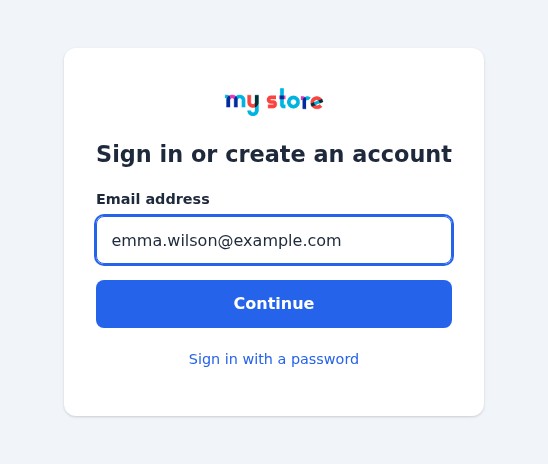
Magic Login sign-in page of a PrestaShop shop: the logo of the shop, the title Sign in or create an account, an e-mail field, the Continue button and the link Sign in with a password.
One field to sign in or create an account

Instant Login via Email or Google

Give your users the simplicity they deserve. With Magic Login, there's nothing to remember and nothing to mistype:

  • One-Click Google Login: Instant signup or login using a Google account. Name, last name, and email are fetched automatically, and the Google token is verified on your server.
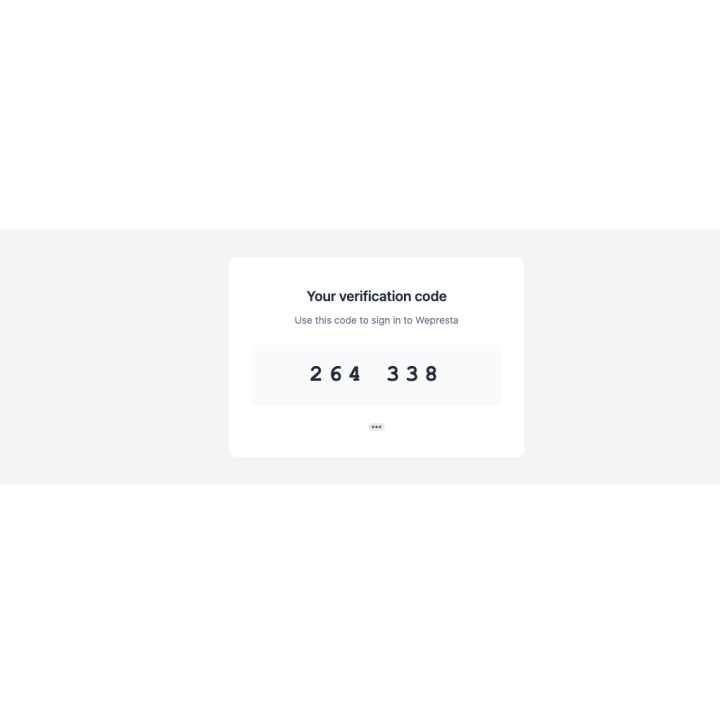
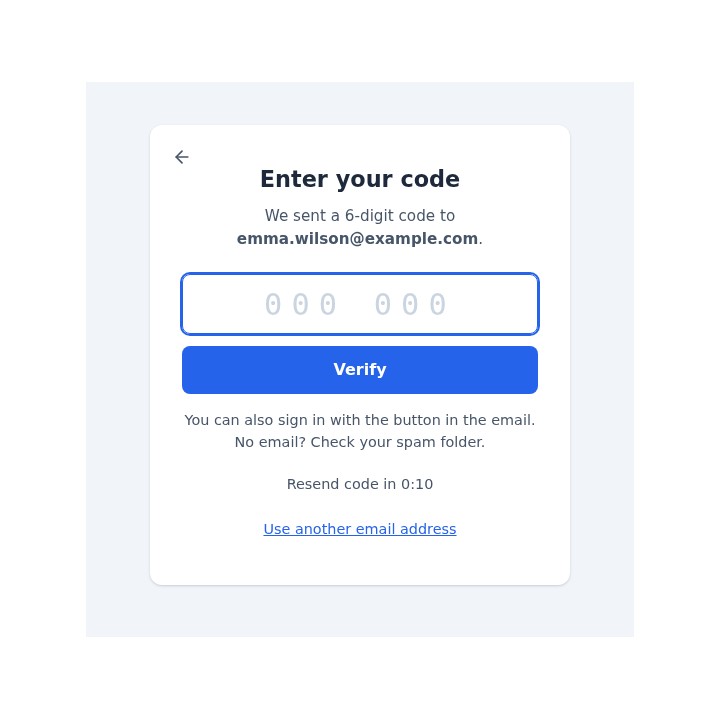
  • Magic Email Code: Customers receive a 6-digit code via email, enter it (or paste it, or let their phone fill it in), and they're in. The code works once and expires after the delay you choose.
  • One-Click Link: the same e-mail holds a button that opens a confirmation page, so the mail scanners that open links do not use it up.
  • Smart Detection: The module automatically recognizes if it's a new or returning customer for a zero-friction journey, with no โ€œSign inโ€ or โ€œRegisterโ€ choice.
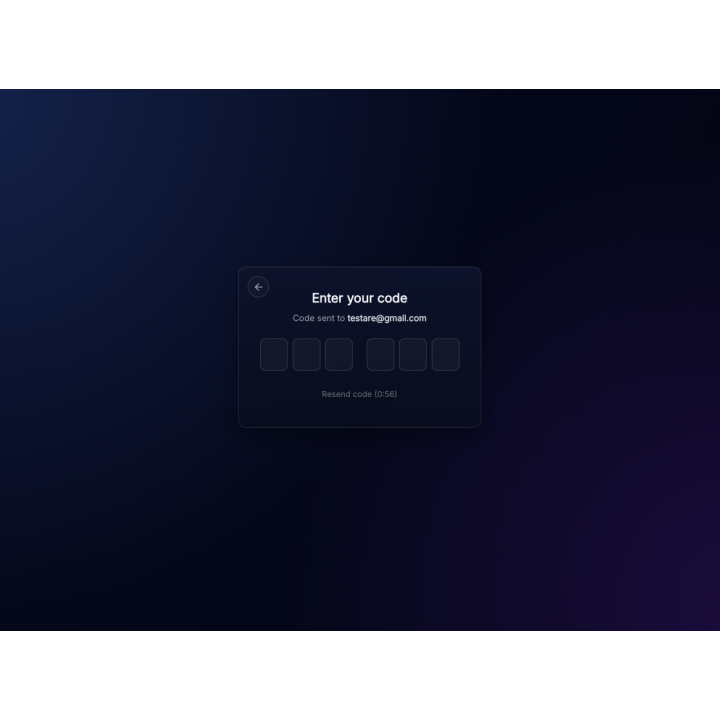
Code step of Magic Login: the customer types the 6-digit code sent to their e-mail address; the e-mail also holds a button that signs them in with one click.
A code or a link: the customer chooses

Real Accounts, Like the Native Registration

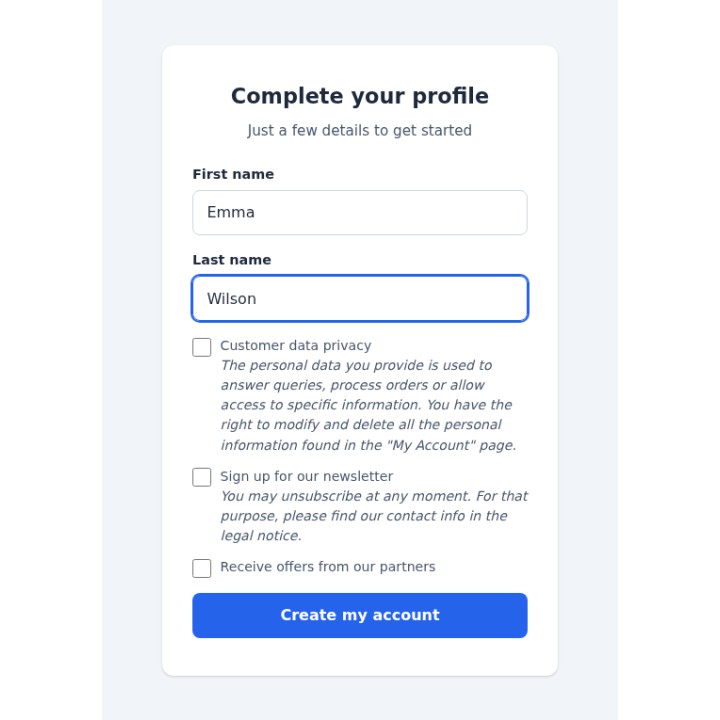
A new customer gives a name and accepts the consents of your shop (privacy, newsletter, partner offers), then receives the welcome e-mail; the hooks of your other modules (CRM, newsletter) are called as for any registration. A guest account with the same address becomes a customer account and keeps its orders, the cart follows the customer and the automatic vouchers of their group apply.
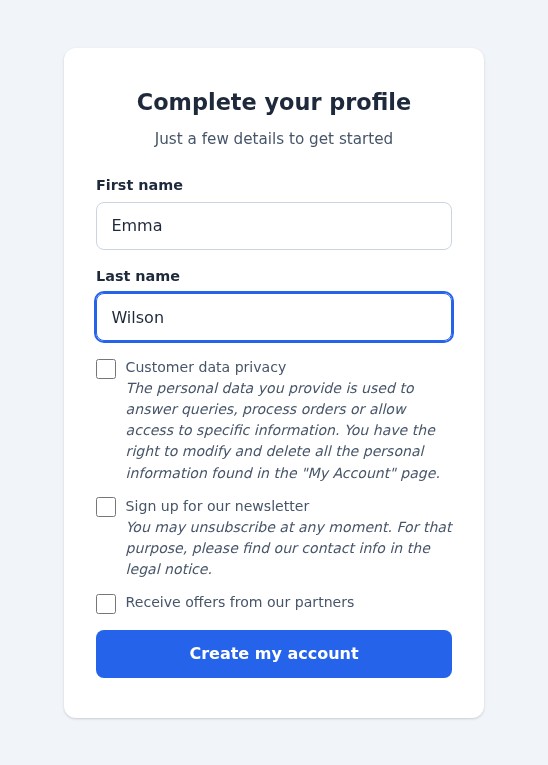
Profile step for a new customer: first name, last name and the privacy, newsletter and partner-offer boxes of the shop, then the Create my account button.
New customers: a name and the consents of your shop

Mobile-First Full-Screen Interface

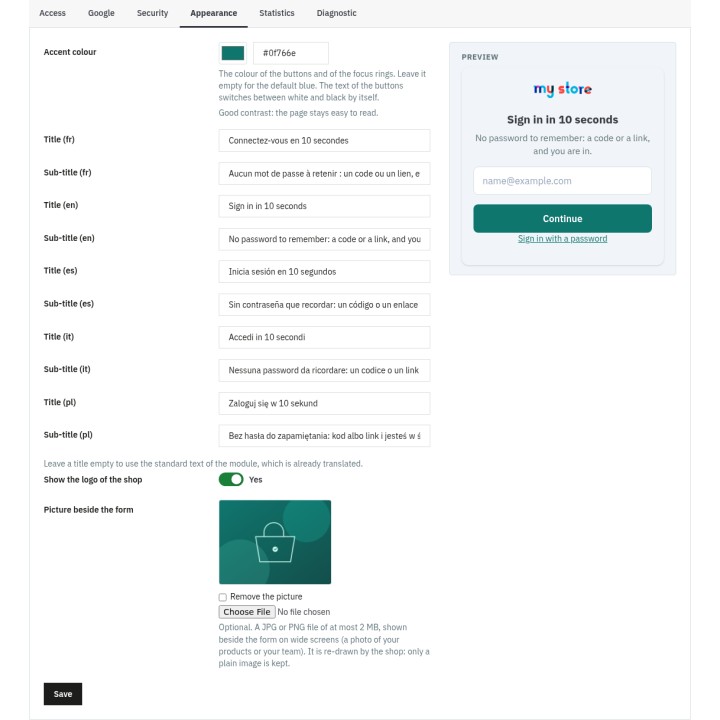
Forget dull, standard PrestaShop forms. Magic Login deploys a dedicated full-screen interface, stripped of headers and footers to eliminate distractions. Fully optimized for mobile browsing, it features smooth AJAX transitions (no page reloads) and a clean design that builds buyer confidence during checkout. It is accessible (labels, announced errors, keyboard use, reduced motion) and independent of your theme: choose your accent colour, write a title and a sub-title in each language and add a picture beside the form, with a preview in the back office.
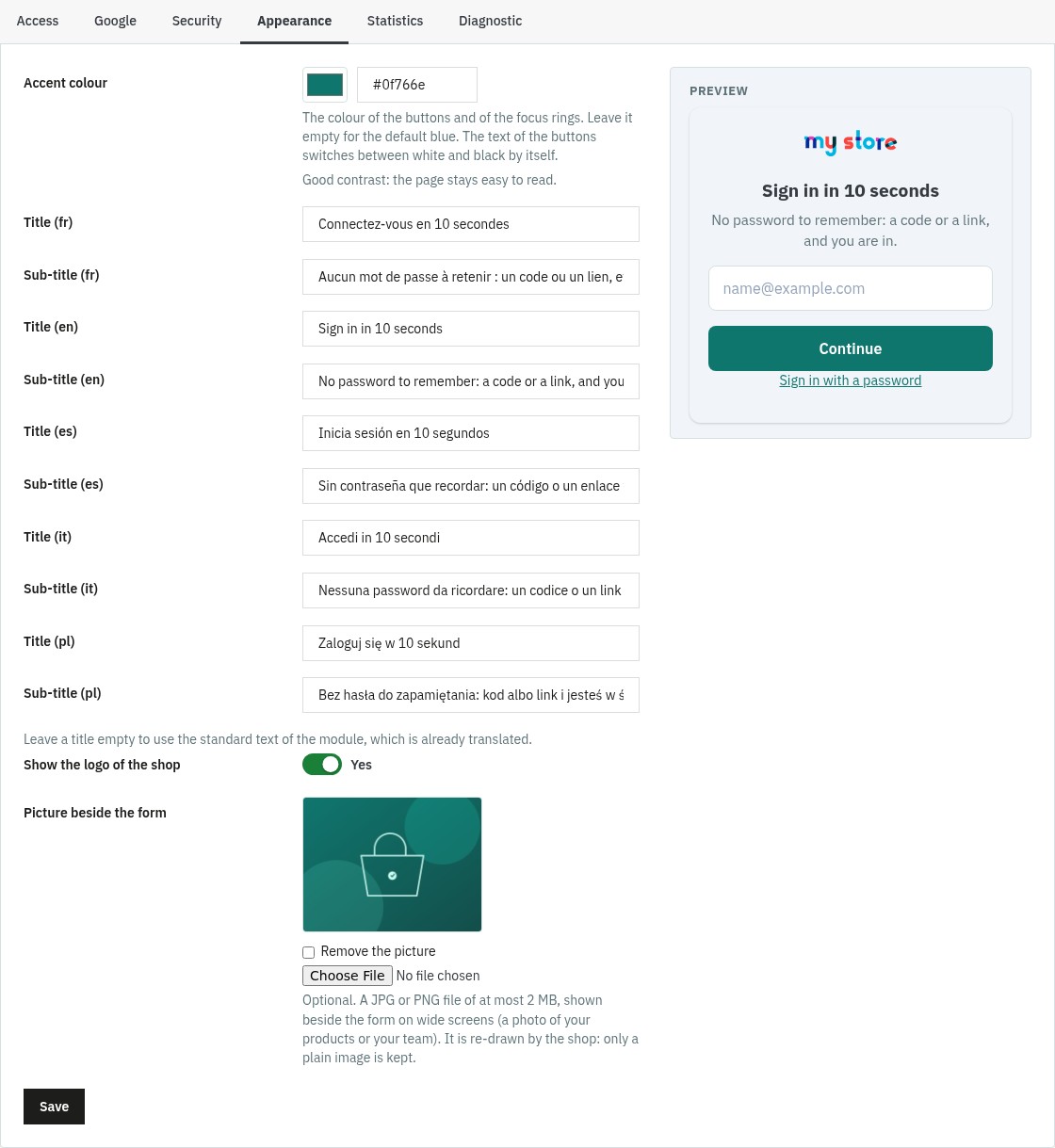
Appearance tab of the back office: accent colour with a contrast notice, a title and a sub-title for each language, the logo option and the picture beside the form, with a preview.
Your colour, your texts, your picture

Smart Redirects & Native Integration

Magic Login is built to supercharge your checkout flow. It becomes the login and registration page of the whole shop (the โ€œSign inโ€ link of the theme, โ€œMy accountโ€ in the footer, the pages that need an account). When an unauthenticated user clicks "Checkout," they are redirected to the Magic Login screen. Once logged in, they land exactly where they left off, with their cart intact, or they choose Order without an account when your shop allows guest checkout. You can also disable "Guest Checkout" and turn every sale into a loyal customer account: the module gives the setting back as it was if you change your mind or uninstall it.
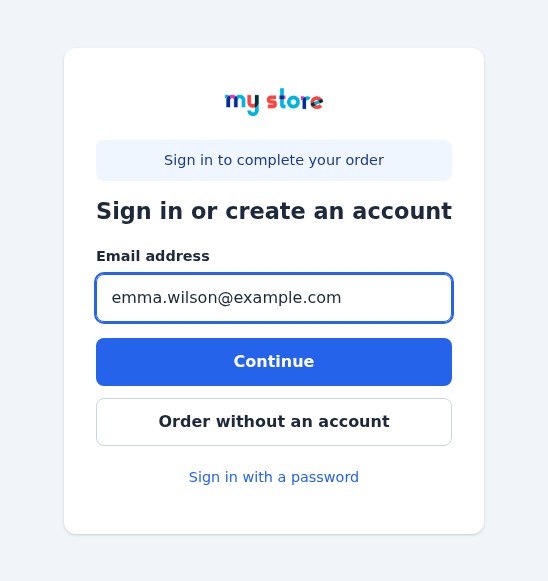
Sign-in page reached from the cart: the message Sign in to complete your order, the e-mail field and the Order without an account button.
From the cart: sign in, or order without an account

Maximum Security, Your Database Untouched

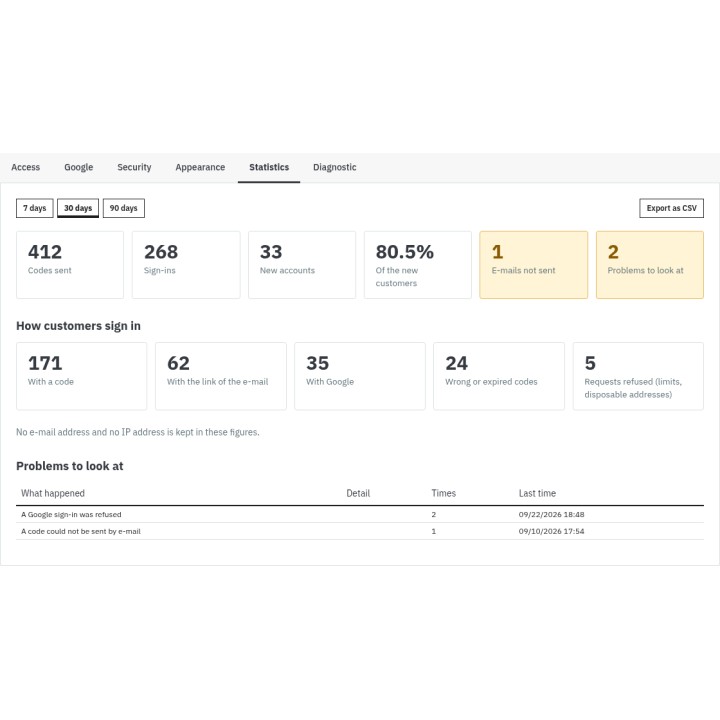
Magic Login works in harmony with the native structure of PrestaShop: it never changes the tables of your shop. On the security side, codes are stored hashed and work once, Rate Limiting applies to the tries per code, the codes per address and the codes per visitor, an address that collects too many wrong codes is locked for a while, every request carries a token of the visitor (CSRF protection), and the return pages must belong to your shop. An option refuses disposable e-mail addresses. The Statistics tab shows the codes sent, the sign-ins by code, link and Google and the new accounts, with a CSV export that holds no e-mail address; a test e-mail and a diagnostic check your configuration in a minute.
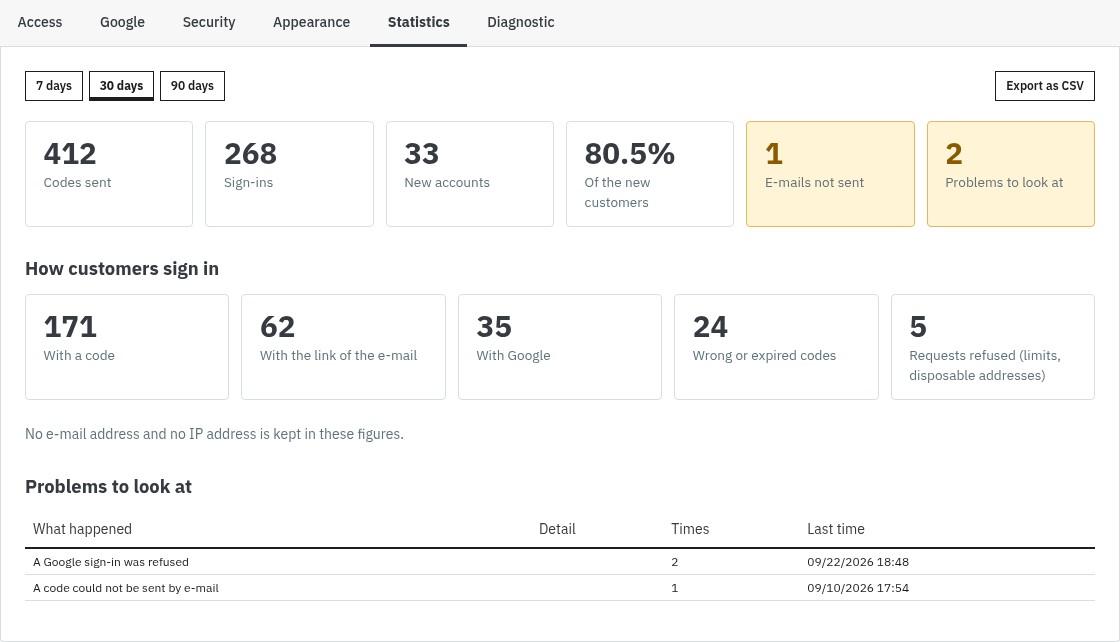
Statistics tab of the back office: codes sent, sign-ins by code, link and Google, new accounts and the share of new customers, with a CSV export.
Which way your customers choose

Easy to Install, Wide Compatibility

The module works with PrestaShop 1.7.8, 8.0+ and 9.0+ and needs PHP 7.4 or later; PrestaShop 1.7.7 and earlier are not supported. It overrides no class of the shop and works next to Social Login 2: the buttons of your other sign-in modules appear on the page.

  • Standard installation from the Module Manager, with an archive of about 310 KB.
  • Multi-store: Google client ID, texts and limits for each shop.
  • If the license is not active, your shop keeps its normal login pages.
  • Page, e-mail and administration in French, English, Spanish, Italian and Polish.
  • Complete documentation and technical support according to your plan.

Ready to remove the password? Install Magic Login, add your Google client ID if you wish, and let your customers sign in with an e-mail address. Read the full documentation.

Comparaison

Why choose us?

See how we compare to the most common alternatives on the market.

Feature Addons
Transparent pricing
Lifetime updates included
Direct developer support
PS 1.7, 8 & 9 compatible
Standardized clean code
Multi-store ready
No hidden renewal fees
Included Not included Partial / Not guaranteed
Preview

Discover the module in images.

One field to sign in or create an account: an e-mail address
One field to sign in or create an account: an e-mail address

From the cart: sign in with a code or order without an account
From the cart: sign in with a code or order without an account

The same page on a phone: one field and large buttons, no header or footer
The same page on a phone: one field and large buttons, no header or footer

A code or a link: the customer chooses
A code or a link: the customer chooses

New customers: a name and the consents of your shop
New customers: a name and the consents of your shop

Your colour, your texts, your picture
Your colour, your texts, your picture

Which way your customers choose

Which way your customers choose

Support

FAQ

Find answers to frequently asked questions about this module

Magic Login replaces the โ€œe-mail + passwordโ€ login with a passwordless path: the customer types an e-mail address, receives a 6-digit code and a button that signs them in with one click, and is signed in, or gets an account if they are new. Google sign-in is an option. It removes the forgotten-password step, where many customers give up an order, and every customer ends up with a real account of your shop.

The module sends a 6-digit code with the e-mail system of your shop, and the page asks for it in a single field, which accepts a pasted code and the auto-fill that phones and browsers offer for one-time codes. The code is valid for 10 minutes by default and works once. A wrong code is refused and counted, a new code cancels the previous one, and the customer can ask for another code after a short countdown.

With the Google button the customer chooses their Google account in the window of Google and the module receives the verified e-mail address and the name: no code to type. If an account of your shop has the same address, the customer is signed in to it and their Google account is linked to it. A new customer gets an account, after the consents of your shop when it has any. The link with the Google account is kept, so a customer who later changes the address of their Google account is still recognised.

Yes, Google Identity Services is free. You create a project in the Google Cloud console, create an OAuth client ID of type Web application, add the addresses of your shop to the Authorized JavaScript origins (the Google tab of the module shows the exact addresses with a Copy button) and paste the client ID in the module. A button of the Google tab checks that your server can reach Google. Your shop must be served over HTTPS.

Yes. A visitor who is not signed in and starts to order is sent to Magic Login, which says Sign in to complete your order. After signing in they come back to their order with their cart, and the automatic vouchers of their customer group apply. If your shop allows guest checkout, the page also offers Order without an account. If you use a one-page checkout module that has its own sign-in step, switch off Send visitors to Magic Login in the Access tab.

Yes, with the Disable guest checkout option of the Access tab. The module remembers what the setting of your shop was and gives it back when you switch the option off or uninstall the module. While guest checkout is off, the Order without an account button is not shown.

It never changes the structure of the tables of PrestaShop. It creates its own tables (codes, links with Google accounts, statistics) and writes its settings in the configuration of PrestaShop. Existing accounts stay as they are and can still sign in with their password. A customer created by Magic Login has a random password that nobody knows; they can choose one with Forgot your password? or on their personal information page. A guest account with the same address becomes a customer account and keeps its orders. On uninstall the tables and the settings are deleted, unless you ask to keep the data.

The codes are stored hashed and work once. They expire (after 10 minutes by default) and stop after 5 wrong tries, and ten wrong tries on an address in a quarter of an hour lock it for the rest of that time. The number of codes sent per hour is limited per address and per visitor. Every request of the page carries a token of the visitor, so another site cannot sign anybody in. The page the customer returns to must belong to your shop. The Google token is checked on your server: signature, application, expiry and certified e-mail. The statistics keep no e-mail address and no IP address, only a short coded value that groups the requests of one visitor.

Magic Login has its own full-screen page, independent of the layout of your theme, so it needs no template override. The โ€œSign inโ€ link of your theme leads to it, and the module can hide the sign-in block of the default themes of PrestaShop if you prefer to place its own link, in the position you choose in the header.

PrestaShop 1.7.8, 8.0 and later, and 9.0 and later, with PHP 7.4 or later. In a multi-store installation the settings are saved per shop (Google client ID, texts, limits). The page, the e-mail and the back office are available in French, English, Spanish, Italian and Polish, and the title and the sub-title of the page can be written for every language of your shop.

The e-mail holds the code and a button. The button opens a page of your shop that shows the address, partly hidden, and a Sign in button: nothing happens until the customer presses it, so the mail scanners and the previews that open links do not use it up. The link works once, for as long as the code, and signs in the browser where the button is pressed, the phone that holds the e-mail for instance. You can switch the link off in the Security tab.

Yes, right after signing in. PrestaShop asks for the current password on the personal information page, which a customer created by Magic Login has never seen. For 30 minutes after the sign-in (1 to 120 minutes, as you choose) the page does not ask for it, and the password of the account is never changed by this page. After that time a customer created by Magic Login confirms with a new code before editing their information, and a customer who has a password of their own gets the usual page with their password.

The module switches itself off and your shop works as it did before: the login and registration pages of PrestaShop come back, the cart is no longer redirected and your customers keep their accounts. Renewing the license, which the configuration page of the module asks for, switches the module on again with all its settings. You can also switch the module off without losing any setting with the first switch of the Access tab.

Join +111 merchants using this module

5-minute installation · Full documentation included

inventory_2 Module 10.70 โ‚ฌ 4.28 โ‚ฌ one-time -60%
Choose your license
3 months of support for 0.99โ‚ฌ · then 1.99โ‚ฌ/month
  • โ€ข Response within 24 business hours
  • ๐Ÿ”ง Installation & configuration assistance
  • ๐Ÿ’ฌ Direct contact with the developer
No commitment · Cancel in 1 click from your account
Instead of --โ‚ฌ/year if purchased separately
Loading...