- One field for everyone
- A code or a one-click link
- Google sign-in
- Accounts like the native registration
- The login page of your whole shop
- From the cart to the order
- Personal information without a password
- Your page: colour, texts, picture
- Statistics and journal
- Test e-mail and diagnostic
- Disposable e-mail addresses
- Works next to Social Login
- On a phone
- Multi-store and languages
- A classic shop
- A shop where every customer must have an account
- A shop with a one-page checkout
- An international shop
- Magic Login with Social Login
- A shop that refuses temporary addresses
- What is Magic Login (passwordless login) and what is it for?
- How does sign-in with the e-mail code work for the customer?
- What does Google sign-in change for registration and for returning customers?
- Is Google sign-in free, and what must I configure?
- Does it work with the PrestaShop checkout, and does the cart stay intact?
- Can I disable guest checkout?
- Does the module change the database or the existing customer accounts?
- How is security handled (tokens, limits, expiry)?
- Is the module compatible with all themes?
- Which PrestaShop versions are supported, and what about multi-store and languages?
- How does the one-click link of the e-mail work, and is it safe?
- Can a customer change their personal information without a password?
- What happens when the license expires or when I switch the module off?
- The customer does not receive the code
- The Google button does not appear, or Google refuses the sign-in
- The login page of my shop still shows the native form
- A customer is told that too many codes were asked
- The link of the e-mail says that it expired or was used
- Two “Sign in” links appear in the header
- The order page loops back to the sign-in
- A customer wants a password
Passwordless login for PrestaShop: e-mail code, one-click link and Google — configuration and guide
Magic Login replaces the “e-mail + password” login of your shop with one page: the customer types an e-mail address and signs in with a 6-digit code, a one-click link or Google. A returning customer finds their account and their orders; a new customer gets a real account of your shop in the same page, without ever choosing a password. The page replaces the login and registration pages of the shop and the sign-in step of the cart.
This guide explains how to install the module, set up Google, choose how customers reach the page, protect the sign-in and solve the common cases.
Highlights:
- One field to sign in or create an account: a code, a one-click link or Google
- Accounts like the native registration: first and last name, the consents of your shop, the welcome e-mail and the hooks of your other modules
- The login page of your whole shop, whatever the theme, with the link “Sign in with a password” for those who prefer it
- From the cart to the order: the customer signs in and comes back to their order, or orders without an account when you allow it
- Personal information without a password right after a sign-in
- Protected sign-in: limits, a token for each visitor, return pages limited to your shop, Google token checked on your server
- Your page: accent colour, title and sub-title in each language, picture; Statistics, test e-mail and Diagnostic in the back office
- PrestaShop 1.7.8, 8.0+ and 9.0+; PHP 7.4 minimum; page, e-mail and administration in French, English, Spanish, Italian and Polish
Overview
Passwords are one of the biggest frictions of an online shop. Your customers visit dozens of shops, they do not remember the password of yours, and at the moment of the order they face a login form. Some ask for a reset e-mail and wait; many leave. According to the Baymard Institute, nearly one shopper in five has abandoned an order because the site wanted them to create an account. With Magic Login:
- The customer types an e-mail address in a single field. There is no “Sign in” or “Register” choice: the module recognizes a returning customer and a new one by itself.
- The customer confirms the address: they type the 6-digit code received by e-mail, or press the button of the same e-mail, or use the Google button.
- A new customer gives a first and last name and accepts the consents of your shop, exactly as in the native registration form. A returning customer is signed in at once.
- The customer comes back to the page they came from: their order, their account, the product they were reading.
The customer gets a real PrestaShop account: orders, addresses, “My account”, vouchers and your other modules work as for any customer. The module adds nothing to the other pages of your shop: no file and no query where the page is not needed.
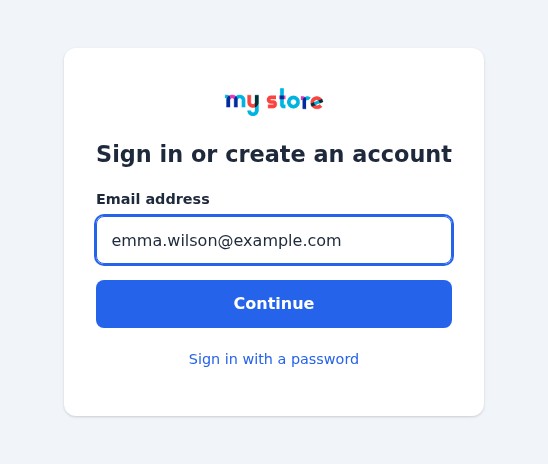 One field to sign in or create an account
Why remove passwords
The password problem in e-commerce
A customer who forgot their password leaves the order to ask for a reset e-mail, waits, chooses another password and, too often, does not come back. Guest checkout avoids this, but you lose the account, the history and the loyalty. Magic Login offers a third way: creating an account takes one field and one code, so the account is no longer a barrier, and the customer never has to remember anything.
What the customer sees
A code by e-mail is a path your customers already know. The page asks for it in a single field that accepts a pasted code and the auto-fill that phones and browsers offer for one-time codes. The e-mail holds the code in large characters and a button that signs in with one click. With Google enabled, the Continue with Google button signs in a customer without any typing.
Features
One field for everyone
The customer types an e-mail address and presses Continue. If an account has this address, the module sends a code and signs the customer in once the code is confirmed. If not, it asks for a code too, then for the name and the consents of your shop, and creates the account. The two paths look the same, so nobody has to wonder which form to use.
A code or a one-click link
The module sends a 6-digit code with the e-mail system of your shop. The code works once, expires after 10 minutes by default (1 to 60) and stops after 5 wrong tries (1 to 10). A new code cancels the previous one, and a countdown (60 seconds by default) separates two sends.
The same e-mail holds a button. It opens a page of your shop that shows the address, partly hidden (p***@example.com), and a Sign in button. Nothing happens until the customer presses it: the mail scanners and the previews that open links do not use it up. The link works once, for as long as its code, and signs in the browser where the button is pressed, the phone that holds the e-mail for instance. You can switch it off in the Security tab.
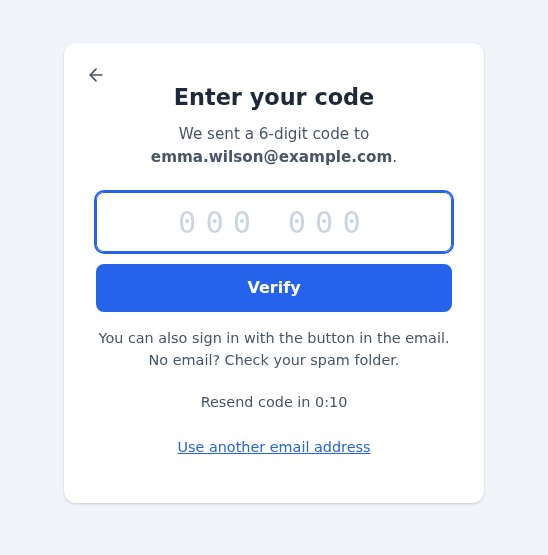 A code or a link: the customer chooses
Google sign-in
With a Google client ID in the Google tab, the page shows the official Continue with Google button. The customer chooses their Google account in the window of Google; the module checks the Google token on your server (signature, application, expiry, nonce made for the visitor and certified e-mail address) and then:
- if an account of your shop has the same address, signs the customer in and links the Google account to it;
- if not, creates the account with the first and last name of Google, after the consents of your shop when it has any.
The link with the Google account is kept: a customer who later changes the address of their Google account is still recognized.
Accounts like the native registration
A customer created by Magic Login goes through the same sequence as in the native registration form: the first and last name, the consents of your shop (privacy policy, newsletter, partner offers, the boxes added by the official GDPR module), the welcome e-mail of your shop, and the hooks that your other modules listen to (CRM, newsletter, loyalty). A customer who signs in goes through the hooks and the cart rules of the native sign-in: the cart follows the customer and the automatic vouchers of their group apply.
A guest account with the same address becomes a customer account instead of a duplicate, and its orders appear in “My account”.
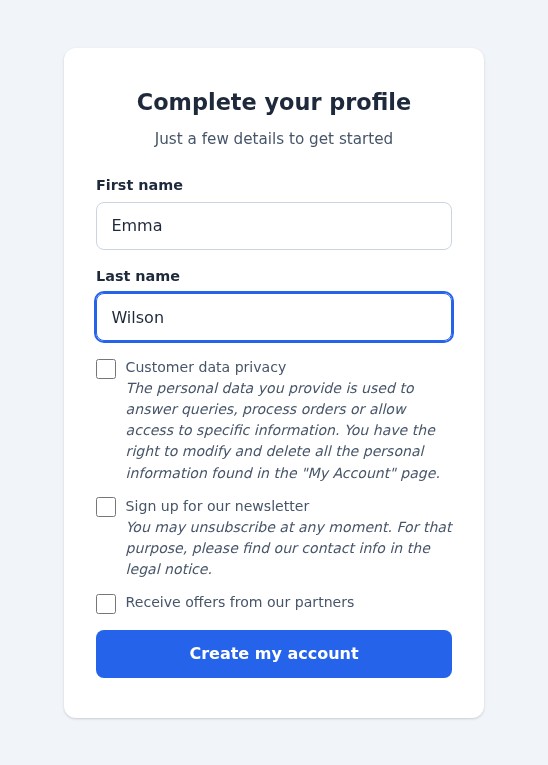 New customers: a name and the consents of your shop
The login page of your whole shop
With Magic Login is the login page of the shop (switched on by default), the login and registration pages of the shop open Magic Login instead, whatever the theme: the “Sign in” link of the theme, “My account” in the footer, the pages that need an account. The link Sign in with a password under the form opens the native form for the customers who prefer their password, and brings them back to the page they came from. Forms that are sent (a customer who types a password) are never redirected.
From the cart to the order
With Send visitors to Magic Login, a visitor who is not signed in and starts to order arrives on the page with the message Sign in to complete your order. After signing in the customer comes back to their order with their cart. When your shop allows guest checkout, the page also shows Order without an account. If you use a one-page checkout module that has its own sign-in step, switch this option off.
The option Disable guest checkout forces every customer to have an account. The module remembers what the setting of your shop was and gives it back when you switch the option off or uninstall the module.
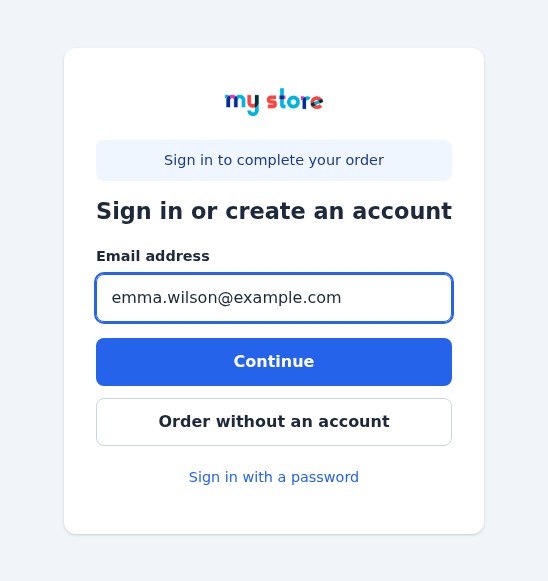 From the cart: sign in, or order without an account
Personal information without a password
PrestaShop asks for the current password on the personal information page, which a customer created by Magic Login has never seen. For 30 minutes after a sign-in by code, link or Google (1 to 120, Fresh session for personal information in the Security tab), the page does not ask for it, and the password of the account is never changed by this page. After that time, a customer created by Magic Login confirms with a new code before editing their information; a customer who has a password of their own gets the usual page and uses it.
Your page: colour, texts, picture
In the Appearance tab you choose the accent colour of the buttons and of the focus rings (the page warns you when the contrast is low and darkens the links by itself), a title and a sub-title for each language of your shop, whether the logo of the shop is shown and an optional picture beside the form (JPG or PNG, 2 MB, drawn again by the shop: only a plain image is kept). A live preview shows the result as you type, in the language of the field you edit, before you save.
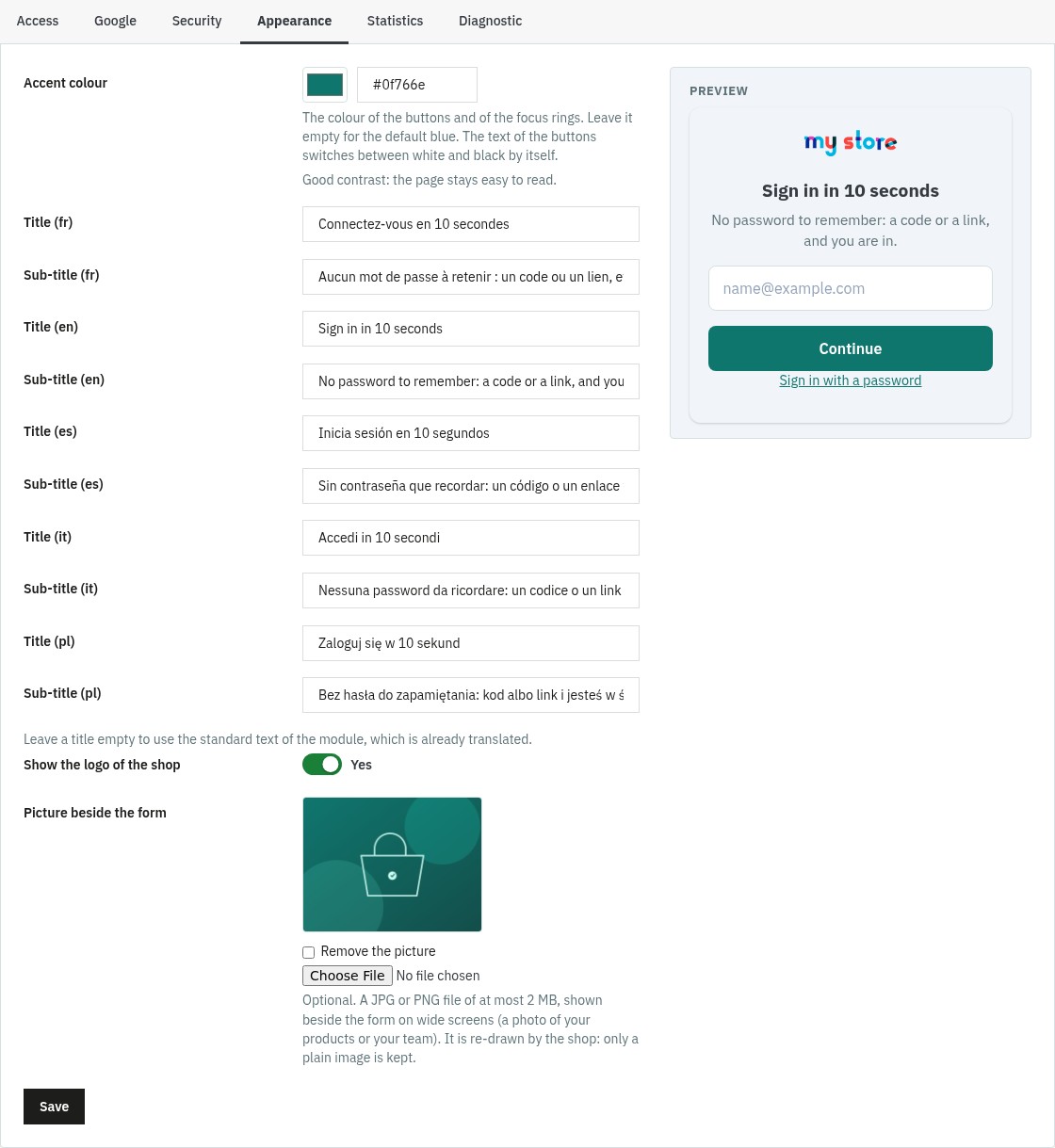 Your colour, your texts, your picture
Statistics and journal
The Statistics tab shows, over 7, 30 or 90 days, the codes sent, the sign-ins (with a code, with the link of the e-mail, with Google), the new accounts, the share of new customers, the e-mails that were not sent, the wrong or expired codes and the requests refused, with the last problems and a CSV export. No e-mail address and no IP address is kept in these figures. The statistics are deleted after 30, 90, 180 or 365 days, as you choose in the Diagnostic tab.
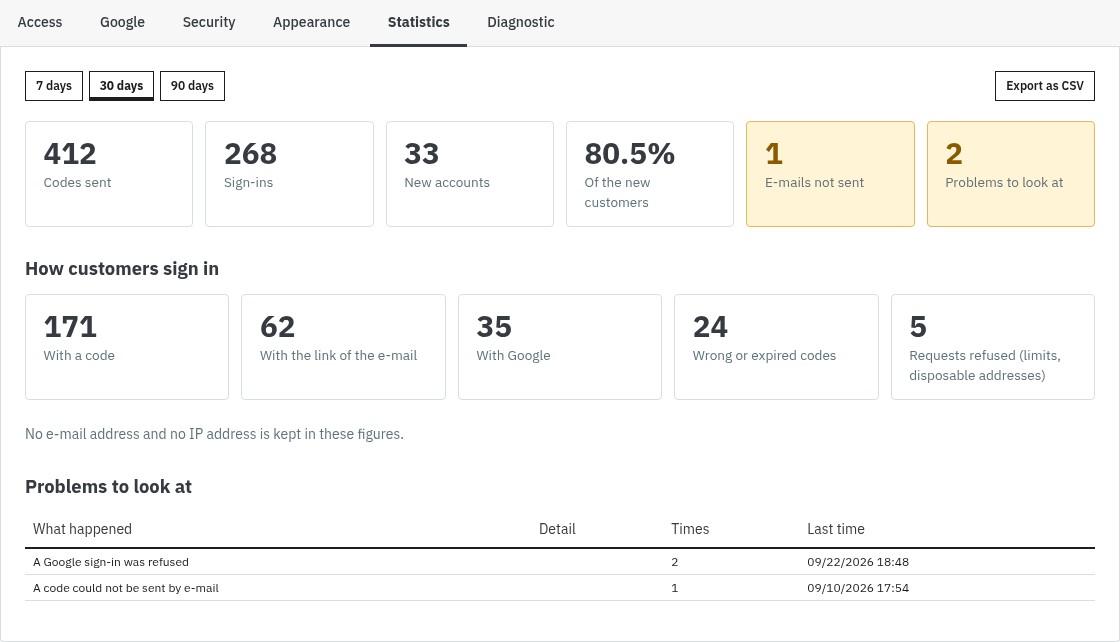 Which way your customers choose
Test e-mail and diagnostic
The Diagnostic tab checks the PHP extensions, the sending of e-mails, HTTPS, the address that your server sees for the visitors (a proxy or a CDN can hide it, which would disable the limit per visitor), the access to the page, Google, Social Login and the data. Send me a test code sends the real e-mail, with a dummy code, to your own address and in your language: you see what a customer receives, and you know that the shop can send e-mails. A diagnostic mode writes the steps of each sign-in in the PrestaShop logs, never a code, a link or an address.
Disposable e-mail addresses
An option refuses the addresses of the best-known temporary mailbox services (about 240 domains) and of the domains you add, sub-domains included. It is switched off by default; the customer sees a neutral message.
Works next to Social Login
When Social Login 2 is installed, add a position on its hook displayWeprestaSocialLogin (Social Login > Display) and its buttons (Facebook, Apple, PayPal…) appear on the Magic Login page. Use one Google button only: switch Google on in one of the two modules.
On a phone
The page is a single column with large touch targets and no header or footer. The code field opens the numeric keyboard and accepts the auto-fill of the code received by e-mail; the messages are announced to screen readers, and the page respects the reduced-motion setting.
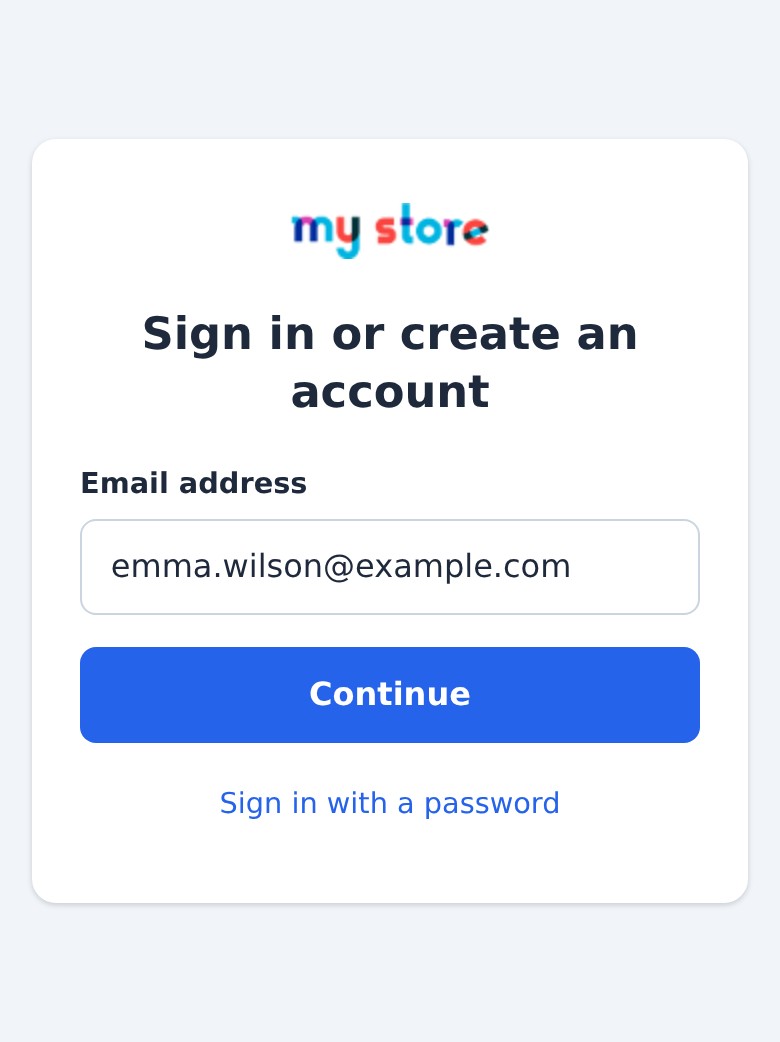 The same page on a phone
Multi-store and languages
Settings are saved per shop: Google client ID, limits, texts, colour. The page, the e-mail and its subject, the messages and the administration exist in French, English, Spanish, Italian and Polish.
Security
- Codes: stored hashed, used once, limited in time and in tries. Ten wrong tries on an address in a quarter of an hour lock it for the rest of that time, whatever the number of codes asked.
- Limits: codes per hour for an address (5 by default, 1 to 20) and for a visitor, all addresses together (20 by default, 1 to 100); the visitor is recognized by a short coded value made from their IP address, which is not kept. Tries are counted by the database, so requests sent in parallel cannot exceed them.
- A token for each visitor: every request of the page carries it, so another site cannot sign anybody in and a token taken from another visitor is refused.
- Return pages: only pages of your shop are accepted, compared by host.
- Google: the token is checked on your server, never accepted as sent by the browser.
- Link of the e-mail: confirmation page, one use, same life as its code.
- Data: no e-mail address and no IP address in the statistics (only the short coded value of the visitor, which goes with them); expired codes deleted every day; export and erasure through the official GDPR module; nothing changes in the tables of PrestaShop.
Requirements
- PrestaShop: 1.7.8, 8.0+ or 9.0+. PrestaShop 1.7.7 and earlier are not supported.
- PHP: 7.4 minimum, with the
curl,json,mbstringandopensslextensions. - E-mails: the shop must be able to send e-mails (SMTP or PHP mail): the Diagnostic tells you.
- HTTPS is recommended, and required by Google.
- Theme: the page is independent of the layout of your theme; the “Sign in” link of any theme leads to it.
Installation
Method 1 — from the back office (recommended)
- Download the archive from your WePresta customer area
- Go to Modules > Module Manager
- Click Upload a module and select the ZIP archive
- Wait for the installation to finish, then click Configure and activate your license
Method 2 — by FTP
- Unzip the archive
- Upload the
wepresta_passwordless_login/folder to/modules/ - In the back office: Modules > Module Manager, search for “Magic Login” and click Install, then Configure
What the installation does
- It creates the tables of the codes, of the links with Google accounts and of the statistics, and the menu entry
- It registers only the hooks that your settings need; it overrides no class of the shop
- It never changes the tables of PrestaShop
- If the installation fails, what it had created is removed
Updating from version 1.0.0
- Your settings, the links with Google accounts and your license are kept
- Magic Login becomes the login and registration page of the whole shop. To keep the previous behavior, set Magic Login is the login page of the shop to No in the Access tab
- The position of the link in the header and the hiding of the theme link chosen in 1.0.0 are kept
- The IP addresses that 1.0.0 stored with the codes are erased, and the expired codes are deleted: a code asked just before the update still works for its few minutes
- The libraries and the development files shipped with version 1.0.0 are deleted: the archive goes from 28 MB to about 310 KB
Set up in ten minutes
1. License
After the installation, Configure shows the activation form: enter the license key and the license secret available in your WePresta customer area. The license can be deactivated on a domain from the same page. When a subscription expires, a grace period of seven days avoids any interruption; then your shop goes back to its normal login pages until the license is renewed. The module notices the renewal by itself (it asks the license server again at most once an hour) and each time you open its pages in the back office. Your settings are kept.
2. Access
The six tabs of the module are Access, Google, Security, Appearance, Statistics and Diagnostic. In Access, the first switch turns Magic Login on or off without losing any setting. The defaults suit most shops: Magic Login is the login page of the shop, the link “Sign in with a password” is offered, visitors who start to order are sent to Magic Login. Choose here whether to disable guest checkout, and, only if your theme has no “Sign in” link, a position for the link of the module in the header (a custom hook name is accepted). Hide the sign-in link of the theme hides the sign-in block of the default themes of PrestaShop for visitors when you prefer your own link.
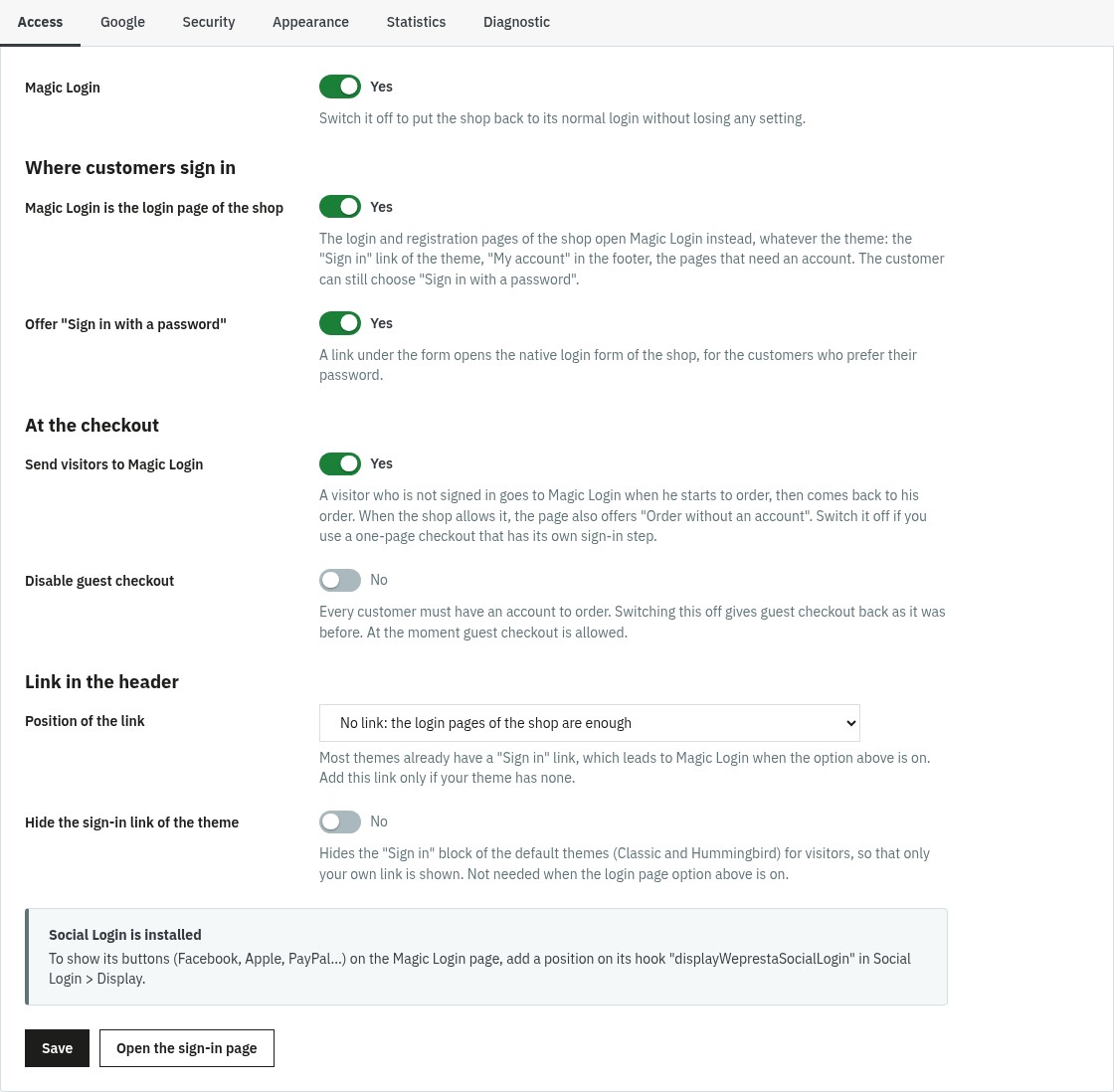 Where the page replaces the login of your shop
3. Google (optional)
In the Google tab, switch Google sign-in on and paste your client ID. To get it, open the Google Cloud console, create a project, fill the OAuth consent screen (user type External), create a credential OAuth client ID of type Web application and add the addresses shown in the tab (with a Copy button) to the Authorized JavaScript origins; no redirect address is needed. Check that this server can reach Google tests the connection.
4. Security
The defaults of the Security tab are reasonable: keep them unless you have a reason. Switch the one-click link off if you prefer the code only, refuse disposable e-mail addresses if your shop needs it, and change the limits if your customers share an address (a company, a school).
5. Appearance
Pick your accent colour, write a title and a sub-title for each language, and add a picture if you wish. Leave a title empty to use the standard text of the module, which is already translated.
6. Try it
In the Diagnostic tab, press Send me a test code, then open your shop in a private window, sign in and create a test account. Check the Statistics tab afterwards.
Common use cases
A classic shop
Keep the defaults: the customers sign in with a code or a link, guest checkout stays allowed, the page offers Order without an account at the cart.
A shop where every customer must have an account
Switch on Disable guest checkout: the account is created in one field and one code, so the order is not slowed down. The module gives the setting back as it was if you switch the option off.
A shop with a one-page checkout
If your checkout module has its own sign-in step, switch off Send visitors to Magic Login: the login pages of the shop keep opening Magic Login, the order page is left alone.
An international shop
Write the title and the sub-title of the page in each language of your shop; the e-mail, the page and the messages follow the language of the customer.
Magic Login with Social Login
Add a position on the hook displayWeprestaSocialLogin in Social Login and use the Google button of only one of the two modules.
A shop that refuses temporary addresses
Switch on Refuse disposable addresses in the Security tab and add your own domains if needed.
FAQ
What is Magic Login (passwordless login) and what is it for?
Magic Login replaces the “e-mail + password” login with a passwordless path: the customer types an e-mail address, receives a 6-digit code and a button that signs them in with one click, and is signed in, or gets an account if they are new. Google sign-in is an option. It removes the forgotten-password step, where many customers give up an order, and every customer ends up with a real account of your shop.
How does sign-in with the e-mail code work for the customer?
The module sends a 6-digit code with the e-mail system of your shop, and the page asks for it in a single field, which accepts a pasted code and the auto-fill that phones and browsers offer for one-time codes. The code is valid for 10 minutes by default and works once. A wrong code is refused and counted, a new code cancels the previous one, and the customer can ask for another code after a short countdown.
What does Google sign-in change for registration and for returning customers?
With the Google button the customer chooses their Google account in the window of Google and the module receives the verified e-mail address and the name: no code to type. If an account of your shop has the same address, the customer is signed in to it and their Google account is linked to it. A new customer gets an account, after the consents of your shop when it has any. The link with the Google account is kept, so a customer who later changes the address of their Google account is still recognised.
Is Google sign-in free, and what must I configure?
Yes, Google Identity Services is free. You create a project in the Google Cloud console, create an OAuth client ID of type Web application, add the addresses of your shop to the Authorized JavaScript origins (the Google tab of the module shows the exact addresses with a Copy button) and paste the client ID in the module. A button of the Google tab checks that your server can reach Google. Your shop must be served over HTTPS.
Does it work with the PrestaShop checkout, and does the cart stay intact?
Yes. A visitor who is not signed in and starts to order is sent to Magic Login, which says Sign in to complete your order. After signing in they come back to their order with their cart, and the automatic vouchers of their customer group apply. If your shop allows guest checkout, the page also offers Order without an account. If you use a one-page checkout module that has its own sign-in step, switch off Send visitors to Magic Login in the Access tab.
Can I disable guest checkout?
Yes, with the Disable guest checkout option of the Access tab. The module remembers what the setting of your shop was and gives it back when you switch the option off or uninstall the module. While guest checkout is off, the Order without an account button is not shown.
Does the module change the database or the existing customer accounts?
It never changes the structure of the tables of PrestaShop. It creates its own tables (codes, links with Google accounts, statistics) and writes its settings in the configuration of PrestaShop. Existing accounts stay as they are and can still sign in with their password. A customer created by Magic Login has a random password that nobody knows; they can choose one with Forgot your password? or on their personal information page. A guest account with the same address becomes a customer account and keeps its orders. On uninstall the tables and the settings are deleted, unless you ask to keep the data.
How is security handled (tokens, limits, expiry)?
The codes are stored hashed and work once. They expire (after 10 minutes by default) and stop after 5 wrong tries, and ten wrong tries on an address in a quarter of an hour lock it for the rest of that time. The number of codes sent per hour is limited per address and per visitor. Every request of the page carries a token of the visitor, so another site cannot sign anybody in. The page the customer returns to must belong to your shop. The Google token is checked on your server: signature, application, expiry and certified e-mail. The statistics keep no e-mail address and no IP address, only a short coded value that groups the requests of one visitor.
Is the module compatible with all themes?
Magic Login has its own full-screen page, independent of the layout of your theme, so it needs no template override. The “Sign in” link of your theme leads to it, and the module can hide the sign-in block of the default themes of PrestaShop if you prefer to place its own link, in the position you choose in the header.
Which PrestaShop versions are supported, and what about multi-store and languages?
PrestaShop 1.7.8, 8.0 and later, and 9.0 and later, with PHP 7.4 or later. In a multi-store installation the settings are saved per shop (Google client ID, texts, limits). The page, the e-mail and the back office are available in French, English, Spanish, Italian and Polish, and the title and the sub-title of the page can be written for every language of your shop.
How does the one-click link of the e-mail work, and is it safe?
The e-mail holds the code and a button. The button opens a page of your shop that shows the address, partly hidden, and a Sign in button: nothing happens until the customer presses it, so the mail scanners and the previews that open links do not use it up. The link works once, for as long as the code, and signs in the browser where the button is pressed, the phone that holds the e-mail for instance. You can switch the link off in the Security tab.
Can a customer change their personal information without a password?
Yes, right after signing in. PrestaShop asks for the current password on the personal information page, which a customer created by Magic Login has never seen. For 30 minutes after the sign-in (1 to 120 minutes, as you choose) the page does not ask for it, and the password of the account is never changed by this page. After that time a customer created by Magic Login confirms with a new code before editing their information, and a customer who has a password of their own gets the usual page with their password.
What happens when the license expires or when I switch the module off?
The module switches itself off and your shop works as it did before: the login and registration pages of PrestaShop come back, the cart is no longer redirected and your customers keep their accounts. Renewing the license, which the configuration page of the module asks for, switches the module on again with all its settings. You can also switch the module off without losing any setting with the first switch of the Access tab.
Troubleshooting
The customer does not receive the code
Open the Diagnostic tab: it tells you when the shop is set to never send e-mails, when the sender address is invalid, and Send me a test code proves that the e-mail reaches you. Ask the customer to look in the spam folder, and check the e-mail settings of PrestaShop (Advanced Parameters > E-mail).
The Google button does not appear, or Google refuses the sign-in
Check that Google sign-in is switched on and that the client ID ends with .apps.googleusercontent.com. Check that each address shown in the Google tab is in the Authorized JavaScript origins of the client ID, with HTTPS, and use Check that this server can reach Google.
The login page of my shop still shows the native form
Check the license (a shop without an active license keeps its normal login pages), that Magic Login is the login page of the shop is switched on, and read the line Access to the page of the Diagnostic tab. If a module sends a form to the native login page, the form is not redirected, by design.
A customer is told that too many codes were asked
The limits protect your customers' mailboxes. Raise them in the Security tab if several customers share an address. If every visitor looks like the same address, the Diagnostic shows that a proxy or a CDN hides the visitors: configure it to pass the real address (X-Forwarded-For).
The link of the e-mail says that it expired or was used
The link works once, with its code, and for the same time. The customer asks for a new code and uses the new e-mail.
Two “Sign in” links appear in the header
Keep the position of the link of the module on No link (the link of your theme already leads to Magic Login), or use Hide the sign-in link of the theme.
The order page loops back to the sign-in
Your checkout probably has its own sign-in step: switch off Send visitors to Magic Login in the Access tab.
A customer wants a password
They can choose one with Forgot your password? or on their personal information page; the account then works with the password too.
Changelog
Version 2.0.0
New features
- A one-click link in the e-mail, next to the code: it opens a confirmation page and works once.
- Sign-in with the official Google button, with the Google token checked on your server.
- Magic Login becomes the login and registration page of the whole shop, whatever the theme; the Sign in with a password link stays available.
- From the cart, visitors sign in and come back to their order, or order without an account when your shop allows it.
- Accounts created like the native registration: the consents of your shop, the welcome e-mail and the hooks of your other modules.
- A guest account with the same address becomes a customer account and keeps its orders.
- The personal information page opens without a password right after a sign-in, with a confirmation by code afterwards.
- A Statistics tab with sign-ins by code, link and Google, new accounts and a CSV export that holds no e-mail address.
- A Diagnostic tab with checks of your configuration and a test e-mail that sends you a code.
- An option to refuse disposable e-mail addresses, with your own list of domains.
- Your colour, a title and a sub-title for each language and a picture for the sign-in page, with a preview in the back office.
- The buttons of other sign-in modules such as Social Login 2 are shown on the page.
Improvements
- One code field that accepts a pasted code and the auto-fill of phones, instead of six boxes.
- Every text in five languages: the page, the e-mail and its subject, the messages and the back office.
- A clearer e-mail with the logo of your shop, the code, its validity and a reminder to ignore it if the customer did not ask for it.
- A sign-in that behaves like the native one: the cart follows the customer and the automatic vouchers of their group apply.
- An accessible page: labels, announced errors, keyboard use, reduced motion and large touch targets.
- Lighter pages: no file and no query of the module on the pages that do not need it, and an archive that goes from 28 MB to about 310 KB.
- Limits at every step: tries per code, codes per address and per visitor, a lock after repeated failures and a delay before a new code.
- Return pages limited to your shop, a token for each visitor and server-side checks of the Google token.
- Old data removed by itself: expired codes every day and the statistics after the number of days you choose.
- Export and erasure through the official GDPR module, and settings per shop in a multi-store installation.
- A single archive for PrestaShop 1.7.8, 8.0+ and 9.0+ with PHP 7.4 minimum.
Fixes
- A customer who signs in with Google no longer loses the link with their Google account when they complete their profile.
- A guest account with the same address no longer gets a second, empty account.
- A code no longer expires early when PHP and the database do not share the same time zone.
- After a sign-in the customer returns to the page they came from, including on a shop installed in a sub-folder, and no longer to the home page.
- Customers created by the module can change their personal information.
- The sign-in link of the default theme of PrestaShop 9 is hidden like the one of the earlier default themes when you ask for it.
- The subject of the e-mail and the messages of the page are translated.
- Codes tried in parallel can no longer exceed the number of tries allowed.
- A module that prints something while a customer signs in no longer breaks the sign-in.
- Guest checkout is given back as it was when you switch the option off or uninstall the module.
After the update: your settings, the links with Google accounts and your license are kept. The login and registration pages of your shop now open Magic Login; to keep the previous behavior, set Magic Login is the login page of the shop to No in the Access tab. The IP addresses that version 1.0.0 stored with the codes are erased. This update also strengthens the checks of the sign-in: we recommend it to every shop that uses version 1.0.0.
Version 1.0.0
- Login and registration via 6-digit email verification code
- Google Login via Google Identity Services
- Fullscreen mobile-first interface with AJAX transitions
- Automatic login/registration detection
- Smart checkout redirection
- Progressive profile completion (name after verification)
- Optional guest checkout deactivation
- Configurable native store logo
- Optional classic login
- Complete security system (bcrypt hash, expiration, rate limiting, CSRF)
- Multi-store and multilingual compatible (FR/EN)
- Verification emails optimized for mobile notifications
Support
For any help, contact us through your WePresta customer area or by e-mail at mail@wepresta.shop, depending on the support option of your plan.
Before writing to us, prepare:
- the PrestaShop and PHP versions
- a screenshot of the Diagnostic tab
- the theme in use
- the address and the time of a sign-in that failed, without the code
