How to run a WCAG 2.1 AA accessibility audit on PrestaShop
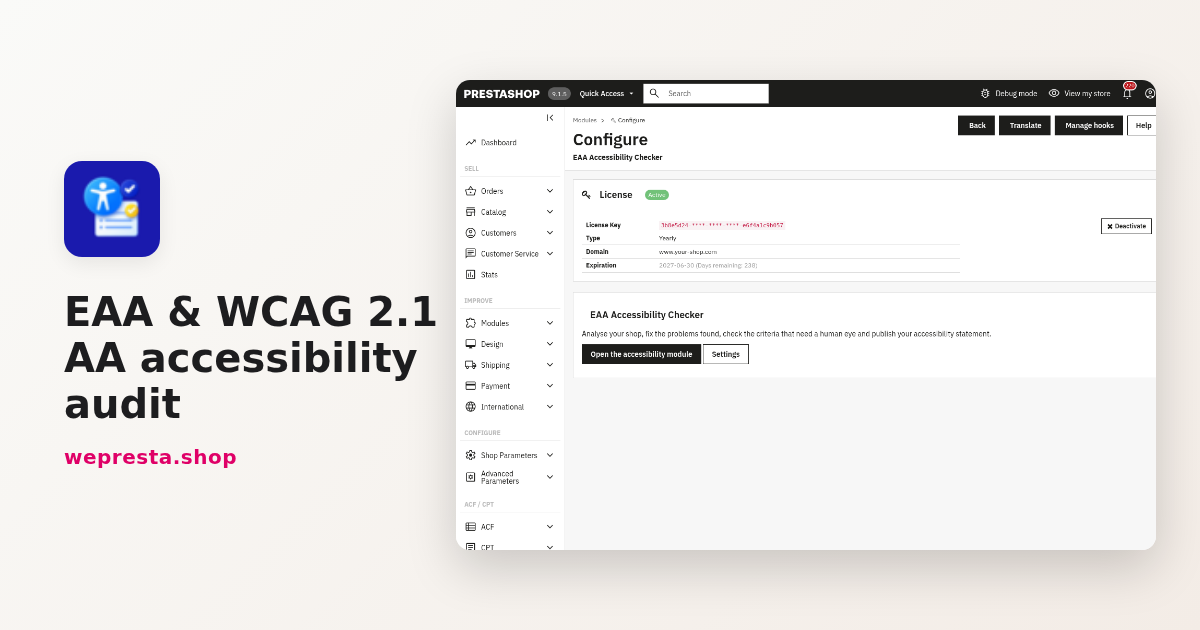
Which pages fail, what to fix, what needs a manual check and what your accessibility statement must contain: the EAA process in PrestaShop, with its limits.

Security Audit Pro helps merchants and agencies review store security across eight categories. Run a resumable audit, distinguish confirmed issues from points to investigate and track your corrections.
Inspect evidence, compare reports and export JSON or text for your developer or AI assistant. The module does not block attacks or apply automatic fixes. Compatible with PrestaShop 1.7.8, 8.2+ and 9.1+.
Targeted checks, evidence to review and a history to track corrections to your store.
Pause an audit, resume after interruption or cancel it.
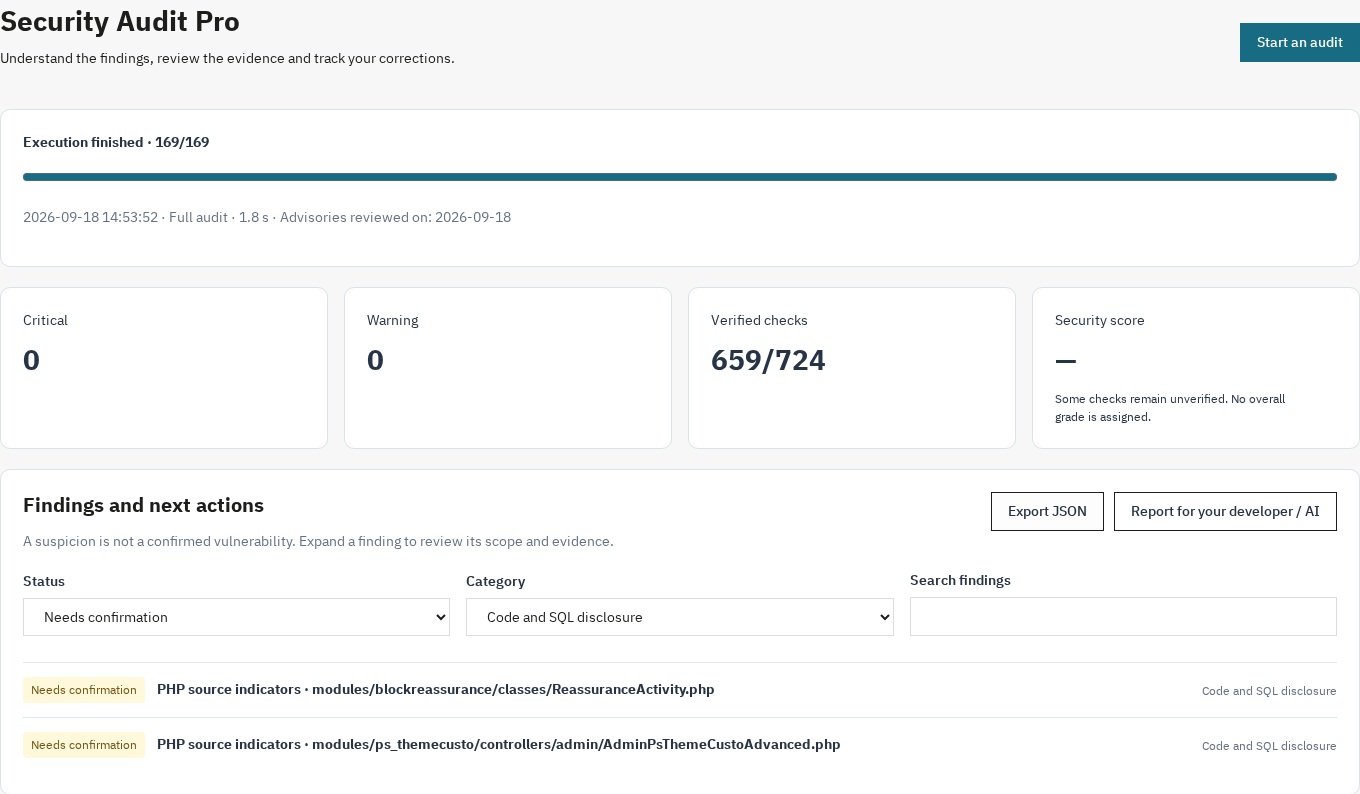
Each finding includes a status, scope, explanation, available evidence and a recommendation where action is useful.
The text report brings together findings, available evidence and recommendations.
Headers, files, administration, modules, WebService, SQL code, XSS/CSRF and permissions: targeted coverage with explicit limits.
Find dated audits, open reports when needed and compare new, persistent, resolved or unverified findings.
Use PrestaShop 1.7.8, 8 or 9 with a PHP version supported by your store. Open the module through Module Manager.
Configuration mistakes, exposed files and vulnerable modules deserve investigation before an incident occurs. Security Audit Pro brings PrestaShop security checks into your back office: HTTP headers, files, administration, modules, WebService, SQL-related code, XSS/CSRF and permissions.
The audit helps you decide what to correct and what needs further investigation. It does not replace a professional penetration test or provide a firewall or protection specific to an attack technology.
Step 1 — Audit: find Security Audit in Modules → Module Manager, click Configure, then Start audit. Pause and resume after reloading; an interruption retains the steps already saved.
Step 2 — Review: filter findings by status, category or search. Step 3 — Follow up: have the recommendations reviewed, recheck a specific finding and compare two reports to track changes.
The text report brings together findings, available evidence and recommendations. Share it with your developer or AI assistant to prepare suitable corrections; JSON export supports structured analysis.
The module does not apply fixes. A code suspicion needs confirmation before changes are made; have proposed changes reviewed and tested. New reports exclude raw cookie values and secrets identified by the redaction process.
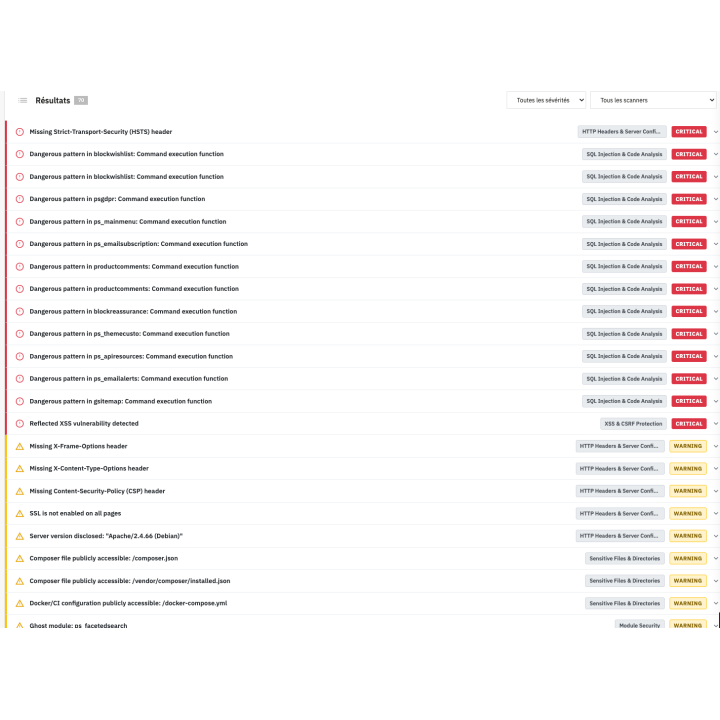
Each finding includes a status, scope, explanation, available evidence and a recommendation where action is useful. Confirmed issues, suspicions, unverified checks and errors are distinguished from passed checks.
A file path, header or affected module helps direct the investigation. Filters replace the eight old tabs, and details open on demand. Explanations help merchants prioritise; they do not guarantee that a technical fix can be completed without assistance.
Your server's HTTP headers are the first line of defense. Missing or misconfigured headers leave your store exposed to clickjacking, XSS attacks, MIME sniffing, and data leakage.
Review HSTS, CSP, framing protection, X-Content-Type-Options, Referrer-Policy and Permissions-Policy. Reports also identify disclosed server versions and certain cookie attributes.
When a usable HTTPS response is available, the check verifies the certificate and its expiry. CORS observed on a public page provides limited evidence and does not validate every endpoint on the site.
One of the most common and devastating attack vectors: files that should never be publicly accessible. A single exposed .env file can hand your entire database credentials to an attacker.
The module checks a bounded list of sensitive paths, including .env files, Git metadata, PrestaShop configuration, Composer files, common backups and logs. It also looks for directory-listing indicators.
An HTTP200 response to a file probe is a suspicion to confirm, not proof that its contents are exposed. Unavailable or ambiguous responses remain unverified.
Review the administration folder name, relevant employee accounts, certain login dates and stored password formats. A missing or invalid login date does not establish that an account is inactive.
Detected protection modules are only indicators; their effectiveness still needs investigation. The module does not attempt brute-force logins or certify back-office protection.
Compare core and module versions with the security advisories included in the bundled catalogue, with sources and a review date. Identify unregistered module directories and certain entry points that need inspection.
The catalogue covers an explicit selection of advisories. No match does not prove a module is safe. Audit requests do not call module entry points that could modify data.
Check WebService activation, HTTPS usage and the anonymous response from /api/. The module reviews the length and character diversity of active store keys and certain sensitive write permissions.
Reports contain counts and observations without exporting key values. Anonymous-access indicators or broad rights require contextual investigation; customer resources are not extracted to demonstrate an intrusion.
A limited search request checks for SQL error disclosure. Bounded reading of PHP files in modules and overrides identifies certain calls and patterns for investigation without executing the analysed code.
Static indicators are suspicions, not confirmed exploitable injections. File depth, count and size are limited, and reaching a limit remains visible in the report.
Cross-Site Scripting (XSS) allows attackers to inject malicious scripts into your pages, stealing customer cookies, session tokens, and personal data. Cross-Site Request Forgery (CSRF) tricks authenticated users into performing unwanted actions.
A search probe uses an inert HTML marker to identify reflection that needs review. No executable script is sent. CSP is included in the header observations.
A token field on the contact form does not prove server-side validation. The CSRF check remains unverified and calls for further investigation.
Review certain configuration-file permissions, the presence of Apache rules in upload directories and a redirect response without following the external destination.
An .htaccess file does not prove that PHP execution is blocked by the server. The module does not try to access other customers’ orders or certify object-ownership checks (IDOR).
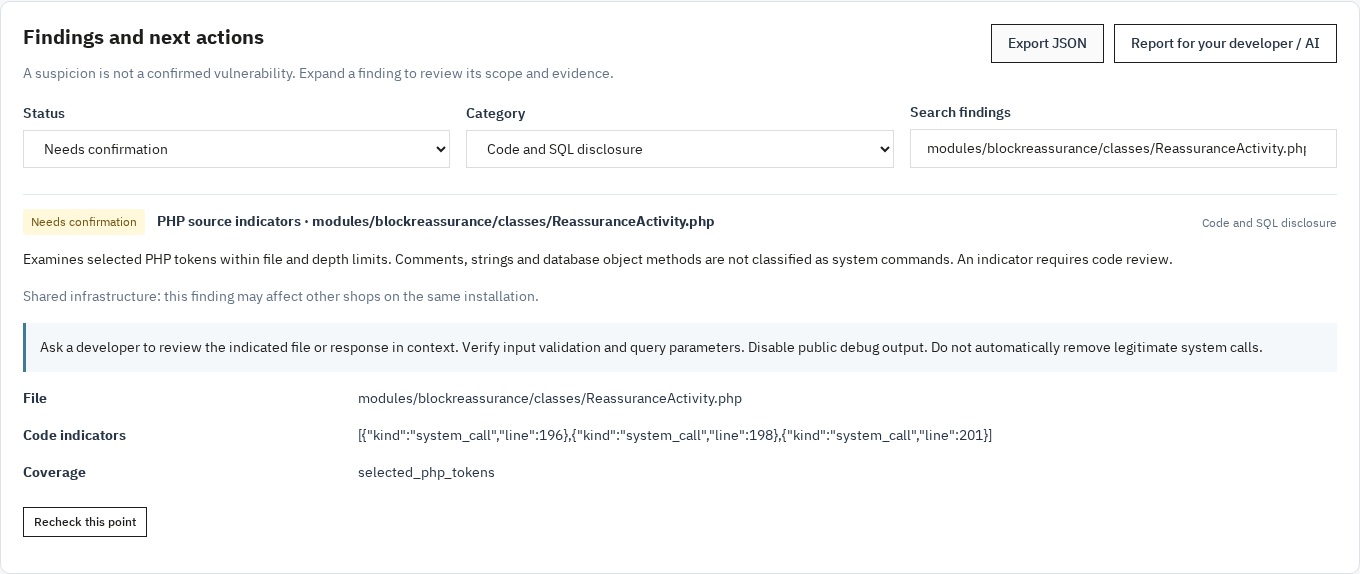
Counters highlight critical findings, warnings and verified checks. An overall grade is calculated only for a finished audit whose applicable checks are verified; otherwise it is withheld with an explanation.
A critical finding caps a calculable score. Neither a high grade nor a passed check guarantees overall security; coverage and evidence remain essential to interpretation.
Find dated audits, open reports when needed and compare new, persistent, resolved or unverified findings. A missing check is not automatically treated as a confirmed correction.
Pause, resume and cancel to stay in control. After a module update or technical intervention, recheck the relevant finding and follow changes in the history.
Checks read the audited files and settings without automatically correcting them. The module saves its own reports and progress. HTTP requests are bounded, stay on the configured store and do not follow redirects.
The module adds no script to the storefront. Auditing still consumes resources while running; duration depends on the store and hosting. You can pause or cancel it.
Select a store to view and run its audits. New reports and comparisons are separated by store; findings about shared files are identified as shared.
Old archives without a reliable store association are reserved for the superadministrator and excluded from comparisons. Employee permissions remain enforced for viewing, auditing and deletion.
Access the module through Configure in Module Manager, without an extra sidebar entry. The interface and reports are available in French, English, Spanish, Italian and Polish.
PrestaShop 1.7.8, 8.2+ and 9.1+ (8.0, 8.1 and 9.0 not supported); PHP 7.4 minimum, using a version compatible with your PrestaShop release. Required extensions: JSON, PDO, mbstring, cURL and OpenSSL. The local interface uses no remote library and requires no compilation by the merchant.
For merchants who want to understand findings before involving their developer; agencies following several stores; and developers who need to inspect file indicators and compare results after a correction.
Specialist auditing is still needed to confirm suspicions and examine protections that cannot be validated automatically.
See how we compare to the most common alternatives on the market.
| Feature | WePresta | Addons |
|---|---|---|
| payments Transparent pricing | check_circle | cancel |
| update Lifetime updates included | check_circle | cancel |
| support_agent Direct developer support | check_circle | cancel |
| verified PS 1.7, 8 & 9 compatible | check_circle | help_outline |
| code Standardized clean code | check_circle | cancel |
| storefront Multi-store ready | check_circle | help_outline |
| money_off No hidden renewal fees | check_circle | cancel |
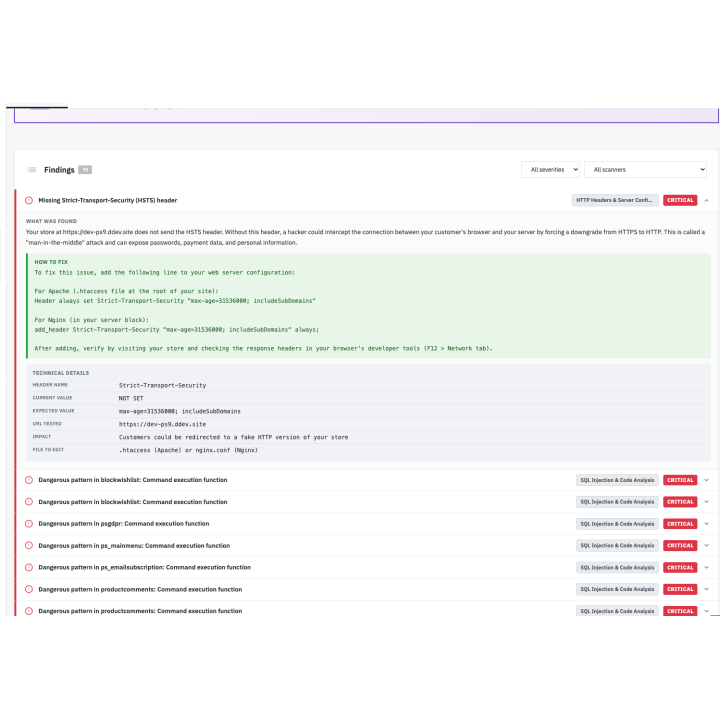
PrestaShop security audit: findings and correction tracking
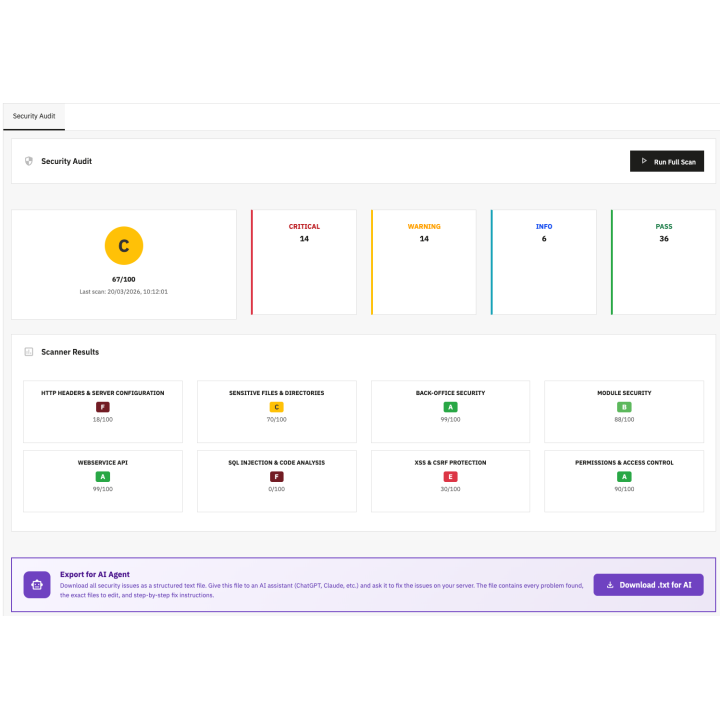
Follow progress and distinguish findings from checks that still need verification.
Open a finding to inspect evidence, read the recommendation and recheck that point.
Find answers to frequently asked questions about this module
Join +290 merchants using this module
5-minute installation · Full documentation included
Which pages fail, what to fix, what needs a manual check and what your accessibility statement must contain: the EAA process in PrestaShop, with its limits.
A merchant guide to PrestaShop back-office 2FA: TOTP setup, mandatory profiles, trusted devices, lost-phone recovery and what a licence change does.
check_circle
check_circle