
Shipping Cost by Zip Code — Postal Code Based Shipping Fees - Module PrestaShop
PrestaShop Zip Code Shipping Module: Automate Your Custom Shipping Rates and Protect Your Margins
Apply different shipping fees based on postal codes of your customers. This PrestaShop shipping module lets you create unlimited delivery zones by zip code and configure shipping rates per carrier for each zone.
Calculate shipping costs by weight or cart amount, as a fixed price, a percentage or a surcharge on the carrier price, offer free shipping per zone or above a threshold, and refuse delivery to areas you do not serve with a clear message. Supports exact codes, ranges and prefixes, CSV import/export with preview and multilang.
Your customers check delivery to their postal code on the product page and in the cart; at checkout, PrestaShop applies tax and currency. Compatible with PrestaShop 1.7.8, 8.2+ and 9.1+.
Everything you need, nothing you don't.
Zones by postal code, prefix or range, rates per carrier and a delivery checker for your customers.
Zones by postal code
Exact codes, ranges and prefixes such as 75* or SW1*, with dashes, spaces or letters.
Rates by weight and amount
Weight or amount brackets, fixed or percentage price, replacement or surcharge.
CSV import/export
Preview before import, merge or replace, and an automatic backup of the configuration.
Unlimited number of zones
Adjustable priority between zones and coverage checks right in the list.
Carriers of your choice
Choose the carriers the module prices; store pickup keeps its own price.
Fair rates for every customer
Checker on product pages and in the cart, with a clear message when a zone is not delivered.
They use it every day.
description Full description expand_more
Shipping Cost by Zip Code — Advanced Postal Code Based Shipping Fees for PrestaShop
Managing shipping costs accurately is one of the biggest challenges for online merchants. By default, PrestaShop only allows you to set shipping fees by zone and country, which is often too broad. A delivery to a remote mountain village should not cost the same as a delivery to a major city center — even within the same country.
The Shipping Cost by Zip Code module solves this problem by giving you full control over your shipping rates based on postal codes. Create custom delivery zones by zip code, assign specific shipping fees per carrier, and let the module calculate the right amount at checkout.
How Does It Work?
First, you choose the managed carriers, for example your express carrier and your local courier. Then you create postal shipping zones: each zone groups zip codes, postal code ranges or prefixes, with its own shipping rates per carrier.
When a customer enters their delivery address, the module finds the zone of their postal code and calculates the shipping cost of each managed carrier. PrestaShop then adds the carrier tax, converts the currency and rounds the price as it does for its own rates. Store pickup, free carriers and carriers of other modules keep their usual prices.
Key Features
Unlimited Delivery Zones by Postal Code
Create as many shipping zones as you need. Split a country into regions, counties, cities or any custom area. Each zone is defined by exact postal codes, numeric ranges (e.g. 75001 to 75020 for Paris, 97100 to 97490 for French overseas territories) or prefixes (e.g. SW1* in London, 20* for Corsica). Codes with dashes, spaces or letters are recognized, such as 00-950 in Poland. Enter several codes at once and check for duplicates before adding them.
Flexible Shipping Rate Configuration
For each zone, configure shipping fees per carrier, or one grid shared by all managed carriers:
- Weight-based calculation — set rates based on the package weight (e.g. 0–5 kg = €5.90, 5–10 kg = €8.50)
- Cart amount calculation — set rates based on the order total (e.g. €0–50 = €6.00, €50–100 = €3.00)
- Percentage-based fees — charge a percentage of the cart total instead of a flat rate (e.g. 3% of the order amount)
- Surcharge on the carrier price — add an amount or a percentage to the PrestaShop rate (e.g. +€8 for islands)
- Unlimited brackets — create as many brackets as you need; the last one can stay open-ended
- Grid copy — copy a carrier's rates to other zones or other carriers, with a price change
Enter your prices tax excluded or tax included, as you prefer: PrestaShop applies the carrier tax, the customer's currency and the shop rounding.
Free Shipping Options
Offer free shipping for specific zones, specific carriers, or automatically when the cart amount exceeds a set threshold. The delivery checker shows this threshold to the customer. PrestaShop global free shipping and your cart rules keep applying.
Disable Delivery for Specific Areas
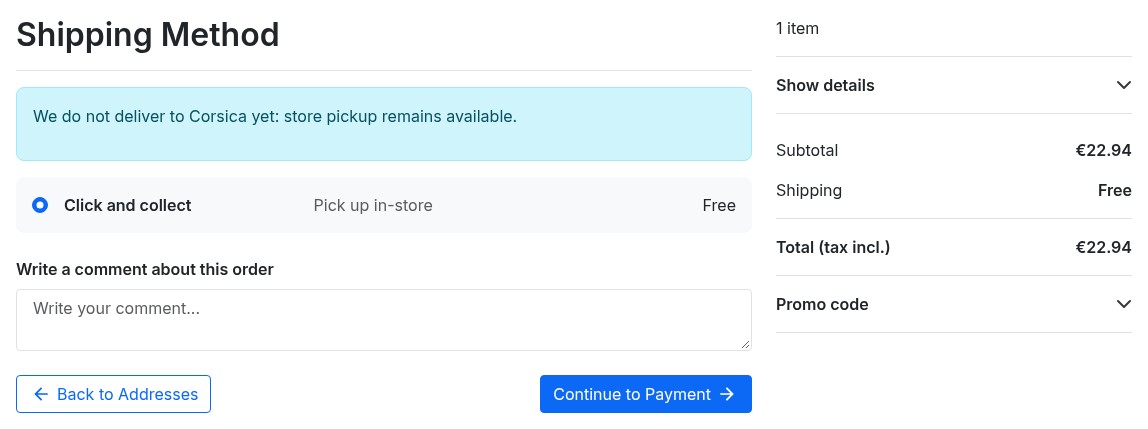
Need to block delivery to certain postal codes? Enable "Refuse delivery" on a zone: the carriers managed by the module no longer appear at checkout for customers in that zone, and store pickup is still offered. You can also refuse a single carrier in a zone or set a minimum order amount for it, for example a courier available from €30. A translated message explains the situation to the customer. Ideal for restricted delivery areas, remote locations or regions you do not ship to.
Zone Priority System
If a postal code belongs to several zones (e.g. a general "Mainland France" zone and a more specific "Paris" zone), the module uses a priority system. An exact code wins over a prefix, and a prefix over a range; between two rules of the same type, the zone placed higher in the list wins. The list flags codes handled by another zone, uncovered brackets and zones without rates.
CSV Import & Export
Managing hundreds of postal codes? Use the CSV import to create zones, postal codes and shipping rates in bulk. A sample CSV file is provided. Before importing, a preview counts zones and rates and flags every line in error; you then choose to merge or replace, and an automatic backup of the configuration is saved. You can also export your entire configuration to keep it or reuse it on another shop.
Postal Code Tester
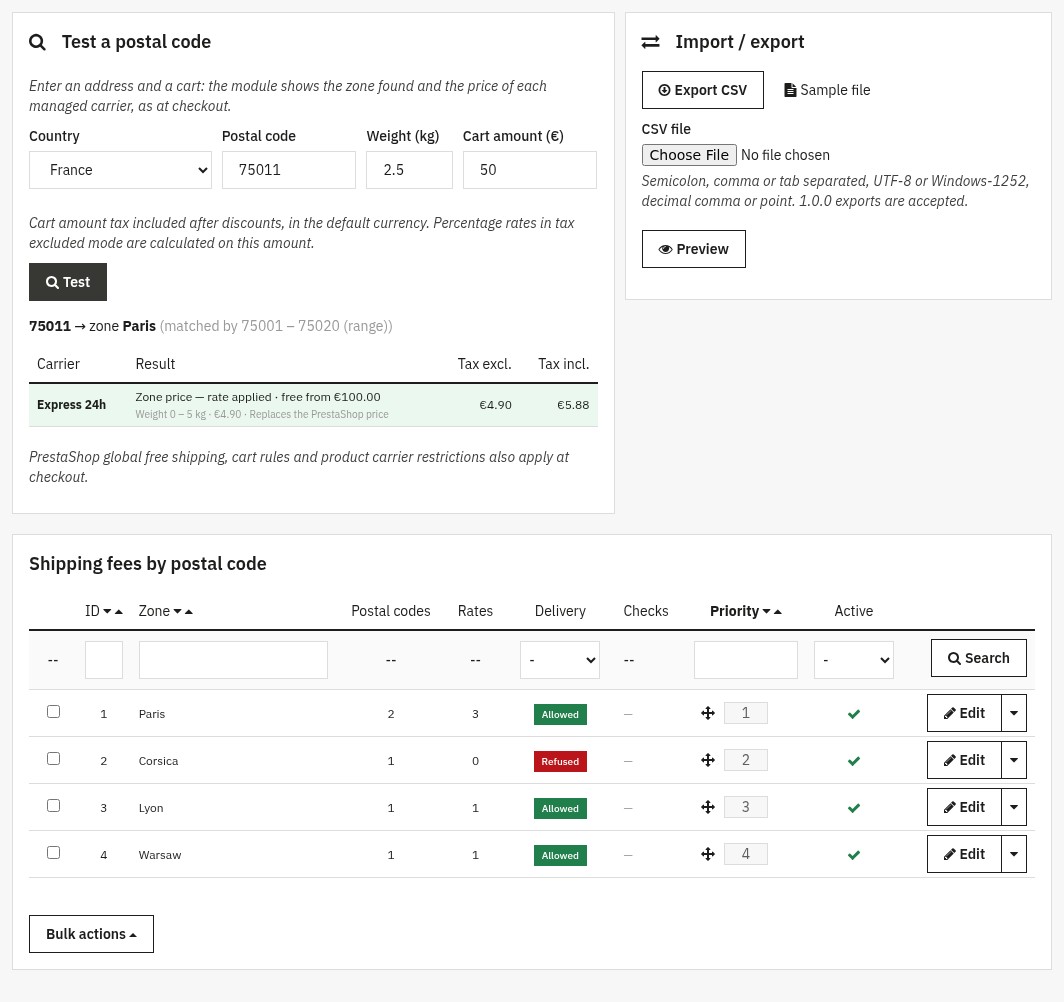
Enter a country, a postal code, a weight and a cart amount: the tester shows the zone found, the rule that selected it and the price tax excluded and included of each managed carrier. It also explains why a carrier is missing at checkout, for example a PrestaShop zone that is not enabled for that carrier.
Multilingual and Multistore
Zone names and customer messages can be translated into each shop language, and the module interface is available in English, French, Spanish, Italian and Polish. In multistore, zones, postal codes and rates are saved for the shop selected at the top of the back office.
Seamless Checkout Experience
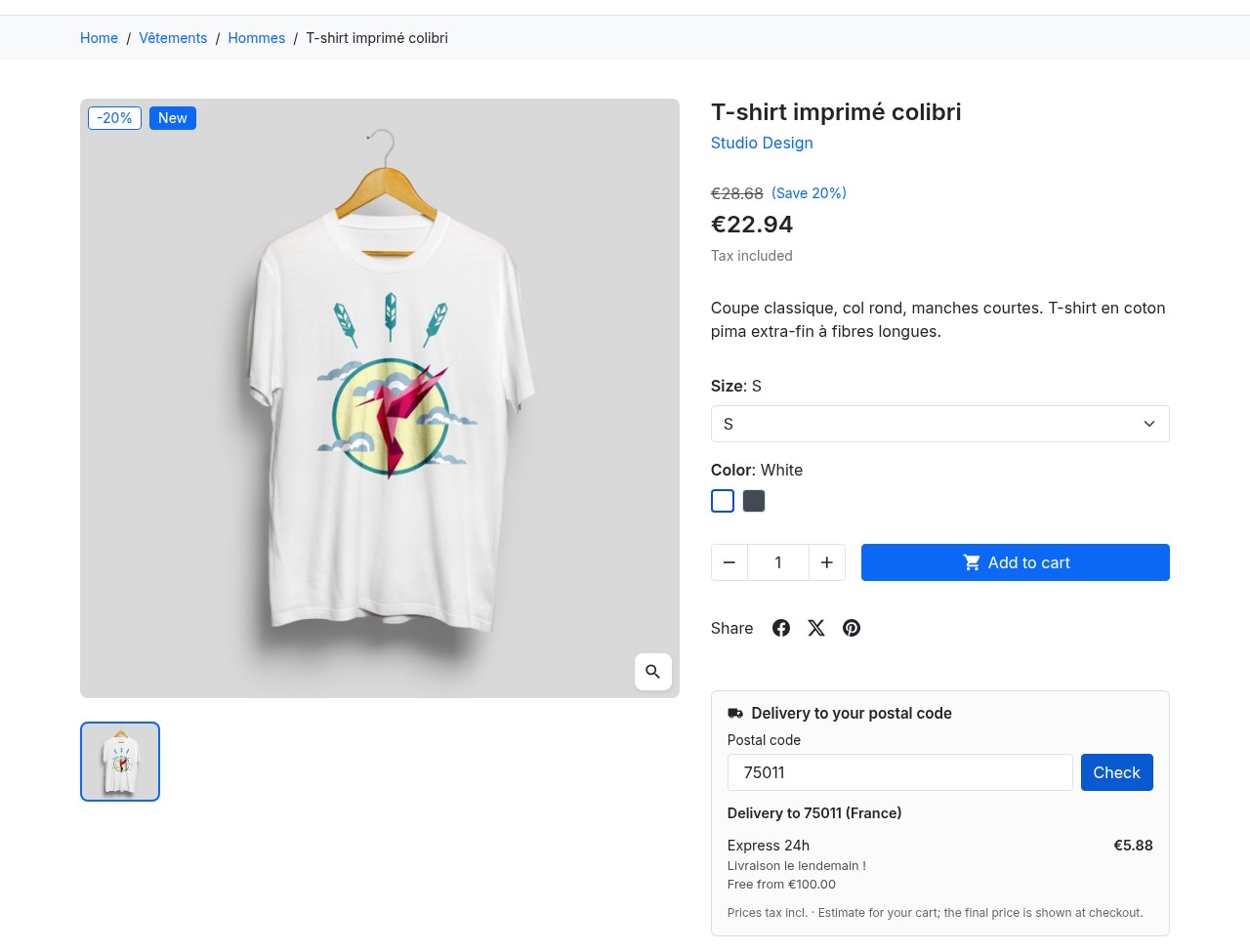
At checkout, your customers simply see the carriers available for their address, with the right price. Even before ordering, a delivery checker on the product page and an estimate in the cart show them the carriers and prices for their postal code, the free shipping threshold and, when needed, the zone message. The checker loads after the page is displayed; you enable it separately on product pages and in the cart.
Easy Back-Office Management
The module integrates into your PrestaShop back office under the Shipping menu, with a dedicated "Shipping by postal code" tab:
- Zone list — see your zones with their number of postal codes and rates, delivery allowed or refused, coverage checks and a priority you set by drag and drop
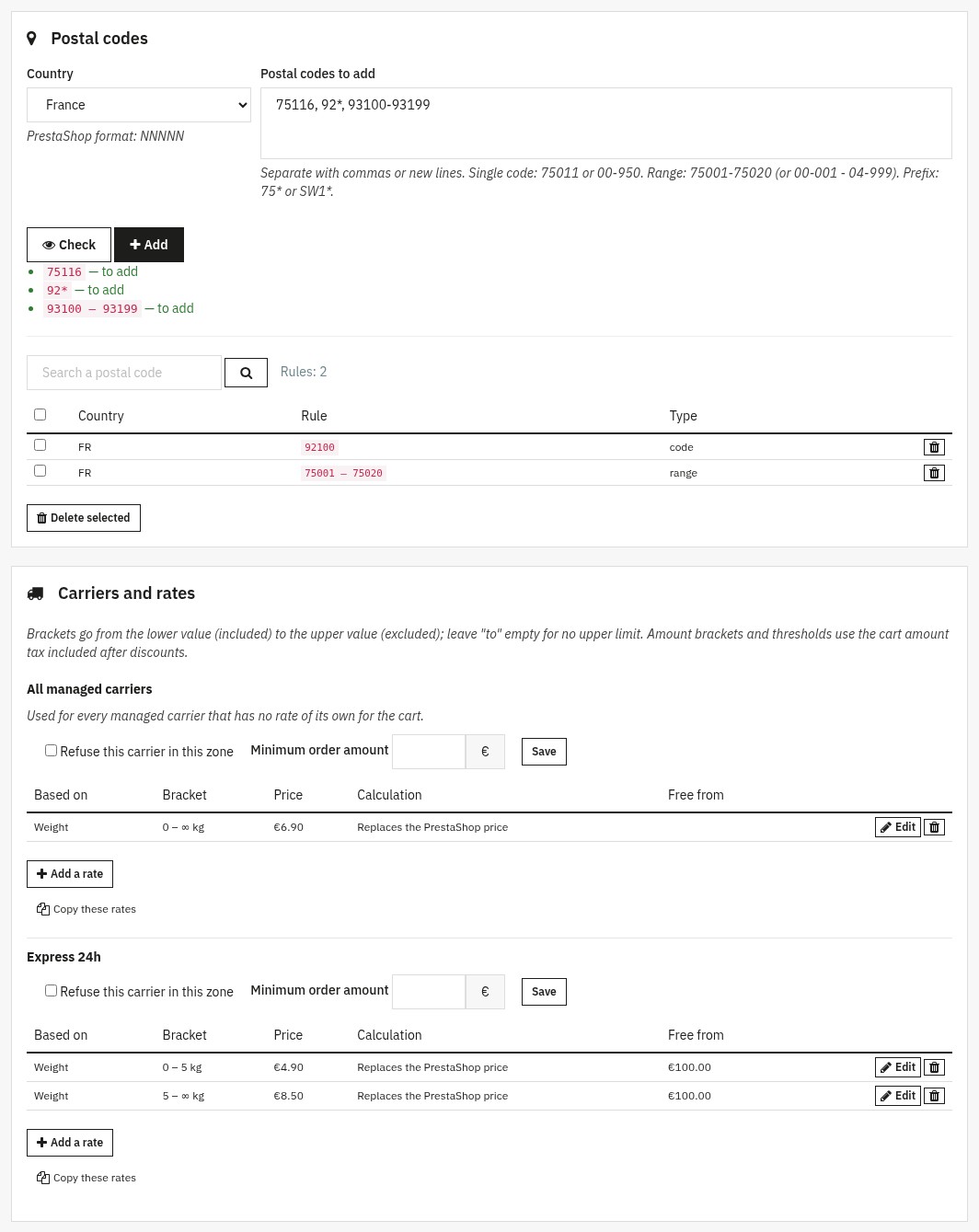
- Zone editor — one page for the zone settings, its postal codes and the rates of each carrier, editable in place
- Tester and CSV import/export — check a postal code and import your files with a detailed preview
- Configuration — managed carriers, prices tax excluded or included, behavior outside zones, customer message, checker and data retention
Technical Details
- Module type: CarrierModule — the module prices the carriers you choose through PrestaShop's official mechanism, which then applies tax, currency and rounding
- No core overrides — the module does not modify any native PrestaShop file; the original carrier settings are restored when you remove them
- Lightweight — one zone lookup per address, reused while the page loads
- Carrier safety — uses the carrier reference (
id_reference) instead ofid_carrier, so your configuration survives carrier updates - Postal codes in every format — digits, dashes, spaces and letters; numeric ranges, and prefixes for alphanumeric codes
- Fallback behavior — configurable: when no zone matches, use standard PrestaShop fees or refuse delivery in the countries covered by your zones
- Data kept — zones and rates are kept when you uninstall the module, unless you ask for their deletion
- License — if the license expires, your shipping fees keep being applied at checkout; only configuration changes are locked
Common Use Cases
- Different shipping fees for overseas territories — charge higher rates for DOM-TOM (97xxx) while keeping mainland France affordable
- Free delivery in your local area — offer free shipping for postal codes near your warehouse
- Block delivery to remote areas — refuse shipping to mountain regions or islands where carriers charge premium rates, while keeping store pickup
- Tiered pricing by region — charge less for nearby cities and more for distant regions, all within the same country
- Percentage-based shipping for high-value orders — charge 2% of cart total instead of flat rates for premium zones
- Local courier with a minimum order — offer a city-center courier from a cart amount you choose
Compatibility
Compatible with PrestaShop 1.7.8, 8.2+ and 9.1+, with PHP 7.4 or later. PrestaShop 1.7.7, 8.0, 8.1 and 9.0 are not supported. A managed carrier must be enabled for the PrestaShop zone of the delivery country and have at least one price range for that zone; the tester flags what is missing.
Support is provided from your WePresta customer area or by email at mail@wepresta.shop, according to the support option of your plan. Read the full documentation
Why choose us?
See how we compare to the most common alternatives on the market.
| Feature | WePresta | Addons |
|---|---|---|
| payments Transparent pricing | check_circle | cancel |
| update Lifetime updates included | check_circle | cancel |
| support_agent Direct developer support | check_circle | cancel |
| verified PS 1.7, 8 & 9 compatible | check_circle | help_outline |
| code Standardized clean code | check_circle | cancel |
| storefront Multi-store ready | check_circle | help_outline |
| money_off No hidden renewal fees | check_circle | cancel |
Discover the module in images.

Shipping fees by postal code
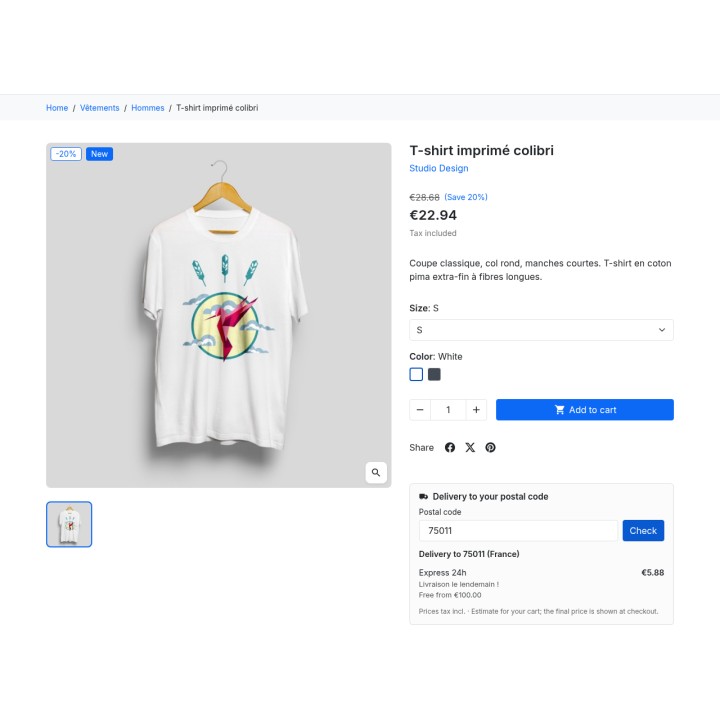
Delivery checker on the product page
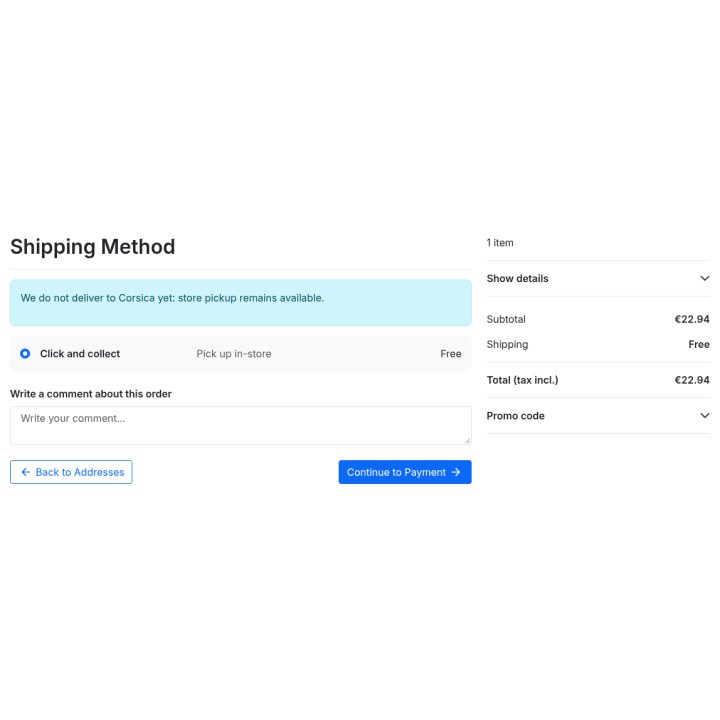
Message shown when a zone is not delivered
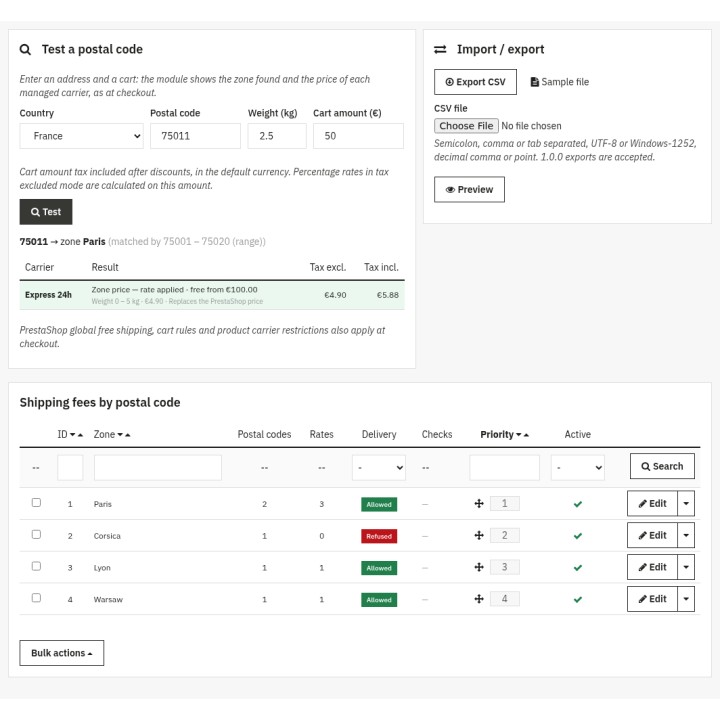
Postal code tester and zone list
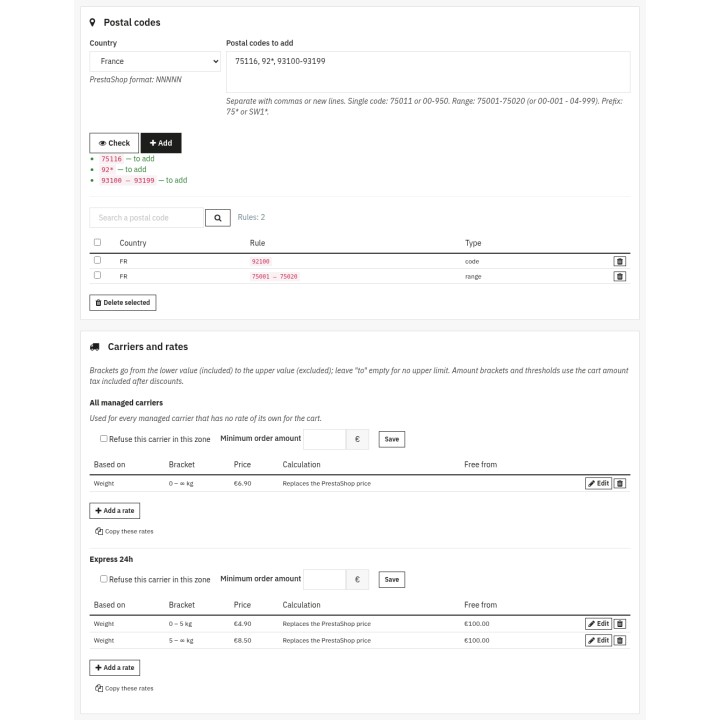
Postal codes and rates of a zone
FAQ
Find answers to frequently asked questions about this module
Join +39 merchants using this module
5-minute installation · Full documentation included