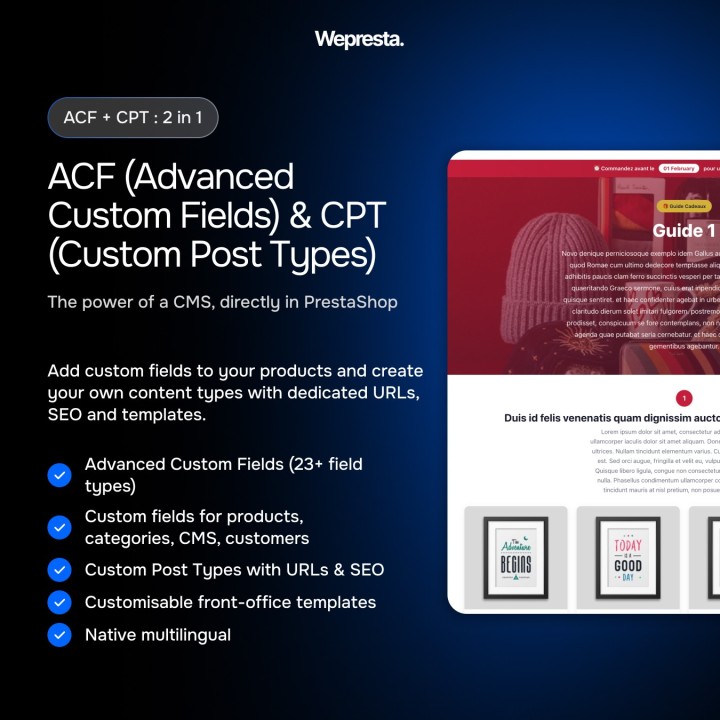
Advanced Custom Field and Custom Post Types (2-in-1) - Module PrestaShop

PrestaShop ACF and CPT module: the 2-in-1 tool to create custom fields and content without coding

+24 downloads โ˜… โ˜… โ˜… โ˜… โ˜… 4.99 / 5 Version 2.0.0 1.7.8 8.0+ 9.0+ 5 languages ๐Ÿ‡ซ๐Ÿ‡ท FR ๐Ÿ‡ฌ๐Ÿ‡ง EN ๐Ÿ‡ฎ๐Ÿ‡น IT ๐Ÿ‡ช๐Ÿ‡ธ ES ๐Ÿ‡ต๐Ÿ‡ฑ PL
  • Create custom fields on your products, categories, CMS pages and customers
  • Show them in your shop without code: list, table, FAQ or badges
  • Custom post types: blog, testimonials, portfolio, with URLs and SEO
  • Replace dozens of modules with a single one
  • Compatible with PrestaShop 1.7.8, 8.0+ and 9.0+
Not sure yet? Try it free for 24 hours โ€” no credit card required.
Features

Everything you need, nothing you don't.

Custom fields and content types, shown without writing a single line of code.

Unlimited custom fields

Text, repeater, list, image, video, relation: 24 field types.

Built-in Custom Post Types

Blog, testimonials, portfolio: your content with its URLs, SEO and categories.

Visual drag & drop interface

Build your groups by drag and drop, or start from a ready-made template.

Works on products, categories, CMS

Show your fields on these pages without touching the theme: list, table, FAQ or badges.

Multilingual and multistore

Every field is translatable, every shop keeps its own values.

Replace dozens of modules

FAQ, badges, specification sheets, blog and testimonials in a single module.

Customer reviews

They use it every day.

5 out of 5 · 4.99 reviews

"Un must-have. Installation rapide et efficace."

FO Florian O.

"Support team replied within an hour. Impressive!"

ON Olivia N.

"Je recommande ร  100%. Trรจs bien documentรฉ."

NF Nicolas F.

"Kompatybilny z PS 8 bez ลผadnych konfliktรณw."

TK Tomasz K.

"Been using it for 6 months now, zero issues."

LS Laura S.

"Lo consiglio a tutti i merchant PrestaShop."

GB Giulia B.

"Lo uso en 3 tiendas sin ningรบn problema."

CM Carlos M.
description Full description expand_more

Take Full Control of Your Store: The ACF & CPT Revolution Finally Hits PrestaShop

Do you envy the flexibility of WordPress? It is finally within your reach. ACF Field Builder is the game-changer e-merchants have been waiting for: finally regain total control over your data without relying on a developer or stacking dozens of expensive modules. Create tailor-made experiences, enrich your product pages, and build a unique content structure that sets you apart from the competition.

Stop Stacking Modules (and Invoices)

Why spend over $500 on a multitude of specific modules when a single solution can do it all? Reduce your costs and optimize site performance by replacing your FAQ, visual badges, size guides, or blog extensions with one unique tool.

  • No more financial drain: One single investment for unlimited possibilities.
  • Increased performance: Lighten your store by removing redundant modules and the risk of conflicts.
  • Total independence: Create your own fields and structures in just 5 minutes.

A Universal Toolbox with 23+ Field Types

Whether you need rich text, image galleries, color pickers, or complex repeater fields, everything is included. Imagine, design, deploy:

  • Advanced Technical Sheets: Specification tables, nutritional info, or technical guides.
  • Visual Marketing: "Made in France" badges, the end date of an offer, or demo videos.
  • Smart Relations: Manually link products to boost your average cart value via ultra-relevant cross-selling, shown with the product cards of your theme.

Show Your Fields Without Touching Your Theme

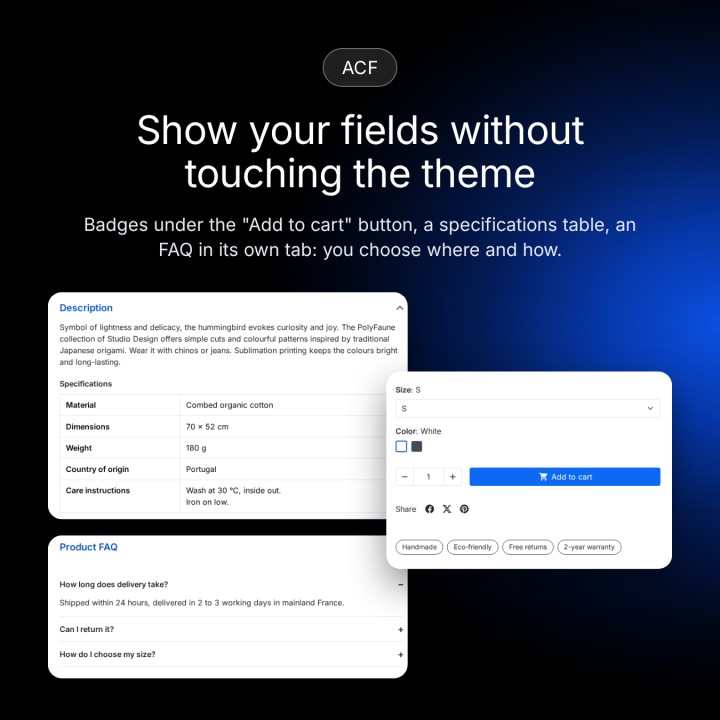
Choose where each group appears: under the "Add to cart" button, at the end of the description, in its own tab or at the bottom of the product page; above or below the products of a category; at the end of a CMS page. Choose its layout too: list, specifications table, FAQ accordion or badges. Only filled-in fields are shown.
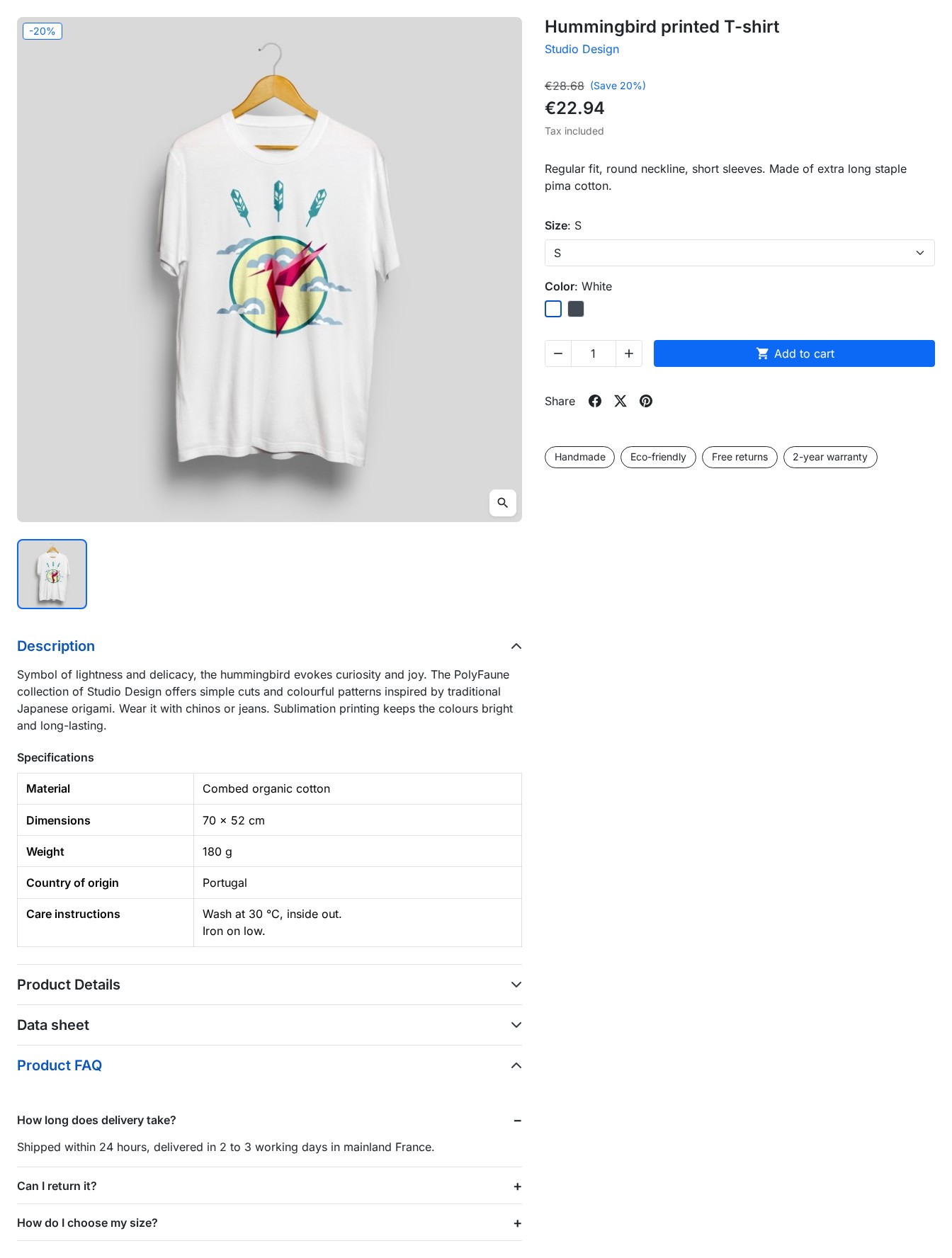
Product page with badges, a specifications table and an FAQ accordion
A product page: badges under the "Add to cart" button, a specifications table at the end of the description and an FAQ in its tab.

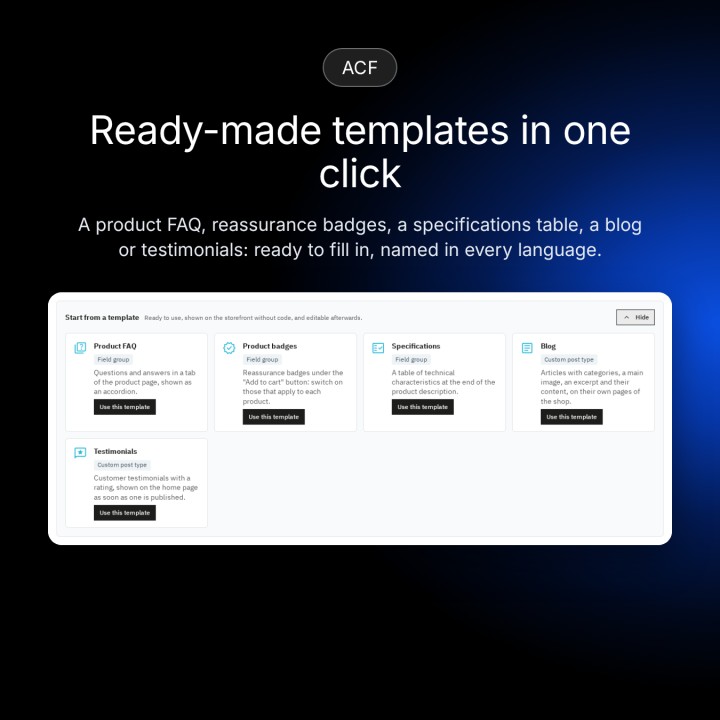
To go faster, ready-made templates create a product FAQ, reassurance badges, a specifications table, a blog or testimonials in one click, already named in every language of your shop. You then adapt them like your own groups.
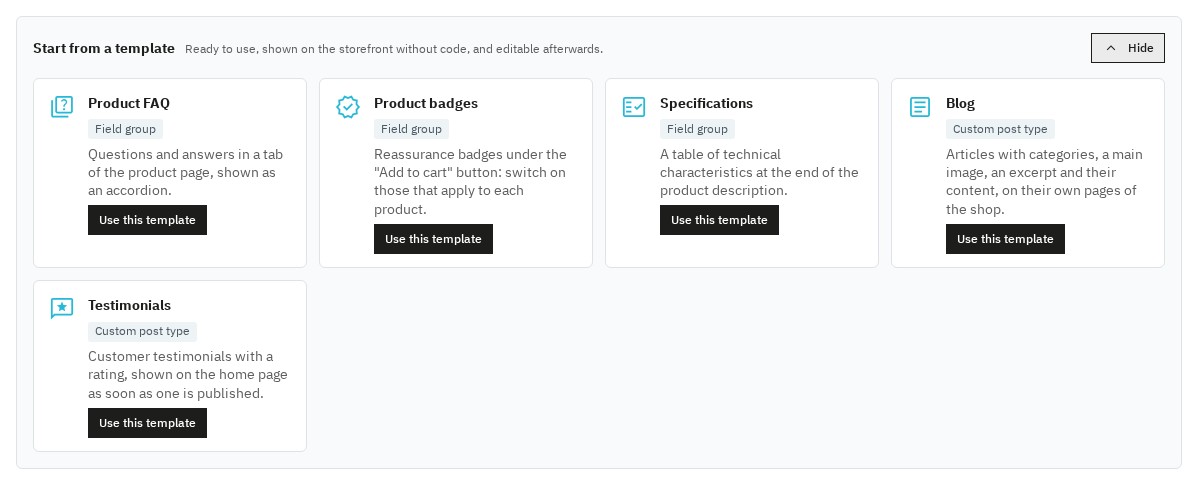
Template gallery: product FAQ, badges, specifications, blog and testimonials
The ready-made templates of the builder, created in one click.

Custom Post Types (CPT): Build More Than Just a Shop

Don't limit yourself to just products and categories. With Custom Post Types, transform your PrestaShop into a complete content platform. Easily create a professional blog, a portfolio, real estate listings, recipes, or customer testimonials. Each content type benefits from customizable URLs and dynamic Meta tags for powerful international SEO.

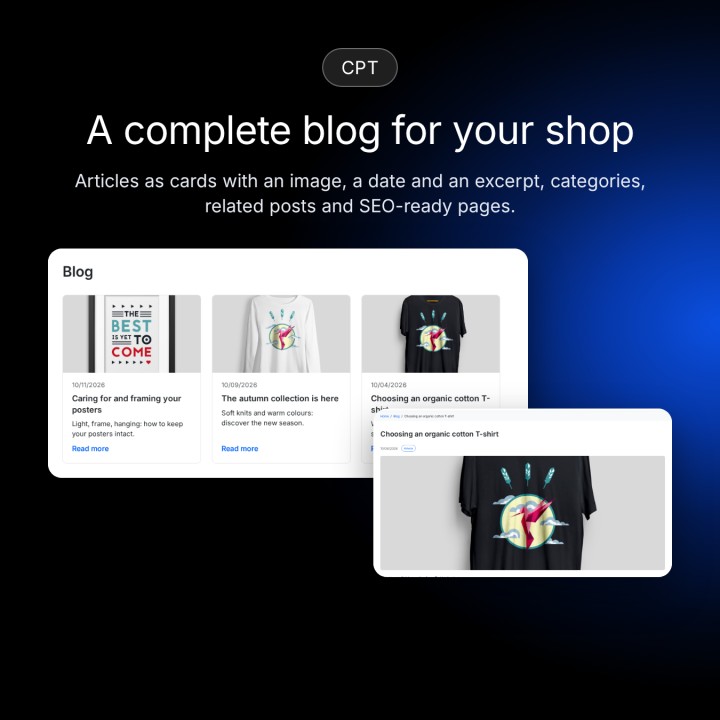
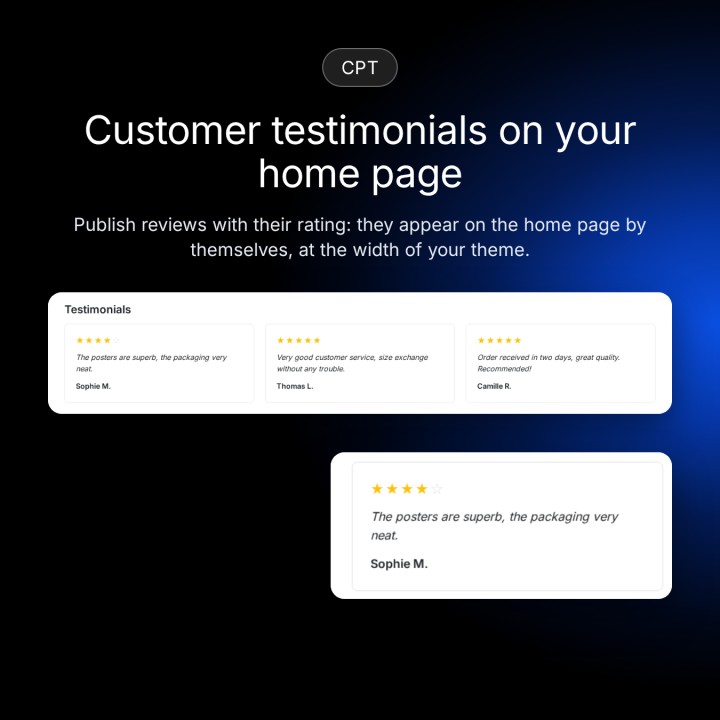
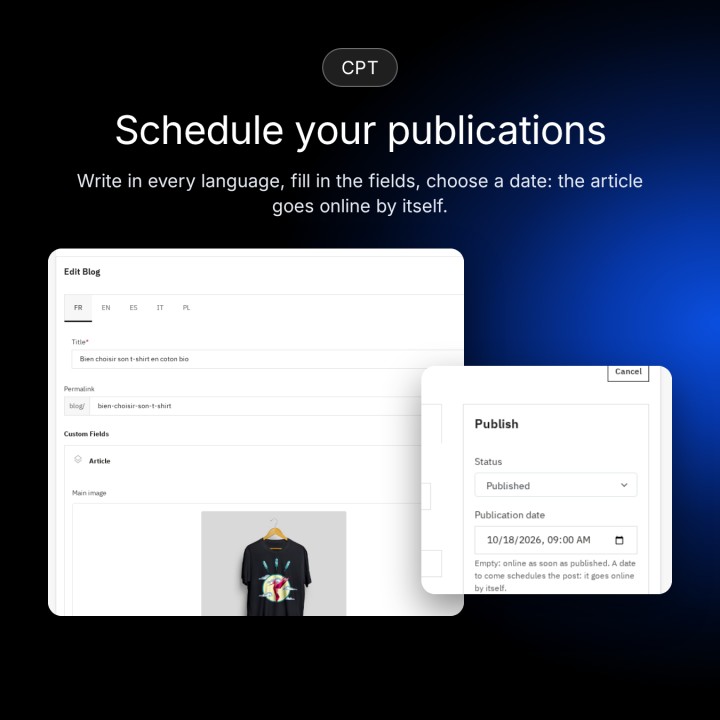
Your articles are shown as cards with an image, a date and an excerpt, with their categories and a "Read also" section. Schedule their publication for the date of your choice, show your customer testimonials on the home page and find your pages in the PrestaShop sitemap. Each page has its canonical address, its language versions, its breadcrumb and its structured data.
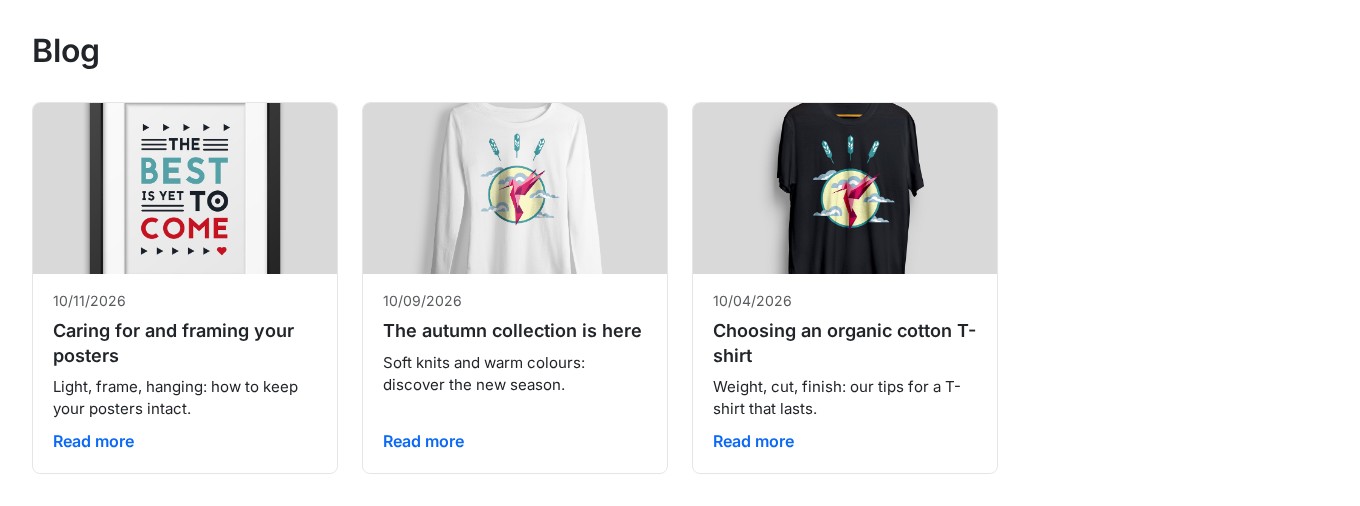
Blog archive with three articles as cards
The blog page: articles as cards with an image, a date and an excerpt.

Seamless Integration & Premium Support

You don't need to be a coding expert to succeed. The module makes the $acf variable available everywhere in your store and offers shortcodes for your CMS pages. To guarantee immediate success, the online documentation covers:

  • A step-by-step guide to show your first FAQ in a few minutes.
  • A library of ready-to-use Smarty snippets (copy and paste).
  • Concrete use cases to set up your FAQs, badges, blog and widgets.

Read the complete documentation

A Solid Foundation for Your Shop

  • Compatibility: PrestaShop 1.7.8, 8.0+ and 9.0+, PHP 7.4 or higher.
  • Multilingual and multistore: every field is translatable, every shop keeps its own values.
  • Teamwork: the permissions of employee profiles apply to the builder and the forms.
  • Peace of mind: your data is kept when you uninstall, and an expired license leaves your shop displaying its content.
  • Plans: monthly, yearly or lifetime, from one site to an unlimited number of sites.

Ready to turn your shop into an e-commerce powerhouse? Stop installing, start building with ACF Field Builder for PrestaShop.

Comparaison

Why choose us?

See how we compare to the most common alternatives on the market.

Feature Addons
Transparent pricing
Lifetime updates included
Direct developer support
PS 1.7, 8 & 9 compatible
Standardized clean code
Multi-store ready
No hidden renewal fees
Included Not included Partial / Not guaranteed
Preview

Discover the module in images.

ACF & CPT for PrestaShop: custom fields and content types, without code
ACF & CPT for PrestaShop: custom fields and content types, without code

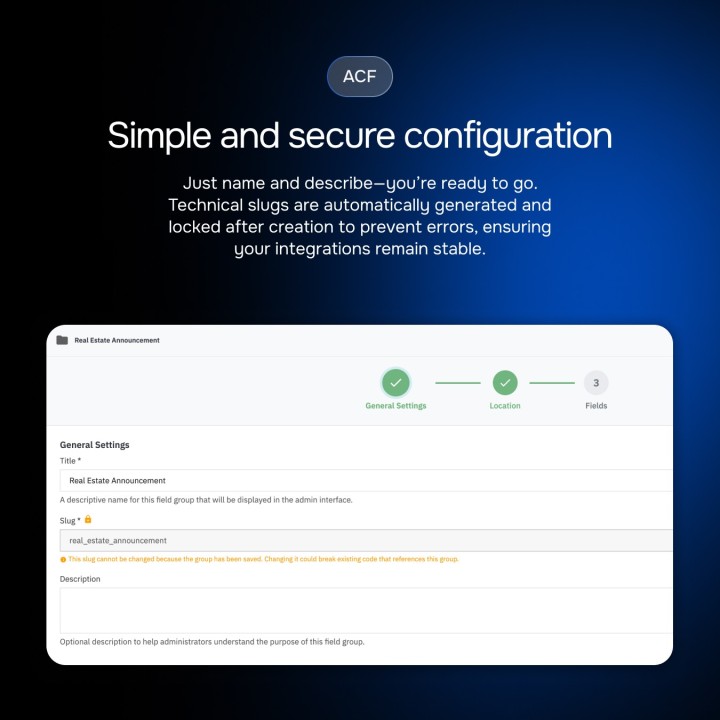
Create a field group in seconds: title, slug, description
Create a field group in seconds: title, slug, description

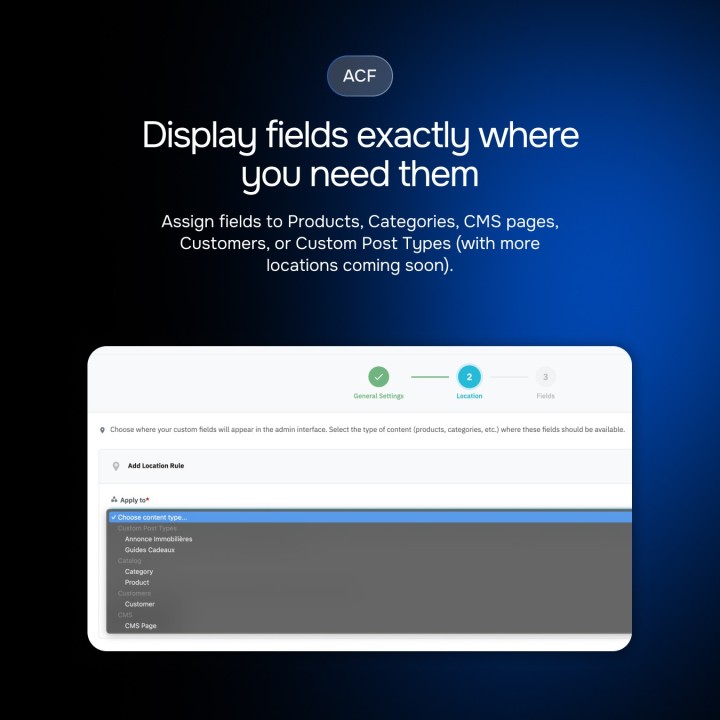
Choose the pages that show your fields: products, categories, CMS, customers, content
Choose the pages that show your fields: products, categories, CMS, customers, content

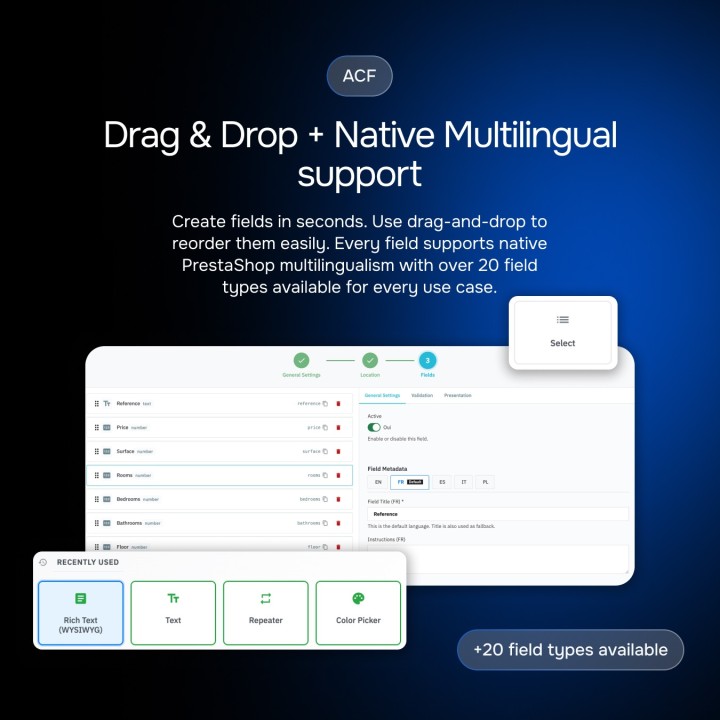
Add your fields by drag and drop, in every language of the shop
Add your fields by drag and drop, in every language of the shop

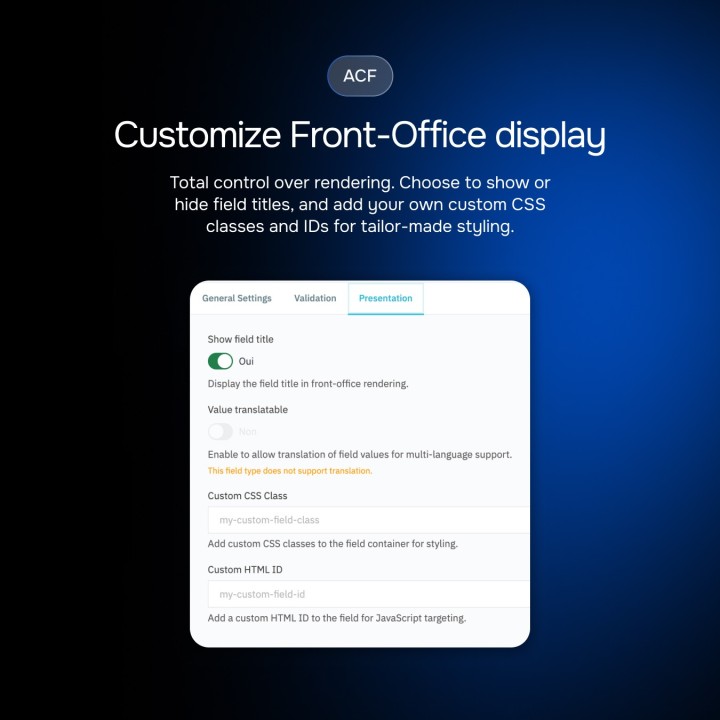
Set how each field is shown in the shop: label, CSS class, identifier
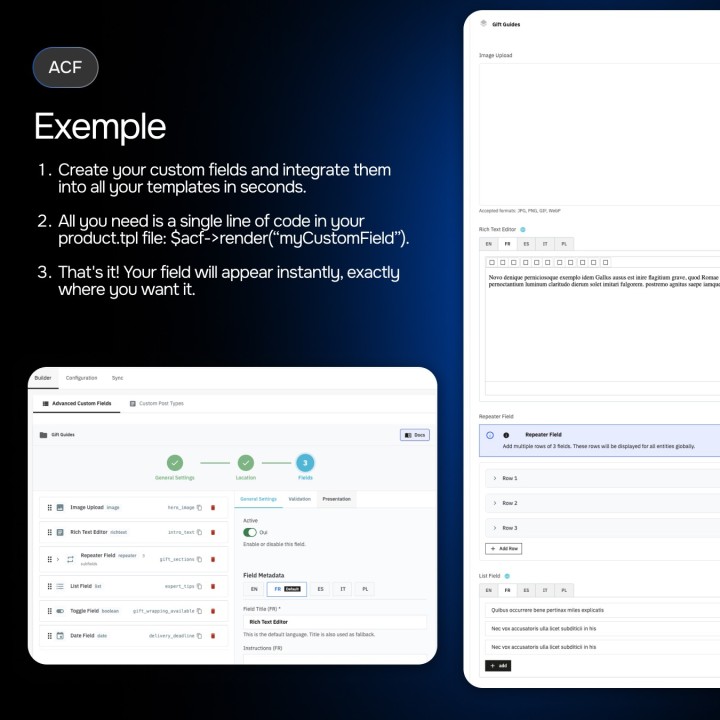
Set how each field is shown in the shop: label, CSS class, identifier

Show a field in your theme with a single line of Smarty
Show a field in your theme with a single line of Smarty

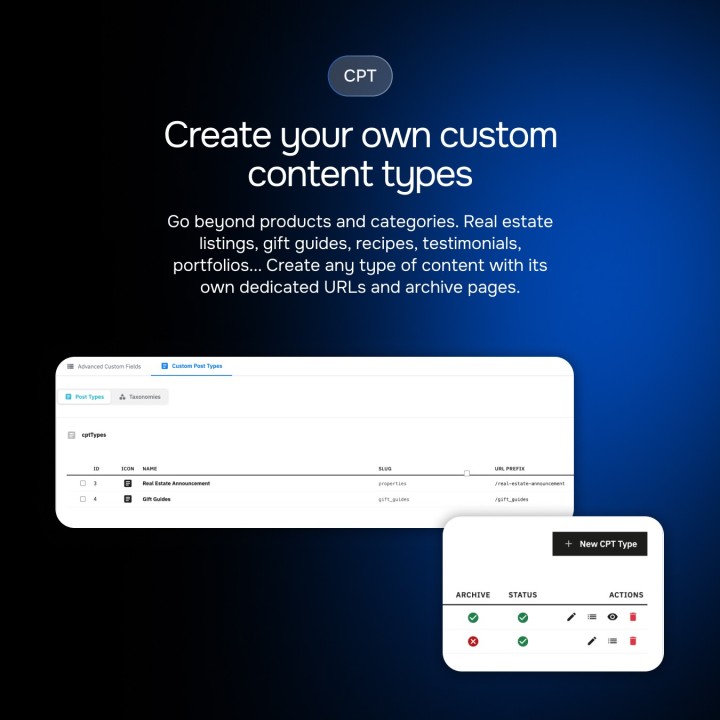
Create your own content types, with their pages and URLs
Create your own content types, with their pages and URLs

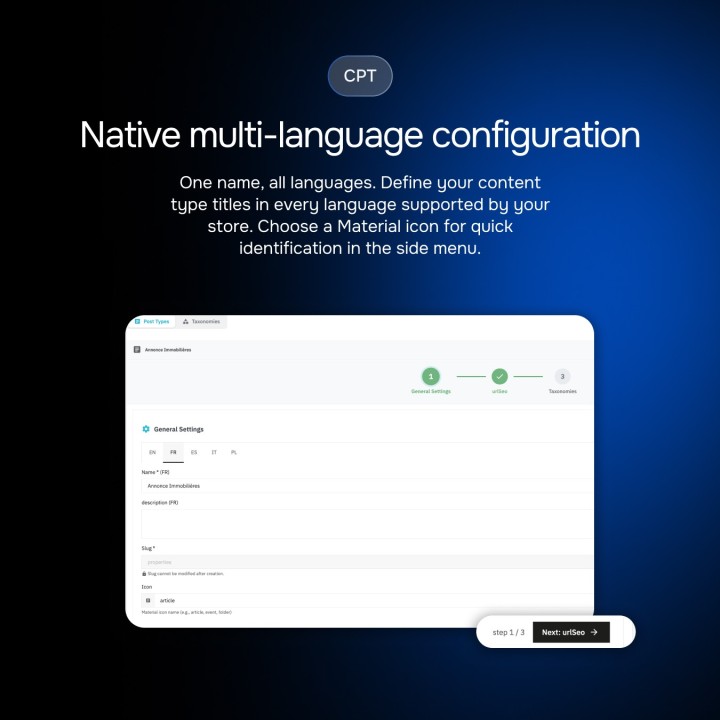
Name each content type in every language, with its icon
Name each content type in every language, with its icon

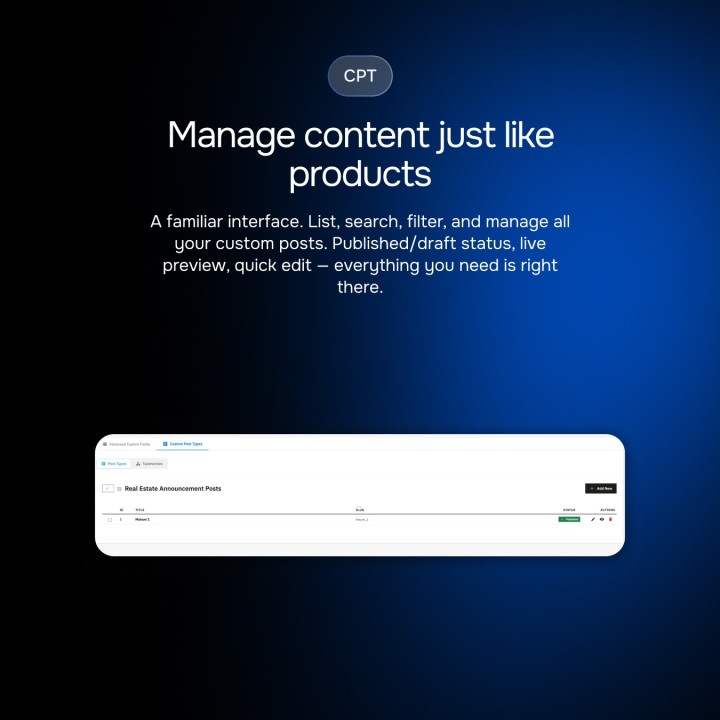
Manage your content like your products: list, search, status
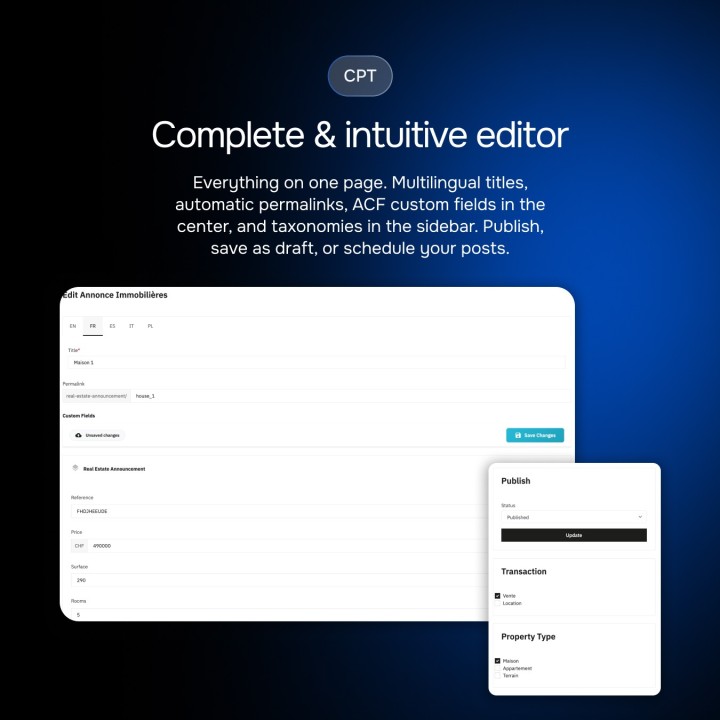
Manage your content like your products: list, search, status

Write your content in a complete editor, fields and categories included
Write your content in a complete editor, fields and categories included

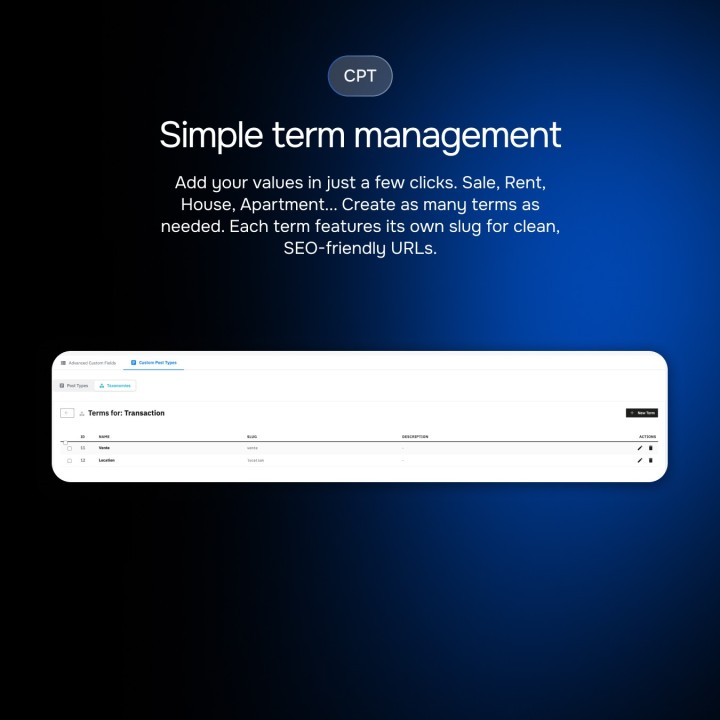
Add the terms of your taxonomies in a few clicks
Add the terms of your taxonomies in a few clicks

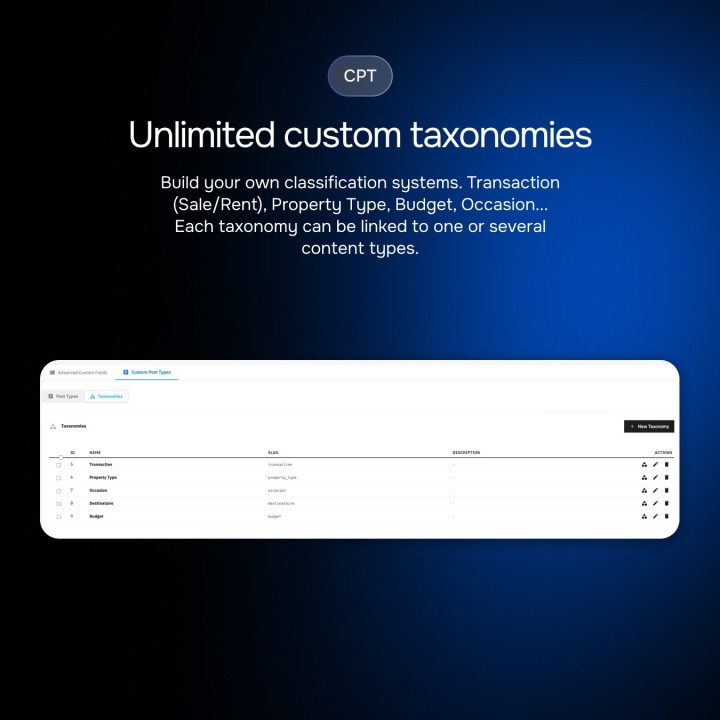
Create as many taxonomies as you need to sort your content
Create as many taxonomies as you need to sort your content

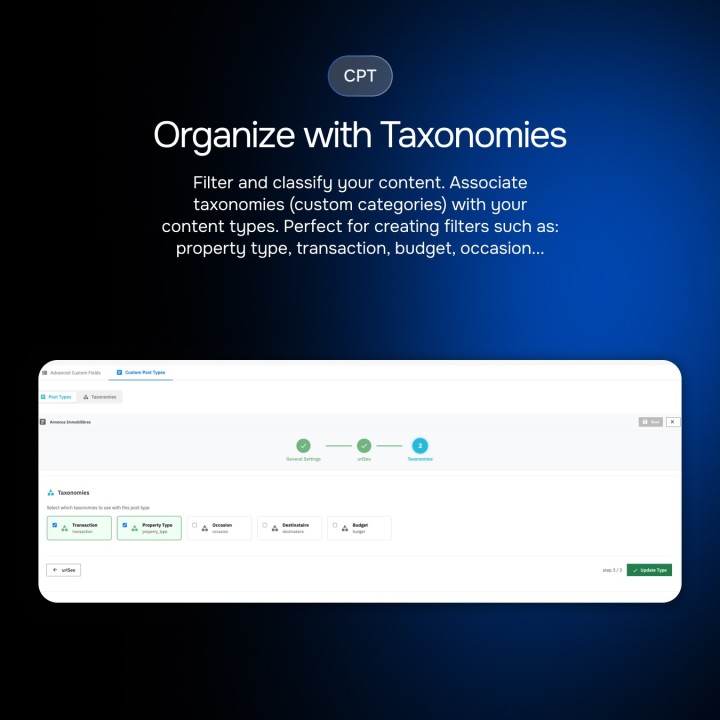
Link taxonomies to each content type
Link taxonomies to each content type

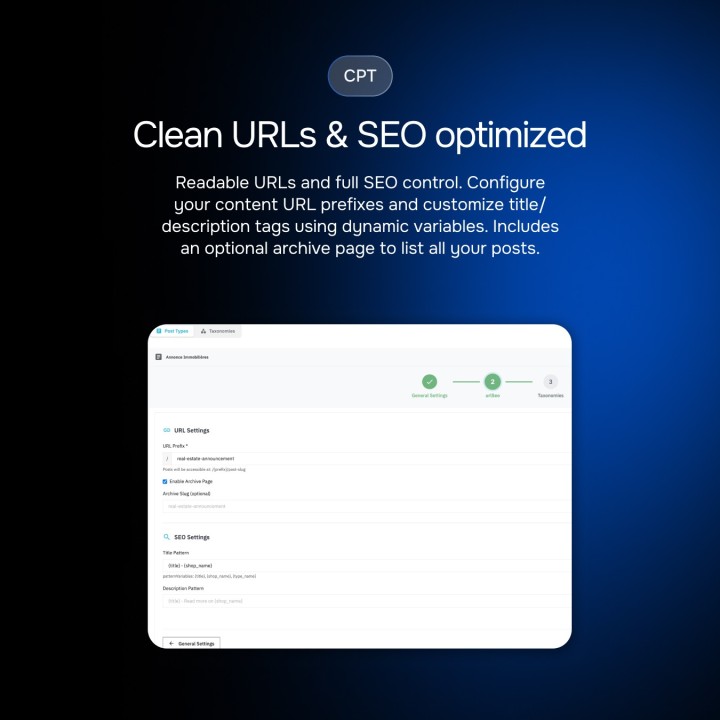
Clean URLs and SEO tags for each content type
Clean URLs and SEO tags for each content type

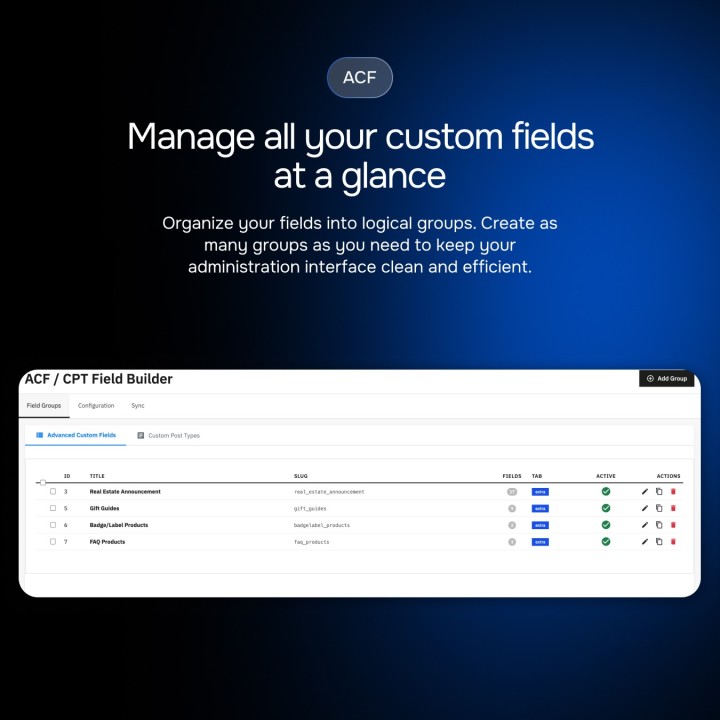
Find all your field groups in a single list
Find all your field groups in a single list

Show an FAQ, badges and specifications on the product page, without code
Show an FAQ, badges and specifications on the product page, without code

Create an FAQ, badges, a blog or testimonials in one click
Create an FAQ, badges, a blog or testimonials in one click

A complete blog: articles as cards, categories and optimised pages
A complete blog: articles as cards, categories and optimised pages

Your customer testimonials on the home page, with their rating
Your customer testimonials on the home page, with their rating

Schedule the publication of your content

Schedule the publication of your content

Support

FAQ

Find answers to frequently asked questions about this module

ACF Field Builder & CPT is a PrestaShop module that allows you to model your data like in a CMS: you create field groups, associate them with entities (products, categories, CMS pages, customers, or custom content), and then use this data in the front-office without having to develop a custom structure for every need. The SEO and business benefits are immediate: richer product pages (proofs, specs, media), structured editorial pages, and a reduction in the "patchwork" of redundant small modules.

You can cover most e-commerce cases with a single tool: basic fields (text, textarea, WYSIWYG, email, URL, number), choice fields (select, checkbox, radio, true/false, rating), media (image, gallery, YouTube/Vimeo video, file), and advanced fields (repeaters, relations to products/categories, color, date/datetime). In practice, this is used to create feature tables, product FAQs, marketing badges, "nutritional information" sections, "brand content" blocks, etc.

The recommended workflow is: 1) create a field group, 2) define its location rules (which entities it applies to), 3) add your fields, 4) use the values in the theme. You can target products, categories, CMS pages, customer profiles, and also your Custom Post Types (if you create a blog, a directory, etc.). This logic avoids duplication: the same group can serve multiple types of entities if you wish (e.g., "Editorial SEO" on products + categories).

Custom Post Types (CPT) are used to add new types of content beyond the "Products / CMS" duo. You define a name (multilingual), a technical slug, a description, an icon, then configure the URLs (prefix, archive) and SEO. Concretely, you can create: Blog, Portfolio, Testimonials, Global FAQ, Recipes, Events, Real Estate Directory... Each type becomes a structured, indexable, and manageable editorial "mini-catalog".

Taxonomies are the equivalent of categories, but applied to your CPTs. They allow you to classify and filter your content (e.g., "Property Type", "Transaction", "Level", "Theme", "Brand"). SEO: you can create cleaner listing pages (search intent by theme), better interlinked, and easier to maintain. Content-wise, it also facilitates production: a writer simply chooses terms in the back-office during editing.

The module exposes an $acf variable in your Smarty templates, with several methods depending on the desired rendering: field() to retrieve an escaped text value, raw() for raw data, render() for ready-to-use HTML rendering (images/videos), label() for translated labels (choice fields), has() to test the existence of a value, repeater() to loop over repeatable fields. This approach allows you to integrate your fields without hacking (nor duplication in the theme) and to keep a readable code.

Yes: via shortcodes usable in the WYSIWYG editor, for example [acf field="brand"], [acf_render field="image"], [acf_group id="1"], or repeater-type loops. This is particularly useful for: "guide" CMS pages, product sheets where the merchant wants to inject a structured block, landing pages, or editorial FAQs โ€” while keeping the theme more stable.

The key point is to treat your CPTs as full-fledged SEO pages: clean URLs, possibly archives/listings, and especially configurable meta tags. The module mentions dynamic variables (e.g., {title}, {shop_name}, {type_name}) to generate Title/Description consistently at scale, while remaining customizable. Recommendation: define a Title/Meta "pattern" per CPT, then refine case-by-case only on strategic content.

Before deployment, check: PrestaShop 1.7.8, 8.0+ or 9.0+, PHP 7.4 or higher, MySQL 5.7+ or MariaDB 10.2+, and back-office access with rights on modules. Then install the ZIP: the module creates its tables and works immediately. Performance-wise, best practice remains: limit field display to useful areas, avoid rendering galleries/videos everywhere, and favor clean Smarty snippets.

To industrialize your use (staging โ†’ prod, multi-project), use the JSON export/import via the Sync tab: you version your field groups, duplicate them between stores, and reduce the risk of human error. During migration, best practice: export the configuration, check theme compatibility (override if necessary), then re-validate the front-end display (templates + shortcodes). During updates, the goal is to keep field IDs/slugs stable to avoid display breakage.

In the builder, open the group and go to the Location step: the "Display on the storefront" section offers, depending on the pages covered, a position on the product page (under the "Add to cart" button, at the end of the description, in its own tab or at the bottom of the page), on categories (above or below the products, at the end of the description) and at the end of CMS pages. Then choose the layout: list, table, FAQ accordion or badges. Only filled-in fields are shown. The Product FAQ, Product badges and Specifications templates are already set up this way.

Your shop keeps showing your fields and your content, and the module stays active. Only creating and editing groups, fields and content waits for the license to be renewed; a message says so in the back office.

Yes. Values are saved per shop, and field groups and content types are shown in all your shops, including the ones created later. When you create a shop by importing the data of another one, tick the ACF & CPT module in the list of data to also copy its content and values.

Yes, by default: groups, fields, values and content stay saved when you uninstall or reset the module, and you find them again when you reinstall it. To delete everything, turn on "Delete the data on uninstall" in the module configuration before uninstalling it.

Display without code uses the standard positions of PrestaShop, found in the themes shipped with PrestaShop and in themes that follow its structure; a heavily customised theme may need a style adjustment. Your templates can also show the fields wherever you want with the $acf variable.

Join +24 merchants using this module

5-minute installation · Full documentation included

inventory_2 Module 53.94 โ‚ฌ 21.58 โ‚ฌ one-time -60%
Choose your license
3 months of support for 0.99โ‚ฌ · then 1.99โ‚ฌ/month
  • โ€ข Response within 24 business hours
  • ๐Ÿ”ง Installation & configuration assistance
  • ๐Ÿ’ฌ Direct contact with the developer
No commitment · Cancel in 1 click from your account
Instead of --โ‚ฌ/year if purchased separately
Loading...