- Custom fields for every page
- Show your fields without touching the theme
- Ready-made templates
- Enter the values in your forms
- Custom Post Types: your own content types
- Blog, archives and articles
- Taxonomies
- Show your content elsewhere: widgets
- Tailor-made integration with Smarty
- Shortcodes
- Permissions, license and data
- What is ACF Field Builder & CPT and what is it used for in a store?
- What types of custom fields can be created (concrete examples)?
- On which pages can fields be displayed (products, categories, CMS, customers...)?
- How to create a blog (or portfolio, directory...) with Custom Post Types?
- What are taxonomies used for and how to use them for SEO?
- How to display fields in the front-office with Smarty (cleanly)?
- Can fields be displayed in a CMS page or product description without touching the theme?
- How to manage the SEO of custom content (URLs + dynamic metas)?
- Technical compatibility and prerequisites: what to check before installation?
- Updates, migration, export/import: how to secure configuration and data?
- How do I show my fields in the shop without editing the theme?
- What happens if my license expires?
- Does the module work in multistore mode?
- Is my data kept if I uninstall the module?
- Is the module compatible with my theme?
ACF (Advanced Custom Fields) & CPT (Custom Post Types) - PrestaShop Module
PrestaShop only offers a limited set of fields for your products and categories. As soon as you want to present a specification sheet, an FAQ, reassurance badges or a blog, you usually have to stack modules or edit the theme. ACF & CPT brings all of this together in a single module: you create your own fields and your own content types from the back office, then show them in your shop without writing code.
This guide explains what the module can do, how to install it, how to set up your first field group and how to use it every day.
Key points:
- 24 field types: text, rich text editor, image, gallery, video, file, repeater, relation, colour, date, rating…
- Display without code on product pages, categories and CMS pages: list, table, FAQ accordion or badges
- Ready-made templates: product FAQ, badges, specifications, blog and testimonials in one click
- Custom Post Types: blog, testimonials, portfolio… with URLs, SEO, categories and scheduled publication
- Multilingual and multistore, permissions per employee profile, data kept when uninstalling
Discover the module and its plans
Overview
ACF & CPT turns your shop into a truly flexible CMS. Add custom fields to your products, categories, CMS pages and customer accounts, then create your own content types, all without writing a single line of code.
The module is organised around field groups. A group gathers the fields of one subject (for example "Specifications": material, dimensions, weight, origin) and applies to the pages you choose: all products, some categories, specific products, CMS pages or customers. Values are then entered directly in the form of each product, category or page.
Three ways to show them complement each other:
- Without code: choose a position and a layout in the builder, the module does the rest.
- Shortcodes in your CMS pages and descriptions.
- The
$acfvariable in your Smarty templates, for a tailor-made integration.
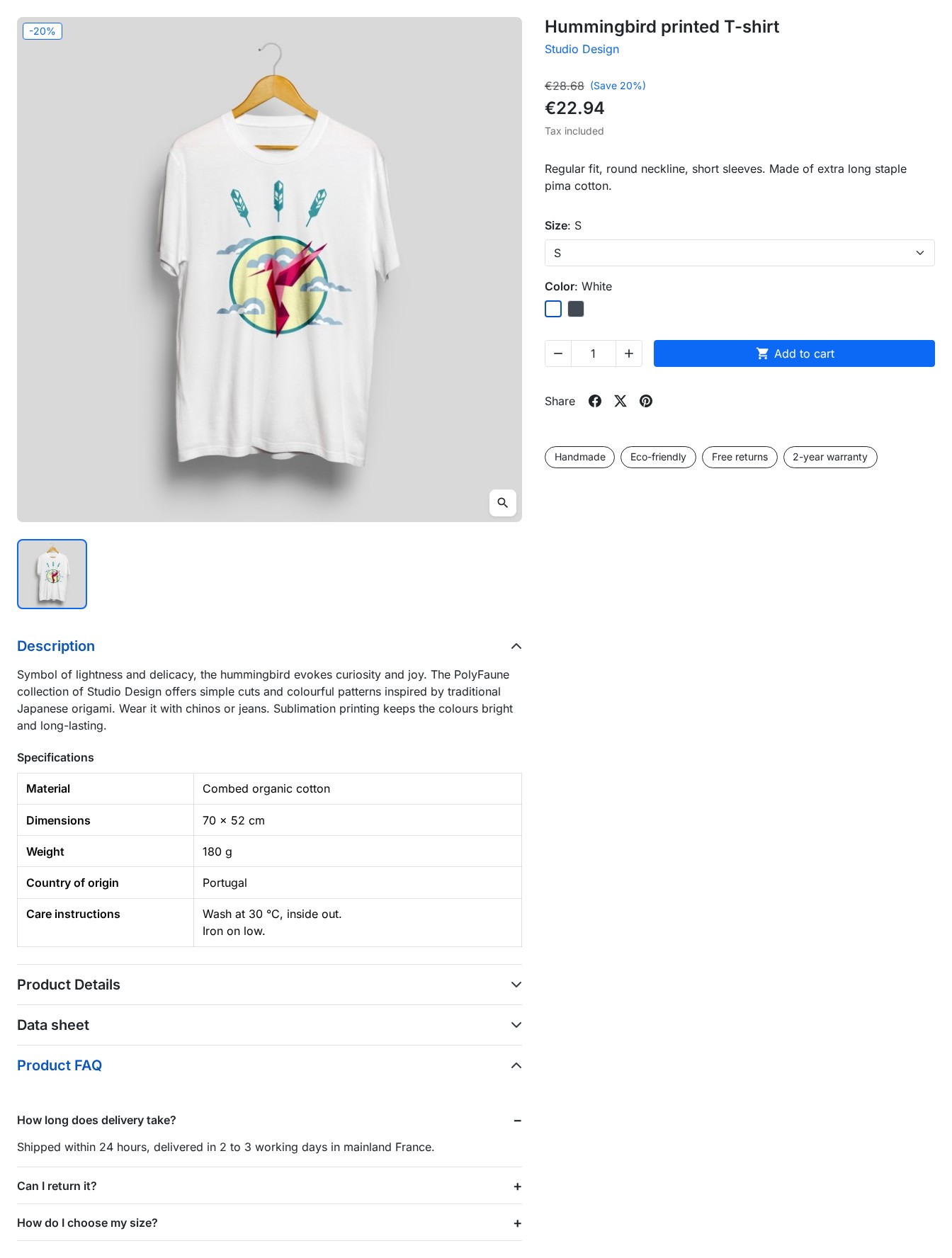 A product page: badges under the "Add to cart" button, a specifications table at the end of the description and an FAQ in its tab.
Features
Custom fields for every page
Create a group, set its location rules (products, categories, CMS pages, customers or Custom Post Types; specific products or categories; products of a category, a brand or a supplier), then add the fields you need. Each field has validation, display and translation options.
The field types cover every need:
- Basic fields: text, text area, rich text editor, number, email, URL
- Choices: list, checkboxes, radio buttons, yes/no switch, star rating
- Media: image, gallery of several images, YouTube, Vimeo or file video, downloadable files
- Advanced: repeater for repeatable rows (questions of an FAQ, steps, characteristics), relation to products or categories, colour, date, date and time, time, button, list
The title of each group and each field can be translated into every language of the shop: the shop and the back-office menus show the one of the current language.
Show your fields without touching the theme
In the Location step of a group, the Display on the storefront section offers, depending on the pages covered:
- Product page: under the "Add to cart" button, at the end of the description, in its own tab or at the bottom of the page
- Category: at the end of its description, above or below the product list
- CMS page: at the end of the content
Then choose the layout: list (name and value), table for a specification sheet, accordion for an FAQ (one question per row of a repeater) or badges (the switches that are on and short values). Only filled-in fields are shown: a product without values shows nothing.
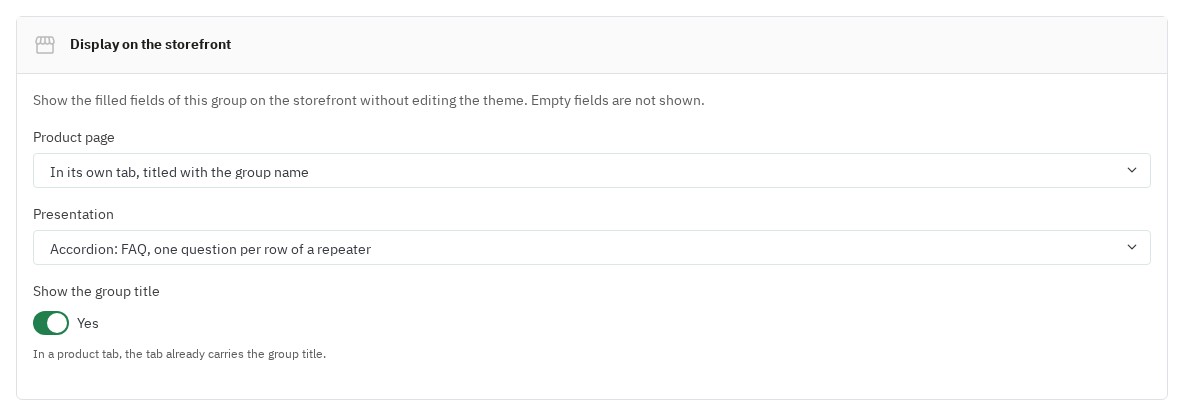 The "Display on the storefront" setting of a group: its position on the product page and its layout.
Ready-made templates
The Templates button of the builder creates a complete group in one click, already set up to be shown in the shop and named in every language:
- Product FAQ: questions and answers in a tab of the product page, as an accordion
- Product badges: "Handmade", "Eco-friendly", "Free returns" and a warranty, under the "Add to cart" button
- Specifications: a table of characteristics at the end of the description
- Blog: a content type with its categories, a main image, an excerpt and a content
- Testimonials: customer reviews with a rating, shown on the home page
Each template can then be changed like a group created by hand.
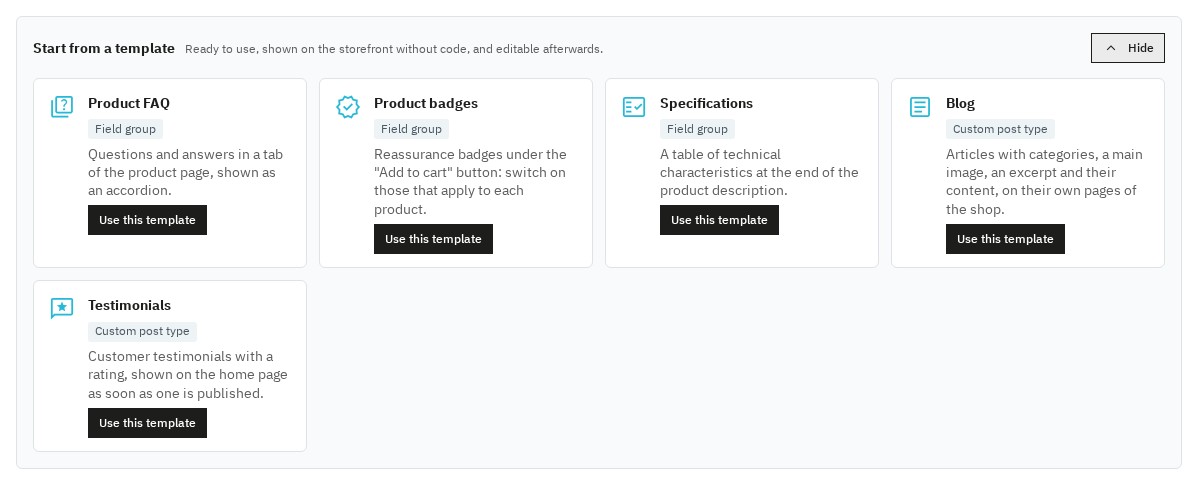 The ready-made templates of the builder, created in one click.
Enter the values in your forms
The fields appear in the form of each product (Modules tab on PrestaShop 8 and 9), category, CMS page and customer. Translatable fields offer a tab per language, the rows of a repeater carry the title of their first text and can be reordered, galleries accept several images at once. Values are saved with the form.
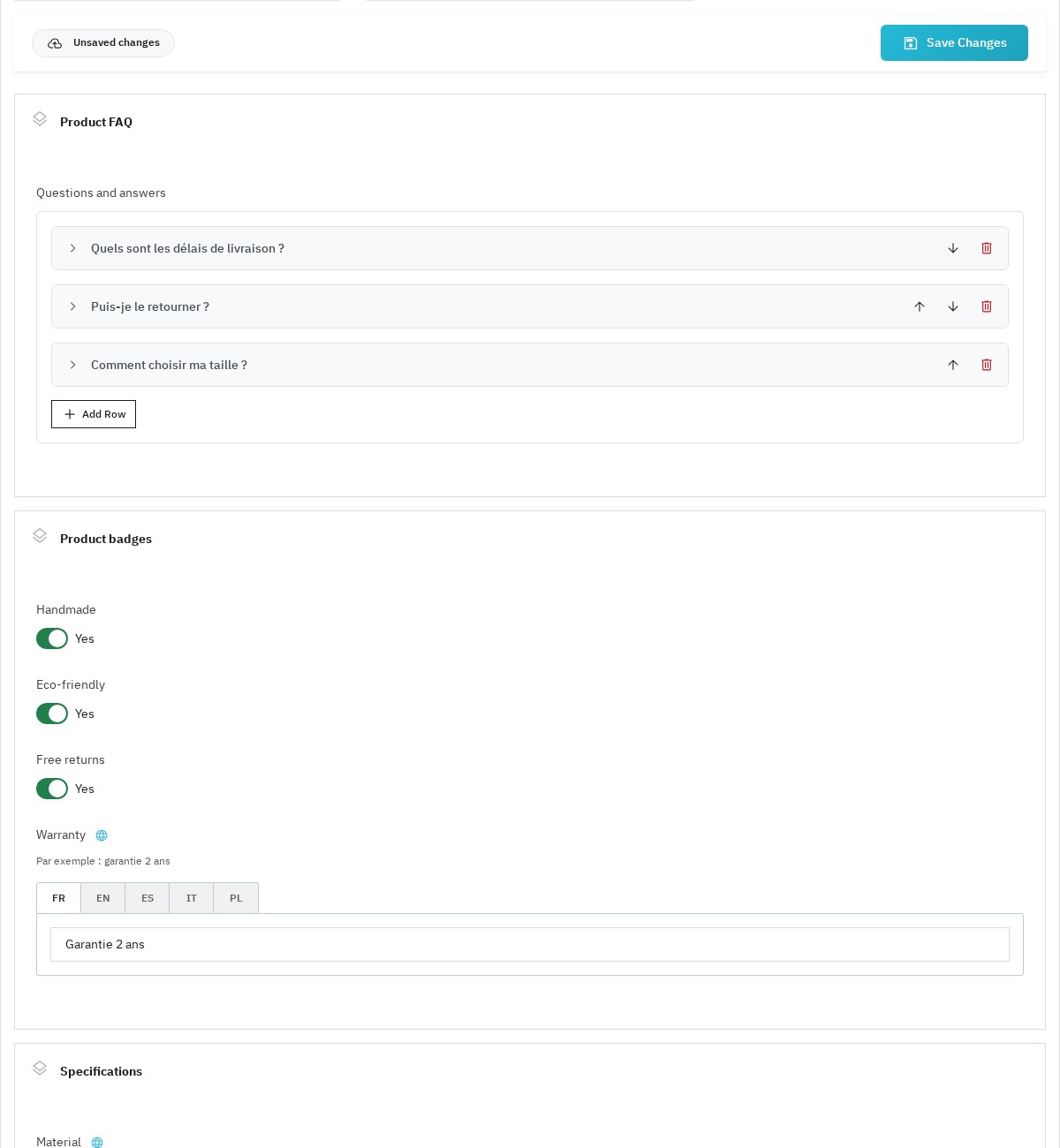 Entering values on a product page: FAQ questions, badges to turn on, warranty in each language.
Custom Post Types: your own content types
Create content types independent of the catalogue: blog, real estate listings, portfolios, testimonials, guides, events, recipes. Each type has its own slug, its URLs with a prefix, an optional archive page and SEO meta tags set with dynamic variables such as {title}, {shop_name} and {type_name}.
The content editor brings together the title and permalink in each language, the fields of the type, the categories and the publication:
- Draft or published, with a publication date: a future date schedules the content, which goes online by itself
- A single button saves the content and its fields; the module warns you before you leave a modified page
- A permalink already used by another content item of the same type is reported before saving
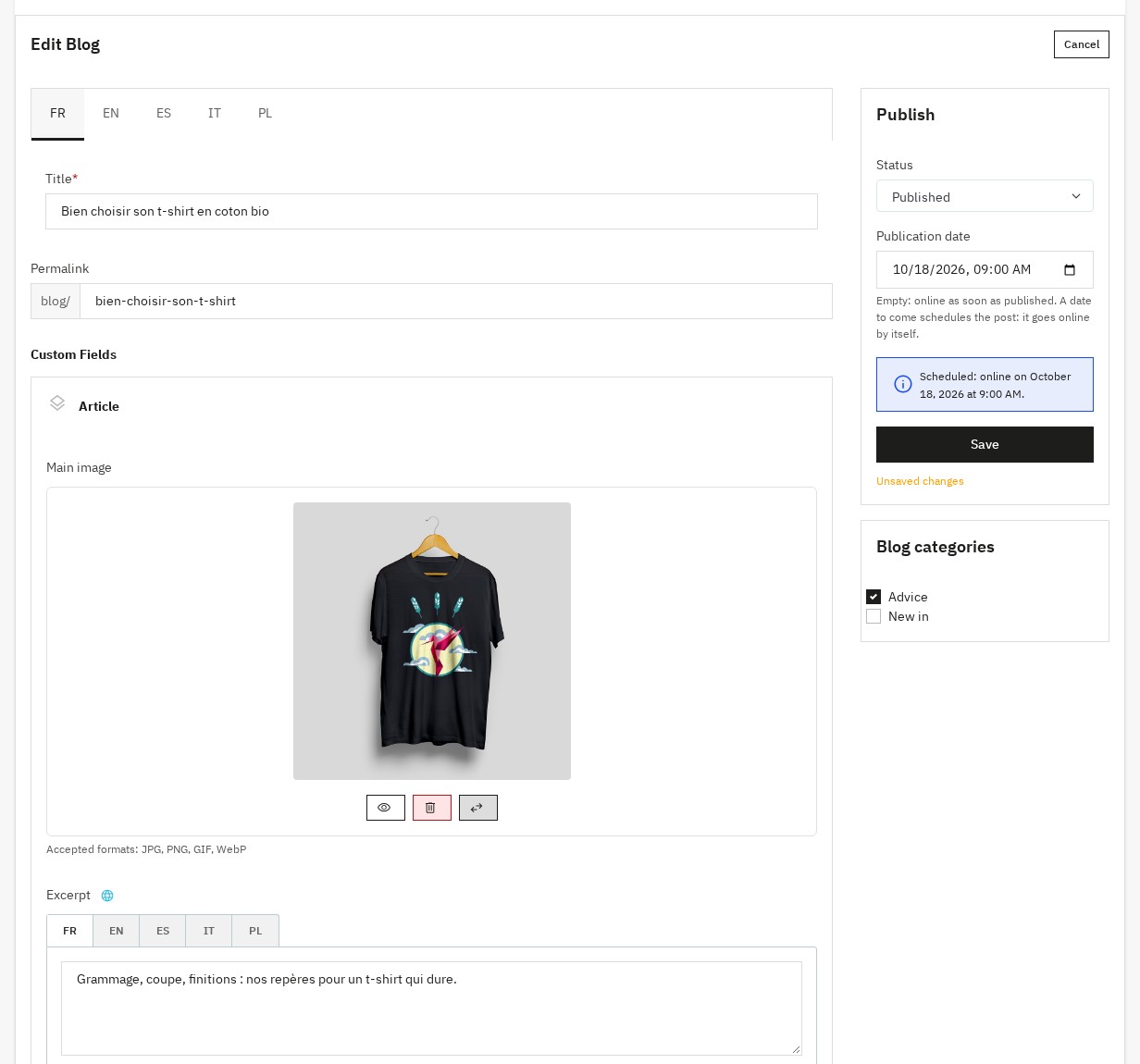 The editor of an article: title and permalink in each language, fields, categories and a scheduled publication date.
The content list shows their status (published, scheduled, draft) and lets you publish, unpublish or delete several items at once.
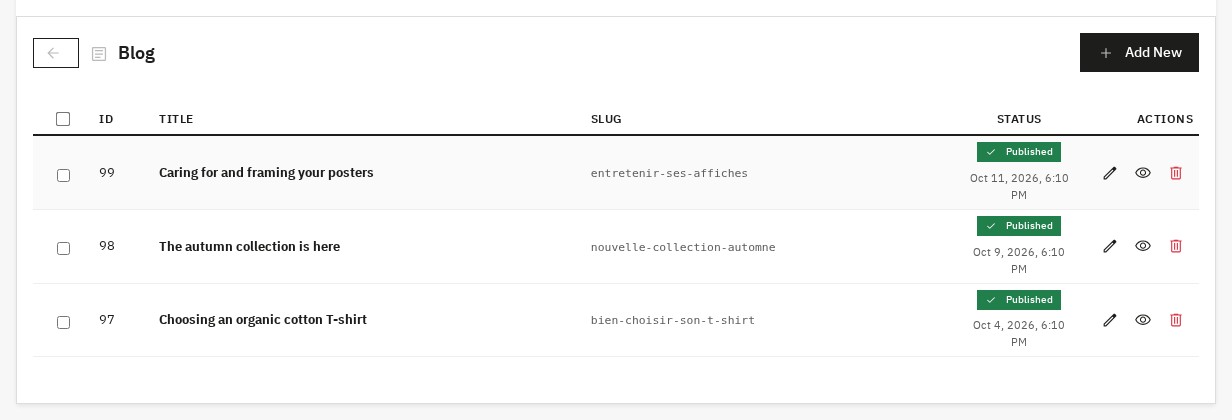 The list of blog articles with their status and date.
Blog, archives and articles
In the shop, each content type has its own pages:
- Archive: the content as cards with an image, a date and an excerpt, with pagination
- Category (term of a taxonomy): the content filed under that category
- Article: title, image, content, categories and a "Read also" section
These pages have a canonical address, their language versions (hreflang), a breadcrumb and structured data. If you use the PrestaShop "Google sitemap" module, the pages of your content are added to it.
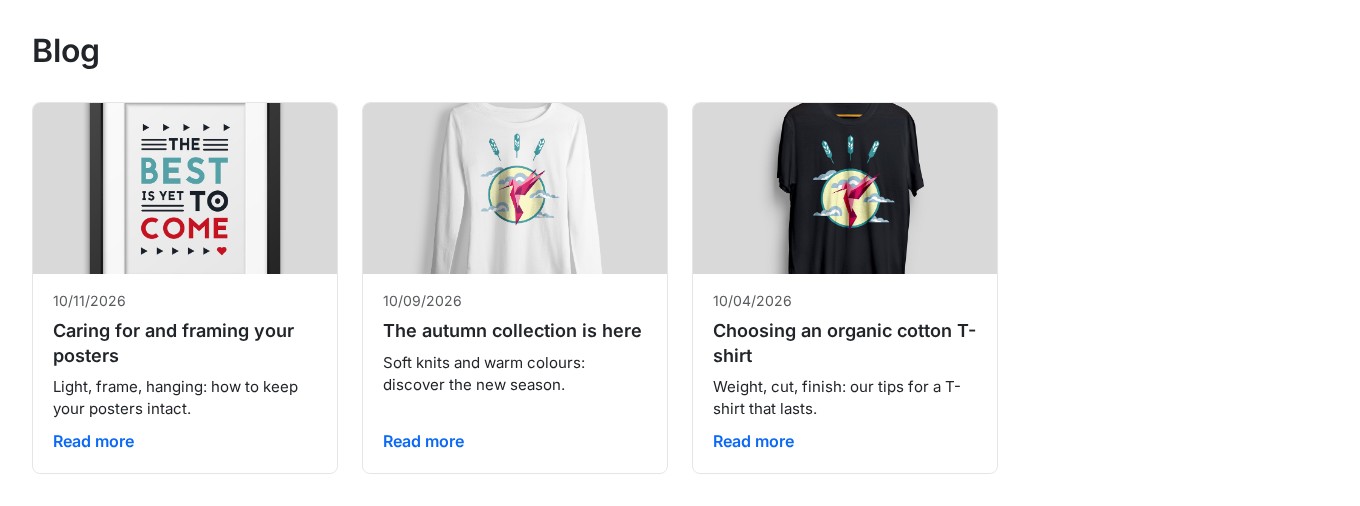 The blog page: articles as cards with an image, a date and an excerpt.
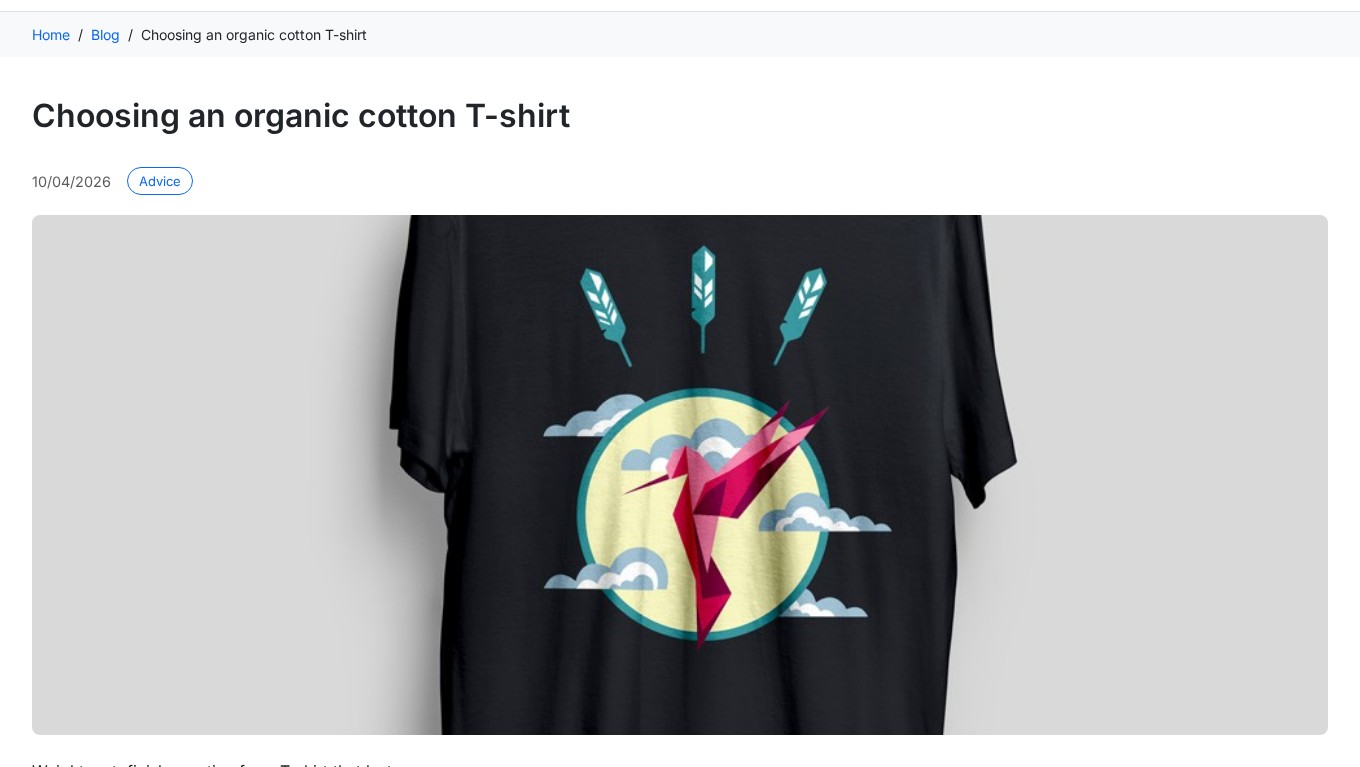 An article page: breadcrumb, category, date and main image.
Taxonomies
Taxonomies sort and filter your custom content. They work like product categories, but for your Custom Post Types. Create taxonomies (Transaction, Property type, Budget…) then their terms (Sale, Rental, House, Apartment…): they appear in the side column of the content editor for quick selection.
Show your content elsewhere: widgets
Show the latest items of a content type (blog, events, testimonials…) outside their archive: home page, footer or any other position.
1. From the back office (PrestaShop hooks)
Open a content type in the builder, Widget section: turn the widget on, choose the hook (displayHome, displayFooter…), the number of items and the title. The widget appears in the shop straight away. The Testimonials template uses it to show your reviews on the home page.
 Customer testimonials on the home page, with their rating.
2. With a Smarty tag (templates, page builders)
{acf_widget type="blog" limit="6"}
{acf_widget type="events" limit="3"}
3. With a shortcode (CMS content)
[acf_widget type="blog" limit="6"]Available parameters:
type(required): slug of the content typelimit(6 by default): number of items shownshow_title(yes by default): show the titletitle: custom title (name of the type by default)show_view_all(yes by default): link to the archivetemplate: a specific Smarty template (Smarty tag only)
To adapt the display of a type, copy the widget.tpl template of the module into your theme, in the folder modules/wepresta_acf/ then views/templates/front/cpt/, named widget-blog.tpl (for the blog type).
Tailor-made integration with Smarty
The $acf variable is available in all your Smarty templates:
field(): a text value, escapedraw(): the raw datarender(): the HTML rendering of images, videos and other rich fieldslabel(): the translated label of a choice fieldhas(): whether a field has a valuerepeater(): loop over the rows of a repeater
To show a field in a product list (product cards):
{$pid = $product.id_product}
{$pAcf = $acf->forProduct($pid)}
{$pAcf->field('field_slug')}
The values of a product list are loaded at once, without a query per card.
Shortcodes
Add your fields to CMS pages or descriptions with the shortcodes of the editor: [acf field="brand"], [acf_render field="image"], [acf_group id="1"] or [acf_repeater slug="specs"]…[/acf_repeater].
Permissions, license and data
- Permissions per profile: the builder and the forms follow the permissions of PrestaShop employee profiles (view, add, edit, delete).
- Expired license: your shop keeps showing your fields and content; only editing them waits for the license to be renewed.
- Data kept: uninstalling or resetting the module keeps your groups, fields, values and content. To delete everything, turn on "Delete the data on uninstall" in the module configuration.
- Multistore: values are saved per shop; groups and content types are shown in all your shops, including the ones created later.
- Import and export: the Sync link of the builder exports your groups as JSON and imports them into another shop.
Installation
- Download the module from your WePresta customer account.
- In your back office, go to Modules > Module Manager and click Upload a module.
- Select the ZIP file; PrestaShop installs the module and creates its tables.
- Click Configure and enter your license key. The pages of the module open from the ACF / CPT menu of the back office.
Getting started
- Open ACF / CPT > ACF: the list of your groups appears. Click Templates.
- Choose Product FAQ and click Use this template: the group is created and will be shown in a tab of the product page.
- Open a product in Catalog > Products, Modules tab, and add two or three questions with their answers. Save.
- Open the product page in your shop: the "Product FAQ" tab shows your questions as an accordion.
- To create your own group, click Add Group, give it a title (in each language if needed), choose its pages in Location and its position in Display on the storefront, then add its fields by drag and drop.
Configuration
Field groups
The builder guides the creation of a group in three steps:
- General Settings: title in each language, slug (locked once the group is saved, because your templates use it), description, activation
- Location: the pages concerned and the display in the shop
- Fields: adding fields by drag and drop and setting each one
Field settings
Each field is set in three tabs:
- General Settings: title and instructions in each language, slug, activation
- Validation: required field, minimum and maximum values, regular expression
- Presentation: label shown in the shop, translatable value, CSS class and HTML identifier
Content types
From the Custom Post Types tab, create your types with a name in each language, a slug, a description and an icon. Then set their URLs (prefix, archive page), their SEO meta tags, their taxonomies and their widget.
Module configuration
The Configuration page (link at the top of the builder) gathers the maximum size and the extensions of uploaded files, keeping the data on uninstall and the synchronisation with the theme. Uploading PHP field types is reserved for the SuperAdmin and turned off by default.
Requirements
- PrestaShop 1.7.8, 8.0+ or 9.0+
- PHP 7.4 or higher
- MySQL 5.7+ or MariaDB 10.2+
- A theme that follows the PrestaShop structure, like the ones shipped with PrestaShop
Updating from a 1.x version
Update from the Module Manager: your groups, fields, values, content and their addresses are kept, and the $acf variable of your templates keeps working. Your groups are not shown in the shop automatically after the update: choose their position in Display on the storefront if you want to use display without code.
FAQ
What is ACF Field Builder & CPT and what is it used for in a store?
ACF Field Builder & CPT is a PrestaShop module that allows you to model your data like in a CMS: you create field groups, associate them with entities (products, categories, CMS pages, customers, or custom content), and then use this data in the front-office without having to develop a custom structure for every need. The SEO and business benefits are immediate: richer product pages (proofs, specs, media), structured editorial pages, and a reduction in the "patchwork" of redundant small modules.
What types of custom fields can be created (concrete examples)?
You can cover most e-commerce cases with a single tool: basic fields (text, textarea, WYSIWYG, email, URL, number), choice fields (select, checkbox, radio, true/false, rating), media (image, gallery, YouTube/Vimeo video, file), and advanced fields (repeaters, relations to products/categories, color, date/datetime). In practice, this is used to create feature tables, product FAQs, marketing badges, "nutritional information" sections, "brand content" blocks, etc.
On which pages can fields be displayed (products, categories, CMS, customers...)?
The recommended workflow is: 1) create a field group, 2) define its location rules (which entities it applies to), 3) add your fields, 4) use the values in the theme. You can target products, categories, CMS pages, customer profiles, and also your Custom Post Types (if you create a blog, a directory, etc.). This logic avoids duplication: the same group can serve multiple types of entities if you wish (e.g., "Editorial SEO" on products + categories).
How to create a blog (or portfolio, directory...) with Custom Post Types?
Custom Post Types (CPT) are used to add new types of content beyond the "Products / CMS" duo. You define a name (multilingual), a technical slug, a description, an icon, then configure the URLs (prefix, archive) and SEO. Concretely, you can create: Blog, Portfolio, Testimonials, Global FAQ, Recipes, Events, Real Estate Directory... Each type becomes a structured, indexable, and manageable editorial "mini-catalog".
What are taxonomies used for and how to use them for SEO?
Taxonomies are the equivalent of categories, but applied to your CPTs. They allow you to classify and filter your content (e.g., "Property Type", "Transaction", "Level", "Theme", "Brand"). SEO: you can create cleaner listing pages (search intent by theme), better interlinked, and easier to maintain. Content-wise, it also facilitates production: a writer simply chooses terms in the back-office during editing.
How to display fields in the front-office with Smarty (cleanly)?
The module exposes an $acf variable in your Smarty templates, with several methods depending on the desired rendering:
field() to retrieve an escaped text value,
raw() for raw data,
render() for ready-to-use HTML rendering (images/videos),
label() for translated labels (choice fields),
has() to test the existence of a value,
repeater() to loop over repeatable fields. This approach allows you to integrate your fields without hacking (nor duplication in the theme) and to keep a readable code.
Can fields be displayed in a CMS page or product description without touching the theme?
Yes: via shortcodes usable in the WYSIWYG editor, for example [acf field="brand"], [acf_render field="image"], [acf_group id="1"], or repeater-type loops. This is particularly useful for: "guide" CMS pages, product sheets where the merchant wants to inject a structured block, landing pages, or editorial FAQs — while keeping the theme more stable.
How to manage the SEO of custom content (URLs + dynamic metas)?
The key point is to treat your CPTs as full-fledged SEO pages: clean URLs, possibly archives/listings, and especially configurable meta tags. The module mentions dynamic variables (e.g., {title}, {shop_name}, {type_name}) to generate Title/Description consistently at scale, while remaining customizable. Recommendation: define a Title/Meta "pattern" per CPT, then refine case-by-case only on strategic content.
Technical compatibility and prerequisites: what to check before installation?
Before deployment, check: PrestaShop 1.7.8, 8.0+ or 9.0+, PHP 7.4 or higher, MySQL 5.7+ or MariaDB 10.2+, and back-office access with rights on modules. Then install the ZIP: the module creates its tables and works immediately. Performance-wise, best practice remains: limit field display to useful areas, avoid rendering galleries/videos everywhere, and favor clean Smarty snippets.
Updates, migration, export/import: how to secure configuration and data?
To industrialize your use (staging → prod, multi-project), use the JSON export/import via the Sync tab: you version your field groups, duplicate them between stores, and reduce the risk of human error. During migration, best practice: export the configuration, check theme compatibility (override if necessary), then re-validate the front-end display (templates + shortcodes). During updates, the goal is to keep field IDs/slugs stable to avoid display breakage.
How do I show my fields in the shop without editing the theme?
In the builder, open the group and go to the Location step: the "Display on the storefront" section offers, depending on the pages covered, a position on the product page (under the "Add to cart" button, at the end of the description, in its own tab or at the bottom of the page), on categories (above or below the products, at the end of the description) and at the end of CMS pages. Then choose the layout: list, table, FAQ accordion or badges. Only filled-in fields are shown. The Product FAQ, Product badges and Specifications templates are already set up this way.
What happens if my license expires?
Your shop keeps showing your fields and your content, and the module stays active. Only creating and editing groups, fields and content waits for the license to be renewed; a message says so in the back office.
Does the module work in multistore mode?
Yes. Values are saved per shop, and field groups and content types are shown in all your shops, including the ones created later. When you create a shop by importing the data of another one, tick the ACF & CPT module in the list of data to also copy its content and values.
Is my data kept if I uninstall the module?
Yes, by default: groups, fields, values and content stay saved when you uninstall or reset the module, and you find them again when you reinstall it. To delete everything, turn on "Delete the data on uninstall" in the module configuration before uninstalling it.
Is the module compatible with my theme?
Display without code uses the standard positions of PrestaShop, found in the themes shipped with PrestaShop and in themes that follow its structure; a heavily customised theme may need a style adjustment. Your templates can also show the fields wherever you want with the $acf variable.
Support
For any help, contact us from your WePresta customer account or by email at mail@wepresta.shop, according to the support option of your plan.
Changelog
Version 2.0.0
New features
- Show a field group in your shop without editing the theme: under the "Add to cart" button, at the end of the description, in a tab of the product page or at the bottom of the page.
- Show your groups on category pages too (above or below the products, or at the end of the description) and at the end of CMS pages.
- Choose the layout of each group: list, specifications table, FAQ accordion or badges.
- Create a product FAQ, reassurance badges, a specifications table, a blog or testimonials in one click, ready to fill in and named in every language of the shop.
- Give each group a title in each language: it is shown in the shop and in the back-office menu.
- Schedule the publication of a content item: it goes online by itself on the chosen date.
- Present your articles as cards with an image, a date and an excerpt, with their categories and a "Read also" section.
- Show your customer testimonials on the home page, with their rating.
- Find the pages of your content in the sitemap of the "Google sitemap" module.
- Show related products with the product cards of your theme, at the price of the customer's group.
- Use the module on PrestaShop 1.7.8, 8 and 9.
Improvements
- Custom fields appear on category, CMS page and customer forms.
- An expired license no longer disables the module: your shop keeps showing your content, only editing waits for the renewal.
- Your groups, fields, values and content are kept when you uninstall or reset the module, unless you choose to delete them.
- The content editor saves the article and its fields at once and warns you before leaving a modified page.
- The rows of a repeater carry the title of their first text, for example the question of an FAQ.
- Galleries accept several images and file lists can be edited from the form.
- Product pages and product lists load faster.
- The permissions of employee profiles apply to the builder and the forms.
- The interface is translated into French, English, Spanish, Italian and Polish.
- Your content pages have a canonical address, their language versions, a breadcrumb and structured data.
- A shop added in multistore mode shows your groups and content types; when it imports the data of another shop, it also copies its content and values.
Fixes
- Shortcodes in CMS pages and categories show their values.
- Rich text is shown with its formatting.
- YouTube and Vimeo videos are shown in their player.
- Internal links of buttons stay valid.
- Entered text is shown as typed, line breaks included.
- Content titles are shown in the visitor's language.
- Drafts no longer appear on content category pages.
- Renaming a saved group keeps its identifier, used by your templates and shortcodes.
- The module also installs in a shop that shares its database with another one.
- Updating from versions 1.4 and 1.5 keeps your fields, values and content.
After the update: your groups are not shown in the shop automatically. To use display without code, choose their position in "Display on the storefront".
Version 1.5.0
- ID-based location rules: target specific Product, Category, Customer or CMS Page IDs (supports multi-IDs)
- Product Category condition: show fields on all products in given categories
- Front-office now respects location rules (field(), render(), has())
Version 1.4.0
New Navigation Structure
- "ACF / CPT" section in the back-office sidebar, replacing the old "WePresta" tab.
- Separate ACF and CPT tabs, each expandable with dynamic sub-tabs.
- Dynamic sub-tabs for each ACF group created (appearing under the ACF tab).
- Dynamic sub-tabs for each CPT type created (appearing under the CPT tab).
- Sub-tabs are automatically created, renamed, and deleted during CRUD operations.
Version 1.3.0
CPT Widget System
Major new feature allowing you to display posts from your Custom Post Types (blog, events, portfolio...) outside their archive page — on the homepage, footer, or anywhere on your site — via three integration methods: PrestaShop hook from the back office, Smarty tag in templates, or shortcode in CMS pages. Templates are overridable per type directly from your theme.
Refactored archive templates
Archive templates now use reusable partials (_partials/posts-grid.tpl, _partials/pagination.tpl). No visual change — same rendering as before.
Fix
- Fixed saving of
configandseo_configfields in the CPT type update API
Update
Upload the module files, then click "Upgrade" in the back office (Modules > WePresta ACF). Widget hooks are registered automatically. No database migration required.
Version 1.2.0
- Batch ACF prefetch for product listings (
actionProductSearchComplete) - Custom fields on product thumbnails
- New Smarty helper for category pages integration
- Improved field rendering performance
To use the Smarty helper on product thumbnails, insert into your template:
{$pid = $product.id_product}
{$pAcf = $acf->forProduct($pid)}
{$pAcf->field('field_slug')}
Version 1.0.0
- Initial version
- 15+ custom field types
- Custom Post Types with SEO URLs
- Taxonomy system
- Native multilingual support
- Drag & drop interface
- Customizable templates
- Shortcodes for CMS pages
- JSON export/import of configurations
- PrestaShop 8.x and 9.x compatibility
