- Analyse the pages as your customers see them
- Follow the process on the dashboard
- Fix the problems found
- Switch on the safe automatic fixes
- Fill in the image captions
- Check the criteria with the checklist
- Publish the accessibility statement
- Schedule the analyses and receive the report
- Export the report
- What is the EAA and why is your store affected?
- WCAG 2.1 AA: what does it actually mean for an e-commerce?
- What does the accessibility scanner detect and how are issues prioritized?
- Auto-Fix: what corrections are made automatically?
- Is Auto-Fix enough to be 100% compliant?
- How to manage alternative texts (ALT) at scale, without spending weeks?
- Why is a manual checklist essential, even with an automatic scanner?
- What is the accessibility statement for and how is it generated?
- Can scans be automated (CRON) and alerts received in case of regression?
- Performance and prerequisites: does it slow down the front-office? what are the technical conditions?
- Why analyse in the browser rather than on the server?
- Does the module work in multistore and on PrestaShop 1.7?
- What happens if I already used version 1 of the module?
EAA and WCAG 2.1 AA accessibility on PrestaShop: analyse, fix, declare
Since 28 June 2025, the European Accessibility Act (EAA) requires online stores selling to consumers in the European Union to be usable by people with disabilities and to inform about their accessibility. The technical reference is the EN 301 549 standard, which takes up the WCAG 2.1 level AA criteria.
EAA & WCAG 2.1 AA accessibility audit (EAA Accessibility Checker) runs this process in the PrestaShop back office, in four steps: analyse the pages of the store, fix the problems found, check the criteria that need a human eye and publish the accessibility statement in every language. This guide explains how to install it, succeed with a first analysis and use it day to day.
Highlights:
- An analysis of the real pages in the browser with axe-core, contrasts included, and a server analysis for the scheduled analyses
- An honest score: a criterion is only counted as met after your check, with no open problem
- Problems explained, grouped by element, with how to fix them in PrestaShop
- Six safe automatic fixes, switched on one by one
- An accessibility statement on the European model, prefilled for six countries, published in every language
Discover the module and its plans
Overview
No tool can declare a store accessible on its own: part of the WCAG criteria depends on content and use (relevance of a text alternative, captions, reading order). So the module combines automatic checks, a manual checklist of the 50 WCAG 2.1 A and AA criteria (and of the 6 WCAG 2.2 criteria as an option) and a statement that reflects the reality of your store.
It is for PrestaShop merchants who want to know where their store stands, what to fix and where to start, and to keep track of their work for their customers, their agency or an inspection. The module is not legal advice; the prefilled texts of the statement are a starting point to adapt.
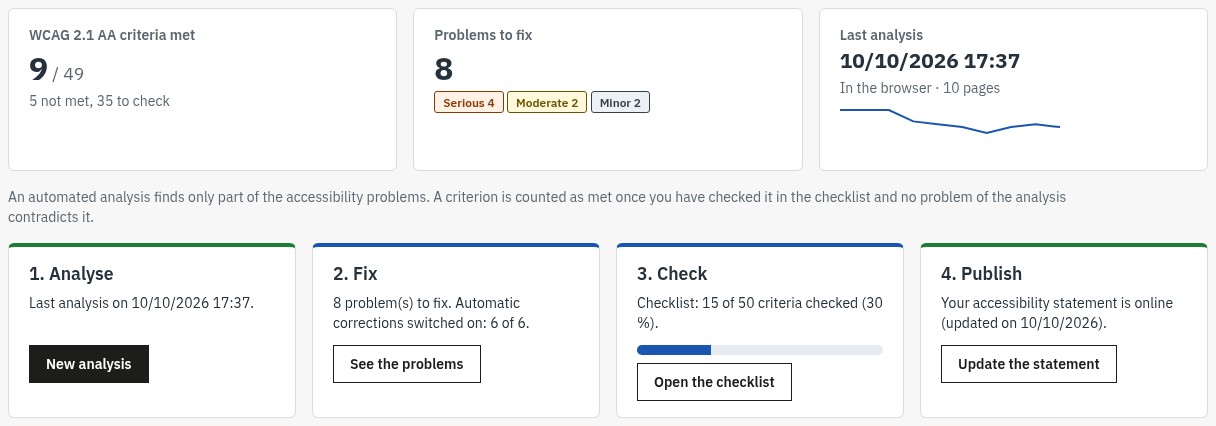 Your process in four steps, with an honest score
Features
Analyse the pages as your customers see them
The 1. Analyse screen suggests representative pages of each template of your store: home, categories, products with and without combinations, CMS page, brand, search results, contact, sign-in, account creation and cart. The first ticked language gets every type of page; the other languages get the home page, a category and a product. You can add any other address of your store (a landing page, the page of a module).
Two analysis modes:
- In your browser (recommended): each page is opened invisibly in your window and checked by axe-core, as your visitors see it. It is the only mode that measures contrasts, ARIA attributes, content added by scripts and the effect of the fixes. Keep the page open during the analysis: about fifteen pages take around one minute.
- By the server: the server reads the HTML of the pages and checks the rules of the module (images, labels, names of buttons and links, headings, languages, forms). It is the mode of the scheduled analyses; it does not measure contrasts.
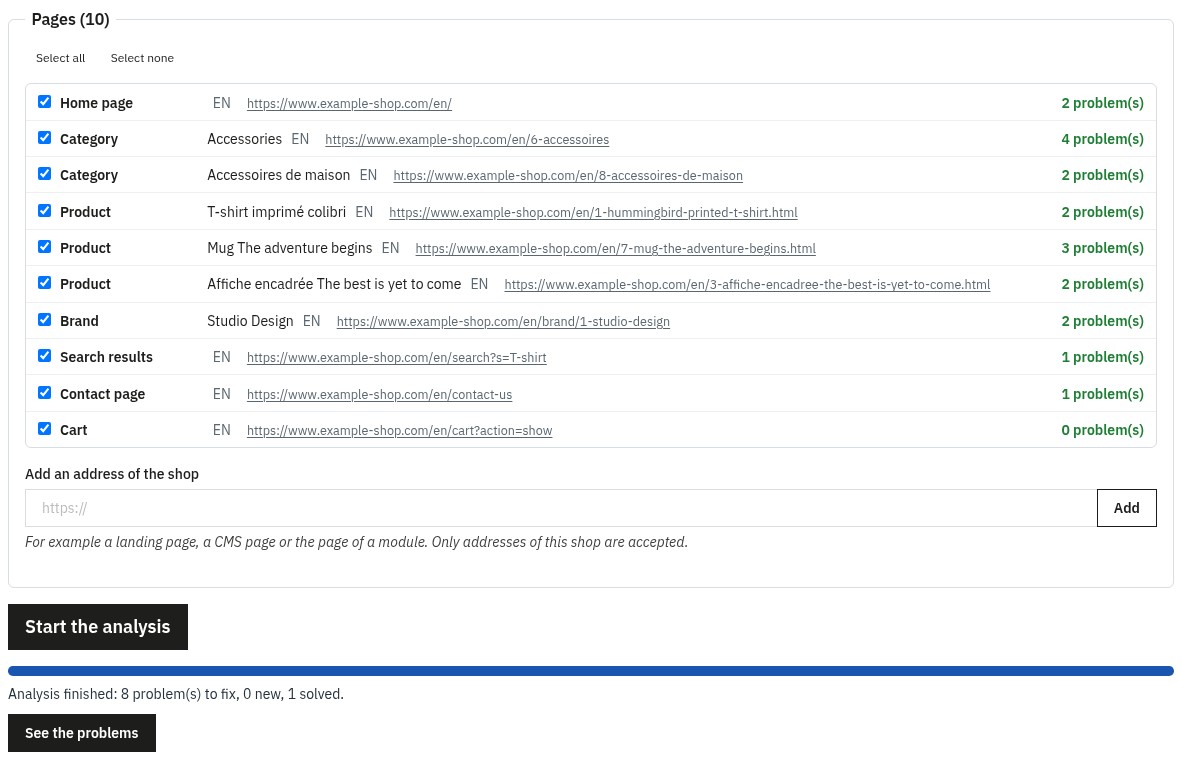 An analysis of the real pages, in the browser
A page that cannot be analysed (for example a sign-in page replaced by another module, which redirects to its own page) is reported as not analysed, with the reason, without distorting the results.
Follow the process on the dashboard
The overview shows the number of WCAG 2.1 AA criteria met, the problems to fix by severity (serious, moderate, minor), the last analysis and its trend, then the four steps with their state: Analyse, Fix, Check, Publish. A criterion is counted as met when you have checked it in the checklist and no open problem of the analysis contradicts it.
Fix the problems found
The 2. Fix screen lists the open problems, grouped by element: the same defect repeated on dozens of pages appears only once, with the number of pages concerned. Filter by status, severity, where to fix (theme, content, catalogue images, module) and WCAG criterion.
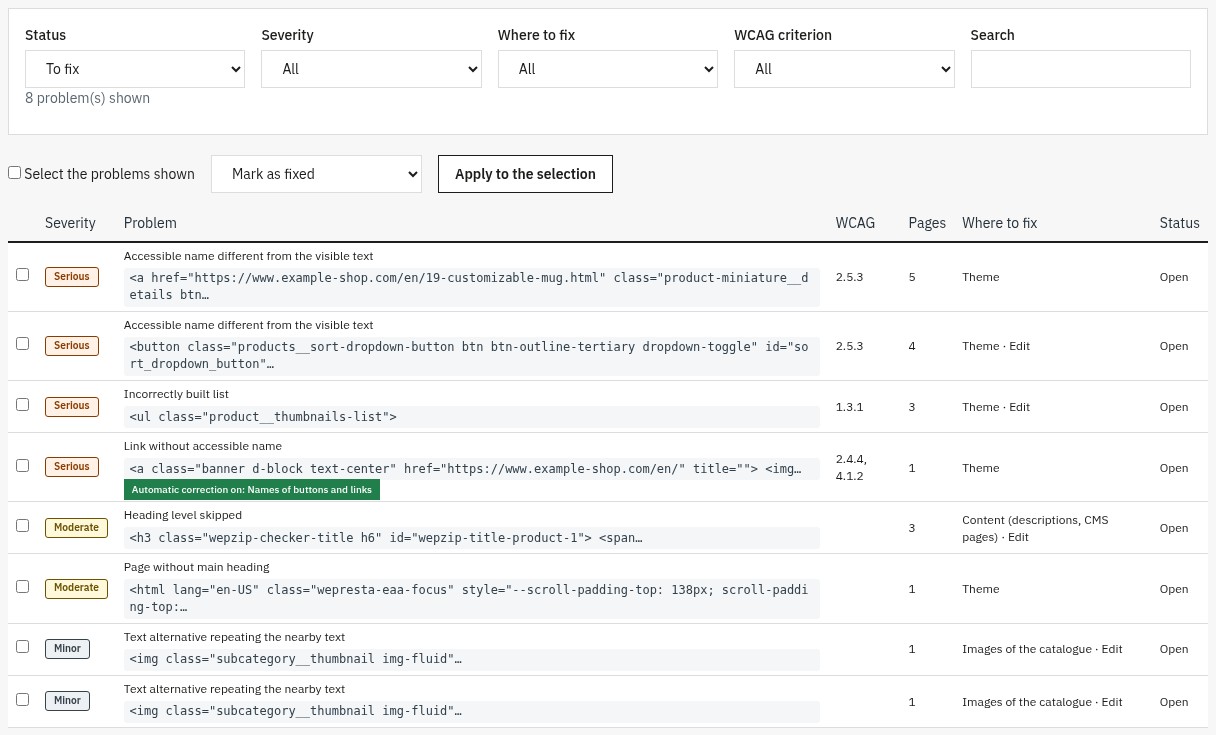 The problems to fix, grouped by element
Each problem has its page: why it matters, how to fix it in PrestaShop, the WCAG criterion concerned, the element and its HTML extract, and the pages where it appears, with a link to the back office screen to edit when there is one (product page, CMS page, catalogue images).
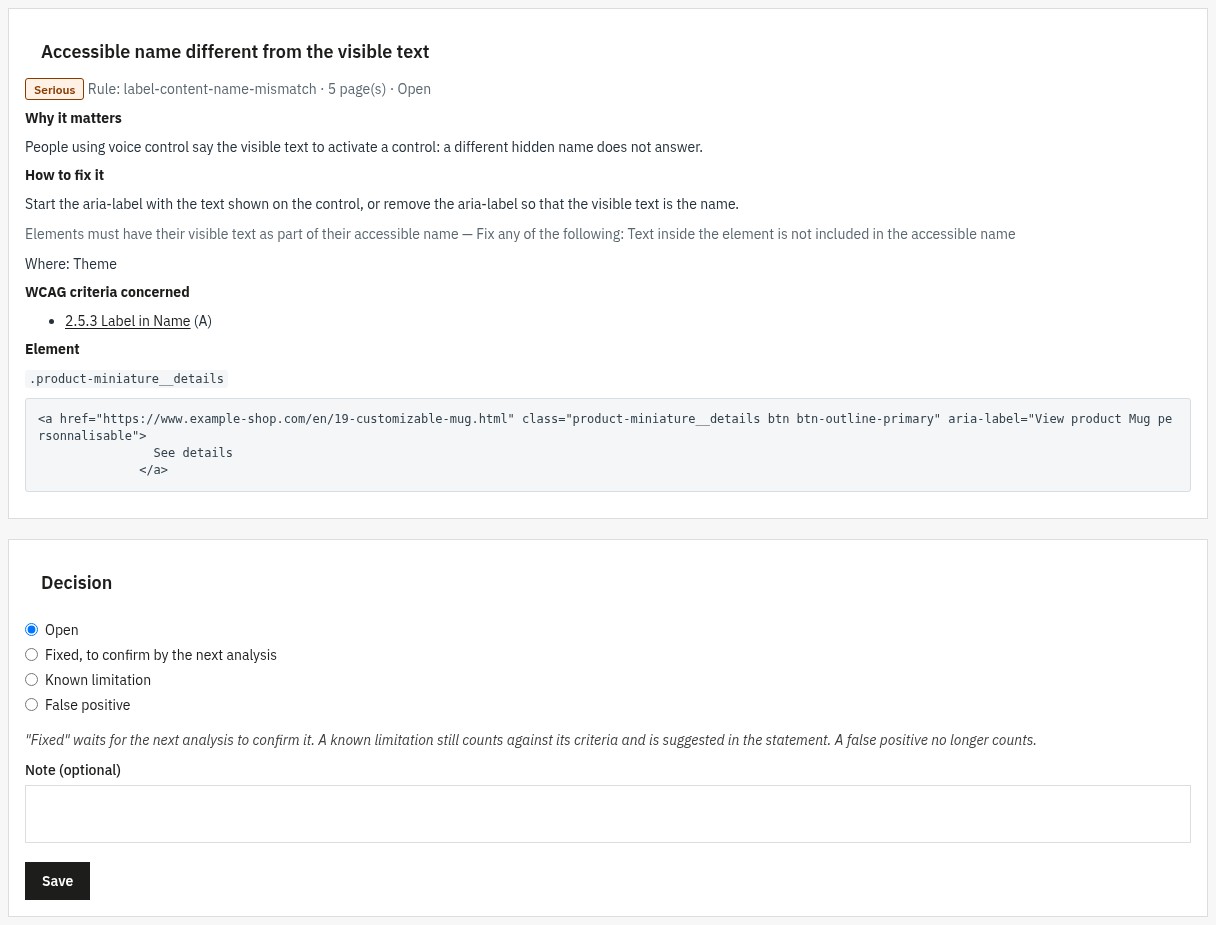 Why it matters, and how to fix it
For each problem, choose a decision:
- Fixed, to confirm by the next analysis: it becomes open again if the next analysis still finds it.
- Known limitation: it still counts against its criteria and it is suggested in the non-accessible content of the statement.
- False positive: it no longer counts.
Decisions are kept from one analysis to the next. A bulk action handles several of the problems shown.
Switch on the safe automatic fixes
In Settings, six fixes of the store are switched on separately:
- Skip link: a “Skip to main content” link, shown when the keyboard reaches it, only if the theme does not already have one.
- Names of buttons and links: a name for buttons and links made of an icon (cart, search, menu, close, quantity, social networks), from their title, their icon or their role in the theme.
- Decorative icons: icon fonts and decorative SVG are hidden from screen readers when the control already has a name.
- Form labels: a name for the fields that only have a placeholder (search, newsletter) and the repair of labels that point to a field by its name instead of its id.
- Autocomplete: the purpose of the fields of the account and address forms (e-mail, name, address, phone) is declared, so that browsers fill them in.
- Visible focus: a clear ring around the element reached with the keyboard, on every background.
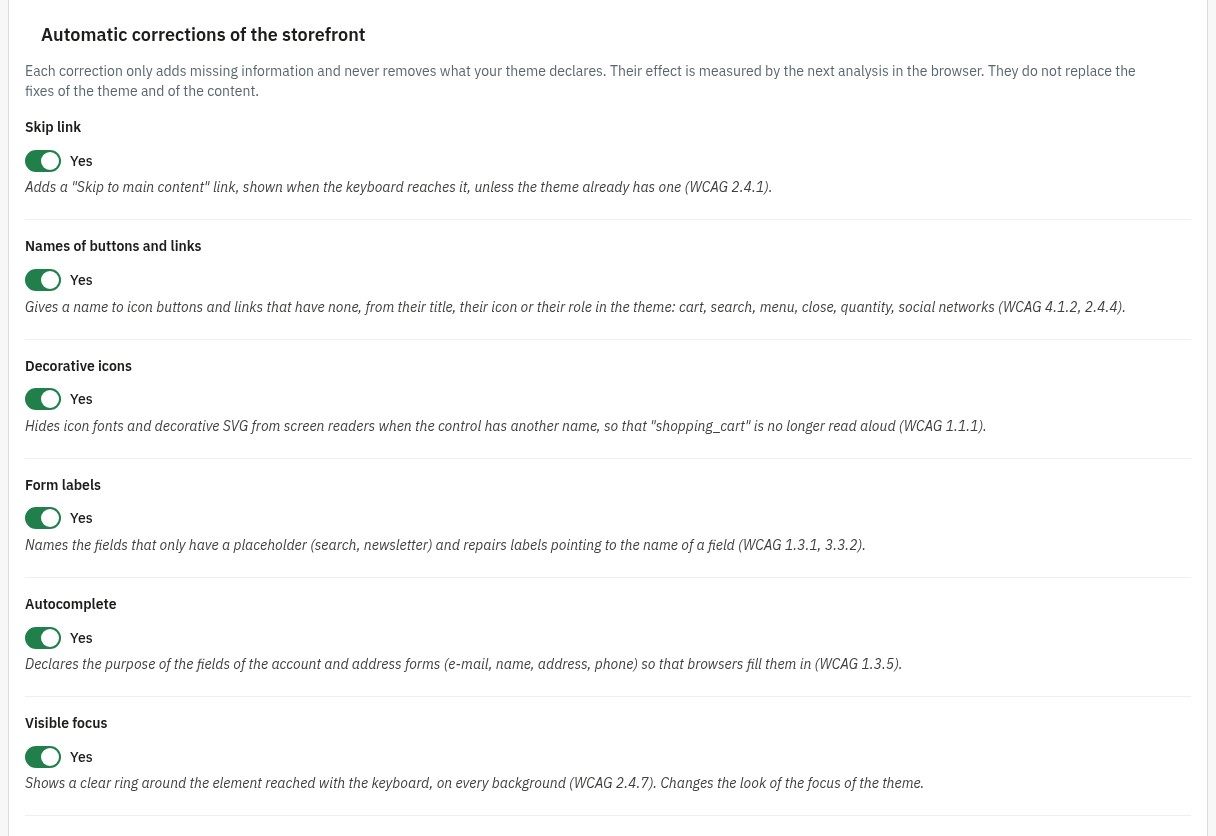 Safe fixes, switched on one by one
Each fix only adds missing information and never removes what your theme declares. Their effect is measured by the next analysis in the browser. They do not replace a fix of the theme. On the overview, the Switch on the recommended corrections button switches on the first five at once; the visible focus, which changes the look of the focus of your theme, is switched on separately.
Fill in the image captions
The Image captions screen shows, for each language, the share of captioned product images, then the images page by page, even in a large catalogue. Filter by language, by state (without caption, with caption, all) and by product name or reference. The Use the product name for the empty captions of this page button suggests a first caption; each caption is saved as soon as you type it.
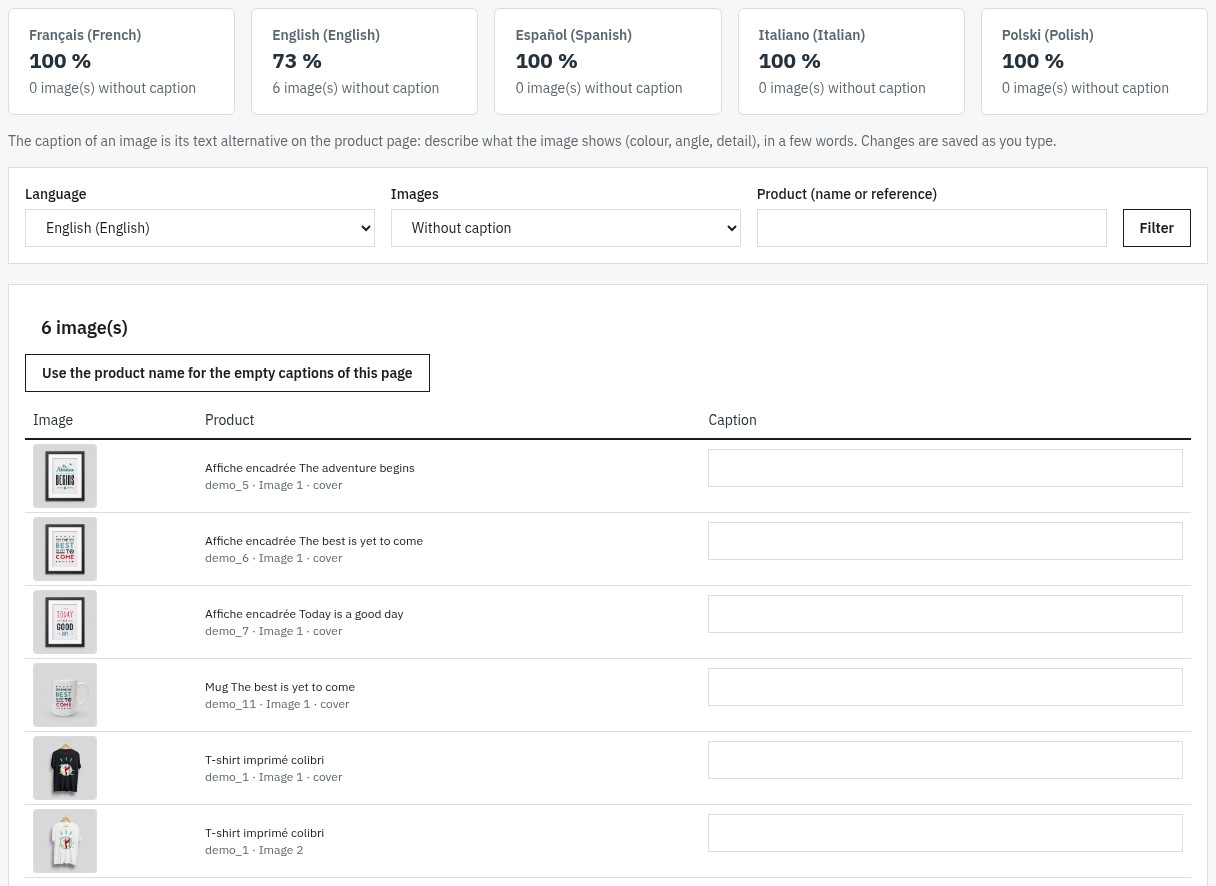 Missing image captions, done in minutes
A good text alternative describes what the image shows (colour, angle, detail) in a few words, rather than repeating the product name.
Check the criteria with the checklist
The 3. Check screen shows the 50 WCAG 2.1 A and AA criteria required by EN 301 549, grouped by principle (perceivable, operable, understandable, robust), and the 6 WCAG 2.2 criteria marked “recommended”. For each criterion:
- what it asks for and concrete advice for PrestaShop;
- what the analysis checks of it (fully, partly or not at all);
- your verdict: met, not met or not applicable;
- a note (what you checked, what remains), with the author and the date.
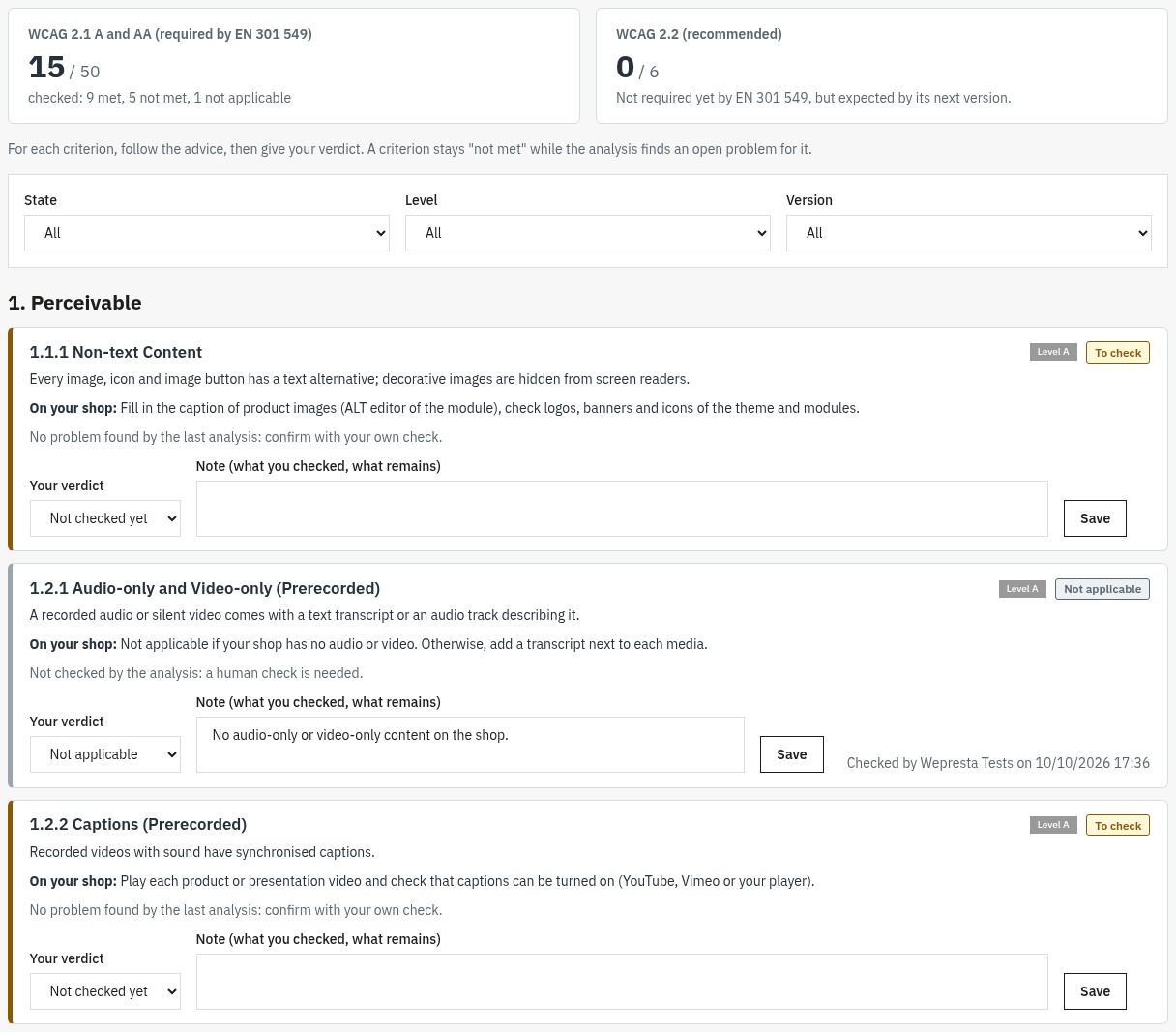 Every WCAG criterion, with advice for PrestaShop
A criterion stays “not met” while the analysis finds an open problem for it. The filters by state, level and version help you move forward in batches.
Publish the accessibility statement
The 4. Publish screen prepares the statement on the European model (Directive (EU) 2019/882, EN 301 549):
- Country of reference: the national law and the enforcement authority are prefilled for France, Belgium, Spain, Italy, Poland and Germany, and remain editable; the other countries use the European model.
- Compliance status: fully, partially or not compliant, with the suggestion drawn from your checklist.
- Contact: e-mail, optional phone, link to the contact form and response time.
- Texts per language: measures taken, non-accessible content and its alternatives (the Insert the criteria not met button takes them from your checklist), description of the service and enforcement procedure.
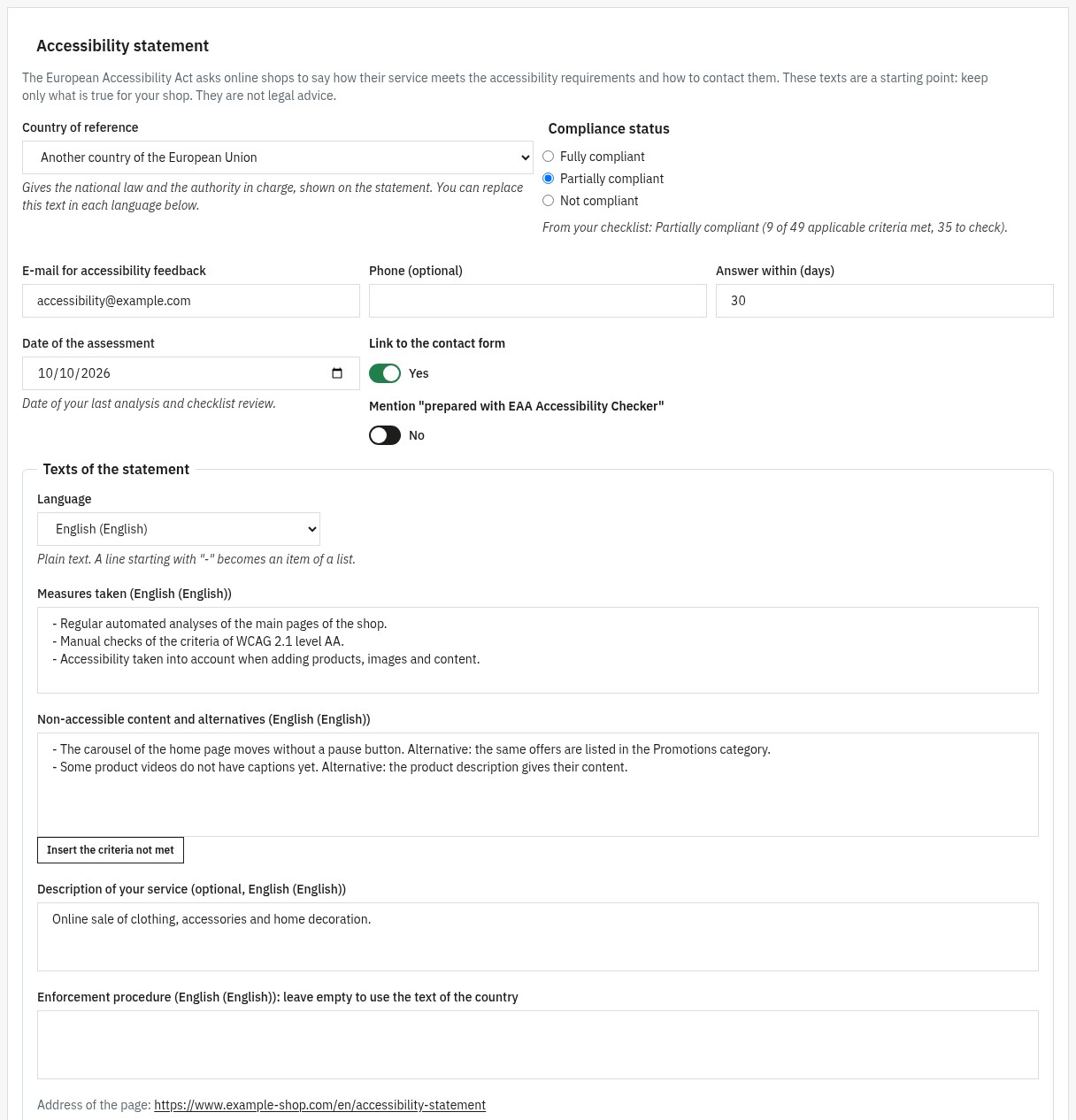 A statement prefilled for your country
Switch on Publish the statement on the shop: the page is available in every language, at a readable address, with a link in the footer of every page if you switch it on. As long as it is not published, the address answers “page not found” and you can preview it in the back office.
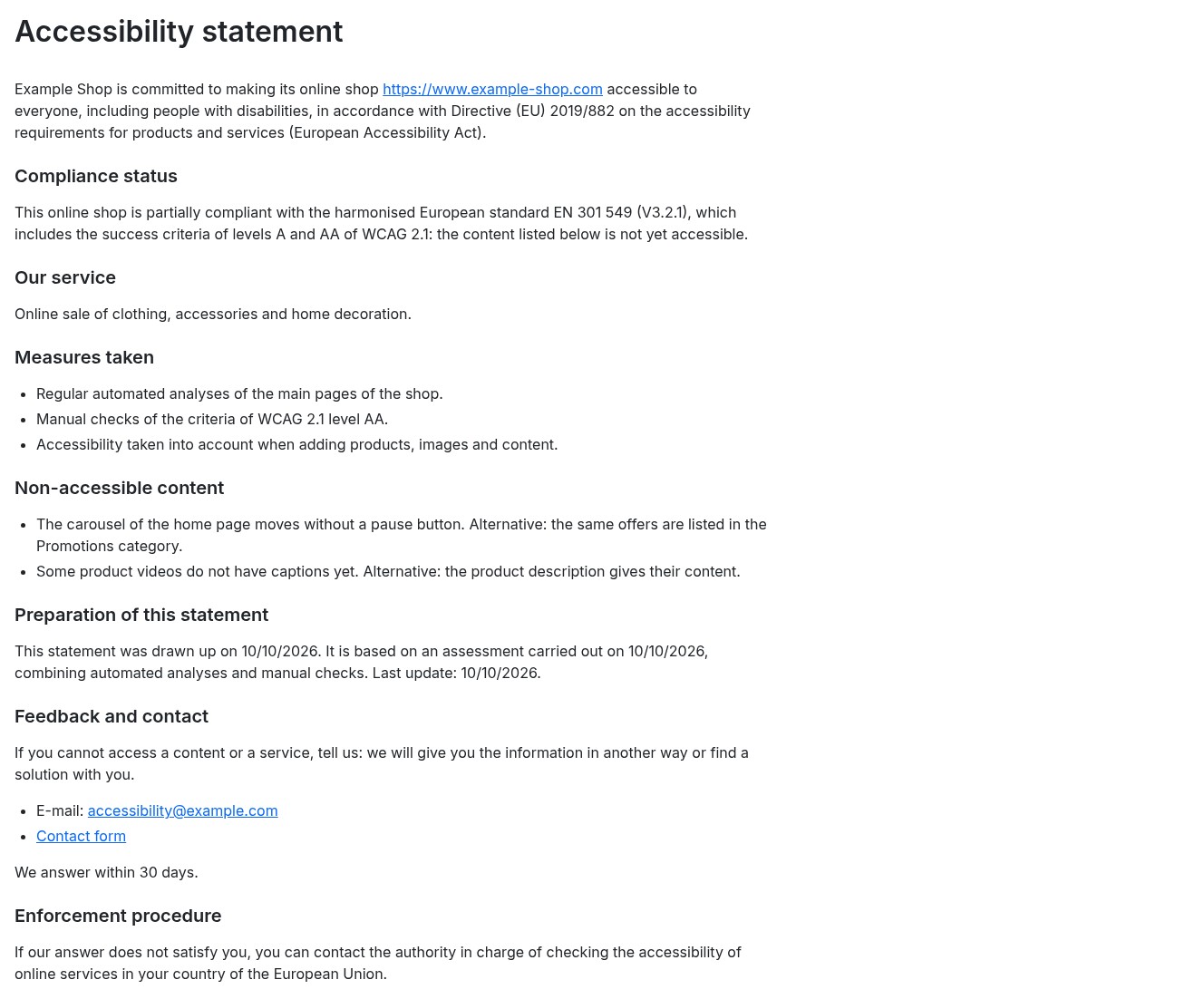 The published statement, in every language
Schedule the analyses and receive the report
In Settings, switch on Analyse the shop automatically, choose the frequency (every day, every week, every month), the day and the hour, then the recipients of the report by e-mail. The report shows the open, new and resolved problems since the previous analysis.
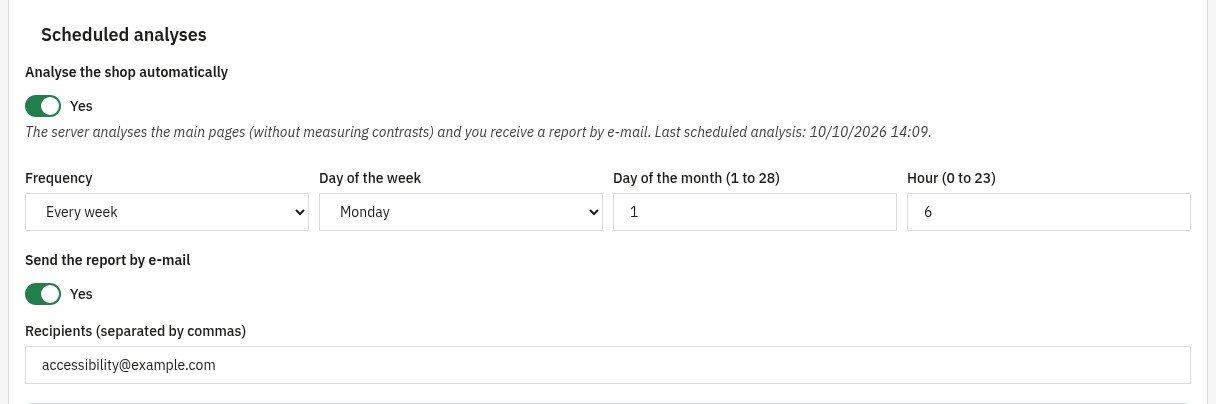 Scheduled analyses and a report by e-mail
The analyses start when your host runs one of the two tasks shown in the settings, every hour (recommended) or every day:
- the command to give to the cron task of the host;
- or the address with a secret, compatible with the PrestaShop “Cron tasks manager” module. A button creates a new secret.
Export the report
The Report screen opens a dated printable report (analyses, criteria and problems), to save as PDF with the print command of the browser, and exports the problems or the checklist as CSV (readable in a spreadsheet).
Installation
- Download the archive of the module from your WePresta customer account.
- In the back office, open Modules > Module Manager and click Upload a module.
- Send the ZIP file.
- Click Configure to activate your license, then open the module with the button of the page or the WePresta > Accessibility (EAA) menu (Modules > Accessibility (EAA) when the store has no WePresta menu).
The installation creates the tables of the module, the readable address of the statement and the menu entry. No page of the store changes until you switch on a fix or the footer link.
First analysis
- Open 1. Analyse, keep In your browser and the suggested pages ticked.
- Click Start the analysis and keep the page open: each page shows its number of problems.
- Open 2. Fix: start with the serious problems present on many pages, often linked to the theme.
- Switch on the recommended fixes in Settings, then run a new analysis to measure their effect.
- Move forward in 3. Check, then prepare and publish your statement in 4. Publish.
Store protected by a password (staging): fill in its HTTP credentials in the settings for the server analyses and the scheduled analyses.
Requirements and compatibility
- PrestaShop 1.7.8, 8.0+ and 9.0+
- PHP 7.4 or later, DOM extension
- A cron task (or the “Cron tasks manager” module) for the scheduled analyses
- Single store or multistore: each store has its own analyses, checklist and statement
- Interface in English, French, Spanish, Italian and Polish
On the store, axe-core is only loaded on the pages opened by an analysis; only the fixes you switch on add a script of about 5 KB compressed.
FAQ
What is the EAA and why is your store affected?
The European Accessibility Act (Directive (EU) 2019/882) has applied since 28 June 2025 to many digital services, including online shops selling to consumers in the European Union. Your store must be usable by people with disabilities and inform about its accessibility. The technical reference is the EN 301 549 standard, which takes up the WCAG 2.1 level AA criteria; micro-enterprises providing services are exempt. The module helps you measure, fix, check and document this work; it is not legal advice.
WCAG 2.1 AA: what does it actually mean for an e-commerce?
WCAG 2.1 brings together 50 criteria of levels A and AA: text alternatives of images, contrasts, keyboard navigation, understandable forms, headings and structure, language of the pages, and more. For a store, the critical pages are the home page, the product lists, the product page, the cart, the checkout and the customer account. The module analyses these page templates in every language and suggests, for each criterion, a check suited to PrestaShop.
What does the accessibility scanner detect and how are issues prioritized?
The analysis in the browser relies on axe-core: it checks dozens of WCAG A and AA rules on the page as it is displayed, contrasts included. The server analysis, used by the scheduled analyses, checks the HTML with the rules of the module (images, labels, names of buttons and links, headings, languages, forms). Problems are ranked by severity (serious, moderate, minor), grouped by element and linked to where to fix them: theme, content, catalogue images or module.
Auto-Fix: what corrections are made automatically?
Six fixes, each switched on separately: the “Skip to main content” link (only if your theme has none), a name for buttons and links made of an icon, decorative icons hidden from screen readers, labels for fields that only have a placeholder (search, newsletter), autocomplete on the account and address forms, and a visible focus on every background. They add missing information without removing what your theme declares, and the next analysis in the browser measures their effect.
Is Auto-Fix enough to be 100% compliant?
No, and no tool can be. Automatic fixes handle common technical defects, but many criteria depend on content and use: relevant text alternatives, captions of videos, reading order, understandable error messages. An effective process is to (1) analyse, (2) fix the theme and the content, helped by the safe fixes, (3) check the manual criteria in the checklist, (4) publish a statement that reflects reality.
How to manage alternative texts (ALT) at scale, without spending weeks?
The captions editor shows the images of your products page by page, which stays fast in a large catalogue. Filter by language, by product or reference and by images without a caption; a button suggests the product name for every empty caption of the page, and each caption is saved as soon as you type it. For a good text alternative, describe what the image shows (colour, angle, detail) rather than repeating the product name.
Why is a manual checklist essential, even with an automatic scanner?
A machine cannot judge whether a text alternative is relevant, whether captions are present, the order of the focus or the clarity of an error message. The checklist covers the 50 WCAG 2.1 A and AA criteria and, as a recommended option, the 6 criteria of WCAG 2.2, grouped by principle. For each criterion: concrete advice for PrestaShop, your verdict (met, not met, not applicable), your notes, the author and the date. A criterion stays “not met” while the analysis finds an open problem for it.
What is the accessibility statement for and how is it generated?
It tells your customers the accessibility level of your service, the non-accessible content and its alternatives, and how to contact you or assert their rights. The module prepares it on the European model, with the national law and the enforcement authority prefilled for France, Belgium, Spain, Italy, Poland and Germany (editable, or a European model for the other countries). You choose the compliance status, write the texts in every language and publish a dedicated page, with a link in the footer if you wish.
Can scans be automated (CRON) and alerts received in case of regression?
Yes. Choose a frequency (daily, weekly or monthly), a day and an hour: the cron task of your host, or the “Cron tasks manager” module with the secret address shown in the settings, starts the analysis once the planned moment has passed. The e-mail report shows the open, new and resolved problems since the previous analysis.
Performance and prerequisites: does it slow down the front-office? what are the technical conditions?
Analyses start from the back office: axe-core is only loaded on the pages opened by an analysis. On the store, only the fixes you switch on add a script of about 5 KB compressed and a small stylesheet. Requirements: PrestaShop 1.7.8, 8.0+ or 9.0+, PHP 7.4 or later and the DOM extension; a cron access is useful for the scheduled analyses.
Why analyse in the browser rather than on the server?
The browser sees the page as your customers do: styles applied, content added by JavaScript, real colours. It is the only way to measure contrasts and the effect of the automatic fixes. The server analysis remains useful for the scheduled analyses; for a store protected by a password (staging), fill in its HTTP credentials in the settings.
Does the module work in multistore and on PrestaShop 1.7?
Yes. Each store has its own analyses, checklist and statement; when several stores are selected, the module asks you to choose one. The same module works on PrestaShop 1.7.8, 8.0+ and 9.0+ with PHP 7.4 minimum.
What happens if I already used version 1 of the module?
The update keeps your checklist, the contact of your statement and your scheduled analysis settings. The old analysis results are replaced by those of the new analysis. Then review your statement and publish it again from the Publish screen: it is not put back online automatically.
Support
For any help, contact us from your WePresta customer account or by e-mail at mail@wepresta.shop, according to the support option of your plan.
Before writing to us, prepare:
- the versions of PrestaShop and PHP
- the theme used
- the address of the page concerned and a screenshot of the page of the problem
Changelog
Version 2.0.0
New
- Analyse your pages in the browser with axe-core: computed contrasts, ARIA attributes and content added by scripts.
- Follow your process in four steps: Analyse, Fix, Check, Publish.
- Find each problem grouped by element, with how to fix it in PrestaShop and a link to the screen to edit.
- Mark a false positive or a known limitation: your decision is kept for the next analyses.
- Check the 50 WCAG 2.1 A and AA criteria and, as an option, the 6 criteria of WCAG 2.2, with advice for each criterion.
- Publish an accessibility statement on the European model, with the law and the authority prefilled for six countries.
- Add the link of the statement to the footer of the store.
- Export a printable report, and the problems or the checklist as CSV.
- Run the scheduled analyses with the cron task of your host or with a secret address.
- Use the module on PrestaShop 1.7.8, 8.0+ and 9.0+ with PHP 7.4 minimum.
Improvements
- A criterion is only counted as met after your check, with no open problem.
- The analysed pages represent each template of your store, in every language.
- The server analysis checks more rules: headings, languages, forms, autocomplete, zoom.
- Each automatic fix is switched on separately and its effect is measured by the next analysis.
- The captions editor stays fast in a large catalogue and saves each caption as soon as it is typed.
- The e-mail report shows the new and resolved problems.
- The module opens from the WePresta menu, with an interface in five languages.
- An address added by hand is limited to the domains of your store.
Fixes
- The public page of the statement shows its content.
- The scheduled analyses run again.
- Ignoring a problem no longer counts it as fixed.
- Images without a text alternative no longer receive the text “Image”.
- The skip link is placed at the start of the page, without duplicating the one of the theme.
- Opening the module no longer clears the cache of the store.
- The rights of employee profiles are respected on PrestaShop 8.
After the update: your checklist, the contact of the statement and your scheduled analysis settings are kept; review your statement, then publish it again from the Publish screen.
Version 1.0.0
- Initial release
- WCAG 2.1 AA scan engine
- Integrated Auto-Fix
- Alt Text Editor
- Multilingual accessibility statement generator
