- Promotions ready in a few clicks
- Discount mechanics
- Precise conditions
- Stacking, priorities and limits
- Promote your offers
- Track results
- Test a cart
- Is the module compatible with my theme?
- Are promotions compatible with payment modules?
- Can a customer reuse another customer's discount?
- Can I prevent certain promotions from stacking?
- How do I find out why a promotion does not apply?
- Does the module work with multi-store and several currencies?
Smart Promotions: 3 for 2, tiers and bundles
Presentation
Smart Promotions is a PrestaShop module that applies your promotions automatically in the cart, without coupon codes: 3 for 2, second item at -50 %, progressive tiers, bundles at a fixed price, sales on a category, "buy A, get B cheaper" or free shipping from an amount.
As soon as the cart meets the conditions, the discount appears in the cart, the order and the invoice under the name you choose. The module relies on PrestaShop's native cart rules: taxes, currencies and payment modules work as with a regular discount. Each discount belongs to the cart of the customer who obtained it.
It is designed for merchants who want to increase the average order value and run their campaigns (sales, Black Friday, loyalty) without development or codes to distribute.
Highlights:
- 10 discount mechanics, including 3 for 2, progressive tiers and bundles
- 22 combinable conditions (customer, cart, products, delivery, currency)
- Ready-made templates and a plain-language summary of the offer
- Progress messages ("Only €12 more for free shipping"), product badges and a "You save" block
- Statistics per promotion and a cart test tool
- Multi-store, multi-currency and multi-language
Features
Promotions ready in a few clicks
Create a promotion from a template: 3 for 2, second item at -50 %, -10 % from €100, free shipping from €50, welcome offer, birthday offer, "buy more, save more", 3 products for a fixed price, sale on a category or "buy A, get B cheaper". The promotion opens pre-filled; you adjust the values and save it.
Products, categories, brands, suppliers, customers, groups, countries, zones, carriers and currencies are chosen by search: type a few letters and pick the suggested items.
While you edit, a plain-language summary describes the offer, its conditions, its period and its stacking rules. It also points out what needs checking: a promotion without a discount, an end date in the past, or a promotion hidden by another one with a higher priority.
A promotion can be saved as a draft or activated right away. Saving is checked: incomplete fields are highlighted and nothing applies until the promotion is valid.
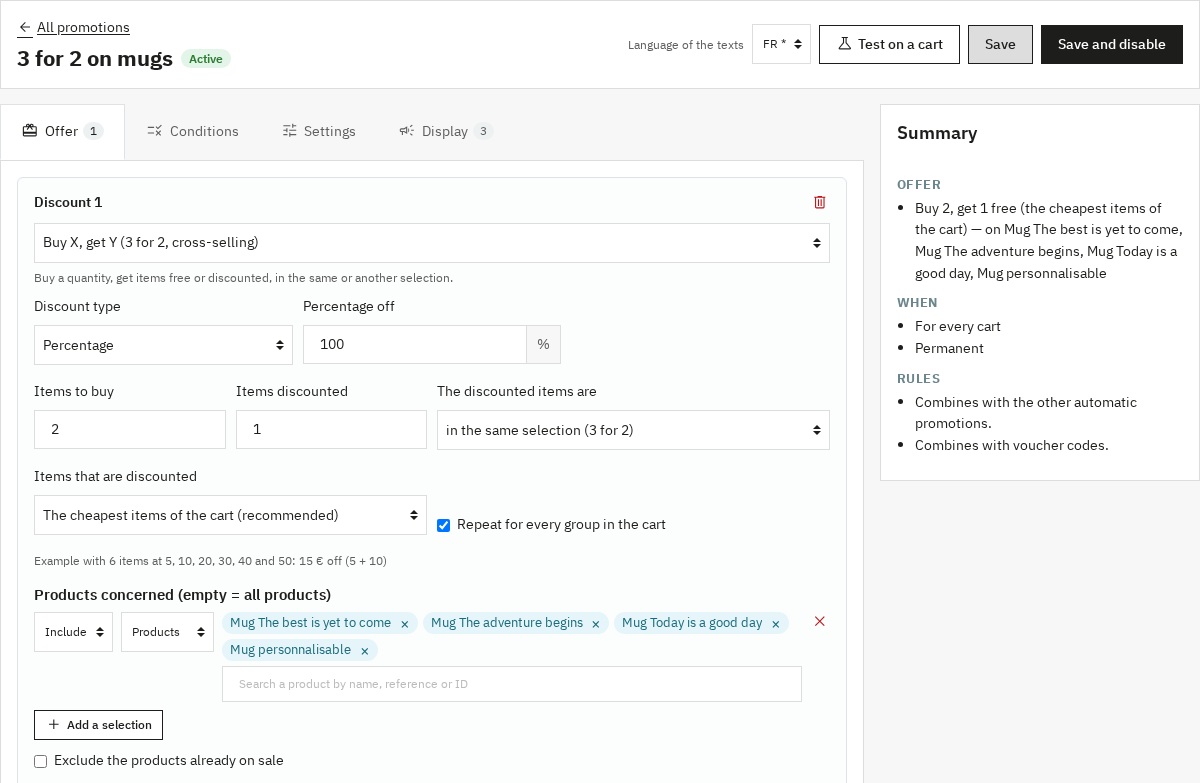 Promotion editor with its plain-language summary
Discount mechanics
- Buy X, get Y: 3 for 2, buy 1 get 1 at -50 %, in the same selection or in another one (buy shirts, get a tie cheaper). You choose the discounted items: the cheapest of the cart, the most expensive, or the cheapest of each group.
- Discount on products: a percentage, an amount or a fixed price on a selection, for example -30 % on dresses.
- Progressive tiers: the discount grows with the quantity or the amount (2 items -5 %, 3 items -10 %, 5 items and more -15 %).
- Every Nth item discounted: second item at -50 %, the cheaper item of each pair being discounted.
- Bundle at a fixed price: 3 products for €30, mixing the products of the selection.
- All items after X: the first items at full price, the next ones discounted.
- Discount from an amount: on the order or on the selected products.
- Discount per spent amount: for example €5 for every €50 spent, with a maximum number of tiers.
- Discount on the order and free or discounted shipping.
Each discount can target products, categories, brands or suppliers and exclude others. The "exclude products already on sale" option avoids a double discount. A discount cap can be set.
Precise conditions
Promotions apply according to:
- the customer: specific customers, group, newsletter subscription, first order, number of orders, total spent, registration date, seniority, birthday, title;
- the cart: amount with or without tax, number of items, weight, products, categories, brands or suppliers in the cart;
- delivery and payment: country, zone, carrier, currency.
Conditions are grouped: all the conditions of a group, or at least one of them. Amounts entered in the default currency are converted into the customer's currency.
Stacking, priorities and limits
Each promotion has a stacking mode:
- Stackable: it adds to the other promotions;
- Last: it adds to the promotions with a higher priority, then blocks the next ones;
- Exclusive: it applies alone.
Exclusion groups apply only the best offer of a group for the customer. You also decide whether the promotion combines with the voucher codes entered by the customer.
You can limit the total number of orders and the number of uses per customer, over the whole period or per year, month, week or day. A customer is recognised by their account and by their e-mail address, including when ordering as a guest. A cancelled or refunded order frees its use.
Promote your offers
- Messages: show a text on the product page, in product lists, in the add-to-cart window, in the cart or the checkout, or in the general areas of the shop. A message can be shown at all times, only when the customer is close to the offer, or once the discount is obtained; only to the customers concerned and on the products of the promotion.
- Variables and progress bar:
{remaining_amount},{missing_quantity},{discount},{end_date}and{promo_name}personalise the text, for example "Only {remaining_amount} more for free shipping!". A progress bar can accompany the message. The cart updates without reloading the page. - Badges: a badge, with the text and colour of your choice, appears on the products concerned, in lists and on the product page.
- You save: a summary of the promotions obtained appears in the cart, the checkout and the add-to-cart window.
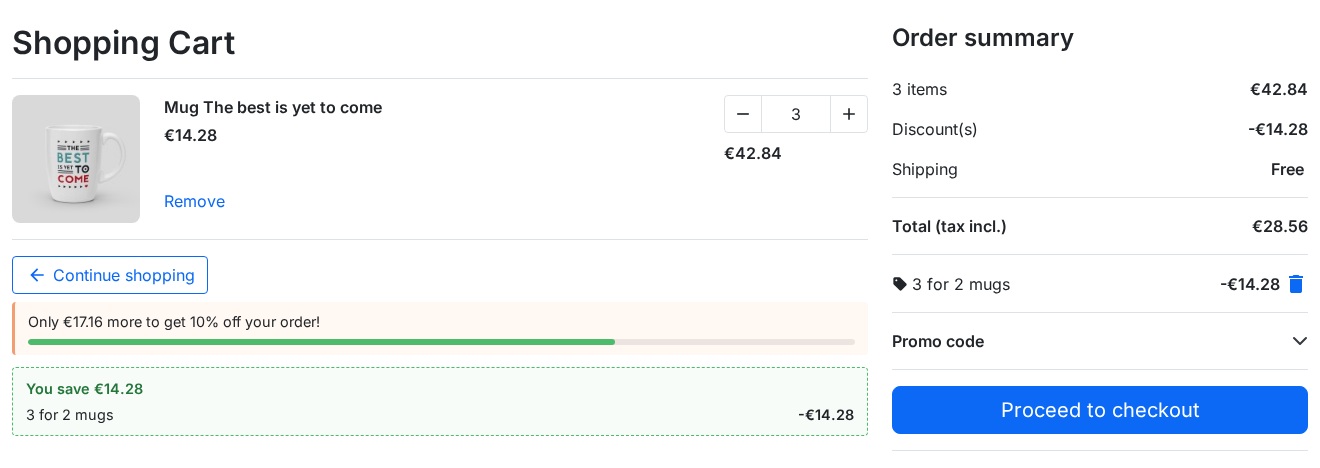 Cart: savings obtained and progress towards the next offer
Track results
The Performance page shows, for the chosen period, the orders with a promotion, their revenue, the discounts granted and the average order value with and without a promotion, then the details per promotion. The data can be exported to CSV. The promotion list shows the real status (scheduled, running, ended, limit reached), the summary of the offer, the uses and the total discounts.
Test a cart
The "Test a cart" page explains which promotions apply and why, without changing the cart: on an existing cart or on a cart made of products, for a given customer, currency, country and carrier. A draft promotion can be tested before it is activated. A detailed journal can be turned on for a few hours; it then turns off by itself.
Installation
- Download the module from your WePresta customer account.
- In the PrestaShop back office, go to Modules > Module Manager.
- Click Upload a module and select the ZIP file.
- The module creates its tables and adds the Smart Promotions entry to the WePresta menu.
To update the module, upload the new ZIP the same way: your promotions, statistics and settings are kept.
Configuration
Create your first promotion
- Open Smart Promotions > Promotions and click New promotion from a template.
- Choose for example 3 for 2.
- In the Offer tab, select the products or categories concerned.
- In the Display tab, adjust the badge and the messages.
- Check the summary, then click Save and activate.
Add three products of the selection to the cart: the cheapest one is free and the cart shows "You save".
Promotion settings
- Internal name and label shown to customers (cart, order confirmation, invoice), in each language
- Start and end dates
- Priority, stacking mode, exclusion group and combination with voucher codes
- Maximum number of orders and uses per customer, with their period
- Shops concerned in multi-store
Module settings
The Settings page lets you suspend all promotions, show or hide the "You save" block, choose the order statuses that free a use, the delay after which the discounts of abandoned carts are removed, how long the journal is kept, and whether data is kept when the module is uninstalled.
A daily maintenance removes the discounts of abandoned carts and ended promotions. It runs at the first back-office visit of the day; a scheduled task makes it regular (address provided in the settings, compatible with PrestaShop's Cron tasks manager module).
Requirements
- PrestaShop 1.7.8, 8.2 or later, 9.1 or later (PrestaShop 8.0, 8.1 and 9.0 are not supported)
- PHP 7.4 or later
- SSL (HTTPS) recommended
FAQ
Is the module compatible with my theme?
Yes. Discounts use PrestaShop's native cart rules. Messages and badges use the standard positions of PrestaShop themes; a custom theme that keeps these positions displays them as well.
Are promotions compatible with payment modules?
Yes. The discount is part of the cart like a regular cart rule: the amount paid and the invoice include it.
Can a customer reuse another customer's discount?
No. Each discount is created for one cart, with an internal code the customer does not see and that applies to no other cart.
Can I prevent certain promotions from stacking?
Yes: with the stacking modes (stackable, last, exclusive), priorities, exclusion groups and the option to combine with voucher codes.
How do I find out why a promotion does not apply?
Use Test a cart: each promotion is shown with its result and the reason, for example an unmet condition, a limit reached or an exclusive promotion with a higher priority.
Does the module work with multi-store and several currencies?
Yes. Each promotion is linked to the chosen shops, and amounts are converted into the cart currency.
Support
For any technical questions or assistance:
mail@wepresta.shop
Please include:
- PrestaShop version
- PHP version
- A detailed description of the problem
- The full configuration of the promotion concerned; the result of Test a cart helps us answer faster
Changelog
Version 2.0.2
Fixes
- Visitors can switch language or currency with items in their cart on PrestaShop 1.7.8: the “Fatal error” page no longer appears and the cart promotions stay applied.
Version 2.0.1
Fixes
- Activating the license reloads the configuration page: no more error on activation or when an expired license is renewed.
Version 2.0.0
New
- Create your promotions from ten ready-made templates.
- Choose products, categories, customers and carriers by search, without typing IDs.
- Read the offer in a plain-language summary before activating it.
- Choose the discounted items of a "Buy X, get Y": the cheapest, the most expensive or per group.
- Discount a product of another selection: buy shirts, get a tie cheaper.
- Apply a discount to a category, a brand or products, with exclusions.
- Offer progressive tiers based on quantity or amount.
- Show progress messages with variables and a bar, only to the customers and products concerned.
- Highlight discounted products with a badge.
- Show customers how much they save in the cart.
- Track the orders, revenue and discounts of each promotion, with CSV export.
- Test a cart to understand why a promotion applies or not.
- Limit uses per customer and per period.
Improvements
- Save a promotion in one go, as a draft or active.
- Choose the discount label shown to customers, on the invoice and in e-mails.
- Set stacking with one choice: stackable, last or exclusive.
- Amounts follow the customer's currency.
- Guest orders count towards the limit per customer.
- Cancelled or refunded orders free their use.
- Discounts of ended promotions and abandoned carts are removed every day.
- The cart and the shop pages load faster.
- The module also works on PrestaShop 1.7.8 and with PHP 7.4.
Fixes
- A discount obtained by one customer no longer applies to another visitor's cart.
- Editing a discount keeps the products it applies to.
- Employees without rights on the module can no longer change promotions.
- Discounts without tax and in foreign currencies have the right amount.
- The second item at -50 % discounts the cheaper item of each pair.
- A message placed under the price no longer replaces the price.
After updating
- Check the products of your promotions: an edit made with the previous version may have extended a discount to the whole catalog.
- Existing "Buy X, get Y" promotions keep their per-group calculation; you can choose another mode in the Offer tab.
Version 1.0.0
- Initial release
- 9 promotion action types
- 22 condition types
- Full priority and exclusion system
- Multi-store and multi-language support
