- Drag-and-drop visual editor
- Smart triggers
- Audience targeting
- Frequency, scheduling and priority
- Display, mobile and search engines
- Discount codes
- Cart and free shipping
- Countdown
- Reminder tab
- Ready-made templates
- Statistics and conversions
- Preview and test mode
- Google Tag Manager / GA4 events
- Administration, multistore, multilingual
- Welcome offer with a unique code
- Cart recovery
- Free shipping after adding to cart
- Information banner
- Flash sale with a countdown
- How many popups can I create?
- Does the editor slow down the shop?
- Does the popup work on mobile?
- Can unique codes be abused?
- My shop uses a page cache. Is it compatible?
- Is the module GDPR-friendly?
- Can I test a popup without my customers seeing it?
- The popup does not appear
- Exit intent does not fire
- The "add to cart" trigger does not work
- The countdown does not show
- Statistics stay at zero
Creative Popup
Want to show the right message to the right visitor without slowing your shop down: a welcome offer, a discount code when a shopper hesitates, delivery information or a flash sale? Creative Popup lets you design these popups in a visual editor, decide precisely when and to whom they appear, then measure the sign-ups, codes used and orders they bring in.
See Creative Popup and the license offers
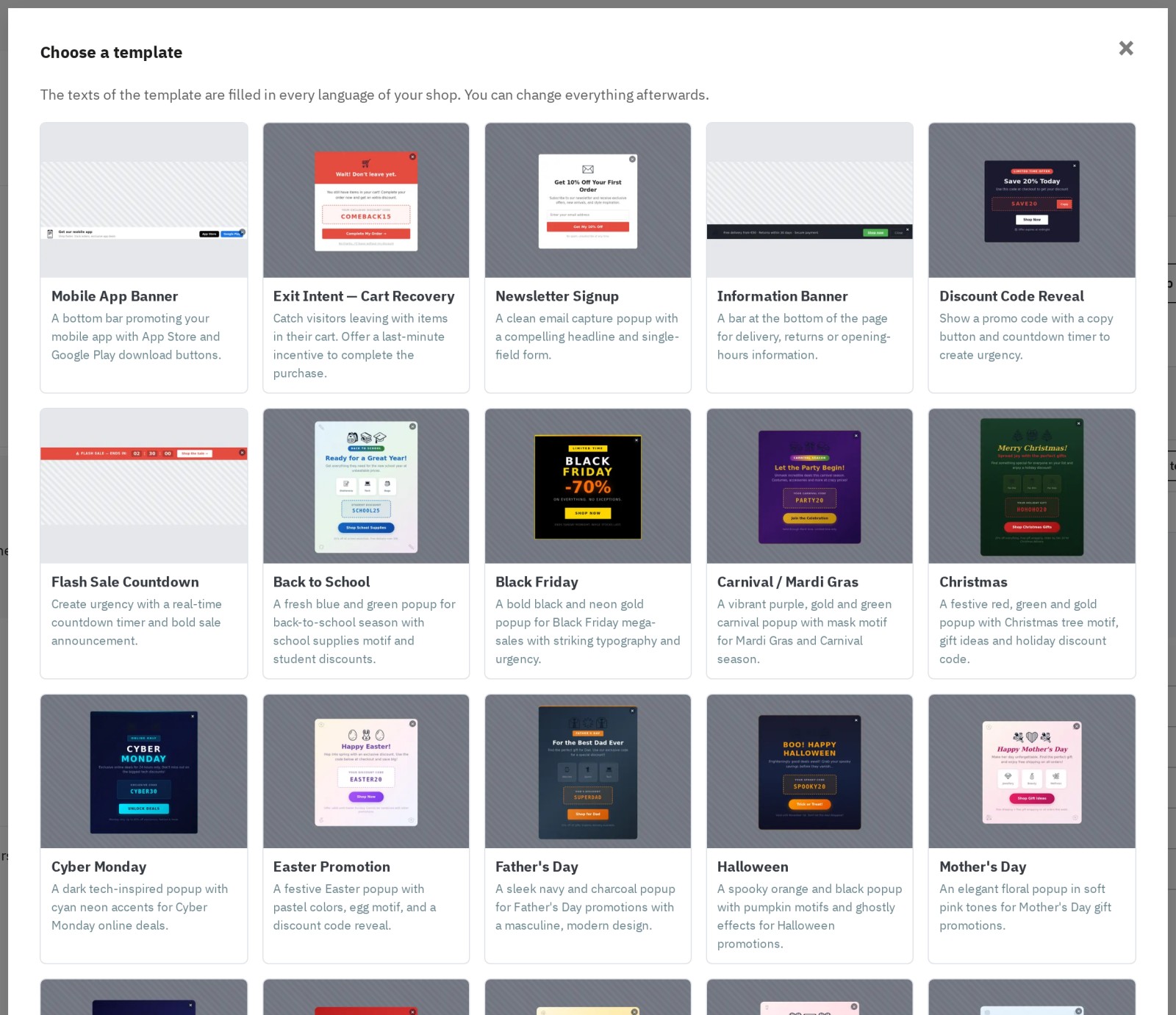
Pick one of 22 templates: their texts are filled in every language of your shop.
Presentation
Creative Popup is a popup module for PrestaShop, built to create effective marketing campaigns without writing a single line of code. Instead of a basic text editor, it includes a real drag & drop visual builder (GrapesJS, bundled with the module): you compose your popup, adjust every style (typography, colors, spacing, backgrounds) and control precisely when, where and to whom it is shown. The goal is simple: grow newsletter sign-ups, improve conversion, reduce cart abandonment and promote your offers with fast, responsive and well-targeted popups.
Highlights:
- Drag & drop editor in the back office, with one design per language
- 22 templates translated into English, French, Spanish, Italian and Polish
- 8 triggers: delay, exit intent, scroll, inactivity, click, add to cart, pages viewed and time on site
- "Is / is not" targeting rules: pages, categories, products, customers, devices, traffic source, campaigns and cart content
- Unique discount codes generated for each visitor, with order attribution
- Conversion statistics: sign-ups, codes copied, orders and revenue
- Preview on the shop and Test status before going live
- No file loaded on a page where no popup is planned
Why this module?
Classic popup modules are often limited: fixed layouts, few triggers, little targeting, scripts loaded everywhere and no way to measure what the popup actually earns. Creative Popup answers these problems: a complete visual editor to create any design, a precise rule engine to serve the right popup to the right visitor, discount codes and statistics that connect the popup to sales, and an architecture built for performance. Your shop stays fast while you add a lever for acquisition (e-mails), conversion (discount codes, calls to action) and reassurance (shipping, returns, payment).
Features
Drag-and-drop visual editor
The editor is the heart of the module. Drag and drop blocks, edit texts in place, adjust styles and preview the result on desktop, tablet and mobile. The Layers panel shows the popup structure, the Style panel sets typography, backgrounds, borders, spacing and shadows, and the Settings panel manages element properties (button link, image text, etc.). Undo and redo are always available.
Available blocks:
- Title
- Paragraph
- Image (JPEG, PNG, GIF or WebP)
- Button
- Newsletter sign-up
- Discount code (with a Copy button)
- Countdown
- "No thanks" link
- Separator
- Form elements
Each language has its own design. Badges show which languages are designed, and Copy this design to empty languages saves you from starting over. A visitor whose language has not been designed sees the default language version, never an empty popup.
Smart triggers
Creative Popup offers 8 triggers to show the popup at the right moment:
- After a delay on the page, in seconds.
- Exit intent: on desktop, when the mouse leaves the page; on mobile, on a quick scroll back up.
- Scroll: after a percentage or a number of pixels.
- Inactivity: after a period without interaction.
- Click on an element of your page (CSS selector), on every click.
- Add to cart: right after a product is added.
- Number of pages viewed during the visit.
- Time spent on the shop.
These triggers cover the key e-commerce scenarios: e-mail capture at the right time, gentle reminders, cart recovery, upselling and contextual offers.
Audience targeting
Targeting shows a popup only in the right context. Each rule can include ("is") or exclude ("is not"); all rules must match, and one matching value is enough inside a rule. A summary sentence at the top of the editor always tells you who will see the popup.
- Page type: home, categories, products, CMS, cart, checkout, search, brands, customer account, etc.
- Categories (with or without subcategories) and products, picked by search
- Customer groups, logged-in customer or not
- Device: desktop, tablet, mobile
- New or returning visitor
- Page address (contains, starts with, is exactly)
- Traffic source: search engine, social network or a specific website
- Campaign (UTM parameter)
- Pages viewed during the visit
- Cart: amount, empty or filled, product or category in the cart
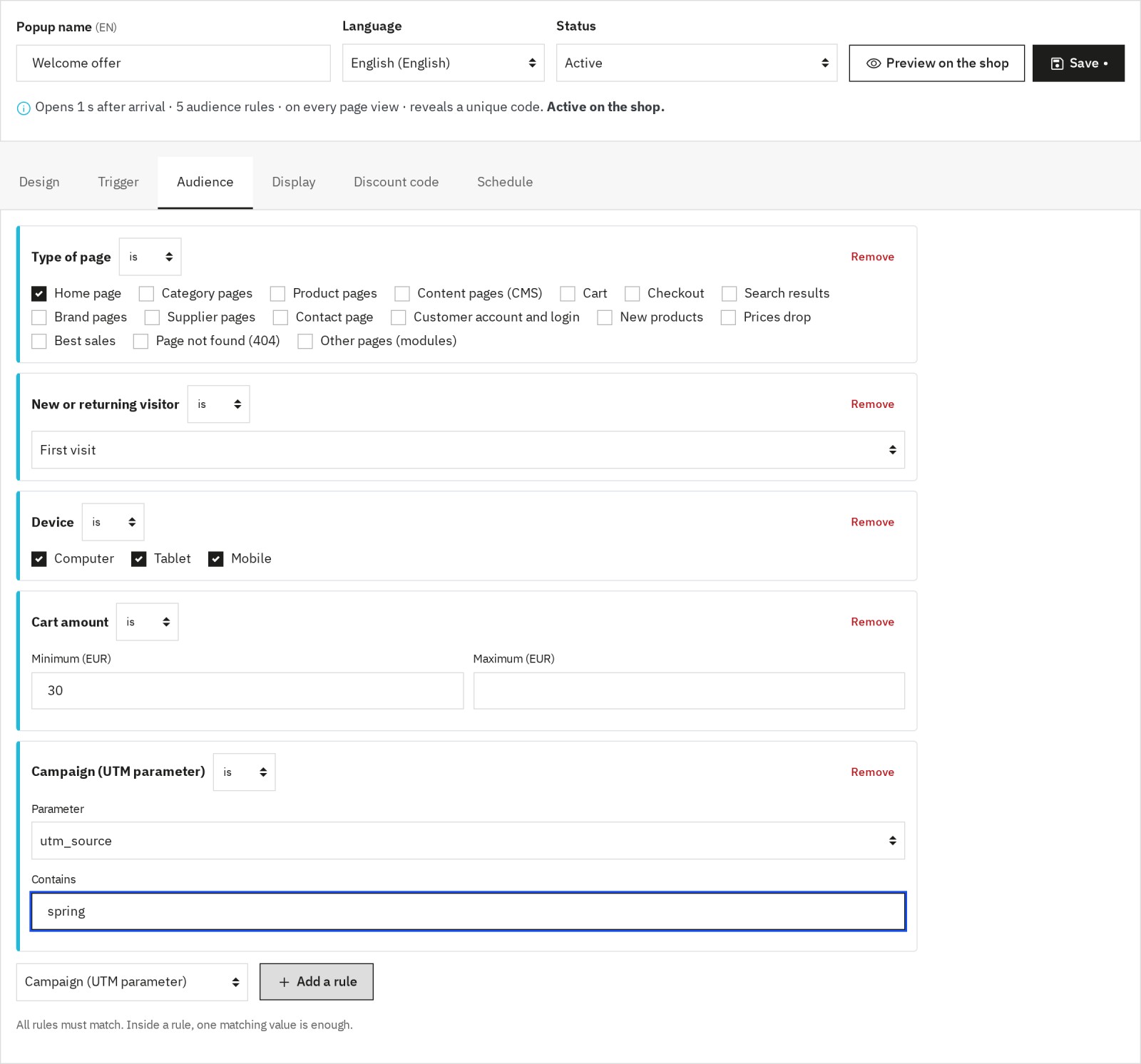
Combine audience rules: the summary tells you in one sentence who will see the popup.
Frequency, scheduling and priority
To avoid fatigue and respect your visitors' experience, you control:
- Frequency: on every page view, once per visit, once every X days or only once.
- Stop after conversion: the popup is no longer shown to a visitor who signed up or copied their code.
- Scheduling: start and end date and time, in the shop's time zone.
- Priority: when several popups are eligible, only one opens at a time, the highest priority first.
- Global limits: popups per page, per visit and minimum delay between two popups.
Display, mobile and search engines
- Positions: centered window, top bar, bottom bar, bottom-left corner, bottom-right corner and full screen.
- Opening and closing animations: fade, zoom, bounce or slide.
- Darkened background and closing on a click outside the popup.
- Mobile variant: same display, panel sliding from the bottom, bottom bar or popup hidden on phones.
- Search-engine friendly on mobile: a centered or full-screen popup is not shown on the first page of a mobile visitor coming from a search engine, as Google recommends.
- Accessibility: dialog announced to screen readers, keyboard focus, closing with the Escape key and reduced animations when the visitor asks for it.
Discount codes
The Discount code block shows a code with a Copy button. In the Discount code tab, choose:
- no code (free text in the design);
- the same code for everyone, by selecting an existing cart rule;
- a unique code for each visitor, generated automatically: percentage, amount or free shipping, minimum order, validity and prefix.
The code is revealed as soon as the popup opens, when the visitor clicks "Get my code", or after a successful newsletter sign-up. Each unique code can be used once, in the popup's shops; a visitor (or an e-mail address) always receives the same code, and a daily cap limits abuse. Expired unused codes are removed automatically. When an order uses a popup code, it is attributed to that popup in the statistics.
Cart and free shipping
Show an offer right after a product is added, or reserve a popup for carts above an amount or containing a specific product. Write {free_shipping_remaining} in a popup text to show the amount left before free shipping, in the visitor's currency; it updates after each addition to the cart. The amount uses the free-shipping threshold set in Shipping > Preferences; thresholds specific to each carrier are not taken into account.
Countdown
The countdown works:
- as a duration (hours, minutes, seconds): each visitor gets the same time from their first view;
- until a date, in the shop's time zone: one common deadline, such as the end of the sales. The popup is no longer shown once the deadline has passed.
Reminder tab
After a close without conversion, a small tab (for example "-10% for you") stays on the side of the screen and reopens the popup. You choose its text in each language, its side, its colors and how long it stays; the visitor can hide it for good.
Ready-made templates
The module includes 22 templates ready to customize, translated into English, French, Spanish, Italian and Polish:
- Seasonal: Black Friday, Cyber Monday, Christmas, Halloween, Valentine's Day, Easter, Mother's Day, Father's Day, Summer Sales, Winter Sales, New Year Sale, Carnival, Singles' Day, Back to School.
- Utility: newsletter sign-up, discount code reveal, exit-intent cart recovery, information banner (shipping, returns, payment), full-screen welcome, social media follow, mobile app banner, flash sale countdown.
Choosing a template fills every language of your shop; a language that is not covered receives the English version. Every template remains fully editable.
Statistics and conversions
For each popup and each shop, the module counts:
- views, closes and clicks;
- newsletter sign-ups, codes copied and codes issued;
- orders and attributed revenue;
- clicks on the reminder tab.
The dashboard shows these figures for the selected period, compared with the previous period, with a daily chart, a table per popup and a CSV export. Visits from employees who opened the back office in their browser and from search-engine robots are not counted.
Preview and test mode
The Preview on the shop button opens your shop with the popup shown immediately, without waiting for its trigger and whatever its rules. The Test status makes a popup visible only in your browser for 12 hours, with its real behavior: ideal to check a campaign before enabling it for everyone.
Google Tag Manager / GA4 events
When enabled in the settings, the module sends the wp_popup_view, wp_popup_click, wp_popup_close, wp_popup_conversion and wp_popup_teaser events to the page dataLayer. wpPopup:* JavaScript events are also emitted for your developers.
Administration, multistore, multilingual
- Popup list with status (Active, Test, Scheduled, Expired, Draft), trigger, schedule, views, click rate and conversions; filters, preview, duplicate and delete
- Multistore: each popup is linked to one or more shops
- Multilingual: design, name and reminder text per language, shared settings
- Employee permissions respected: a read-only employee can view popups without changing them
- No override of PrestaShop files
Requirements
- PrestaShop 1.7.8, 8.2 or later, 9.1 or later (8.0, 8.1 and 9.0 not supported)
- PHP 7.4 or later
- MySQL 5.7+ or MariaDB 10.3+
- The ps_emailsubscription module for the newsletter block (and psgdpr for a consent checkbox)
Performance note: the editor is only loaded in the back office. On the shop, no module file is loaded on a page where no popup is planned.
Installation
- Download the ZIP from your Wepresta customer account.
- Go to Modules > Module Manager.
- Click Upload a module and select the ZIP file.
- Click Configure and activate your license when the form asks for it.
- Open Creative Popup from the back-office menu.
Updating from version 1.0
Simply upload the new ZIP. Your popups, their designs, languages, shops and settings are kept; audience rules from the first version are converted to the new format. The search-engine friendly mode stays off on existing popups so their behavior does not change: turn it on if you wish. Statistics from before the update may be incomplete.
Quick start
To create a first popup in a few minutes:
- Open Creative Popup and click New popup.
- Choose a template, for example "Newsletter Signup".
- Customize texts, images and colors in the Design tab.
- In Trigger, choose "After a delay on the page" (for example 5 seconds) and the "Once per visit" frequency.
- In Audience, add for example the "New visitor" rule.
- In Discount code, choose a unique 10% code revealed after the sign-up, then click "Add the block to the design".
- Click Preview on the shop, then set the popup to Active and save.
The popup editor
The editor is organized in six tabs: Design, Trigger, Audience, Display, Discount code and Schedule. At the top, the name, language, status and summary stay visible; a warning tells you if you leave the page with unsaved changes.
The Design tab has three areas: blocks and layers on the left, the canvas in the center with the desktop / tablet / mobile switch, and styles and settings on the right. Build a readable mobile version, with a call to action visible right away and an easy way to close.
General settings
The Settings page gathers the options shared by all popups:
- show or hide all popups at once;
- display limits: popups per page, per visit and minimum delay between two popups;
- compatibility with page caches: automatic, always on or off. When on, customer and cart rules are checked in the browser with a light request, so cached pages stay correct for every visitor;
- excluding employee visits;
- dataLayer events;
- debug mode (explanations in the browser console).
Display on the shop
The module handles positions, animations, the darkened background and several ways to close (button, click outside, Escape key). The final rendering depends on the design created in the editor, which gives you complete freedom. Each popup's styles are isolated: they do not change the rest of your theme.
Technical architecture
- Back office: Symfony controllers and Twig templates, employee permissions checked on every action
- Editor: GrapesJS bundled with the module, loaded only while editing
- Shop: a single lightweight script with no dependency
- Data: dedicated tables (popups, content per language, rules, shops, statistics, codes, attributed orders)
Filtering and performance
The server selects popups by shop, language, page, category and product; the browser then checks the device, the visit, the traffic source, the dates and the frequency. Candidate popups are cached per shop and language. If no popup is planned on a page, nothing is loaded.
No override
The module does not change any PrestaShop file. It relies on hooks and the native menu system, which makes maintenance and updates easier.
Common use cases
Welcome offer with a unique code
- Template: Newsletter Signup
- Trigger: after 5 seconds
- Audience: new visitor
- Discount code: unique 10% code, revealed after the sign-up
- Goal: grow your e-mail list and measure the orders placed with the code.
Cart recovery
- Template: Exit Intent — Cart Recovery
- Trigger: exit intent
- Audience: cart page, filled cart
- Frequency: once per visit
- Goal: offer an incentive (discount code, free shipping) when the visitor is about to leave.
Free shipping after adding to cart
- Trigger: add to cart
- Position: bottom bar
- Text: "Only {free_shipping_remaining} left for free shipping"
- Goal: increase the average order value.
Information banner
- Template: Information Banner
- Position: bottom bar
- Frequency: once every 7 days
- Goal: remind shoppers about shipping, returns or payment methods without getting in the way.
Flash sale with a countdown
- Template: Flash Sale Countdown
- Countdown: until the end date
- Schedule: the campaign period
- Goal: create urgency; the popup disappears on its own at the deadline.
FAQ
How many popups can I create?
There is no practical limit. Targeting, priorities and global limits let you run several campaigns without overlap: only one popup opens at a time.
Does the editor slow down the shop?
No. The editor is only loaded in the back office. On the shop, the module loads a single lightweight script, and only on pages where a popup is planned.
Does the popup work on mobile?
Yes. Choose the display on phones (same, panel, bar or hidden) and enable the search-engine friendly mode to follow Google's recommendations. Mobile exit intent fires on a quick scroll back up.
Can unique codes be abused?
Each code can be used once, only in the popup's shops, and is valid for the duration you choose. The same visitor or e-mail address always receives the same code, requests are limited per IP address and a daily cap applies to each popup.
My shop uses a page cache. Is it compatible?
Yes. In automatic mode, compatibility turns on when a known cache module is detected; you can also force it in the settings. Customer and cart rules are then checked with a light request that is never cached.
Is the module GDPR-friendly?
The module stores the popups already seen in the visitor's browser (local storage) to respect the frequency; this data is not sent to third parties. To attribute a unique code after a sign-up, it only keeps a fingerprint of the e-mail address; the sign-up itself is handled by PrestaShop's newsletter module. With the psgdpr module, a consent checkbox is added to the newsletter form. Mention these uses in your privacy policy.
Can I test a popup without my customers seeing it?
Yes: use the Test status, visible only in your browser, or the Preview on the shop button.
Troubleshooting
The popup does not appear
- Check that it is Active and that "Show popups on the shop" is enabled in the settings
- Check the schedule dates and the linked shop
- Test in a private window: the frequency may prevent a new display
- Read the summary at the top of the editor to check the audience rules
- Enable debug mode: the browser console explains why a popup is not shown
Exit intent does not fire
On desktop, it fires when the mouse leaves the page through the top; on mobile, on a quick scroll back up. Adjust the sensitivity in the Trigger tab.
The "add to cart" trigger does not work
It relies on PrestaShop's standard cart update event (Classic and Hummingbird themes). A custom theme that does not emit it will not fire it; use a cart rule with another trigger instead.
The countdown does not show
Add the Countdown block to the design and choose its mode in the Display tab.
Statistics stay at zero
Your own visits are not counted when employee exclusion is on: test from another browser. Some ad blockers may also block sending.
Compatibility
PrestaShop
- 1.7.8.x, 8.2+ and 9.1+ (8.0, 8.1 and 9.0 not supported)
PHP
- 7.4 or later, up to the versions supported by your PrestaShop version
Databases
- MySQL 5.7+ / 8.0
- MariaDB 10.3+
Themes
- Classic and Hummingbird, and themes based on them. The "add to cart" trigger needs the standard cart event.
Browsers
- Chrome, Firefox, Safari and Edge (recent versions)
Changelog
Version 2.0.0
New
- Create unique discount codes for each visitor: percentage, amount or free shipping.
- Reveal the code when the popup opens, on click or after the newsletter sign-up.
- Track the orders and revenue brought by each popup.
- Trigger a popup after an addition to the cart, a number of pages viewed or a time spent on the shop.
- Target the cart amount and content, the traffic source, UTM campaigns and logged-in customers.
- Show the amount left before free shipping.
- Exclude an audience with the "is not" condition.
- Check a popup before going live with the preview on the shop and the Test status.
- Choose the display on mobile: same, panel, bar or hidden.
- Follow Google's recommendations with the search-engine friendly mode on mobile.
- Reopen a closed popup with the reminder tab.
- Start from 22 templates translated into the five shop languages.
- Send popup events to Google Tag Manager / GA4.
- Export statistics as CSV.
Improvements
- Install the module on PrestaShop 1.7.8, 8 and 9, with PHP 7.4 or later.
- Download a much lighter archive.
- Work in an editor reorganized into six tabs, with a summary of the popup.
- Set delays in seconds.
- Only one popup opens at a time, according to its priority.
- No file is loaded on pages without a popup.
- The module stays correct with page caches.
- Use the interface in the five shop languages.
- The cookie consent template becomes an information banner.
Fixes
- Statistics are recorded correctly.
- Audience rules and trigger settings are kept on every edit.
- A language that has not been designed shows the default language instead of an empty popup.
- Saving works with texts containing an apostrophe.
- Customer group targeting tells visitors, guests and customers apart.
- The click trigger works on every click.
- The countdown follows the shop's time zone and the popup disappears at the deadline.
After updating
- Your popups and their settings are kept. Check their audience rules in the new editor and turn on the search-engine friendly mode if you wish.
Version 1.0.0 — March 2026
- GrapesJS editor with 10 custom blocks
- 5 trigger types
- Advanced targeting engine
- Scheduling and priority system
- Countdown modes
- 30+ templates
- Built-in statistics
- Multilingual & multistore
- No overrides
Support
For help, contact support from your Wepresta customer account.
Before contacting support, prepare:
- PrestaShop and PHP versions
- Theme name
- A precise description of the problem and the steps to reproduce it
- Screenshots (configuration and result on the shop)
- Browser console messages (with debug mode enabled)
License
Creative Popup is a commercial Wepresta module. The offer chosen on the product page sets the number of shops, the update period and the support included.
Copyright © WePresta. All rights reserved.