- Automated 3-step email sequence
- Secure cart recovery
- Existing PrestaShop discount codes
- Paid-order reporting
- Consent, unsubscribe and retention controls
- Multilingual emails and shop context
- Controlled sending and native integration
- Latest activity and reminder diagnostics
- How does this module detect an abandoned cart on my store?
- What is the best timing to send abandoned cart recovery emails?
- Can I customize subjects, content, and CTAs based on the customer's language?
- How do I add a promo code (CartRule), and is it automatic?
- How does secure cart recovery work?
- Is a CRON job mandatory? How do I set it up properly?
- Does the module provide reliable statistics (opens, clicks, recovered revenue)?
- Is it multi-store compatible and does it work with guest checkout?
- GDPR: how does the module handle consent, unsubscribing, and data retention?
- Why choose a native recovery tool over an external email marketing service?
Set up abandoned cart reminders in PrestaShop
Customers may leave a purchase to compare a product, check delivery or return later. A reminder brings their selected items back to their attention and helps them continue shopping. Choose the steps your store needs and track paid orders after reminders, without offering a discount in every email.
Features
Bring customers back to their carts with up to three personalized reminder emails. Abandoned Cart Reminder combines adjustable delays, secure recovery links and existing PrestaShop discount codes to help customers resume their purchase.
The module examines carts without orders and with a known customer email, according to active-step delays. It applies the minimum cart amount, stock settings, and unsubscribe choices. The minimum uses the tax-inclusive product total, excluding shipping, converted into the store’s default currency. Visitors with no known email cannot be reminded. Newsletter subscription is required. You can exclude customer groups and carts where every product belongs to an excluded category.
Automated 3-step email sequence
Enable each step independently and set its delay after the last cart activity. Initial delays of 1, 24 and 72 hours provide a starting point: a simple reminder, reassurance, then a final follow-up. The third step can run with the second disabled. Eligibility is checked again before sending and reminders stop when an order exists.
Secure cart recovery
The personal link opens a confirmation page. Registered customers sign in to their account to recover their cart; guest recovery copies items into a new cart without carrying over the guest’s identity or addresses. PrestaShop recalculates prices and checks availability. Valid links from different reminders remain usable until they expire.
Existing PrestaShop discount codes
Create a cart rule in PrestaShop and attach it to a step: percentage discount, fixed amount or free shipping according to that rule. The module checks its conditions before showing it in the email and before optionally applying it to the recovered cart. It does not generate new coupons. Customer-specific codes are not offered for anonymous guest recovery.
Paid-order reporting
The dashboard distinguishes paid orders after a reminder from orders following confirmed cart recovery. Amounts account for credit slips and the exchange rate recorded on the order. Cancelled or unpaid orders are not reported as recovered sales. Pixel-based opens are indicative: email software can block images or load them automatically.
Consent, unsubscribe and retention controls
Every email includes an unsubscribe link. Sending requires the customer’s newsletter subscription. Configure open tracking, data retention and a custom legal footer. Reminder data is managed in your store and emails use its delivery service. These controls help you apply your communication policy; they are not an automatic compliance guarantee.
Multilingual emails and shop context
Customize the subject, title, message and button for each step in your store’s languages. Initial content is provided in English, French, Spanish, Italian and Polish. Preview uses saved content in the selected language: save changes before previewing or sending a test. In multistore mode, check each shop’s configuration and scheduled task.
Controlled sending and native integration
Each run has processing limits and progressively resumes the carts to examine. Protection per cart and step prevents duplicate concurrent sends. If a delivery outcome is uncertain, it remains visible without an automatic retry: check the mail service first. The module uses native PrestaShop emails, without core overrides or an additional reminder platform.
Latest activity and reminder diagnostics
Check the latest scheduled run and processing counters from the dashboard. When enabled, detailed logs can be filtered to explain a skipped cart or failed send. Distinguish a task that has not run from an ineligible cart or a delivery issue.
Module previews
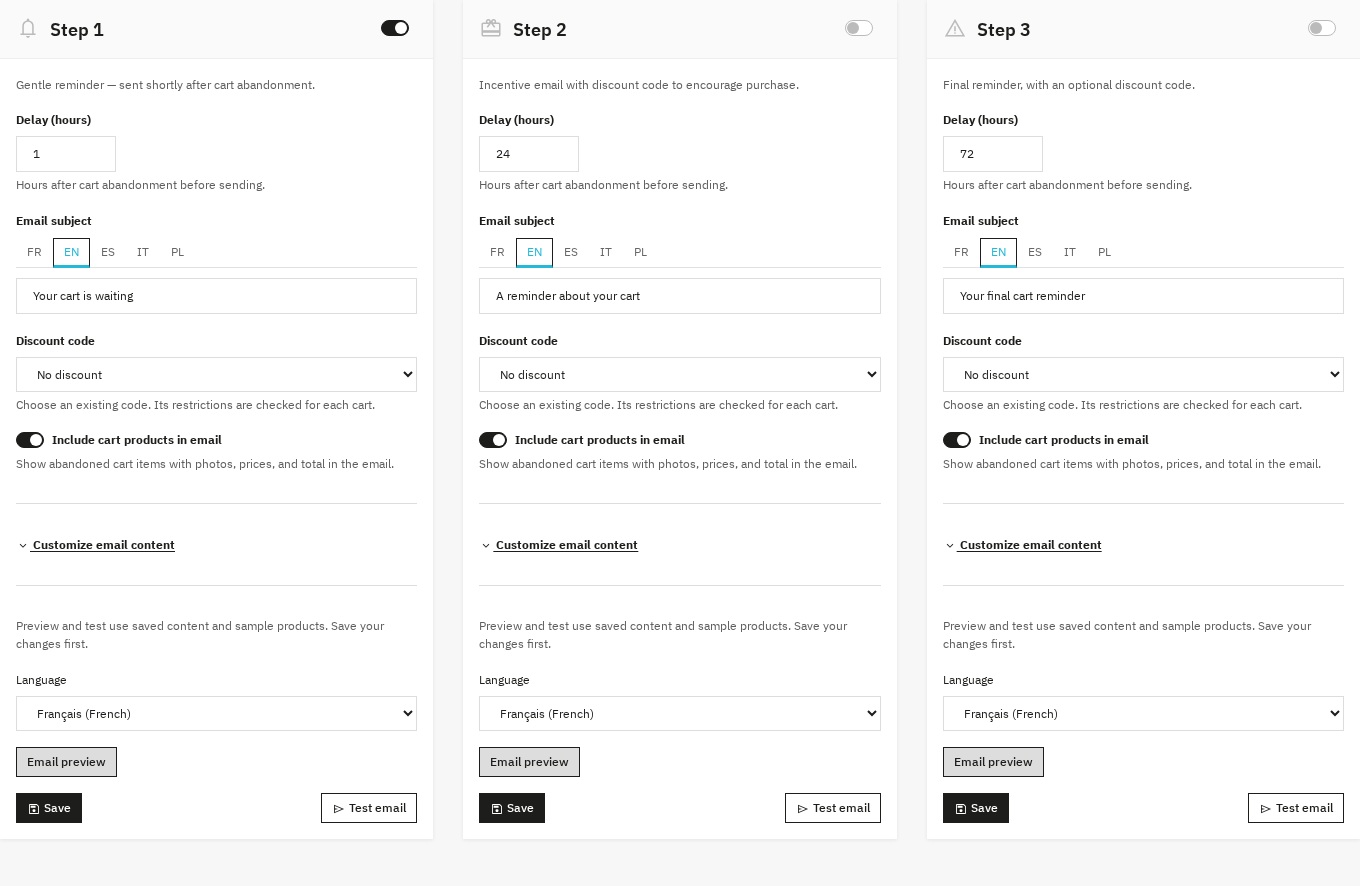 Example of the three reminder steps
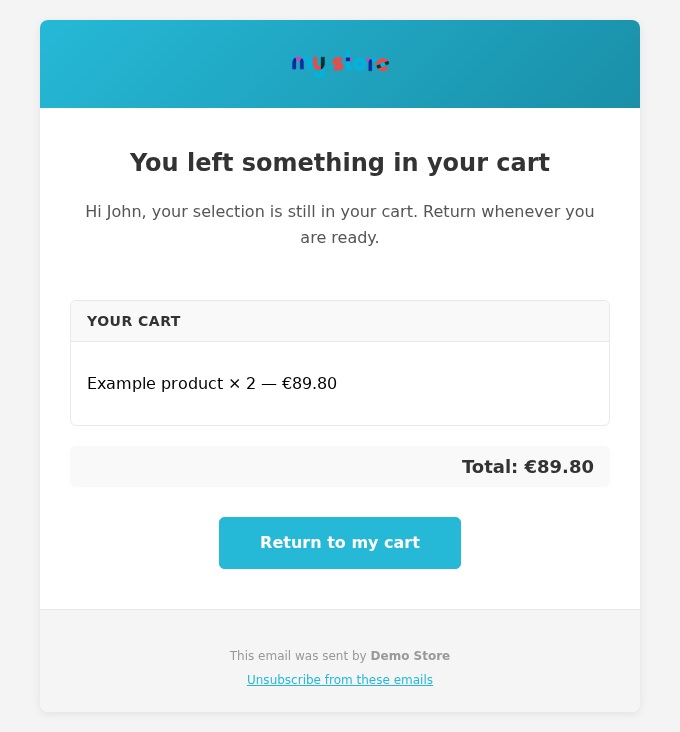 Preview of a saved email
Installation
- Download the archive for your PrestaShop version from your customer account.
- In Modules > Module Manager, upload the ZIP and install the module. Activate your license according to your offer.
- Open Configure, review settings and customize the steps. Save, select a language and check the preview; send a test to an address you control.
- Copy the displayed CRON URL and schedule it on your hosting, for example every 15 minutes. Then check the latest activity.
Requirements and compatibility
Compatible with PrestaShop 1.7.8.x on PHP 7.4, plus PrestaShop 8.2+ and 9.1+ on a PHP version supported by your PrestaShop release. Earlier 1.7 releases, PrestaShop 8.0, 8.1 and 9.0 are not covered. A working email service and scheduled task are required. Use HTTPS for customer links.
Configuration
- Statistics: review activity, emails, recoveries and paid amounts.
- Configuration: set the minimum cart amount, out-of-stock behavior, email limit, link validity, exclusions and retention.
- Reminder steps: choose delays, activation, localized content, product display and an existing coupon; save and preview.
- Diagnostics: enable detailed logs when needed, filter events and investigate the cause of an issue.
CRON
Copy the full URL from configuration and keep its token private. Schedule it every 15 minutes, then check the module’s latest activity. Set the maximum emails per run; remaining carts can be examined on a subsequent run. Automatic sending requires this task.
Frequently asked questions
How does this module detect an abandoned cart on my store?
The module examines carts without orders and with a known customer email, according to active-step delays. It applies the minimum cart amount, stock settings, and unsubscribe choices. The minimum uses the tax-inclusive product total, excluding shipping, converted into the store’s default currency. Visitors with no known email cannot be reminded. Newsletter subscription is required. You can exclude customer groups and carts where every product belongs to an excluded category.
What is the best timing to send abandoned cart recovery emails?
Enable each step independently and set its delay after the last cart activity. Initial delays of 1, 24 and 72 hours provide a starting point: a simple reminder, reassurance, then a final follow-up. The third step can run with the second disabled. Eligibility is checked again before sending and reminders stop when an order exists.
Can I customize subjects, content, and CTAs based on the customer's language?
Customize the subject, title, message and button for each step in your store’s languages. Initial content is provided in English, French, Spanish, Italian and Polish. Preview uses saved content in the selected language: save changes before previewing or sending a test. In multistore mode, check each shop’s configuration and scheduled task.
How do I add a promo code (CartRule), and is it automatic?
Create a cart rule in PrestaShop and attach it to a step: percentage discount, fixed amount or free shipping according to that rule. The module checks its conditions before showing it in the email and before optionally applying it to the recovered cart. It does not generate new coupons. Customer-specific codes are not offered for anonymous guest recovery.
How does secure cart recovery work?
The personal link opens a confirmation page. Registered customers sign in to their account to recover their cart; guest recovery copies items into a new cart without carrying over the guest’s identity or addresses. PrestaShop recalculates prices and checks availability. Valid links from different reminders remain usable until they expire.
Is a CRON job mandatory? How do I set it up properly?
Copy the full URL from configuration and keep its token private. Schedule it every 15 minutes, then check the module’s latest activity. Set the maximum emails per run; remaining carts can be examined on a subsequent run. Automatic sending requires this task.
Does the module provide reliable statistics (opens, clicks, recovered revenue)?
The dashboard distinguishes paid orders after a reminder from orders following confirmed cart recovery. Amounts account for credit slips and the exchange rate recorded on the order. Cancelled or unpaid orders are not reported as recovered sales. Pixel-based opens are indicative: email software can block images or load them automatically.
Is it multi-store compatible and does it work with guest checkout?
Customize the subject, title, message and button for each step in your store’s languages. Initial content is provided in English, French, Spanish, Italian and Polish. Preview uses saved content in the selected language: save changes before previewing or sending a test. In multistore mode, check each shop’s configuration and scheduled task. The module examines carts without orders and with a known customer email, according to active-step delays. It applies the minimum cart amount, stock settings, and unsubscribe choices. The minimum uses the tax-inclusive product total, excluding shipping, converted into the store’s default currency. Visitors with no known email cannot be reminded. Newsletter subscription is required. You can exclude customer groups and carts where every product belongs to an excluded category.
GDPR: how does the module handle consent, unsubscribing, and data retention?
Every email includes an unsubscribe link. Sending requires the customer’s newsletter subscription. Configure open tracking, data retention and a custom legal footer. Reminder data is managed in your store and emails use its delivery service. These controls help you apply your communication policy; they are not an automatic compliance guarantee.
Why choose a native recovery tool over an external email marketing service?
Each run has processing limits and progressively resumes the carts to examine. Protection per cart and step prevents duplicate concurrent sends. If a delivery outcome is uncertain, it remains visible without an automatic retry: check the mail service first. The module uses native PrestaShop emails, without core overrides or an additional reminder platform.
Troubleshooting
If no emails are sent, check the latest activity, active steps, delays, customer email and eligibility criteria. Test native email delivery and consult the logs. For an uncertain result, inspect the mail transport logs before taking action. If recovery is refused, check link expiry and the signed-in account. If a coupon is missing, check its dates, restrictions, minimum amount and availability. Also check receipt and spam placement using your test mailbox.
Upgrading
Back up the store and temporarily pause the scheduled task during installation. The upgrade preserves settings, custom content, unsubscribes and known history. Review personalized text: recovery now requires confirmation and, for registered customers, sign-in. Verify the steps, preview and resumed CRON activity; see UPGRADE.md in the archive for details.
Support
From your Wepresta customer account, provide PrestaShop and PHP versions, the expected behavior, latest activity and relevant diagnostic messages. Hide CRON tokens and personal data in screenshots. Support services depend on your offer.
Version history
2.0.1 — 2026-09-28
- Activate your license from the module configuration page on PrestaShop 9: the form no longer shows “Invalid form token”.
2.0.0 — 2026-09-22
- Use the module on PrestaShop 1.7.8 with PHP 7.4, plus PrestaShop 8 and 9 on supported configurations.
- Avoid duplicate concurrent sends; uncertain results remain visible and are not automatically retried.
- Enable the steps you need: the third reminder can run while the second is disabled.
- Recover carts from different emails whose links remain valid, with confirmation and customer account sign-in when required.
- Select an existing discount code, checked against the cart before display and application.
- View paid orders after reminders and after confirmed recovery, net of credit slips and using order-time exchange rates.
- Check the latest reminder activity without enabling detailed debug logging.
- Preview saved content in five languages before sending a test.
- Install a smaller archive without development dependencies; the interface loads Alpine locally.
Version 1.0.0
- Initial release: multi-step reminders, email templates, recovery links, coupons, tracking, dashboard, debug/logs, GDPR, multistore, PrestaShop 8.x and 9.x compatibility.
License
This module is distributed under the Academic Free License (AFL 3.0).
Copyright © WePresta. All rights reserved.