- Scan the catalogue and explain every flag
- Review and decide
- The due-diligence record of the product
- Plots
- Suppliers
- The supplier portal
- Readiness and the dashboard
- Order check
- Information sheet and TRACES pack
- Import, export, log and rights
- Does the module make my shop compliant with the EUDR?
- Which products are scanned?
- How does the module recognise a commodity?
- Why is a product flagged when it is not concerned?
- Does the module file the DDS in TRACES?
- What happens when an order is validated?
- Does the supplier need an account?
- Why must a plot over 4 hectares be a polygon?
- Can I import my existing data?
- What happens without an active license?
- Does it work in multistore and on PrestaShop 1.7.8?
EU Deforestation Regulation (EUDR) on PrestaShop: find, document and prepare your shipments
Regulation (EU) 2023/1115 on deforestation-free products, known as EUDR, asks operators and traders who place wood, coffee, cocoa, soya, palm oil, rubber, cattle or their derived products on the European market to show that these goods do not contribute to deforestation. In practice, you need to know the origin of the materials, geolocate the production plots, assess the risk, keep the evidence and file a due diligence statement (DDS) for each shipment.
The deadlines are staggered: 30 December 2026 for large and medium companies and for micro and small companies already covered by the EU Timber Regulation (EUTR); 30 June 2027 for micro and small companies; 30 December 2027 for the products added to Annex I by Regulation (EU) 2025/2650 and Delegated Regulation (EU) 2026/2102. Check the official text for your situation: the dates stored in the module are editable.
In a PrestaShop shop this information is rarely centralised. Product pages describe part of the materials, supplier invoices hold another part, DDS arrive by e-mail and plots live in separate files. At shipping time nobody can say whether the order is covered.
EU Deforestation (EUDR) brings this work into the PrestaShop back office: it scans the catalogue, keeps the registers of suppliers, plots and DDS, computes what is missing, checks every order and prepares the information sheet and the TRACES pack.
Key points:
- A catalogue scan that finds the products made from the regulation’s seven commodities, with the reason for every flag
- A human decision that prevails: in scope, out of scope or to review, with reason, author and date
- A due-diligence record per product: components, origin, plots, supplier, DDS and risk level
- A supplier portal by signed link, with no account to create, and validation of every submission
- An order check that never blocks a shipment, with a PDF sheet and a TRACES pack as a ZIP
- Compatible with PrestaShop 1.7.8, 8.0+ and 9.0+, PHP 7.4 minimum
Discover the module and its plans
Overview
What the regulation asks for
The EUDR covers seven commodities — cattle, cocoa, coffee, palm oil, rubber, soya and wood — and the derived products listed in Annex I: leather, chocolate, tyres, furniture, paper, food and cosmetics, among others. For each shipment the operator must carry out due diligence: collect information on the goods and their origin, geolocate the plots, assess the deforestation risk, take mitigation measures when the risk is not negligible, then file a DDS in the European TRACES system. A downstream trader must be able to give customs the reference numbers of its suppliers’ DDS.
The work is as much documentary as commercial: for every product sold, you must retrieve the commodity, the origin, the plot, the supplier and its statement. That is exactly what the module organises.
What the module does in PrestaShop
The module adds an EUDR due diligence menu to the back office, with a dashboard, the product list, suppliers, plots, portal entries, orders, import/export, scan rules, the change log and settings. It works inside the native product and order pages, without changing your theme or the storefront — apart from the supplier portal page, reachable only through a signed link.
The usual path has five steps:
- Scan the catalogue to find the products that mention a commodity or carry a matching CN code.
- Review each product and document the decision, then complete its due-diligence record.
- Gather suppliers, their DDS and the geolocated plots, directly or through the supplier portal.
- Check every order on validation and follow the ones still to complete.
- Prepare the PDF information sheet and the TRACES pack to attach to the customs file.
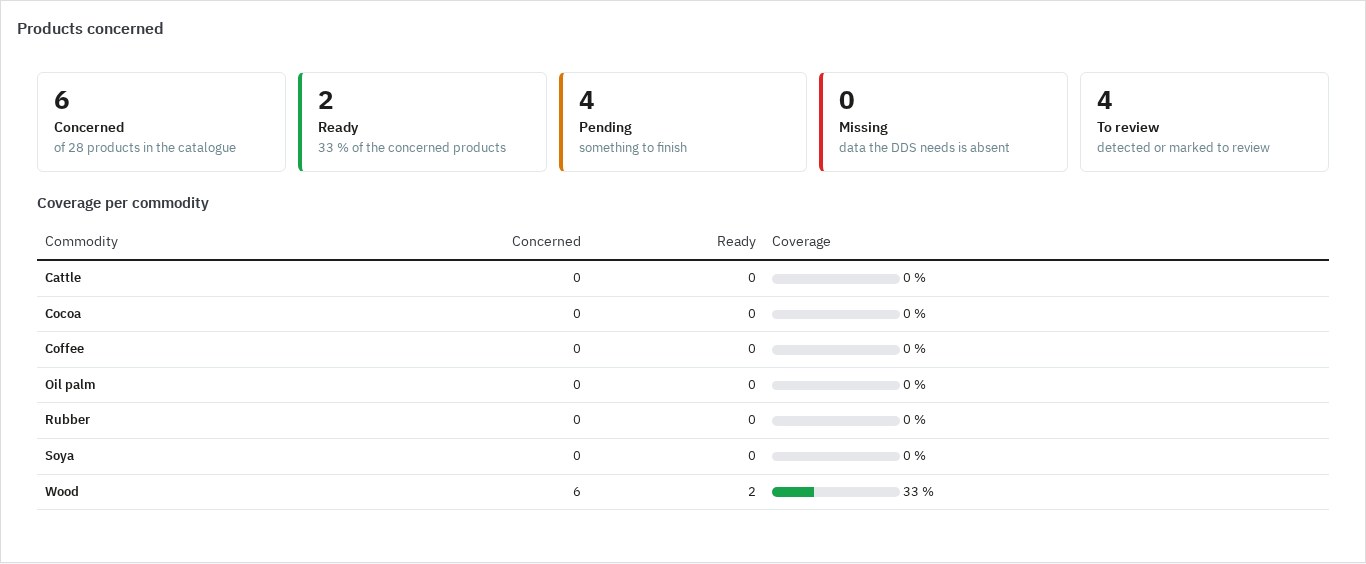 Catalogue coverage, commodity by commodity
What it does not do
The module is a preparation aid, not a certification. It files nothing in TRACES, signs no statement, does not verify the authenticity of a DDS with a supplier or an authority, does not analyse satellite images and does not compute a deforestation risk from coordinates. It does not replace legal advice, a customs invoice or a supply-chain system, and it does not cover the GPSR, DPP or EPR obligations. It never blocks an order, a payment or a shipment.
Features
Scan the catalogue and explain every flag
For every product, in every language of the shop, the scan reads: the name, the features (name and value), the combination names and the short description. Descriptions and category names can be included through a setting. The CN code comes from the due-diligence record, or from the value of a feature chosen in the settings.
Four kinds of rules apply:
- CN code: the product matches when its code starts with the digits of the rule.
- Keyword: a word or phrase, with an asterisk to cover variants; the search ignores accents and case and works on whole words.
- Exclusion: a phrase that cancels a keyword in a context that is not the commodity, for example “coffee table” for coffee or “faux leather” for leather.
- Category: a category and its sub-categories.
Every flagged product shows the commodity, the rule type, the matched value, the field, the language and an excerpt. The built-in Annex I rules ship with the module; you can switch them off, restore them, and add your own codes, keywords and categories. A rule change marks the scan as out of date.
The full scan starts from the Products page, in batches, with a progress bar; it can be interrupted, resumed or cancelled. A product saved from any page is scanned again at the end of the save, without changing manual decisions.
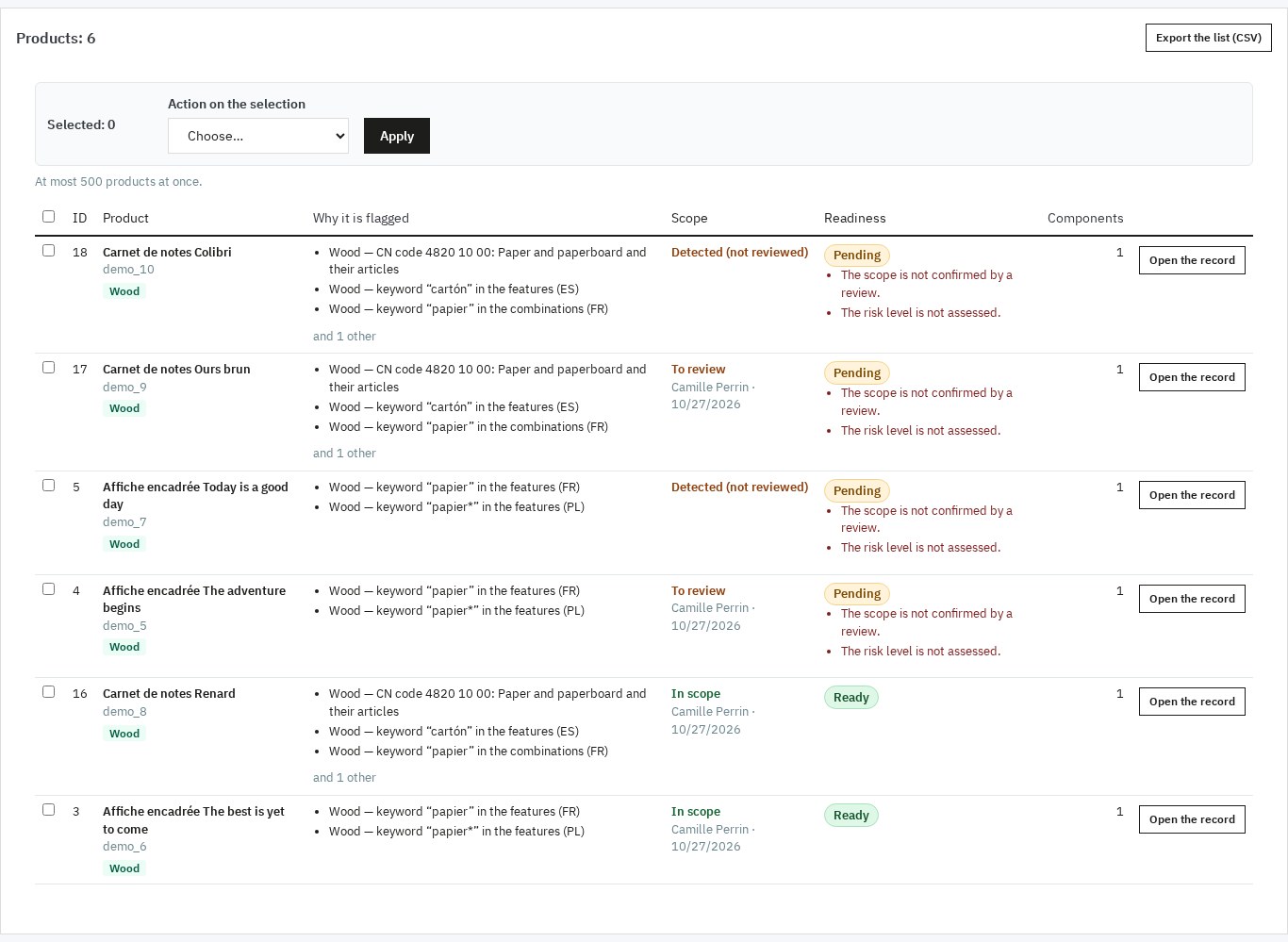 Every flagged product with its reasons and readiness
Review and decide
A flag is a lead, not a conclusion. For each product you choose In scope, Out of scope or To review, with a required reason (up to 1,000 characters), the employee’s name and the date. The manual decision always prevails over the scan. It can be set from the product record or on a whole selection from the list, with a shared reason.
The effective scope combines the review and the scan: a flagged product that has not been reviewed is “detected, not reviewed”; a product reviewed as out of scope is no longer concerned, even if the scan still flags it. Every review is kept in the change log, with the values before and after.
The due-diligence record of the product
At product level the record holds:
- the CN code and the net mass per unit (prefilled from the product weight when the shop’s weight unit is kg or g);
- the risk level — not assessed, negligible or non-negligible — and, when the risk is non-negligible, the mitigation measures;
- a free-text certification, notes and attachments (PDF, images, spreadsheets, GeoJSON, TXT, ZIP; 10 MB per file).
Then, for each commodity, one or more components:
- the commodity and, when needed, the combination concerned;
- the country of production and, for wood, the scientific and common species names;
- the linked plots;
- the supplier, its DDS reference and verification numbers, and the DDS date.
The EUDR tab of the back-office product page shows the status, the reasons and what is missing, with a link to the record, without ever saving a field with the product form.
Plots
The plot register accepts:
- a point, with validated latitude and longitude stored with six decimals;
- a GeoJSON polygon (Polygon or MultiPolygon), pasted or imported from a .geojson or .json file, in WGS 84, in [longitude, latitude] order.
A plot over 4 hectares — except for cattle — must be a polygon. The module applies the rule from the declared area or the computed area of the polygon, shows both and flags the plots concerned. Each plot has an SVG preview computed offline, with no call to a map service, and an “Open on OpenStreetMap” link. The GeoJSON of a plot can be downloaded.
Plots are linked to components from the component form or through a bulk action on a product selection.
Suppliers
Each supplier record holds its country, commodities, contact, address, EORI number, portal language, DDS number and validity date, notes and attachments. A four-point checklist follows the due diligence: geolocation received, risk assessed, measures taken, DDS obtained; the list shows progress (for example 4/4).
DDS are classified as missing, expired, expiring soon (configurable delay, 30 days by default) and valid. Alerts appear in the list, on the supplier page, on the dashboard and, if you enable it, in a daily or weekly digest e-mail.
The supplier portal
From a supplier record you create a signed link valid for 1 to 365 days (30 by default). You can copy it or send it by e-mail in the supplier’s language. Sending a new link does not revoke the previous ones; only the revoke button invalidates every link already sent.
The portal page, available on Classic and Hummingbird, offers three forms:
- the DDS: reference number, verification number, validity date and a PDF or image document;
- one plot: reference, name, commodity, country, area, production period and a point or polygon;
- several plots from a GeoJSON file (FeatureCollection of up to 500 plots, 2 MB), reading the reference, area and country from the properties.
Every submission becomes a pending entry; nothing is written into your registers before your decision. The Portal entries page lets you preview the geometry and the document, accept — the plot is created or updated, the DDS and its document are copied to the supplier — or refuse with a note that the supplier will see. Accept and refuse also work in bulk. The link is tokenised, expires, requires no customer account and the page is noindex.
Readiness and the dashboard
Readiness is computed for each product from the decision, the components, the plots and the DDS:
- Ready: everything is filled in;
- Pending: points remain to be confirmed (review not done, risk not assessed, supplier checklist incomplete);
- Missing: a component, a country of production, a geolocated plot, a polygon for a plot over 4 hectares, a valid DDS or a supplier is missing;
- Not concerned: the product was classified as out of scope.
The status and the list of gaps are stored with the product, filterable in the list, and recomputed after every change of record, component, plot, supplier, review, scan, import or accepted entry. A bulk action links a supplier or a plot to several products at once, or launches the TRACES pack for a selection (up to 500 products per action).
The dashboard shows concerned, ready, pending, missing and unreviewed products, coverage per commodity with a percentage, products without origin, plot or DDS, suppliers without DDS, expired or expiring, waiting portal entries and orders to complete. It counts the days left before the three deadlines and recalls the state of the last scan. Every figure opens the matching filtered list.
Order check
When an order is validated, the module checks the concerned lines and stores a snapshot: Complete if every concerned line is ready, To complete otherwise, Not concerned if no line is concerned. The snapshot keeps the product, reference, quantity, net mass, CN code, commodities, components, origin, supplier, DDS references, plots and gaps.
The order is never blocked, delayed or changed: a warning appears in the back office and the order joins the module’s Orders page, filtered by default on “to complete”. You can run the check again, alone or in bulk, and check older orders over a date range.
The EUDR panel of the order page shows the status, the lines and their gaps, with three buttons: information sheet PDF in the chosen language, TRACES pack as a ZIP, and check again.
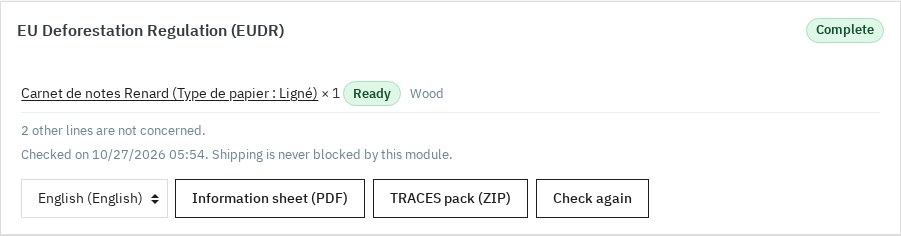 An order check, with its sheet and TRACES pack
Information sheet and TRACES pack
The information sheet is a PDF per order: operator and shop, order reference and date, delivery country, carrier, then the table of concerned lines with product, reference, quantity, net mass, CN code, commodity, country of production, supplier, DDS reference and verification numbers and plots. Lines that are not ready are marked “to complete” with their gaps; the number of lines not concerned and the disclaimer appear at the bottom.
The TRACES pack is a ZIP available for an order, for a period (one year at most, quantities added up) or for a product selection. It contains:
manifest.csvandmanifest.json: one line per product and component, with CN code, description, quantity, net mass, commodity, country, species, supplier, EORI, DDS references and plots;plots-all.geojsonand one file per CN code, in WGS 84;operator.json: the operator profile;dds-references.csv: the references to enter in TRACES;README.txt: how to use it and the disclaimer, in the employee’s language.
The module files nothing and signs nothing: you use these files to enter and sign your DDS in TRACES with your EU Login account.
Import, export, log and rights
Products, components, plots and suppliers are exported as CSV (UTF-8 with BOM, semicolon separator, formula protection) with an empty template per entity. The import accepts a file of 5 MB and 5,000 lines, detects the separator and quotes, and offers a dry run by default: each line gets the status created, changed, unchanged or refused, with its reason. The same file can then be applied. Products are identified by id_product or by reference, suppliers by name, plots by reference, components by product, commodity and description.
The change log keeps the date, shop, actor (employee, supplier, system, import), object, action, summary and the values before and after. It can be filtered and exported as CSV. Evidence retention is configurable from 1 to 20 years (5 years by default); the daily maintenance removes older log lines, decided entries and order checks, never a record still in use.
Rights are those of the menu entry, per employee profile: view opens every page and allows downloads; add creates suppliers, plots, components, attachments and imports; edit covers the review, records, scan, accepting entries, portal links, rules and settings; delete deletes records, attachments and custom rules.
Installation
- Download the module archive from your WePresta customer account.
- In the back office, open Modules > Module Manager and click Upload a module.
- Send the ZIP file; PrestaShop installs the module and creates its tables.
- Click Configure and activate your license.
- Open the module from the button on its configuration page, or from WePresta > EUDR due diligence (PrestaShop 9) or Modules > EUDR due diligence (1.7 and 8).
Installation creates eleven tables, the menu entry and the built-in Annex I rules. It changes no theme file and adds no visible hook to the storefront. If a table cannot be created, or a table with the same name has another structure, the installation is rolled back: no half-installed module remains.
Configuration and first run
- Operator profile: name, address, country, EORI, e-mail, phone, role (operator or trader) and company size. These details feed the TRACES pack and the information sheet.
- Deadlines: the three dates are prefilled (30/12/2026, 30/06/2027, 30/12/2027) and editable; the one matching the company size is highlighted on the dashboard.
- Scan: choose the fields read (name, features, combinations, short description, optionally description and categories) and the feature that holds the CN code. Rescan on save is on by default.
- Scan rules: review the built-in rules, switch off those that do not concern your catalogue, add your keywords, CN codes or categories. Built-in rules are restored in one click.
- Full scan: start it from the Products page and keep the page open; on a large catalogue you can resume it later.
- Review: start with the detected products, decide and document the reason. Then complete the due-diligence records of the concerned products.
- Suppliers and plots: create the suppliers, their DDS and checklist, then the plots, or open the portal and let them fill them in.
- Orders: enable the check on validation and the order panel, then check older orders if needed.
- Alerts and scheduled task: set the notification addresses, the delay before a DDS expires and the digest frequency. The scheduled task address (token URL or command line) is given in the settings; without it, the daily maintenance runs when a module page is opened.
- Evidence and data: set the retention period and whether to delete the data on uninstall. The diagnostic checks the versions, the zip and fileinfo extensions, the storage folder and the license state.
Use cases
Furniture and wood products. A manufacturer-retailer sells oak and beech furniture. The scan finds the products whose features mention wood or whose CN code starts with 9403. For each product the team links the sawmill, the species, the forest plot and the DDS. Plots over 4 hectares are entered as polygons; the dashboard shows the ones still without geolocation.
Coffee, cocoa, chocolate. A roaster sells coffees from several origins. Components are created per origin, with the country, plot and supplier. Keyword scanning in every language avoids relying on a single translated product page, and exclusions prevent false positives from accessories.
An importer with many suppliers. Suppliers receive a portal link in their language and submit their DDS and plots. The merchant accepts the entries as they arrive; DDS that are about to expire appear in the digest and on the dashboard, leaving time to request a renewal.
Preparing for a control or a customer request. The PDF information sheet of an order and the TRACES pack of a period gather the elements to hand over. The change log shows who filled in what and when.
A multistore group. Settings belong to each shop, while suppliers, plots and rules are shared across the group.
Requirements and compatibility
- PrestaShop 1.7.8, 8.0+ and 9.0+
- PHP 7.4 or later
- PHP zip extension for TRACES packs and fileinfo for attachment checks
- Classic and Hummingbird themes supported for the portal page
- Interface in English, French, German, Spanish, Italian and Polish; portal and e-mails in the supplier’s language; PDF in the chosen language
- Multistore: settings per shop, product, supplier, plot and rule registers shared
- An active license is needed to scan, change records and save settings; without a license, the pages stay readable and downloads available
Accepted limits: the scan works on words and codes; it does not see products whose texts do not name their materials and may flag a product that merely mentions them. The manual review decides. The module does not check DDS with TRACES, does not analyse satellite images and does not produce a customs invoice.
FAQ
Does the module make my shop compliant with the EUDR?
No. It helps prepare and document due diligence: it finds the products, gathers origin and DDS, computes what is missing and prepares the files. It does not certify compliance, never calls a product deforestation-free, files nothing in TRACES and does not replace legal advice. The decision and the filing of the DDS remain your responsibility.
Which products are scanned?
The scan covers all the products of the shops in context, in all their languages. It reads the name, features, combination names and short description; descriptions and category names are optional. Disabled products are scanned too, so that you can correct them before they go online.
How does the module recognise a commodity?
Through four kinds of rules: the Annex I CN codes, keywords per commodity in six languages, categories and exclusions. The built-in rules ship with the module and remain editable. Every flag shows the matched value and an excerpt, so that you can judge.
Why is a product flagged when it is not concerned?
The scan is a net, not a judge: a word such as “coffee” may describe an accessory. Use the exclusion, switch the rule off or classify the product Out of scope with a reason. Your decision prevails and stays in the change log.
Does the module file the DDS in TRACES?
No. It prepares a ZIP with the manifest, the plot GeoJSON, the operator profile and the DDS references. You then log in to TRACES with your EU Login account to enter and sign your statement.
What happens when an order is validated?
The concerned lines are checked and a snapshot is kept. If a line is not ready, the order appears in “Orders to complete” and a warning is shown. Nothing is blocked: you ship as usual and complete the file afterwards.
Does the supplier need an account?
No. The supplier receives a signed link, valid for 1 to 365 days, in its language. It submits its DDS, one plot or a GeoJSON file there, with no account or password. You accept or refuse each submission; sending a new link does not revoke the previous ones, only the revoke button invalidates the links already sent.
Why must a plot over 4 hectares be a polygon?
The regulation asks for precise geolocation of plots. The module applies the 4-hectare rule, except for cattle, from the declared or computed area, and flags plots that only have a point. You can enter the polygon by hand or import a GeoJSON file.
Can I import my existing data?
Yes: products, components, plots and suppliers are imported as CSV, with a template per entity and a line-by-line dry run before writing. Unknown columns are reported and every refused line gives its reason. The same data can be exported as a backup.
What happens without an active license?
The module never switches itself off. The pages stay readable, records, PDFs, TRACES packs, CSV files and attachments stay downloadable, order checks keep running and the portal still accepts submissions. Scanning, changes and settings wait for activation. Uninstalling keeps the data unless you ticked its deletion.
Does it work in multistore and on PrestaShop 1.7.8?
Yes. The module runs on PrestaShop 1.7.8, 8.0+ and 9.0+ with PHP 7.4 minimum. In multistore, settings belong to each shop and the registers are shared; product lists, the dashboard and orders follow the employee’s context.
Support
For any help, contact us from your WePresta customer account or by e-mail at mail@wepresta.shop, according to the support option of your plan.
Before writing to us, prepare:
- the PrestaShop and PHP versions;
- the name of the theme in use;
- the address of the page concerned and a screenshot;
- if possible, the exact message displayed.
Changelog
Version 1.0.0
- Scan the catalogue and find the products made from the regulation’s seven commodities, with the reason for every flag.
- Decide per product — in scope, out of scope or to review — with a reason, author and date, alone or in bulk.
- Complete a due-diligence record per product: CN code, net mass, risk, measures, certification, notes and attachments.
- Describe each commodity through components: country of production, plots, supplier, DDS and species for wood.
- Keep a plot register with points or GeoJSON polygons, the 4-hectare rule and an offline preview.
- Keep a supplier register with its DDS, validity and a due-diligence checklist.
- Let suppliers submit DDS and plots through a signed link, with no account, and accept every entry.
- Follow the readiness of each product and the catalogue coverage per commodity.
- Check every order on validation, without ever blocking a shipment.
- Print a PDF information sheet and download a TRACES pack as a ZIP for an order, a period or a selection.
- Import and export products, components, plots and suppliers as CSV, with a dry run before writing.
- Keep the trace of changes and evidence, with rights per employee profile.
- Use the module on PrestaShop 1.7.8, 8.0+ and 9.0+ with PHP 7.4 minimum, in multistore and in six languages.
