Back office 2FA : to secure admin logins - Module PrestaShop

PrestaShop 2FA Module: Secure Your Back-Office and Stop Password Theft

+7 downloads ★ ★ ★ ★ ★ 5 / 5 Version 2.0.1 1.7.8 8.0+ 9.0+ 5 languages 🇵🇱 PL 🇪🇸 ES 🇮🇹 IT 🇬🇧 EN 🇫🇷 FR
  • 6-digit code from an app (Google Authenticator, Authy, Microsoft Authenticator…) after the password
  • One code per month and per browser: 30-day trusted devices, 12-hour verified session
  • Mandatory 2FA by profile, with a grace period and a lockout after wrong codes
  • Dashboard, journal, recovery codes and reset of a colleague in a few clicks
  • Compatible with PrestaShop 1.7.8, 8.0+ and 9.0+ (PHP 7.4 minimum)
Not sure yet? Try it free for 24 hours — no credit card required.
Features

Everything you need, nothing you don't.

TOTP two-factor authentication with Google Authenticator, Authy or Microsoft, trusted devices and management per employee.

TOTP double verification

A 6-digit code from an app, in addition to the password, before any action of the back office while the module is active.

QR code activation

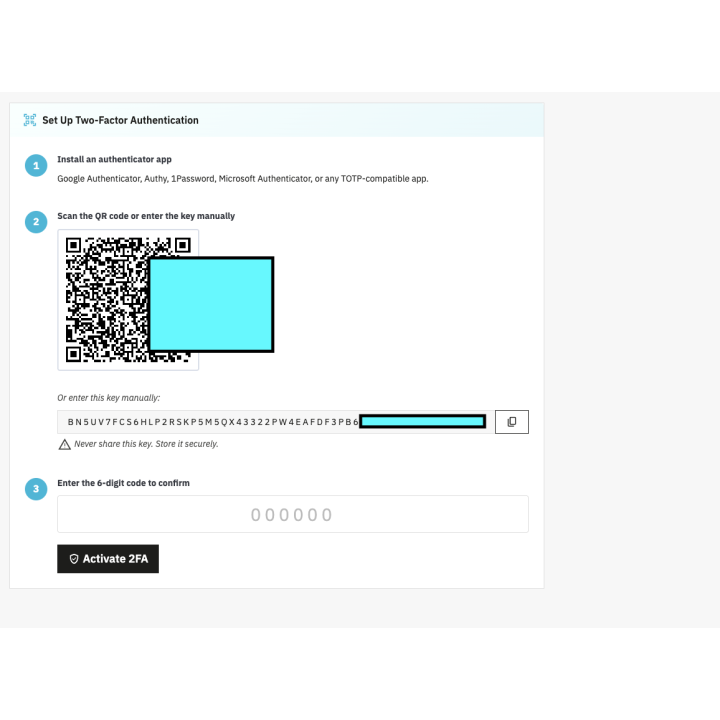
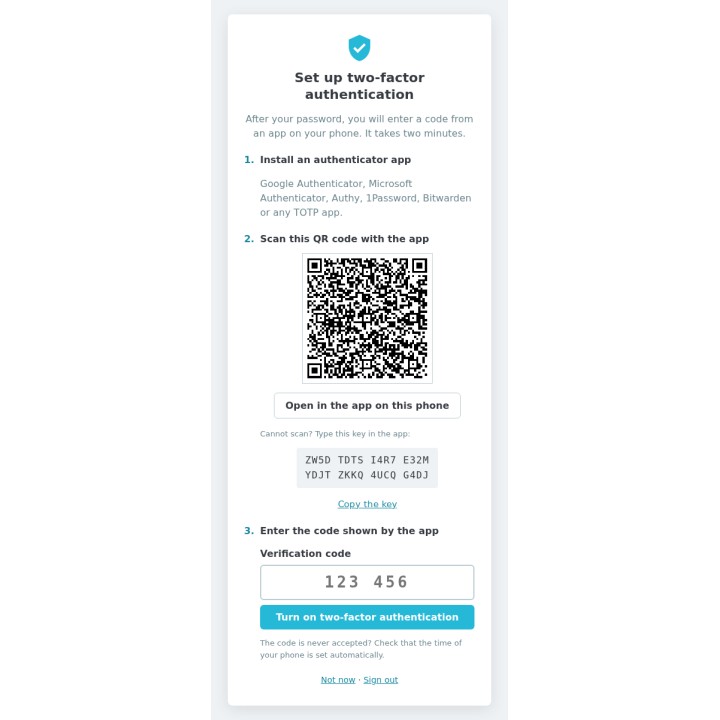
Scan the QR code, enter a first code: the set-up takes two minutes.

Works with all authenticator apps

Google Authenticator, Microsoft Authenticator, Authy, 1Password, Bitwarden and any TOTP app.

Recovery codes included

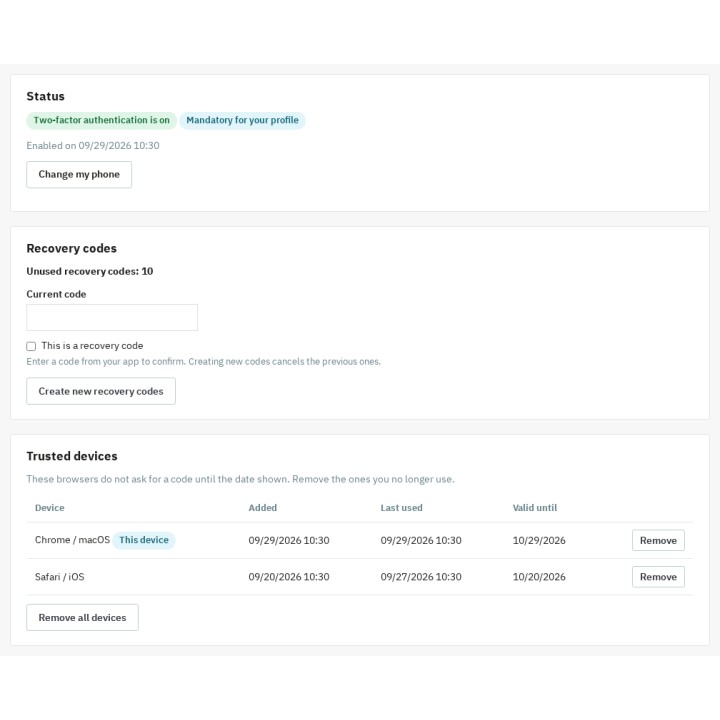
Ten single-use codes per employee, renewable from the "My two-factor authentication" page.

Per-employee management

Each employee manages their own 2FA; a super administrator resets or unlocks a colleague from the dashboard.

Protection against password theft

With a valid license, a stolen password is not enough: no page, form or AJAX call of the back office runs without the code.

Verified license

A valid license is required for protection: without one, the module disables itself, keeps enrolments, codes and settings, and re-enables itself after activation or renewal.

Renewal without interruption

Seven days of grace after the stored end date, a server check at most once an hour and seven days of tolerance for temporary answers: a paid license is not cut off by mistake.

Customer reviews

They use it every day.

5 out of 5 · 5 reviews

"Best module I've found for PrestaShop. Worth every penny."

TG Tom G.

"Lo uso en 3 tiendas sin ningún problema."

IT Isabel T.

"Soporte técnico rápido y eficaz. Gran trabajo!"

DS Diego S.

"Relación calidad/precio inmejorable."

PR Pablo R.
description Full description expand_more

Secure your PrestaShop Back-Office with Two-Factor Authentication (2FA)

Did you know that a password, no matter how complex, is no longer enough to guarantee the security of your online store? Faced with the rise of phishing and credential theft, access to your administration is the preferred target for hackers. Our Two-Factor Authentication (2FA) module adds a second step to every sign-in: the 6-digit code of an app on the employee's smartphone. With a valid license, a stolen password is no longer enough: no page, no form and no AJAX call runs in your back office without that code. Without a valid license, the module disables itself: no code is asked and the module pages are closed, while enrolments, recovery codes, trusted devices, settings and journal are kept.

A Second Lock Against Password Theft

The security of your turnover and the protection of your customer data are your priorities. The module relies on the open TOTP standard (Time-based One-Time Password, RFC 6238) supported by the common authenticator apps: the code changes every 30 seconds and works only once. You strengthen the protection of your store's personal data and build trust within your management team; the access journal helps you document your GDPR obligations.

A Sign-In That Does Not Slow Your Team Down

A two-factor authentication that people bypass because it wears them out protects nobody. The module reduces the number of codes asked without weakening the check:
  • One code per month and per browser: a trusted device is remembered for 30 days (adjustable), whatever the IP address. Each employee sees their devices and removes the ones they no longer use.
  • A verified session of 12 hours: a single code per working day, even on a browser that is not remembered. The duration is adjustable from 1 to 168 hours and signing out ends it.
  • Quick entry: the code is sent at the sixth digit, and the "Remember this device" box is ticked by default (adjustable).

Key Features

  • Universal Compatibility: Google Authenticator, Microsoft Authenticator, Authy, 1Password, Bitwarden or any TOTP app. Set-up by QR code, by a readable setup key or with the "Open in the app" button on a phone.
  • Granular Profile Management: make 2FA mandatory for critical profiles (e.g., SuperAdmin) and let the others turn it on themselves from "My two-factor authentication".
  • Configurable Grace Period: give your employees a few days (7 by default) to get equipped before making double authentication mandatory. The delay runs from the day the profile becomes mandatory, and a banner shows the days left.
  • Lockout After Wrong Codes: after 5 wrong codes (adjustable), the account is locked for 15 minutes (adjustable). The lockout is stored in the database: signing in again does not reset the attempts.
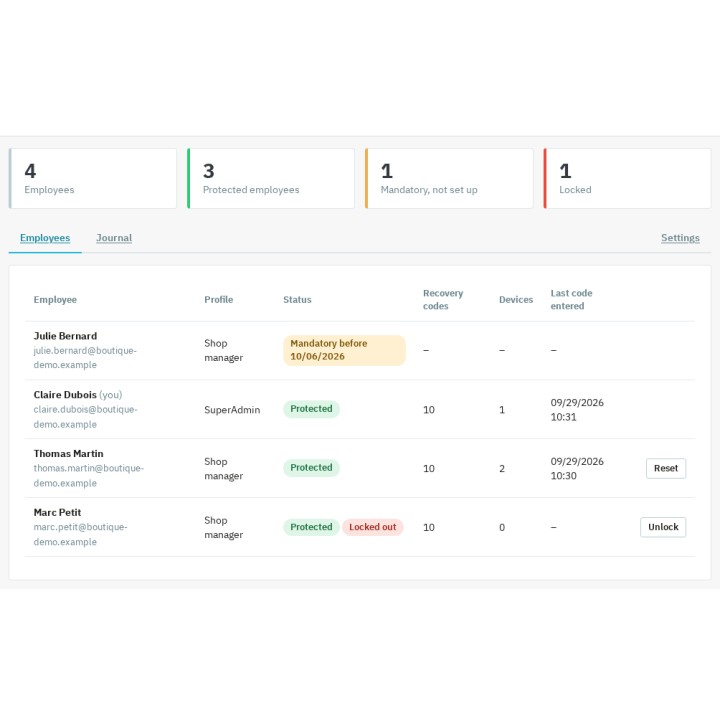
  • Dashboard and Journal: super administrators see who is protected, who is locked out and who still has to set up 2FA, and read the history of verifications, failures and security changes.
  • Reset a Colleague: an employee lost their phone? A super administrator resets or unlocks the account in a few clicks, after confirming with their own code.
  • Check Before Any Action: while the module is active, the code is required before a page, a form or an AJAX call runs. Changing phone or creating new recovery codes also requires a valid code.
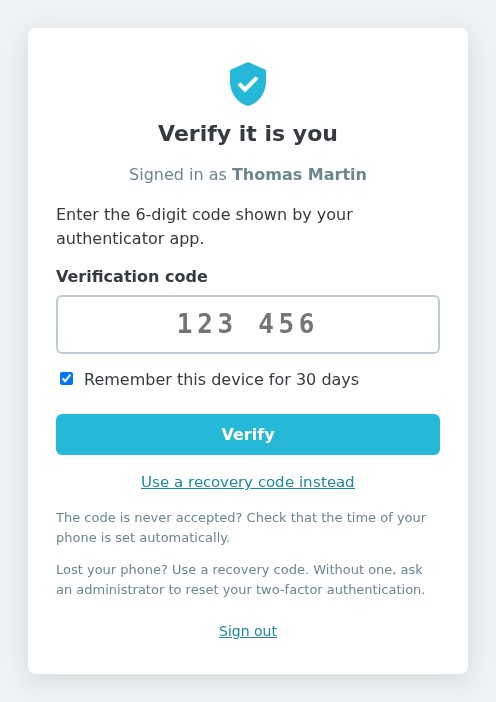
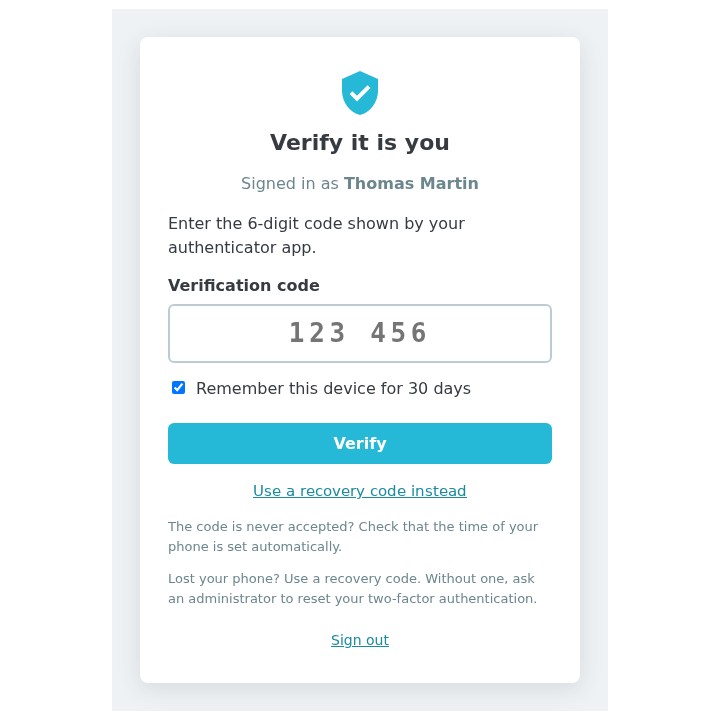
"Verify it is you" page: 6-digit code field, the "Remember this device for 30 days" box ticked and a link to the recovery codes
Code page after the password
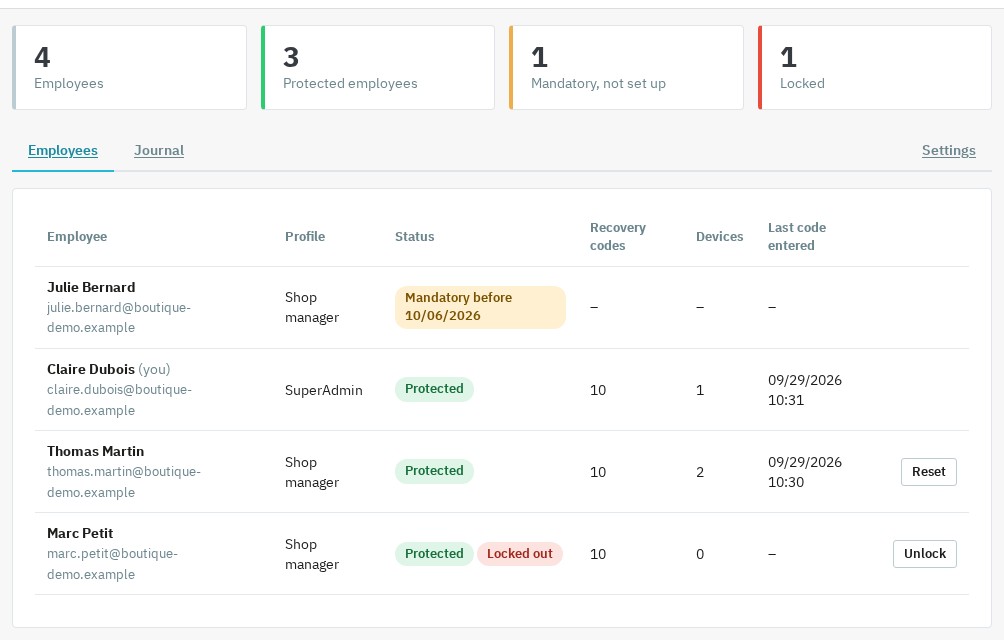
Super administrator dashboard: 4 employees of which 3 protected, one mandatory set-up pending, one locked employee, with the Reset and Unlock buttons
Employee dashboard

A valid license, continuous protection

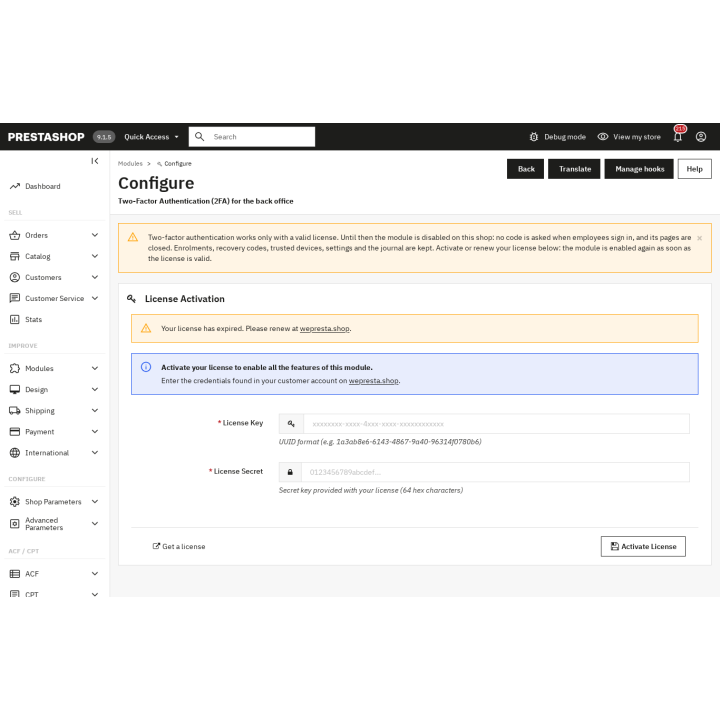
Two-factor authentication only applies with a valid license. If the license is missing, expired, suspended or revoked, or if the domain or signature is not recognized, the module disables itself on all shops: no code is asked at sign-in and the module pages are closed. Enrolments, recovery codes, trusted devices, settings and journal are kept, and the shop stays available: only the password then protects the back office. The license form remains reachable from Configure.

Activate or renew the license from that page, choosing the context that covers all shops in multistore: the module re-enables itself at once and, from the next page, the back office asks for the code again. A paid license is not cut off by mistake: the module keeps the protection for seven days after the stored end date, checks the server at most once an hour and tolerates seven days of temporary answers from the first failure. A definitive answer (expired, suspended or revoked license, unknown domain or signature) is applied immediately.

Why Choose This Solution for Your PrestaShop Store?

Unlike other complex solutions, our module was designed for demanding e-merchants who don't want to sacrifice their time. It offers a balance between high security and ease of use.

  • Peace of Mind: your catalog, margins and customer files are protected by a digital double lock.
  • Always a Way Back In: 10 single-use recovery codes per employee, the reset by a super administrator, the DISABLE_2FA file and the wepresta:2fa:disable console command keep you from a permanent lockout.
  • Lightweight: no override, no third-party PHP library, encrypted and authenticated secrets, an archive of less than 250 KB.
  • A valid license, no re-enrolment: without a license, the module disables itself and keeps enrolments, recovery codes and settings; once the license is activated or renewed, protection resumes without enrolling employees again.

Simple, Fast, and Effective Installation

You don't need to be a cybersecurity expert to protect your business. Installation takes just a few clicks directly from your module manager. Once activated, the module guides each employee step by step through the set-up of their mobile app: two minutes are enough. Pick the mandatory profiles, and your PrestaShop back-office benefits from professional-grade protection, ready to face modern web threats.
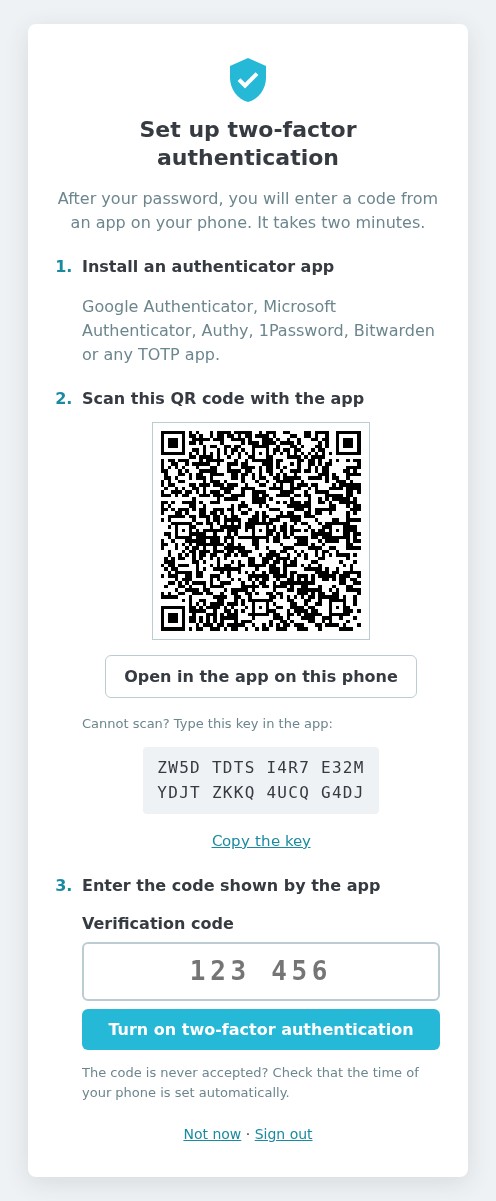
Set-up page: install an authenticator app, scan the QR code (or type the key), then enter the code shown by the app
Three-step set-up
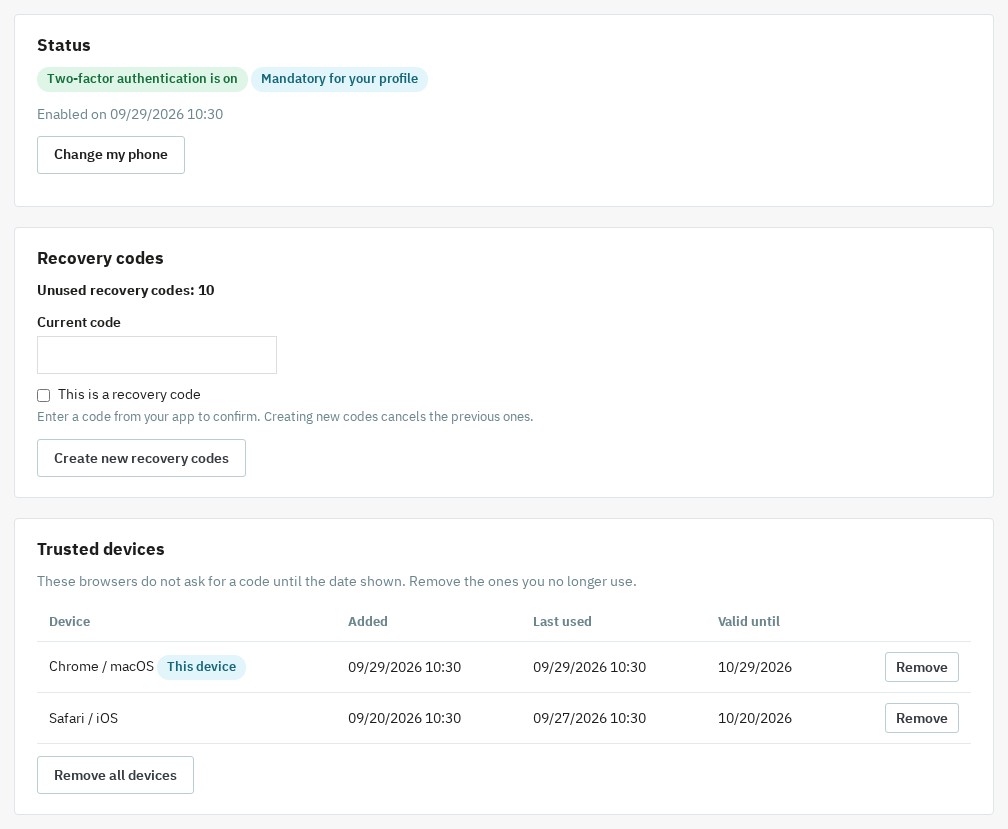
"My two-factor authentication" page: status on, 10 unused recovery codes and the list of trusted devices (Chrome / macOS, Safari / iOS) with their expiry date
My 2FA: recovery codes and trusted devices

Compatibility

Compatible with PrestaShop 1.7.8, 8.0+ and 9.0+, with PHP 7.4 minimum (json, openssl and mbstring extensions). PrestaShop 1.7.7 and earlier versions are not supported. One archive fits all these versions. The interface is available in French, English, Spanish, Italian and Polish. On PrestaShop 1.7, the settings page points out three legacy stand-alone PrestaShop scripts (backup.php, pdf.php, get-file-admin.php) to delete: they answer to a signed-in employee without going through the check of the module.

Support is provided from your WePresta customer area or by email at mail@wepresta.shop, depending on the support option of your plan. Read the full documentation

Comparaison

Why choose us?

See how we compare to the most common alternatives on the market.

Feature Addons
Transparent pricing
Lifetime updates included
Direct developer support
PS 1.7, 8 & 9 compatible
Standardized clean code
Multi-store ready
No hidden renewal fees
Included Not included Partial / Not guaranteed
Preview

Discover the module in images.

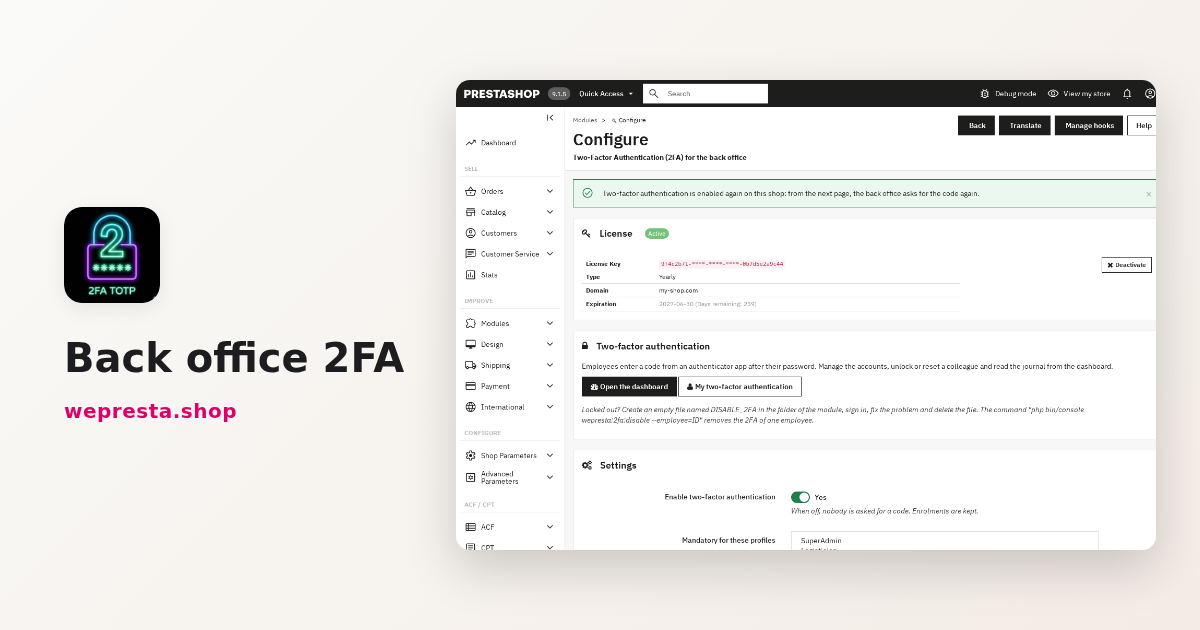
Two-factor authentication (2FA) for the PrestaShop back office
Two-factor authentication (2FA) for the PrestaShop back office

Code page after the password
Code page after the password

Employee dashboard
Employee dashboard

Three-step set-up
Three-step set-up

My 2FA: recovery codes and trusted devices
My 2FA: recovery codes and trusted devices

Expired license: module disabled, no code requested, license form reachable from Configure.
Expired license: module disabled, no code requested, license form reachable from Configure.

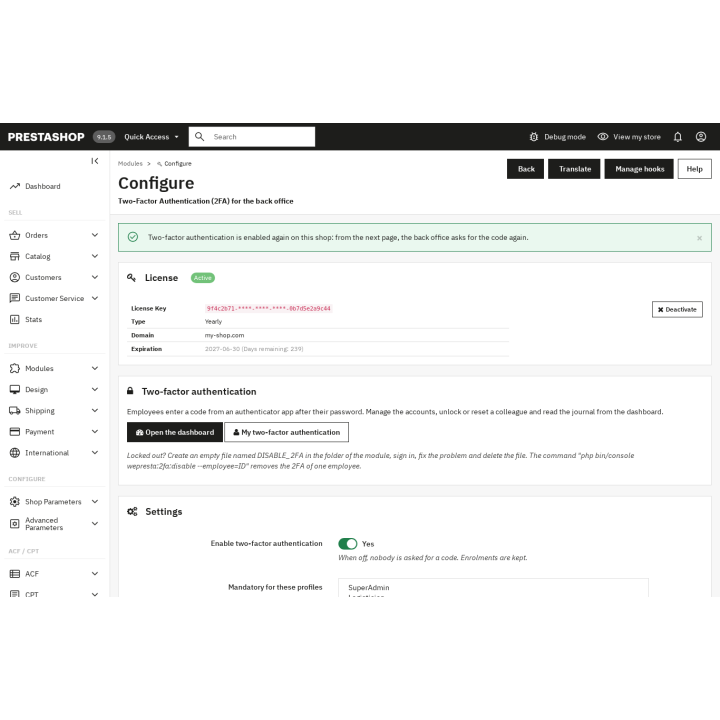
Renewed license: module re-enabled from Configure, 2FA active again without entering the settings.

Renewed license: module re-enabled from Configure, 2FA active again without entering the settings.

Support

FAQ

Find answers to frequently asked questions about this module

It adds a second check when signing in to the administration. While the module is active, with a valid license, a stolen password is not enough: the back office stays closed without the temporary code generated on the employee’s phone. It is a direct protection against a store takeover: price changes, order diversion, creation of administrator accounts or export of customer data.

The module uses the TOTP standard (Time-based One-Time Password, RFC 6238): a 6-digit code that changes every 30 seconds, generated by an authenticator app. No SMS (costs, deliverability) or email (compromised mailbox) is needed, and the code is generated without a network connection. A phone whose clock is off by one 30-second period is still accepted; a given code works only once.

All TOTP apps: Google Authenticator, Microsoft Authenticator, Authy, 1Password, Bitwarden and their equivalents. Each employee uses the app of their choice, with no proprietary tool imposed. The QR code is scanned with the app; on a phone, the "Open in the app" button or typing the setup key avoids the scan.

Yes. In the settings you choose the profiles for which 2FA is mandatory, for example SuperAdmin and the profiles that reach payments, modules or exports. The other employees can turn it on themselves from "My two-factor authentication". A grace period (7 days by default) leaves time to get equipped: it runs from the day the profile becomes mandatory, and a banner shows the days left.

Two mechanisms add up. The trusted device remembers a browser for 30 days (adjustable), whatever the IP address: the employee enters one code per month and per browser, with the "Remember this device" box ticked by default. On a browser that is not remembered, the verification stays valid for 12 hours (adjustable from 1 to 168 hours): a single code per working day. Signing out or removing the device asks for the code again.

They sign in with one of their 10 recovery codes (single use), then set up their new app with "Change my phone". If they have no code left, a super administrator opens the dashboard, clicks "Reset" on their row and confirms with their own code: the employee’s 2FA is removed and they set it up again at their next sign-in. Every reset is written to the journal.

Four ways, from the simplest to the most radical: the employee’s recovery code; the reset by another super administrator; the console command wepresta:2fa:disable (option --employee with the ID or email, or --all for the whole shop, and --dry-run to simulate); the empty DISABLE_2FA file placed in the module folder, which suspends the code request for everybody as long as it exists. A red banner reminds super administrators that it is there.

Yes. The journal of the dashboard, reserved for super administrators, lists with the date, the employee, the IP address and the detail: accepted or wrong codes, recovery codes used, lockouts and unlocks, phone changes, new recovery codes, devices added or removed, resets and deactivations. It can be filtered by employee and never contains a code or a secret. Lines older than 90 days (adjustable from 7 to 3650 days) are deleted automatically.

Yes, while the module is active. The code is checked before the back office runs anything: pages, forms (POST), AJAX and JSON calls, pages without a menu. With the password alone, a page is redirected to the code page and an AJAX call gets a 401 answer with no data. Known limit on PrestaShop 1.7: the legacy stand-alone scripts backup.php, pdf.php and get-file-admin.php answer to a signed-in employee without going through the PrestaShop core; the settings page points it out and asks you to delete them.

2FA stops without a valid license: the module disables itself on all shops, no code is asked and its pages are closed; enrolments, recovery codes, trusted devices, settings and journal are kept. Activate or renew the license from Configure: the module re-enables itself at once and the next page asks for the code again. A paid license gets seven days of grace after the stored end date, and a temporary server answer is tolerated for seven days from the first failure. A definitive answer (expired, suspended or revoked license, unknown domain or invalid signature) is applied immediately. In multistore, activate from the context covering all shops.

The module works with PrestaShop 1.7.8, 8.0+ and 9.0+, and PHP 7.4 minimum, with a single archive; PrestaShop 1.7.7 and earlier versions are not supported. To update, upload the 2.0.1 archive in the module manager: the enrolments, the recovery codes and the journal are kept. The trusted devices of version 1.0.0 are no longer recognized: each employee enters their code once per browser. If the license is not valid, activate it from Configure after the update.

Yes. TOTP secrets are stored in an encrypted and authenticated format, recovery codes and trusted-device tokens as digests, and the journal never contains a code or a secret. The keys derive from the PrestaShop encryption key, which is not in the database: a database export alone cannot produce a valid code.

Join +7 merchants using this module

5-minute installation · Full documentation included

Lifetime license
One-time payment, updates included for life.
Choose your license
No commitment · Cancel in 1 click from your account
Instead of --€/year if purchased separately
Loading...