EU Deforestation (EUDR) on PrestaShop: products, suppliers and DDS
How to find the products covered by EUDR in a PrestaShop catalogue, collect supplier DDS and plot geolocation, and prepare each order's file without blocking the shipment.
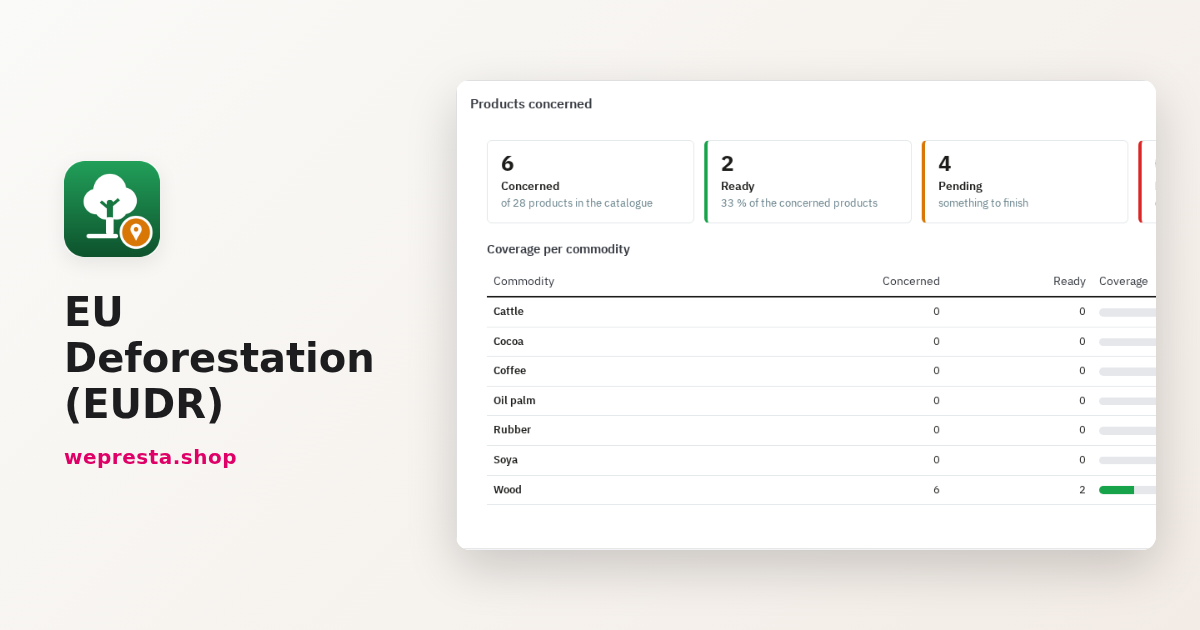
You sell wooden furniture, coffee, paper or palm-oil cosmetics, and a customer asks where the material comes from. Regulation (EU) 2023/1115, the EU Deforestation Regulation (EUDR), asks you to prove it, with a due diligence statement and the coordinates of the plots. The steps below show how a PrestaShop shop finds the products in scope, stores the evidence and prepares the file for each order, without blocking shipments.
Which products in my shop does the EU Deforestation Regulation cover?
Seven commodities fall under the regulation: cattle, cocoa, coffee, oil palm, rubber, soya and wood, plus the derived products listed in Annex I. A product is covered because of what it contains, not because of the shelf it sits on.
In practice that ranges from a wooden wardrobe (CN code 9403) to a paper notebook (4820), from chocolate to tyres. The text has moved: Delegated Regulation (EU) 2026/2102 removed leather (4101, 4104, 4107), rubber belts and other vulcanised rubber articles (4010, 4016) and retreaded or used tyres (4012, except treads 4012 90 30); Regulation (EU) 2025/2650 removed printed books (ex 49). The module ships those rules switched off. Other products apply from 30 December 2027, such as coffee extracts (2101 11 00) and frozen cattle tongues (0206 21 00).
Bamboo and rattan, second-hand goods, recovered paper, single-use packaging that presents another product, samples and items of correspondence are not covered. A coffee table is not coffee: the built-in exclusions cancel the keyword there, and your review decides.
How do I scan the catalogue and read a flag?
Open the Products page and click Scan the catalogue: the scan runs in batches with a progress bar and can be resumed if you close the page.
Two settings come first. The Operator profile (name, address, country, EORI, role, company size) feeds the PDF sheet and the TRACES pack. Feature that holds the CN/HS code tells the module where to read the code when it is not typed in the product record.
The scan reads the name, features, combination names and short description, in every language and every shop. Description and categories are optional settings. Four rule kinds apply: CN code, keyword (with a trailing asterisk), exclusion and category. Built-in rules can be switched off, restored, and you can add your own in Scan rules.
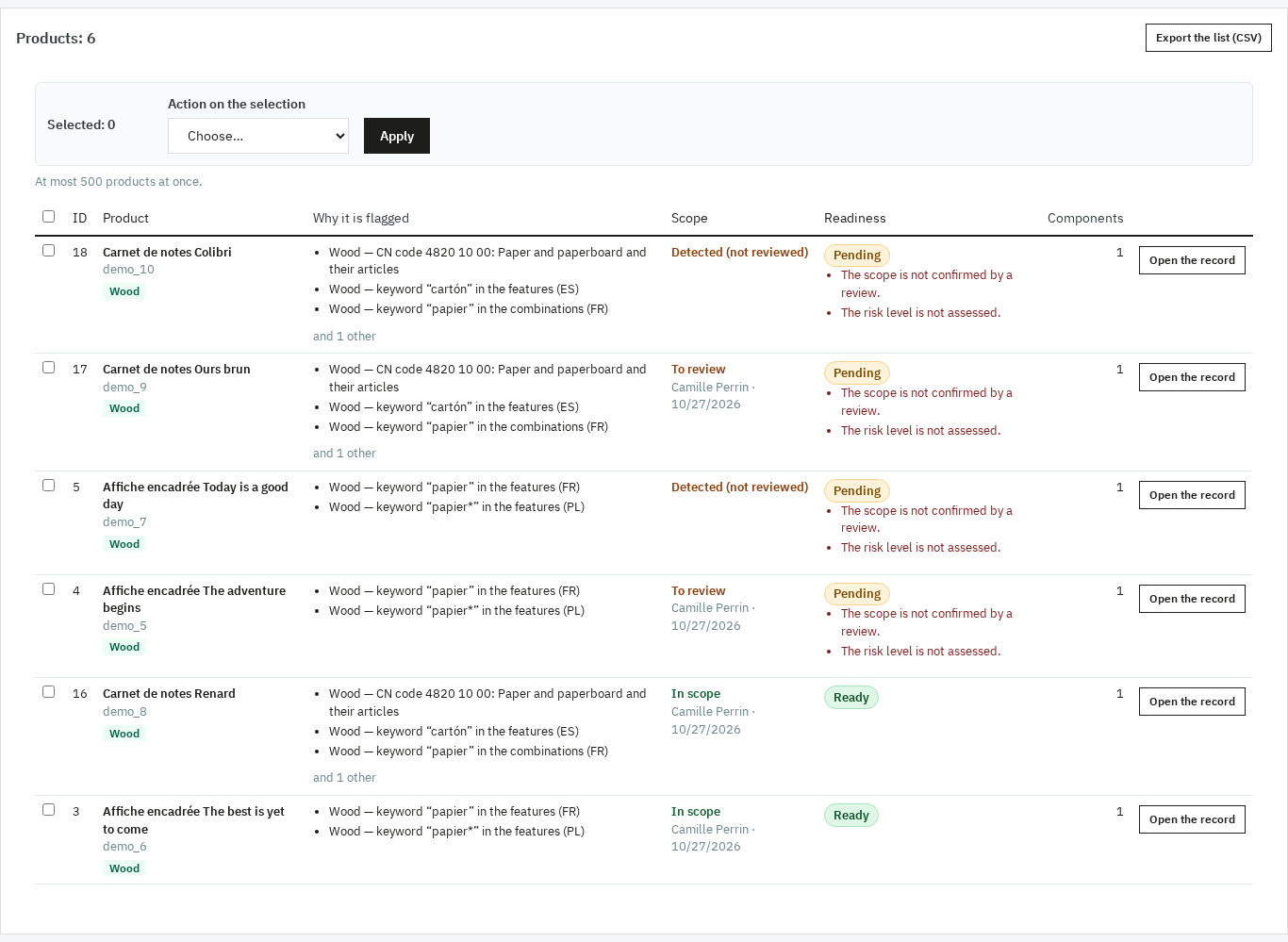
The list then shows a Why it is flagged column for each product: commodity, rule kind, matched value, field, language and an excerpt. A typical line reads “Wood — keyword ‘paper’ in the combinations field (FR)”. The Scope and Readiness columns give the decision and what is missing; Open the record opens the detail, Scan this product again reruns the check.
How do I decide on a flagged product and document it?
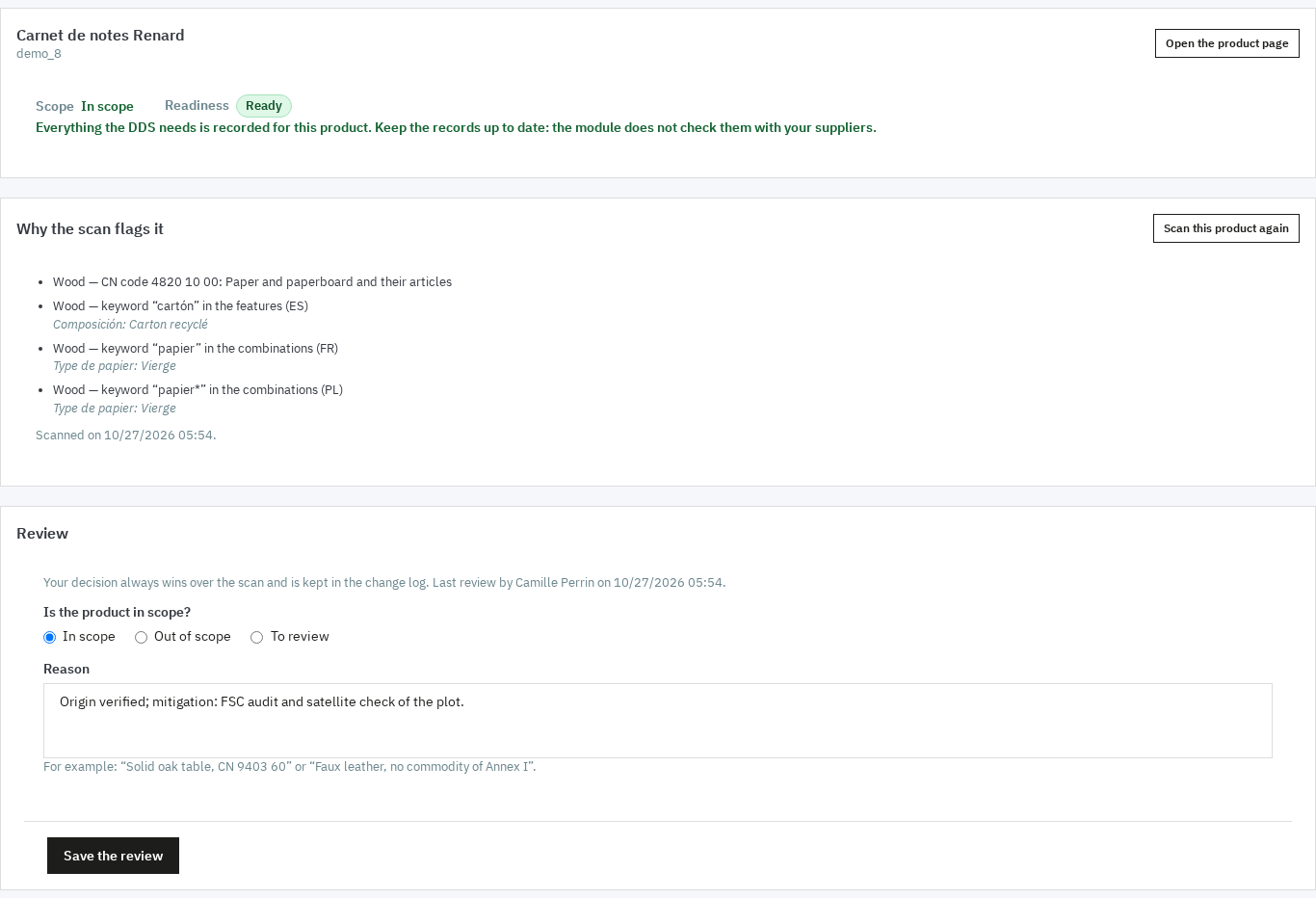
You choose In scope, Out of scope or To review, with a mandatory reason: your decision wins over the scan and stays in the change log.
A flag is a lead. A coffee product may be an accessory, a coffee machine is not coffee. The review is done from the record, or on a selection in the list with one shared reason (up to 500 products per action). Save the review stores the employee and the date; the history shows the values before and after.
The due-diligence record then holds the CN code, Net mass per unit (kg), Risk level (not assessed, negligible, non-negligible), Mitigation measures when risk is non-negligible, Certification, Notes and attachments (10 MB per file). For each commodity, a Component states the combination, Country of production, plots, supplier, the DDS reference and verification numbers and its date, and for wood the Species.
How do I gather supplier data, plots and DDS?
The supplier register keeps the DDS, its validity date and a four-point checklist; the plot register keeps the geolocation that most files are missing.
A supplier holds its country, commodities, contact, EORI, language, the DDS reference and verification numbers and the validity date. The Checklist follows four boxes: Geolocation received, Risk assessed, Mitigation measures taken, DDS obtained. The list and the dashboard show DDS missing, expired, expiring soon (30 days by default) or valid.
A plot is entered as a Point (latitude and longitude with six decimals) or a Polygon (GeoJSON in WGS 84, pasted or imported). Above 4 hectares, except for cattle, a polygon is required: the module shows the area of the polygon next to the area you declare. The preview is computed offline, with no map service call, and links to Open on OpenStreetMap.
How do I get the DDS and plots without creating a supplier account?
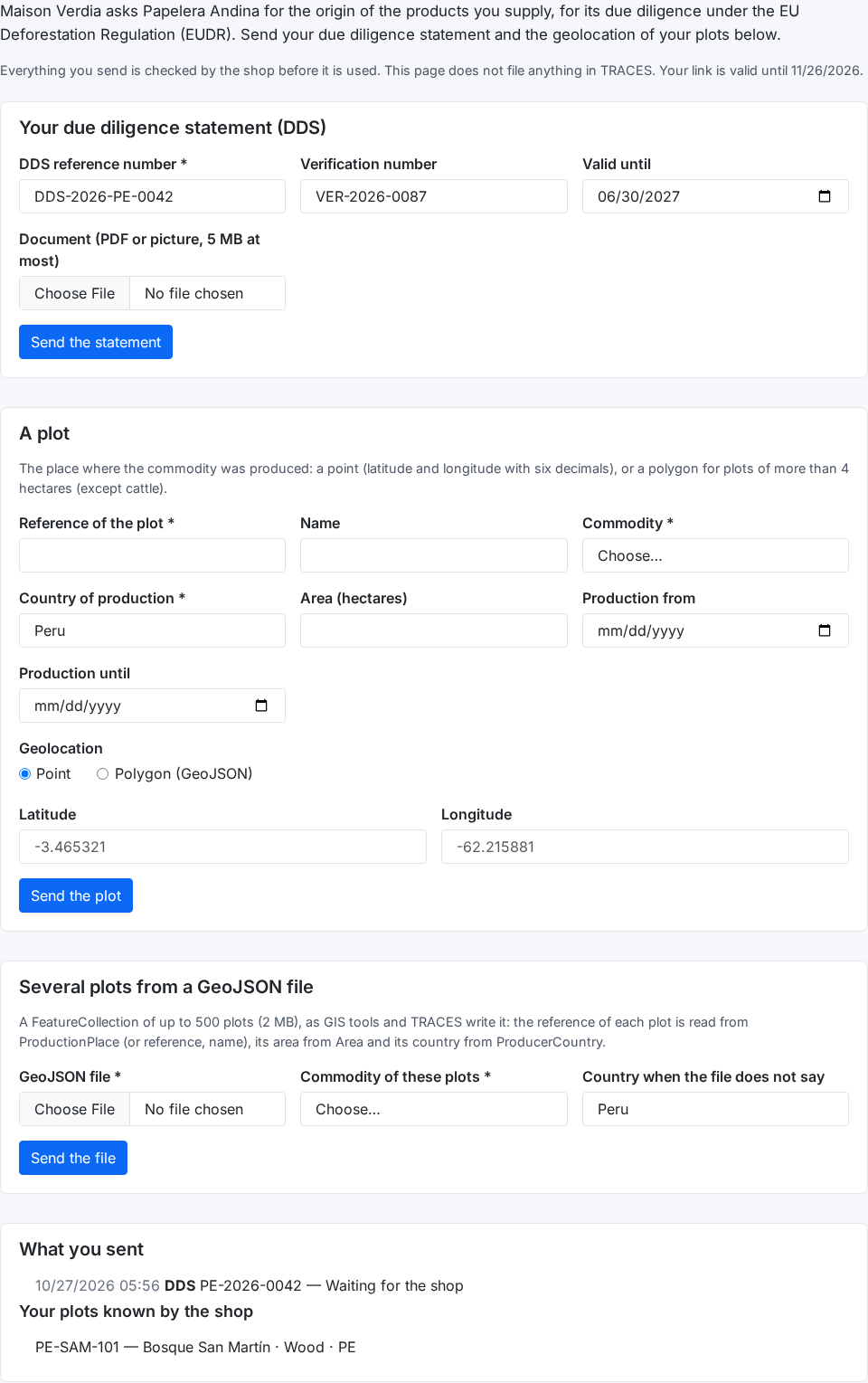
From the supplier record, switch on Portal open for this supplier, make a signed link valid for 1 to 365 days, then copy it or send it by e-mail: the supplier uploads documents without an account or password.
The Portal links panel offers Make a link to copy, Send the link by e-mail and Revoke every link. A new link does not cancel earlier ones; revoking cuts them all at once. The page, in the supplier's language, has three forms: the DDS (reference, verification, validity date, document), one plot, and several plots from a GeoJSON file (up to 500 plots and 2 MB).
Nothing enters your registers before your decision. Each upload waits in Portal entries; you preview the geometry and the document, then Accept or Refuse with a note the supplier will see. Both actions work in bulk.
What happens when an order is placed?
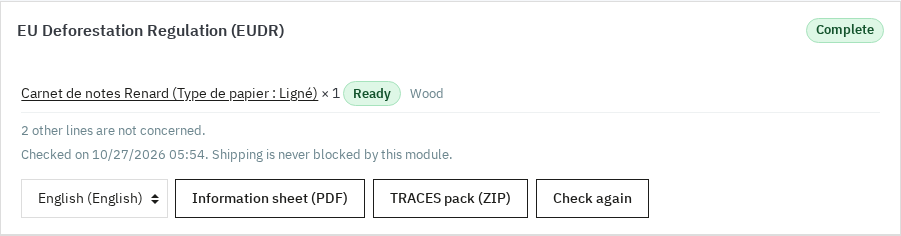
The module checks the concerned lines and stores Complete, To complete or Not concerned; the order is never blocked, delayed or changed.
The EU Deforestation Regulation (EUDR) panel on the order page shows the state, the lines and their issues. Three buttons: Information sheet (PDF), TRACES pack (ZIP) and Check again. The line under the date says it plainly: “Shipping is never blocked by this module”.
The PDF sheet repeats the operator, the shop, the order, the delivery country, the carrier and, line by line, the product, quantity, net mass, CN code, commodity, origin, supplier, DDS references and plots. The ZIP holds a CSV and JSON manifest, the plot GeoJSON files, the operator profile and the DDS references. You use them to enter and sign your statement in TRACES with your EU Login account.
Who is it for, and what does it not do?
It is for shops that sell at least one of the seven commodities, and leaves aside those whose catalogue contains none.
It fits if you sell furniture or wooden items, paper and paper products, coffee, chocolate, tyres and rubber goods, food or cosmetics made with palm oil or soya, or if you import and distribute those products. Micro and small businesses have until 30 June 2027, unless they already fall under the EU Timber Regulation (EUTR): then 30 December 2026 applies to them too.
The module is a preparation aid, not a certification. It files nothing in TRACES, signs nothing, calls no satellite or map service, and stores the DDS numbers your suppliers give you without checking them in TRACES. It does not replace the due diligence statement you file yourself. The scan works on words and codes: it misses products that do not name their materials and sometimes flags products that only mention them; your review decides. It never blocks an order or a shipment. Check the official text for your scope and your dates.
For a public product page with a QR code, see the digital product passport module. For more detail, the module documentation covers every screen, and the EU Deforestation (EUDR) page lists the requirements: PrestaShop 1.7.8, 8.0+ or 9.0+, PHP 7.4, the zip and fileinfo extensions. If you communicate on product origin, have your wording checked with the EmpCo green-claims checker: “deforestation-free” is a claim to back with evidence.
Frequently asked questions
How do I know whether a product is covered by EUDR?
Which compliance deadline applies to my business?
What is a due diligence statement and what goes in it?
How do I collect plot geolocation from suppliers?
Does the module file the DDS in TRACES?
Products in this article

EU Deforestation (EUDR): flag products at risk and track supplier DDS
Finds the products made from the regulation’s seven commodities: wood, coffee, cocoa, soya, palm oil, rubber and...
Digital Product Passport (DPP): QR code & public page
A public passport page and a printable QR code for every product Composition, durability, repair, end of life,...

EmpCo Green Claims Checker: find risky eco claims
Finds the wording to check in every text of the shop, in each active language A built-in dictionary in six...