EU Deforestation (EUDR): flag products at risk and track supplier DDS - Module PrestaShop

The back office that finds the products covered by the EU Deforestation Regulation, gathers your suppliers’ origin data and DDS, and prepares each order’s file.

New Version 1.0.0 1.7.8 8.0+ 9.0+ 5 languages 🇫🇷 FR 🇬🇧 EN 🇪🇸 ES 🇮🇹 IT 🇵🇱 PL
  • Finds the products made from the regulation’s seven commodities: wood, coffee, cocoa, soya, palm oil, rubber and cattle
  • A due-diligence record per product: origin, geolocated plots, supplier, DDS number and risk level
  • A supplier portal by signed link: DDS and plots sent without an account, accepted by you
  • Order check, PDF information sheet and TRACES pack, without ever blocking a shipment
  • Compatible with PrestaShop 1.7.8, 8.0+ and 9.0+
Not sure yet? Try it free for 24 hours — no credit card required.
Features

Everything you need, nothing you don't.

From the first catalogue scan to the sheet attached to the customs file, one place to see what is covered and what is still missing.

The catalogue under review

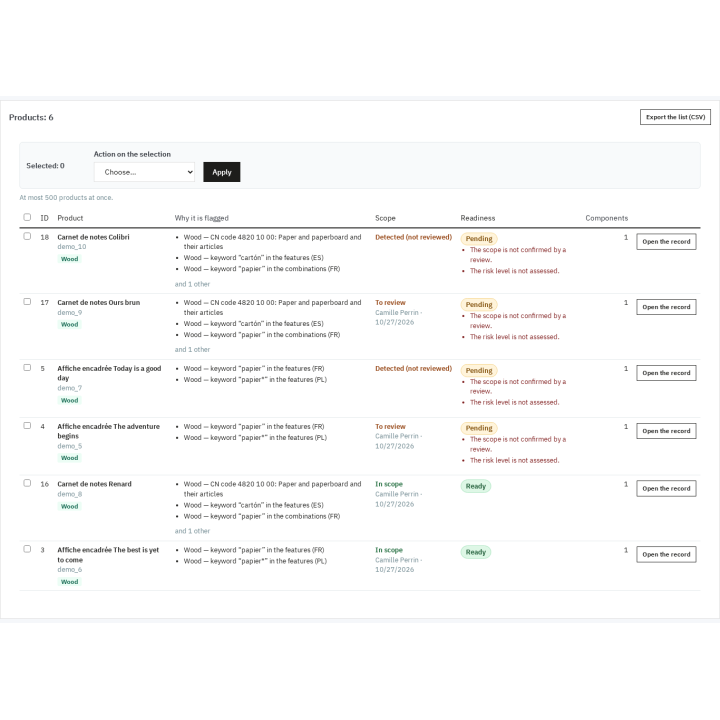
Wood, coffee, cocoa, soya, palm oil, rubber, cattle: the scan reads names, features, combinations and short descriptions in every language, matches CN codes and keywords, and shows for each flagged product the commodity, the rule, the word or code found and an excerpt. The rules remain editable.

Your decision prevails

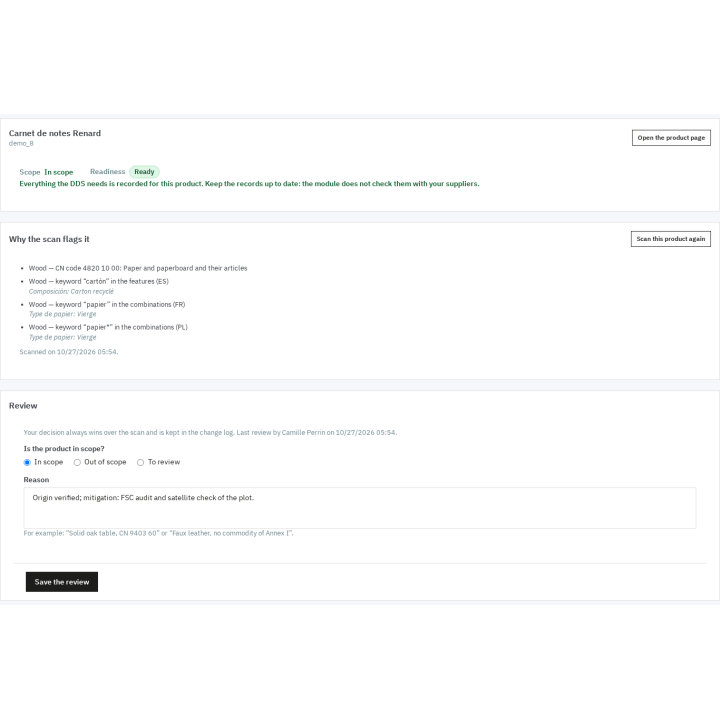
A flag is a lead. You decide per product — in scope, out of scope or to review — with a required reason, your name and the date. The manual decision overrides the scan, can be applied to a whole selection and stays in the change log.

One due-diligence record per product

CN code, net mass, risk level, mitigation measures, certification, notes and attachments; for each commodity, a component with the country of production, plots, supplier, DDS number and date, and the species for wood. The readiness status shows what is missing.

Geolocated plots

A point with six decimals or a GeoJSON polygon, pasted or imported. Above 4 hectares, except for cattle, a polygon is required and the computed area is shown next to the declared one. Offline preview, OpenStreetMap link, GeoJSON export of each plot.

The supplier submits, you accept

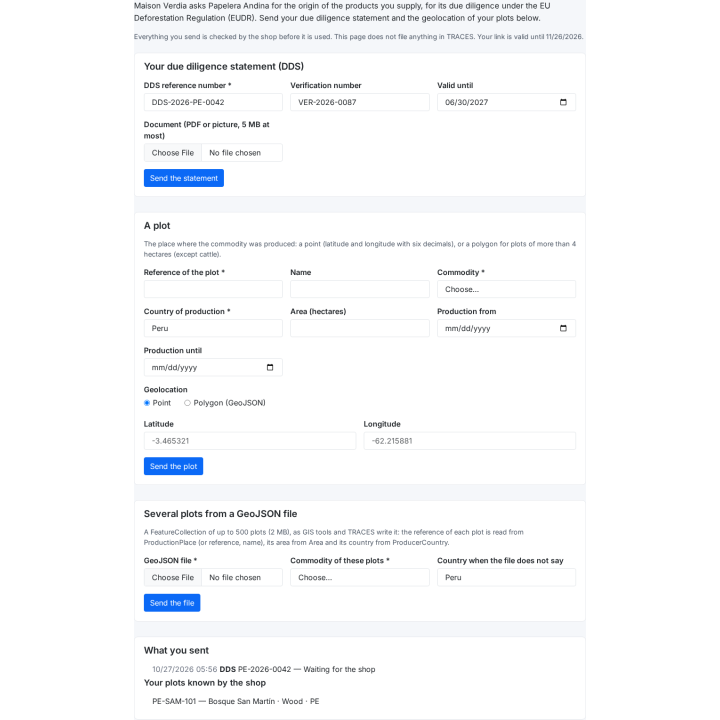
A signed link, valid for 1 to 365 days, opens a form for the supplier with no account: its DDS with its document, one plot or a set of plots in GeoJSON. Each submission waits for your decision; you accept, refuse with a note, or process in bulk.

Ready before shipping

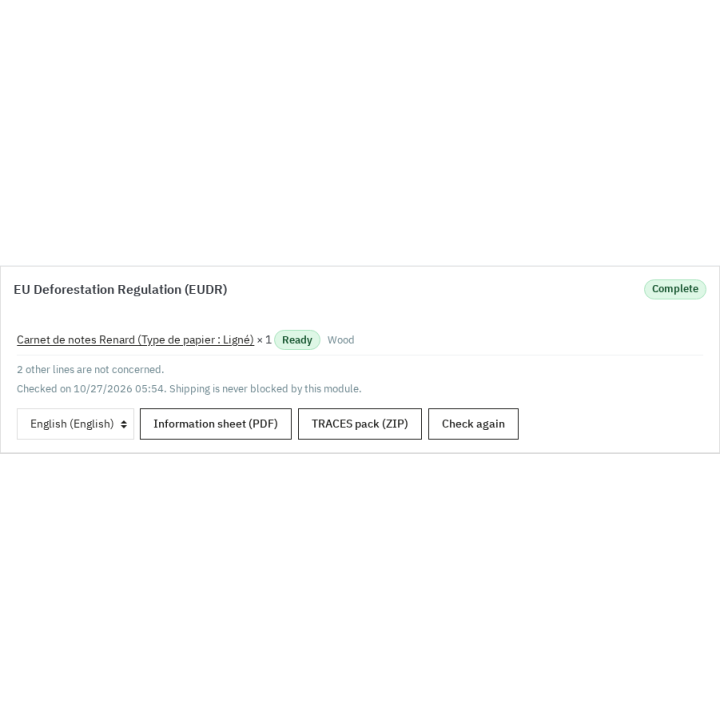
On validation, every order is checked and stored with a snapshot of its lines. The order panel gives the PDF information sheet and the TRACES pack as a ZIP; the Orders page lists those to complete. No shipment is ever blocked.

description Full description expand_more

The EU Deforestation Regulation, product by product

Regulation (EU) 2023/1115 on deforestation-free products, known as EUDR, asks businesses that place wood, coffee, cocoa, soya, palm oil, rubber, cattle and their derived products on the European market to know exactly where these materials come from and which plots produced them. The deadlines are staggered: 30 December 2026 for large and medium companies — and for micro and small companies already covered by the EU Timber Regulation (EUTR) —, 30 June 2027 for micro and small companies, and 30 December 2027 for the products added to Annex I by Regulation (EU) 2025/2650 and Delegated Regulation (EU) 2026/2102.

In a PrestaShop shop the information is scattered: some materials are described in product pages, others live in supplier invoices, due diligence statements (DDS) arrive by e-mail, and nobody knows at shipping time whether the order is covered. EU Deforestation (EUDR) brings this work into the back office: it finds the products concerned in the catalogue, keeps the register of suppliers, plots and DDS, checks every order and prints the sheet to attach to the customs file.

It is a preparation aid. The module does not certify compliance, never calls a product deforestation-free, files nothing in TRACES and does not replace legal advice. It never blocks an order or a shipment.

Find the products concerned, with the reason

The scan reads the name, features, combination names and short description of each product, in every language and every shop, plus the CN code typed in the due-diligence record or read from a product feature of your choice. It compares this data with the Annex I rules: Combined Nomenclature codes, keywords per commodity in six languages (English, French, German, Spanish, Italian, Polish) and exclusions that avoid false positives, such as “coffee table” for coffee or “faux leather” for leather.

You switch each rule on or off, add your own codes, keywords or categories and restore the built-in rules. Every flagged product shows the reason: commodity, rule type, matched value, field and language, with an excerpt of the text. The scan runs in batches from the Products page with a progress bar; it can be interrupted and resumed. A saved product is scanned again at the end of the save, and the pages say when the rules have changed since the last scan.

Decide, then document

A flag is a lead, not a verdict. For each product you choose In scope, Out of scope or To review, with a required reason and the name of the employee. Your decision overrides the scan, is kept in the change log and can be applied to a whole selection at once.

The due-diligence record of the product gathers the CN code, the net mass per unit, the risk level (not assessed, negligible, non-negligible), the mitigation measures, the free-text certification, notes and attachments (PDF, images, spreadsheets, GeoJSON, up to 10 MB per file). For each commodity, one or more components give the combination concerned, the country of production, the plots, the supplier, the number and date of its DDS, and for wood the scientific and common species names.

Plots and suppliers

The plot register accepts a point (latitude and longitude with six decimals) or a GeoJSON polygon in WGS 84, pasted or imported from a file. Above 4 hectares — except for cattle — the plot must be a polygon: the module says so and shows the computed area next to the declared one. Each plot is previewed offline, without calling a map service, with a link to OpenStreetMap if you want to see it in context.

The supplier register holds country, commodities, contact, EORI, language, DDS number and validity, and a four-point checklist: geolocation received, risk assessed, measures taken, DDS obtained. Missing, expired or soon-to-expire DDS are flagged in the list, on the supplier page and on the dashboard.

The supplier portal, with no account to create

From a supplier page, create a signed link valid for 1 to 365 days, copy it or send it by e-mail in the supplier’s language. The supplier submits its DDS with its document, one plot, or a GeoJSON file of several plots. Nothing enters your data before your decision: each submission waits in Portal entries, and you accept or refuse it with a note, one by one or in bulk. Sending a new link does not revoke the previous ones; the revoke button invalidates every link already sent.

Know where you stand, order by order

The readiness of each product is computed from your decision, the components, the plots and the DDS: Ready, Pending, Missing or Not concerned, with the list of what is left to do. It is shown and filterable in the product list and is updated after every change.

When an order is validated, the module checks the concerned lines and keeps a snapshot: Complete, To complete or Not concerned. A warning appears in the back office and the Orders page lists those still to complete; no order is ever blocked. From the order you print the PDF information sheet (product, quantity, net mass, CN code, commodity, origin, supplier, DDS number, plots, with the lines to complete marked) and download the TRACES pack as a ZIP: CSV and JSON manifest, plot GeoJSON, operator profile and list of DDS references, ready to serve as the basis of your statement.

Dashboard, import and evidence

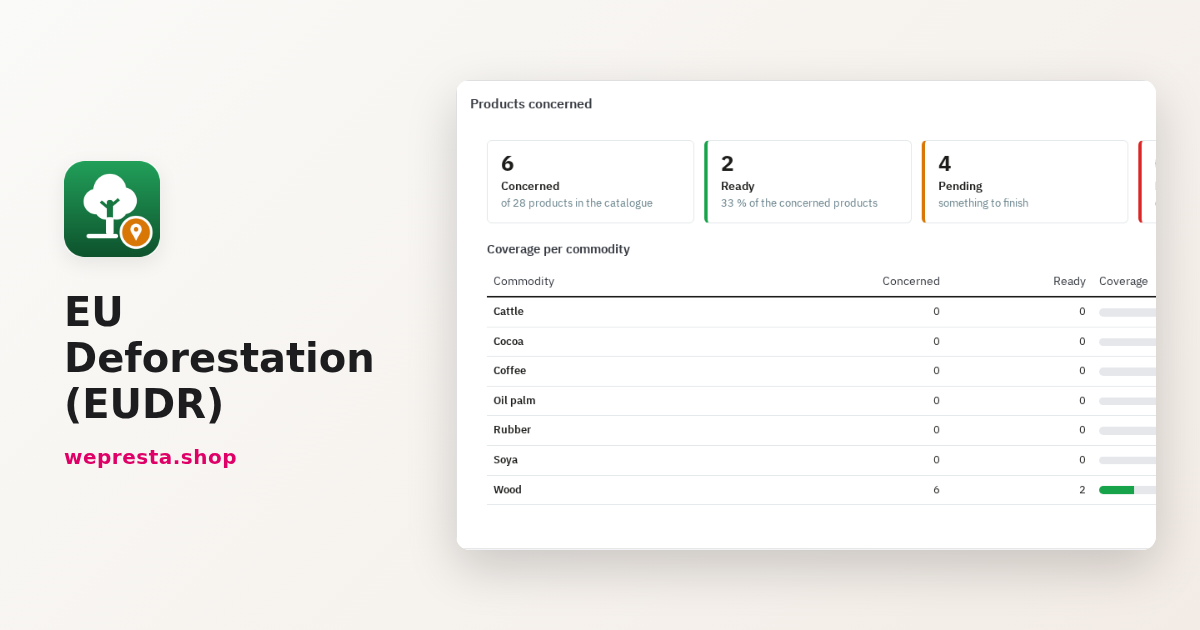
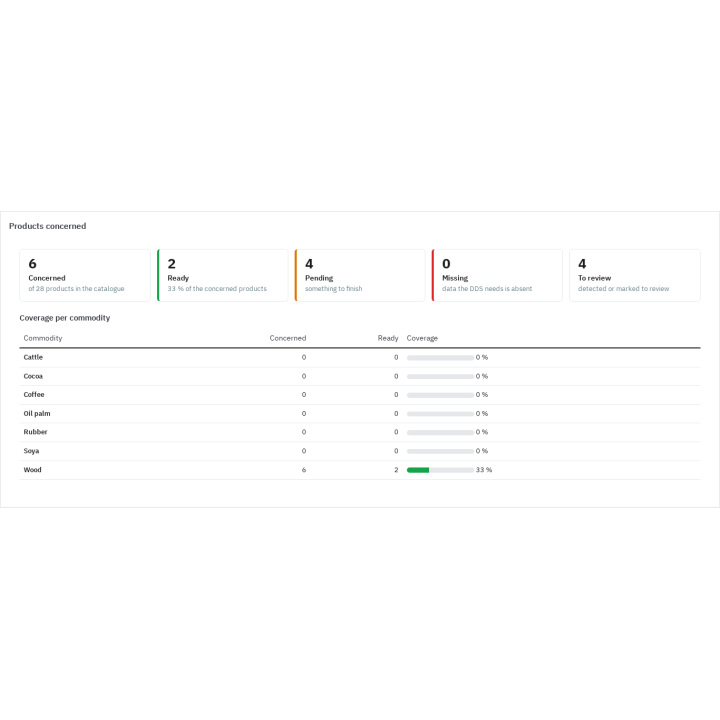
The dashboard gives coverage per commodity, products without origin, plot or DDS, suppliers without DDS, waiting portal entries, orders to complete and the countdown to the three deadlines; every figure opens the matching filtered list. Products, components, plots and suppliers can be imported and exported as CSV, with a line-by-line dry run before anything is written. The change log keeps who changed what and when, with the values before and after, and the evidence retention period is configurable (five years by default). Rights are set per employee profile: view, add, edit, delete.

What the module does not do

  • It does not file the DDS in TRACES and signs nothing: filing remains your act, with your EU Login account.
  • It does not verify the authenticity of a DDS with a supplier or an authority.
  • It does not analyse satellite images or compute a deforestation risk from the coordinates.
  • It does not replace the customs invoice or a supply-chain system, and it does not cover the GPSR, DPP or EPR obligations.
  • The scan works on words and codes: it misses products whose texts do not name their materials and sometimes flags a product that merely mentions them. The manual review decides.

Which shops is it for?

Furniture and wood products, paper and printing, coffee and tea, chocolate and confectionery, leather and footwear, tyres and rubber goods, food and cosmetics based on palm oil or soya, distributors and importers that must keep the origin and DDS references. It works in multistore: settings per shop, shared registers.

Requirements

PrestaShop 1.7.8, 8.0+ or 9.0+, PHP 7.4 or later, the PHP zip extension for TRACES packs and fileinfo for attachments. Interface in English, French, German, Spanish, Italian and Polish; portal and e-mails in the supplier’s language; PDF in the chosen language. An active license is needed to scan, change records and save settings; without a license the data stays readable and downloadable.

See what the regulation covers in your catalogue, gather the evidence and reach shipping with a file that is ready.

Comparaison

Why choose us?

See how we compare to the most common alternatives on the market.

Feature Addons
Transparent pricing
Lifetime updates included
Direct developer support
PS 1.7, 8 & 9 compatible
Standardized clean code
Multi-store ready
No hidden renewal fees
Included Not included Partial / Not guaranteed
Preview

Discover the module in images.

See the EUDR exposure of the whole catalogue at a glance

See the EUDR exposure of the whole catalogue at a glance

Every Annex I product is found automatically in the catalogue

Every Annex I product is found automatically in the catalogue

One complete due diligence file per product: origin, risk, decision

One complete due diligence file per product: origin, risk, decision

The EUDR check of an order is ready before it ships

The EUDR check of an order is ready before it ships

Suppliers send their origin data from a signed link, with no account to create

Suppliers send their origin data from a signed link, with no account to create

Support

FAQ

Find answers to frequently asked questions about this module

No, and it does not claim to. It is a preparation aid: it finds the products concerned, gathers origin and DDS evidence, computes what is missing and prepares the files. It does not certify compliance, never calls a product deforestation-free, files nothing in TRACES and does not replace legal advice. The decision and the filing remain your responsibility.

The seven Annex I commodities: cattle, cocoa, coffee, palm oil, rubber, soya and wood, and their derived products (leather, chocolate, tyres, furniture, paper, food and cosmetics, among others). The module ships the Annex I CN codes as amended by Regulations (EU) 2025/2650 and 2026/2102, including the products that only apply from 30 December 2027 and the removed entries, shipped switched off. Always check the official text for your case.

Every flag shows its reasons: the commodity, the rule type (CN code, keyword, category), the value found, the field concerned (name, feature, combination, short description), the language and an excerpt. For example: “Wood — CN code 4820 10 00: Paper and paperboard” or “Coffee — keyword ‘coffee’ in the name (EN)”. If a reason is wrong for your product, switch the rule off, add an exclusion or decide through the manual review.

No. It prepares a ready-to-use ZIP: product and quantity manifest in CSV and JSON, plot GeoJSON, operator profile and list of DDS references. You then log in to TRACES with your EU Login account and enter and sign your statement there. The module talks to no European system and signs nothing.

The module checks the concerned lines and stores a snapshot: complete, to complete or not concerned. A warning appears in the back office and the order joins the “to complete” list if a line is not ready. Nothing is blocked, delayed or changed: you ship as usual, then complete the file and print the information sheet.

No. You send a signed link, valid for 1 to 365 days, in the supplier’s language. There it submits its DDS, one plot or a GeoJSON file, with no account or password. You can revoke every link at once by generating a new key, and each submission waits until you accept it or refuse it with a note.

The regulation asks for the geolocation of plots: a point is enough for small plots, but a plot over 4 hectares must be described by a polygon, except for cattle. The module applies this rule from the declared or computed area, flags the plots concerned and counts them as missing in the readiness status.

Yes. Products, components, plots and suppliers are imported as CSV, with an empty template per entity and a line-by-line dry run before anything is written. Unknown columns are reported, an empty cell empties the field, and each line gets the status created, changed, unchanged or refused with its reason. The same data can be exported for a backup or to work in a spreadsheet.

Yes. The module runs on PrestaShop 1.7.8, 8.0+ and 9.0+ with PHP 7.4 minimum. In multistore, settings belong to each shop while product, supplier and plot records are shared; product lists, the dashboard and orders follow the employee’s context. The interface comes in six languages and the portal in the supplier’s language.

The module never switches itself off. Without a license, the pages stay readable, records, PDFs, TRACES packs, CSV files and attachments stay downloadable, order checks keep running and the portal still accepts your suppliers’ submissions. Scanning, changes, settings and link creation wait for activation. Uninstalling keeps your data unless you ticked its deletion.

5-minute installation · Full documentation included

Lifetime license
One-time payment, updates included for life.
Choose your license
No commitment · Cancel in 1 click from your account
Instead of --€/year if purchased separately

You might also like

Loading...