- Rules and conditions
- Variables in messages
- Places on the product page
- Badges on product lists
- Shipping countdown
- Call-to-action buttons
- Message and button styles
- Dates, order and number of messages
- Ready-made rules and tester
- List of the rules
- Multistore, rights and languages
- What is the purpose of Product Message Rules on an e-commerce store?
- What conditions are available (stock, price, weight...)?
- Can multiple conditions be combined with AND/OR logic?
- How to target the relevant products (catalog, categories, selection)?
- What types of messages and designs are possible?
- Can a Call to Action (CTA) button be added to the message?
- Can message display be scheduled (start/end dates)?
- How is a rule created in the back-office (workflow)?
- Can the exact display location be controlled (hook / shortcode / theme integration)?
- Compatibility, prerequisites, and basic troubleshooting
- Can a countdown to the shipping cut-off time be shown?
- Can badges be shown on product lists?
- What happens to my rules when I update from version 1.0?
- What happens if my license expires?
- The message does not show
- The message does not follow the combination
- The countdown does not show
- A customer sees the message of another customer
- A place shows nothing
Conditional messages on PrestaShop product pages: setup and examples
Conditional product messages & CTAs (Product Message Rules) shows on your product pages the message that fits the situation: “Only 3 items left in stock” when stock runs low, the discount during a sale, the shipping cut-off time, a reassurance or an offer reserved for your professional customers. You write a rule once; the module applies it to every product concerned and removes it when the condition is no longer true.
This guide presents what the module can do with examples, then explains how to install it, create a rule and adjust the display.
Highlights:
- Rules with conditions: stock of the combination, price excluding or including tax, discount, weight, new product, pre-order, brand, supplier, feature, attribute
- Based on the customer: customer group, logged in, country, zone, currency, language, mobile phone
- Living messages: variables such as {stock}, {price} or {discount}, with the plural forms of each language
- Badges on product lists and a shipping countdown
- Buttons to a page, a category or a product of your shop, in each language
- Easy to set up: ready-made rules, a tester on a product, styles with a preview
- PrestaShop 1.7.8, 8.0+ and 9.0+; PHP 7.4 minimum; back office in French, English, Spanish, Italian and Polish
See the Conditional product messages & CTAs module
Presentation
Your customers make up their mind on the product page. That is where they should read that only a few items are left, that the discount ends on Sunday, that their parcel leaves today if they order before 2 pm, or that a heavy product is delivered on a pallet. Writing this information by hand in every description takes time, and it becomes wrong as soon as the stock or the price changes.
With this module:
- You write a message in the languages of your shop, with variables if you wish (“Only {stock} items left in stock”).
- You set the conditions: for example stock at most 5 and greater than 0.
- You choose the products (the whole catalog, categories or a selection) and, if needed, dates.
- The message shows by itself on each product page, and for each combination, that meets the conditions, in the place you chose. It disappears when this is no longer the case.
Messages are part of the page: they are visible at once, without an extra request, and readable by search engines. When the customer changes the size or the colour, they follow the chosen combination.
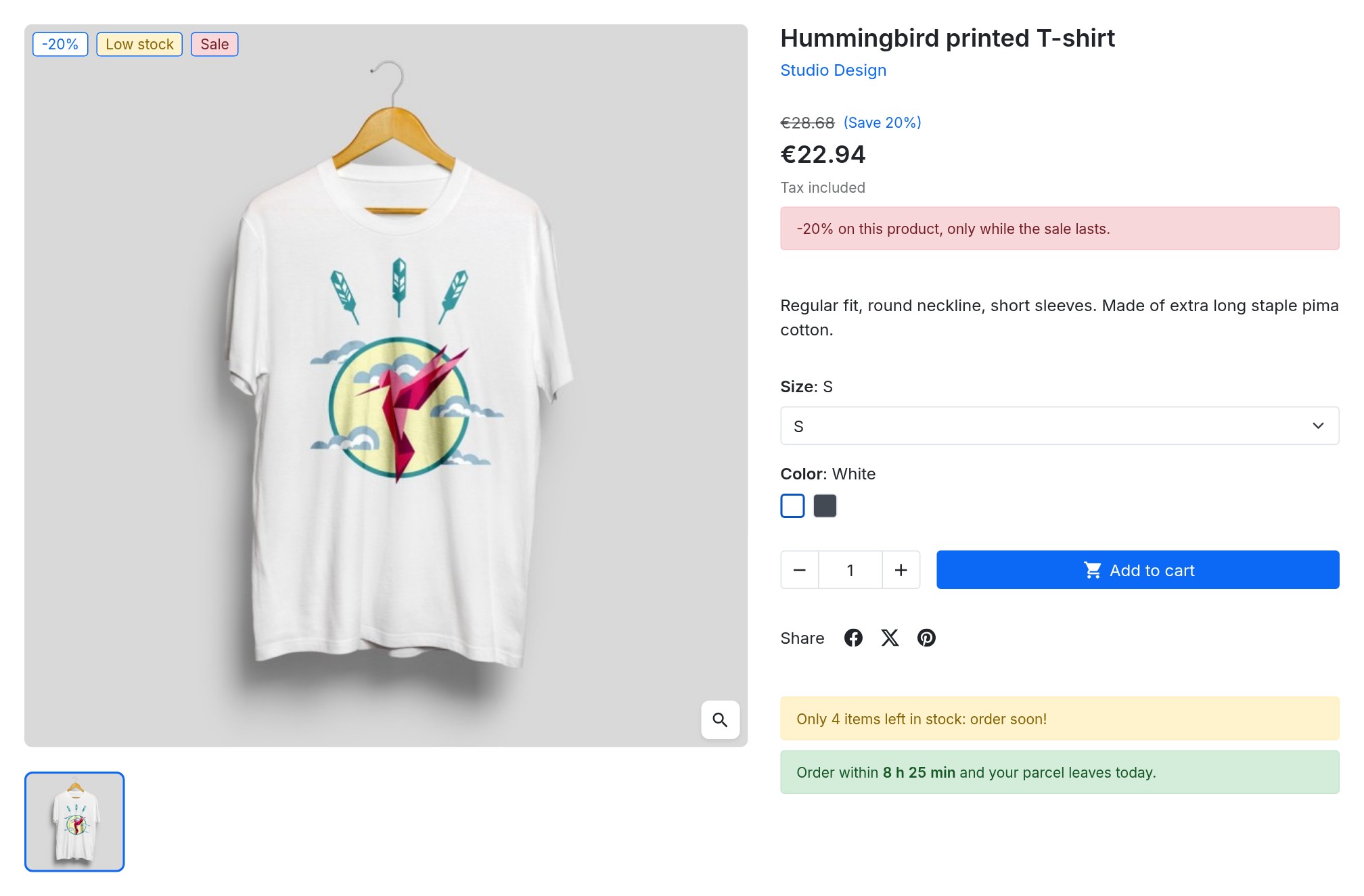 Sale, low stock and countdown on the product page
Examples of messages
- Low stock: “Only {stock} items left in stock: order soon!” from 1 to 5 items, with a “Low stock” badge on the lists.
- Orderable when out of stock: “Out of stock, but you can still order: it ships as soon as it is back” when ordering without stock is allowed.
- Pre-order: “Pre-order: ships from {available_date}” when the availability date is in the future.
- Sale: “-{discount} on this product, only while the sale lasts” from 20% off, with a “Sale” badge.
- Countdown: “Order within {countdown} and your parcel leaves {ship_date}” according to your shipping calendar.
- Heavy product: “Heavy item: delivered on a pallet, by appointment” above 30 kg.
- Payment in instalments: from a price of your choice.
- Professional customers: “Payment at 30 days” for the Professionals customer group only.
- Country: “No customs fees” for visitors from Switzerland.
- Reassurance: “Free returns within 30 days” with a button to your terms page.
Features
Rules and conditions
A rule shows a message when its conditions are true. Conditions are arranged in groups: all the conditions of a group must be true (AND), and the message is shown when one of the groups is true (OR). Without any condition, the message is shown on every targeted product.
Available conditions:
- Product: stock of the combination, price (excluding or including tax, compared with the displayed price, in the default currency), discount percentage, weight, new product, pre-order, orderable when out of stock, brand, supplier, feature, attribute of the combination
- Visitor: customer group, logged in or not, country, zone, currency, language, mobile device
- Shipping: before the cut-off time of the day
A price rule stays silent when the price is not displayed (catalog mode, group without prices).
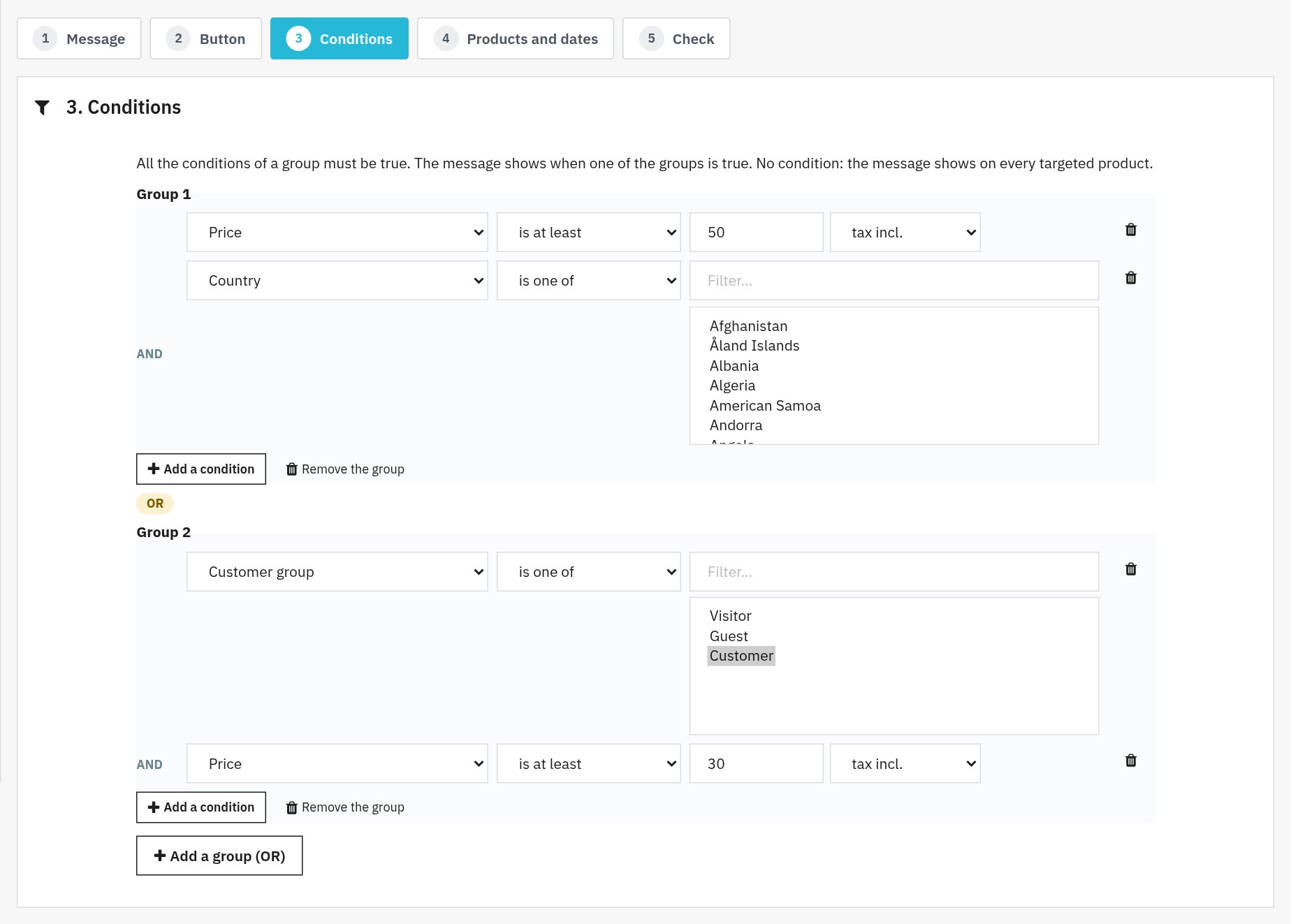 Combined conditions: AND groups, joined by OR
Variables in messages
Click a variable to insert it into the message:
{stock}: stock of the combination{price}and{regular_price}: price and price before discount{discount}: discount (for example “20%”){product_name},{available_date},{weight}{countdown}and{ship_date}: countdown and shipping day
To make a word agree with the stock, write {stock|item|items}: the module picks the form that fits the quantity (three forms in Polish).
Places on the product page
Each rule chooses its place:
- under the “Add to cart” button (recommended: visible in every theme and updated with the combination)
- next to the price
- in the purchase area, under the product images or under the product description
- in the reassurance block
- in a hook of your theme, or exactly where you want with a shortcode
- as a badge only, without a message on the product page
Badges on product lists
A rule can also show a short badge on the product picture in categories, search results, the home page and related products, in the colours of its style. The badges of a whole page are worked out at once.
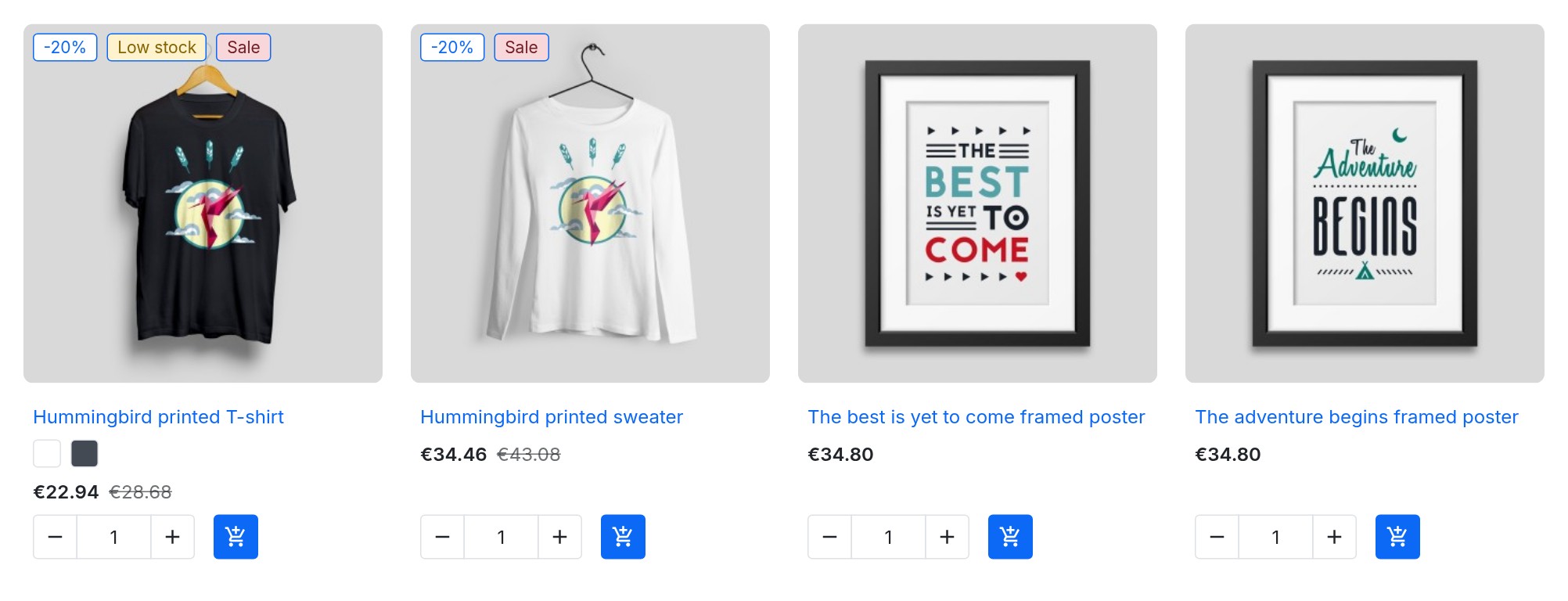 Badges in the colours of their style on your product lists
Shipping countdown
In the settings, give the shipping cut-off time of each day of the week (empty for a day without shipping) and your public holidays. The variables {countdown} and {ship_date} then show “Order within 2 h 14 min and your parcel leaves today”, then “tomorrow” or the next shipping day. The timer runs in the browser without any request, in the time zone of your shop, and the “before the cut-off time” condition lets you show another message once the time has passed.
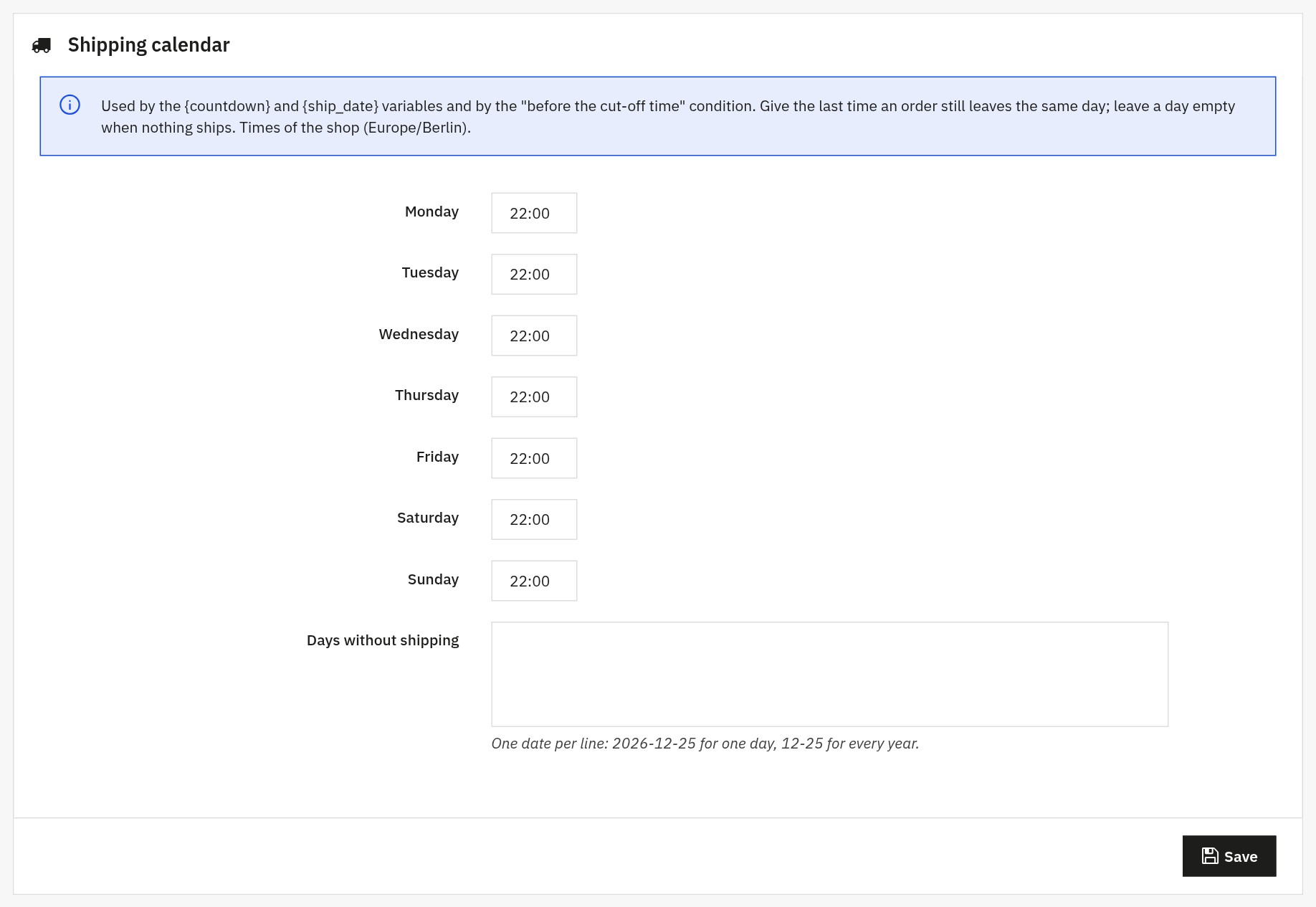 The shipping calendar of the countdown
Call-to-action buttons
Add a button to a message: text in each language, a link to a page of your shop, a category or a product (its address is built in each language) or a different link for each language. The button sits to the right, to the left or under the message, or inside its box, and can open in a new tab. Unsafe links are refused.
Message and button styles
Six message styles (Success, Warning, Danger, Info, Dark, Light) and six button styles are provided. Change them or create your own: colours, border, radius, spacing, text weight and additional CSS, with an instant preview.
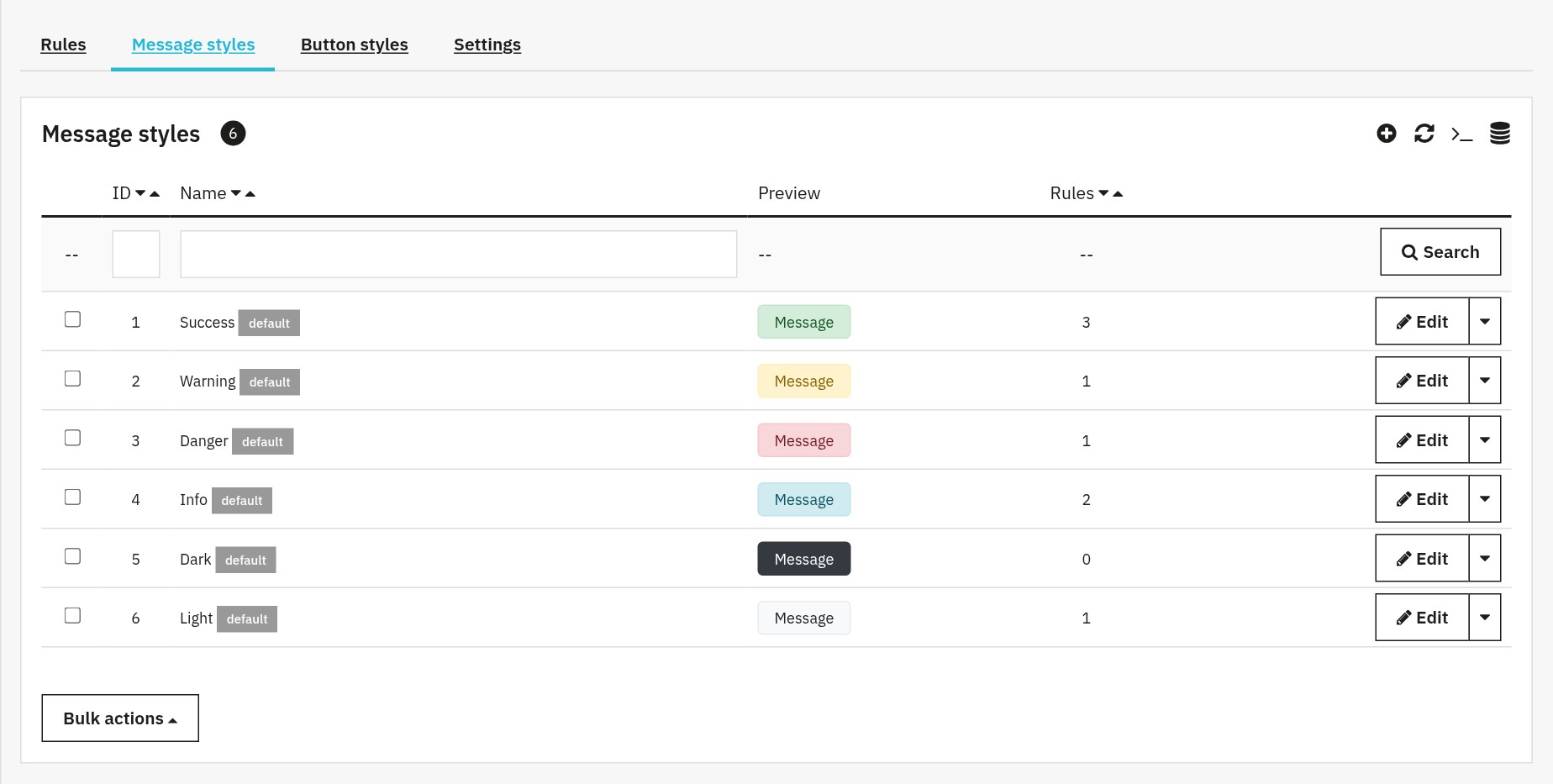 Six ready-to-use message styles
Dates, order and number of messages
- Start and end dates for each rule (the end covers the whole chosen day)
- Order of the rules by drag and drop: it sets the display order
- “Stop after this rule” and a maximum number of messages per place
- Messages the customer can close
Ready-made rules and tester
“Start from a ready-made rule” opens a rule already filled in, in every language of your shop, switched off: low stock, orderable when out of stock, pre-order, big discount, heavy product, payment in instalments, shipping countdown, invite to create an account.
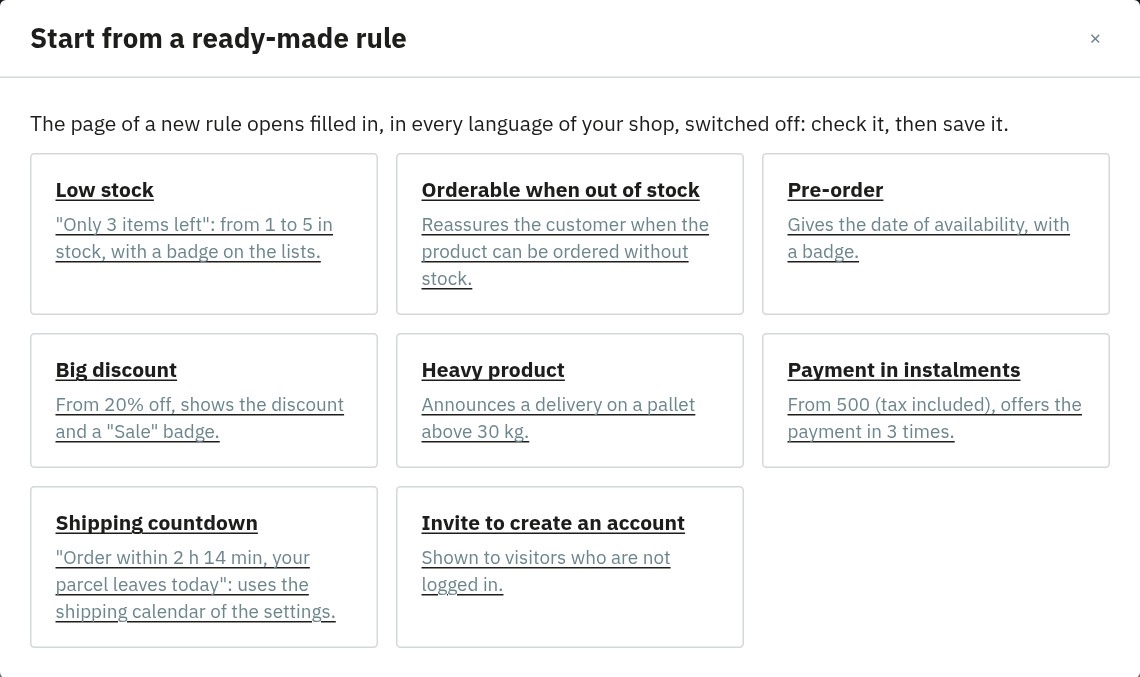 Start from a ready-made rule
At the last step of a rule, test it on a product: the module shows one line per combination with the stock, the price, each condition true or false, and the preview of the message, without saving the rule.
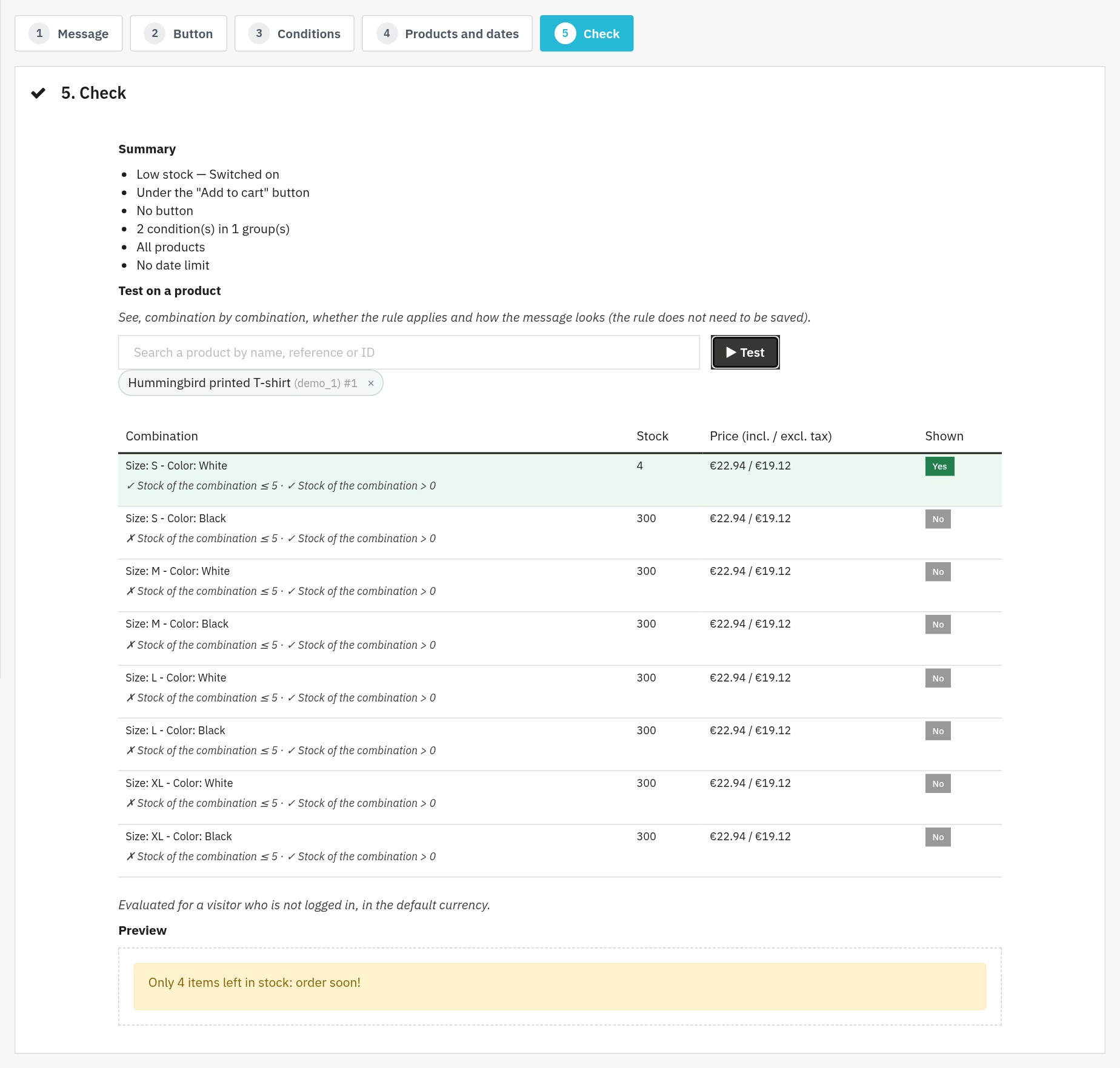 Test a rule on a product before saving it
List of the rules
The list shows the status of each rule (shown, scheduled, ended, switched off), its place, products, style and shops. Filter, reorder, duplicate, switch on or off or delete several rules at once.
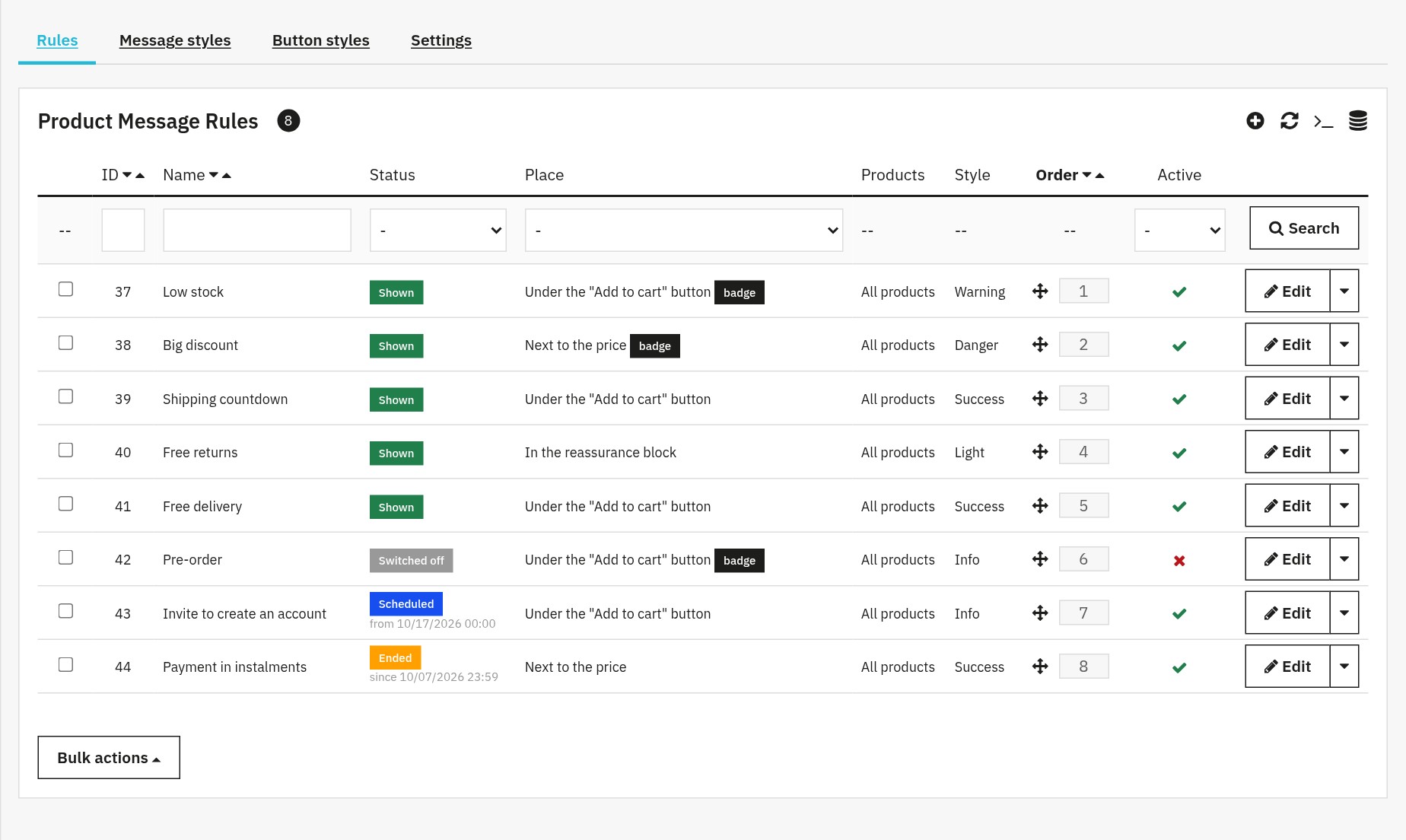 All your rules, their status and their order
Multistore, rights and languages
- Each rule and each style belongs to one or more shops; a new shop receives the default styles.
- The module respects the rights of your employees: a read-only profile can look at the rules without changing them.
- The back office is available in French, English, Spanish, Italian and Polish.
Requirements
- PrestaShop 1.7.8, 8.0+ or 9.0+ (PrestaShop 1.7.7 and earlier versions are not supported)
- PHP 7.4 minimum
- A standard PrestaShop theme, or a theme that displays its product page hooks
- An active license to show the messages
Installation
- Download the archive of the module from your WePresta customer account.
- In the back office, go to Modules > Module Manager and click Upload a module.
- Upload the ZIP file, then click Configure.
- Activate your license on the configuration page.
The rules are managed in the Modules menu (under WePresta on PrestaShop 9), page Product Message Rules, or from the Manage the rules button of the configuration page.
Updating from version 1.0
Back up your shop, then upload the archive as for an installation: PrestaShop runs the update. Your rules, their conditions, styles, dates and products are kept; the place chosen for the whole shop is applied to each rule and the link of the button is copied to each language. Then open a product page and check the place of your rules in their list.
Create your first rule
- Open Product Message Rules and click Start from a ready-made rule, then Low stock.
- Message step: check the text in each language, the style and the place, and the badge on the lists.
- Conditions step: “Stock of the combination is at most 5” AND “is greater than 0”.
- Products and dates step: all products, or a category.
- Check step: test the rule on a product, switch it on and save.
The message shows on the product pages whose chosen combination has 1 to 5 items in stock.
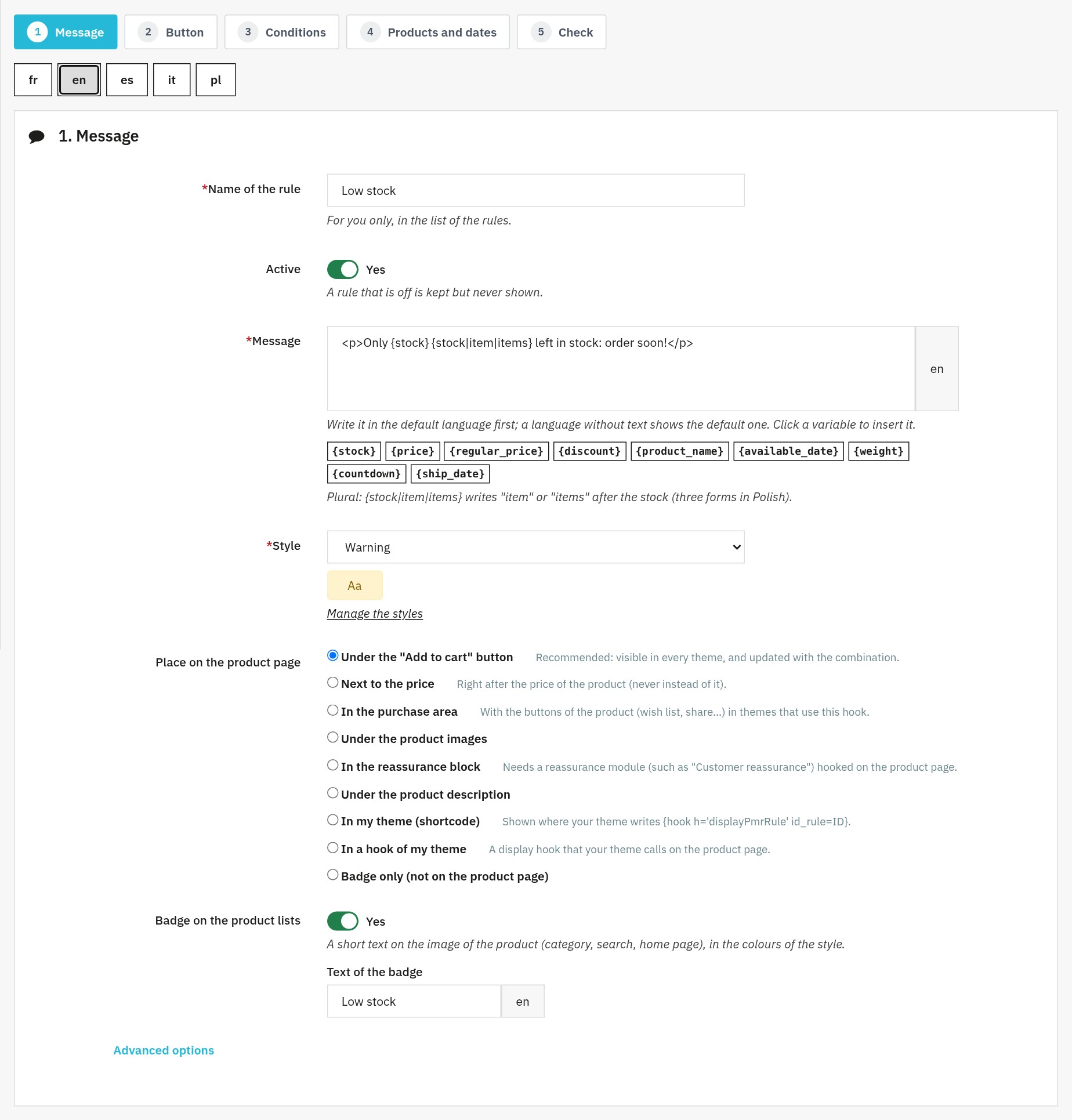 One message per language, variables and the place of the rule
Settings
- Show the messages and badges: switches the whole display off without changing the rules.
- Drawing of the messages: “With the page” (recommended) or after the page has loaded, for a shop behind a full-page cache.
- Most messages per place: 0 for no limit.
- Shipping calendar: cut-off time of each day and days without shipping.
Placing a rule in your theme
Choose the place “In my theme (shortcode)”, then write this line in the template of the product page, replacing 12 with the ID of the rule:
{hook h='displayPmrRule' id_rule=12}For a display hook of your theme, choose “In a hook of my theme” and give its name.
Full-page cache
With a cache that serves the same page to every visitor (Varnish, a page cache module), choose the display after the page: the messages are then loaded for each visitor, and the rules based on the customer stay right.
FAQ
What is the purpose of Product Message Rules on an e-commerce store?
Product Message Rules is a PrestaShop module that displays personalized messages on the product page only when certain conditions are true (e.g. low stock, sale, heavy product, professional customer). It standardizes your communication (promotions, alerts, delivery information, reassurance) without editing each product by hand, and messages appear or disappear automatically with your data (stock, price, discount…), the customer and your periods (dates). A rule can also show a badge on product lists.
What conditions are available (stock, price, weight...)?
Product: stock of the combination, price excluding or including tax, discount percentage, weight, new product, pre-order (future availability date), orderable when out of stock, brand, supplier, feature and attribute of the combination. Visitor: customer group, logged in or not, country, zone, currency, language and mobile device. Shipping: before the cut-off time of the day. You can create messages such as “Only 3 left”, “Delivered on a pallet” or “Payment at 30 days for professionals”.
Can multiple conditions be combined with AND/OR logic?
Yes. All the conditions of a group must be true (AND), and the message is shown when one of the groups is true (OR). A typical example: group 1: stock at most 10 AND price at least 50; OR group 2: stock equal to 0. This logic allows fine personalization (rare and expensive, out of stock, etc.) while staying readable.
How to target the relevant products (catalog, categories, selection)?
A rule can target the whole catalog, specific products or one or more categories (with their subcategories if you wish), with excluded products. In a multistore installation, each rule belongs to one or more shops. A “24/48 h delivery” message can be global, while a “pre-order” message is limited to a dedicated category.
What types of messages and designs are possible?
You get 6 message styles (Success, Warning, Danger, Info, Dark, Light) and 6 ready-to-use button styles, and you can create as many custom styles as you need (colours, border, radius, spacing, additional CSS) with a live preview. Messages accept variables: {stock}, {price}, {regular_price}, {discount}, {product_name}, {available_date}, {weight}, {countdown} and {ship_date}, with the plural forms of each language.
Can a Call to Action (CTA) button be added to the message?
Yes. Each message can include a button: text in each language, a link to a page of your shop, a category or a product (its address is built in each language) or a different link for each language, opening in a new tab or not, to the right, to the left or under the message, or inside its box. Button styles are managed like message styles.
Can message display be scheduled (start/end dates)?
Yes: set a start date and an end date to switch a campaign on and off automatically (sales, Black Friday, special delivery, end of line…). The list of the rules shows whether each one is shown, scheduled, ended or switched off, so nothing is forgotten.
How is a rule created in the back-office (workflow)?
A rule is created in 5 steps: message (name, text, style, place, badge), button, conditions, products and dates, then a check with a summary and a test on a product. You can also start from a ready-made rule, already translated. A rule is saved switched on or off, with its Active switch.
Can the exact display location be controlled (hook / shortcode / theme integration)?
Yes. Each rule has its own place: under the “Add to cart” button, next to the price, in the purchase area, under the product images, in the reassurance block, under the product description, in a hook of your theme, or exactly where you want with a Smarty shortcode. You also set the order of the rules, stop after a rule and a maximum number of messages per place.
Compatibility, prerequisites, and basic troubleshooting
The module works with PrestaShop 1.7.8, 8.0+ and 9.0+ and PHP 7.4 minimum (PrestaShop 1.7.7 and earlier versions are not supported). If a message does not show, check that the rule is switched on, that its conditions are met (the tester of the Check step shows them), that the product and the shop are targeted and that the dates are valid, then clear the PrestaShop cache.
Can a countdown to the shipping cut-off time be shown?
Yes. In the settings, give the cut-off time of each day, your days without shipping and your public holidays. The variables {countdown} and {ship_date} show “Order within 2 h 14 min and your parcel leaves today”, then the next shipping day. The timer runs in the browser without any request, in the time zone of your shop.
Can badges be shown on product lists?
Yes. A rule can show a short badge (“Low stock”, “Sale”…) on the product picture in categories, search results and the home page, in the colours of its style. The badges of a whole page are worked out at once.
What happens to my rules when I update from version 1.0?
They are kept, with their conditions, styles, dates and products. The place chosen for the whole shop is applied to each rule and the link of the button is copied to each language. After the update, open a product page and check the place of your rules.
What happens if my license expires?
The module stays installed and your rules and styles are kept; the messages are no longer shown in the shop until you activate the license again from the configuration page. A temporary error of the license server does not switch the messages off.
Troubleshooting
The message does not show
Open the rule and test it on the product at the Check step: the tester shows the condition that is false. Also check that the rule is switched on and within its dates, that the product and the shop are targeted, that the display is switched on in the settings and that the license is active, then clear the PrestaShop cache.
The message does not follow the combination
Choose the place “Under the “Add to cart” button”: it is updated with the combination in every theme. The other places depend on the theme.
The countdown does not show
A message that uses {countdown} or {ship_date} is only shown when the shipping calendar has at least one day with a cut-off time.
A customer sees the message of another customer
Your shop is behind a full-page cache: choose the display after the page in the settings.
A place shows nothing
The places “In the purchase area” and “In the reassurance block” need a theme or a module that shows these areas on the product page. Choose another place or the shortcode.
Changelog
Version 2.0.0
New features
- Add variables to your messages: stock, price, price before discount, discount, product name, availability date and weight, with the plural forms of each language.
- Show a message according to the sale, a new product, a pre-order, ordering when out of stock, the brand, the supplier, a feature or an attribute of the product.
- Target your customers: customer group, logged in or not, country, zone, currency, language and mobile phone.
- Show badges on product lists: categories, search results and home page.
- Show a countdown to the shipping cut-off time and the shipping day, with your calendar, your public holidays and the time zone of your shop.
- Choose the place of each rule on the product page, its order, stop after a rule, a maximum number of messages and messages the customer can close.
- Test a rule on a product before saving it: each combination, each condition and the preview of the message.
- Start from a ready-made rule, already translated into the languages of your shop.
- Find your rules with their status (shown, scheduled, ended, switched off), filters and bulk actions.
- Give each rule and each style to one or more shops.
- Point a button to a page, a category or a product of your shop, or to a different link in each language.
Improvements
- Messages are shown with the page: at once, without any extra request and readable by search engines; a mode for full-page caches is still available.
- The module works with PrestaShop 1.7.8, 8.0+ and 9.0+ (PHP 7.4 minimum) and its archive is much lighter.
- The back office is available in French, English, Spanish, Italian and Polish and can be used on a phone.
- The pages of the module open straight from the menu, without an intermediate page.
- The module respects the rights of your employees: a read-only profile cannot change anything.
- Price thresholds are compared with the displayed price, and a price rule stays silent when the price is hidden.
- Without an active license, your rules and styles are kept and the module stays installed.
Fixes
- The “price block” place no longer hides the prices of the shop.
- Saving a rule no longer switches it on and keeps its categories and its tax choice.
- A rule whose product selection is empty no longer applies to the whole catalog.
- Duplicating a rule keeps its button, classes and place.
- Messages are also shown when friendly URLs are switched off.
- “Reset” keeps your rules and styles.
- A temporary error of the license server no longer disables the module.
- A message without text in a language shows the one of the default language.
After the update: your rules, their conditions, styles and dates are kept; the place chosen for the whole shop is applied to each rule. Open a product page and check the place of your rules in their list.
Version 1.0.3
- Messages now follow the customer’s latest choice, even when combinations are changed quickly.
- Messages that should be hidden no longer reappear after a combination change.
- Messages in different locations now update independently.
- The correct message is displayed as soon as the product page opens.
Version 1.0.0
- Initial release
- Conditional rules (stock, price, weight)
- Message and CTA templates
- Scheduling system
- Product and category targeting
Support
A question or need help? Contact us from your WePresta customer account or by e-mail at mail@wepresta.shop.
