- One form per subject
- Nine field types
- Checks on every field
- Conditions: show a field only when it is useful
- Files that stay safe
- Routing: each request to the right team
- An acknowledgement that stays professional
- Requests kept and exported
- GDPR and privacy
- Anti-spam
- Customer groups, languages and several shops
- On a phone
- 1. Create the form
- 2. Add the fields and their conditions
- 3. Route the request and write the acknowledgement
- 4. Follow the requests
- 5. Protect the form and set the privacy options
- License
- After-sales: the right questions for each reason
- B2B quote requests
- A members-only subject
- One form for several shops
- Collect documents
- What is the purpose of a “dynamic” contact form on PrestaShop?
- Can you really create a different form for each contact subject?
- What types of custom fields can be added?
- How does conditional logic (fields that appear/disappear) work?
- Can certain forms be reserved for B2B customers (customer groups)?
- How does the module help with GDPR compliance?
- Does the customer receive an automatic confirmation after submission?
- Is the module protected against spam (without CAPTCHA)?
- How to deploy the same configuration on multiple stores (or environments)?
- Compatibility, prerequisites, and uninstallation: what to watch out for?
- Can each request go to the right team?
- Where are the requests kept, and can I export them?
- What happens if my license expires?
- The contact page shows a simple form instead of my forms
- The contact page shows nothing at all
- My e-mails do not arrive
- A file is refused
- A customer is told they sent too many requests
- The captcha does not appear
- I edited the override of version 1.0.0
Dynamic contact form for PrestaShop: one form per subject — configuration and guide
Dynamic Contact Form turns the contact page of PrestaShop into a form per subject: the customer chooses “After-sales service” or “Quote request” and sees only the questions that fit, with fields that appear or disappear according to the answers. Each request reaches the right team, is kept in a table you can filter and export, and still opens a conversation in the native customer service.
This guide explains how to install the module, build your first form, route the requests, protect the form from spam and solve the common cases.
Highlights:
- One form per subject of the contact page, with its own fields, recipients and acknowledgement
- Nine field types (text, text area, list, radio buttons, tick boxes, tick box, date, file, information block), with placeholder, help text and checks
- Conditions that work: a field appears only when the answer to another field calls for it, in the browser and on the server
- Routing: copy and blind copy, a recipient chosen by the answer to a list, a subject line with variables
- Requests kept in the back office: filters, files to download, CSV export, automatic deletion
- Conversation in customer service as with the native form, and an acknowledgement that never repeats the customer’s message
- GDPR consent, anti-spam (limits, filling time, optional Turnstile or reCAPTCHA) and secure files
- PrestaShop 1.7.8, 8.0+ and 9.0+; PHP 7.4 minimum; administration in French, English, Spanish, Italian and Polish
Overview
The native PrestaShop contact form has the same fields for every subject. A customer who has a breakdown, a customer who wants a quote and a customer who asks about delivery fill in the same form, and your team writes back to ask for the order number, the quantity or a photo. With Dynamic Contact Form:
- Each subject of the contact page (Customer Service > Contact) gets its own form: the fields you need for that kind of request.
- The fields follow the answers: the order number and the photo of the problem appear for a breakdown, the company appears when the customer asks for an invoice.
- The request goes to the right people: the address of the subject, a copy, and a recipient chosen by the answer to a list.
- The request is kept: a conversation in the customer service, and a line in the module with its answers and its files, ready to filter and to export.
The module adds nothing to the page apart from the form. The theme draws the page, the module draws the form in its contact area. Without any form for a subject, the module shows a simple form (e-mail, message, attachment), so no subject is ever left empty.
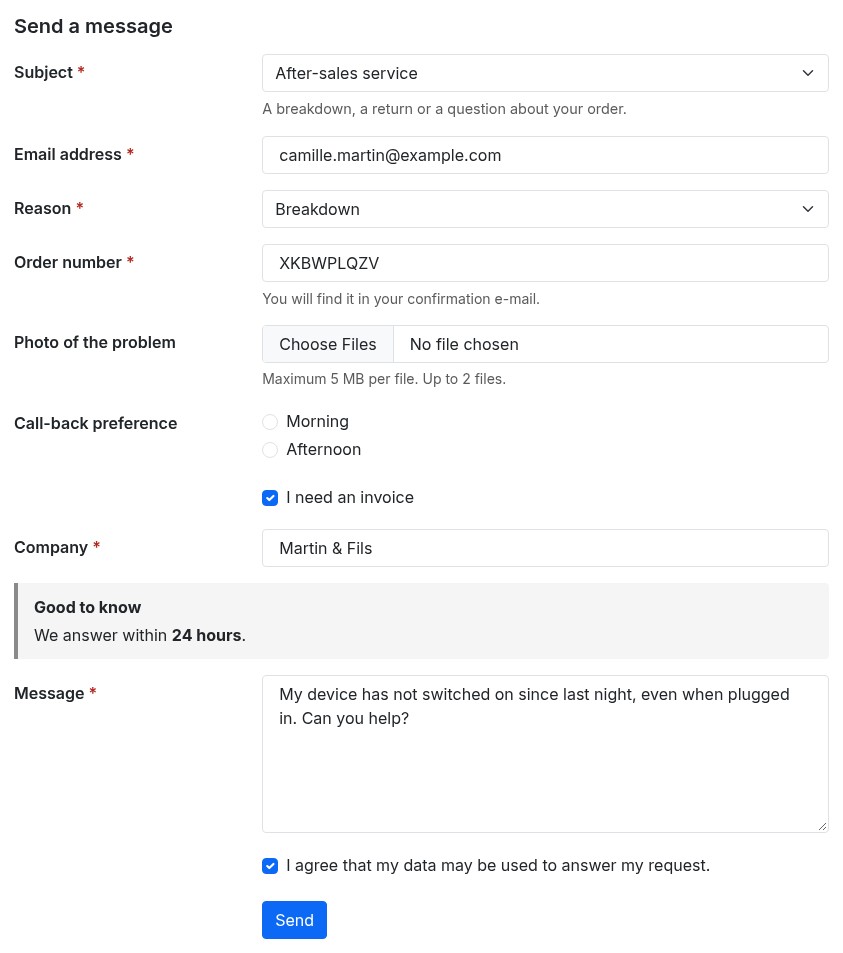 One form per subject, with fields that appear as needed
Features
One form per subject
All the subjects of the shop are offered in the list of the contact page. Choose a subject: its form appears, with the short description of the subject below the list. A subject that has no form shows the simple form; a form that you switch off gives its subject back to the simple form.
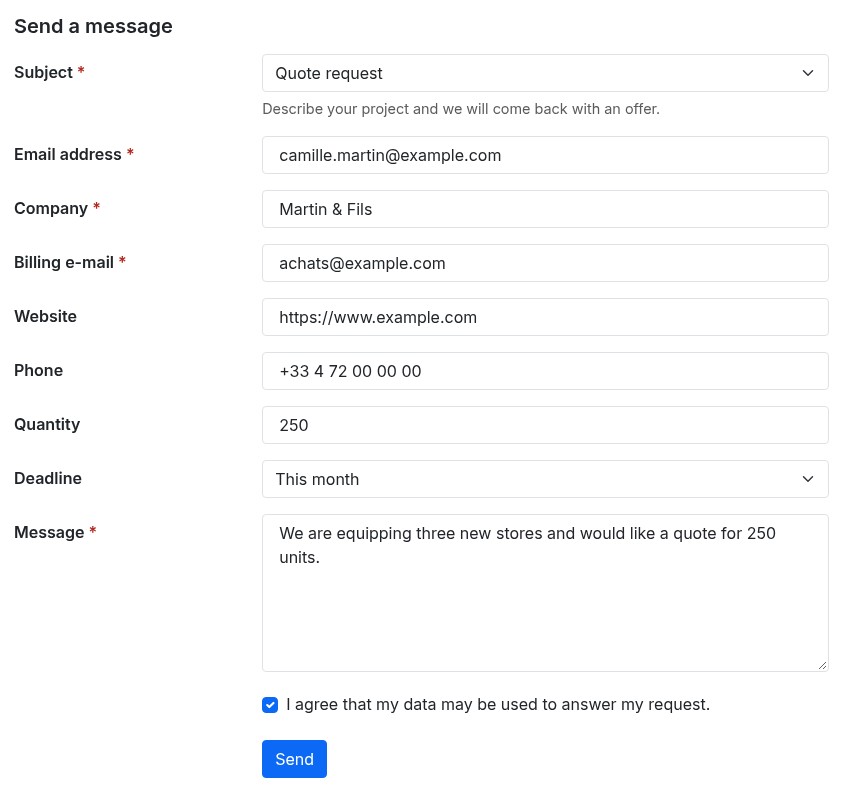 Another subject, another form
Nine field types
- Text (one line) and Text (several lines), with a placeholder and a help text
- Drop-down list, Radio buttons and Several tick boxes, with the answers you write (one per line if you paste them)
- Tick box, for a yes or no question
- Date
- File: you choose the accepted types, the largest size and the number of files
- Information block: a title and a text (HTML allowed) that the customer reads, such as “We answer within 24 hours”
Each field can be required, has a label, a placeholder and a help text in every language of the shop, and a key (made from the label) that names the field in the CSV export and in the e-mails.
Checks on every field
A text field can be checked as an e-mail address, a web address, a phone number, a number or with your own regular expression (for example ^[0-9]{5}$ for a French postal code; a test field in the editor tells you whether a value fits). The customer sees the message next to the field, in their language, and keeps what they typed. The browser checks while typing; the server checks again when the form is sent.
Conditions: show a field only when it is useful
A condition looks at another field of the same form:
- a list, radio buttons or several tick boxes: the answer is one of (or is none of) the answers you tick
- a tick box: it is ticked (or is not ticked)
- a text field: it equals, is not or contains a value
A hidden field is neither required nor stored. A condition has one level: a field that depends on another cannot itself be tested by a third one. The browser and the server apply the same rules.
Files that stay safe
Files sent with a request are inspected by their content, kept outside the public folder of the shop under random names, and offered to your team as downloads (they are never opened in the browser). They are attached to the e-mail of the team up to the size you set; larger files stay in the back office, where the request links to them.
Routing: each request to the right team
- The request goes to the address of the subject (Customer Service > Contact)
- A form can add a copy and a blind copy, always
- Routes choose recipients from the answer to a list: “when the answer to Reason is Return, send the request to returns@… instead of the address of the subject”, or “as well as” the address of the subject
- The subject line of the e-mail accepts variables:
{firstname},{lastname},{email},{order_reference},{reference},{subject},{shop_name}and{field:key}for the answer to a field
An acknowledgement that stays professional
Switch on the acknowledgement of a form: the customer receives an e-mail right after sending, with the subject and the text you write in each language (same variables). It never repeats what the customer wrote.
Requests kept and exported
Every request becomes a conversation in Customer Service > Customer Service, with the answers written in the message and a link to the request. If you keep the requests in the back office, the Requests tab lists them: filter by subject, date or e-mail, open a request to read its answers and download its files, and export to CSV (one column per field) for Excel, LibreOffice or Google Sheets. A customer who answers from your e-mail continues the same conversation.
GDPR and privacy
Each form can ask for consent with your own text (HTML allowed, for example a link to your privacy policy) or use the consent of the official GDPR module. The date of the consent is kept with the request. Requests can be deleted automatically after a number of days, and the official GDPR module can export or erase the requests of a customer.
Anti-spam
A limit of requests per hour and per address and per hour and per e-mail, a shortest time to fill the form, a limit of links, a hidden trap field and a security token. You can add Cloudflare Turnstile or Google reCAPTCHA with your own keys. A hook, actionWeprestaDcfSubmitBefore, lets a developer accept or refuse a request.
Customer groups, languages and several shops
Restrict a form to customer groups (visitors, guests, customers or your own groups): the others do not see the subject. Every text exists in every language of the shop. In a multi-store installation, each shop has its own form for each subject. A form can be duplicated, exported to a JSON file and imported into another shop (it arrives switched off).
On a phone
The form follows the layout of your theme: the labels sit above the fields, the keyboard of the phone suits an e-mail, a phone number or a number, and the messages stay next to the field.
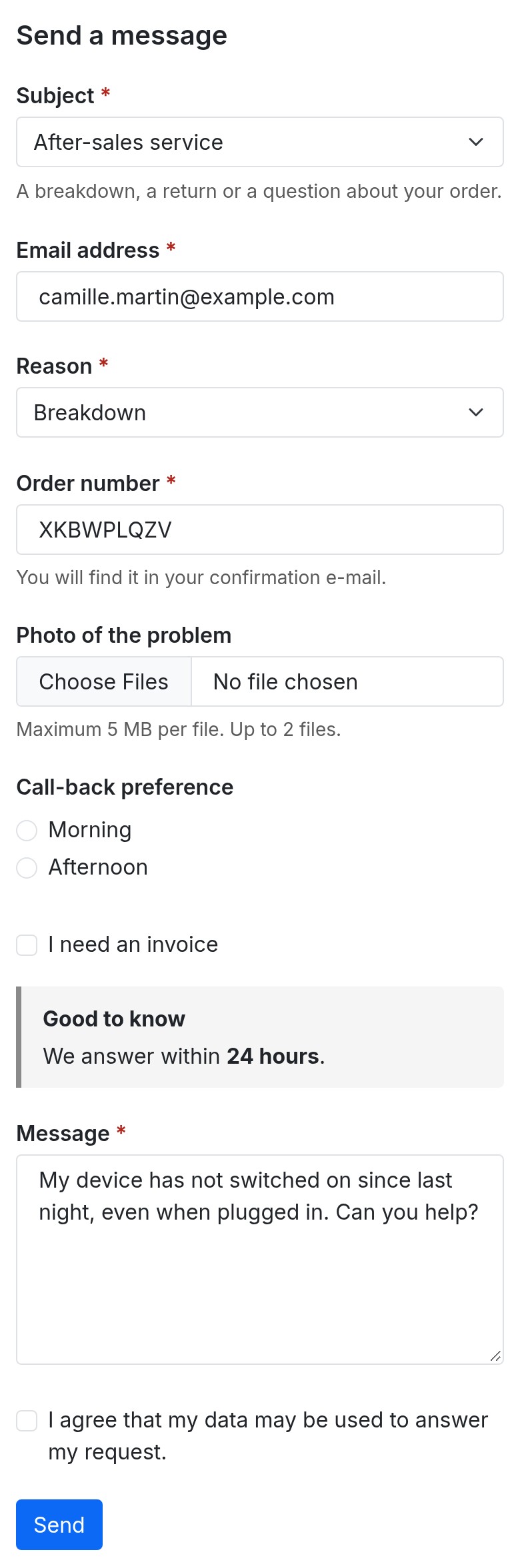 The same form on a phone
Requirements
- PrestaShop: 1.7.8, 8.0+ or 9.0+. PrestaShop 1.7.7 and earlier are not supported.
- PHP: 7.4 minimum, with the
curl,jsonandmbstringextensions. Thefileinfoextension is recommended: without it only the extension of a file is checked, not its content. - Theme: a theme shipped with PrestaShop, or a child theme that keeps the contact page of its parent. The Diagnostic tells you what your theme does.
- HTTPS is recommended.
Installation
Method 1 — from the back office (recommended)
- Download the archive from your WePresta customer area
- Go to Modules > Module Manager
- Click Upload a module and select the ZIP archive
- Wait for the installation to finish, then click Configure and activate your license
Method 2 — by FTP
- Unzip the archive
- Upload the
wepresta_dynamic_contact_form/folder to/modules/ - In the back office: Modules > Module Manager, search for “Dynamic Contact Form” and click Install, then Configure
What the installation does
- It switches the native contact form off, so that the module serves the contact page; uninstalling the module switches it back on
- It creates the tables of the forms and of the requests, a folder for the files outside the public folder, and the menu entry
- It registers the hooks of the module; it overrides no class of the shop
- If the installation fails, what it had created is removed
Updating from version 1.0.0
- Your forms and their fields are kept, in every language
- The texts and the regular expressions damaged by version 1.0.0 (apostrophes with a backslash, for instance) are repaired
- The conditions are converted so that they follow the answers by themselves, in every language
- The override of the contact page installed by version 1.0.0 is removed; if you edited it by hand, the module leaves it and the Diagnostic tells you
- The libraries and the development files shipped with version 1.0.0 (up to 150 MB) are deleted: the archive goes from 28 MB to about 340 KB
- If the CSS and JavaScript of the theme are combined, clear the PrestaShop cache after the update
Build your first form in ten minutes
Open Modules > Module Manager > Dynamic Contact Form > Configure: the page offers Manage the forms and Open the requests, and every page of the module has three tabs, Forms, Requests and Settings.
1. Create the form
- In Forms, click Add a form and choose its contact subject (create the subjects you need in Customer Service > Contact).
- Leave Active on, choose the customer groups if the subject is reserved, and tick Order reference if logged-in customers can say which order the request is about.
- Write the consent text if the form needs a consent box, then save: the Fields panel appears.
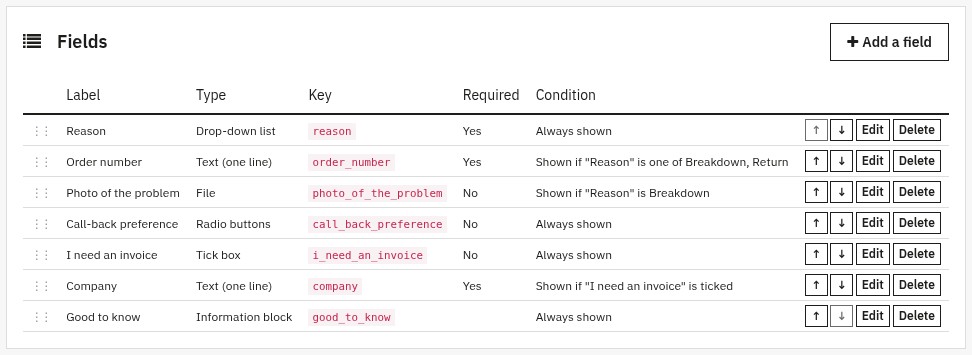 Every field and its condition at a glance
The table of the fields shows, for each one, its type, its key, whether it is required and its condition written as a sentence: “Shown if “Reason” is one of Breakdown, Return”.
2. Add the fields and their conditions
- Click Add a field, choose the type, write the label (the language bar of the window switches the language), the placeholder and the help text.
- For a list, radio buttons or tick boxes, add the answers one by one, or paste them one per line and click Add these answers.
- In Check, choose the kind of value expected (e-mail, web address, phone, number, your own pattern).
- In Condition, choose another field of the form and the answers (or the state of the box) for which this field must appear.
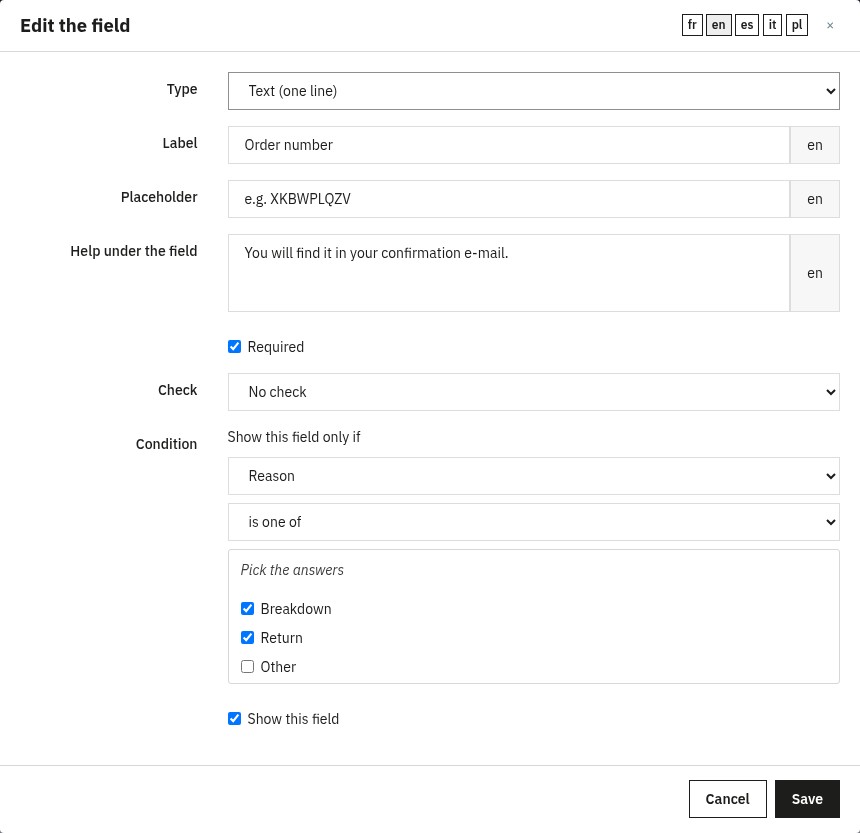 Edit a field: type, texts, check and condition
Example for an after-sales form: a Reason list (Breakdown, Return, Other); an Order number field shown if the reason is one of Breakdown or Return; a Photo of the problem file shown if the reason is Breakdown; an I need an invoice box that shows a Company field.
3. Route the request and write the acknowledgement
In the E-mail to your team panel, add the addresses in Copy to and Blind copy to, the Subject line (with variables), and the Routes: choose a list field, the answers and the recipients, and whether the request goes instead of or as well as the address of the subject. Then, in Acknowledgement to the customer, switch it on and write the subject and the text in each language.
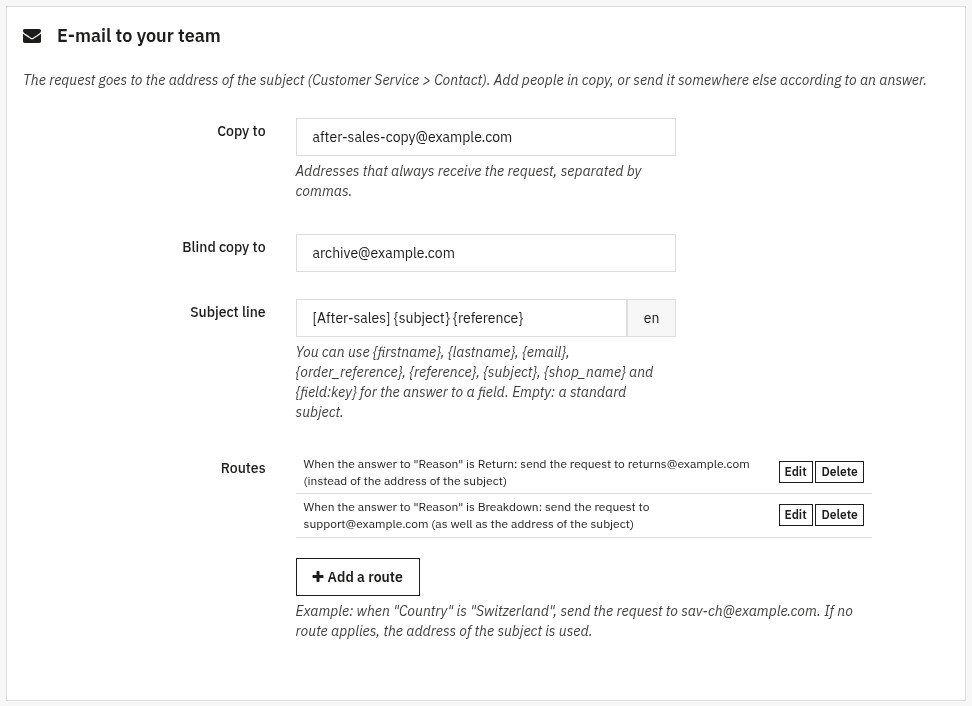 Send each request to the right team
Save, then click See it on the shop: choose the subject on the contact page and try the form.
4. Follow the requests
Each request appears in the Requests tab: open it to read the answers and download the files. To export, choose a subject and dates in Export to CSV, then click Export.
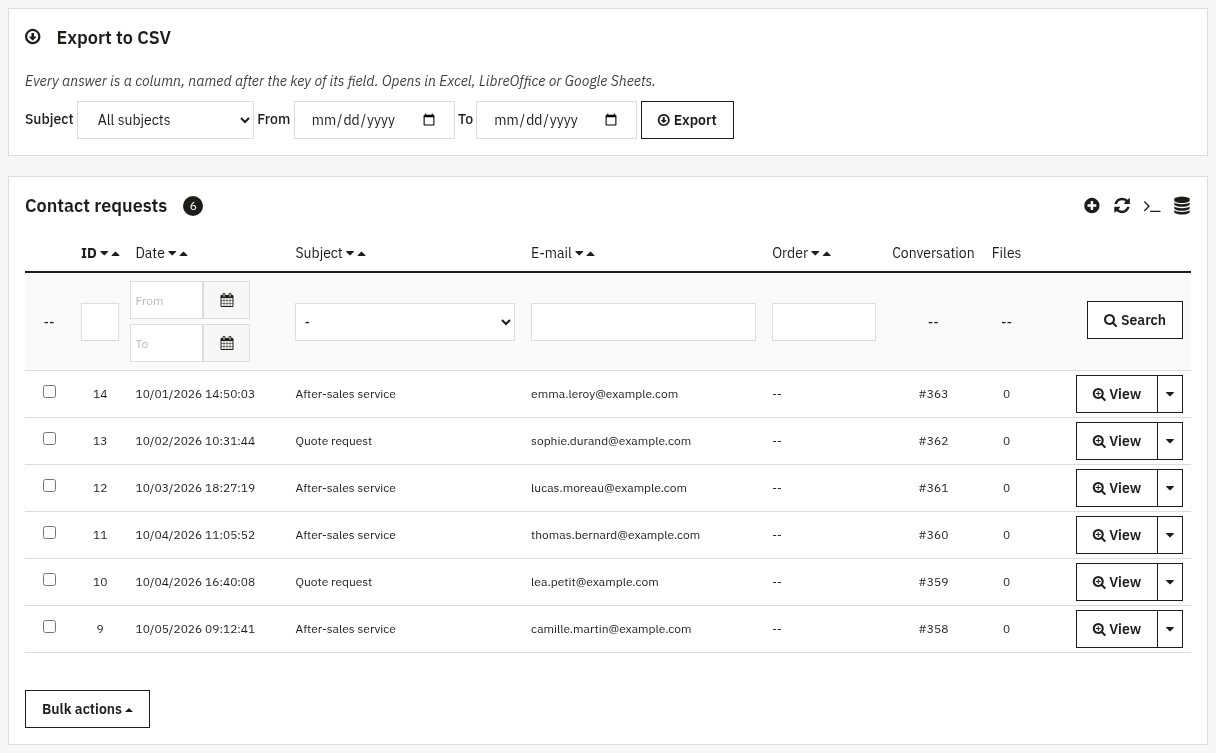 Requests kept in a table and exported to CSV
5. Protect the form and set the privacy options
Open the Settings tab: the Anti-spam panel holds the limits (by default 10 requests per hour for an address, 5 for an e-mail, 3 seconds minimum to fill the form, 3 links in a message), the optional captcha and its keys, and what to do if the captcha cannot be reached (accept the request, or refuse it). The Requests, files and privacy panel lets you keep the requests in the back office, delete them after a number of days (0 keeps them until you delete them), set the largest file, the accepted file types and the size of the files attached to the e-mail of your team.
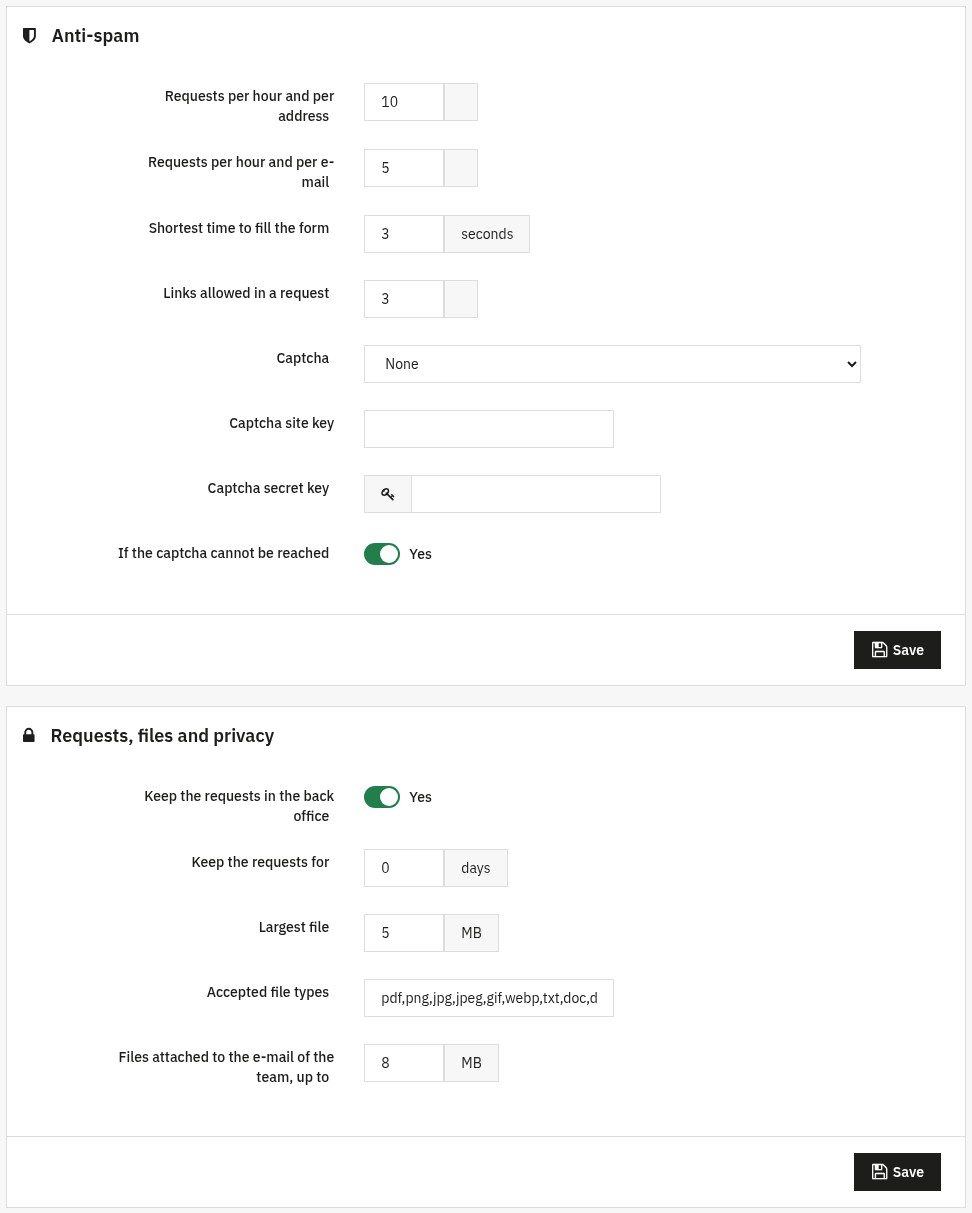 Anti-spam, retention and privacy settings
License
After the installation, Configure shows the activation form: enter the license key and the license secret available in your WePresta customer area. The license can be deactivated on a domain from the same page. When a subscription expires, a grace period of seven days avoids any interruption; then the contact page keeps a simple form (subject, e-mail, message, attachment) that still creates the conversation, until the license is renewed. The module notices the renewal by itself (it asks the license server again at most once an hour) and each time you open its pages in the back office. Your forms and their data are kept.
Common use cases
After-sales: the right questions for each reason
One form with a Reason list: a breakdown asks for the order number and a photo, a return asks for the order number, “Other” asks for nothing more. Your team receives complete requests and sends the returns to the returns team through a route.
B2B quote requests
A Quote request subject with company, billing e-mail (checked as an e-mail), website (checked as a web address), phone, quantity (checked as a number) and deadline. Reserve it to your professional customer group if you wish.
A members-only subject
Restrict a form to a customer group: only these customers see the subject on the contact page.
One form for several shops
Export the form to a JSON file and import it into another shop: fields, conditions, answers and texts come with it, switched off until you check them.
Collect documents
Add a File field with the types you accept (for example pdf,png,jpg), the largest size and the number of files: the files are kept outside the public folder and your team downloads them from the request.
FAQ
What is the purpose of a “dynamic” contact form on PrestaShop?
The native form is often too generic: the same fields for every subject, little qualification and many exchanges with customer service. The module replaces it with one form per subject (customer service, quote, technical support, partnership…), with fields that fit the request and appear only when they are useful, so that each message arrives complete and with the right team.
Can you really create a different form for each contact subject?
Yes. Choose a subject defined in Customer Service > Contact, create its form in the module (Forms) and add its fields: each subject has its own fields and options, its own recipients and its own acknowledgement. A subject without a form shows a simple form (e-mail, message, attachment), so no subject is left empty.
What types of custom fields can be added?
Nine types: one-line text, multi-line text, drop-down list, radio buttons, several tick boxes, single tick box, date, file and information block. A text field can be checked as an e-mail address, a web address, a phone number, a number or with your own pattern. Each field can be required, have a placeholder and a help text, and its label, answers and texts exist in every language of the shop.
How does conditional logic (fields that appear/disappear) work?
A field is shown only if another field of the same form meets a condition: the answer to a list, radio buttons or tick boxes field is one of (or none of) the answers you pick, a tick box is ticked (or not), or a text field equals, differs from or contains a value. The rules are the same in the browser and on the server, and a hidden field is neither required nor stored. Conditions have one level: a conditional field cannot be the parent of another one.
Can certain forms be reserved for B2B customers (customer groups)?
Yes. Restrict a form to one or more customer groups: only their customers see the subject. This is useful for a “pro quote” form, a reseller form or a members-only subject, without creating several contact pages.
How does the module help with GDPR compliance?
Each form can include a consent box with your own text (HTML allowed, for example a link to the privacy policy) or use the consent of the official GDPR module. The date of the consent is kept with the request. Requests can be deleted automatically after the number of days you choose, and exported or erased for a customer through the official GDPR module.
Does the customer receive an automatic confirmation after submission?
Yes, if you switch it on for the form: an acknowledgement e-mail is sent right after the request, with a subject and a text of your own in each language and variables such as {firstname}, {reference} or the answer to a field. It never repeats what the customer wrote. The request itself still creates a conversation in Customer Service > Customer Service, like the native form.
Is the module protected against spam (without CAPTCHA)?
Yes: a limit of requests per hour for each address and each e-mail (kept in the database, so a robot without cookies cannot get around it), a shortest filling time, a limit of links, a hidden trap field and a security token. If you want more, an optional captcha (Cloudflare Turnstile or Google reCAPTCHA, with your own keys) can be switched on.
How to deploy the same configuration on multiple stores (or environments)?
Each shop has its own forms. To reuse a form, export it to a JSON file (fields, conditions, answers and texts) and import it in another shop: the imported form arrives switched off, so you can check it before switching it on. This is useful for an agency (staging → production) and to back up your forms before an update.
Compatibility, prerequisites, and uninstallation: what to watch out for?
PrestaShop 1.7.8, 8.0+ and 9.0+ with PHP 7.4 or later; HTTPS is recommended. PrestaShop 1.7.7 and earlier are not supported. The module switches the native contact form off when it is installed and switches it back on when it is uninstalled. Uninstalling deletes the forms, the requests and their files: export your forms (JSON) and your requests (CSV) first.
Can each request go to the right team?
Yes. Besides the address of the subject (Customer Service > Contact), a form can send a copy and a blind copy to other addresses, and routes choose the recipients from the answer to a list: for example a “Return” request goes to the returns team instead of the usual address, and a “Breakdown” request is also copied to the support. The subject line of the e-mail accepts variables.
Where are the requests kept, and can I export them?
Every request creates a conversation in Customer Service and, if you keep requests in the back office, a line in the Requests tab of the module: filter by subject, date or e-mail, read the answers, download the files and export to CSV (one column per field) for Excel, LibreOffice or Google Sheets. You can also set an automatic deletion after a number of days.
What happens if my license expires?
The contact page never goes empty: it keeps a simple form (subject, e-mail, message, attachment) that still creates the conversation in customer service. Your forms and their data are kept and come back when the license is renewed: the module notices the renewal by itself (it asks the license server again at most once an hour) and each time you open its pages in the back office. A grace period of seven days avoids an interruption on the day of expiry.
Troubleshooting
The contact page shows a simple form instead of my forms
Check in this order: the license (Configure shows its status; a simple form is the behavior without an active license); the form (is it switched on, and does it belong to this shop?); the subject (a form is served for the subject it belongs to); the customer groups of the form (a visitor does not see a form reserved for a group); the Diagnostic at the bottom of the settings page.
The contact page shows nothing at all
Your theme may not show what modules put in the contact area. The Diagnostic says what your theme does. On PrestaShop 1.7, the module serves the contact template of the classic theme by itself; a child theme that replaces the contact template must keep the contact area.
My e-mails do not arrive
Check the e-mail settings of PrestaShop (Advanced Parameters > E-mail): the module asks PrestaShop to send the messages, and the Diagnostic warns you when the sending is switched off. The requests themselves stay in the customer service and in the Requests tab.
A file is refused
The extension must be in the accepted types, the file within the largest size, and its content must match its type when the fileinfo extension is available. Programs and web pages are never accepted.
A customer is told they sent too many requests
The limits per hour for an address and for an e-mail protect you from robots. Raise them in Settings > Anti-spam if several real customers share an address (a company, a school).
The captcha does not appear
Both keys (site key and secret key) must be saved, and your content security policy must allow the provider (Cloudflare Turnstile or Google reCAPTCHA).
I edited the override of version 1.0.0
The update leaves an override you modified by hand and the Diagnostic mentions it. The module no longer needs it: compare your changes, then delete the file ContactController.php from the folder override/controllers/front/ and clear the cache.
Changelog
Version 2.0.0
New features
- Conditions that work: a field is shown only when the answer to another field is one of (or none of) the answers you choose, when a box is ticked, or when a text matches; the browser and the server apply the same rules.
- New field types: radio buttons, several tick boxes and an information block, with a placeholder and a help text under each field.
- Checks for e-mail, web address, phone number, number or your own pattern, with a message next to the field; what the customer typed is kept after an error.
- A file field that works: you choose the types, the size and the number of files, and the files are kept outside the public folder of the shop.
- Routing of the requests: a copy and a blind copy per form, a recipient chosen by the answer to a list, and a subject line with variables.
- An acknowledgement e-mail per form, in each language, that never repeats the free message of the customer.
- Requests kept in the back office in a table with filters, files to download and a CSV export.
- Automatic deletion of the requests after the number of days you choose, and export and erasure through the official GDPR module.
- The customer service conversation links to the request, and a customer who answers from your e-mail continues the same conversation.
- Anti-spam by address and by e-mail, a shortest filling time, a limit of links and an optional Cloudflare Turnstile or Google reCAPTCHA.
- A hook for developers, actionWeprestaDcfSubmitBefore, to accept or refuse a request before it is sent.
- A diagnostic with a Copy for the support button, and a debug mode.
- The module works on PrestaShop 1.7.8, 8.0+ and 9.0+ with PHP 7.4 minimum, in a single archive of about 340 KB.
- The administration is translated into French, English, Spanish, Italian and Polish.
Improvements
- A subject without a form shows a simple form (e-mail, message, attachment) instead of nothing, and a form that is switched off gives its subject back to the simple form.
- A table of the fields with the condition written as a sentence, a window to edit a field with a language bar, answers pasted one per line, and a status switch on each form.
- Duplicate a form, export it to a JSON file, import it (it arrives switched off) and delete several forms at once.
- One form per subject and per shop in a multi-store installation.
- The contact page of the classic theme of PrestaShop 1.7 shows the form without any override of the shop.
- The contact page loads its forms in a few grouped queries, whatever the number of fields.
- The native contact form is switched back on when the module is uninstalled, and a failed installation leaves nothing behind.
- The archive goes from 28 MB to about 340 KB.
Fixes
- The contact page no longer ends up without any form when the license has a problem.
- The administration pages no longer fail on PrestaShop 1.7 or under PHP 7.
- Conditions can be saved and applied, and the Active switch of a form works.
- A required file field no longer makes sending impossible, and a file is no longer lost.
- On PrestaShop 8, Delete the selection deletes the forms you ticked and no longer the first form.
- Apostrophes in labels no longer gain a backslash at each save, and a pattern such as ^[0-9]{5}$ no longer refuses every entry.
- An expired security token no longer locks the customer in a loop, and a long message no longer ends on an error page.
- An employee without the right can no longer change the forms, and the sort order of the lists can no longer be abused.
- The messages shown to customers, the header of the conversation and the e-mail subjects are translated.
After the update: your forms and their fields are kept, the texts and patterns damaged by version 1.0.0 are repaired, the conditions are converted, the override installed by version 1.0.0 is removed (one you edited by hand is kept and the Diagnostic tells you) and the libraries it shipped are deleted. If the CSS and JavaScript of the theme are combined, clear the PrestaShop cache.
Version 1.0.0
- Initial release
Support
For any help, contact us through your WePresta customer area or by e-mail at mail@wepresta.shop, depending on the support option of your plan.
Before writing to us, prepare:
- the PrestaShop and PHP versions
- the Diagnostic report (Copy for the support button)
- the theme in use
- screenshots of the form and of the editor
