- Full page cache, in every language and currency
- Precise purge
- Pre-load
- Test my cache and dashboard
- Exclusions
- Visitors with a cart
- Multistore
- Scheduled task and API
- Compression and HTML minification
- Safe behaviour under load
- What is a full-page cache on PrestaShop?
- How can this module speed up my store?
- Do the cart and customer information remain accurate?
- Does the cache clear automatically when I modify my catalog?
- What is cache warm-up (pre-load) for?
- Is the module suitable for multi-language, multi-currency, and multi-store setups?
- Can different cache durations be set based on the page type?
- Is it compatible with PrestaShop 1.7.8, 8 and 9?
- How to verify that the cache is working properly?
- Which pages are never stored?
- Will the first visitors still see slow pages?
- Does the module improve SEO?
- Is it compatible with a CDN or another cache module?
- Can the cache be controlled from an ERP, a PIM or a script?
- What happens when I update from version 1.0.0?
- Do I need to change my server configuration?
- A page is not stored
- The test says the module is not reached
- A price, a stock or a text is outdated
- The pre-load reports errors
- The cache folder can be downloaded
Cache Pro — Full Page Cache with Brotli, Warm-Up & AJAX
Cache Pro is a full page cache module for PrestaShop. It stores a ready-to-serve copy of each page of your store and sends it to your visitors before PrestaShop has to build the page again. Stored pages are served much faster, your server does far less work, and your store keeps its speed when traffic grows.
The cache is built for real stores: customers and visitors with a cart always get normal, exact pages, prices follow the currency and the language of the visitor, and when you change a product, a price, a promotion or a stock level only the pages that show it are cleared.
Highlights:
- Stored pages sent before PrestaShop builds the page, without any database query from the module
- Precise purge: a change to a product, price, promotion, stock, image, brand or supplier clears only the pages concerned
- Pre-load of the home page, categories, products and CMS pages in every language, from the back office or a scheduled task
- One-click Test my cache and a dashboard: hit rate, speed-up, pages by type, why pages skipped the cache, latest purges, health checks
- Exclusions by URL, IP range, cookie, product, category or CMS page; pages 2, 3… and sort orders have their own copy
- Multilingual, multi-currency and multistore
- Gzip pre-compression (Brotli too when your server has the PHP extension) and optional HTML minification
- Address protected by a secret token for cron jobs, ERP, PIM and deployment scripts
- One download for PrestaShop 1.7.8, 8.0+ and 9.1+ (PHP 7.4 minimum)
Overview
Every time a visitor opens a page, PrestaShop starts, runs its modules, queries the database, compiles templates and finally builds the HTML. On a store with many products, prices rules and modules this takes hundreds of milliseconds, sometimes seconds, and it is repeated for each visitor even though most pages are identical for everybody.
With Cache Pro the first visit builds the page as usual and the module keeps a copy. The following visitors receive that copy right away:
- The visitor requests a page.
- The module looks for a stored copy for this shop, address, language, currency and device (desktop or mobile).
- If a valid copy exists, it is sent at once (already compressed) and PrestaShop stops there.
- Otherwise the page is built normally, sent to the visitor, and stored for the next ones.
The result is a much lower server response time (TTFB) on the pages that matter most for your visitors and for Google, and a server that copes with more visitors. A stored page needs a fraction of the database queries of a generated one.
Who gets stored pages
Stored pages are for visitors who see the same page as everybody else. Anyone whose page is personal is answered by PrestaShop directly, so nothing is ever shown to the wrong person.
| Visitor or request | What happens |
|---|---|
| Anonymous visitor on a page of your catalogue | Stored page |
| Logged-in customer | Normal page |
| Visitor with products in the cart | Normal page (optional: stored page with the cart block refreshed, see Visitors with a cart) |
| Excluded IP address, cookie, URL, product, category or CMS page | Normal page |
| Form submission, Ajax request | Normal page |
| Maintenance mode or geolocation switched on | Normal page |
Pages that are stored: the home page, product pages, category pages (including pages 2, 3… and sort orders), CMS pages, best sales, new products, price drops, brands, suppliers and the sitemap. Cart, checkout, customer account, search results, contact form and the pages of other modules (blog…) are never stored.
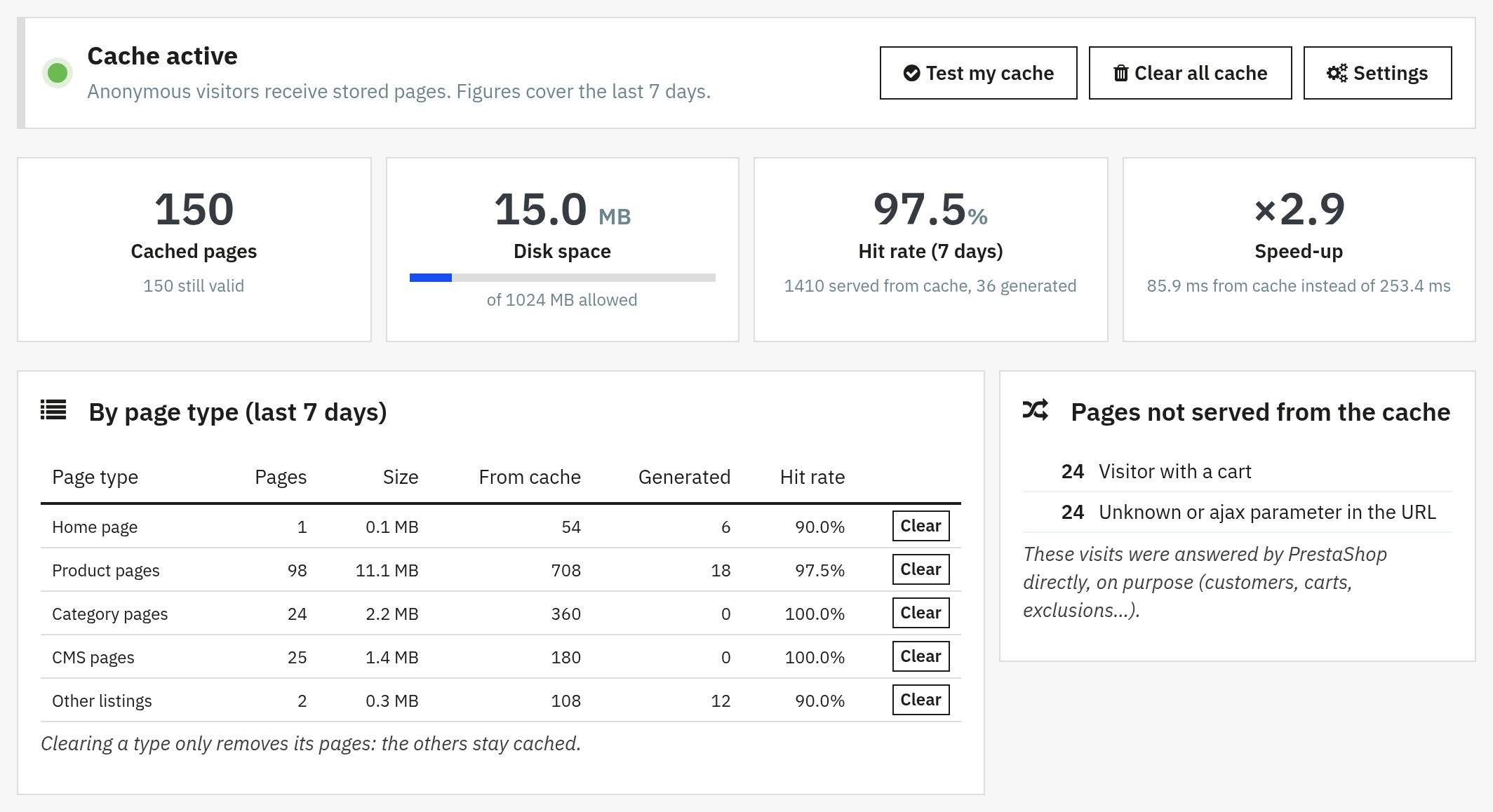 Dashboard: stored pages, hit rate, speed-up and the reasons why some visits skipped the cache
Features
Full page cache, in every language and currency
A separate copy is kept for each shop, address, language, currency and device (desktop or mobile), and for the visitors who have the cookies you choose (for example cookie consent). A visitor browsing in Swiss francs never receives the page of a visitor in euros, and a change of currency or language shows the right prices at once.
Tracking parameters such as utm_source, gclid or fbclid are ignored, so a campaign link uses the same stored page as the normal address. Pages 2, 3… and sort orders of a category have their own copy. An address with an unknown parameter is never stored.
Precise purge
You should not have to clear the cache after every edit. Cache Pro listens to what happens in PrestaShop and removes only the pages concerned:
| What changes | What is cleared |
|---|---|
| A product (edit, add, delete), a combination, an image, a brand or a supplier | Its own pages, the listings that show it (categories, home, best sales…) |
| A price, a specific price or a promotion, a stock level (including an order) | The pages that show the product |
| A category or a CMS page | The whole shop (menus and footers show them) |
| A currency, a tax, a language, a feature, an attribute, a customer group, a country, a catalogue price rule | The whole shop |
| Modules enabled, disabled or moved, a theme change, the default language or currency, catalogue mode, contact details or price display in Shop Parameters | The whole shop, at the next back-office page |
| Another module's settings saved (optional) | The whole shop of that back office |
| The Clear cache button of PrestaShop | The whole shop |
A page that shows a promotion which starts or ends later is stored only until that moment, so a scheduled promotion appears on time. You can also clear everything, one page type, or one page by its address from the dashboard. Purges work even when the cache is switched off, so a page can never come back outdated.
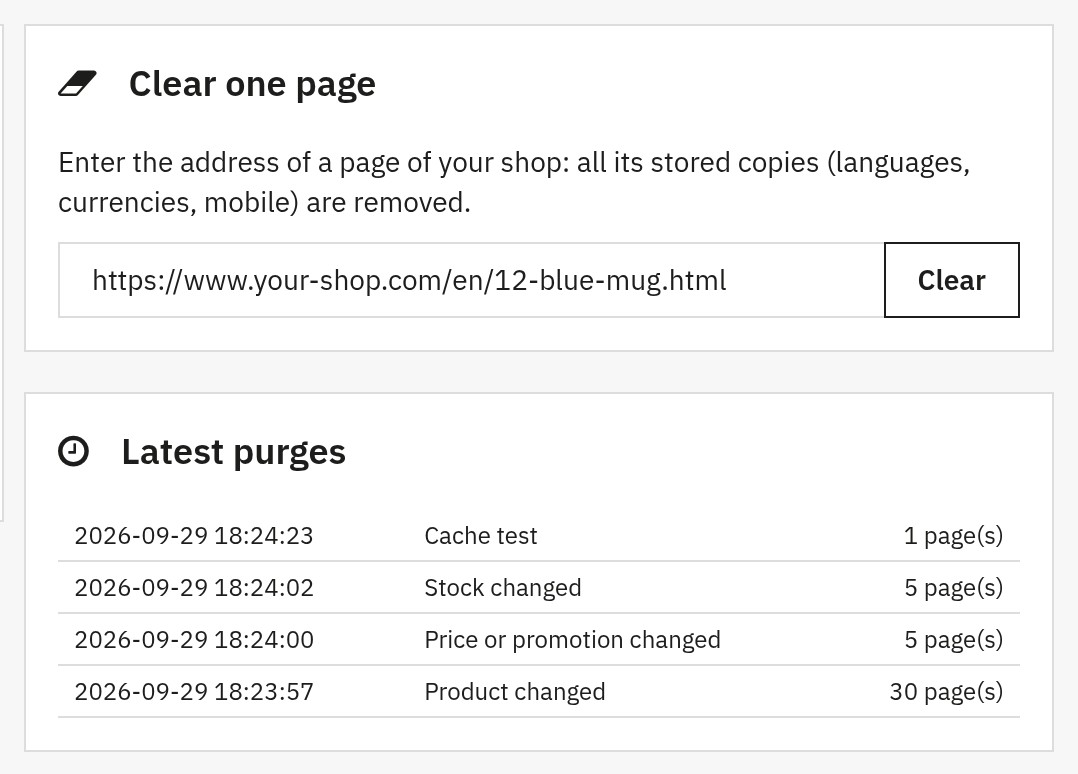 Precise purge: clear one page from its address and follow the latest purges with their cause
Pre-load
An empty cache means slow pages for the first visitors. The pre-load visits your pages in advance: home page, categories, best sales, new products, brands, suppliers, products and CMS pages, in every active language and, if you wish, in the mobile version. It uses your XML sitemap when there is one, otherwise the catalogue.
Start it from the dashboard and watch the progress bar, or let a scheduled task (cron) run it. Choose the speed (2, 5, 10 or 20 pages at a time) to suit your hosting. A shop protected by a password (a staging site) is supported with HTTP authentication.
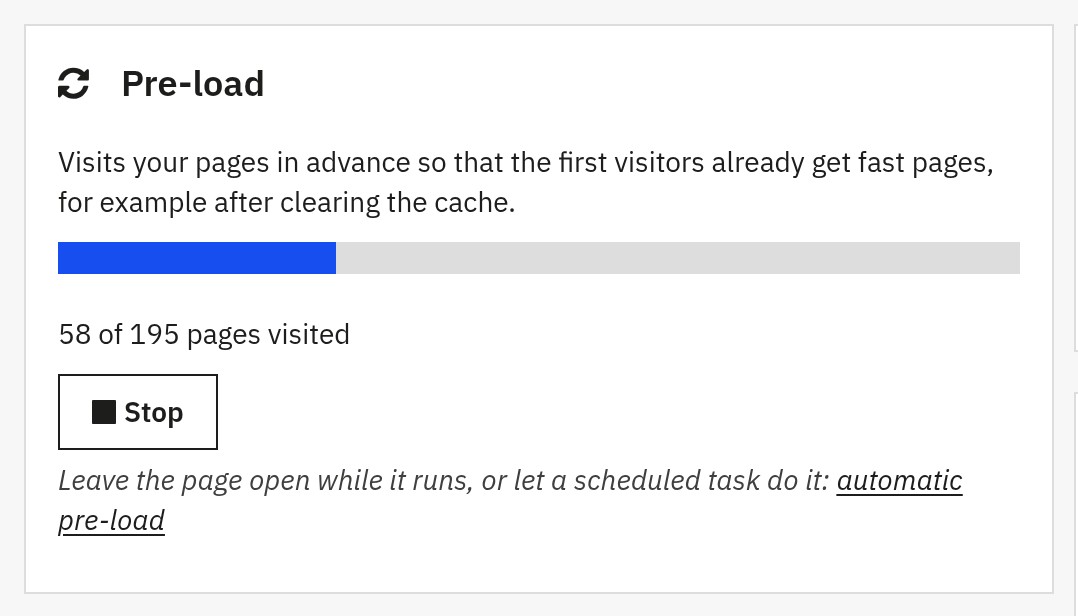 Pre-load: visit your pages in every language before your visitors arrive, with a progress bar
Test my cache and dashboard
Test my cache visits your home page twice and tells you in seconds whether the cache works (first visit generated and stored, second visit served from the cache, cache folder not downloadable from the web).
The dashboard shows what the cache does for your store over the last 7 days:
- number of stored pages, disk space used and limit
- hit rate and speed-up (response time from the cache compared with a generated page)
- pages and hit rate by type of page
- the reasons why some visits skipped the cache (customer, cart, exclusion, unknown parameter, maintenance…)
- a chart per day
- the latest purges and their cause
- health checks: cache folder, license, PHP, Gzip and Brotli, cURL, maintenance, geolocation, other page-cache modules, currencies, theme, disk space
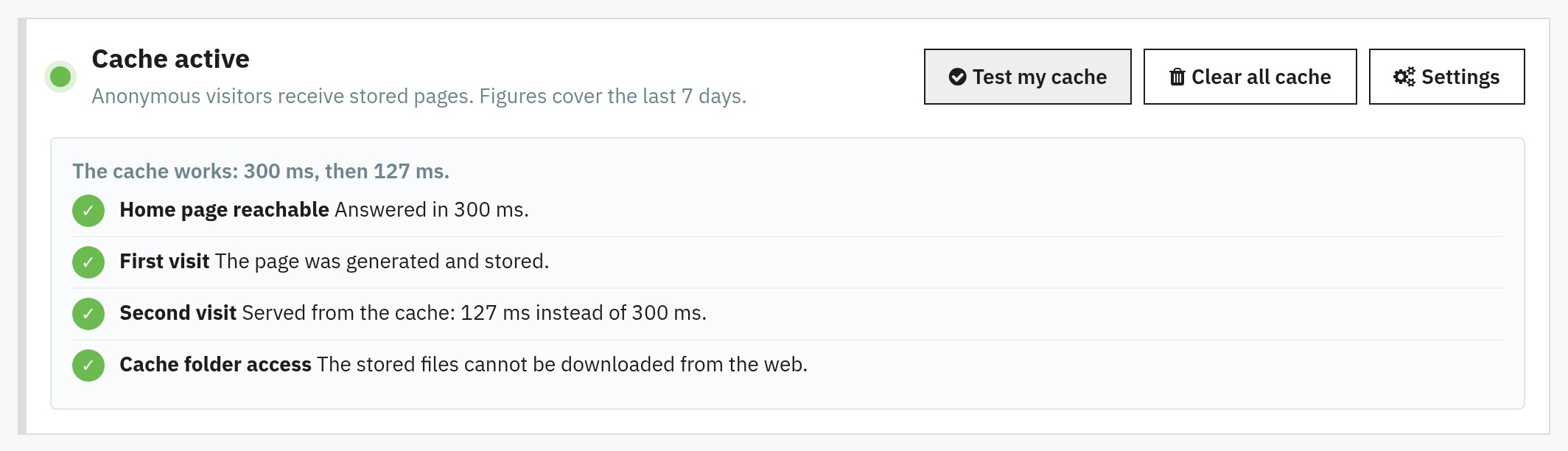 Test my cache: two visits to your home page and their response times, in one click
Exclusions
Keep some pages out of the cache when they must always be generated:
- URLs: plain text (
/blog), wildcards (/*/promo-*) or regular expressions - IP addresses and ranges (
203.0.113.0/24): your team always sees live pages - Cookies: visitors who have one of the cookies you list (A/B tests, personalisation)
- Products, categories and CMS pages by identifier
- Page types: switch off the types you do not want stored
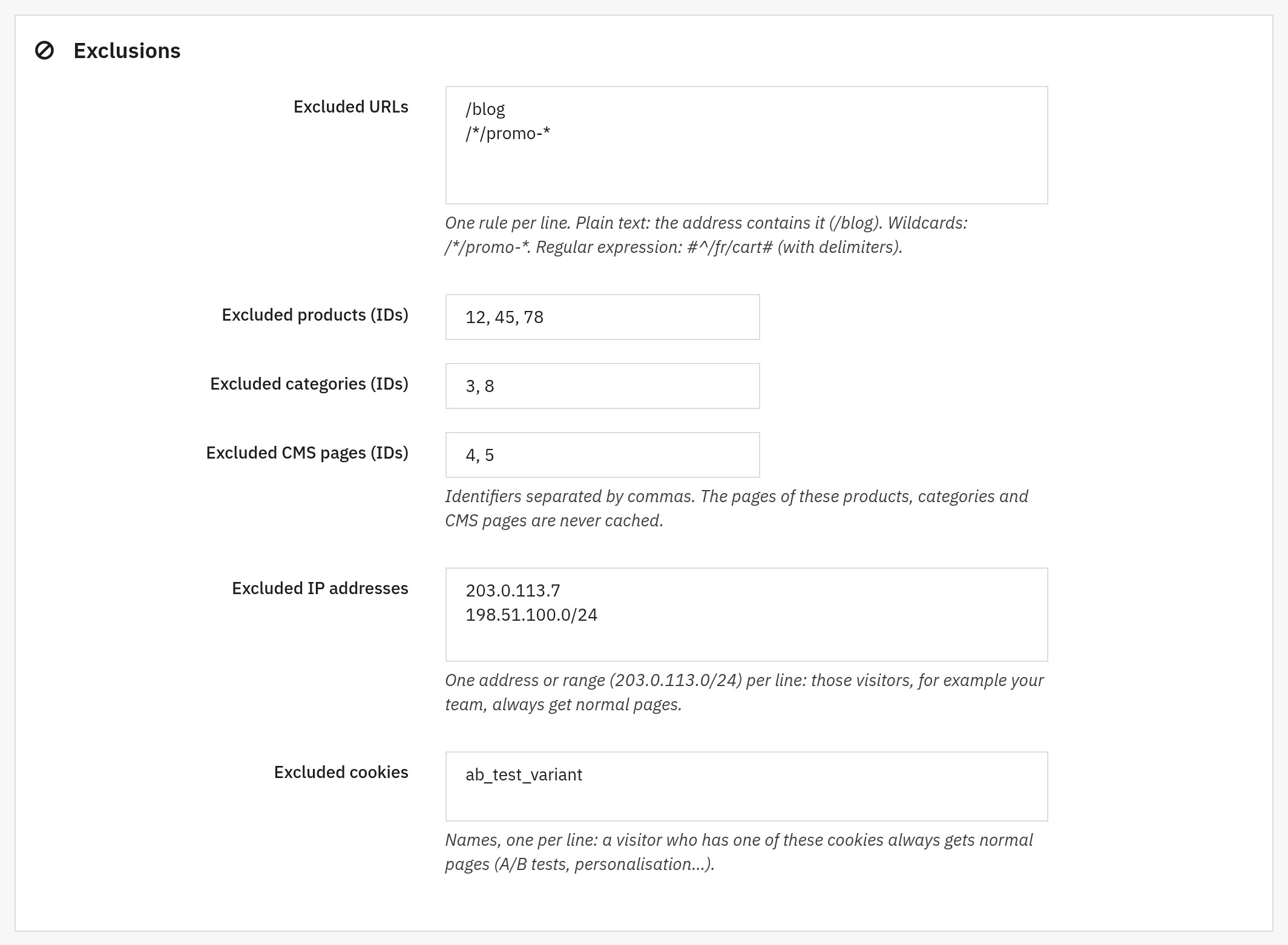 Exclusions: keep chosen URLs, products, categories, CMS pages, IP addresses and cookies out of the cache
Visitors with a cart
By default a visitor who has products in the cart receives normal pages, so the cart, the totals and the prices are always exact. This is the safest choice.
If you prefer that these visitors also get stored pages, the advanced option Serve stored pages and refresh the cart block sends the stored page and refreshes the cart block with a small request as soon as the page has loaded. The button Detect the cart block of my theme fills in the block for the Classic and Hummingbird themes; other themes need the hook and the CSS selector of the block. The page of such a visitor is never stored.
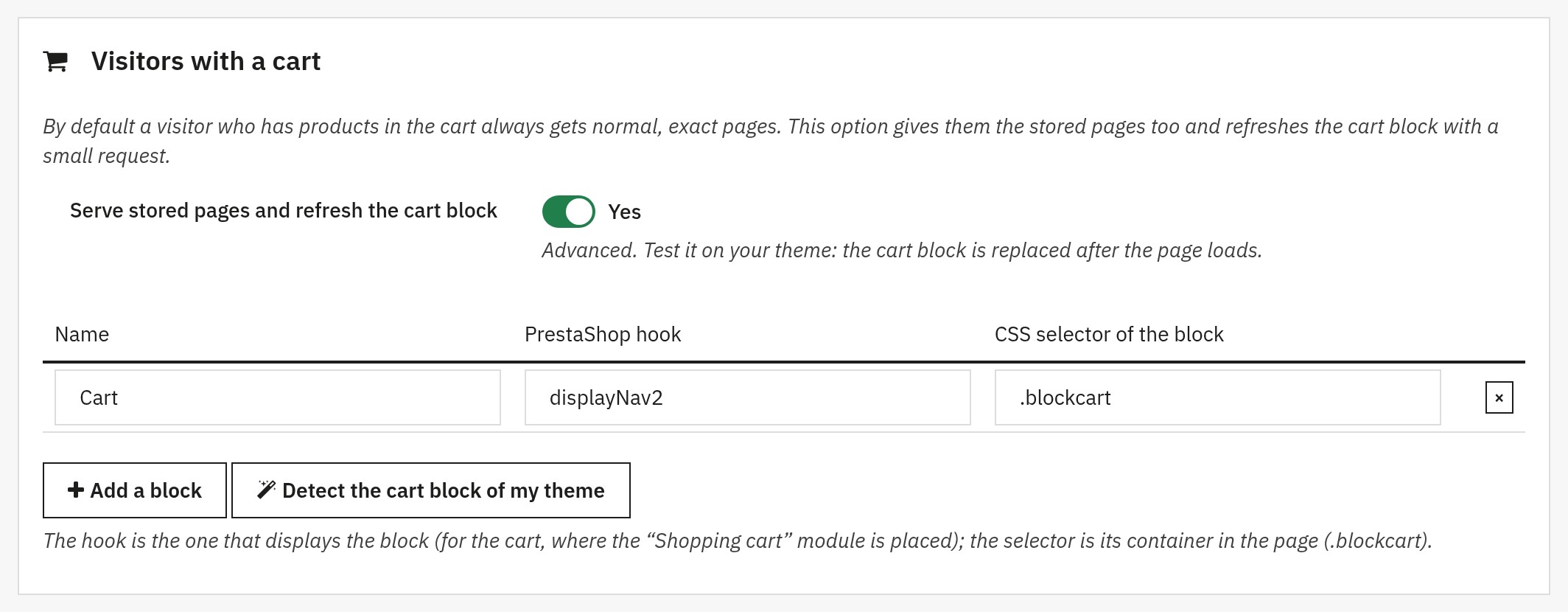 Visitors with a cart: serve stored pages and refresh the cart block once the page has loaded
Multistore
With several shops, every shop has its own settings, stored pages, statistics and pre-load. The back office asks you to choose a shop when you open Cache Pro from the "all shops" view.
Scheduled task and API
Cache Pro gives you an address protected by a secret token:
- a scheduled task (cron) address that removes expired pages, keeps the cache under its size limit and runs the pre-load
- an API for your ERP, PIM or deployment scripts: purge everything, a page type, a product, a category, a CMS page, a brand, a supplier or an address, start the pre-load, read the statistics
See Cron and API for the parameters.
Compression and HTML minification
Pages are stored pre-compressed with Gzip, and with Brotli as well when your server has the PHP Brotli extension. The visitor receives the best format its browser accepts, without any compression work at request time. An optional minification removes comments and spaces between tags in the stored copy; scripts, styles and text are untouched.
Safe behaviour under load
- A page is written completely or not at all: a visitor never receives a truncated page.
- When a page expires, one visitor regenerates it while the others still receive the previous copy (5 minutes at most), so a popular page never makes visitors queue. A purge never serves an old copy.
- The stored pages are kept under a size limit (1 GB by default): the oldest pages are removed first.
- The cache folder is protected and checked by the diagnostic.
Requirements
- PrestaShop 1.7.8, 8.0+ or 9.1+ (one download for all versions). PrestaShop 1.7.7 and earlier, and 9.0, are not supported.
- PHP 7.4 or later
- PHP extensions: cURL (pre-load and test), zlib (Gzip)
- Write access to the folder
modules/wepresta_cache_pro/cacheof the module - A valid WePresta license
- One page-cache module at a time: disable any other full page cache
Installation
- Download the module ZIP file from your WePresta customer account.
- In the PrestaShop back office, open Modules > Module Manager and click Upload a module.
- Select the ZIP file and start the installation.
The installation creates its two small database tables, registers its hooks, creates the cache folder and protects it. The cache stays switched off until you activate it. With Apache the folder is protected by a .htaccess file; with nginx add location ~ ^/modules/wepresta_cache_pro/cache/ { deny all; } to your server configuration. The dashboard tells you whether the folder can be downloaded from the web.
Updating from version 1.0.0
Install the new archive over the old one from the Module Manager. The module updates itself: the switched-on or switched-off state, the lifetimes, your exclusions (URLs, cookies, IP addresses) and the pre-load speed are kept; the four URL exclusions suggested by version 1.0.0 (search, account, cart, contact) are removed, because those pages are never stored anyway; the obsolete files are deleted and the cache is emptied once. Visitors with a cart now receive normal pages: turn on the option described above if you want them to get stored pages.
First steps
- Open Cache Pro in the Modules menu (WePresta menu on PrestaShop 9). The Health checks at the bottom of the dashboard tell you what to fix, if anything.
- Click Activate with recommended settings.
- Click Test my cache: the answer shows the two visits and their response times.
- Click Start the pre-load and leave the page open until it ends, or schedule the task described below.
- Visit your store in a private window: reload a page and watch the dashboard count stored pages and hits.
To follow a page yourself, open the developer tools of your browser, load a page twice and read the response header X-WP-Cache: MISS the first time, HIT the second time, BYPASS when PrestaShop answered on purpose (customer, cart, exclusion…).
Settings
General
- Enable the cache: switches stored pages on and off. Customers and visitors with a cart always get normal pages.
- Minify the HTML: comments and spaces between tags are removed from the stored copy.
- Serve the expired page while it is regenerated: on by default, see above.
- Clear the cache when another module is configured: a banner, a menu or a block edited in another module's settings shows up at once.
- Diagnostic headers: adds
X-WP-Cache-Key,-Type,-TTL,-Age(and-Reasonwhen a page skips the cache) to responses. - Browser cache: Check each time (recommended), or 1, 5, 15 minutes, 1 hour.
- Maximum size: when the limit is reached the oldest pages are removed (
0= no limit).
Pages to cache and lifetimes
For each type of page, choose whether it is stored and for how long (minimum 60 seconds). Defaults: home page 30 minutes, product pages 2 hours, category pages 1 hour, CMS pages 24 hours, other listings 1 hour. A page changed in the back office is refreshed at once, whatever its duration.
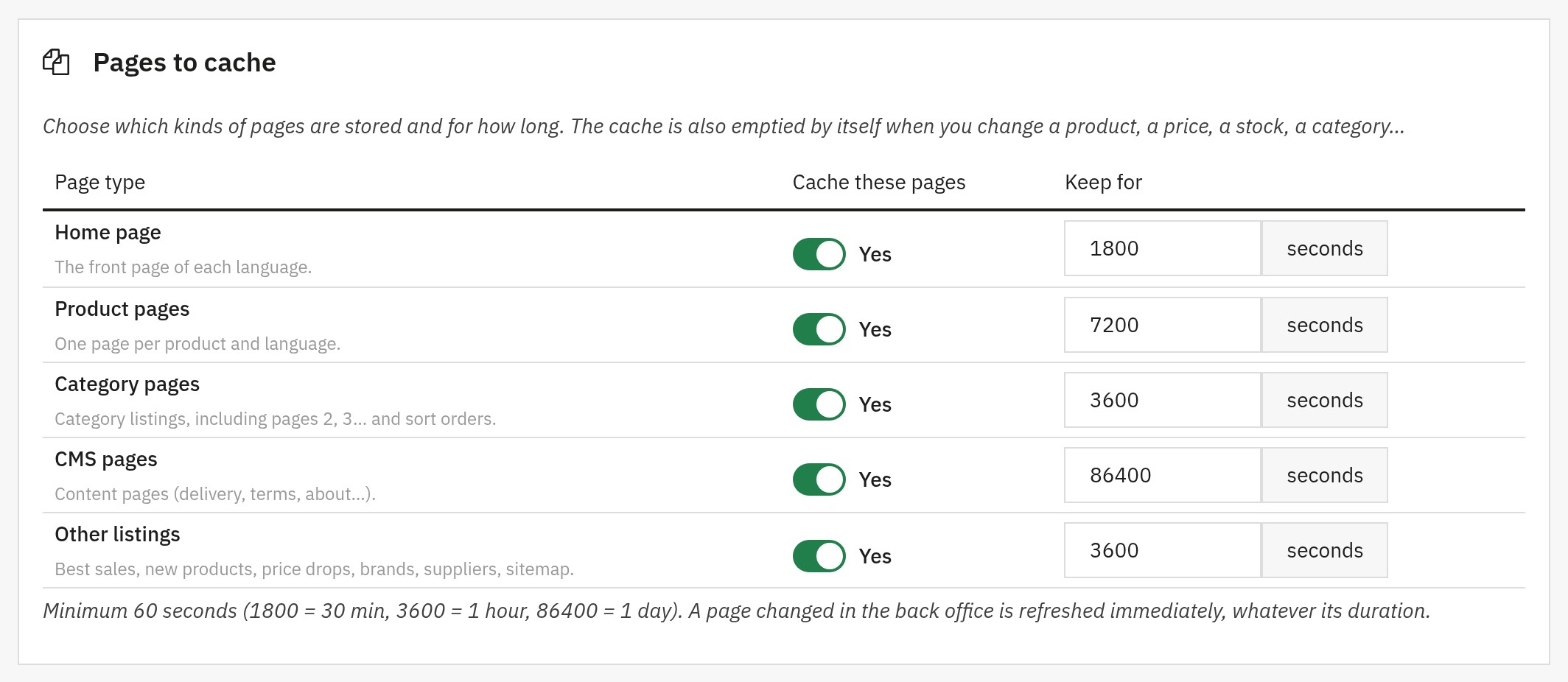 Pages to cache and lifetimes: choose what is stored and for how long
Exclusions
Excluded URLs, product, category and CMS page identifiers, IP addresses and ranges, cookies. Saving refuses an invalid regular expression or address and shows what you typed.
Addresses and variants
- Ignored parameters: tracking parameters that do not change the page (a long list is built in).
- Extra parameters with their own copy: parameters of your theme that select a version of the page (for example a sort order).
- Cache filtered pages: results of the faceted search (
?q=…). Off by default because they can be very numerous. - Cookies that change the page: names of cookies (cookie consent…) whose presence creates a separate copy.
Pre-load and automation
Pre-load speed, mobile version, HTTP authentication of the shop, the scheduled task address, the token (which you can regenerate) and the API reminder.
Cron and API
Call the cron address every 10 minutes: it removes expired pages, keeps the size under the limit and runs the pre-load. Keep the address private, it contains your token.
The API lives at /module/wepresta_cache_pro/api of your shop. Send the token as token or in the X-WPC-Token header, and name the action in action:
status(GET): version, shop, cache state, pages and size, pre-load.stats(GET): hits, misses and skipped visits (7 and 30 days), average response times.warmup(GET): starts or continues the pre-load (optionaltime,batch,intervalandforce).cleanup(GET): removes expired pages and enforces the size limit.cron(GET): cleanup then pre-load in one call.purge(POST): clears whatscopedesignates:all;type(addtype=product,category,cms,homeorother);product,category,cms,manufacturerorsupplier(addid);url(addurl= the page address).
Example, from a script after a catalogue import:
SHOP=https://your-shop.com

curl -X POST \
  -H "X-WPC-Token: YOUR_TOKEN" \
  -d action=purge \
  -d scope=category \
  -d id=12 \
  "$SHOP/module/wepresta_cache_pro/api"
Compatibility and other systems
- Other cache modules: keep only one full page cache. The dashboard warns you if another one is detected.
- CDN and reverse proxies: pages are answered with
Cache-Control: private, so a CDN does not keep them and always asks your store; the module's own cache does the work. Use your CDN for images, scripts and styles. - nginx: add the
locationrule of the installation section to block direct downloads of the cache folder. - PHP-FPM: with PHP-FPM the page is sent to the visitor before it is stored; without it the visitor who generates a page waits a little longer.
- Compression by PHP (
zlib.output_compression): the module then sends the uncompressed copy and lets PHP compress it. - PrestaShop statistics: pages served from the cache are not counted by PrestaShop's own visit statistics (Stats > Visits). Use Google Analytics or your server logs to count visits.
- Themes: any theme. The cart block refresh has ready-made settings for the Classic and Hummingbird themes.
FAQ
What is a full-page cache on PrestaShop?
A full-page cache saves the final HTML of a page and sends that copy to the visitors who follow, instead of running PrestaShop, its modules, the database queries and the templates again for each request. On a PrestaShop store this shortens the server response time of the pages that many visitors share: home page, categories, products and CMS pages.
How can this module speed up my store?
Cache Pro sends the stored copy of a page before PrestaShop builds it: the module itself makes no database query, and the page needs a fraction of the queries of a generated page. Stored pages are pre-compressed (Gzip, and Brotli when your server has the PHP extension), the HTML can be minified, and the pre-load fills the cache before your visitors arrive. The gain depends on your hosting, your theme and your modules: use "Test my cache" to see it on your own store.
Do the cart and customer information remain accurate?
Yes. Logged-in customers and visitors with products in their cart always receive normal pages built by PrestaShop, so nothing personal is stored or shown to somebody else. If you prefer that visitors with a cart also get stored pages, an advanced option sends the stored page and refreshes the cart block with a small request once the page has loaded, with ready-made settings for the Classic and Hummingbird themes.
Does the cache clear automatically when I modify my catalog?
Yes. Editing a product, a combination, an image, a brand or a supplier clears its own pages and the listings that show it. Changing a price, a specific price, a promotion or a stock level (including through an order) clears the pages that show the product. Categories, CMS pages, currencies, taxes, languages, modules and theme changes refresh the whole shop. A page that shows a promotion which starts or ends later is never kept beyond that moment. Purges work even when the cache is switched off.
What is cache warm-up (pre-load) for?
It visits your important pages before visitors arrive: home page, categories, best sales, new products, brands, suppliers, products and CMS pages, in every language and, if you wish, in the mobile version. After an installation, a full purge or a big catalogue update, the first visitors then get stored pages instead of normal generation times. Start it from the dashboard or from a scheduled task.
Is the module suitable for multi-language, multi-currency, and multi-store setups?
Yes. A separate copy is kept for each shop, address, language, currency and device (desktop or mobile), and for the visitors who have the cookies you choose (cookie consent, for example). With several shops, each one has its own settings, stored pages, statistics and pre-load.
Can different cache durations be set based on the page type?
Yes. Each type of page (home page, products, categories, CMS pages, other listings) has its own on/off switch and lifetime, with recommended defaults and a minimum of 60 seconds. A page changed in the back office is refreshed at once, whatever its lifetime.
Is it compatible with PrestaShop 1.7.8, 8 and 9?
Yes: PrestaShop 1.7.8, 8.0+ and 9.1+, with PHP 7.4 or later. PrestaShop 1.7.7 and earlier, and 9.0, are not supported. One archive fits all these versions. The module works with the Classic and Hummingbird themes and with third-party themes.
How to verify that the cache is working properly?
Click "Test my cache" in the dashboard: it visits your home page twice and tells you whether the first visit was stored and the second one served from the cache, with both response times. You can also load a page twice with your browser's developer tools open and read the response header X-WP-Cache: MISS the first time, HIT the second time, BYPASS when PrestaShop answered on purpose. The dashboard also lists the reasons why some visits skipped the cache.
Which pages are never stored?
Cart, checkout, customer account, search results, contact form and the pages of other modules are never stored, nor are form submissions, Ajax requests, maintenance mode and geolocation, or the pages you exclude by URL, IP address, cookie, product, category or CMS page. Customers and visitors with a cart get normal pages (or stored pages with a refreshed cart block, if you choose that option).
Will the first visitors still see slow pages?
The first visit to a page builds it as usual and stores it; the next visitors get the stored copy. The pre-load removes that first wait by visiting your pages in advance, and you can run it from a scheduled task after each purge.
Does the module improve SEO?
Indirectly. A faster server response on the pages that Google and your visitors open most often improves the user experience and the technical performance of your store, which can help your visibility. Tracking parameters are ignored and pages 2, 3… keep their own content, so search engines and visitors get the right page.
Is it compatible with a CDN or another cache module?
Keep only one full page cache: the dashboard warns you if another one is detected. A CDN or reverse proxy in front of your store is fine: pages are sent with Cache-Control: private, so the CDN does not keep them and Cache Pro does the work; use the CDN for images, scripts and styles.
Can the cache be controlled from an ERP, a PIM or a script?
Yes. A scheduled-task address and an API protected by a secret token let your tools clear everything, a page type, a product, a category, a CMS page, a brand, a supplier or an address, start the pre-load and read the statistics with a simple HTTP request. The token can be regenerated at any time.
What happens when I update from version 1.0.0?
Install the new archive over the old one. The switched-on or switched-off state, the lifetimes, your exclusions (URLs, cookies, IP addresses) and the pre-load speed are kept; the four URL exclusions suggested by version 1.0.0 are removed, because those pages are never stored anyway; the obsolete files are deleted and the cache is emptied once. Visitors with a cart now receive normal pages; turn on the cart block option if you want them to get stored pages.
Do I need to change my server configuration?
Not with Apache: the cache folder is protected by a .htaccess file. With nginx, add a rule that blocks direct downloads of the cache folder; the dashboard tells you whether the folder can be downloaded from the web. Nothing else is needed on shared, VPS, dedicated or cloud hosting.
Troubleshooting
A page is not stored
Open the dashboard: Pages not served from the cache lists the reasons (customer, cart, excluded URL, unknown parameter, maintenance, geolocation, response not storable…). Check the response header X-WP-Cache and, with the diagnostic headers on, X-WP-Cache-Reason.
The test says the module is not reached
The response carries no cache header: another cache is in front of the store, the module is disabled, or the address is protected by a password (fill in HTTP authentication in the settings).
A price, a stock or a text is outdated
Products, prices, promotions, stock, images, categories and CMS pages clear the right pages by themselves. Changes made outside PrestaShop (direct SQL, imports that do not use PrestaShop objects, theme files) are not seen: use Clear all cache, the PrestaShop Clear cache button, or the API.
The pre-load reports errors
The error list shows the address and the message. Typical causes: the shop protected by a password (fill in HTTP authentication), a firewall that blocks requests from the server to itself, an invalid SSL certificate on a staging site.
The cache folder can be downloaded
Block the folder in your web server configuration (see Installation).
Changelog
Version 2.0.0
New features
- The module works on PrestaShop 1.7.8, 8.0+ and 9.1+, with PHP 7.4 minimum, in a single archive.
- The back-office menu shows Cache Pro, with its dashboard and its settings, in French, English, Spanish, Italian and Polish.
- Test my cache visits your home page twice and tells you in seconds whether the cache works.
- The dashboard shows the hit rate, the speed-up, the pages by type, a chart per day, the reasons why some visits skipped the cache, the latest purges and health checks.
- Clear one page from its address, one type of page or everything, from the dashboard.
- The pre-load runs without an open page: a scheduled-task address starts it, with four speeds, every language and an optional mobile version.
- A token-protected API purges everything, a page type, a product, a category, a CMS page, a brand, a supplier or an address, starts the pre-load and returns the statistics.
- Visitors with a cart can receive stored pages with the cart block refreshed after the page loads; a button detects the block of the Classic and Hummingbird themes.
- Exclusions by cookie, IP address or range, product, category, CMS page and page type, in addition to URLs; an invalid regular expression or address is refused with an explanation.
- Cookies that change the page, such as cookie consent, get their own stored copy.
- Pages 2, 3… and sort orders of a category have their own stored copy, and so does each currency.
- Pages are never kept beyond the start or end of a scheduled promotion.
- The cache stays under a maximum size by removing the oldest pages, and the scheduled task removes expired files.
- The response header X-WP-Cache tells HIT, MISS or BYPASS for each page.
- With several shops, each shop has its own settings, stored pages, statistics and pre-load, and a page asks you to choose a shop from the "all shops" view.
Improvements
- A stored page is sent without any database query or write from the module.
- A page is written completely or not at all, so a visitor never receives a truncated page.
- When a page expires, one visitor regenerates it while the others receive the previous copy for 5 minutes at most; a purge never serves an old copy.
- Purges work even when the cache is switched off, so a page can never come back outdated.
- PrestaShop's Clear cache button, module and theme changes and the main shop settings refresh the stored pages.
- The archive weighs about 240 KB instead of 27 MB.
Fixes
- The "Powered by Module Starter" text and the public page /module/wepresta_cache_pro/display no longer exist.
- Pages 2, 3…, sort orders and filtered lists no longer show the first page.
- Changing the currency no longer shows the prices of another currency.
- The maintenance page is shown while your shop is in maintenance mode.
- Customers and visitors with a cart no longer receive a stored page built for somebody else.
- Editing a product, a price, a promotion, a stock level, a category or a CMS page refreshes the stored pages at once, instead of after their lifetime.
- Excluded cookies are taken into account, and the suggested URL exclusions that also hid legitimate pages, such as gift cards, are gone.
- The script that refreshes the cart block is now in the archive, so the block no longer stays empty.
- Browsers no longer keep a stored page after a visitor logs in or adds a product to the cart.
- The files and settings are removed when you uninstall the module.
- The hit rate is exact: purges no longer reset it.
After updating: the switched-on or switched-off state, the lifetimes, your exclusions (URLs, cookies, IP addresses) and the pre-load speed are kept. The four URL exclusions suggested by version 1.0.0 are removed, because those pages are never stored anyway. The obsolete files are deleted and the cache is emptied once. Visitors with a cart now receive normal pages: turn on the cart block option if you want them to get stored pages.
Version 1.0.0
- Initial module release
- Full Page Cache implementation
- Multilingual, multi-currency, and multistore context handling
- Smart automatic invalidation
- Gzip and Brotli compression
- HTML minification
- Performance dashboard
- Cache warm-up
- Dynamic AJAX blocks
Support
For any assistance, contact us through your WePresta customer area or by email at mail@wepresta.shop, according to the support option of your plan.
Before contacting support, please provide:
- PrestaShop version and PHP version
- the address of the page concerned and its
X-WP-Cacheheader - the result of Test my cache and the health checks of the dashboard
- screenshots
- PrestaShop logs if available
