- Filter Engines
- Available filters and displays
- Where the filters appear
- Guided search on the homepage
- SEO filter pages
- Storefront display (desktop and mobile)
- Prices, stock and an index always up to date
- Does the module replace ps_facetedsearch?
- Do I need to disable ps_facetedsearch?
- Does the module generate indexable SEO pages per facet?
- Do price filters take discounts into account?
- Is the module compatible with my theme?
- Can the module handle a large catalog?
Advanced Search Pro: faceted navigation and product filters for PrestaShop
Advanced Search Pro adds fast product filters to your PrestaShop store: price, sizes, colors, brands, features, availability, discounts… Your customers narrow down a category in a few clicks, without page reloads, on desktop and mobile. The module replaces the native ps_facetedsearch module and goes further: several filter engines for your product universes, indexable SEO filter pages and a guided search on the homepage.
See the Advanced Search Pro module
Overview
The module relies on the native PrestaShop product list, like ps_facetedsearch: your theme keeps showing the products, sorting, pagination and the number of results. Advanced Search Pro provides the filters, calculates the results and updates the list on each choice.
Highlights:
- Instant filtering with product counters recalculated on each choice
- Multiple Filter Engines for your categories and pages
- Filtered prices identical to displayed prices: discounts, group reductions, taxes and the visitor's currency
- Size or color filters limited to in-stock combinations
- SEO filter pages ("White T-shirts") with their own URL, title and text
- Guided search on the homepage, leading to a results page that can be filtered further
- Mobile filter panel, usable with the keyboard
- Automatically updated index, cache and health panel
- No PrestaShop core override
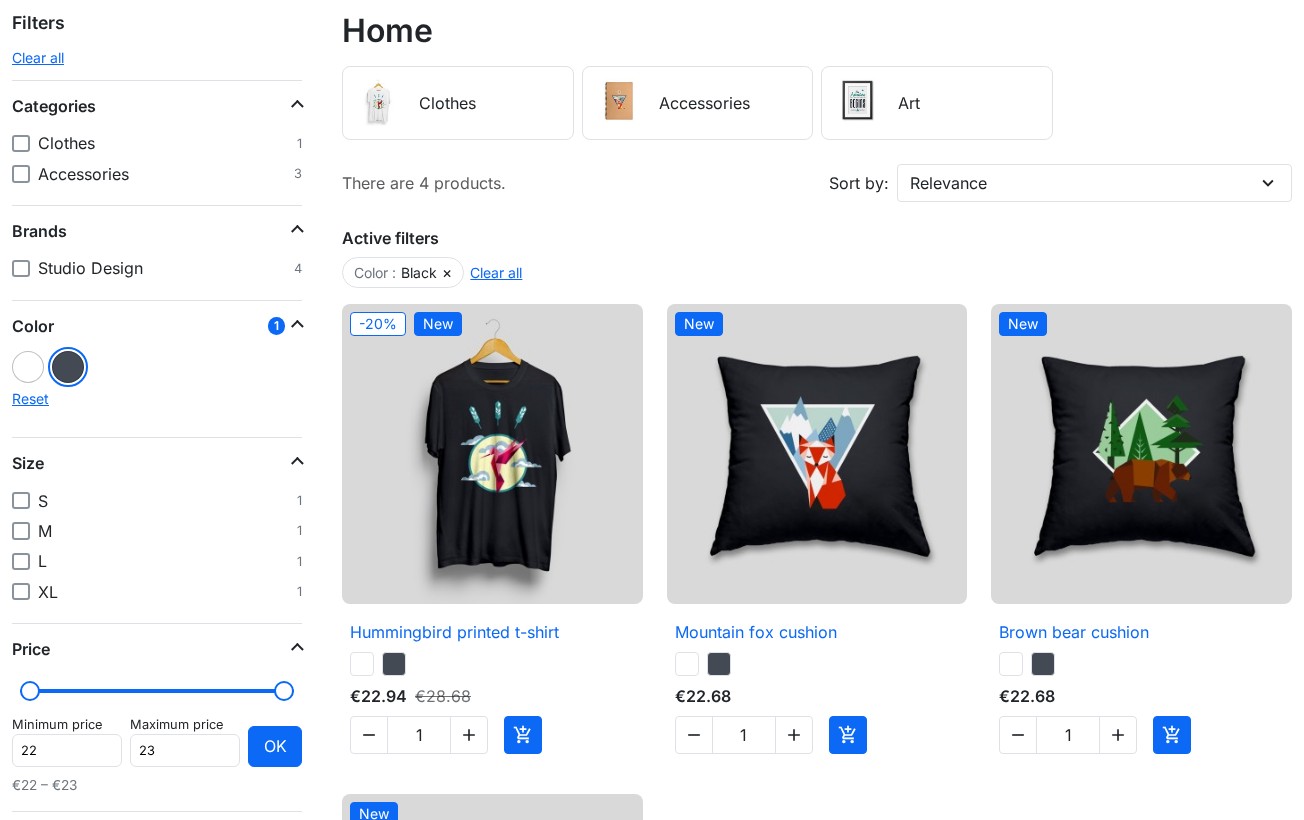 Filters in the category column: color, size, price and active filters
Why this module?
The native ps_facetedsearch module quickly becomes limiting: a single filter block for the whole store, few settings per criterion, no indexable filter page and a rigid back office. Advanced Search Pro keeps its native integration and adds what is missing.
| Native module limits | What Advanced Search Pro brings |
|---|---|
| A single filter block for the whole store | Several engines per category or page type |
| Limited criteria settings | Display, operator, values without products, "Show more" and search set per group |
| No filter on combination stock | "Size M" only returns products whose size M is in stock |
| No indexable filter page | SEO filter pages with title, text, URL and sitemap |
| Nothing on the homepage | Guided search with a results page |
| Manual migration | One-click import of ps_facetedsearch templates |
Features
Filter Engines
A filter engine is an independent filter block with its own configuration: filter groups, position, pages, priority, default sorting and mobile display. Create as many as you need to adapt navigation to each product universe.
- Positions: left column, right column, full width above the content, homepage (guided search)
- Enable, duplicate and delete in one click
- Instant filtering on each choice, or with an "Apply filters" button
- Default sorting and products per page for each engine
- Option: show only products in stock
Available filters and displays
| Filter | Examples |
|---|---|
| Price | Slider and minimum/maximum fields, in the visitor's currency |
| Attributes | Size, color (swatches), material, shoe size |
| Features | Composition, dimensions, power |
| Categories | Subcategories of the current page that contain products |
| Brands | With a search field for long lists |
| Availability | In stock, out of stock |
| Discounts | Products on sale |
| Condition | New, used, refurbished |
Each filter group has its own settings:
- Display: checkboxes, radio buttons, drop-down list, color swatches, tags or price slider
- Custom title in each language ("Shade" instead of "Color")
- Several values selected: products with any of the values (OR) or all of them (AND)
- Values without product: hidden, greyed out or shown, to avoid "0 products" dead ends
- Show more after a chosen number of values, search field in the values, collapsible group
- Only combinations in stock for an attribute: "Size M" only lists products whose size M is available; with a color, the same combination must match both choices
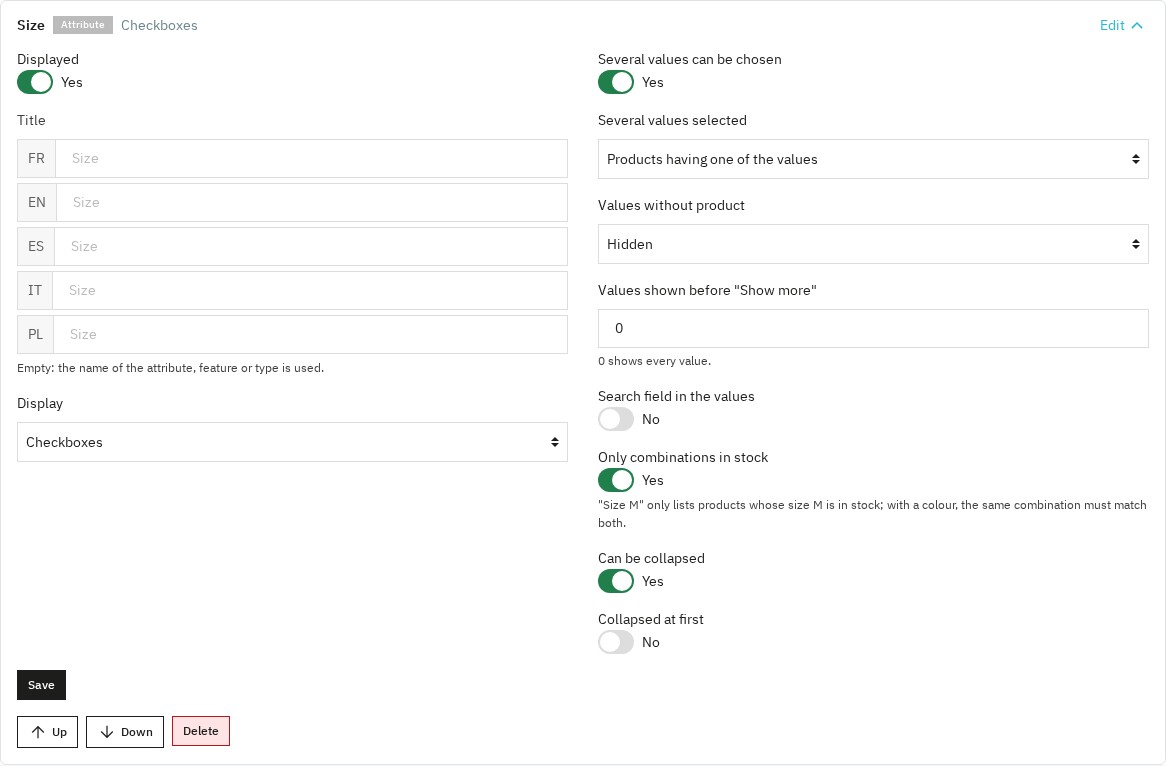 Filter group settings: title per language, display, values without products and in-stock combinations
Where the filters appear
By default, an engine is shown on every product list: categories, brands, suppliers, search results, prices drop, new products and best sales. On each page, the filters apply to the products of that page: a brand page stays limited to the brand.
You can also restrict an engine to chosen pages: categories (with or without subcategories), brands, suppliers, CMS pages and special pages. On the same position, the engine with the lowest priority is shown; the "Always display" option lets you show several.
This allows a "global + specialized" setup: one general engine for all lists, and dedicated engines for your universes (fashion, electronics, spare parts…).
Guided search on the homepage
An engine placed on the homepage becomes a guided search: the customer picks, for example, a brand then a size; each choice updates the other lists and the number of products, then the "Search" button opens a results page with the same filters in the column. For this engine, choose the products concerned: a fixed category or the whole catalog.
SEO filter pages
An SEO page is a category with preselected filters, for example "White T-shirts" in the Clothes category. In each language it has:
- its URL, under the category URL (
/clothes/white-t-shirts) - an H1 title, a title tag, a meta description and an introduction text
- its place in the sitemap (with the PrestaShop Google sitemap module)
The page shows the matching products with the other available filters. It is its own canonical; when a customer ticks the same filters on the category, the filter link leads to the SEO page. Other filter combinations stay noindex, follow so that search engines only index your categories and your SEO pages. Links between the SEO pages of a category can be shown under their title.
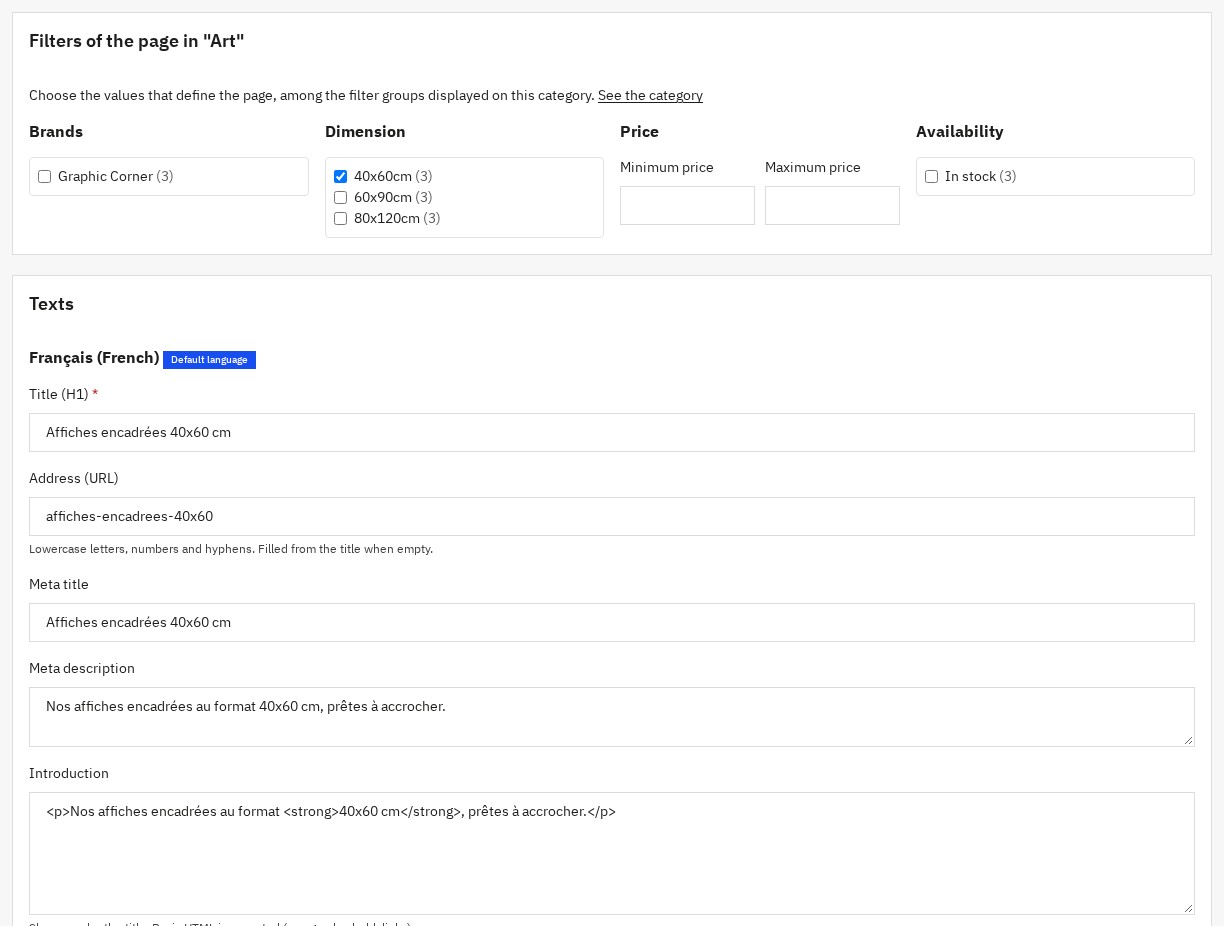 SEO filter page: category, preselected filters, URL and texts
Storefront display (desktop and mobile)
- Active filters shown above the products, with individual removal and "Clear all"
- Readable, shareable filter URLs; the browser back button works
- Sorting, pagination and product count always consistent with the filters
- On mobile: a "Filters" button opening a panel, closed with the cross or the Escape key; or filters shown in the page. Adjustable mobile threshold (768 px by default)
- Usable with the keyboard; the number of products found is announced to screen readers
- Module texts in French, English, Spanish, Italian and Polish
Prices, stock and an index always up to date
The module indexes combinations with their stock and the prices your customers actually see: discounts (with their dates), group reductions, taxes by group and the visitor's currency. A product on sale therefore appears in the right price range, and products whose price comes from their combinations are filtered correctly.
Added or edited products are indexed automatically. A full rebuild runs step by step, with a progress bar, without emptying the results during the operation. Hidden products (visibility "nowhere" or "search only") and categories restricted to some customer groups are respected.
Requirements
| Component | Minimum version |
|---|---|
| PrestaShop | 1.7.8, 8.2 or later, 9.1 or later (8.0, 8.1 and 9.0 not supported) |
| PHP | 7.4 |
| MySQL | 5.7 / MariaDB 10.3 |
The theme must use the standard PrestaShop product list, like the Classic and Hummingbird themes and themes compatible with
ps_facetedsearch.Disable
ps_facetedsearchso that the Advanced Search Pro filters serve your lists: when both modules are active, PrestaShop may give the list to the native module. The health panel reports it and offers to disable it.
Installation
- Go to Modules > Module Manager
- Click Upload a module
- Select the
wepresta_advanced_search_pro.ziparchive - Wait for the installation to finish, then open Advanced Search Pro in the menu
What the installation does
- Creates the configuration tables (engines, filter groups, visibility, SEO pages) and index tables (combinations, prices)
- Indexes the catalog; on a large catalog, indexing continues from Indexing and health or with the scheduled task
- Adds the Advanced Search Pro menu: Filter engines, SEO pages, Indexing and health, Settings
Quick start
- Open Advanced Search Pro > Filter engines
- Click Import the templates to reuse your
ps_facetedsearchtemplates (same categories, same filters, same order), or Create the recommended engine (categories, price, your main attributes and features, brands, availability and discounts) - Check the filter groups, their order and display, then save; an imported engine stays inactive until you enable it
- In Indexing and health, disable
ps_facetedsearchif the panel reports it - Open a category page: the filters appear in the chosen column
Configuration
Engine settings
- Name: only visible in the back office; title shown to customers in each language ("Filters" when empty)
- Position, priority and always display
- Where to display: every list, or only chosen pages
- Products filtered: for the guided search, a fixed category or the whole catalog; on lists, the products of the page
- Include subcategories, in-stock products only, default sorting, products per page
- Display: instant filtering or with a button, product count, active filters, mobile display and threshold
Filter groups
Add a group (price, attribute, feature, categories, brands, availability, discounts, condition), then open it to set its title, display and behavior. The order of the list is the order shown in the store.
SEO pages
In SEO pages, choose a category, tick the values that define the page among the filters shown on this category, then write the title, URL, metadata and introduction of each language. Only values that have products in the category are offered.
General settings
- Filtered listings not indexed: adds
noindex, followto filtered lists - Cache of the filter counts and cache duration: filters of pages without selection are kept between visits, and every selection when the PrestaShop cache is enabled
- Index changed products immediately and products per indexing step
Indexing, scheduled task and health
The Indexing and health panel checks the installation: active engines, complete index, queue, last scheduled task, conflict with ps_facetedsearch, positions missing from your theme. It rebuilds the index step by step and processes the queue.
Schedule the address shown in this panel every 15 minutes (cron job of your hosting): it indexes waiting products, finishes a started rebuild and takes into account discounts that start or end.
Upgrading from version 1.x
- Your engines and filter groups are kept; the index is rebuilt automatically.
- The "product list CSS selector" setting disappears: the filters use the standard product list of your theme.
- The "fixed category" and "whole catalog" modes apply to the guided search; on lists, the filters apply to the products of the page.
- Filtered URLs use the standard PrestaShop format (
?q=…).
Compatibility
- PrestaShop 1.7.8, 8.2+ and 9.1+ (8.0, 8.1 and 9.0 not supported)
- PHP 7.4 and above
- MySQL 5.7+ / MariaDB 10.3+
- Classic, Hummingbird and themes using the standard PrestaShop product list
- Multilingual
FAQ
Does the module replace ps_facetedsearch?
Yes. It uses the same native integration with the product list, adds multiple engines, SEO pages and guided search, and imports your ps_facetedsearch templates.
Do I need to disable ps_facetedsearch?
It is recommended: when both modules are active, PrestaShop may serve the list with the native module and the Advanced Search Pro filters are not shown. The health panel offers to disable it in one click.
Does the module generate indexable SEO pages per facet?
Yes. Create SEO filter pages with their URL, title, meta description and introduction text in each language; they can be added to the sitemap. Other combinations stay non-indexed.
Do price filters take discounts into account?
Yes. The filtered price is the one the customer sees: current discounts, group reductions, taxes and currency.
Is the module compatible with my theme?
Yes if your theme uses the standard PrestaShop product list, like Classic, Hummingbird and themes compatible with ps_facetedsearch. The health panel reports a theme that does not seem to use it.
Can the module handle a large catalog?
Yes. Counters come from a dedicated index, pages without filters are cached and the rebuild runs step by step. Schedule the task for catalogs imported in bulk.
Troubleshooting
The filter block does not appear
- Check that the engine is active and has displayed filter groups
- Check that your theme shows the chosen column on this page (the health panel lists pages without a column)
- Check Where to display and the priority (another engine may take over)
- Check that
ps_facetedsearchis disabled - Clear the PrestaShop cache
Counters show 0 or values are missing
- Start a rebuild from Indexing and health
- Check the Values without product setting of the group
- For an "in-stock only" attribute, check the stock of the combinations
The rebuild stops
- Lower Products per indexing step
- Click Rebuild the index again: it resumes where it stopped, or let the scheduled task finish it
Changelog
Version 2.0.0 — September 2026
New
- Create SEO filter pages with their own URL, title, introduction text and place in the sitemap.
- Offer a guided search on the homepage that opens a results page you can filter further.
- Filter by availability, by products on sale and by condition (new, used, refurbished).
- Limit a size or color filter to in-stock combinations.
- Import your
ps_facetedsearchtemplates or create a recommended engine in one click. - Follow the state of your installation in the Indexing and health panel.
- Use the module on PrestaShop 1.7.8, 8 and 9 with PHP 7.4 minimum.
Improvements
- The filters use the PrestaShop product list: sorting, pagination and product count stay consistent with the filters.
- A filtered URL can be shared and opens already filtered; the browser back button works.
- Brand, supplier, search, prices drop, new products and best sales pages filter their own products.
- Filtered prices match displayed prices: discounts, group reductions, taxes and the visitor's currency.
- Added or edited products are indexed automatically, and the rebuild runs step by step without emptying the results.
- Pages with filters display faster, and the module files only load on those pages.
- Set for each group the AND/OR operator, single or multiple choice, "Show more", the search in values and values without products.
- Rename each filter group in each language.
- Use the filters with the keyboard; the number of products found is announced to screen readers.
- Find the back office and filters translated into French, English, Spanish, Italian and Polish.
Fixes
- Hidden products no longer appear in filtered lists.
- Names with special characters ("L'Oréal & Co") are displayed correctly.
- The default sorting chosen for an engine is applied.
- The "Include subcategories" option can be turned off.
- Per-page display rules and employee permissions are respected on PrestaShop 8.
After the update
- Your engines and filter groups are kept; finish the index rebuild from Indexing and health if the panel says so.
- The "product list CSS selector" setting is removed: your theme must use the standard PrestaShop product list.
Version 1.1.0 — September 2026
- SEO and crawl control: automatic noindex,follow on filtered URLs, optional canonical tag, new dedicated settings section
- Full PrestaShop 9.x compatibility (back office)
- Fixed product sorting by name, price, date and position
- Active result caching, automatically invalidated on every reindex
- Turning product counters off now genuinely removes the related requests
- Fixed a possible conflict with other modules (class autoloading)
- Lighter package: under 1 MB
Version 1.0.0 — March 2026
- Multiple engines, page visibility, priority system
- 3 search modes (context / fixed category / whole catalog)
- Criteria: price, attributes, features, categories, manufacturers
- Instant AJAX filtering, active filter pills, clear all
- Mobile drawer + configurable breakpoint
- Dedicated indexing + cache TTL
- Settings: debounce, batch size, CSS selector, debug
- Symfony controllers, multistore, multilingual, no overrides
License
Distributed under the Academic Free License (AFL 3.0).
Copyright © WePresta. All rights reserved.
