- Is the module compatible with my theme?
- Another module already sends GA4: what should I do?
- Why doesn't a purchase appear in GA4?
- How can I get support?
Google Analytics 4 (GA4) & GTM for PrestaShop
This guide explains how to measure your PrestaShop store in Google Analytics 4, Google Tag Manager and Google Ads with the Google Tracking module: what is measured, how to set it up in a few minutes, how to respect your visitors' consent and how to check the result before opening your reports.
See the Google Analytics 4, GTM and Search Console module
What the module measures
The module sends the e-commerce events recommended by Google for GA4, with the same product data from the beginning to the end of the journey:
- Browsing: product lists viewed (categories, search, brands, new products, best sellers, price drops, including after a filter), product clicked in a list, product page with the selected combination, internal search.
- Cart: every quantity added from the product page, a list, the quick view or the cart; line deleted or quantity decreased; cart viewed.
- Checkout: checkout started, delivery method confirmed with the carrier name, payment method selected, purchase with the order currency, tax, shipping and coupon.
- Account and contact: login, account creation (guest accounts created during checkout are not counted), request sent with the contact form.
Page views are those of the Google tag in GA4 direct mode. Each event can be disabled in the Events tab.
Choosing the integration mode
- Google Analytics 4 direct (recommended): the module loads the Google tag and sends every event to GA4, and to Google Ads if configured. The simplest choice.
- Google Tag Manager: the module loads your container and fills the DataLayer. GA4 and Google Ads tags are configured in Tag Manager; the Diagnostics tab offers a container ready to import.
- Google Ads only: the module loads the Google tag for Google Ads only: conversions and remarketing, without Google Analytics.
Installation and first setup
- Download the module archive from your customer account.
- In the back office, open Modules > Module Manager, click Upload a module and select the archive.
- Open the module configuration and choose the integration mode.
- Paste your GA4 measurement ID (format G-XXXXXXXXXX, in Google Analytics > Admin > Data streams) or your container ID (GTM-XXXXXXX).
- For Search Console, paste the HTML verification tag or only its
contentvalue: the code is extracted automatically. - Save. The status bar shows Active and the selected mode.
Nothing is added to your pages as long as the identifier of the selected mode is empty.
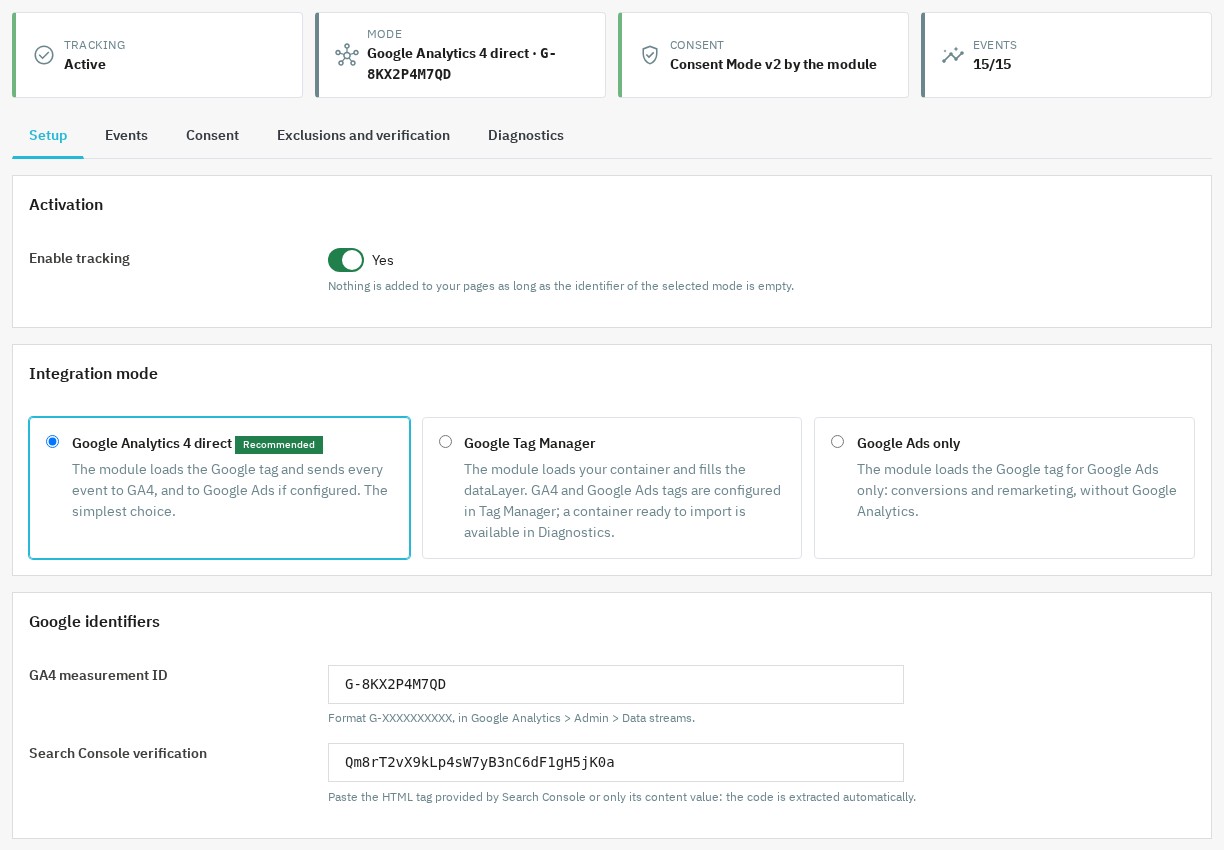 Integration mode and Google identifiers in the module
Events and product data
In the Events tab, enable or disable each event and set the product data: the identifier sent (product ID, combination ID or reference), prices with or without tax, the purchase value (total paid, taxes and shipping included, or products excluding tax after discounts, without shipping) and the number of products sent per list. Choose the identifier used by your Merchant Center feed if you use dynamic remarketing.
Google Ads: conversions, enhanced conversions and remarketing
- Enter your Google Ads ID (AW-…) and the label of the Purchase conversion: it is sent on order confirmation with the amount, currency and order reference, once per order. You can also paste the full “AW-…/label” tag.
- The Contact conversion label and its estimated value measure contact requests.
- Enhanced conversions add the customer's email and phone, hashed with SHA-256, to the purchase conversion, only if the visitor granted
ad_user_data. Mention it in your privacy policy. - Dynamic remarketing adds the product identifiers expected by Google Ads to the events.
Consent Mode v2 and consent banner
In the Consent tab, choose who manages Consent Mode. With this module, you set the default values of analytics_storage, ad_storage, ad_user_data and ad_personalization, for all visitors or only in the EEA, the United Kingdom and Switzerland, as well as the banner wait time, advertising data redaction and passing click identifiers in URLs.
Automatic connectors update consent from Cookiebot, Axeptio, OneTrust (C0002 and C0004 categories), CookieYes and tarteaucitron, including when the visitor withdraws consent.
For another banner, for example a PrestaShop cookie module, enter the name of the cookie that stores the choices and the expressions that mean consent for measurement and advertising.
If your tool already sends Consent Mode (Cookiebot, Didomi, OneTrust, Usercentrics, iubenda, Axeptio or tarteaucitron configured for it), choose My consent tool sends Google Consent Mode itself: the module then sends no default values.
Custom integration: call wpGtUpdateConsent({analytics_storage: 'granted'}) from your banner or dispatch the wpgt:consent event with the same values.
Excluding internal traffic and linking your domains
- The browser you open the back office with is automatically excluded from tracking: your test visits and orders do not distort your reports. The Exclude this browser link also excludes another browser, for example a phone.
- Exclude IP addresses or address ranges (for example
203.0.113.0/24), IPv4 or IPv6; your current address is displayed. - Cross-domain keeps the visitor's session across several domains in GA4 direct mode.
- Contact forms submitted without a page reload are detected with CSS selectors you can adjust.
Checking tracking without a test account
From the Exclusions and verification tab, enable verification mode for your browser. For 24 hours, a panel is displayed in the store and lists each computed event with its data, without sending anything to Google. The Remove the mark from this browser link disables it.
The Diagnostics tab checks identifiers, consent, the presence of another tracking module that would count twice and the theme hooks used by the module, and lists the latest orders sent.
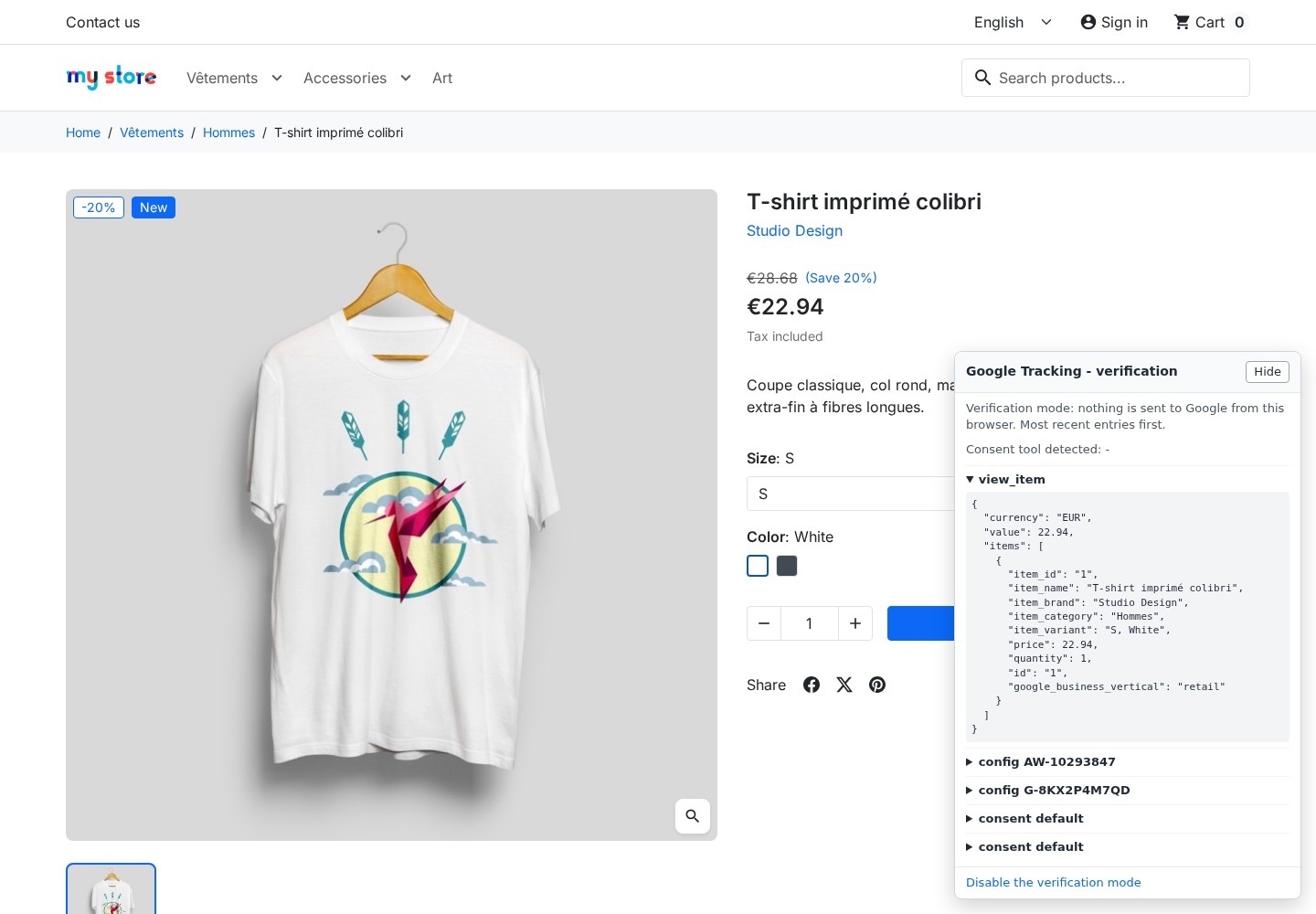 Verification mode: computed events are displayed in the store without being sent to Google
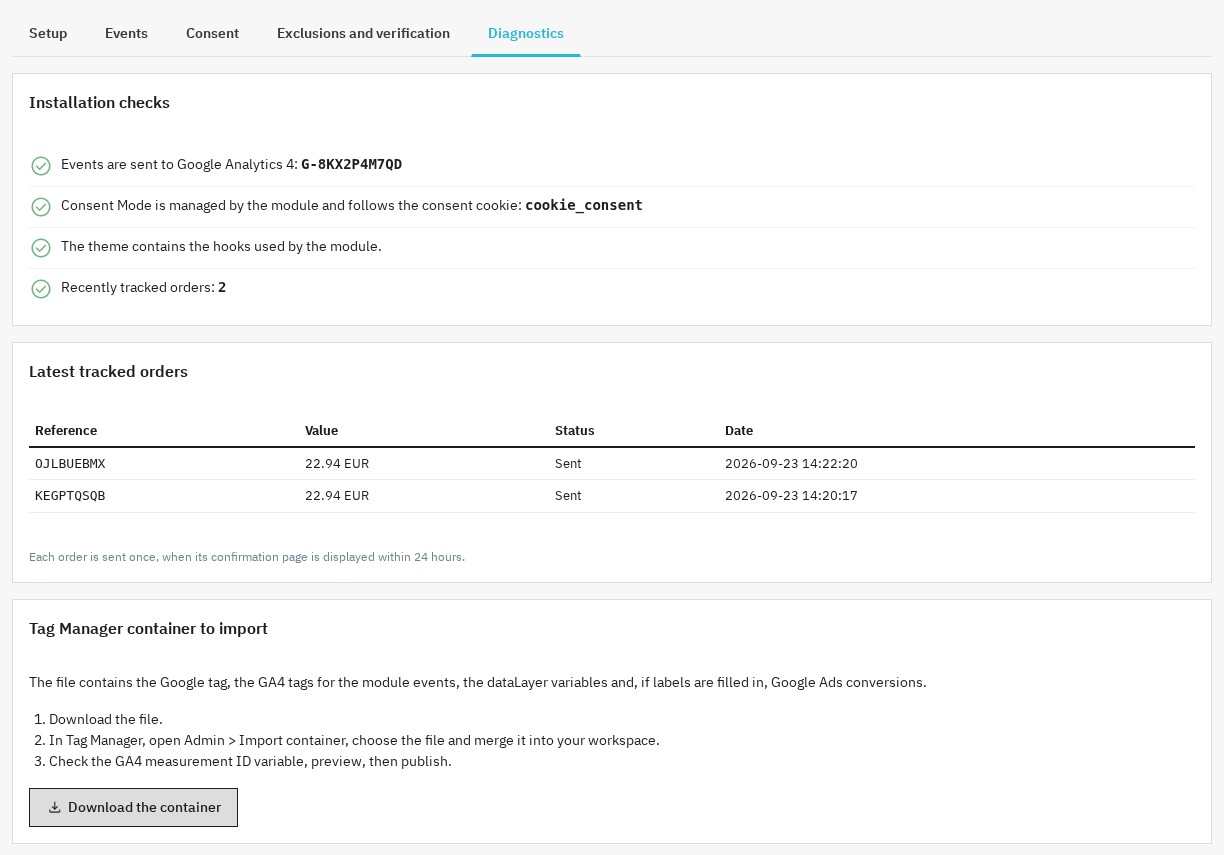 Diagnostics: installation checks, latest tracked orders and Tag Manager container
In Tag Manager mode, download the container to import: it contains the Google tag, the GA4 event tags, the DataLayer variables and, if labels are set, the Google Ads conversions. In Tag Manager, open Admin > Import container, merge it into your workspace, check the measurement ID, preview and publish.
You can then confirm reception with GA4 DebugView or Tag Assistant.
Upgrading from version 1.x
- Your settings are kept. If you had entered a Google Tag Manager container, Tag Manager mode stays active: check that your GA4 tags use the module's events or import the container offered in the Diagnostics tab.
- Purchases use the same product identifier as the other events (product ID by default). If your reports or your Merchant Center feed rely on the reference, choose Reference in the Events tab, Product data section.
Requirements
- PrestaShop 1.7.8, 8.2 or later, 9.1 or later (PrestaShop 8.0, 8.1 and 9.0 are not supported).
- PHP 7.4 or later.
- A theme that keeps the standard PrestaShop hooks (the diagnostics check them).
- A Google Analytics 4, Google Tag Manager or Google Ads account depending on the selected mode.
FAQ
Is the module compatible with my theme?
The module uses the standard PrestaShop hooks, without overrides. It works with themes that keep them, including the default PrestaShop themes. The Diagnostics tab reports a hook missing from the theme.
Another module already sends GA4: what should I do?
Disable the other tracking module or its Google tags: otherwise each visit or purchase may be counted twice. The diagnostics report active Google tracking modules.
Why doesn't a purchase appear in GA4?
The purchase is sent when the order confirmation page is displayed, within 24 hours of the order, and only once. Also check the visitor's consent and Google Analytics processing time.
How can I get support?
Contact us from your customer account. Include your PrestaShop and PHP versions, your theme, your consent tool and a screenshot of the Diagnostics tab.
Support
Contact us from your WePresta customer account.
See the Google Analytics 4, GTM and Search Console module
Changelog
Version 2.0.1
Fixes
- Activate your license from the module configuration page on PrestaShop 9: the form no longer shows “Invalid form token”.
Version 2.0.0
New features
- Choose your integration mode: Google Analytics 4 direct, Google Tag Manager or Google Ads only.
- Measure your sales in Google Ads with a purchase conversion sent once per order.
- Optionally enable Google Ads enhanced conversions and dynamic remarketing.
- Check your installation without sending data thanks to verification mode, directly in your store.
- Check your configuration in the Diagnostics tab: identifiers, consent, duplicate modules, theme and latest tracked orders.
- Import into Google Tag Manager a ready-to-use container for all the module's events.
- Connect Consent Mode to Cookiebot, Axeptio, OneTrust, CookieYes, tarteaucitron or any banner that stores choices in a cookie.
- Choose the product identifier sent (product ID, combination ID or reference), prices with or without tax, and the purchase value.
- Install the module on PrestaShop 1.7.8 to 9.
Improvements
- E-commerce events are sent to Google Analytics 4 even without Google Tag Manager.
- Product lists and product clicks are measured on every catalog page, including after a filter.
- Quantities added, changed or removed from the cart are measured with their exact value.
- Each product keeps the same identifier, name, brand, category and price type as on the product page until the purchase.
- Checkout start is counted once, even when the steps reload the page.
- Delivery method confirmation is measured with the carrier name.
- The visitor's consent withdrawal is passed to Google.
- Your test visits and orders from the back-office browser are no longer counted.
- IP address exclusions accept address ranges.
- Only employees allowed to edit the module can change the tracking identifiers.
- The module archive is much lighter and no longer contains development tools.
Fixes
- A purchase is no longer counted twice when the confirmation page is reloaded.
- Purchases are sent in the order currency.
- Requests sent with the PrestaShop contact form are detected.
- Guest accounts created during checkout are no longer counted as sign-ups.
- Removing a product from the cart is no longer counted as an addition.
- Google Ads only mode now adds the Google tag to your pages.
After the update
- Your settings are kept. If you had entered a Google Tag Manager container, Tag Manager mode stays active: check that your GA4 tags use the module's events, or import the container offered in the Diagnostics tab.
- Purchases now use the same identifier as the other events (product ID by default). If your reports or your Merchant Center feed rely on the reference, choose “Reference” in the Events tab, Product data section.
Version 1.1.0
- Lead tracking: contact form submissions are tracked as GA4
generate_leadevents. - Google Ads conversion tracking: contact form submissions can be tracked as lead conversions in Google Ads, with three new fields: Google Ads ID, conversion label and lead value.
- Contact forms submitted without a page reload are supported.
- 15 GA4 events tracked (up from 14).
- Compatible with Consent Mode v2 (Axeptio, Cookiebot, etc.).
Version 1.0.0
- Initial release
- 14 complete GA4 e-commerce events
- GTM and/or standalone GA4 support
- Google Consent Mode v2 integration
- Automatic Axeptio and Cookiebot detection
- Google Search Console verification
- Configurable cross-domain tracking
- Employee and IP exclusions
- Multi-store support
- Compatible with PrestaShop 8.x and 9.x