- Subscribers, import and consent
- Preferences, unsubscribe and suppression
- Segments and RFM scoring
- Block editor, templates and personalisation
- Campaigns, queue and delivery
- A/B tests
- Automated journeys
- Tracking, reports and attribution
- Deliverability and the pre-send checklist
- Multistore, permissions, logs and GDPR
- Without a valid license, the module disables itself
- Renewal and a license server that does not answer
- Do I need an account on an external emailing platform?
- Can I import my existing list?
- How does double opt-in work?
- What happens without a scheduled task?
- How many emails can the module send per hour?
- Are opens reliable?
- How is an order attributed to a campaign?
- Is the module enough to comply with GDPR?
- Does the module send SMS, push notifications or abandoned cart reminders?
- What happens if the license is no longer valid?
Newsletter and email campaigns on PrestaShop: segments, automations and tracking
A newsletter list only becomes useful when it can be split, written for and measured. PrestaShop keeps a list of subscribers, but it does not compose a campaign, does not target a group of customers and does not run a series of emails on its own. Many shops therefore export their contacts to an external emailing platform, pay for a plan that grows with the list and maintain a synchronisation on top of the shop.
Newsletter & email campaigns moves that work into the PrestaShop back office. It keeps subscribers and their consent, builds segments from orders and behaviour, provides a block-based campaign editor, sends through a queue at a controlled rate, runs automated journeys, tracks opens, clicks and attributed sales, and checks the sending configuration before a campaign leaves.
The module prepares and sends; a person decides. A checklist blocks what would prevent a correct send, recipients are frozen when sending starts, and a send in progress can be paused, resumed or cancelled.
Highlights:
- Subscribers and consent: reuse of PrestaShop's list, CSV import, double opt-in with a signed expiring link, consent log with wording and version, preferences page without login, one-click unsubscribe
- Segments: up to 20 conditions and 10 exclusions, live count, preview of 20 recipients, RFM score in 11 named groups
- Editor: blocks, six ready-made templates, per-language subjects and preheaders, conditional content, vouchers, desktop, mobile and text previews
- Sending: scheduled queue, configurable hourly rate, retries, pause, resume, cancel, resend to non-openers
- A/B tests: subject, content or both, decision on opens with a click fallback
- Automations: five ready-made journeys, conditions, frequency cap, dry run
- Tracking: opens (an estimate), clicks, orders and revenue attributed to the last click, reports and CSV exports
- Deliverability: SMTP probe and transcript, SPF, DKIM, DMARC and MX checks, pre-send checklist
- Operations: multistore, per-employee rights, action log, queue and error logs, GDPR export and erasure
- The license: without a valid license the module disables itself completely, keeps the data and is enabled again from its configuration page
Discover the module and its plans
Overview
The module works with PrestaShop's own data and sending layer. Contacts, consents, segments, campaigns, statistics and logs are stored in the shop database; emails leave through the transport configured in Advanced Parameters > E-mail. An authenticated SMTP server is recommended, because PHP's mail() function is frequently filtered as spam. No third-party account, API key or contact synchronisation is involved.
Each recipient receives a personal email, in HTML and in plain text, in their own language, with their personalisation variables, their voucher and their tracked links. Campaigns and journey emails share the same queue, the same suppression list and the same frequency cap.
The module does not replace an emailing infrastructure for very large lists, and it does not send SMS, push notifications or advertising audiences. It is designed for shops that want to keep their contacts and their statistics in PrestaShop while running a real newsletter programme.
Features
Subscribers, import and consent
The module can reuse the list already present in PrestaShop: subscribers of the native Newsletter block, customers who ticked the newsletter box in their account, and customers who accepted partner offers — the last group only when you explicitly ask for it. A CSV import maps columns, merges duplicates, runs a dry run before writing and produces a line-by-line result file. An import requires a consent statement: where the list comes from and that it was not bought, rented or collected without permission.
Double opt-in is the default. An address becomes subscribed only after a click on a signed, dated link; a reminder can be sent and the link expires after 7 days by default, adjustable from 1 to 30. Single opt-in remains available, provided the legal basis is described. PrestaShop already stores the date and IP address of a signup; the module adds the exact wording displayed and its version, the chosen topics, the source and every withdrawal.
The consent log keeps that evidence, filters it and exports it to CSV. By default, proof is retained for five years after an unsubscribe; the duration is configurable. The signup form also uses an unchecked consent box, a honeypot, a signed time token, an Origin and Referer host check, and a limit of five signups per hour per IP and shop, with the IP stored as a hash.
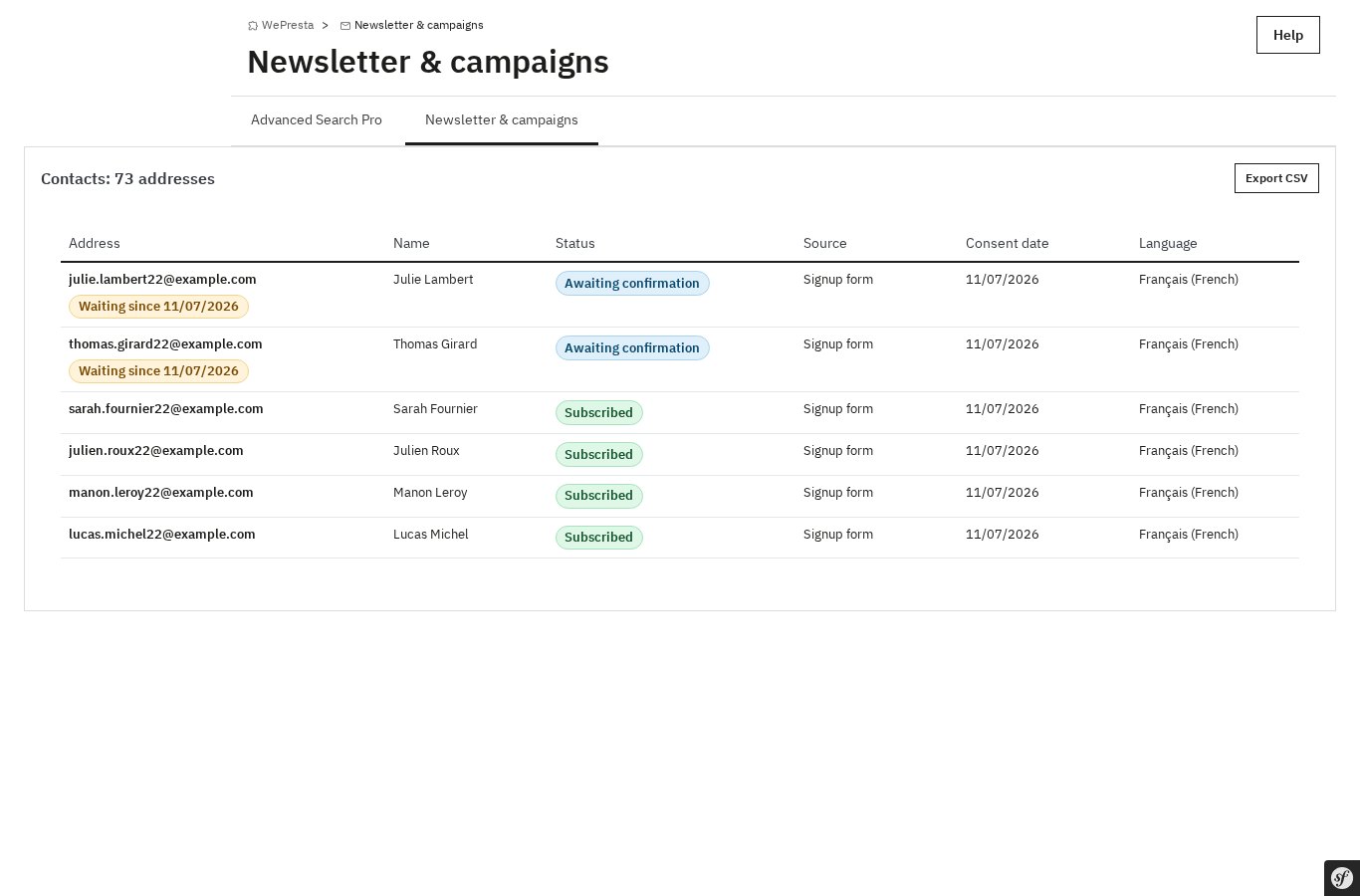 The contact list with status, source, consent date and language.
Preferences, unsubscribe and suppression
Every marketing email contains an unsubscribe link and a link to a preferences page that requires no login. The page shows the masked address, the topics, the frequency, the email language and a full unsubscribe, with an optional reason and comment. Viewing the page never unsubscribes anyone: the action is confirmed by a POST. Mailbox providers also offer one-click unsubscribe through the RFC 8058 List-Unsubscribe-Post header; unsubscribe by replying to the email is also supported when enabled.
An unsubscribe cancels emails still in the queue, stops running journeys, unticks the Newsletter box in the customer account and is written to the withdrawal log. A suppression list excludes addresses with a permanent failure, addresses imported from the SMTP provider and addresses added by hand. Inactive contacts can be identified from their last activity and unsubscribed or purged in bulk.
Segments and RFM scoring
A segment combines up to twenty conditions and ten exclusions. Available criteria include customer group, language, country, source, signup date, topics, account status, number of orders, amount spent, last order date, products or categories bought, products viewed, cart content and value, vouchers used, engagement (opens and clicks), RFM score, birth month and membership of another segment.
The recipient count updates while the segment is being built, and the preview lists the first twenty matching contacts with their orders and spend. The RFM score — recency, frequency, monetary value — is computed every day over an adjustable period, from 1 to 5 on each axis, with eleven named groups. Those groups can be assigned to a PrestaShop customer group after a preview; a customer group can change prices, discounts and shipping or payment options, so the assignment deserves a check first.
Product view tracking is off by default and only records signed-in customers. No anonymous visitor is profiled.
Block editor, templates and personalisation
The editor builds the email from blocks: header, text, image, button, product, product grid, recommendations, separator, spacer, social links and a mandatory footer containing the unsubscribe link. Width, colours, font and corner radius are set once for the campaign. Subject and preheader are written language by language. Six responsive templates are included: promotion, new arrivals, selection, reassurance, welcome and winback. Any block can be saved to a library and reused.
Personalisation variables such as {firstname}, {shop_name} and {voucher_code} accept a fallback value when the field is empty. Conditional blocks show or hide content according to the segment, country, language, customer group or a recipient attribute. Already purchased products can be removed for each recipient.
A voucher can be attached to an existing cart rule, created once with a shared code, or generated individually for each recipient. The desktop, mobile and text previews show what will actually be sent.
Campaigns, queue and delivery
A campaign starts from a template, an existing campaign or a blank page. It remains a draft, can be tested to one to ten addresses, is scheduled with a date, time and time zone, then sends. It can be paused, resumed, cancelled, duplicated or resent only to recipients who did not open the original email. The estimate shows the number of recipients, the exclusions by reason and the expected duration at the configured hourly rate.
The queue is processed by a scheduled task, run every five minutes through the token URL or the command-line script. The hourly rate is configurable from 10 to 100,000 emails per hour, with a default of 300; sends are spread across the hour and never exceed the limit. Only one queue run executes at a time. Temporary errors are retried after 15 minutes, 1 hour and 4 hours; permanent refusals feed the suppression list; three consecutive transport failures stop sending for the shop and raise an alert. Without a scheduled task, the "Send a batch now" button processes the queue on demand.
The "Send at each contact’s usual opening hour" option delays the send to the hour when the recipient most often opens emails, within 24 hours of the start. It relies on recorded opens and can be disabled per campaign.
A/B tests
An A/B test compares two subjects, two contents or both. Between 10% and 50% of the audience — or 100% when no decision phase is wanted — receives version A or B. The winner is decided on the unique open rate, with the click rate as a fallback when opens are not measured, after a delay of 1 to 72 hours. The winning version then goes to the remaining recipients.
Automated journeys
Five journeys are provided: welcome after signup, post-purchase triggered by an order status, winback after a number of days without an order, birthday and follow-up after a product view. Each is a normal automation that can be edited: emails, delays and conditions are added, moved and removed, up to twenty steps. A blank journey also accepts entry into a segment as its trigger.
An automation is activated once every email has passed its checklist. A dry run shows which contacts would enter now and the next step of enrolments in progress, without writing anything. Enrolments stop on purchase or unsubscribe according to the settings. A frequency cap, three marketing emails per week by default, prevents over-contacting the same person, with priorities between journeys. Abandoned cart reminders are handled by a dedicated module; the browse email never targets a product sitting in an open cart.
Tracking, reports and attribution
The open pixel and signed tracking links feed counters for each campaign, each journey email, each link and each segment. Opens are an estimate: some mailbox providers and security filters load images automatically, while a reader that blocks images does not. Clicks are more reliable. No advertising cookie is set or read.
An order placed with the same email address within the attribution window is credited to the last click. The window is 7 days by default and can be set from 1 to 90. Cancelled, refunded and failed orders are excluded; partial refunds are not deducted. Reports show recipients, accepted emails, opens, clicks, unsubscribes, bounces, orders, revenue and average cart, with a breakdown by link and by recipient. Campaigns, journeys and links export to CSV.
Deliverability and the pre-send checklist
The Deliverability page shows the sending method configured in PrestaShop, tests the SMTP server and displays its exact response and transcript, then checks the SPF, DKIM, DMARC and MX records of the sender domain, along with domain alignment. Each result explains what it means and what to correct. Results are cached for 24 hours.
Before each campaign and before activating a journey, a checklist blocks errors that would prevent a correct send — email disabled in PrestaShop, invalid sender, a language without a subject, an invalid link, an empty audience, an expired voucher — and warns about what should be improved: no test email sent, incomplete DNS, a silent scheduled task, an image without alt text.
The module does not guarantee inbox placement. Deliverability depends on your domain, your server and the reputation of your sending; the module provides the checks and the evidence to correct a problem before it affects a campaign.
Multistore, permissions, logs and GDPR
Contacts, segments, campaigns, journeys, settings and statistics are separated per shop, and the scheduled task processes every shop where the module is active. Permissions are granted per employee: view, contacts, segments, campaigns, send, automations and settings. Every action is checked on the server side. The action log records who did what, the queue shows each email and its error, and a send log keeps the outcome of each campaign.
The module integrates with PrestaShop's GDPR tools (psgdpr): it exposes contact data to export and processes erasure, with a record in the consent log. The module helps document consent; it does not replace legal advice.
Installation
- Back up the shop files and database before installing.
- In Modules > Module Manager, upload the module ZIP file and install it.
- Open the module configuration page and enter the license key.
- Check Advanced Parameters > E-mail: email sending must be enabled and the transport configured. An authenticated SMTP server is recommended.
- Configure the sender identity, the subscription form, double opt-in, the hourly rate and the scheduled task.
- Run the scheduled task once, send a test campaign to one or more internal addresses, then check the Deliverability page.
The module is installed as a standard PrestaShop module. Its files sit in modules/wepresta_newsletter_campaigns/; the CLI script is cron.php, in that folder.
First configuration
- Sender and brand: choose the sender name and address used by campaigns, and check that the domain is the one you will authenticate in DNS.
- Subscription: decide between double opt-in (recommended) and single opt-in with a documented legal basis, set the confirmation expiry and the reminder delay, and place the signup form.
- Sending: set the hourly rate according to your SMTP server and hosting, then create the scheduled task. The module shows the exact command and URL to use.
- Tracking: choose whether opens and clicks are tracked, whether UTM parameters are added and whether reply-to unsubscribe is enabled.
- Data: set the consent retention period, the inactive contact thresholds and what happens on uninstall. Deleting data on uninstall is off by default.
Run a complete test on an internal address: signup, confirmation, preferences page, unsubscribe, test campaign, queue processing and report.
License and activation
The module requires an active license. The key is entered on the module configuration page and checked against the license server. A valid license enables the module for the shops covered by the plan.
Without a valid license, the module disables itself
Nothing of the module runs: no signup form, no product-view beacon, no email is sent; scheduled campaigns do not start and automations do not enrol or advance. The scheduled task exits with code 1, and the cron URL answers 404. Links in already-sent emails, including the unsubscribe link, answer 404, so only reply-based unsubscribe remains possible and must be handled by hand.
Data is kept. As soon as a valid license is entered again, the module is re-enabled from its configuration page. Late campaigns and enrolments are not replayed automatically: catch-up pauses campaigns that should have started while the module was inactive and stops enrolments that should have advanced, so a person can decide what to do.
Renewal and a license server that does not answer
A renewal check that meets a transient answer keeps a valid license for 7 days from the first failure. Checks run one at a time, and a page whose check was skipped keeps the license valid. If the license has actually expired, the disabled behaviour above applies until it is renewed.
Day-to-day use
A usual cycle looks like this: import or collect subscribers, check the consent log, build a segment and read its count, duplicate a template, write the subject and content in each language, attach a voucher, run the checklist, send a test, schedule the campaign, then read the report after delivery.
For a journey, duplicate a preset, edit its emails and delays, run the dry run, check the activation checklist and enable it. Watch the queue during the first sends, and check the Deliverability page whenever the sender domain or the SMTP server changes.
Use cases
- Welcome series: confirm the signup, introduce the shop and offer a first-purchase voucher, with a reminder if the first email is not opened.
- Customer reactivation: target customers who have not ordered for several months, with a segment based on the last order date and the RFM score, and a shared or individual voucher.
- New collection announcement: send a segmented campaign to customers who bought from a category or viewed a product, with a product grid and a text version.
- Post-purchase follow-up: thank the customer after a status change, recommend complementary products and stop the journey if the customer buys again.
- Newsletter programme for several shops: keep contacts, campaigns and statistics separate per shop, with per-employee rights.
- List clean-up: identify inactive contacts, check the consent evidence, then unsubscribe or purge in bulk without sending to addresses that should no longer receive marketing.
Requirements and limits
- PrestaShop 1.7.8, 8.0+ and 9.0+; PHP 7.4 or later; the
jsonandmbstringextensions. - A scheduled task is required to process the queue: the token URL or the CLI command, every five minutes. Without it, the queue can be processed by hand with "Send a batch now".
- Sending uses PrestaShop's transport. An authenticated SMTP server is recommended;
mail()is often filtered as spam. Inbox placement is not guaranteed. - No SMS, push notifications, advertising audiences, external platform connectors, machine-learning prediction, abandoned cart reminders or pop-ups. The browse email never targets a product in an open cart.
- Opens are an estimate. Product view tracking is off by default and only covers signed-in customers.
- Very large lists and high-volume transactional sending belong on dedicated emailing infrastructure.
- The module helps document consent and handle GDPR requests; it does not provide legal advice and does not make a shop compliant by itself.
- Without a valid license the module disables itself completely, including links in already-sent emails, and keeps the data until it is re-enabled.
FAQ
Do I need an account on an external emailing platform?
No. The module sends through the transport already configured in PrestaShop. An authenticated SMTP server is recommended, because PHP's mail() function is often classified as spam. No third-party account, API key or synchronisation is needed: contacts and statistics stay in the shop database.
Can I import my existing list?
Yes. You can reuse PrestaShop's subscribers or import a CSV with column mapping, duplicate merging and a dry run. A marketing email still requires a legal basis: double opt-in by default, or a documented single opt-in. The import asks for a consent statement describing the list's origin and confirming it was not bought, rented or collected without permission.
How does double opt-in work?
The address receives an email with a signed, dated link and becomes subscribed only after the click. A reminder can be sent, and the link expires after 7 days by default, configurable from 1 to 30. The wording displayed, its version, the date, IP, page and source are written to the consent log.
What happens without a scheduled task?
Nothing sends automatically: the queue waits. You can process it by hand with "Send a batch now", but a scheduled task every five minutes is the normal way to operate. It can be called through the token URL or the CLI script, and only one run executes at a time.
How many emails can the module send per hour?
The hourly rate is configurable from 10 to 100,000 emails per hour; the default is 300. Sends are spread across the hour and never exceed the limit. The real capacity depends on your SMTP server and hosting: start cautiously, then increase.
Are opens reliable?
They are estimates. The module places an invisible image; some mailbox providers and security filters load it by themselves, which inflates the figure, while a reader that blocks images does not load it. Clicks are more reliable. Reports show both, with a breakdown by link and by recipient.
How is an order attributed to a campaign?
An order placed with the same email address within the attribution window is credited to the last click: 7 days by default, configurable from 1 to 90. Cancelled, refunded and failed orders are excluded; partial refunds are not deducted. No advertising cookie is involved: attribution relies on the email address and the recorded click.
Is the module enough to comply with GDPR?
It helps document consent — exact wording, version, date, IP, page, source, legal basis and withdrawal — and handles export and erasure requests from the contact record. Proof is kept for five years after an unsubscribe by default. It does not replace legal advice or the shop's other obligations; compliance remains the merchant's responsibility.
Does the module send SMS, push notifications or abandoned cart reminders?
No. It focuses on email: no SMS, no push, no advertising audiences, no connector to an external platform, no machine-learning prediction and no pop-up. Abandoned cart reminders remain the job of a dedicated module, and the browse email never targets a product in an open cart.
What happens if the license is no longer valid?
The module disables itself completely: no email is sent, the scheduled task stops, the signup form disappears and links in already-sent emails answer 404, including the unsubscribe link. Reply-based unsubscribe still works and must be handled by hand. Data is kept, and the module is re-enabled from its configuration page as soon as the license is valid.
Support
Before contacting support, check the following:
- the queue and error logs, which show each email and its error;
- the Deliverability page, which displays the SMTP response and the DNS checks;
- the scheduled task: it must run every five minutes and return exit code 0;
- the action log, which records configuration changes and sends;
- the PrestaShop email configuration in Advanced Parameters > E-mail.
When reporting a problem, include the module version, the PrestaShop and PHP versions, the campaign or journey concerned, the exact error from the queue or action log and the SMTP response shown on the Deliverability page. Never send a license key or an SMTP password.
Changelog
Version 1.0.0
- First public version.
- Subscribers, CSV import with column mapping, duplicate merging and dry run, consent log with wording, version, IP, page, source and legal basis.
- Double opt-in with a signed expiring link and reminder; single opt-in with a documented legal basis.
- Preferences page without login, one-click unsubscribe (RFC 8058), reply-to unsubscribe, withdrawal log and suppression list.
- Segments with up to 20 conditions and 10 exclusions, live count, 20-recipient preview, daily RFM scoring in 11 groups and optional assignment to customer groups.
- Block editor with header, text, image, button, product, product grid, recommendations, separator, spacer, social and footer blocks; six ready-made templates and a block library.
- Per-language subjects and preheaders, personalisation variables with fallback, conditional blocks, three voucher modes, desktop, mobile and text previews.
- Campaign lifecycle with draft, test, schedule, pause, resume, cancel, duplicate, resend to non-openers and pre-send estimate.
- Queue processed by scheduled task or on demand, configurable hourly rate, retries on temporary errors, suppression on permanent failures and alerts on transport failures.
- A/B tests on subject, content or both, with a decision on opens and a click fallback.
- Five automated journeys, up to 20 steps, conditions, activation checklist, dry run and frequency cap.
- Open pixel, signed click tracking, UTM parameters, web version, reports by campaign, link and recipient, CSV exports.
- Sales attribution to the last click within a configurable window, excluding cancelled, refunded and failed orders.
- SMTP probe with transcript, SPF, DKIM, DMARC and MX checks with alignment, cached for 24 hours, and a pre-send checklist.
- Multistore separation, per-employee rights, action, send and error logs, GDPR export and erasure.
- License gate: without a valid license the module disables itself completely, keeps the data and is re-enabled from its configuration page.

Related articles
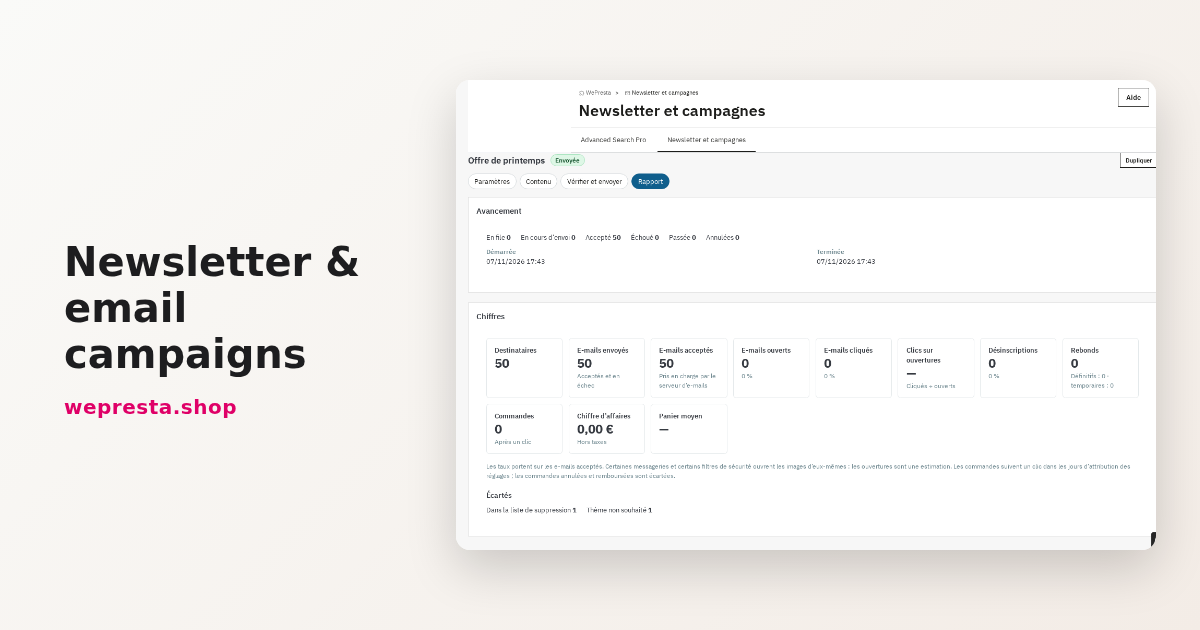
How to send a PrestaShop newsletter and track the sales it brings
The module keeps subscribers, consent records, segments and statistics inside PrestaShop, sends through the back-office queue and links orders back to the emails sent.