- Block scripts, iframes and pixels before consent
- A clear banner and a per-category panel
- Change your mind at any time
- Log every decision
- Prove the log's integrity
- Send Google Consent Mode v2
- Generate the cookie policy
- Scan the store and watch for new trackers
- Dashboard and setup wizard
- Test mode and control page
- Country targeting, GPC and DNT
- Multistore, languages and cache
- Classify services and unknown domains
- Set up the banner
- Consent Mode, scans and maintenance
- Employee permissions
- Does the module really block scripts before consent?
- Do I need an account, an API key or an external service?
- How do I prove what a visitor accepted?
- What happens if a visitor rejects or withdraws consent?
- Is the module compliant with Google Consent Mode v2?
- Does the module slow down the shop, and does it work with the cache?
- What happens without JavaScript?
- Does it work with multistore and PrestaShop 1.7.8?
- What happens if my license expires?
- Is the cookie policy ready to publish?
- Is it an IAB TCF-certified CMP?
GDPR cookies on PrestaShop: banner, real blocking and proof
A consent banner that appears while Google Analytics, Google Ads, Meta or TikTok are already loading does not protect your visitors and gives you no proof of their choice. GDPR Cookies handles consent inside the PrestaShop back office: it neutralizes third-party scripts, iframes and pixels in the HTML it sends, lets the visitor choose in an accessible banner, records every decision in an append-only log with a reference, and generates the shop's cookie policy. It also sends Google Consent Mode v2 signals, with no account, no API key and no external service.
This guide explains what the module does, how to install it, how to complete a first configuration and how to use it day to day.
Highlights:
- Real blocking before consent: third-party scripts, iframes (YouTube, Vimeo, Google Maps), pixels and third-party resources are neutralized in the HTML, then reloaded according to the accepted category
- Append-only log: unique reference, UTC date, action, categories, versions, country and signals, exportable as CSV and JSON
- Technical proof: each row is chained with a SHA-256 fingerprint, and the integrity check reports any modification or deletion
- Accessible, customizable banner: three positions, checked contrast, per-language texts, per-category panel and one-click withdrawal
- Consent Mode v2 and cookie policy: signals sent before any tag, a CMS page generated in every language and a table reusable through a shortcode
- Store scan: six pages checked, unknown domains flagged, scheduled scans and an employee control page
Discover the module and its plans
Presentation
Cookie consent in Europe is governed by the ePrivacy Directive (2002/58/EC) and the GDPR: visitors must be informed, consent freely, specifically and by category, and be able to withdraw their choice as easily as they gave it. In a PrestaShop shop, the topic goes far beyond the window displayed at the bottom of the page. Trackers come from the theme, payment modules, social networks, embedded videos and advertising campaigns. And when a customer, an agency or an authority asks what was accepted, you must be able to answer with a date, a text version and precise categories.
The module brings these three needs — block, inform, document — into a single interface. It rewrites the HTML server-side to neutralize third-party elements before consent, displays a banner and a preferences panel, records each decision in a log that cannot be rewritten, and prepares the cookie policy from the real inventory of your services.
It is an aid for collecting and documenting consent. The module does not certify your shop's compliance, does not replace legal advice and does not turn the generated policy into a document approved by a lawyer. It gives you the technical means to do what the law requires, and a record of what you did.
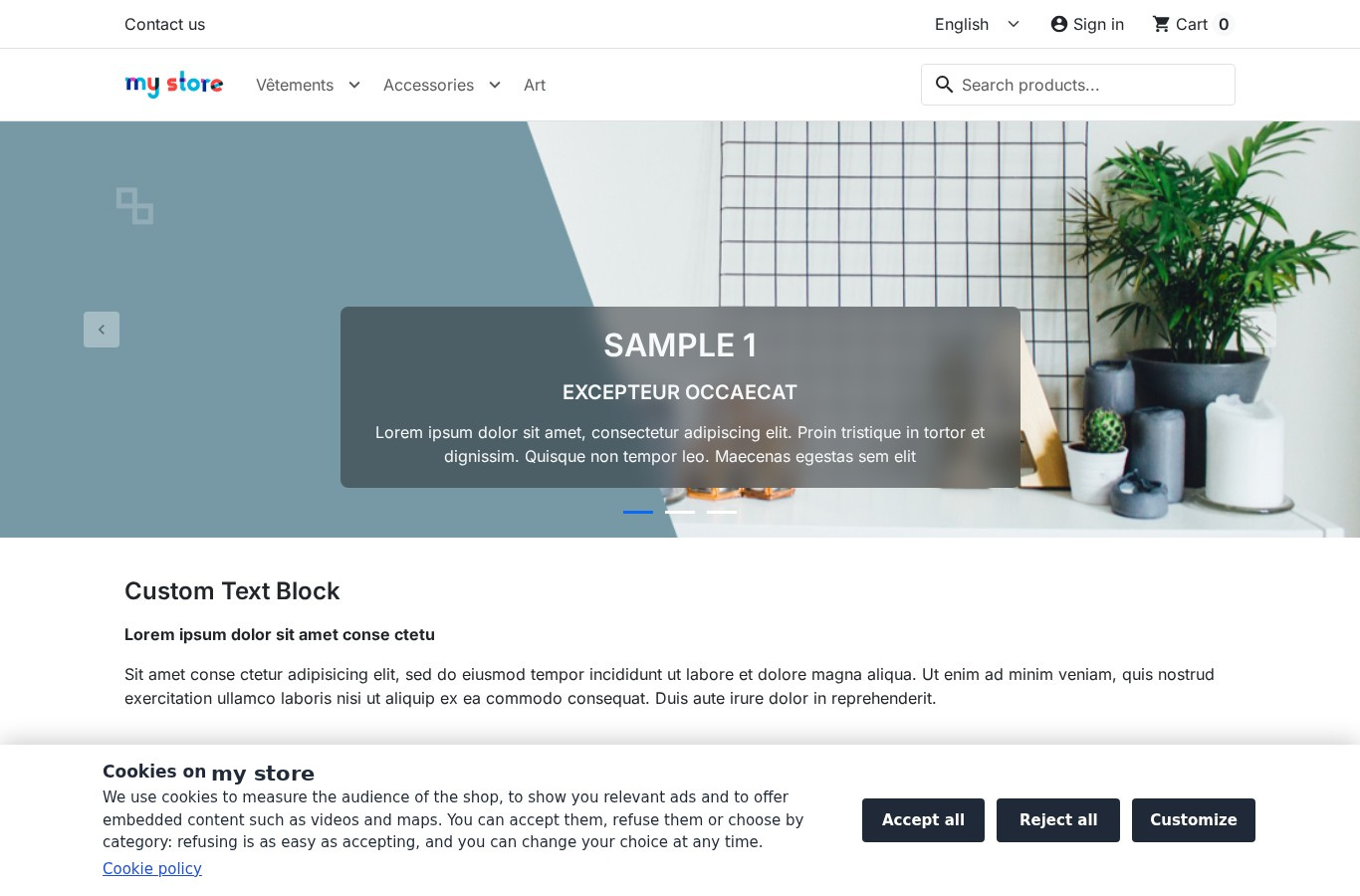 The storefront banner: three choices of equal weight and a link to the cookie policy
Features
Block scripts, iframes and pixels before consent
On every page served, the module analyses the HTML and neutralizes the elements that match an active third-party service: a script keeps its address but does not execute, a YouTube, Vimeo or Google Maps iframe is replaced by a block that names the blocked service and offers to load it by accepting the category, a tracking pixel loses its source, and third-party resources declared in the header are treated the same way. When the visitor accepts a category, the browser recreates the allowed elements in page order, with their original attributes.
Without JavaScript, nothing non-essential loads: neutralized elements stay inert, including those in a <noscript> block. A run-time guard also intercepts scripts and iframes added after load by another script, and releases them as soon as the matching category is accepted.
The module cannot stop the requests an already-allowed script makes itself (fetch, sendBeacon, new Image()), server-side conversions, or a script evaluated by eval. A tag manager must therefore be classified in the category of the tags it loads, or rely on Consent Mode. This limit is deliberate: better to know it than to believe in total blocking.
A clear banner and a per-category panel
The banner comes in three forms: a bottom bar, a centred card or a side panel. You set the colors, logo, position, button order and texts in each language, with a live preview on desktop and mobile. The "Accept all", "Reject all" and "Customize" buttons share the same component, size and visual weight; no box is pre-ticked and scrolling the page never records an agreement.
The preferences panel shows the four categories: strictly necessary (always active), analytics, advertising and remarketing, functionality. For each service, the visitor sees the purpose, the usual cookies and their duration, the recipient and a link to the provider's privacy policy. Each category is recorded separately, and the current choice is recalled with its date and reference.
The contrast of text, buttons and links is measured on save: below the 4.5:1 ratio, the module refuses the configuration and displays the measured value. The banner and panel target WCAG 2.1 AA: semantic dialog, ARIA roles, keyboard navigation, Escape to close, visible focus, 48 px targets and stacked buttons on mobile. This is a design target, not a certification.
Change your mind at any time
A discreet floating tab, a footer link and a [wpcc_preferences] shortcode open the panel from any page. Withdrawing a category deletes the usual cookies of its services on the domain and its parent domains, then reloads the page, because an already executed script cannot be unloaded. Withdrawal is recorded as a consent, with the same ease as acceptance. HttpOnly cookies and cookies from other domains cannot be deleted by a page: the panel and the policy say so.
After the chosen duration — 12 months by default, adjustable from 1 to 13 months — consent expires: the banner asks again, non-essential categories are blocked again and the new choice joins the same visitor's history. The "Ask every visitor again" button triggers the same request immediately, for example after an important text change.
Log every decision
Each choice creates a row in an append-only log: unique reference in the CC-XXXX-XXXX-XXXX format, UTC date, shop, language, page, action (accept, reject, customize, withdraw, reject by browser signal), categories, banner, policy and consent versions, detected country and GPC/DNT signals. The IP address is stored as an HMAC-SHA256 key by default; you can choose to truncate it or not store it. The reference is shown to the visitor after their choice.
The log can be filtered by period, action, source, variant, country, reference or visitor key, and exported as CSV or JSON with the current filters. Rows older than the retention period — 36 months by default, adjustable from 6 to 120 months — are deleted automatically by daily maintenance. No name, email address or customer identifier is recorded.
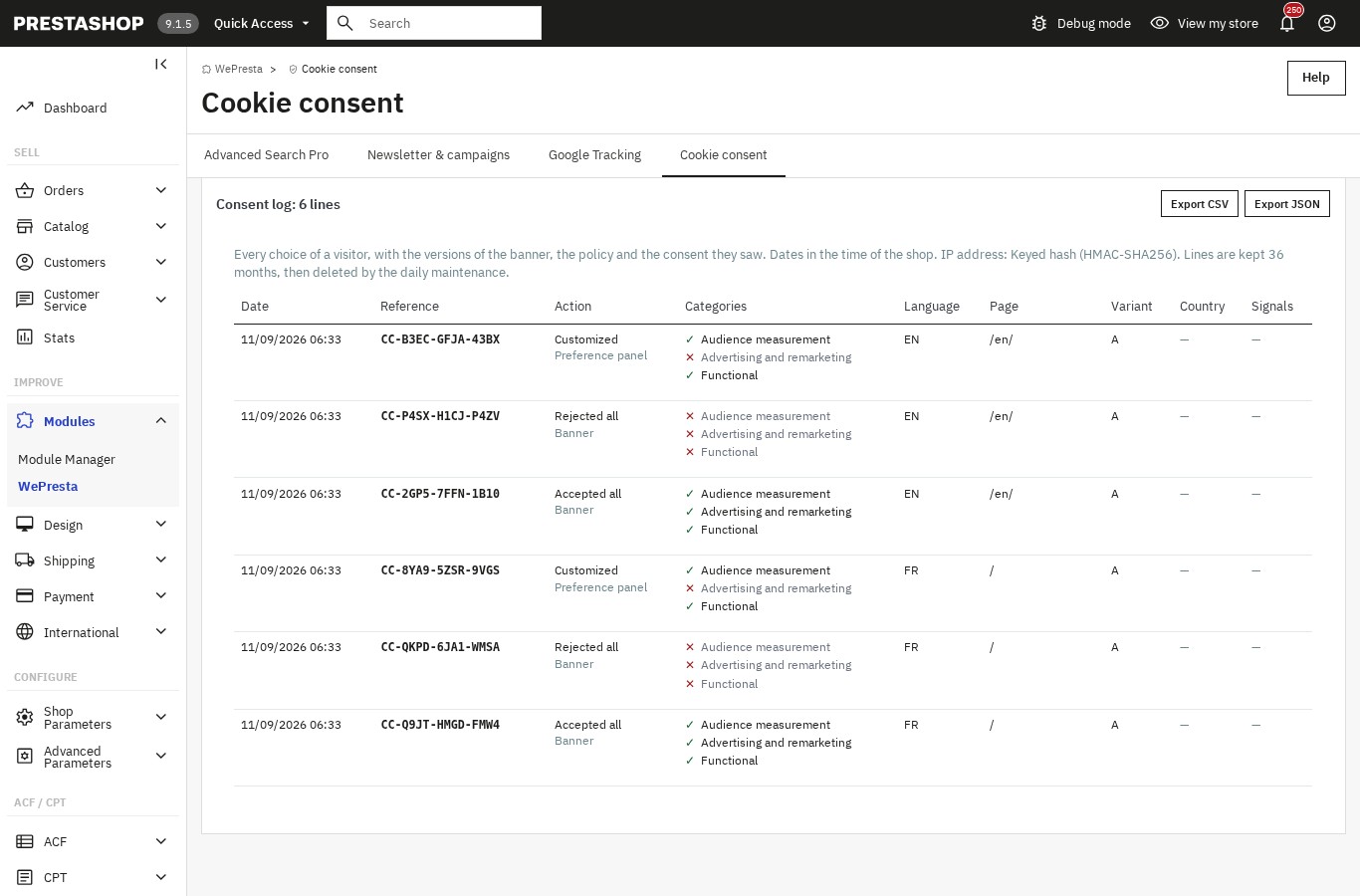 Every choice, its reference and its categories, ready to export
Prove the log's integrity
Rows are chained: each contains the SHA-256 fingerprint of the previous row, and the first starts from a null fingerprint. The module's integrity check walks the chain again, recomputes each fingerprint and verifies that the last row matches the recorded head. A modified or deleted row breaks the chain and raises the alert "The consent log was modified outside the module".
This is technical evidence: it shows that a row was changed or removed without the chain being recomputed. It is not a qualified timestamp and does not detect someone with database access who would recompute the whole chain. The module never repairs a broken chain: it reports it, and you decide what to do next.
Send Google Consent Mode v2
The module can send Google Consent Mode v2 signals before any tag: ad_storage, analytics_storage, ad_user_data, ad_personalization, security_storage and the functional signals. Defaults are denied in the European Union, the EEA, the United Kingdom and Switzerland, then updated on every choice. The wait time and advertising data redaction are configurable. Google requires Consent Mode v2 for advertising and measurement in these regions; it is not a legal obligation in itself.
Only one signal sender must be active. The module can send them itself, or cooperate with the Google Tracking module if it is installed: in that case it passes the choice to it and does not duplicate the commands. If both send, the module displays a warning and offers to correct the source. The three Google services can also be set to consent_mode, which loads them before consent while following the signals; this explicit choice comes with a warning.
Generate the cookie policy
The cookie policy is built from the real inventory: what a cookie is, who is responsible, how consent is requested, the categories and their legal bases, third-party services and cookies with their usual durations, PrestaShop's native cookies (session, cart, language, currency), the consent log and withdrawal methods, then the version and date. It is published as a CMS page in every shop language, with a readable address, and a cookie table can be inserted into another page with the [wpcc_cookie_table] shortcode.
It is a template to review and adapt: the module shows this warning and asks for confirmation before the first publication. If the page has been edited by hand since the last publication, the module flags it and asks for a second confirmation before replacing it. If the inventory changes — a service added, a duration modified — the dashboard alerts: "The cookie policy no longer matches your services".
Scan the store and watch for new trackers
The scan visits six representative pages: home, category, product, CMS page, contact and cart. For each, it lists scripts, iframes, pixels and cookies, and separates what loads before consent, what is blocked until the choice and what the shop sets itself. The report offers a before/after comparison and flags pages that could not be scanned, with the reason.
Unknown domains are listed separately: you can attach them to an existing service, turn them into a custom service or ignore them. A new domain raises a dashboard alert and, if you enable it, an email after the scheduled scan. The scan can be started on demand or on a daily, weekly or monthly schedule, through the host's cron task or the token address shown in the settings.
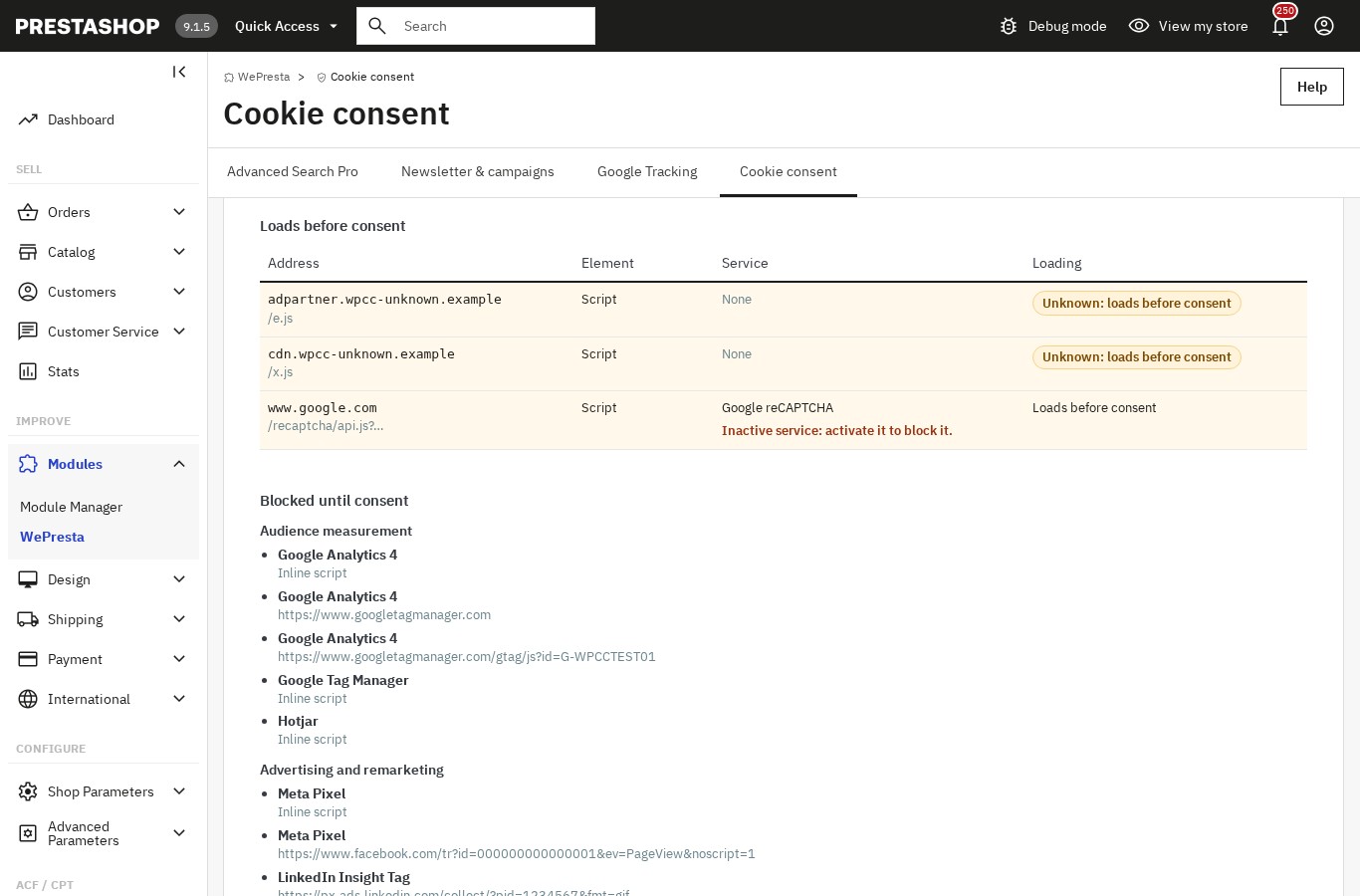 What loads before the choice, what is blocked and what remains to classify
Dashboard and setup wizard
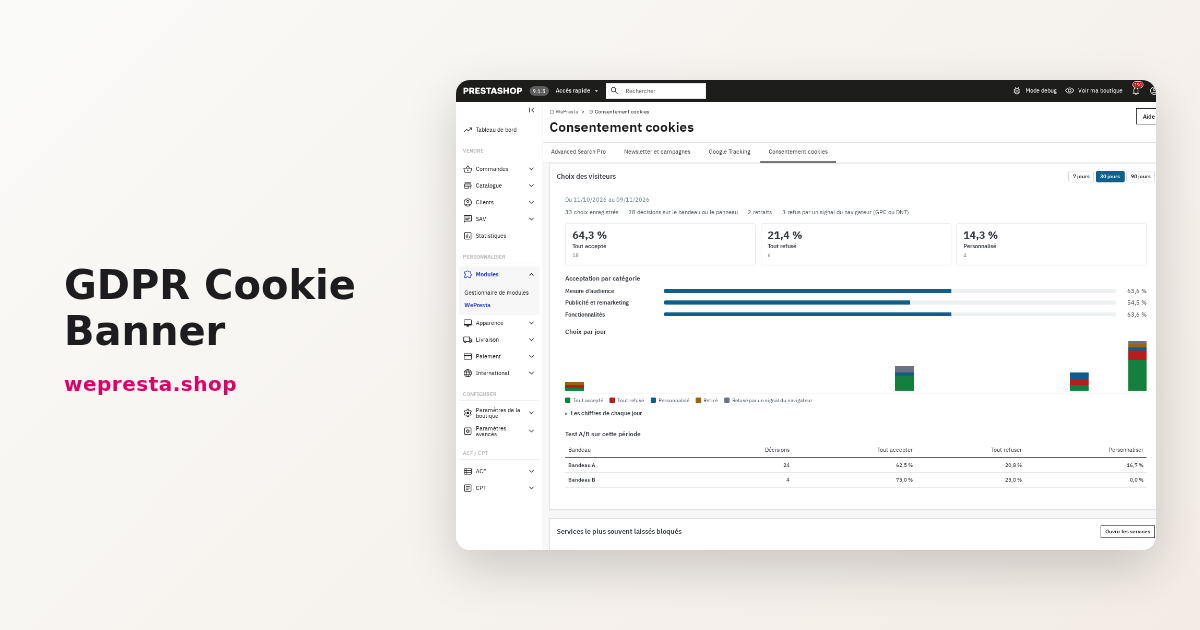
The dashboard brings together, over 7, 30 or 90 days, acceptance, rejection and customization rates, the daily trend, the most frequently blocked services, the last scan and configuration alerts: test mode still active, wizard not completed, no active service, empty rule, unknown domains, old or failed scan, broken chain, missing or outdated policy, double Consent Mode sender, country rule hiding the banner in the EU. Each alert leads to the screen that fixes it.
The four-step wizard guides the first setup: scan the store, classify the detected services, choose the banner, publish the policy then switch to live mode. Each step can be skipped and resumed later. The defaults are cautious: the module installs in test mode, no unclassified service is blocked and an empty rule blocks nothing.
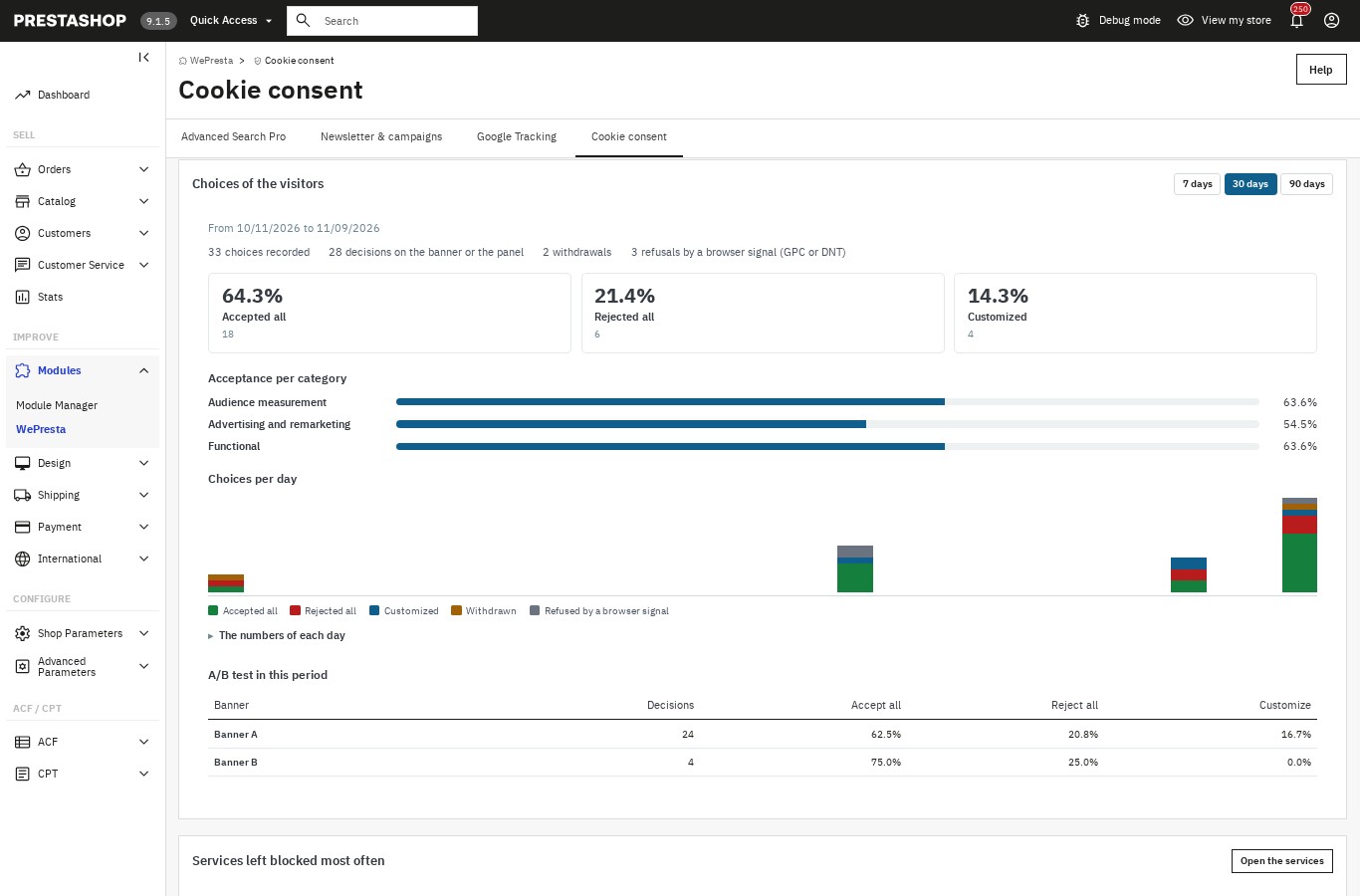 Visitor choices, category by category, and how they change over time
Test mode and control page
After installation, the module stays in test mode: visitors receive the unchanged PrestaShop page, with no banner and no blocking. You can open a banner preview on the storefront, with a "Test mode" ribbon and a noindex tag, and use a control page reserved for employees. This page opens a shop page in a frame and shows the cookies visible to the browser, the loaded services, the neutralized elements and the category status before and after a choice. It also states what it cannot see: HttpOnly cookies and those from other domains.
Switching to live mode is done from the wizard or the configuration page, after a confirmation that recalls what will change: the banner is shown to all visitors and classified services are blocked until accepted.
Country targeting, GPC and DNT
By default, the banner is shown to all visitors. Country rules can show it, hide it or replace it with a simple notice, with an "EU/EEA, United Kingdom and Switzerland" preset. Detection can come from PrestaShop's native geolocation, if the MaxMind database is installed, or from a country header provided by your CDN or proxy. A rule that hides the banner in these countries raises a warning.
The module also recognizes Global Privacy Control and Do Not Track signals, which can be enabled separately: a visitor sending them is treated as refusing non-essential categories, without seeing the banner, and the decision is recorded with the matching action and signal. The tab remains available to accept a category later.
Multistore, languages and cache
Each shop in a multistore has its own settings, texts, services, log, scans and policy. Texts exist in every installed language; the module provides French, English, Spanish, Italian and Polish, and a language without a translation uses the English texts by default with an invitation to write them. JSON export and import of settings, texts, services and country rules lets you duplicate a configuration between shops, without copying the log or statistics.
The HTML is identical for every visitor: the choice is applied in the browser, which makes the module compatible with PrestaShop's native cache and with Cache Pro. On the storefront, one JavaScript file and one CSS file, with no jQuery and no external call. The cache is purged on every settings save that changes the shop; if a server or CDN cache stores your pages, the module reminds you to purge it too.
Installation
- Install the module. In the module manager, upload the ZIP archive and install it. The module appears under the "Cookie consent" menu.
- Activate the license. Open the configuration page and enter your license key. Without a valid license, the module stays disabled; it re-enables as soon as the license is valid.
- Run the wizard. Step 1 scans six shop pages and lists services and unknown domains. Step 2 has you classify each detected service. Step 3 sets the banner, colors and button order. Step 4 prepares and publishes the cookie policy.
- Check in test mode. Open the banner preview and the control page, make a choice, check the cookies and services before and after.
- Switch to live mode. Confirm the switch: the banner is shown to all visitors and classified services are blocked until accepted. Then configure the scheduled scan if you want one.
Configuration
Classify services and unknown domains
The Services page lists services by category, with their mode, number of rules and cookies, last detection date and an enable switch. The library covers, among others, Google Analytics 4, Google Tag Manager, Google Ads, Meta, TikTok, LinkedIn, Pinterest, Bing, X, Criteo, Awin, Hotjar, Matomo, Clarity, HubSpot, Klaviyo, Mailchimp, Zendesk, Crisp, Tawk.to, Brevo, YouTube, Vimeo and Google Maps, with their category, usual cookies and recipient location. You can edit a service, restore the original values or create a custom service with your own domains, paths or script snippets.
Unknown domains found by the scan are classified on the Domains page: attach to a service, create a custom service pre-filled with the domain, or ignore. Each save recompiles the rules, purges the cache and writes a row in the action log.
Set up the banner
The Banner page sets the position, colors, logo, button order and texts in each language, with a live preview and a desktop/mobile switch. The A/B test tab prepares a second text and color variant, splits visitors evenly and compares acceptance rates; below 100 decisions per variant, the module says there are not yet enough choices to conclude. Both variants keep buttons of equal weight and no misleading wording.
Consent Mode, scans and maintenance
The configuration page sets the Consent Mode sender, the wait time, advertising data redaction, default values outside the EU, GPC and DNT signals, the delay before asking again, the log retention period and the IP storage mode. It also shows the cron command and address, with the token and the date of the last run. Daily maintenance deletes expired rows, scans beyond the last 20 and temporary import files, and verifies the log's integrity in stages.
Employee permissions
Permissions follow the PrestaShop menu: view, configure and export. A profile allowed to view sees the pages, preferences and integrity status; a profile allowed to configure manages services, banner, scans and policy publication; only a profile allowed to export downloads the log and settings.
Use cases
- A shop using GA4, Google Ads, Meta or TikTok. Advertising and measurement scripts are blocked until consent, then reloaded by category; Consent Mode v2 receives the choice.
- A shop with videos and maps. YouTube, Vimeo and Google Maps iframes are replaced by an explanatory block: the visitor sees what is blocked and can display it by accepting the functional category.
- An agency managing several shops. Each shop keeps its settings and log; JSON export/import and duplication apply the same configuration, then adjust it.
- A shop that received a question or a letter about its cookies. The scan shows what loads before the choice, unknown domains are classified, and the log provides the references of choices already recorded.
- A shop that wants to change CMP without a subscription. The module runs inside the shop, with no hosted service and no account: consent data stays in your database.
Requirements and compatibility
- PrestaShop 1.7.8, 8.0+ and 9.0+
- PHP 7.4 or higher
- A valid license, activated from the configuration page
- The Classic and Hummingbird themes
- A cron task (or the "Cron tasks manager" module) for scheduled scans and maintenance; maintenance also runs on the first opening of the module's back office each day
- Optional: PrestaShop's native geolocation (MaxMind database) for country targeting, or a country header provided by a CDN
- Interface and texts in French, English, Spanish, Italian and Polish; every installed language can receive its own texts
Without a valid license, the module disables itself: the banner is no longer shown, third-party scripts are no longer blocked and no choice is recorded. Your settings, services, log and policy page are kept, and the module re-enables as soon as the license is valid.
FAQ
Does the module really block scripts before consent?
Yes, for scripts, iframes, pixels and third-party resources that match an active service. The module rewrites the HTML server-side: a script keeps its address but does not execute, an iframe is replaced by an explanatory block and a pixel loses its source. Without JavaScript, nothing non-essential loads. It cannot stop the requests an already-allowed script makes itself, server-side conversions or a script evaluated by eval: a tag manager must be classified in the category of its tags, or rely on Consent Mode.
Do I need an account, an API key or an external service?
No. The module runs entirely inside your shop: no hosted CMP, no cloud registry, no call to a third-party service and no API key. Consent data stays in your database. Links to providers' privacy policies are simple links opened in a new tab.
How do I prove what a visitor accepted?
Each choice gets a reference shown to the visitor and a row in the log: UTC date, categories, action, banner, policy and consent versions, country and signals. Rows are chained with a SHA-256 fingerprint, and the integrity check reports any modification or deletion. This is technical evidence, not a qualified timestamp: it does not detect someone who would recompute the whole chain with database access.
What happens if a visitor rejects or withdraws consent?
Scripts in rejected categories are not loaded. On withdrawal, the module deletes the usual cookies of the category's services on the domain and its parent domains, then reloads the page, because an already executed script cannot be unloaded. Withdrawal is recorded as a choice, with the same ease as acceptance. HttpOnly cookies and cookies from other domains cannot be deleted by a page: the panel and the policy say so.
Is the module compliant with Google Consent Mode v2?
It sends the signals Google expects: default values before any tag, denial in the EU, the EEA, the United Kingdom and Switzerland, an update on every choice, wait time and advertising data redaction. Google requires Consent Mode v2 for advertising and measurement in these regions; it is not a legal obligation in itself. Only one sender must be active: choose the module or the Google Tracking module, and correct the source if both send.
Does the module slow down the shop, and does it work with the cache?
The HTML is identical for every visitor, because the choice is applied in the browser: the module is compatible with PrestaShop's native cache and with Cache Pro. On the storefront it adds one JavaScript file and one CSS file, with no jQuery and no external call. The cache is purged on every settings save that changes the shop; if a server or CDN cache stores your pages, remember to purge it too.
What happens without JavaScript?
The page remains usable and nothing non-essential loads, because neutralized elements stay inert. However, the banner and panel cannot appear or record a choice without JavaScript. No consent is collected, and non-essential categories remain blocked. This is the cautious behaviour, but you should know it if your theme relies heavily on JavaScript.
Does it work with multistore and PrestaShop 1.7.8?
Yes. The module runs on PrestaShop 1.7.8, 8.0+ and 9.0+ with PHP 7.4 minimum, with the Classic and Hummingbird themes. In a multistore, each shop has its settings, texts, services, log, scans and policy; JSON export and import let you duplicate a configuration, without copying the log or statistics.
What happens if my license expires?
The module disables itself: no more banner, no more footer link, no more third-party script blocking, no more Consent Mode signal and no more recorded choice. Your settings, services, log and policy page are kept, and the policy page remains published. The configuration page lets you activate or renew the license; the module re-enables as soon as it is valid.
Is the cookie policy ready to publish?
It is a template generated from your inventory: it describes the categories, services, cookies and known durations, but it must be reviewed and adapted to your shop. The module shows this warning and asks for confirmation before publication. It does not replace legal advice and does not certify the compliance of your policy.
Is it an IAB TCF-certified CMP?
No. The module does not generate IAB TCF consent strings and does not address programmatic advertising publishers, who need a certification issued by IAB Europe. It also does not cover regimes outside the EU/EEA, the United Kingdom and Switzerland (CCPA/CPRA, LGPD, etc.), nor a consent registry hosted in the cloud.
Support
For help, contact us from your WePresta customer area or by email at mail@wepresta.shop, depending on your plan's support option.
Before writing to us, please have ready:
- the PrestaShop and PHP versions
- the theme in use
- the address of the page concerned and a screenshot
- if possible, the reference of a relevant consent and the date of the problem
Changelog
Version 1.0.0
- Blocks third-party scripts, iframes, pixels and resources before consent, then loads them according to the accepted category.
- Replaces YouTube, Vimeo and Google Maps iframes with an explanatory block and a button to display them.
- Intercepts scripts and iframes added after load and releases them when the category is accepted.
- Provides a library of services ready to classify and custom services by domain or expression.
- Scans six shop pages and flags unknown domains, with scheduled scans and email alerts.
- Offers a banner in three positions, customizable per language, with checked contrast and a live preview.
- Opens a per-category preferences panel with services, cookies and their duration.
- Lets visitors change their mind through a tab, a footer link or a shortcode.
- Records every decision in an append-only log, with a reference, CSV/JSON export and automatic purge.
- Chains rows with a SHA-256 fingerprint and checks the log's integrity.
- Sends Google Consent Mode v2 signals before any tag and cooperates with the Google Tracking module.
- Generates the cookie policy in every language and publishes the CMS page, with a table reusable through a shortcode.
- Adds a dashboard, a four-step wizard, a test mode and an employee control page.
- Handles country targeting, GPC and DNT signals, multistore and five languages.
- Works with PrestaShop 1.7.8, 8.0+ and 9.0+ and PHP 7.4 minimum.

Related articles
Cookie consent on PrestaShop: block scripts before the choice
A banner that appears blocks nothing. This guide shows how to neutralize third-party scripts before the choice in PrestaShop, log every decision and generate the cookie…