- The export kit
- Receiving and unlocking the package
- The audit report
- Maps, strategies and preview
- The safety backup
- The import, batch by batch
- Verification
- Rollback, control subset and second pass
- Redirect plan, rights and multistore
- Cleanup and licensing
- Does the module upgrade PrestaShop in place?
- Which versions are supported?
- What exactly is migrated?
- What is not migrated?
- Can the old shop stay online during the export?
- Will customers keep their password?
- Is the package protected?
- Do I need SSH or cron on the old server?
- What happens if the import is interrupted?
- Can I undo the import?
PrestaShop migration: catalog, customers and orders moved without re-typing
Moving to a recent PrestaShop version, changing host or taking over a client’s shop means rebuilding the catalog, customer accounts, orders and URLs in a new installation. Re-entering everything is slow and loses exactly what makes a shop valuable: its history, its invoice numbers, its indexed addresses and its customer passwords.
PrestaShop Migration moves that data into a new installation and surrounds the operation with checks. The module is installed on the new shop. An export kit, run from the command line on the old shop, writes an encrypted package. You receive it, read an audit report, preview what will be written, import in resumable batches, verify both shops and, if needed, roll the import back.
Highlights:
- The export kit: runs on the old shop with nothing installed or activated there, reads a consistent snapshot and never writes to its database
- The encrypted package: AES-256-GCM, a password of at least 12 characters that is never stored, one SHA-256 hash per part and an authenticated manifest
- The audit: source versions, modules, overrides, non-native tables, custom e-mails, theme and volumes, plus what will and will not be migrated and why
- The preview: rows per group, examples, maps, strategies, settings changes, volume and estimated duration, with nothing written to the shop
- The import: resumable batches, pause, replay of failed rows, identifiers and URLs kept, invoice numbers kept, bcrypt passwords kept
- The safety net: mandatory backup, verification, rollback, control subset, differential second pass and redirect plan
Discover the module and its plans
Overview
A PrestaShop shop accumulates more than products. It holds customers with their addresses and consent history, orders with invoices, delivery slips, credit slips and returns, stock movements, carrier and tax settings, CMS pages and the URLs that search engines have indexed. On a new installation, an empty database is not a neutral starting point: every missing identifier breaks a link, every new invoice number breaks the accounting sequence, and every re-created customer account asks the customer to register again.
The in-place upgrade is not always the right answer. A theme, an override or a module written for an older version may not follow, and the operation is difficult to undo once the database has been updated. Starting from a clean installation of the target version is often safer, provided the commercial data can be moved without being retyped.
That is what this module does. It works as a migration workshop on the new shop and leaves the old shop untouched:
- On the new shop, you prepare an export kit and choose the package password.
- On the old shop, the kit reads the database in a consistent snapshot and writes the encrypted package.
- Back on the new shop, you receive and unlock the package, read the audit and preview the import.
- You take a safety backup, run the import in batches, verify the result, and roll back if something is wrong.
The module does not update PrestaShop in place and does not move files from one version to another. It does not decide for you when to switch: it prepares the data, shows what will happen and keeps the old shop available while you check the new one.
It is designed for shops moving to a recent version with their history, for shops changing host or domain, and for agencies taking over a client’s shop. It is not designed for PrestaShop 1.6 sources, for shops without a command line or cron access on the old host, or for migrating the data of third-party modules.
Features
The export kit
The kit is downloaded from step 1 of the module, Package and audit, under Prepare the export. It is a ZIP archive containing export.php, its libraries, a configuration file, a README and the protection files for the folder. You copy the folder to the old shop’s server, next to the shop folder or inside it, but preferably outside the web root, then run:
cd /path/to/wepresta-migration-export
php export.php
The kit page also gives the cron command, cd /path/to/wepresta-migration-export php export.php --max-time=280, to run every five minutes. The file phase stops at the time limit and resumes on the next run, which avoids a timeout on shared hosting. The script refuses to run over HTTP, and the kit folder contains an .htaccess and an index.php to block web access.
The script checks the environment before booting PrestaShop: PHP 7.4 or later, the MySQL extension, OpenSSL with AES-256-GCM, hash_pbkdf2, zlib and JSON. It reads the PrestaShop version before starting and refuses anything below 1.7.8.0 with a clear message. It also checks that the PHP version is within the range supported by that PrestaShop version.
The read is consistent. InnoDB tables are read inside a repeatable-read transaction and are not locked, so the old shop keeps taking orders during the export. Tables using another engine are read first under a read lock and reported in the audit. The script only reads the database: no write statement is sent to it. The package, its log and its state stay in the output folder.
The kit contains the key of its export so that a cron job can run unattended. Delete the kit folder after the export; the README repeats this. The export log records counts and timings, never a database value.
Receiving and unlocking the package
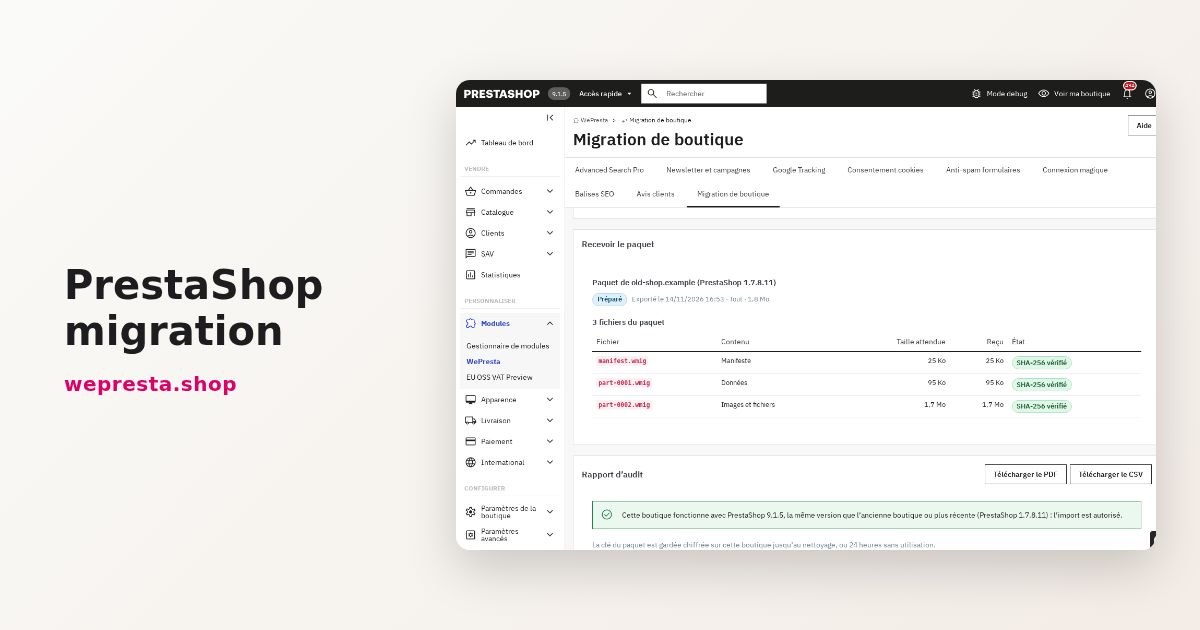
When the export is complete, copy the output folder <uid> to the new shop and receive it in step 1. The module accepts package.json and the part-NNNN.wmig files, several at once by drag and drop. It can also look for packages already copied to the server.
Unlocking uses the password chosen when the kit was prepared. The module rejects an incomplete package, a modified part, a wrong password or a manifest that does not authenticate before anything is staged. It applies the same rules on every later use, so a package that was altered in transit cannot reach the import.
The audit report
The audit report is available on screen, as a PDF and as a CSV. It describes the old shop and the target:
- PrestaShop version, PHP version and database server;
- installed modules, class and controller overrides, non-native tables;
- custom e-mail templates and the theme;
- multistore layout, shops, languages and volumes;
- what will be migrated, what will not and why;
- modules to replace before opening;
- target prerequisites and the version rule: the target must not be older than the source.
The audit also flags tables that are not InnoDB, because they cannot be read without a lock, and it lists files that will be missing. It does not certify that a third-party module is compatible with the target and does not replace a test of the new shop.
Maps, strategies and preview
Before the first import, you choose how the old shops map to the target shops and how the old languages map to the target languages. A source shop maps to one target shop; two source shops cannot be merged into a single target shop.
For each group of data, you choose a strategy. When an identifier is already taken on the target, the module can replace the existing record, renumber the imported one or skip it. When a natural duplicate is found, it can reuse the target record, copy the source record or skip it. The preview shows the effect of these choices before anything is written.
The preview is read group by group: rows to insert, replace, renumber or reuse, rows left out and rows that would fail, with examples. It lists the settings that will change and gives a volume and an estimated duration. It also surfaces the warnings that matter: customer passwords in a legacy format, products whose parent is missing, invoice numbers that collide, carriers attached to inactive modules. Nothing is written to the shop’s tables during this analysis.
The safety backup
Before the first full import, and before a control subset, the module requires a safety backup of the tables the import will touch. The backup is downloadable as a ZIP and can be restored from the module. Its SHA-256 is checked before a restore. A restore returns the shop’s tables to the backup date: orders, customers and products created since are lost. Put the shop in maintenance first. The import cannot start without this backup.
The import, batch by batch
The import runs in resumable batches, either in the browser or through the scheduled task (cron.php at the module root). You can pause it, close the browser, resume later or let the scheduled task continue. Progress is recorded per group and per row.
When a row fails, it is kept in the failure list with its error. The list exports to CSV, and a row can be replayed after the cause is fixed. The mapping table records what each imported row became, which is what makes rollback, the control subset, the second pass and verification possible.
Imported records keep their identifiers and their link_rewrite. Product, category, CMS page, brand and supplier addresses stay the same, as do invoice, delivery slip, credit slip and return numbers. Customer passwords stored with bcrypt are carried as they are; passwords in a legacy format cannot be verified by the new shop, are counted in the preview and the report, and require the customer to use “Forgot your password?”.
Original images are copied to the new shop’s paths and thumbnails are regenerated in the formats of its theme. Files that are missing from the source are listed; the export continues.
Data from native modules follows only when the matching module is installed and enabled on the target: Product Comments reviews, GDPR consents and newsletter subscribers. Other third-party module data is not migrated.
Verification
After the import, verification compares the two shops:
- the number of rows per migrated table;
- order totals excluding and including tax, to the cent;
- stock quantities;
- the presence and SHA-1 hash of images, and the regenerated thumbnails;
- the number of URLs;
- the HTTP status of key pages;
- the back-office order page.
The result is shown on screen and in the final report, available as a PDF and a CSV. A difference is reported with its table and its count; it is not silently rounded away.
Rollback, control subset and second pass
Rollback deletes what the import created, puts back the records, settings and files it replaced, and keeps the records that an order created after the import needs. It is launched from step 4, Verification and rollback, with a confirmation.
A control subset can be imported first: by default 100 orders, customers and products, adjustable from 1 to 1000 and removable after validation. It uses the same mapping and the same checks on a small volume. The subset is optional; remove it before running the full import of the same package, which starts from a clean shop.
A differential second pass carries the orders, customers and products created or changed on the old shop since the first export. It updates existing rows and inserts new ones. As a separate optional action, you can reserve the identifiers the target will need. It is prepared from a base package and run after the switch, before the old shop is closed for good.
Redirect plan, rights and multistore
The redirect plan lists the URLs that changed and generates a CSV, Apache rules and Nginx rules. It covers renumbered records, changed addresses and a change of domain.
Rights are per employee: view, export and import. The action log records the kit preparation, receipts, imports, verifications, rollbacks and deletions. On a multistore, each source shop maps to one target shop, and the module does not merge two source shops into one.
The interface and the reports are available in English, French, Spanish, Italian and Polish. The module has no hook and adds no asset or template to the storefront; its only front entry point is the cron controller used by the scheduled task.
Cleanup and licensing
With automatic cleanup on, a successfully verified pass deletes the package parts, the staged rows, the temporary files and the wrapped key. The mapping, saved rows, error lines, checks and reports stay, so rollback and replay remain possible. A daily maintenance task removes inactive packages after 30 days by default and incomplete uploads after 48 hours. You can also delete a package or a backup from the history, or purge the whole migration with a typed confirmation; purging a migration makes its rollback impossible.
The license is checked on the target shop. Without a valid license, the module disables itself: no kit, import, verification or rollback can run. Packages, the mapping table, the backup and the logs are kept, and an interrupted import resumes after renewal.
Installation
- Back up the old shop and the new shop, including files and database.
- On the new shop, install the module from the Module Manager. It requires PHP 7.4 or later, within the range supported by the installed PrestaShop version. The target must run PrestaShop 1.7.8, 8.0+ or 9.0+, and must not be older than the source.
- Open the Shop migration menu. The module opens on step 1, Package and audit.
- In the licensed edition, activate or renew the license when the module asks for it.
- Once a package is received and unlocked, the audit report checks the shop’s own prerequisites: its PHP version against the requirements of its PrestaShop version, the database version, the required extensions,
allow_url_fopenand PrestaShop’s own configuration tests.
The module has no hook and adds no template or asset to the storefront. Its only front entry point is a cron controller that answers the scheduled task with JSON and is marked noindex. It does not modify the old shop; only the kit folder is copied there.
First configuration
- In step 1, open Prepare the export. Choose Everything or Catalog only. The catalog-only scope leaves out customer and order data; it is intended for a catalog transfer, not for a full shop move.
- Type the package password twice. It must be at least 12 characters. It is never stored, never logged and never sent back to the browser; keep it, because you will need it to unlock the package.
- Choose the part size in MB. The default is 100; the allowed range is 5 to 2000.
- If this is a second pass, select the base package.
- Download the export kit.
- Copy the kit folder to the old shop’s server, next to or inside the shop folder, preferably outside the web root. Delete it after the export.
- Run the script with the PHP binary and
php.iniof the old shop:
cd /path/to/wepresta-migration-export
php export.php
Or create a cron job that runs every five minutes:
cd /path/to/wepresta-migration-export
php export.php --max-time=280- Watch
export.log. When the export is complete, the script prints the output folder and says to download it and receive it in step 1 of the new shop. The key is removed from the kit unless--keep-keywas used. - Download the output folder
<uid>and delete the kit folder from the old server. - On the new shop, in step 1, upload
package.jsonand all the parts, then unlock the package with the password. - Read the audit report. Check the version rule, the modules to replace, the non-InnoDB tables and the missing files.
- Choose the shop map and the language map, then a strategy for each group. Open the preview and review the warnings, the volume and the estimated duration.
- Take the safety backup.
- Run the import. You can start with a control subset, check it, then remove it and run the full import.
- Run the verification. Read the final report and keep its PDF and CSV.
- Prepare the redirect plan before the domain switch.
- After the switch, run the differential second pass, verify again, then close the old shop.
Everyday use
The module is used during a migration project, not every day. Once the new shop is live, the history page keeps each migration, its reports, its mapping and its backups until you delete them.
During the project, the Import step shows the progress, the current group, the rows written and the failures. Pause stops the run cleanly; Resume continues from the recorded position. The scheduled task is the reliable option for long imports: it survives a browser closing and can be monitored from the history.
The Failed rows page lists the rows that could not be written, with their group, their identifier and the error. Correct the cause, then replay the row. Export the list to CSV when you need to compare it with the source.
The History page keeps each migration, its packages, its reports and its backups. The Action log shows: who prepared a kit, received a package, launched an import, ran a verification or a rollback. The Permissions page sets view, export and import rights per employee.
If the import is interrupted by a timeout, a server restart or a closed browser, open the migration again and resume. The state is stored in the database, not in the browser session. If a row fails repeatedly, read its error before replaying it; the failure list keeps the message.
After a verified migration, automatic cleanup removes the package and the temporary files. The mapping, the reports and the backup stay according to the cleanup settings. Keep the final report and the redirect plan outside the module as part of the project file.
Use cases
Moving to a recent PrestaShop version without an in-place upgrade. The shop keeps its catalog, customers, orders, invoice numbers and URLs, while the new installation starts from a clean version. The audit shows the modules and overrides that will need attention; the verification shows what arrived.
Changing host or domain. The export runs on the old server, the import on the new one. The redirect plan covers the addresses that changed, including a new domain. Identifiers and link_rewrite are preserved wherever they are free, so the number of redirects stays limited.
Taking over a client’s shop. An agency starts from a clean installation, imports the client’s data and verifies it before the handover. Per-employee rights and the action log document who did what, and the rollback remains available while the old shop is kept.
Rehearsing a migration. A control subset validates the maps, the strategies and the checks on a small volume. The subset is then removed and the full import is run with the same settings. The final verification compares the two shops before the switch.
Catalog-only transfer. When only the catalog is needed, the catalog-only scope produces a package without customer and order data. It is not a full migration and does not carry the commercial history.
Requirements and limits
- Source shop: PrestaShop 1.7.8.0 to 9.x, on a host that offers SSH or a cron job able to call PHP. Without one, the export cannot run from that server.
- Target shop: PrestaShop 1.7.8, 8.0+ or 9.0+, never older than the source. PHP 7.4 or later for the module, within the PHP range supported by the installed PrestaShop version.
- No in-place upgrade. The module moves data to a new installation; it does not update the source shop or migrate its files from one version to another.
- No PrestaShop 1.6 source. The export script refuses it.
- Third-party module data is not migrated. Product Comments reviews, GDPR consents and newsletter subscribers follow only if the matching module is installed and enabled on the target. Theme, e-mail templates, employees, permissions, domains and SSL are not migrated.
- Settings are copied from a limited list, tied to the migrated data; this is not a full configuration copy.
- Abandoned carts, connections, search statistics and logs are not migrated.
- Customer passwords: bcrypt hashes are kept; passwords in a legacy format cannot be verified and require a reset by the customer.
- A source shop maps to one target shop. Two source shops cannot be merged into one target shop.
- The module does not certify legal or accounting compliance. Invoice numbering and retention rules remain the merchant’s responsibility.
- A valid license is required on the target. Without it, the module disables itself and keeps the data.
- The module adds nothing visible to the storefront. It has no hook and adds no template or script to the theme; its only front entry point is the
croncontroller used by the scheduled task.
FAQ
Does the module upgrade PrestaShop in place?
No. It moves data into a new installation of the target version. The in-place update and the migration of files between versions are not part of its functions.
Which versions are supported?
The source must run PrestaShop 1.7.8.0 or later, up to 9.x. The target must run 1.7.8, 8.0+ or 9.0+, and never be older than the source. The module requires PHP 7.4 or later, within the range supported by the installed PrestaShop version.
What exactly is migrated?
The catalog (products, combinations, categories, brands, suppliers, attributes), customers and their addresses, orders with invoices, delivery slips, credit slips and returns, stock, carriers, tax and price rules, CMS pages, URLs and images. Native module data follows only when the matching module is installed and enabled on the target.
What is not migrated?
Data owned by third-party modules, the theme, e-mail templates, employees and their permissions, domains, SSL, abandoned carts, connections, statistics and logs. Settings are copied from a limited list. A 1.6 shop is refused.
Can the old shop stay online during the export?
Yes. The script reads a consistent snapshot: InnoDB tables are not locked and the shop keeps selling. Tables using another engine are read under a lock and reported. Orders placed after the export are picked up by the differential second pass before the switch.
Will customers keep their password?
Yes if the password is stored with bcrypt. Passwords in a legacy format cannot be verified by the new shop; they are counted in the preview and the report, and the customer must use “Forgot your password?”.
Is the package protected?
The package is encrypted with AES-256-GCM and a password of at least 12 characters that you choose and that is never stored. The key is derived with PBKDF2-HMAC-SHA256, each part carries a SHA-256 hash and the manifest is authenticated. An incomplete or modified package is refused before import. The catalog-only option avoids carrying personal data.
Do I need SSH or cron on the old server?
Yes. The export runs from a command line or a cron job able to call PHP. Without one, the script cannot run on that server and the module cannot retrieve the data.
What happens if the import is interrupted?
The import runs in batches and records its progress. You can pause and resume it, or restart it through the scheduled task. Failed rows are listed, export to CSV and can be replayed individually.
Can I undo the import?
Yes. A safety backup of the modified tables is saved before the first import; it can be downloaded and restored. Rollback deletes the records the import created, puts back the ones it replaced and keeps the records a newer order needs.
Support
For a question about the module, a migration that does not behave as described, or a bug, write to mail@wepresta.shop. Include the PrestaShop version of both shops, the PHP version, the step concerned and the reference of the migration as shown in the module. Never send the package password or the contents of a package by e-mail.
The module’s documentation is updated with each version. The changelog below lists the changes.
Changelog
Version 1.0.0
- First version of the module.
- Export kit run from the command line or cron on the old shop, with a consistent read-only snapshot.
- Encrypted package in AES-256-GCM with authenticated parts, SHA-256 hashes and a password that is never stored.
- Audit report on screen, in PDF and in CSV, with what will and will not be migrated, modules to replace and target prerequisites.
- Preview by group with maps, strategies, examples, settings changes, volume and estimated duration, writing nothing to the shop.
- Resumable batched import with pause, resume, failure list, CSV export and replay.
- Preservation of identifiers,
link_rewriteaddresses, invoice and delivery numbers, and bcrypt customer passwords. - Mandatory safety backup, verification to the cent, final report and rollback.
- Control subset, differential second pass, catalog-only export and redirect plan in CSV, Apache and Nginx rules.
- Per-employee view, export and import rights, action log and multistore mapping.
- Interface and reports in French, English, Spanish, Italian and Polish.

Related articles
Migrate a PrestaShop store without losing orders, customers or images
Moving an old PrestaShop shop to a fresh installation without re-typing data: encrypted package, audit, preview, resumable import, verification and rollback, plus the…