Back office 2FA : to secure admin logins - Module PrestaShop
PrestaShop 2FA Module: Secure Your Back-Office and Stop Password Theft
- 6-digit code from an app (Google Authenticator, Authy, Microsoft Authenticator…) after the password
- One code per month and per browser: 30-day trusted devices, 12-hour verified session
- Mandatory 2FA by profile, with a grace period and a lockout after wrong codes
- Dashboard, journal and reset of a colleague in a few clicks
- 10 recovery codes per employee, emergency access by file or console
- Compatible with PrestaShop 1.7.8, 8.2+ and 9.1+ (PHP 7.4 minimum)
Everything you need, nothing you don't.
TOTP two-factor authentication with Google Authenticator, Authy or Microsoft, trusted devices and management per employee.
TOTP double verification
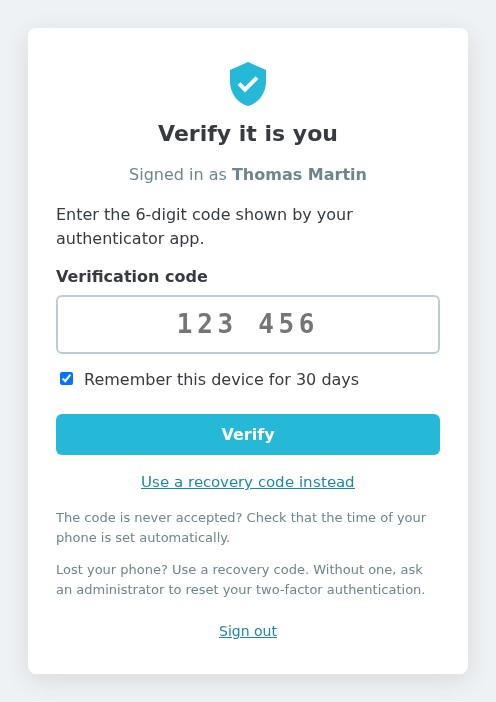
A 6-digit code from an app, in addition to the password, before any action of the back office.
QR code activation
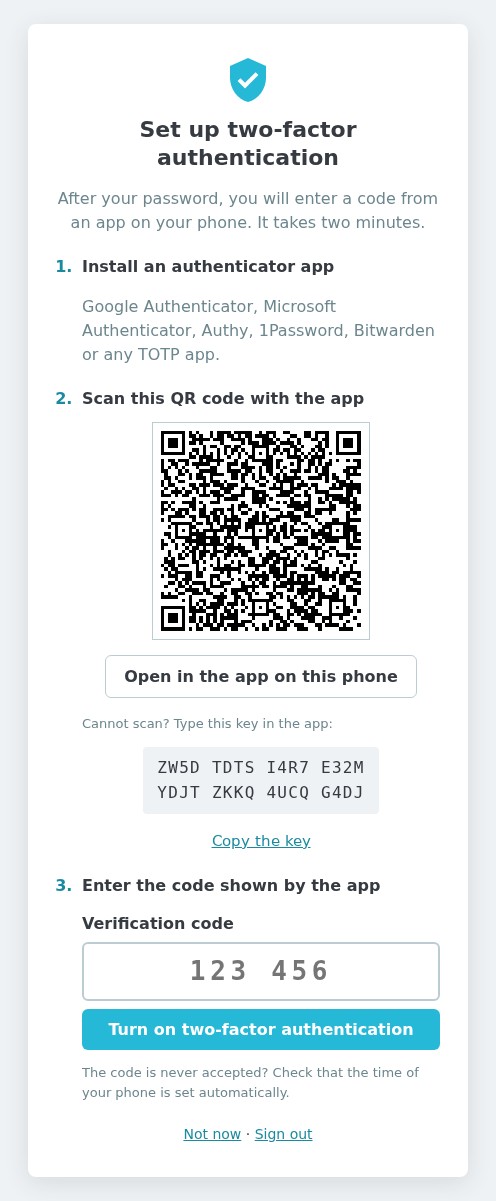
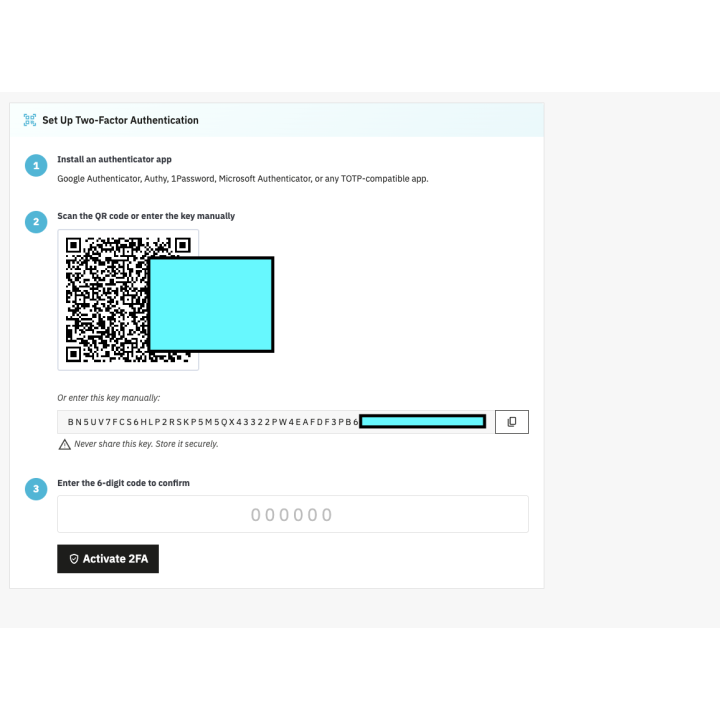
Scan the QR code, enter a first code: the set-up takes two minutes.
Works with all authenticator apps
Google Authenticator, Microsoft Authenticator, Authy, 1Password, Bitwarden and any TOTP app.
Recovery codes included
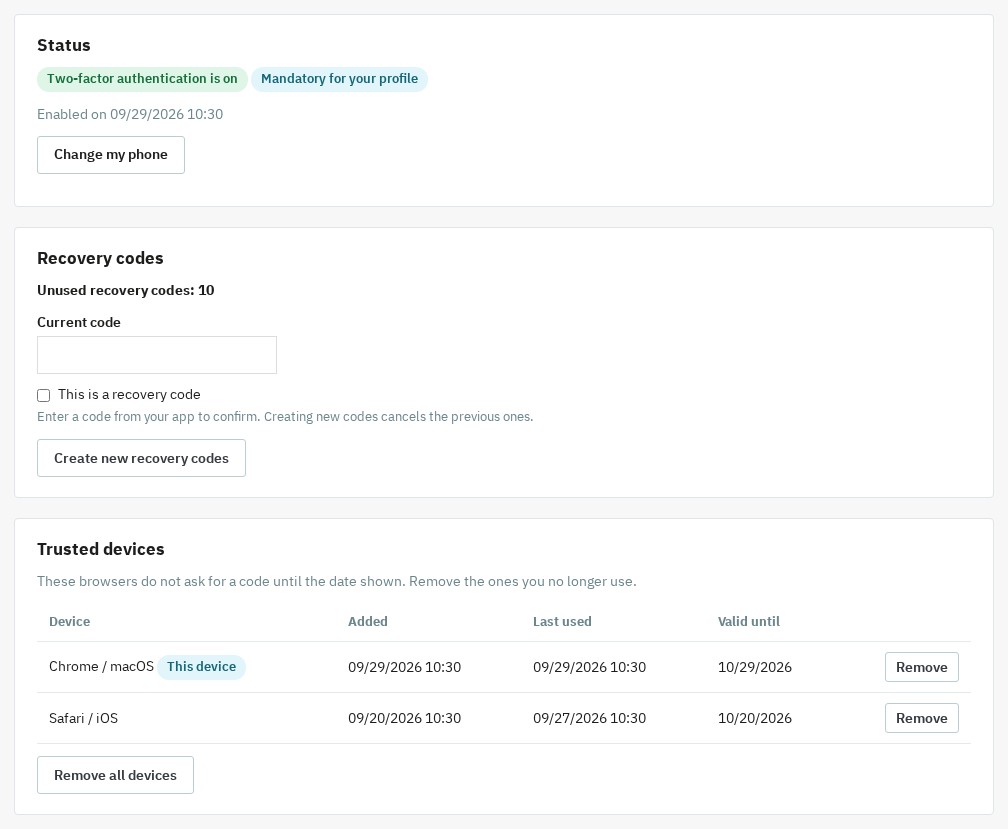
Ten single-use codes per employee, renewable from the "My two-factor authentication" page.
Per-employee management
Each employee manages their own 2FA; a super administrator resets or unlocks a colleague from the dashboard.
Protection against password theft
With a stolen password, no page, form or AJAX call of the back office runs without the code.
They use it every day.
description Full description expand_more
Secure your PrestaShop Back-Office with Two-Factor Authentication (2FA)
Did you know that a password, no matter how complex, is no longer enough to guarantee the security of your online store? Faced with the rise of phishing and credential theft, access to your administration is the preferred target for hackers. Our Two-Factor Authentication (2FA) module adds a second step to every sign-in: the 6-digit code of an app on the employee's smartphone. With a stolen password, nothing runs in your back office: no page, no form, no AJAX call.
A Second Lock Against Password Theft
The security of your turnover and the protection of your customer data are your priorities. The module relies on the open TOTP standard (Time-based One-Time Password, RFC 6238) supported by the common authenticator apps: the code changes every 30 seconds and works only once. You strengthen the protection of your store's personal data (GDPR) and build trust within your management team.
A Sign-In That Does Not Slow Your Team Down
A two-factor authentication that people bypass because it wears them out protects nobody. The module reduces the number of codes asked without weakening the check:
- One code per month and per browser: a trusted device is remembered for 30 days (adjustable), whatever the IP address. Each employee sees their devices and removes the ones they no longer use.
- A verified session of 12 hours: a single code per working day, even on a browser that is not remembered. The duration is adjustable from 1 to 168 hours and signing out ends it.
- Quick entry: the code is sent at the sixth digit, and the "Remember this device" box is ticked by default (adjustable).
Key Features
- Universal Compatibility: Google Authenticator, Microsoft Authenticator, Authy, 1Password, Bitwarden or any TOTP app. Set-up by QR code, by a readable setup key or with the "Open in the app" button on a phone.
- Granular Profile Management: make 2FA mandatory for critical profiles (e.g., SuperAdmin) and let the others turn it on themselves from "My two-factor authentication".
- Configurable Grace Period: give your employees a few days (7 by default) to get equipped before making double authentication mandatory. The delay runs from the day the profile becomes mandatory, and a banner shows the days left.
- Lockout After Wrong Codes: after 5 wrong codes (adjustable), the account is locked for 15 minutes (adjustable). The lockout is stored in the database: signing in again does not reset the attempts.
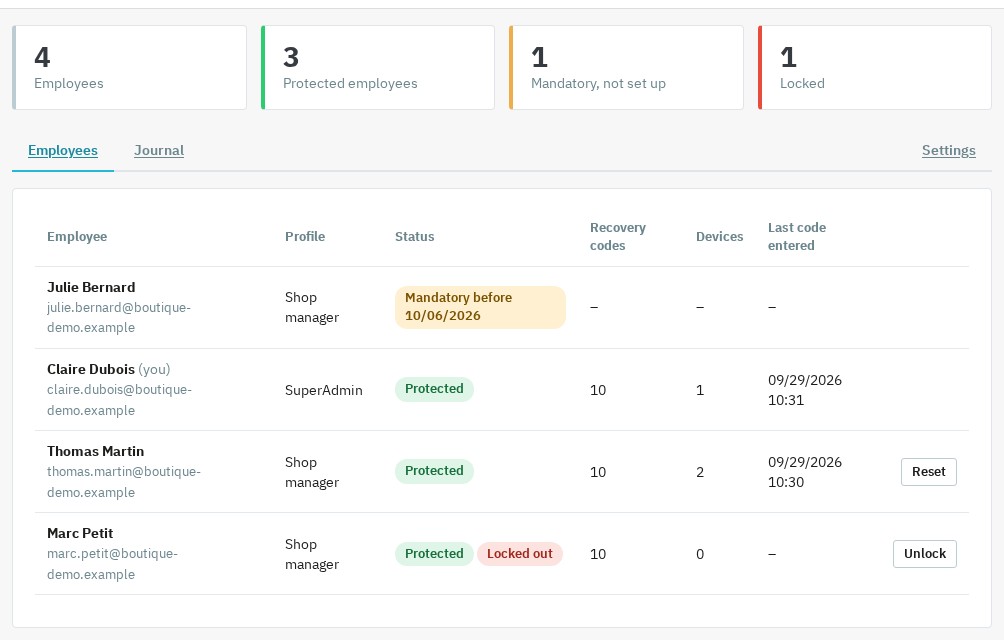
- Dashboard and Journal: super administrators see who is protected, who is locked out and who still has to set up 2FA, and read the history of verifications, failures and security changes.
- Reset a Colleague: an employee lost their phone? A super administrator resets or unlocks the account in a few clicks, after confirming with their own code.
- Check Before Any Action: the code is required before a page, a form or an AJAX call runs. Changing phone or creating new recovery codes also requires a valid code.
Why Choose This Solution for Your PrestaShop Store?
Unlike other complex solutions, our module was designed for demanding e-merchants who don't want to sacrifice their time. It offers a balance between high security and ease of use.
- Peace of Mind: your catalog, margins and customer files are protected by a digital double lock.
- Always a Way Back In: 10 single-use recovery codes per employee, the reset by a super administrator, the
DISABLE_2FAfile and thewepresta:2fa:disableconsole command keep you from a permanent lockout. - Lightweight: no override, no third-party PHP library, encrypted and authenticated secrets, an archive of less than 250 KB.
- A License That Never Switches the Protection Off: if the license expires, 2FA stays enforced; only the settings and the dashboard are locked.
Simple, Fast, and Effective Installation
You don't need to be a cybersecurity expert to protect your business. Installation takes just a few clicks directly from your module manager. Once activated, the module guides each employee step by step through the set-up of their mobile app: two minutes are enough. Pick the mandatory profiles, and your PrestaShop back-office benefits from professional-grade protection, ready to face modern web threats.
Compatibility
Compatible with PrestaShop 1.7.8, 8.2+ and 9.1+, with PHP 7.4 minimum (json, openssl and mbstring extensions). PrestaShop 1.7.7, 8.0, 8.1 and 9.0 are not supported. One archive fits all these versions. The interface is available in French, English, Spanish, Italian and Polish. On PrestaShop 1.7, the settings page points out three legacy stand-alone PrestaShop scripts (backup.php, pdf.php, get-file-admin.php) to delete: they answer to a signed-in employee without going through the check of the module.
Support is provided from your WePresta customer area or by email at mail@wepresta.shop, depending on the support option of your plan. Read the full documentation
Why choose us?
See how we compare to the most common alternatives on the market.
| Feature | WePresta | Addons |
|---|---|---|
| payments Transparent pricing | check_circle | cancel |
| update Lifetime updates included | check_circle | cancel |
| support_agent Direct developer support | check_circle | cancel |
| verified PS 1.7, 8 & 9 compatible | check_circle | help_outline |
| code Standardized clean code | check_circle | cancel |
| storefront Multi-store ready | check_circle | help_outline |
| money_off No hidden renewal fees | check_circle | cancel |
Discover the module in images.
Two-factor authentication (2FA) for the PrestaShop back office
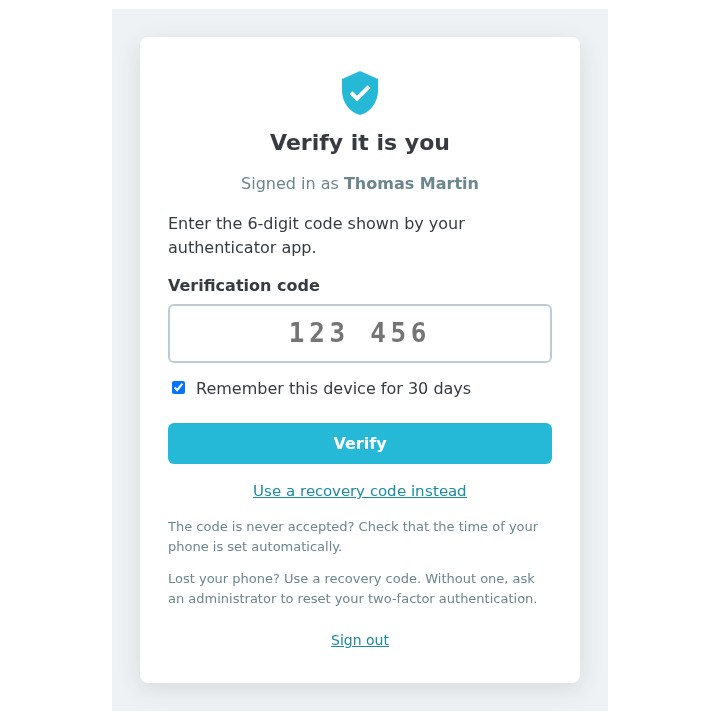
Code page after the password
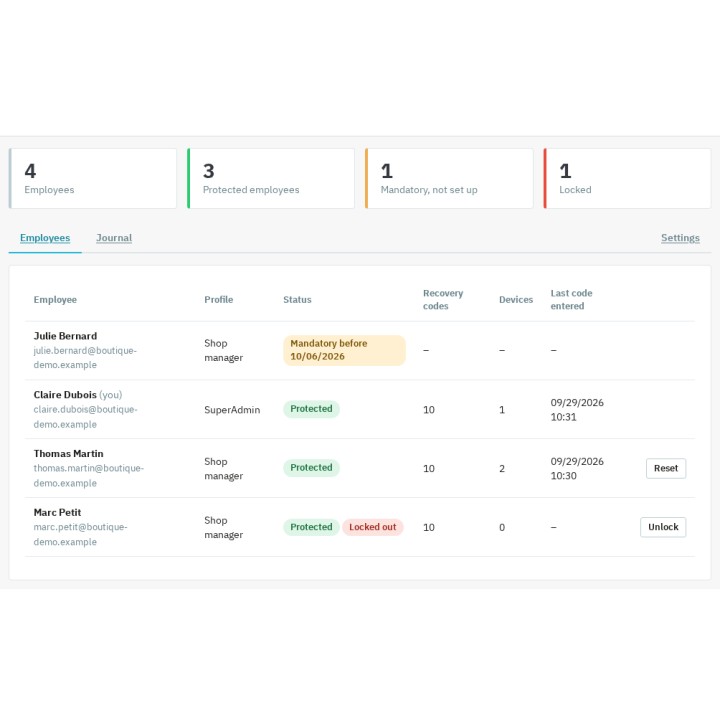
Employee dashboard
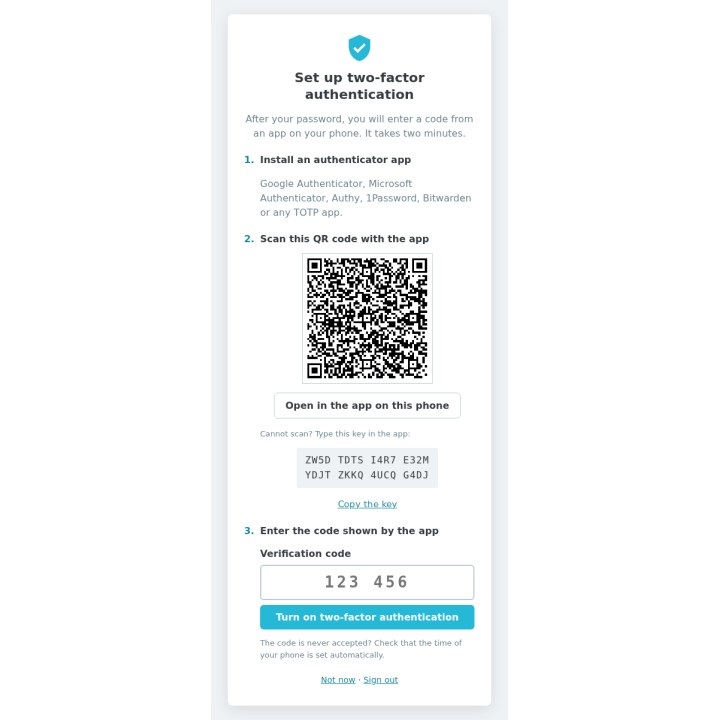
Three-step set-up
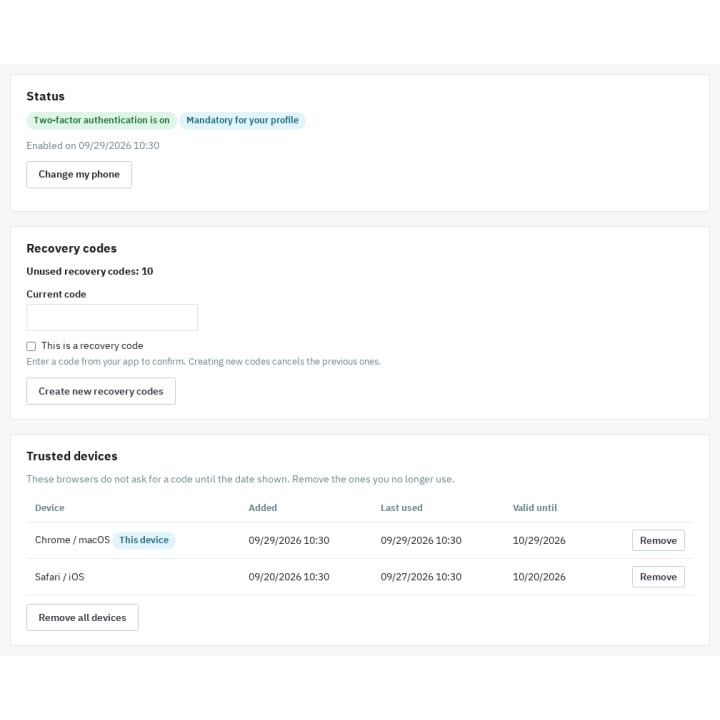
My 2FA: recovery codes and trusted devices
FAQ
Find answers to frequently asked questions about this module
Join +7 merchants using this module
5-minute installation · Full documentation included