
Social Login: Facebook, Google, Apple, PayPal, Amazon, X, TikTok, Microsoft — One-click Login - Module PrestaShop
PrestaShop Social Login Module: Reduce Cart Abandonment with 1-Click Login
- One-click sign-in and registration: Google, Facebook, Apple, Microsoft, PayPal, Amazon, X, TikTok and any OpenID Connect provider
- Existing accounts stay protected: linked without a password only when the provider certifies the e-mail address
- Sign-in window on computers, back to the checkout step with the cart kept
- Buttons everywhere: login, registration, checkout, cart, header, columns or any element by CSS selector
- Connection test, journal with the fix to apply, statistics, welcome code, GDPR export
- Compatible with PrestaShop 1.7.8, 8.2+ and 9.1+ (PHP 7.4 minimum)
Everything you need, nothing you don't.
Sign-in and registration with Google, Facebook, Apple, Microsoft, PayPal, Amazon, X, TikTok and OpenID Connect, on PrestaShop 1.7.8, 8.2+ and 9.1+.
1-click sign-in
Visitors sign in or create their account instantly with the network they already use, with no password to remember.
9 built-in providers
Google, Facebook, Apple, Microsoft, PayPal, Amazon, X, TikTok and any OpenID Connect provider.
Existing accounts protected
An existing account is linked without a password only when the provider certifies the e-mail address.
Buttons placed anywhere
Login, registration, checkout, cart, header or any element of the page by CSS selector.
Fewer drop-offs at checkout
Sign-in window on computers, back to the checkout step with the cart kept.
Multi-store and multilingual
Settings per store, interface and customer pages in French, English, Spanish, Italian and Polish.
They use it every day.
description Full description expand_more
What this module does for you
Did you know that mandatory account creation is one of the main barriers to online purchasing? With over 5 billion active social media users worldwide, your visitors are already permanently connected to Facebook, Google, or Apple. Why ask them to fill out a form when a single click is enough?
The Social Login module removes this friction by allowing your visitors to create an account or log in instantly via their favorite social network. Result: fewer abandoned carts, more registrations, and an increased conversion rate.
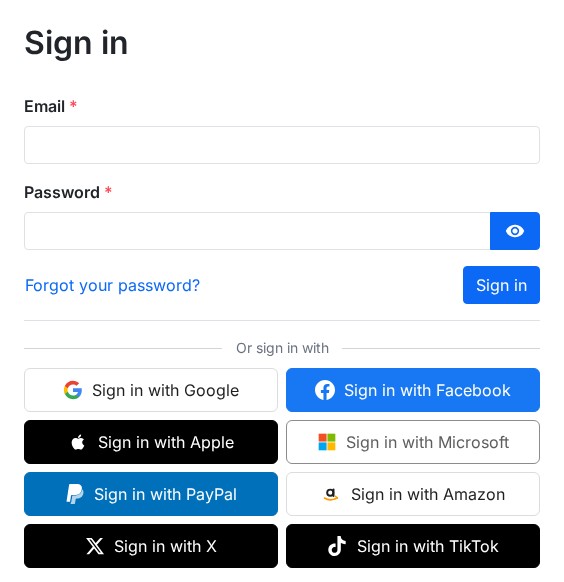
Reduce your cart abandonment rate
It is a recognized fact in e-commerce: the less friction in the buying funnel, the higher the chances the customer will finalize their order. By removing the account creation step, forms, passwords to invent, and confirmation emails, you eliminate one of the most common obstacles to conversion.
Thanks to Social Login, your visitors—whether they already have an account on your store or not—connect in a single click via Google, Facebook, Apple, Microsoft, PayPal, Amazon, X (formerly Twitter), TikTok or your company identity provider. No more need to remember a password. Even when switching devices—smartphone, tablet, or computer—a simple click on the social button is enough to access their account.
In the checkout, an "Or continue with" block appears above the guest or sign-in choice: the customer comes back to the step they were on, their cart is kept and there is nothing to type again.
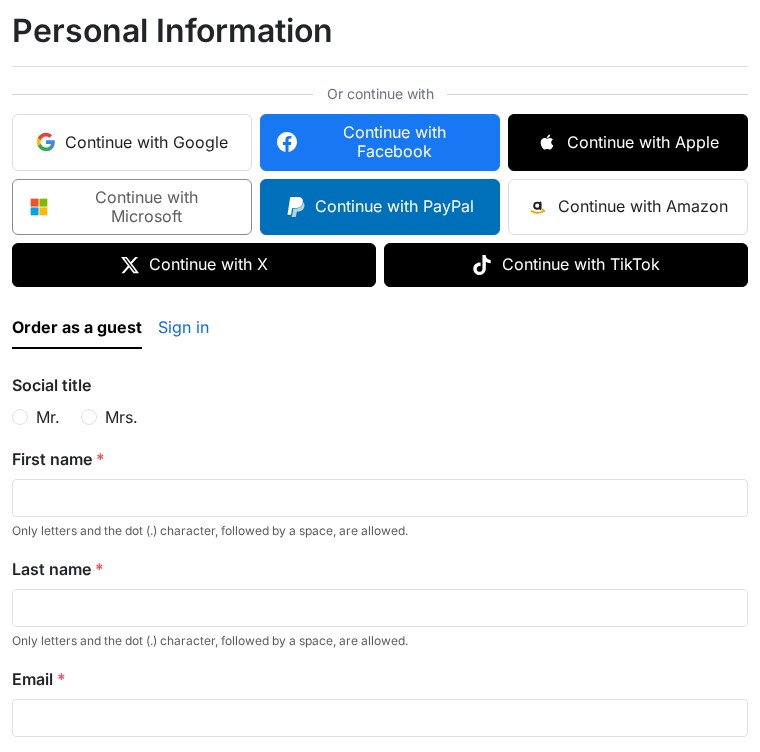
9 sign-in providers to cover all your customers
The module supports the most used platforms in the world, and any OpenID Connect provider:
- Google — the account everyone has
- Facebook — the most popular social network
- Apple — essential for iPhone and Mac users
- Microsoft — personal accounts, work or school accounts, or both, for Outlook and Microsoft 365 users
- PayPal — with an optional address import
- Amazon — the e-commerce giant
- X (formerly Twitter) — the microblogging platform
- TikTok — sign-in for fashion, beauty and entertainment audiences
- OpenID Connect — Keycloak, Okta, Auth0, Authentik, Microsoft Entra… for a B2B store with its own identity provider
Activate only the providers relevant to your audience. Each position can display a different set of buttons: for example, only Google and Apple on the login page, and all providers on the registration page. A single callback address is registered at each provider, for every language of the store.
Existing accounts stay protected
A customer who already has an account is linked and signed in without a password only when the provider certifies their e-mail address (Google, Apple, PayPal, Amazon, Microsoft personal accounts, X with the e-mail permission, OpenID Connect with email_verified). Otherwise the customer types the password of their account once; the following sign-ins take one click. Nobody can open the account of another customer with an address their provider does not certify.
A guest who signs in with a certified address becomes a full customer and finds their orders. An account you disabled cannot sign in with a social network. When a network does not send the e-mail address or the name (X without the e-mail permission, TikTok, Apple), the "Almost there!" page asks only for what is missing, with the consents of your registration form, then the customer goes back to where they were.
Position your buttons exactly where you want
This is the feature that sets Social Login apart: an advanced positioning system that gives you total freedom over button placement.
Predefined positions (ultra-fast installation)
- Login and registration pages
- Checkout, personal information step
- Header, next to the sign-in link (icons)
- Cart page
- Home page, above the footer, left and right columns
Custom positions (going further)
If standard locations don't match your theme, the module offers an advanced positioning tool. Simply enter the CSS selector of the HTML element next to which you want to display the buttons, choose the page, and the module takes care of everything. No code or template modification is necessary. Theme developers also have a widget to place wherever they want.
For example, you can place buttons above the promo code form on the cart page, under the "Add to cart" button on the product sheet, or in any other location of your choice.
A polished design that adapts to your store
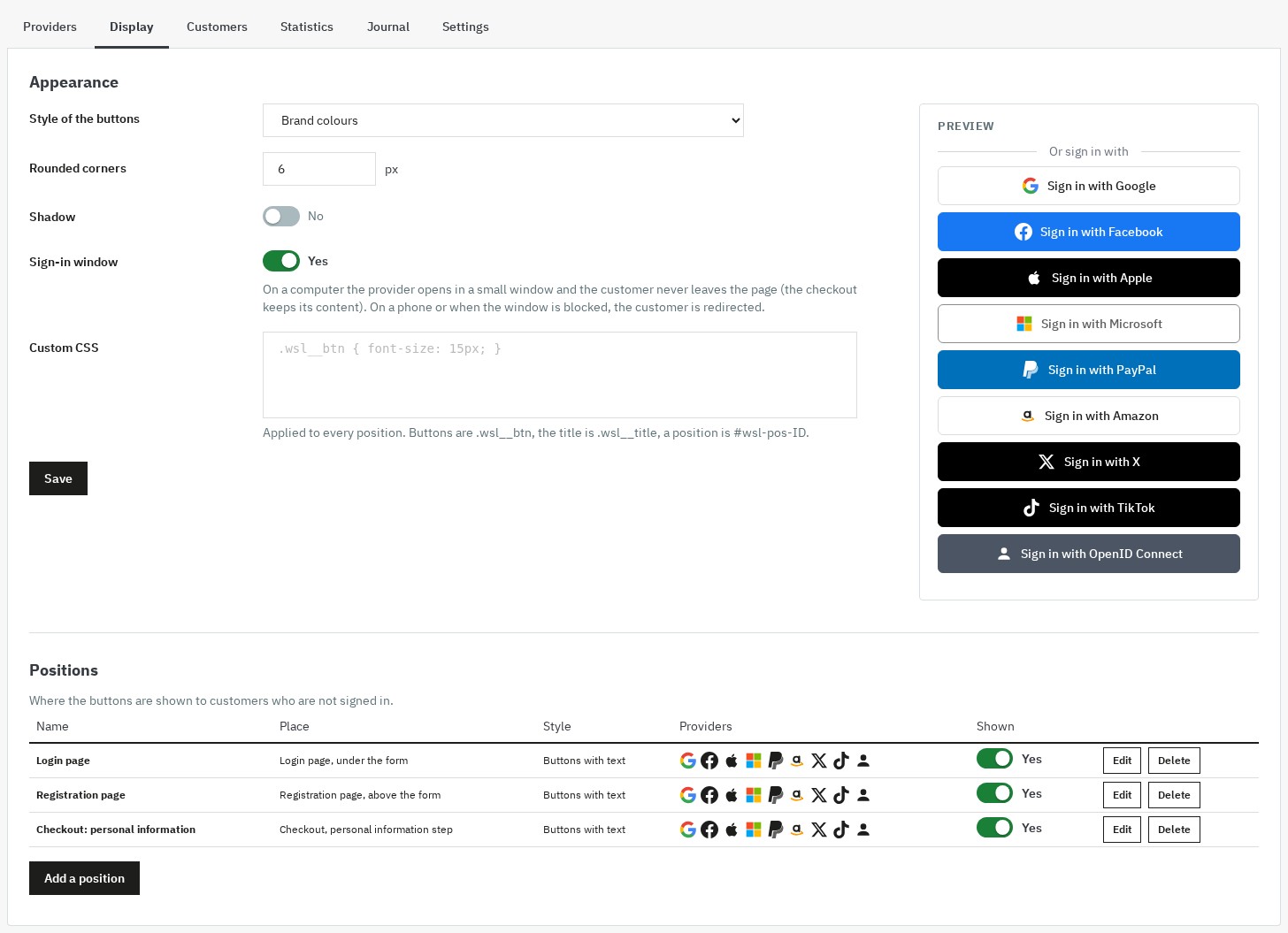
Social Login buttons are designed according to the latest social media standards, with four styles (brand colours, light, dark, outline), and are 100% responsive (mobile, tablet, desktop). A live preview in the configuration page shows the result before you save.
For each position, you can choose:
- Standard buttons — icon + network name (ideal for the login page)
- Mini buttons — icon only (ideal for the header or small spaces)
- Side by side or one per line, the wording ("Sign in with", "Sign up with", "Continue with") and a title in every language
- Customizable rounding — from straight corners to fully rounded
- Drop shadow — for an elegant relief effect
- Custom CSS per position — to adapt each button block independently
Popup mode for a seamless experience
In popup mode (enabled by default), the social network authorization page opens in a small separate window on computers. The customer never leaves your site, including in the checkout, whose content is kept. Once authorized, the window closes, and the customer is logged in on the page they were on. On a phone, or when the browser blocks the window, the customer is simply redirected to the social network and sent back to the page of origin.
Automatic address retrieval with PayPal
When a customer connects via PayPal, an option of the module automatically creates an address in their PrestaShop account from their PayPal profile. The customer can then place an order faster, without typing all their information. The option requires that your PayPal application is allowed to read the address.
My Account page — social link management
Your customers can view and manage their connected social networks from the "My Account" page, in "My social accounts". They can see at a glance which networks are linked to their account, connect new networks from that page and unlink them at any time. The customer sheet of the back office also shows the linked accounts (date of the link, last sign-in, certified address or not) and lets you unlink them. This transparency builds customer trust.
Welcome code to build loyalty from the first registration
Offer a single-use voucher, reserved to the new customer registered with a network that certifies their e-mail address: percentage, fixed amount or free shipping, minimum order, validity, code prefix and combination with other discounts as you choose. The customer sees their code once, in a banner, on the page that follows the registration.
Statistics and journal to steer the results
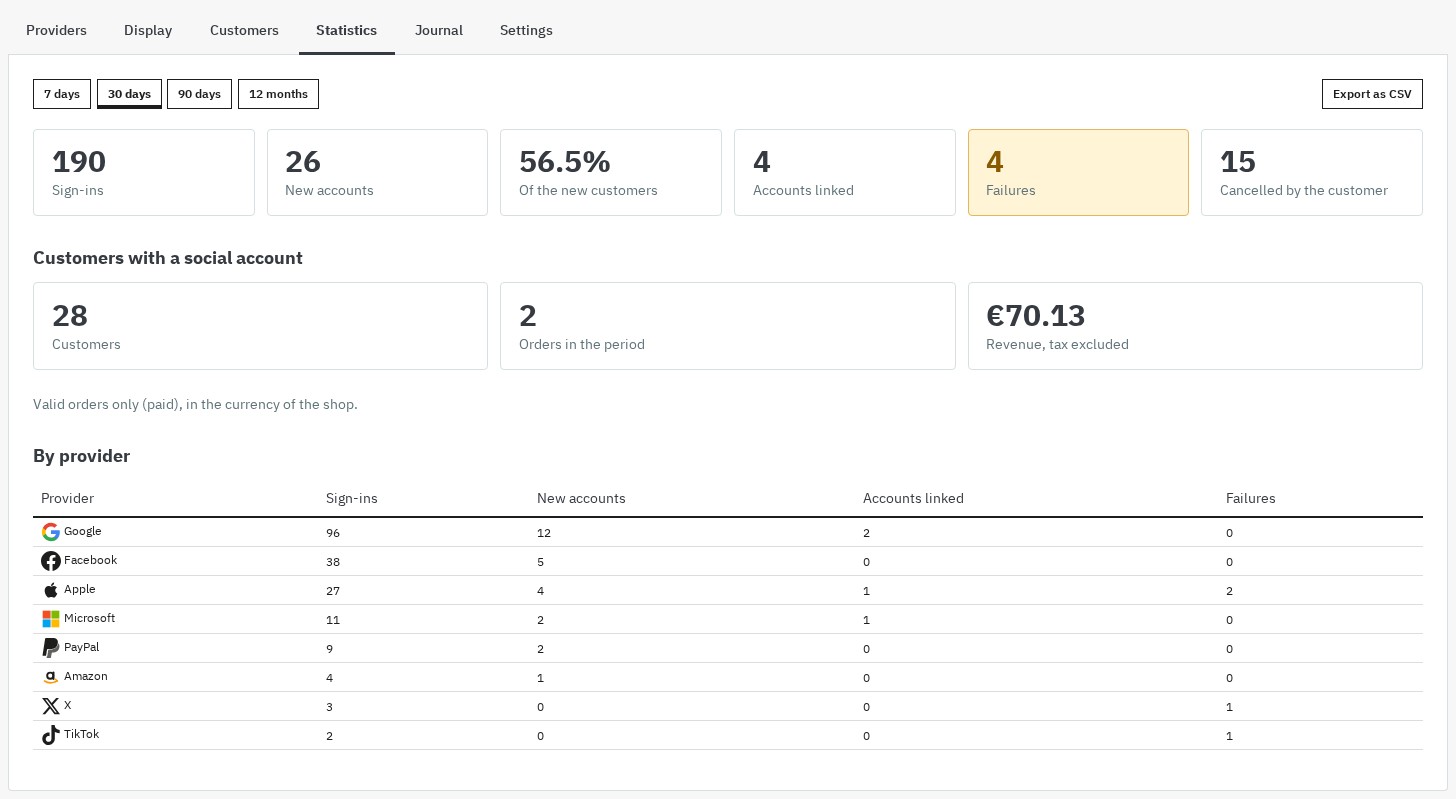
A dashboard measures the effect of social sign-in: sign-ins, new accounts, share of new customers, linked accounts, failures, orders and revenue of customers who use a social account, by period and by provider, with CSV export. The journal records each sign-in, registration, link and failure with its cause and the fix to apply, with filters and an adjustable retention period.
Multi-store and multilingual
The module is fully compatible with PrestaShop multi-store. Each store has its own provider credentials, positions, and configuration. Statistics are separated by store.
All texts seen by the customer and by the administrator are translated. The module comes in French, English, Spanish, Italian and Polish, and the customer keeps the language of the page they were using, even after the trip to the social network.
Personal data under control
The module keeps no access token of the social network: it reads the profile once, at sign-in. The credentials of your applications are stored encrypted and never shown again. At registration, the consents of your form (privacy policy, terms, newsletter) are asked once. The export and erasure requests of the PrestaShop GDPR module cover the linked accounts, the journal and the welcome code of the customer.
Compatible with PrestaShop 1.7.8, 8.2 and 9.1
Social Login works on PrestaShop 1.7.8, 8.2+ and 9.1+, with PHP 7.4 minimum, in a single archive of about 300 KB, with no core override and no third-party PHP library. PrestaShop 1.7.7 and earlier, 8.0, 8.1 and 9.0 are not supported. PrestaShop themes that display the standard places are supported; thanks to the custom position system, it also works with any third-party theme.
Quick and easy setup
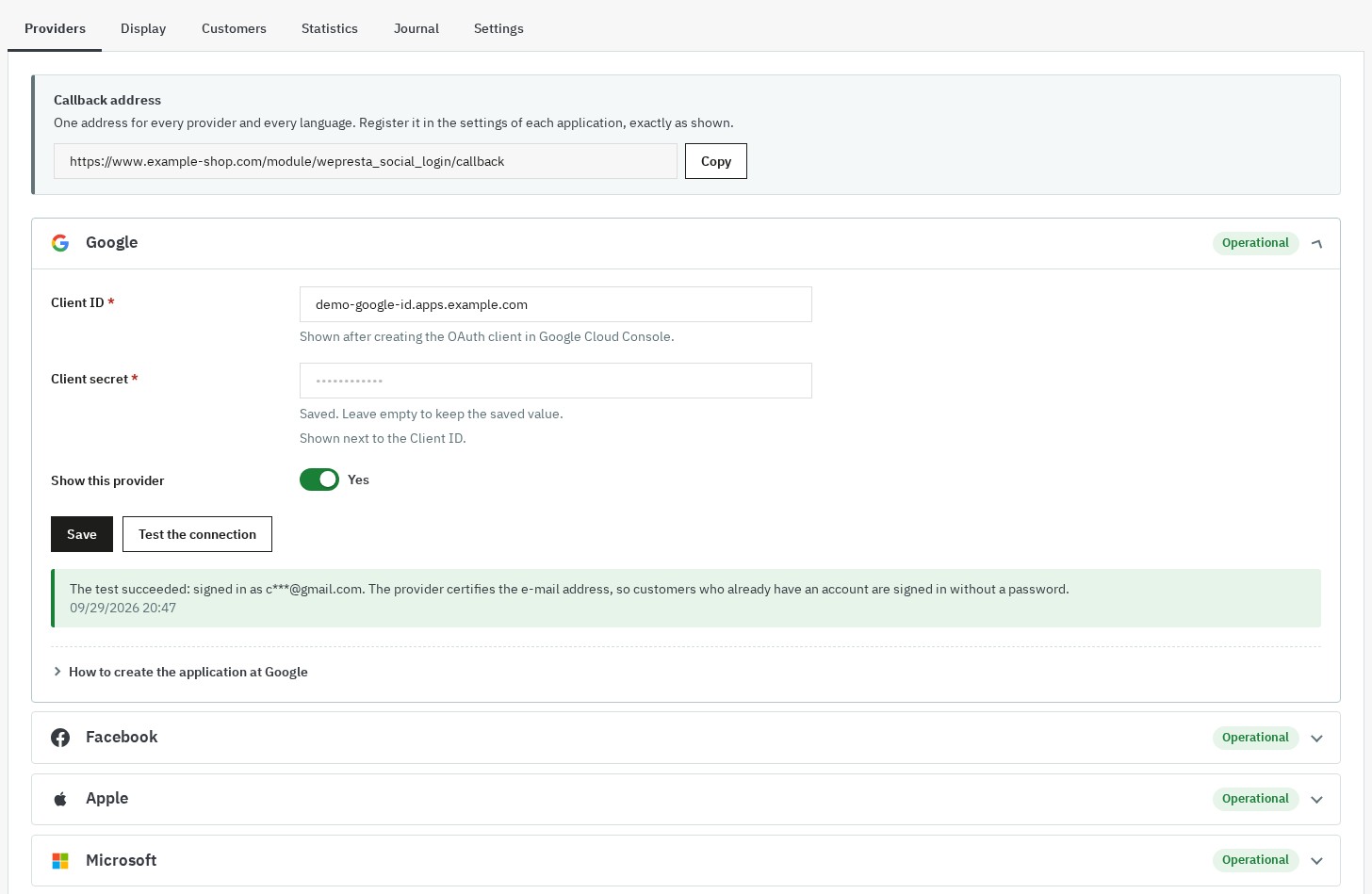
The configuration interface is clear, intuitive, and documented. A single callback address, copied in one click, is enough for all providers and all languages. For each social network, a step-by-step guide helps you create the application and retrieve the credentials. The "Test the connection" button checks the provider without signing anybody in and shows the profile obtained or the exact error with the fix to apply, before you go live. Read the full documentation.
Features Summary
- 9 providers: Google, Facebook, Apple, Microsoft, PayPal, Amazon, X, TikTok and OpenID Connect
- One callback address for every language, a status for each provider and a connection test
- Existing account linked without a password only when the provider certifies the e-mail address
- "Almost there!" page: e-mail, name and consents asked only when missing
- Sign-in window on computers, back to the page of origin and to the checkout step, cart kept
- Positioning on the standard places of PrestaShop, by CSS selector on any element, or by widget
- Standard buttons or icons, four styles, rounding, shadow, title per language, custom CSS per position
- Optional PayPal address import
- "My social accounts" page and linked accounts in the customer sheet of the back office
- Welcome code (percentage, amount or free shipping)
- Statistics with CSV export and journal with the fix to apply
- GDPR export and erasure, no token kept, credentials encrypted
- Full multi-store support, interface in French, English, Spanish, Italian and Polish
- Compatible with PrestaShop 1.7.8, 8.2+ and 9.1+ (PHP 7.4 minimum)
- 100% responsive (mobile, tablet, desktop)
Why choose us?
See how we compare to the most common alternatives on the market.
| Feature | WePresta | Addons |
|---|---|---|
| payments Transparent pricing | check_circle | cancel |
| update Lifetime updates included | check_circle | cancel |
| support_agent Direct developer support | check_circle | cancel |
| verified PS 1.7, 8 & 9 compatible | check_circle | help_outline |
| code Standardized clean code | check_circle | cancel |
| storefront Multi-store ready | check_circle | help_outline |
| money_off No hidden renewal fees | check_circle | cancel |
Discover the module in images.
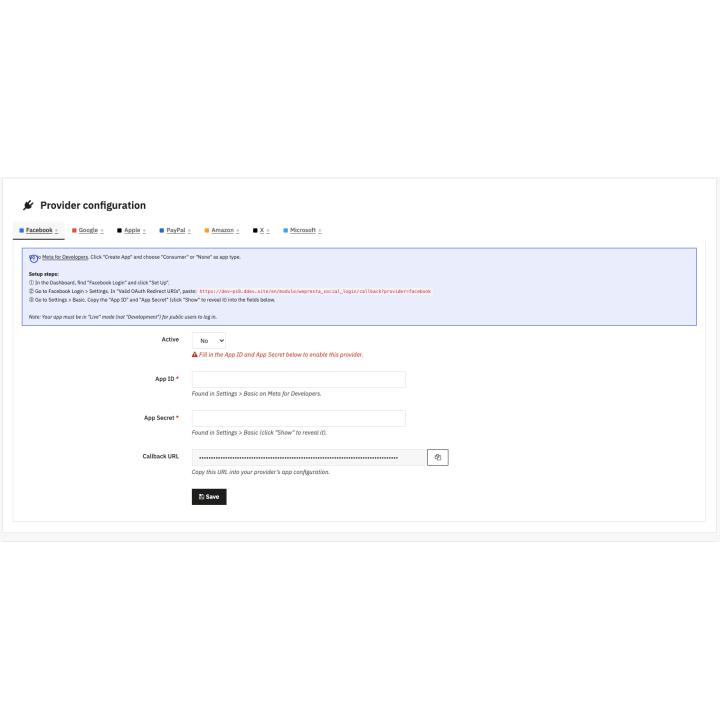
Social Login: one-click sign-in with Google, Facebook, Apple, PayPal, Amazon, X, TikTok and Microsoft
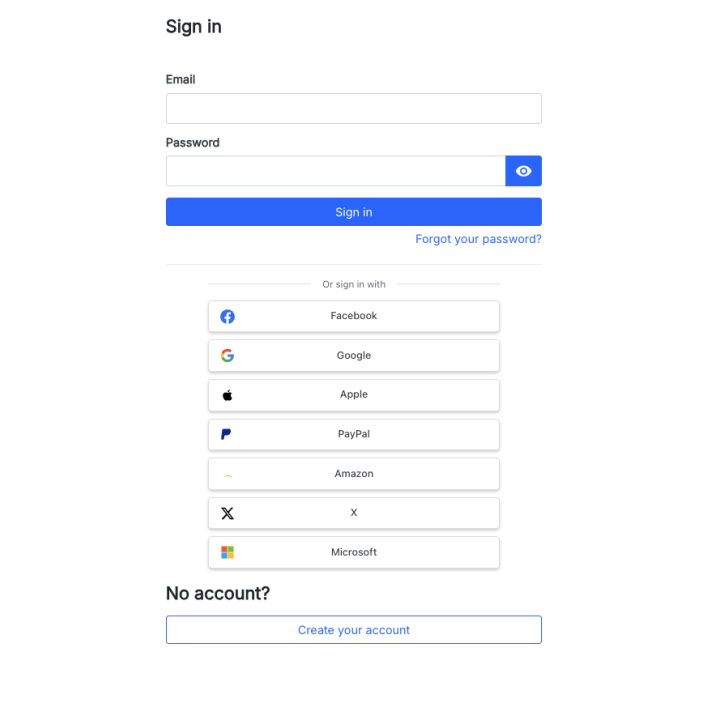
PrestaShop login page with the Google, Facebook, Apple, Microsoft, PayPal, Amazon, X and TikTok buttons
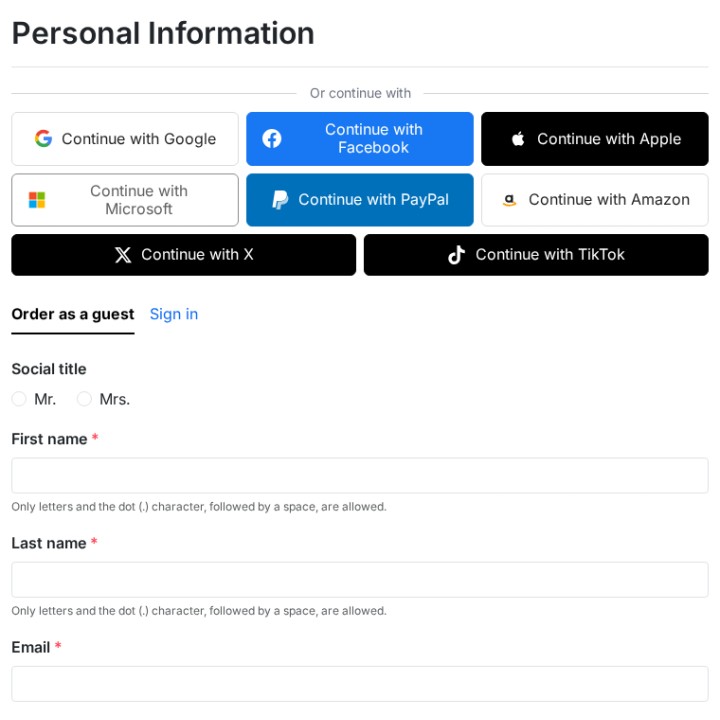
One-click sign-in in the checkout
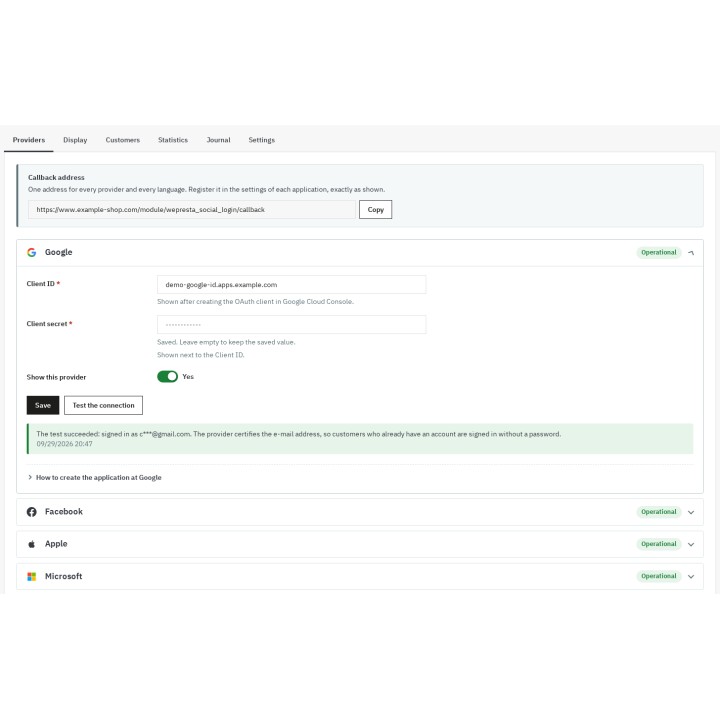
Providers configured, tested and operational
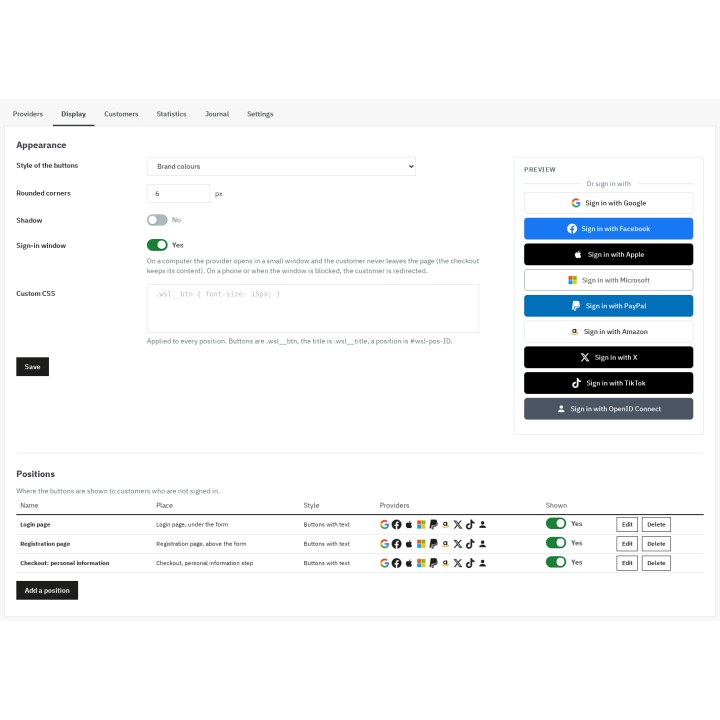
Appearance and places of the buttons
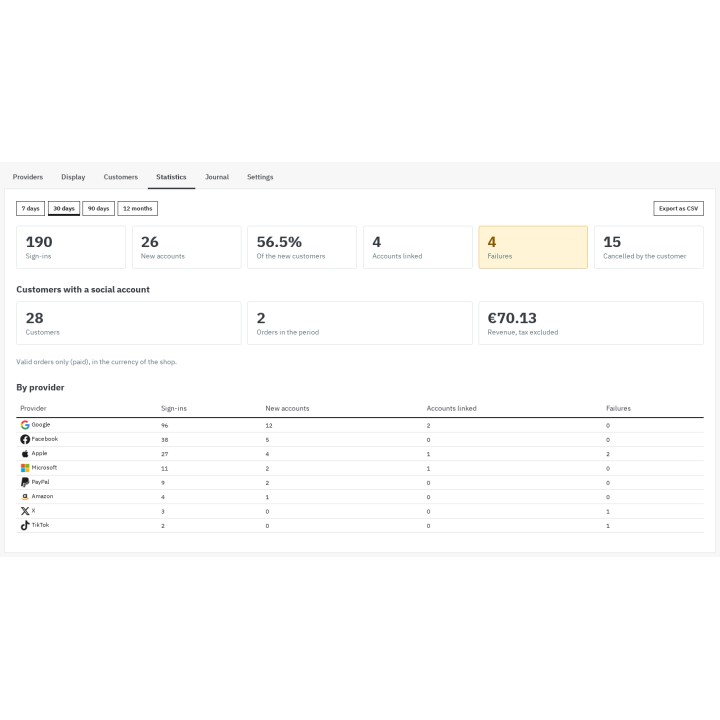
Statistics by period and by provider
FAQ
Find answers to frequently asked questions about this module
Join +289 merchants using this module
5-minute installation · Full documentation included