- Nine providers
- Existing accounts, safely
- The "Almost there!" page, only when needed
- Place the buttons where you want
- Appearance
- Sign-in window
- "My social accounts" page and customer sheet
- Welcome code
- Statistics and journal
- Personal data
- Technical
- First setup: one provider
- The values to enter, provider by provider
- Positions and appearance (Display tab)
- Customers (Customers tab)
- Settings (Settings tab)
- License
- Reduce abandonment in the checkout
- Offer Google and Apple first, everything else elsewhere
- Icons in the header
- A button under "Add to cart"
- Welcome new customers
- An enterprise identity provider (B2B)
- What is a social login module for on PrestaShop?
- Which social networks and providers are supported?
- How do I reduce cart abandonment with one-click sign-in?
- Where can I show the buttons (login, checkout, cart, product page…)?
- Is the module compatible with my version of PrestaShop and my theme?
- What are the technical requirements (PHP, HTTPS)?
- What happens if TikTok or X do not send the customer e-mail address?
- How does PayPal work, and the address import?
- How do I fix the "Invalid redirect URI" error (redirect_uri_mismatch)?
- Does the module change the standard checkout or other modules?
- Can a customer end up signed in to somebody else's account?
- How does the welcome code work?
- Can I follow the results and diagnose a problem?
- Is customer data protected (GDPR)?
- What happens if my license expires?
- "The provider does not know the callback address" (redirect_uri_mismatch)
- "The provider refuses the Client ID or the Client secret" (invalid_client)
- The sign-in window does not open
- The customer has to type their password although they use Google
- Facebook asks a known customer for the password
- Microsoft: personal accounts
- TikTok: only some accounts can sign in
- "The sign-in expired or did not come from the same browser"
- A button is shown but does not appear on my page
- The journal shows failures
Social login for PrestaShop: Google, Apple, Facebook, PayPal, X and more — setup and guide
Social Login lets your customers create an account or sign in with one click using Google, Facebook, Apple, PayPal, Amazon, X, Microsoft, TikTok or any OpenID Connect provider (Keycloak, Okta, Auth0, Authentik, Microsoft Entra…). No registration form to fill in, no password to remember: the customer keeps their cart, lands on the page they were on and finds their account again on the next visit.
This guide explains how to create the applications at each provider, place the buttons where you want them (login page, registration, checkout, cart, header…), handle existing accounts safely, offer a welcome code and follow the results.
Highlights:
- Nine providers: Google, Facebook, Apple, Microsoft, PayPal, Amazon, X, TikTok and generic OpenID Connect
- A single callback address to register at each provider, for every language of the shop
- Test the connection button and a status for each provider (not configured, to test, operational, errors) with the fix to apply
- Registration and sign-in identical to PrestaShop's own: welcome e-mail, customer vouchers, newsletter and CRM modules informed
- An existing account is opened automatically only if the provider certifies the e-mail address; otherwise the customer types their password once
- Sign-in window on computers: the customer does not leave the page, including in the checkout (cart kept)
- Free positions: sign-in and registration forms, checkout, cart, header, home page, above the footer, columns, or any element of the page through a CSS selector
- Welcome code (percentage, amount or free shipping), "My social accounts" page, statistics with CSV export, sign-in journal
- Consents (privacy, terms, newsletter) collected at registration, data export and erasure provided for GDPR
- Interface and customer pages in French, English, Spanish, Italian and Polish
Overview
Creating an account is one of the first obstacles to ordering: a form to fill in, a password to invent, a confirmation e-mail to open. With Social Login, the customer clicks the button of the network they already use, confirms at the provider, and comes back to your shop signed in.
- The customer clicks a button (for example Continue with Google) on the login page, the registration page or the checkout.
- The provider asks for their consent, in a window on computers or in the same page on phones.
- They come back to the page they were on. Their account is created if it did not exist, linked if it already existed, and their session is opened as after a classic sign-in.
The module stores no access token of the provider: it reads the profile once, at sign-in. The credentials of your applications are saved encrypted and are never displayed again in the configuration page.
Features
Nine providers
- Google, Facebook, Apple (Sign in with Apple), Microsoft (personal and work or school accounts), PayPal, Amazon, X and TikTok
- Generic OpenID Connect: a button for your own identity provider (Keycloak, Okta, Auth0, Authentik, Microsoft Entra…), useful for a B2B shop
- For each provider, a step-by-step guide in the configuration page with the links to the console and the values to copy
Existing accounts, safely
- If the provider certifies the e-mail address (Google, Apple, PayPal, Amazon, X with the e-mail permission, Microsoft personal account, OpenID Connect with
email_verified), a customer who already has an account is linked and signed in without a password. A Microsoft work or school account is certified only if your application declares the optional claimxms_edov(address domain verified by the organization); otherwise, the password is asked once - If the address is not certified (Facebook, an address typed by hand), the "Almost there!" page asks for the password of the account once; the following sign-ins take one click
- A guest who signs in with a provider that certifies the same address becomes a full customer, their orders follow them
- An account you disabled cannot sign in with a social network
- When the owner of an address resets their password with the link received by e-mail, the links made with an uncertified address (an address typed by hand for X or TikTok) are removed: the customer confirms them once with the new password
The "Almost there!" page, only when needed
- The e-mail address is asked when the provider does not give one (X without the e-mail permission, TikTok)
- The name is asked when it is missing: Apple gives it only at the first sign-in, TikTok sends only a nickname
- The consents required by your registration form (privacy policy, terms and conditions, newsletter) are asked once, as on the form of the shop
- The password is asked to link an existing account whose address is not certified
- Otherwise, registration takes one click, with no intermediate page
Place the buttons where you want
- Ready-to-use positions: login page, registration page, checkout (personal information step), cart, header (icons), home page, above the footer, left and right columns
- Page element: enter a CSS selector and a position (before, after, start or end of the element) to display the buttons next to any element of any page
- Hook or widget for theme developers:
{widget name="wepresta_social_login" position=ID} - For each position: providers and their order, buttons with text or icons only, side by side or one per line, style, wording ("Sign in with", "Sign up with", "Continue with"), title in every language and custom CSS
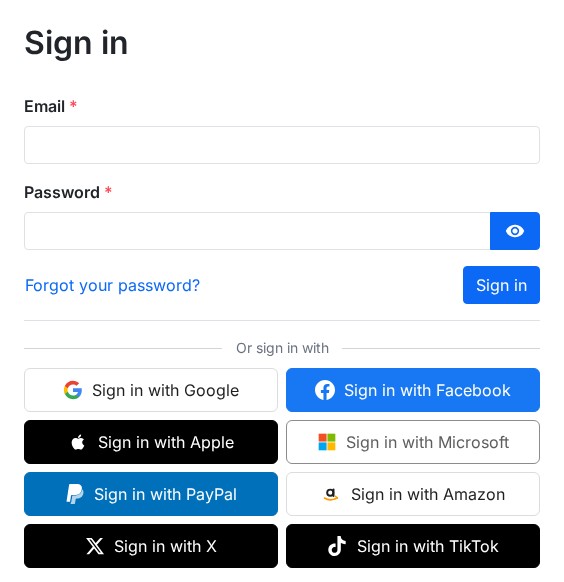 Sign-in buttons on the login page
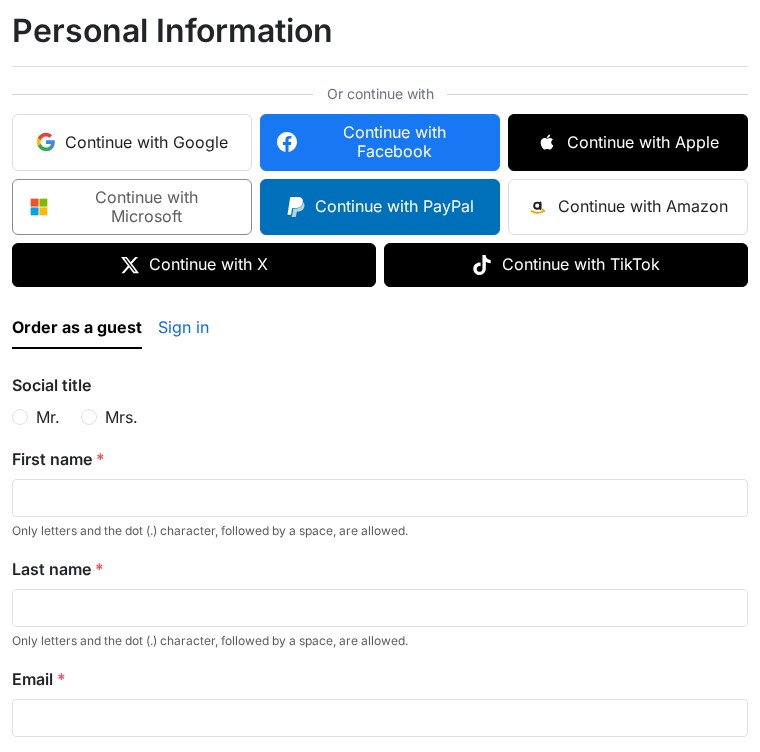 One-click sign-in in the checkout
Appearance
- Four styles: brand colours, light, dark, outline
- Adjustable rounded corners and drop shadow, with a live preview in the configuration page
- Buttons at least 44 px high, keyboard navigation, labels readable by screen readers
- No style sheet or script on pages that display no button
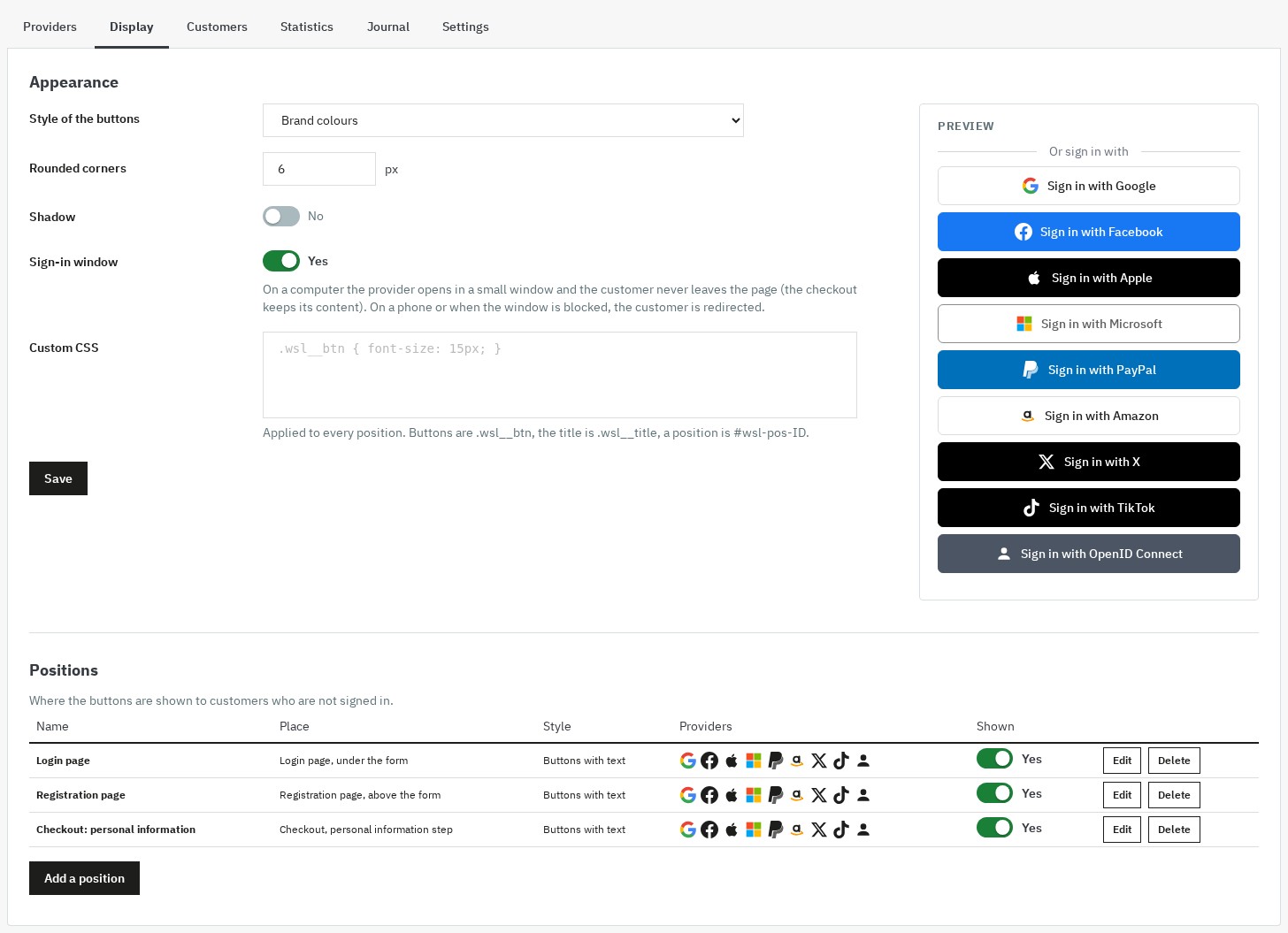 Appearance and places of the buttons
Sign-in window
- On computers, the provider opens in a small window; the customer does not leave the page, and the checkout keeps its content
- On a phone, or if the browser blocks the window, the customer is redirected to the provider then sent back to the page of origin
- The window mode is switched off in one click in Display
"My social accounts" page and customer sheet
- In My account, the customer links or unlinks a provider; a customer whose account was created with a social network is told that they can set a password with "Forgot your password?"
- In the customer sheet of the back office, a Social accounts panel lists the linked providers (date, last sign-in, address certified or not) and lets you unlink them
Welcome code
- A single-use voucher, reserved to the customer, created at registration with a provider that certifies the e-mail address
- Percentage, fixed amount or free shipping discount, minimum order, validity period, code prefix, combinable or not with other discounts
- The customer sees their code once, in a banner, on the page that follows the registration
Statistics and journal
- Statistics over 7, 30, 90 days or 12 months: sign-ins, new accounts, share of new customers, linked accounts, failures, sign-ins cancelled by the customer, orders and revenue excluding tax of the customers who use a social account, detail by provider, CSV export
- Journal: each sign-in, registration, link and failure, with the cause and the fix to apply (for example "the callback address is not registered at Google"), filters by provider, result, event and date
- Adjustable retention (30 days, 90 days, 180 days or 12 months), shortened IP addresses as an option
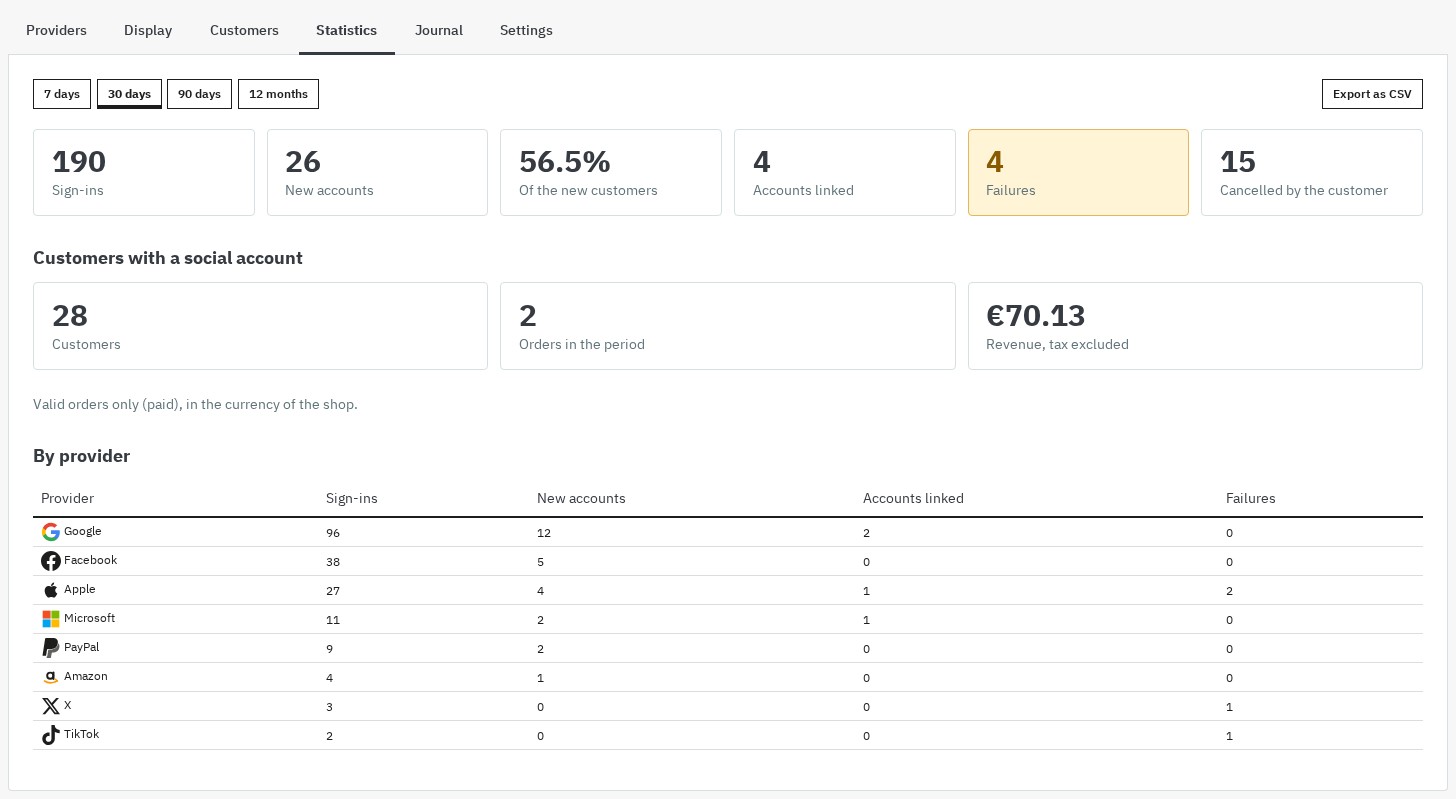 Statistics by period and by provider
Personal data
- No token of the provider is kept; the credentials of your applications are encrypted
- The consents asked at registration are the same as those of your form
- The module answers the export and erasure requests of the PrestaShop GDPR compliance module (
psgdpr): social links, journal and welcome code record of the customer
Technical
- PrestaShop 1.7.8, 8.2+ and 9.1+, PHP 7.4 minimum; the PrestaShop themes and third-party themes that display the standard places are supported, and the positions by CSS selector cover the others
- Multi-store: each shop has its own providers, positions and settings; customers are shared according to the settings of your shop group
- No override of the PrestaShop core, no third-party PHP library, archive of about 300 KB
- Interface in French, English, Spanish, Italian and Polish
Requirements
- PrestaShop: 1.7.8, 8.2+ or 9.1+. PrestaShop 1.7.7 and earlier, 8.0, 8.1 and 9.0 are not supported.
- PHP: 7.4 minimum, with the
curl,json,mbstringandopensslextensions. - HTTPS on the shop: providers do not accept a callback address without HTTPS.
- One application per provider you want to offer, created by you in the console of the provider. It is free at Google, Facebook, Microsoft, Amazon and PayPal; Apple requires enrolment in the Apple Developer Program (paid); TikTok reviews the application before opening it to all customers; the API access conditions of X change: check them before configuring this button.
Installation
Method 1 — through the back office (recommended)
- Download the archive from your WePresta customer area
- Go to Modules > Module Manager
- Click Upload a module and select the ZIP archive
- Wait for the installation to finish, then click Configure and activate your license
Method 2 — through FTP
- Unzip the ZIP archive
- Send the
wepresta_social_login/folder to/modules/ - In the back office: Modules > Module Manager, search for "Social Login" and click Install, then Configure
What the installation does
- Creation of the tables of the module (providers, positions, links, journal), without changing the tables of PrestaShop
- Three default positions: login page, registration page and checkout
- No button is displayed until a provider is configured and switched on
Update from version 1.0.0
- Your providers, their credentials, the customer links, the positions and the settings are kept; the credentials are saved again in the new encrypted format
- The files of version 1.0.0 that are no longer used are removed
- Callback address: a provider configured with 1.0.0 keeps using the address it knows. Register the single address shown at the top of the configuration page at this provider, then click Test the connection: the module switches to it as soon as the test succeeds
- The checkout position is added switched off: switch it on in Display whenever you like
- The tokens that 1.0.0 kept are deleted
Configuration
Open Modules > Module Manager > Social Login > Configure. The page has six tabs: Providers, Display, Customers, Statistics, Journal and Settings.
First setup: one provider
- In Providers, find the callback address at the top of the page and click Copy. It is the same for every provider and every language: the address of your shop (for example
https://your-shop.com) followed by/module/wepresta_social_login/callback. - Open the card of the provider (Google, for example) and unfold How to create the application at Google: the guide gives the link of the console and the steps.
- In the console, create the application and paste the callback address into the authorized redirect addresses.
- Copy the Client ID and the Client secret into the fields of the card, then click Save.
- Click Test the connection: a window opens, you sign in at the provider, and the card shows the result (for example "Test successful: signed in as j***@gmail.com. The provider certifies the e-mail address…") or the fix to apply. The test signs nobody in and creates no customer.
- Switch on Show this provider and save. The status becomes Operational; the button appears on the active positions.
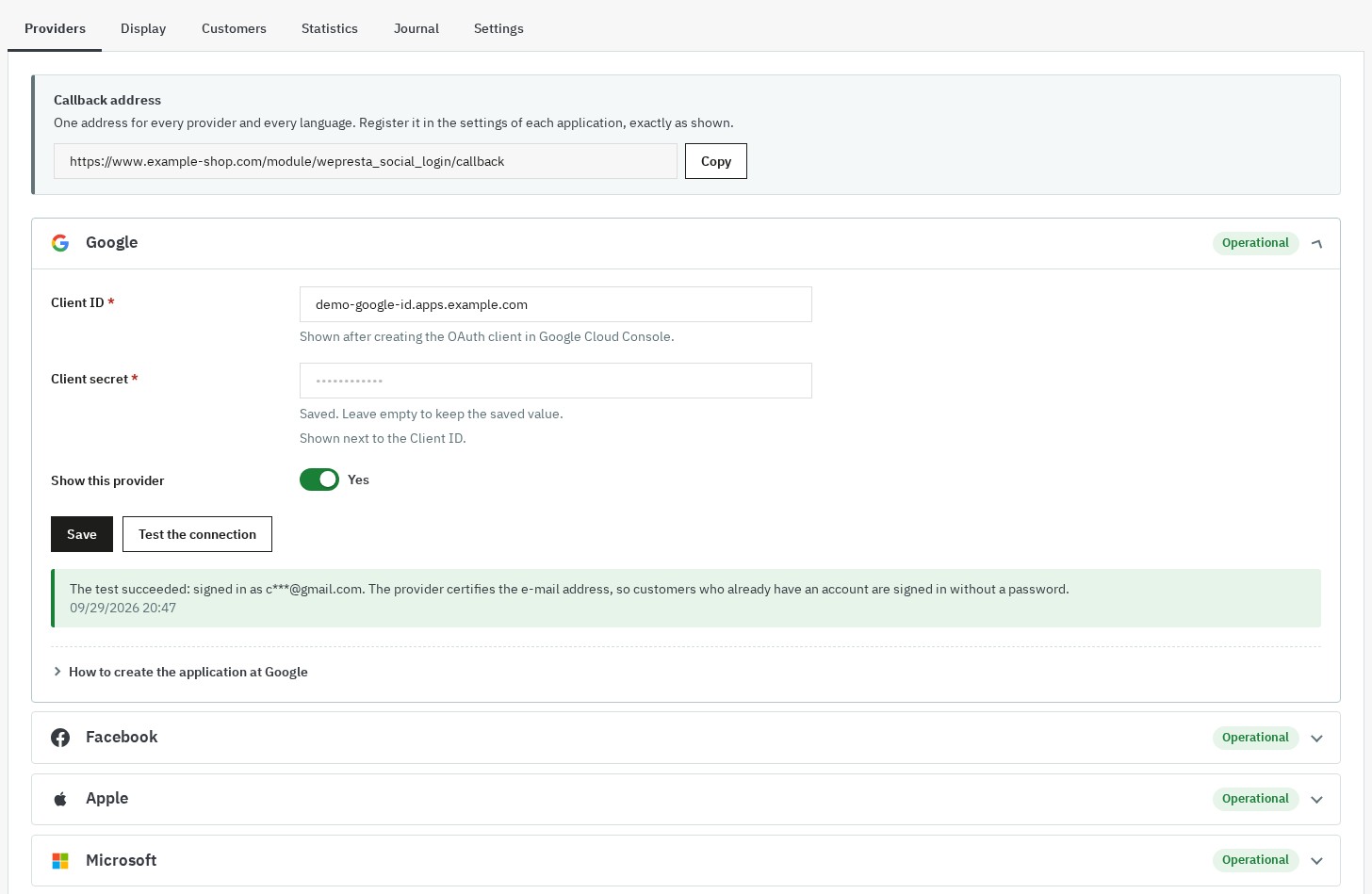 Providers configured, tested and operational
The values to enter, provider by provider
- Google: create an OAuth client ID of type "Web application"; enter the client ID and the client secret
- Facebook: create an app with the Facebook Login product, in Live mode; enter the app ID and the app secret
- Apple: create a Services ID and a "Sign in with Apple" key (.p8 file); enter the Services ID, the Team ID, the Key ID and the content of the .p8 file (checked when saved)
- Microsoft: create a Microsoft Entra ID app registration for personal and work or school accounts; enter the application ID, the secret value and the accepted accounts
- PayPal: create a "Log in with PayPal" app (Live or Sandbox); enter the client ID, the secret, the Sandbox mode and, as an option, the address import
- Amazon: create a "Login with Amazon" security profile; enter the client ID, the client secret and the region
- X: create an OAuth 2.0 app of type "Web App"; enter the client ID, the client secret and, as an option, the request of the e-mail
- TikTok: create an app with the "Login Kit" product; enter the client key and the client secret
- OpenID Connect: create a confidential client at your identity provider; enter the issuer address, the client ID, the secret and the scopes
Each card of the module repeats these steps with the links of the console.
Positions and appearance (Display tab)
- Choose the button style (brand colours, light, dark, outline), the rounded corners and the shadow: the preview updates live.
- Switch the sign-in window on or off (on by default).
- In Positions, switch on, edit or delete a position, or click Add a position.
- For a position: choose Where (a place of the theme or an element of the page with its CSS selector), the providers and their order, buttons with text or icons, layout, style, wording, title per language and custom CSS.
The CSS selector is obtained with the browser inspector: right-click the element, Inspect, then its identifier (#checkout-personal-information-step) or its class (.cart-summary).
Customers (Customers tab)
- Group of new customers: group assigned in addition to the customer group of the shop
- My social accounts page: adds the entry to My account
- Welcome code: switch it on, choose percentage, fixed amount or free shipping, the minimum order, the validity period, the prefix and whether it can be combined
- Consents at registration: the list repeats those of your registration form; the mandatory consents are asked once by the "Almost there!" page
Settings (Settings tab)
- Sign-in with social accounts: hides all the buttons without losing anything
- Keep the journal for (duration) and Shorten the IP addresses in the journal
- Diagnostic mode: writes the steps in the PrestaShop logs, never a token or a secret
- Keep the data on uninstall
License
The configuration page shows the state of your license. When it expires, a grace period of seven days avoids any interruption; then the module switches itself off until renewal, with its data (providers, links, journal) intact. In the meantime, customers registered with a social network sign in with "Forgot your password?".
Common use cases
Reduce abandonment in the checkout
Switch on the Checkout position: above the "guest / sign in" choice, an "Or continue with" block offers the buttons. The customer signs in within a window, keeps their cart and stays at the order step.
Offer Google and Apple first, everything else elsewhere
In Display, edit the position of the login page to keep only Google and Apple, and leave all the providers on the registration page.
Icons in the header
Add the position Header, next to the sign-in link in icons mode with three providers.
A button under "Add to cart"
Add a position of type page element, selector of the block you want, position after the element, pages product pages.
Welcome new customers
Switch on the welcome code (for example 10% from €30, valid for 30 days): the customer sees it in a banner after registering; the voucher is reserved to their account.
An enterprise identity provider (B2B)
Add OpenID Connect, enter the issuer address (the module reads the configuration of the provider itself), the client ID and the secret, then test.
FAQ
What is a social login module for on PrestaShop?
A social login module lets your customers sign in or create an account in 1 click with a network they already use (Google, Facebook, Apple, Microsoft, PayPal, Amazon, X, TikTok) or with your company identity provider (OpenID Connect). It removes a major friction from the funnel: the form, the password to invent, the confirmation e-mail. The PrestaShop account is created automatically when needed, or linked when the address already exists, and the session opens as after a classic sign-in: welcome e-mail, customer vouchers, newsletter and CRM modules informed.
Which social networks and providers are supported?
Google, Facebook, Apple, Microsoft (personal accounts, work or school accounts, or both), PayPal, Amazon, X and TikTok, plus an OpenID Connect button for Keycloak, Okta, Auth0, Authentik, Microsoft Entra… Each provider is switched on or off separately, with a step-by-step guide, a status (not configured, to test, operational, errors) and a "Test the connection" button.
How do I reduce cart abandonment with one-click sign-in?
Show the buttons at the start of the checkout, above the guest or sign-in choice: on a computer the customer signs in in a small window, comes back to the step they were on and keeps their cart. Fewer steps and nothing to type again, especially on mobile, where the customer is redirected to the network and sent back to the same page.
Where can I show the buttons (login, checkout, cart, product page…)?
On the ready-made places: login page, registration page, checkout, cart, header (icons), home page, above the footer and columns. For any other place, a CSS selector position puts the buttons before, after, at the start or at the end of any element of the page without changing your templates, and theme developers have a widget. Each position has its own providers, style, wording and title in every language.
Is the module compatible with my version of PrestaShop and my theme?
It works on PrestaShop 1.7.8, 8.2+ and 9.1+, with PHP 7.4 minimum. PrestaShop 1.7.7 and earlier, 8.0, 8.1 and 9.0 are not supported. PrestaShop themes and third-party themes that display the standard places are supported; for other places, a CSS selector position is enough.
What are the technical requirements (PHP, HTTPS)?
PHP 7.4 minimum with the curl, json, mbstring and openssl extensions, and a store on HTTPS: providers refuse a callback address without HTTPS. If your certificate is valid and the callback address is copied as it is, you avoid most redirection errors.
What happens if TikTok or X do not send the customer e-mail address?
TikTok sends neither the e-mail address nor the full name, and X sends the address only if your application is allowed to. The customer then reaches the "Almost there!" page, which asks only for what is missing (e-mail address, name, the consents of your registration form) and then goes back to where they were. If the address typed already belongs to an account, the password of that account is asked once.
How does PayPal work, and the address import?
PayPal works like the other providers. An option of the module creates an address in the PrestaShop account of the new customer from their PayPal profile, to speed up the order. To use it, your PayPal application must be allowed to read the address (the "Address" attribute of the Log in with PayPal feature).
How do I fix the "Invalid redirect URI" error (redirect_uri_mismatch)?
It means the callback address registered at the provider is not exactly the one of the module. Copy the single address shown at the top of the Providers tab (Copy button) without adding anything, then click "Test the connection": the result, like the journal, tells you the fix to apply.
Does the module change the standard checkout or other modules?
No: the checkout stays the one of PrestaShop. Registration and sign-in follow the native sequence (same events, welcome e-mail, cart and customer voucher rules), so newsletter, CRM or loyalty modules see these customers like any other. The module changes no core file.
Can a customer end up signed in to somebody else's account?
No. An existing account is linked without a password only when the provider certifies the e-mail address. In every other case (Facebook, an address typed by hand, a Microsoft work account without domain verification) the customer confirms the account password once, with a limit on attempts. A disabled account cannot sign in with a social network.
How does the welcome code work?
You switch on a single-use voucher (percentage, fixed amount or free shipping, minimum order, validity, prefix, combination as you choose). It is created for a new customer registered with a provider that certifies their e-mail address, reserved to their account, and shown once in a banner. Signing in again never gives another one.
Can I follow the results and diagnose a problem?
Yes. The statistics give sign-ins, new accounts, linked accounts, failures, orders and revenue of customers with a social account, by period and by provider, with CSV export. The journal records each step with its cause and the fix to apply; the diagnostic mode also writes the steps in the PrestaShop logs, never a token or a secret.
Is customer data protected (GDPR)?
The module keeps no access token of the social network and stores the credentials of your applications encrypted. The consents of your registration form are asked at registration, the IP addresses of the journal can be shortened, and the module answers the export and erasure requests of the PrestaShop GDPR module: linked accounts, journal and the welcome code of the customer.
What happens if my license expires?
A grace period of seven days avoids any interruption; after that, the module is switched off until the renewal, with its data intact. Meanwhile the buttons disappear and customers registered only with a social network sign in with "Forgot your password?".
Troubleshooting
"The provider does not know the callback address" (redirect_uri_mismatch)
The callback address is not registered, or not exactly, in the application of the provider. Copy it from the Providers tab (Copy button), without a space or an added slash. Each shop of a multi-store installation has its own address.
"The provider refuses the Client ID or the Client secret" (invalid_client)
Copy the Client ID and the secret again from the console, without a space, then save again. For Apple, paste the whole content of the .p8 file, BEGIN and END lines included, and check the Team ID and the Key ID.
The sign-in window does not open
The browser may be blocking windows: the module then switches to the redirection. On a phone, the redirection is always used. You can switch the window off in Display.
The customer has to type their password although they use Google
The provider does not certify their e-mail address (or the address typed by hand is not the one of the account). The password is asked only once to link the account.
Facebook asks a known customer for the password
Facebook does not certify e-mail addresses: this is the intended behaviour to protect existing accounts. After the first link, sign-in takes one click.
Microsoft: personal accounts
Microsoft personal accounts refuse redirect addresses that contain parameters: the single callback address contains none. Check that the app registration accepts personal accounts.
TikTok: only some accounts can sign in
Until TikTok has approved the application, only the accounts added as target users can sign in.
"The sign-in expired or did not come from the same browser"
The sign-in is valid for fifteen minutes and must end in the browser that started it. If it happens often, check that the cookies of the shop are not blocked and that no cache serves the sign-in pages.
A button is shown but does not appear on my page
Check in Display that the position is switched on and lists the provider, and that the provider is switched on in Providers. A position by CSS selector waits for the element to exist in the page.
The journal shows failures
Each line gives the cause and the fix to apply. If the line is not enough, switch on the diagnostic mode in Settings and look at Advanced Parameters > Logs.
Changelog
Version 2.0.0
New
- The module works on PrestaShop 1.7.8, 8.2+ and 9.1+, with PHP 7.4 minimum, in a single archive of about 300 KB.
- Sign-in and registration with TikTok.
- An OpenID Connect button for your company identity provider: Keycloak, Okta, Auth0, Authentik, Microsoft Entra…
- A single callback address to register at each provider, valid for every language of the store.
- The "Test the connection" button checks a provider without signing anybody in and shows the profile obtained or the fix to apply; each provider shows its status.
- The buttons can be shown in the checkout, above the guest or sign-in choice.
- The customer comes back to the page they were on, to the checkout with their cart kept.
- A sign-in window on computers: the customer never leaves the page (redirection on phones or when the window is blocked).
- New places: cart, header (icons), home page, above the footer, columns, any element by CSS selector and a widget for theme developers.
- For each place: the providers and their order, buttons or icons, layout, wording, title in every language and custom CSS.
- Four button styles (brand colours, light, dark, outline) with a live preview.
- The "Almost there!" page asks only for what is missing: e-mail address, name, the consents of your registration form or the password.
- The "My social accounts" page of the customer: link a provider from the account, unlink it with a confirmation.
- The social accounts of the customer appear in their back-office sheet, with the possibility to unlink them.
- A single-use welcome code: percentage, fixed amount or free shipping.
- Statistics by period and by provider (sign-ins, new accounts, failures, orders and revenue) with CSV export.
- A journal of the sign-ins with the cause and the fix to apply, filters, an adjustable retention period and shortened IP addresses as an option.
- An option to import the PayPal address.
- Settings, providers and places belong to each store, including a store created after the installation.
- Export and erasure of the customer data through the PrestaShop GDPR module.
Improvements
- Registration and sign-in follow the native PrestaShop sequence: welcome e-mail, customer vouchers, newsletter and CRM modules informed.
- Non-Latin names (Polish, Czech, Cyrillic, Greek) are kept at registration.
- Apple: the service identifier, team, key and .p8 file are entered in the module and checked when saved.
- Microsoft: personal accounts, work or school accounts or both, or a single organization.
- PayPal: switch to Sandbox mode from the configuration.
- The credentials of the providers are no longer shown again in the configuration page and are stored encrypted.
- No token of the provider is kept; those of version 1.0.0 are deleted by the update.
- Messages, the "Almost there!" page and "My social accounts" stay in the language of the customer, even after the trip to the social network.
- The interface is complete in French, English, Spanish, Italian and Polish.
- A page without a button loads no stylesheet or script of the module.
- The buttons are at least 44 px high and can be used with the keyboard.
- The archive goes from 1.1 MB to about 300 KB, with no third-party PHP library.
Fixes
- An existing account is no longer opened by an e-mail address that the provider does not certify: the customer confirms the account password.
- A disabled account can no longer sign in with a social network; a guest becomes a customer instead of being signed in as a guest.
- Apple is usable: the missing fields of its configuration can be entered and its answer is no longer rejected.
- An X sign-in without an e-mail address no longer ends in a dead end: the "Almost there!" page asks for the address.
- The "Link my account" button of "My social accounts" opens the provider, and the entry appears in the My account page.
- After a customer is deleted, their social account can sign in and register again.
- Back from the provider, the customer finds the page they were on instead of "My account".
- Failures are recorded with their cause, and the diagnostic mode is usable.
- Customers shared between the stores of a same group are found by their address.
- The Microsoft and PayPal settings now exist in the configuration page.
- The journal is purged automatically according to the retention period chosen.
After the update: your providers, their credentials, the links of the customers, the places and the settings are kept. A provider configured with version 1.0.0 keeps the callback address it knows until the first successful test of the single address shown at the top of the configuration page. The checkout place is added switched off: turn it on in Display whenever you want. If the license check of version 1.0.0 had switched the module off, the update switches it on again.
Version 1.0.0
- Initial release (multi-provider social login, positions, appearance, multi-store and multi-language)
Support
For any help, contact us through your WePresta customer area or by email at mail@wepresta.shop, depending on the support option of your plan.
Before contacting us, prepare:
- PrestaShop version
- PHP version
- the line concerned in the Journal tab, with its cause
- screenshots
- PrestaShop logs if the diagnostic mode is on
