- One template per page type and per language
- A preview before anything is written
- Batches that can stop, resume and be undone
- The audit
- CSV import and export
- Keywords
- Clean tags in the head
- Automatic generation, queue and daily recalculation
- Optional AI
- Multistore and five languages
- Status
- Lengths and keywords
- Title suffix
- Social tags
- Language alternates (hreflang)
- Canonical URLs
- Keywords tag
- Automatic generation
- AI generation
- Page check
- Data
- A catalog with missing or duplicated metas
- A multilingual shop
- A multistore group
- A catalog whose prices and years change
- An agency or a staging site
- A merchant who wants to keep control
- What exactly does the module write?
- Does it replace values I wrote by hand?
- Is the preview really before any write?
- Does the module translate my meta tags?
- What happens to the keywords tag?
- How does hreflang behave across shops?
- Is the AI mandatory, and what data does it send?
- What happens if the license expires?
- Does it work with my theme?
- Can I try it without writing anything?
Automatic SEO meta tags for PrestaShop: templates, preview and batches
Automatic SEO Meta Tags writes the meta titles, meta descriptions and keywords of your catalog from templates: one per page type and per language. It covers products, categories, brands, CMS pages and the home page, shows every proposed value in a preview before writing, applies it in batches with resume and undo, and keeps a timestamped history of every change.
The module also cleans the head of your pages: Open Graph and Twitter Card tags, hreflang with x-default, a custom canonical URL, an optional shop-name suffix and, where PrestaShop no longer has a native keywords field, the keywords tag itself. Nothing is added to the visible page.
This guide explains what the module does, how to install and configure it, how a batch works and what to check before letting it write to your catalog.
Highlights:
- Templates for five page types and every language, with variables, filters, optional groups and inheritance from the default language
- A real preview: old and new value side by side, character counters, search-result preview, warnings, line-by-line editing and exclusion
- Three replacement modes, a selection by category, brand, language and shop, a progress bar and resume after an interruption
- Undo and a timestamped history: the before, the after and the author of every write
- An audit of empty, too short, too long, duplicate and externally changed values, with CSV export and a filtered selection ready to generate
- CSV import and export, with a dry run that reports file, line, field and reason
- Clean head tags: social tags, hreflang, canonical, title suffix and keywords where the native field is gone
- Automatic generation on creation and update, a queue and a daily recalculation, all switchable per type, language and shop
- Optional AI, with your own key, sent only when you ask and always reviewed before writing
- Multistore and five back-office languages; PrestaShop 1.7.8, 8.0+ and 9.0+ with PHP 7.4 minimum
Overview
The problem with meta tags on a large catalog
A PrestaShop catalog of a few hundred products contains thousands of meta values: a title and a description for every product, category, brand, CMS page and home page, in every active language. Written by hand, this work takes days and is rarely finished. The native back office edits one page at a time and offers no template, so the same description is copied from one product to the next and search engines see pages that look alike. When a price, a brand or a category changes, the values that should follow it do not.
What the module changes
The module adds a workshop on top of the native fields. You describe once, in a template, what a good title and a good description contain. The module then computes the value of each page from its own data — name, category, brand, price, reference, attributes, features, short description, shop name, year, language and currency — and proposes it for review. You decide what is written.
The values are stored in PrestaShop's own meta fields (or, for keywords on versions without a native column, in the module's table). A value typed by hand, imported or changed outside the module is recognized as such and is not replaced by default. The module writes through targeted updates: it does not call ObjectModel::update(), does not touch the modification date, the search index or other fields, and does not add a single visible element to the storefront.
Features
One template per page type and per language
Each of the five page types has its own templates for the meta title, the meta description and the keywords, plus two social templates. Every active language can have its own template; a language left on inheritance applies the default-language template with its own variables, without translating the fixed text. The templates screen shows, for each language, examples you can copy, and its Test the templates panel renders the result for a real product, category, brand or CMS page — or the home page with Test on the home page — without writing anything.
A template combines literal text and variables: {name}, {category}, {brand}, {price}, {reference}, {ean}, {attributes}, {features}, {short_description}, {shop_name}, {year}, {language}, {currency} and a few others depending on the type. Filters format the result: upper, lower, ucfirst, capitalize, strip, truncate:60, default:"text", or:name and first:3. Optional groups print their content only when every variable inside is non-empty, which avoids a dangling separator:
{name}[ - {brand}]gives “Fox cushion - Studio Design”, and “Fox cushion” when the brand is empty.{short_description|or:name}uses the short description and falls back to the name when it is empty; addtruncate:160to cut cleanly at a word boundary.Buy {name}[ from {brand}] at {price}is the kind of example the screen offers; it is never applied by itself.
A template can hold up to 1,000 characters. An unknown variable, an unknown filter, a bad argument or an unclosed group is a validation error shown with its position, and nothing is saved.
A preview before anything is written
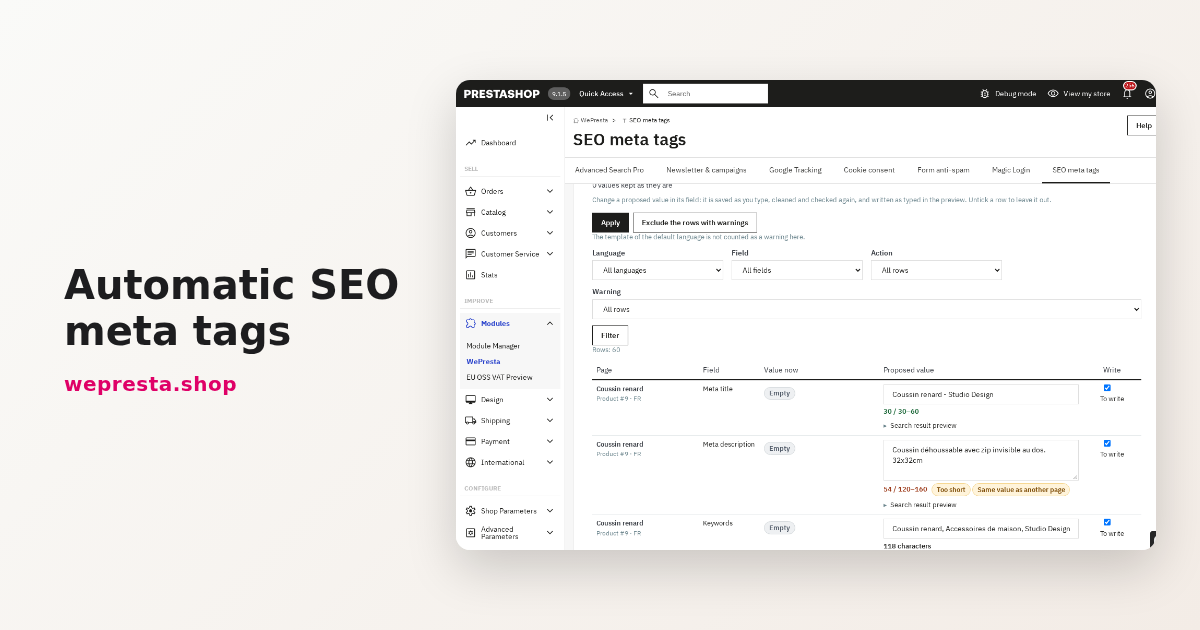
The generation starts with an analysis of the selection: the module reads the current value and its state for every object, shop, language and field, renders the proposal and gives it a set of warnings — empty variable, value too short or too long, duplicate with another page, value cut at the column limit, inherited template. The preview then shows, page by page:
- the old and the new value side by side;
- a character counter against your minimum and maximum, colored by range, with the suffix counted for titles;
- an approximate search-result preview: title, breadcrumb-like URL and two lines of description;
- every warning attached to its row.
Each proposed value can be edited in place or excluded with a checkbox; one button excludes every row that carries a warning. Nothing is written until you approve the batch.
Batches that can stop, resume and be undone
Three modes decide what may be replaced:
- Fill empty fields only — nothing that already has a value is touched.
- Replace the values written by the module — empty fields are filled, and values previously written by the module are updated; values typed by hand, imported or changed outside the module stay untouched.
- Replace every value — every field is written, including manual values, after ticking an explicit confirmation that says they remain in the history.
The selection can target a whole type or a subset: categories with or without their subcategories, brands, active products only, identifiers, a name fragment, CMS categories, languages and one or several shops. The work runs in AJAX steps with a progress bar and a Stop button. If the browser closes, the job is marked interrupted and Resume continues from the exact cursor, without repeating a row already written. If the native value changed after the analysis, the row is skipped with the reason “changed since preview”.
The last application can be undone from its report, from the dashboard or from the history. The history keeps, for every write, the before value, the after value, the source, the date and the author — an employee, “Automatic generation” or “Scheduled task”. Filters select a subset and restore it, with an option to restore even values that changed since.
The audit
The audit scans one shop, one or all languages and one or all types, and classifies the problems: empty title, title too short or too long (suffix included), empty description, description too short or too long, title or description shared by several pages, empty keywords, and value changed outside the module since it was written. The table filters by issue, type, language, state and name, shows how many pages share a duplicate and links each row to the native edit page or to the module's editor. The counts also appear on the dashboard.
A Generate for these pages button opens the generation with the filtered selection already loaded. The CSV export streams exactly the rows on screen.
CSV import and export
The export produces a UTF-8 file with a BOM and a semicolon separator, one line per object and per language: type, identifier, shop, language, name, meta title, meta description, meta keywords and canonical URL. The name is read-only and helps the reader; brand lines have no shop; the home page uses its meta identifier; canonical is empty for brands and the home page. A cell that starts with =, +, - or @ is prefixed with an apostrophe to prevent a spreadsheet formula.
The import begins with a dry run: the file must be a .csv of at most 10 MB and 50,000 lines, UTF-8 with or without BOM, with ; or , detected from the header. Every line is checked — header, type, identifier, shop, language, length, forbidden characters, canonical URL, duplicate line — and the report shows the file, line, field and reason, the counts and a preview of the first 100 changes. An empty cell leaves the field unchanged; the token {empty} clears it. Only then can you import the valid lines, as a job with history and undo.
Keywords
Keywords can be generated from the name, the category, the brand and the feature values, with stop-word lists in the five languages of the interface, a minimum word length, a maximum number of keywords and a maximum length. Deduplication ignores case and accents, including Polish and Spanish letters. The module states plainly that major search engines ignore the keywords tag: it is kept for the shops, tools and internal searches that still use it, with no promise of an effect on rankings.
Clean tags in the head
The module replaces the tags managed by the theme with one configurable set, without changing the visible page:
- Open Graph and Twitter Card for the five types, with social title and description templates, an image fallback chain (product cover, then default category image, then shop logo) and a choice of card type and Twitter account. The
product:*tags of product pages are preserved and the theme's duplicates removed. - Hreflang for products, categories, brands, CMS pages and the home page, in the shop's active languages, with only the translations that exist, absolute URLs, the language code format you choose and an
x-defaultthat can point to the default language, another language or nothing. Fewer than two languages means no alternate at all. Alternates cover the languages of the current shop; several shops sharing a catalog are not linked to each other. - Canonical URL per product, category and CMS page, with validation. Empty means the native canonical is kept; on a covered page, only one canonical tag is served.
- Shop-name suffix in the title, optional, with the separator of your choice; the preview, the counters and the audit measure the title with the suffix.
- Keywords tag where the native column no longer exists: the module stores the keywords and prints the tag itself, after the description. On versions that still have the native field, the theme prints it and the module does not touch it.
The result is identical for every visitor, with no cookie and no per-visitor value, so cached pages stay valid. Settings and applications purge the page cache when a storefront-visible value changes.
Automatic generation, queue and daily recalculation
When a product, category, brand or CMS page is created, its empty fields receive their value. On update, empty fields are filled and, if you enable it, the values previously written by the module are recalculated when the price or another template variable has changed. A value typed by hand, imported or edited outside the module is never touched by this mechanism.
Specific prices and combinations queue the product; a category or brand update queues the products whose template may depend on it. The first 20 objects of a request are processed immediately; beyond that — a native CSV import, a mass action, a web-service batch — the rest goes to a queue processed by the scheduled task, by the first back-office page of each hour or by the Process now button. A daily recalculation walks the module's values in batches with a persisted cursor, so values that depend on the year, catalog price rules, taxes or currencies follow automatically. Everything can be switched off per object type, per language and per shop.
The home page has no automatic generation: it is a single page, edited in the module's editor or by a job.
Optional AI
With your own key and the address of an OpenAI-compatible API, the generation screen can ask for title, description and keyword proposals. You choose the data sent — by default name, category, brand, features and short description — the languages and the fields; the screen states exactly what is sent, to which host, and how many requests will be made. Each object is one request. The answer goes to the same preview and is never written automatically. Failed objects can be retried.
The key is encrypted with the shop's own secret and masked after saving. Without a key, every other function works. No product data leaves the shop without an explicit AI action; the module has no telemetry and loads no CDN asset. Apart from the license check and the AI requests you start, it makes no outbound call.
Multistore and five languages
Templates, settings and jobs are configured per shop, and a generation can target one or several shops. Products, categories, CMS pages and the home page have a value per shop. Brands are the exception: their native fields are shared by all shops, the module writes them once and the screens say so. A new shop receives the default shop's templates, and a button copies templates from one shop to another. The back office is available in English, French, Spanish, Italian and Polish.
Installation
From the back office (recommended)
- Download the archive from your WePresta customer area.
- Go to Modules > Module Manager.
- Click Upload a module and select the ZIP archive.
- Wait for the installation to finish, then click Configure and activate your license.
By FTP
- Unzip the archive.
- Upload the
wepresta_seo_meta_automator/folder to/modules/. - In the back office, open Modules > Module Manager, search for “Automatic SEO Meta Tags”, click Install, then Configure.
What the installation does
- It creates the module's tables (templates, ledger, module fields, jobs, history, queue, activity log) and its menu entry.
- It registers the hooks needed by the settings; it overrides no class and modifies no core table.
- It writes the default settings and the built-in templates, which are language-neutral and contain variables only.
- If the installation fails, what it created is removed.
Configuration
The Configure page begins with the license block, then groups the settings by purpose. Defaults suit most shops; change them after reading the effect described next to each field.
Status
Shows the version, a coverage summary with a link to the dashboard, the last application with its undo button, the queue, the scheduled-task command and URL with their token, the last run and a Rotate the token button. Use the command or URL in your server's scheduler to process the queue and the daily recalculation.
Lengths and keywords
Sets the minimum and maximum title length (30 and 60 by default, adjustable from 10 to 128) and description length (120 and 160 by default, adjustable from 50 to 512), the price tax mode used by {price}, the batch size (50 by default, 10 to 500), and the keyword sources, minimum word length, maximum count and maximum length.
Title suffix
Off by default. When on, choose the separator (|, -, –, —, ·), the suffix text per language — empty means the shop name — and the page types it applies to. The home page and other pages are optional.
Social tags
On by default for the five types. Choose the image type used for products, categories and brands, the Twitter card type and the account. The social title and description templates live on the templates screen; the fallback chain for the image is shown in the card preview.
Language alternates (hreflang)
On by default. Choose the code format (language_code such as en-us, or iso such as en), the x-default target (default language, another language, or none) and whether to skip languages whose name and description are identical to the default language's. Alternates are limited to the current shop's languages.
Canonical URLs
On by default, with the option to add a canonical when the theme prints none. Custom values are entered per object and per language in the editor or through the CSV import.
Keywords tag
Shown on versions where the native keywords column no longer exists. On by default: the module prints the keywords it stores. On older versions, the native field is printed by the theme and this section is not shown.
Automatic generation
On by default for creation, empty fields and recalculation, for products, categories, brands and CMS pages. Choose the types and the languages per shop. The help recalls that the scheduled task is required for the queue and the daily recalculation, and gives the command and URL.
AI generation
Off by default. Enter the base URL (any OpenAI-compatible endpoint, local servers included), the model, the key, the JSON mode, the temperature and the timeout, then choose the data sent per shop and any writing instructions. Test the connection reports whether the endpoint answered, refused the key, could not find the model or address, hit a rate limit, timed out or returned invalid JSON.
Page check
The Check my pages button on the dashboard fetches the home page, one active product, category, brand and CMS page in each active language, and reports the number of title, description, canonical, alternate, x-default, og:title, twitter:card and keywords tags found, and whether the values match what the module expects. A duplicate count, a different value or a missing tag is flagged. For a staging protected by HTTP authentication, enter the user and password here; the password is never shown back. A page cache may still serve the old page after a change: purge it before concluding.
Data
Sets how long the history is kept (365 days by default, 30 to 3,650) and whether uninstalling deletes the module's data. The text lists exactly what would be deleted — templates, history, the keywords and canonicals stored by the module — and states that PrestaShop's native meta fields are never deleted.
Common use cases
A catalog with missing or duplicated metas
Run the audit, filter on empty and duplicate values, then press Generate for these pages. The preview shows what will be written; the “Fill empty fields only” mode leaves every existing value alone. One generation can cover an entire catalog, and the history lets you undo it.
A multilingual shop
Write a template per language, or let the other languages inherit the default one when the fixed text can stay the same. The preview warns when a language inherits, and the counters work per language. The hreflang output lists only the translations that exist.
A multistore group
Target several shops in one generation; products, categories, CMS pages and the home page receive a value per shop. Brands are written once and flagged as shared. Copy the templates to a new shop instead of recreating them.
A catalog whose prices and years change
Enable recalculation so that values containing {price}, {year}, tax-dependent amounts or currency follow the catalog. The scheduled task runs the queue and the daily recalculation; Process now handles a backlog immediately.
An agency or a staging site
Use the page check with the staging's HTTP credentials to verify what the server really prints. Export the audit or the tags as CSV for the client, import corrections after a dry run, and keep the history as a record of what changed and when.
A merchant who wants to keep control
Use “Fill empty fields only”, edit proposals in the preview and exclude rows with warnings. Values typed by hand, imported or edited outside the module are recognized and protected; the “Replace every value” mode exists but requires an explicit confirmation.
Requirements
- PrestaShop 1.7.8, 8.0+ or 9.0+. PrestaShop 1.7.7 and earlier are not supported.
- PHP 7.4 minimum, with the
mbstring,json,opensslandcurlextensions.opensslis required only for the optional AI key encryption. - MySQL or MariaDB as used by your PrestaShop version.
- A scheduled task (cron or the URL with its token) for the queue and the daily recalculation. Without it, automatic generation still runs on save for the first objects, but a large backlog waits for Process now or the next back-office visit.
- A standard head: the module rewrites the standard meta tags of the head on the Classic and Hummingbird themes. A theme that prints its own tags outside the standard structure may need its output checked with Check my pages.
- HTTPS is recommended for the back office and for the page check. The AI endpoint must use HTTPS unless it is a loopback address.
FAQ
What exactly does the module write?
It writes the meta title, the meta description and the keywords of products, categories, brands, CMS pages and the home page, in each active language and each shop; brands are shared and written once. It also stores a custom canonical URL for products, categories and CMS pages, and prints the head tags it manages: social tags, hreflang, canonical, title suffix and, where no native keywords column exists, the keywords tag.
Does it replace values I wrote by hand?
Not by default. The “Fill empty fields only” mode touches nothing that exists. The “Replace the values written by the module” mode only replaces values the module itself wrote. The “Replace every value” mode requires an explicit confirmation and keeps the old values in the history. Automatic generation never touches a value typed by hand, imported or changed outside the module.
Is the preview really before any write?
Yes. The analysis reads the current values, renders the proposals and stores them in the job; the preview displays them with their warnings. Writing starts only when you approve the batch. You can edit or exclude rows, and the module re-checks that the native value has not changed since the analysis before writing.
Does the module translate my meta tags?
No. A language that inherits a template applies the default-language template with its own variables; the fixed text stays in that language. For genuinely native wording, write a template per language. The optional AI can propose texts in each active language, but only through the preview.
What happens to the keywords tag?
On versions where the native keywords field no longer exists, the module stores the keywords and prints the tag itself. On versions that still have the field, the theme prints it and the module does not touch the tag. Major search engines ignore it; it is kept for the tools and shops that use it, without any promise of an effect on rankings.
How does hreflang behave across shops?
Alternates cover the active languages of the current shop and only the translations that exist, with absolute URLs and an optional x-default. Several shops sharing a catalog are not linked to one another; the help in the settings says so.
Is the AI mandatory, and what data does it send?
No. Without a key, everything else works. When you start an AI generation, the module sends only the checked data (name, category, brand, features and short description by default), for the objects and languages you selected, to the endpoint you configured. Each object is one request. The result stays in the preview and is written only after your approval. The key is encrypted and masked.
What happens if the license expires?
Without a valid license the module disables itself: the values already written stay in your PrestaShop fields, but new objects are no longer filled and the module's head tags are no longer printed. Templates, history, settings and the values stored by the module are kept, and the module is enabled again from its configuration page once the license is valid. An application in progress can be resumed after renewal.
Does it work with my theme?
The module acts on the standard tags of the head and overrides no template. It is tested with the Classic and Hummingbird themes. A theme that prints non-standard tags can be checked with Check my pages, which reports duplicates, differences and missing tags on real pages.
Can I try it without writing anything?
Yes. The Test the templates panel renders a full preview for one object found by name or ID, and the generation's preview can be canceled before writing. The audit and the page check are read-only. The CSV import starts with a dry run that writes nothing.
Changelog
Version 1.0.0
- Templates for meta titles, descriptions and keywords on products, categories, brands, CMS pages and the home page, per language, with variables, filters and optional groups.
- Preview with old and new values, counters, search-result preview, warnings, line-by-line editing and exclusion.
- Batch application in three replacement modes, with selection by type, category, brand, language and shop, progress, resume, undo and timestamped history.
- Audit of empty, short, long, duplicate and externally changed values, with filters, native links and CSV export.
- CSV import and export with a dry run, a line-level report and a protected formula guard.
- Keyword generation with stop words, minimum word length and accent-insensitive deduplication.
- Open Graph and Twitter Card tags, hreflang with
x-default, custom canonical URLs, optional shop-name suffix and keywords tag where no native column exists. - Automatic generation on creation and update, a queue, a daily recalculation and a process-now action.
- Optional OpenAI-compatible AI generation with an encrypted key, one request per object and preview-only results.
- Multistore support, five back-office languages and a license gate that keeps written values, data and settings.
Support
For help, contact us through your WePresta customer area or by e-mail at mail@wepresta.shop, depending on the support option of your plan.
Before writing, please prepare:
- the PrestaShop and PHP versions;
- the theme in use;
- the exact screen and the action that failed;
- a screenshot of the message, without any license key or AI key.

Related articles
Meta titles and descriptions: fill a whole PrestaShop catalog
A PrestaShop catalog is filled from templates, not one product at a time: preview before writing, three replacement modes, a duplicate audit and undo. Here is how to set…