- Collect reviews on four kinds of pages
- Photos and videos sent by customers
- A "Verified purchase" badge based on your orders
- Multi-criteria ratings, helpful votes and reports
- Moderate without ever filtering by rating
- Reply in public and document disputes
- Ask for a review after the order
- Questions and answers about products
- Show reviews where they matter
- Rich results for search engines
- Import and export reviews
- A dashboard and a public method page
- Multistore, languages and accessibility
- Does the module replace Product Comments?
- Can guests who are not signed in leave a review?
- How is the "Verified purchase" badge awarded?
- Do review requests filter out unhappy customers?
- Will Google show stars for my reviews?
- Can I bring over reviews from another platform?
- What happens if my license is no longer valid?
- Does it work with multistore and several languages?
- Can a customer edit or delete their review?
- Does the module guarantee that reviews are authentic or compliant?
Product and store reviews on PrestaShop: collect, moderate and publish your reviews
Reviews are part of the buying journey: a customer who hesitates looks for other customers' experience before ordering. PrestaShop's native module stops at product comments: no photos or videos, no reviews of the store, categories or CMS pages, no request after the order, and a basic moderation.
Product and Store Reviews brings that whole journey into one module installed on your shop: collection, moderation, replies, review requests, questions and answers, display and rich results. This guide explains how to install it, configure it and use it every day.
Key points:
- Four kinds of pages: products, the store, categories and CMS pages, each with its own form and block
- Customer photos and videos: up to ten photos and one video per review, photos re-encoded without their metadata, videos published as sent, in a full-screen gallery
- A "Verified purchase" badge based on orders, with a "Verified customer" badge for the store, categories and CMS pages
- Complete moderation: queue, filters, bulk actions, public replies, templates and documented disputes
- Review requests after the order, off by default, with a signed link and one-click opt-out
- Rich results, CSV import and Product Comments import, a dashboard and a public method page
Discover the module and its plans
Overview
A useful review is more than a rating. It shows the product in real use, answers a precise question and tells whether its author actually bought it. That is why the module combines photos, a video, per-criterion ratings, a verification badge and a reply space, on the product page and on the other pages where customers look for information.
Everything is stored on your server: no account on a third-party review platform, no file sent elsewhere. The module never translates a review automatically: each one keeps the language it was written in. You keep control over what is published, how you reply and what you tell visitors.
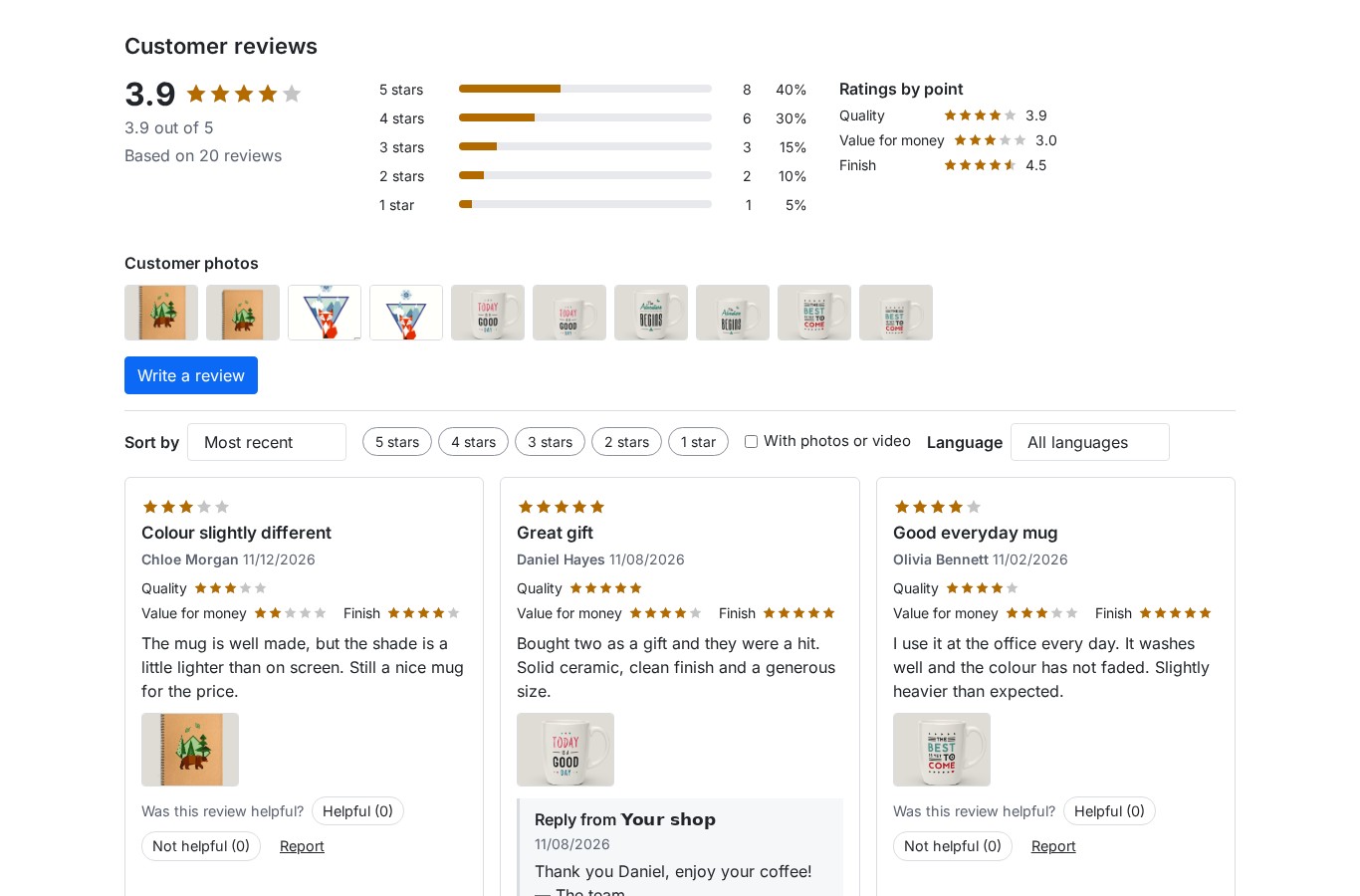 The summary and published reviews under the product page
Features
Collect reviews on four kinds of pages
- Products: a 1 to 5 rating, an optional title, the text, the display name, photos and a video, with a summary under the price and the full block under the description. Stars also appear in product lists.
- Store: a dedicated "Customer reviews of the store" page with the average rating, the distribution and the form, to collect the shopping and service experience.
- Categories: a block on category pages, for every category or only the ones you choose.
- CMS pages: a block on selected pages, to collect feedback on a service, warranty or presentation page.
You decide who can write: everyone, signed-in customers only, or only customers who bought the product. A guest confirms their e-mail address through a signed link. The "one review per customer and target" option prevents duplicates, and customers can edit or delete their own review from their account.
Photos and videos sent by customers
Customers attach up to ten photos per review (five by default) and one MP4 or WebM video. Photos are accepted as JPG, PNG, WebP or GIF, checked on their real content, then re-encoded: camera metadata, including GPS location, is removed, animations become still images and thumbnails are created automatically.
The full-screen gallery opens by click or keyboard, moves with the arrow keys and shows each photo with the review excerpt and its stars. The video is published as it was sent, with no transcoding and no external service; only the location boxes of MP4 files are blanked. Size limits and accepted formats follow your server's PHP configuration and are written in the form.
 The full-screen gallery of customer photos (interface shown here in French)
A "Verified purchase" badge based on your orders
The module matches a review to an order of its author: the order must be paid, shipped or delivered, must not be cancelled or refunded, and must contain the product. The review then shows the "Verified purchase" badge with a link to your method page. For reviews of the store, a category or a CMS page, the badge reads "Verified customer".
The match is recalculated at every order state change: a review loses the badge when the order is cancelled or refunded, and can gain it when an order becomes eligible. A review imported from a file or from Product Comments is never marked as verified.
Multi-criteria ratings, helpful votes and reports
You create up to five criteria per target, for example Quality, Value for money and Finish for products, or Customer service for the store. Each criterion can cover all products, some categories or a selection of products. Customers rate them if they wish, and the average of each criterion is shown next to the overall rating.
Visitors vote "Helpful" or "Not helpful", once per review and per visitor, and can sort reviews by usefulness. They can also report a review for a precise reason: fake, offensive, personal data, spam, off topic or other. At the number of reports you set, the review is hidden automatically until you decide; you can dismiss the reports or uphold them.
Moderate without ever filtering by rating
The review list shows the status, target, rating, excerpt, author, language and badges: verified, imported, photos, reported, edited, disputed, replied. You filter by status, rating, product, language, date, source or media, search the text and act in bulk: approve, reject with a reason, delete or dismiss reports.
On a review page you approve, reject with an internal reason, or edit only the title and text with a public reason shown under the review ("Edited by ..."). The previous version is kept in the history. You can also publish a reply, open a dispute, delete a photo, and read the verification details and the action log.
Publication never depends on the rating: a one-star and a five-star review follow exactly the same rule. By default every review waits for your approval; you can choose to publish at once only the reviews matched to an order. Rights are set per employee profile: view, moderate, reply and configure.
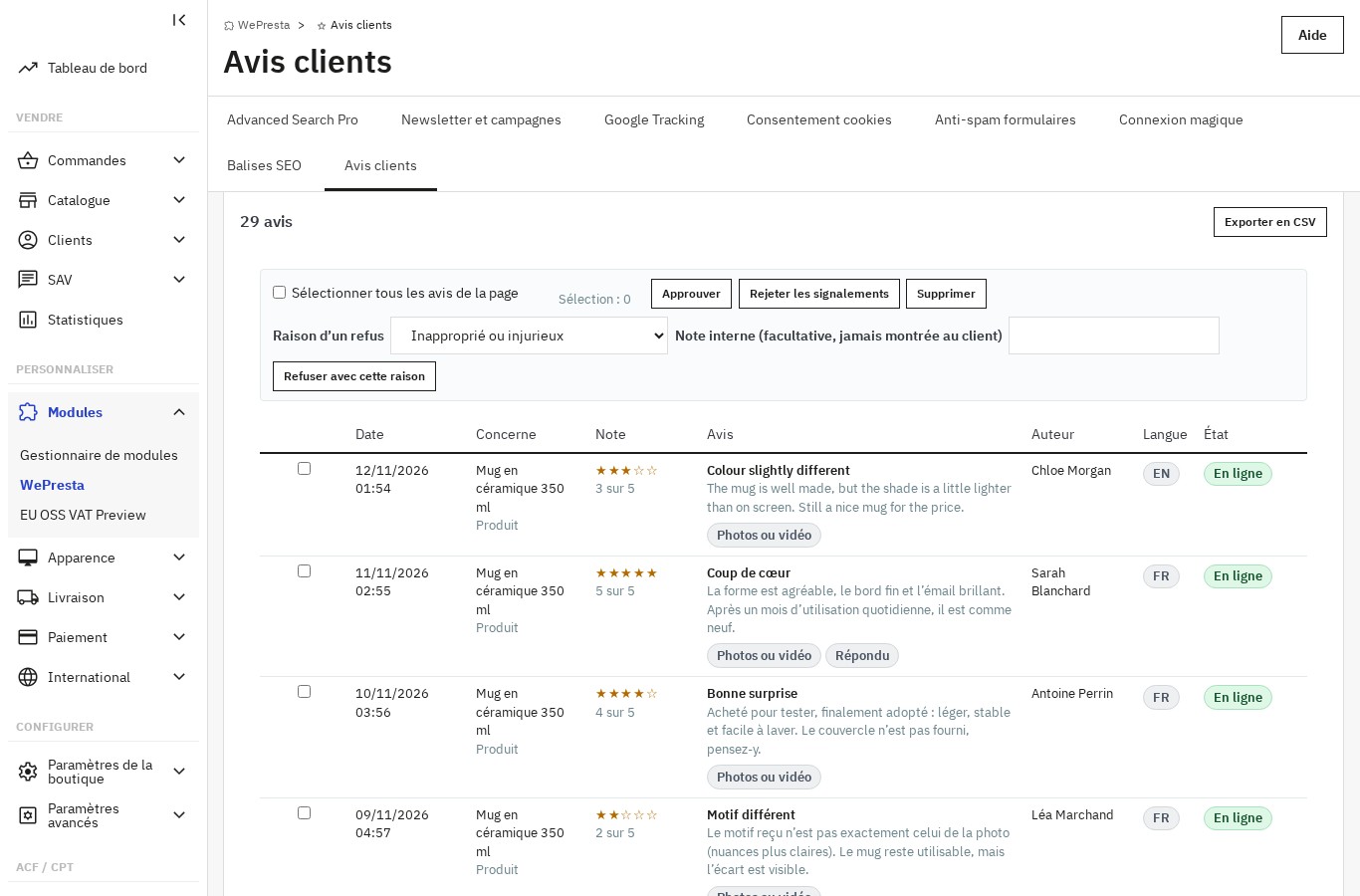 The moderation queue and its bulk actions (interface shown here in French)
Reply in public and document disputes
Every review can receive one public reply from the shop, with its date and the shop name. Reply templates written in each language are inserted in one click with the customer, product and shop names. An e-mail alert warns you when a review rated at or below a threshold you set is submitted.
For a negative review (rating 3 or less), you open a dispute and ask the customer for details through a signed link. The customer can answer or update the review; the review stays published during the exchange, and every step is timestamped in its history. The dispute is closed as resolved or unresolved.
Ask for a review after the order
Review requests are off at installation: you switch them on. When an order reaches the state you choose ("Delivered" by default), the module schedules an e-mail after the delay you set (seven days by default). One e-mail is sent per order, in the order's language and shop, with an image and a signed link to the products bought, a link to the store reviews and a one-click opt-out link.
Every customer of a qualifying order is asked, whatever rating they might give: the module never filters customers by satisfaction. Nothing is sent for a cancelled or refunded order, or to an address that opted out. The "Review requests" section shows sends, skips by reason, failures, opened links and conversion into reviews, with a readable log.
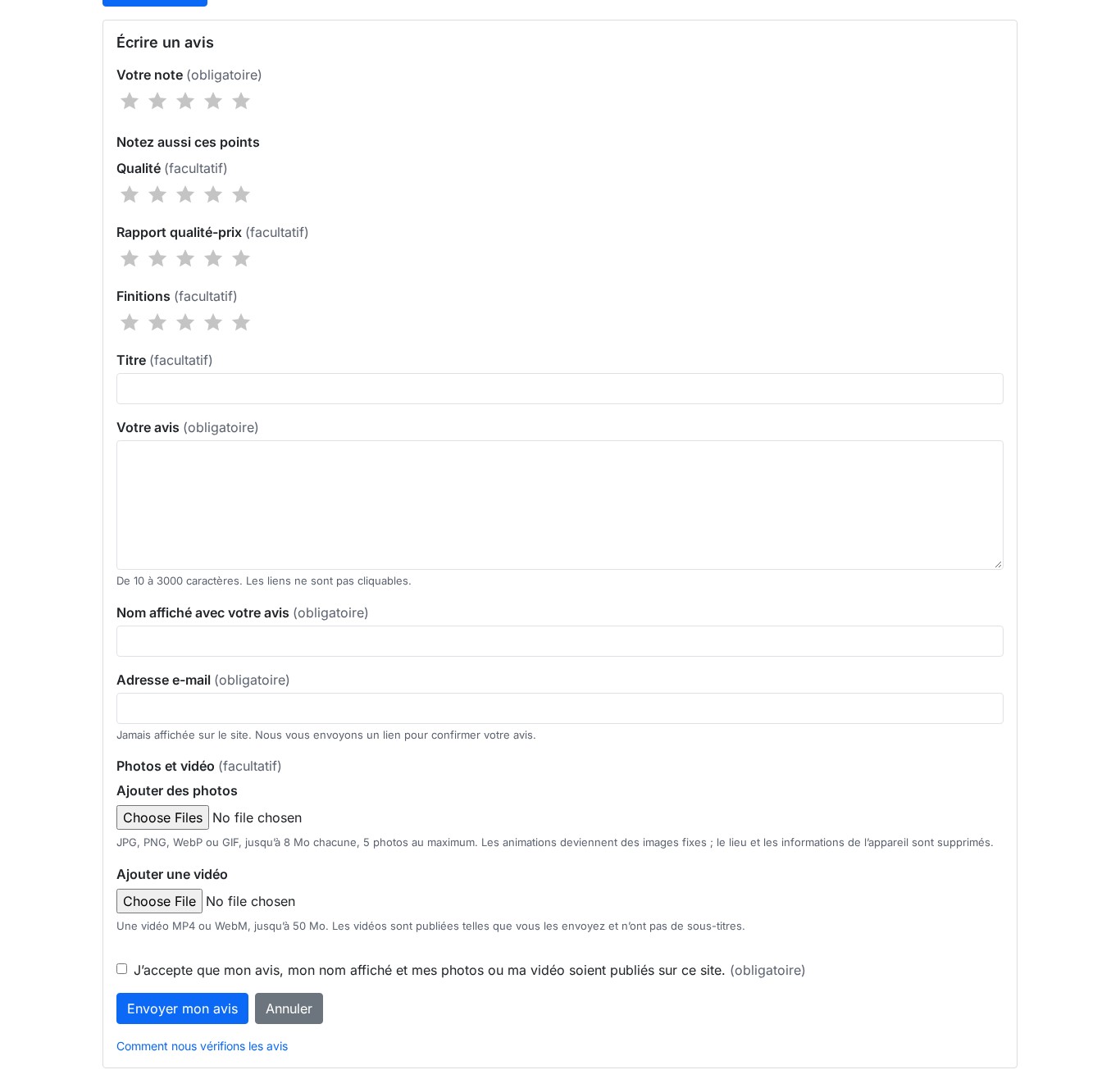 The review form, with photos, video and criteria (interface shown here in French)
Questions and answers about products
Below the reviews, a "Questions and answers" block lets customers ask a question about a product. You answer as the shop, and you can allow customers to answer each other. Questions and answers can be moderated, answers receive helpful votes, and the author of a question is notified by e-mail when an answer is published. Questions export to CSV along with the reviews.
Show reviews where they matter
The module offers two layouts (list or grid), four presentation styles, the number of reviews per page, five sort orders, filters by rating, photos or videos, verified reviews and language, and the star color. The rating distribution is clickable and acts as a filter.
Besides the product page, you insert reviews wherever you need them: home block, category or CMS page block, the displayWeprestaProductReviews hook, the {widget name='wepresta_product_reviews' …} widget or the [wepresta_reviews type="store" limit="6"] snippet in page content. The settings show each code with a copy button.
Rich results for search engines
When Schema Pro is active and uses this module's reviews as its source, the module gives it the average rating, the review count and the published reviews, and Schema Pro prints the markup. When Schema Pro is absent or disabled, the module completes the Product node your theme already outputs with the rating and reviews, and never creates a second Product node. When Schema Pro is active with no review source, it removes the theme's Product node and no review markup is emitted. Store reviews are marked up as reviews of the organization, without an aggregate rating, and answered questions can produce FAQPage markup.
Nothing is emitted when there is no published review: no empty rating, no zero. The markup is provided for search engines; whether they display stars is their decision and is never guaranteed, and reviews a shop publishes about itself do not produce stars in search results.
Import and export reviews
Bring reviews from another platform with a CSV file: the module first shows a preview and a line-by-line report, with valid lines and the reason for each skipped one, before anything is written. Re-importing the same file adds no duplicate, and a file can hold up to 20,000 lines or 10 MB. The one-click import from Product Comments takes the criteria, comments, grades, votes and reports.
Every imported review is marked "Imported review" and never gets the verified badge. You also export reviews and questions as CSV, with the filters of the list. The module never enables, disables or changes Product Comments: after the import, disable it in the Module Manager to avoid two review blocks.
A dashboard and a public method page
The dashboard gathers the number of reviews by status, the average rating, the 1 to 5 distribution, the share of verified purchases, the reply rate, the share of reviews with photos or videos, the twelve-month trend, the best and worst products, the store rating, questions waiting, disputes, review requests and their conversion, and anti-spam refusals. The figures export to CSV, and alerts point out situations to fix.
The public "How we verify reviews" page explains your method: who can write, the guest confirmation, the verified badge rule, the moderation mode, the review requests, how imported reviews are handled, reports and the retention period. The module can generate it from your real settings, and you can replace it with your own text in each language.
Multistore, languages and accessibility
Each shop can have its own reviews, or share them with the shops of its group. Settings, e-mail texts and the method page are set per shop, and the dashboard consolidates every shop. The interface, back office, e-mails and public pages exist in English, French, Spanish, Italian and Polish.
The rating is always written in text ("4 out of 5"), the gallery is keyboard accessible, focus stays visible, forms show an error summary and contrasts are respected. Reviews load page by page, images load on demand and counters come from summary tables, so the product page stays light.
Installation
- Download the module from your customer account.
- In your back office, go to Modules > Module Manager and click Upload a module.
- Select the ZIP file; PrestaShop installs the module.
- Click Configure and enter your license key. The module sections open from the configuration page. Without a valid license the module disables itself: only the license form stays available to activate or renew the license, and the module is re-enabled when you reopen this page with a valid license.
Getting started
- Collection settings: choose who can write, and switch the guest confirmation and the one-review-per-customer-and-target limit on or off.
- Moderation: decide whether reviews wait for your approval and set the low-rating alert threshold.
- Criteria: create up to five criteria per target, with their scope.
- Display: check the summary under the price, the block under the description, stars in lists and the store page.
- Review requests: enable them if you wish, then choose the order state and the delay.
- Method: read the "How we verify reviews" page generated from your settings, then adapt it if needed.
- Submit a test review as a guest to check the whole journey, then delete it.
Configuration
Settings are grouped by theme on the configuration page:
- Collection: who can write, guest confirmation, one review per customer and target, immediate publication of verified reviews only, number of photos, video size and criteria.
- Moderation: default status, automatic hiding threshold after reports, low-rating alert threshold, reply templates and rights per employee profile.
- Display: summary under the price, block and stars in lists, store page, home, category and CMS page blocks, layout, style, reviews per page, sorts, filters and star color.
- Rich results: cooperation with Schema Pro, completion of the theme's Product node and FAQPage markup.
- Compliance: method page generated from your settings, retention period, anonymization or deletion, and information notices.
- Anti-spam: time token, honeypot field, limits per IP address and cooperation with Form Anti-Spam.
- Multistore: sharing reviews between the shops of a group or separating them per shop.
- Data: CSV export of reviews and questions, and export of the dashboard figures.
The module's scheduled task must run every fifteen minutes: it sends review requests and runs the daily maintenance. PrestaShop e-mails must be enabled for confirmations, alerts and review requests.
Use cases
- You are starting out: collect your first reviews without depending on an external platform, with requests sent after orders.
- You are leaving a review platform: import your reviews as CSV; they stay marked as imported and are never presented as verified.
- You sell products customers want to see: decoration, fashion, crafts, furniture or electronics; customer photos and videos answer better than text alone.
- You run several shops: share or separate reviews per shop, with settings and texts of their own.
- You must explain your method: the "How we verify reviews" page, adjustable retention and customer data export help you document your practices.
Requirements
- PrestaShop 1.7.8, 8.0+ or 9.0+
- A valid WePresta license
- PHP 7.4 or higher, with the GD extension for photo processing
- A scheduled task running every fifteen minutes
- PrestaShop e-mails enabled for confirmations, alerts and review requests
- Interface in English, French, Spanish, Italian and Polish; each review keeps its language
- Multistore: reviews shared between the shops of a group or separated per shop
FAQ
Does the module replace Product Comments?
It brings its own blocks, stars and forms, and the one-click import takes the criteria, comments, grades, votes and reports from Product Comments. It never enables, disables or changes Product Comments: after the import, disable it yourself in the Module Manager to avoid two review blocks.
Can guests who are not signed in leave a review?
Yes, if you allow guests. They enter their e-mail address and confirm their review through a signed link before publication. You can also restrict reviews to signed-in customers or to customers who bought the product.
How is the "Verified purchase" badge awarded?
The module matches the review to an order of its author: the order must be paid, shipped or delivered, not cancelled or refunded, and contain the product. The match is recalculated at every state change, and an imported review is never marked as verified.
Do review requests filter out unhappy customers?
No. Every customer of a qualifying order is asked, whatever rating they might give, and the module never filters customers by satisfaction. Review requests are off at installation: you switch them on and choose the order state and the delay.
Will Google show stars for my reviews?
The module provides the markup: it completes your theme's Product node, or goes through Schema Pro when it is active and uses the module's reviews as its source, and never creates a second Product node. Whether stars are displayed is up to search engines and is never guaranteed; store reviews do not produce them, and no markup is emitted without a published review.
Can I bring over reviews from another platform?
Yes, with a CSV file: the module shows a preview and a line-by-line report before writing anything, and re-importing the same file adds no duplicate. The one-click import from Product Comments also takes the criteria, comments, grades, votes and reports. Every imported review is marked "Imported review" and never gets the verified badge.
What happens if my license is no longer valid?
The module disables itself: no stars, blocks, forms or markup on the storefront, and signed links already sent answer "page not found". Your reviews, photos, questions, requests and settings are kept; open the module's configuration page with a valid license to enable it again. A transient incident of the license server does not disable an already licensed module: tolerance is seven days.
Does it work with multistore and several languages?
Yes. Each shop can have its own reviews or share them with the shops of its group, settings and texts are set per shop, and the dashboard consolidates every shop. The interface, back office, e-mails and public pages exist in five languages, and each review keeps the language it was written in, with no automatic translation.
Can a customer edit or delete their review?
Yes, from their "My reviews" area. An edit goes back through moderation, and a deletion wipes their personal data. You can also edit the text yourself, with a public reason shown under the review, while the previous version stays in the history.
Does the module guarantee that reviews are authentic or compliant?
No. It helps you document how reviews are collected and checked: who can write, the verified badge rule, the moderation mode, the review requests and the retention. It does not certify that reviews are authentic and does not replace legal advice or the obligations that apply to your shop.
Support
For any help, contact us from your WePresta customer account or by e-mail at mail@wepresta.shop, according to the support option of your plan.
Changelog
Version 1.0.0
- Reviews on products, the store, categories and CMS pages, with a form and a block for each target.
- Customer photos and videos: photos re-encoded to remove their metadata, videos published as sent, in a keyboard-accessible full-screen gallery.
- "Verified purchase" badge based on orders, recalculated at every state change, and "Verified customer" badge for the other targets.
- Per-criterion ratings, helpful votes and reports with automatic hiding at a configurable threshold.
- Complete moderation: queue, filters, bulk actions, rejection reasons, editing with a public reason, action log and rights per profile.
- Public replies, reply templates and an e-mail alert for low ratings.
- Disputes opened on negative reviews, with the customer's answer, review updates and a timestamped history.
- Review requests after the order, off by default, with a signed link per product and one-click opt-out.
- Questions and answers about products, with guest confirmation, moderation and author notification.
- Configurable display: summary under the price, block, stars in lists, store page, blocks and embed codes.
- Rich results for search engines, with completion of the theme's Product node and FAQPage markup.
- CSV import with preview and line-by-line report, Product Comments import, CSV exports, dashboard and public method page.
- Multistore, five languages, keyboard accessibility and anti-spam protection.

Related articles
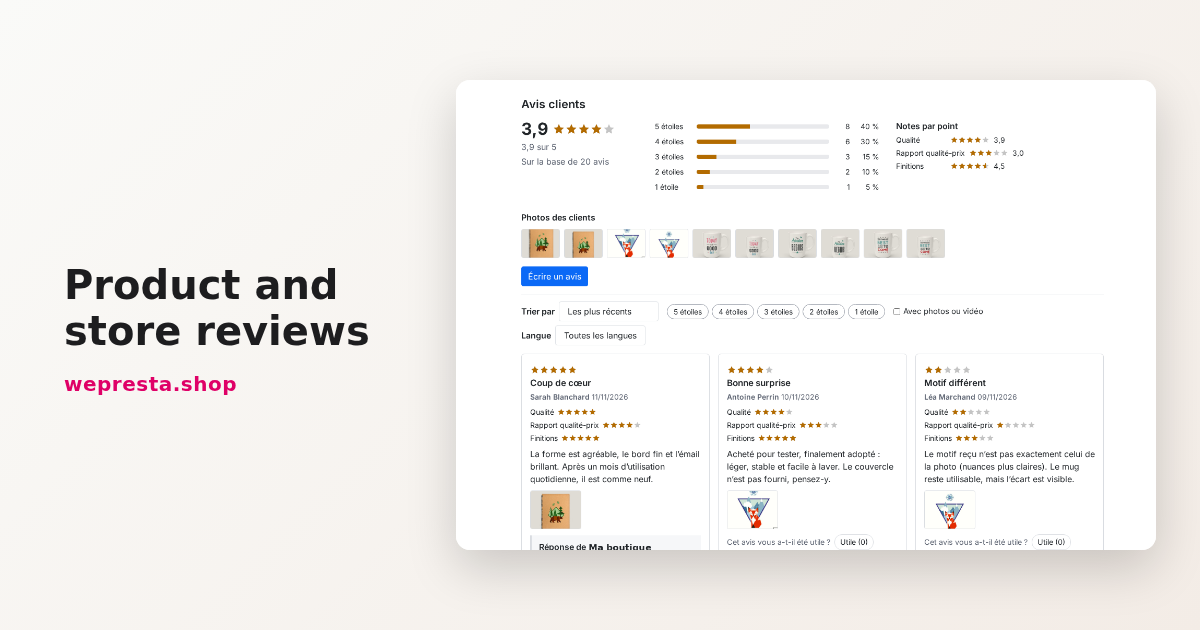
How to collect and publish customer reviews on PrestaShop
From the review form to requests sent after delivery, moderation, public replies and JSON-LD markup: how the Product and Store Reviews module organizes collection on a…