- A shipment record per order
- Partial shipping and PrestaShop 9.1
- Carrier labels, ZIP and print queue
- The parcel label generated by the module
- Customs data on products
- CN22, CN23 and invoices
- Returns on the native return
- Exchange and store credit
- Customer tracking page and e-mails
- Tracking statuses: manual and CSV
- Carrier diagnostic
- Shipment dashboard
- Carton library
- License and module status
- Sender and documents
- Shipping defaults
- Carriers
- Cartons
- Customs
- E-mails and files
- Ship an order in several parcels
- Prepare a non-EU shipment
- Handle a return
- Import tracking statuses
- Print the day's labels
- Review the month
- A shop that splits orders
- A shop selling outside the European Union
- A shop with regular returns
- A multi-carrier agency
- Does the module buy carrier labels?
- Is the tracking updated in real time?
- Do I need a carrier account or an API key?
- Which PrestaShop versions and themes are supported?
- How does splitting an order into several parcels work?
- Are the CN22 and CN23 legally valid?
- What happens without a valid license?
- Does the module handle refunds?
- Does the module merge the carrier PDFs?
- Does it work with multistore and several employees?
- Can the customer e-mails be edited?
Shipping labels and parcel tracking for PrestaShop
A customer orders three items. Two are in stock and leave today; the third arrives from the supplier next week. The carrier labels sit in a downloads folder, the tracking numbers are retyped into a spreadsheet, the CN22 is filled in by hand, and the customer writes to ask which parcel is stuck. In PrestaShop, the order carries one carrier and one tracking number. Everything that happens after that first parcel is managed outside the shop.
Shipping labels and parcel tracking brings the shipment record into the back office, order by order. You create one or more parcels, assign the items, import the labels obtained from your carriers, validate tracking numbers, prepare customs documents from product data and follow customer returns. No carrier account, API key or third-party platform is required: the module works with the documents and numbers the merchant already has.
This guide explains what the module does, how to install and configure it, how to use it day to day, what it does not do and which questions buyers ask most often.
Highlights:
- Several parcels per order: contents assigned line by line, computed remaining quantities, partial shipping and a parcel status from prepared to delivered
- Carrier labels under control: PDF, PNG, JPG or ZPL imported per parcel, protected storage, print queue, print count, ZIP download and a generated A4 or 10 × 15 cm parcel label
- Customs prepared once: HS codes, origin, weights, value and composition per product, CN22/CN23, commercial and proforma invoices, with missing-data alerts
- Returns in PrestaShop's own return: structured reason, customer files, return label and tracking, exchange order or native store credit, return statistics
- Customer follow-up: signed tracking page without login, one shipping e-mail per parcel, manual or CSV tracking statuses, carrier diagnostic and carton suggestion
Discover the module and its plans
Overview
Why the order page stops at one parcel
PrestaShop's order records one carrier and one tracking number. As long as every order leaves in a single parcel with one label, that is enough. It stops being enough as soon as a shop splits an order because of weight, stock or a pre-order, ships the available items first, or buys labels on a carrier website and keeps the PDFs in a folder.
PrestaShop 9.1 introduces a native shipment split, but it remains a feature flag, it does not produce or store carrier labels, and it says nothing about customs documents. On 1.7 and 8, the split does not exist at all. The result is a familiar chain of workarounds: a shared spreadsheet for tracking numbers, a folder of carrier PDFs named after order references, customs forms typed from product pages, and return requests handled by e-mail.
The customs side adds a second problem. A CN22 or CN23 needs an HS code, a country of origin, net and gross weight, a customs value and a description for every item. That data usually sits nowhere in the catalog, or only on some products. The merchant discovers the gaps at the worst moment, when the parcel is packed and the carrier is waiting.
Returns add a third. PrestaShop's native merchandise return records a request and a status, but it has no return label, no return tracking number, no customer portal with photos, and no link to an exchange or a store credit.
What the module does
The module adds a shipment record to each order and a set of tools around it:
- one or more parcels per order, with carrier, weight, dimensions, shipping date, tracking number, status and internal note;
- quantities assigned per order line, with the remaining quantity computed and partial shipping supported;
- native PrestaShop 9.1 shipments read when the feature flag is enabled, with the possibility of taking over a native parcel;
- carrier labels imported per parcel in PDF, PNG, JPG or ZPL, stored outside public access, previewed, replaced, deleted and logged;
- bulk ZIP download of imported labels, a print queue with a print counter and reprints;
- a parcel label PDF generated by the module, in A4 (1, 2 or 4 per page) or 10 × 15 cm, with a Code 128 barcode;
- carrier settings keyed on the native carrier, without duplicating the carrier record: cut-off time, transit time, label format, default carton, instructions, tracking-number rules, address checks and tracking URL;
- a customer tracking page reached through a signed link, without login, showing only that customer's parcels and history;
- one shipping confirmation e-mail per parcel, editable per language, with manual resend and an optional copy to the merchant;
- manual tracking statuses and CSV import with column mapping, dry run and line-by-line errors;
- shipment CSV export with configurable columns, separator and encoding;
- customs data per product and combination, category defaults and CSV import/export;
- CN22 and CN23 declarations, commercial and proforma invoices, with automatic document choice by destination and value;
- a customs dashboard listing missing HS codes, origins, weights and values, with bulk filling;
- returns built on PrestaShop's native return, with reason, customer files, return label, carrier, tracking number and received date;
- a customer return portal with a signed link, acceptance or refusal with a reason, and acceptance, refusal and receipt e-mails;
- an exchange order at zero price or a native store credit from an accepted return, with quantity and stock checks;
- return statistics by period, reason, product and carrier, with CSV export;
- a carrier diagnostic explaining why each carrier is or is not offered for an order or a simulated cart;
- a shipment dashboard with orders to ship, parcels without tracking numbers, labels to print, parcels in transit, late parcels and returns to decide;
- a carton library with the smallest compatible carton suggestion and the empty-space ratio;
- multistore, five interface languages, permissions per employee profile and an action log;
- a license gate that disables the module without a valid license and keeps all its data.
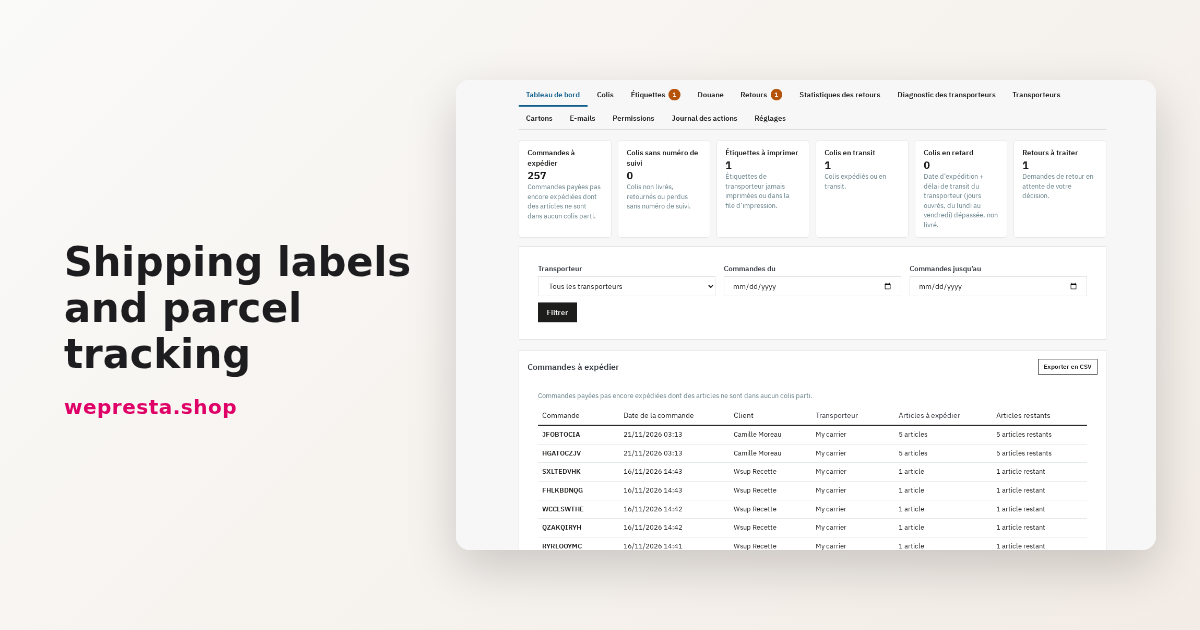
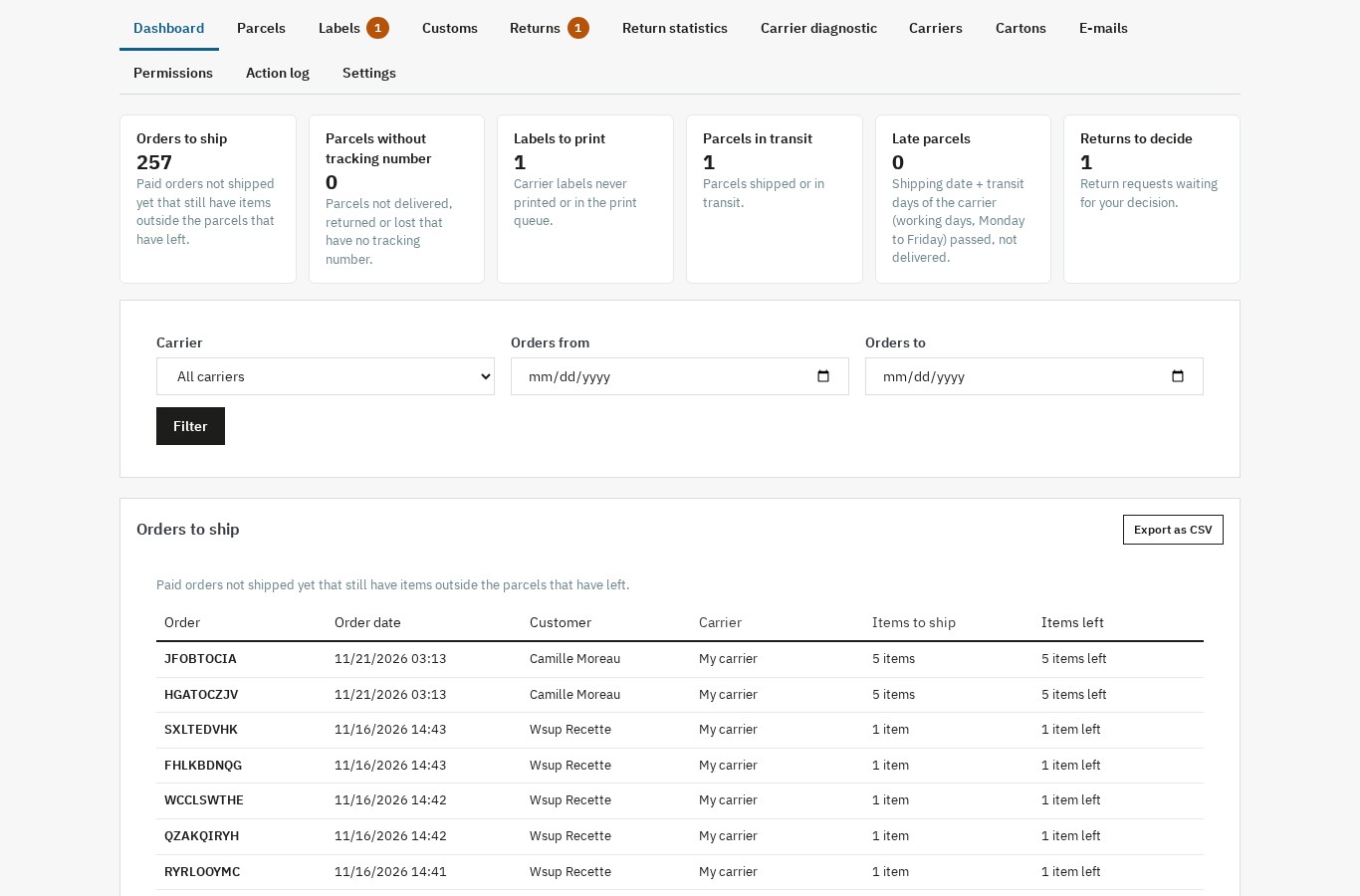 The dashboard gathers the day's shipments: orders to ship, parcels without a tracking number, labels to print, transit and late parcels, and returns to decide.
What the module does not do
The module does not buy carrier labels, compare carrier rates or call a carrier API. It does not track a parcel in real time: statuses are entered by hand or imported from a CSV file, and the carrier's tracking link remains the reference for transport.
It does not manage relay points, pickup networks, marketplaces, picking lists or shipping costs by postcode. Refunds and credit slips stay on PrestaShop's native path; the module only creates a zero-price exchange order or a native store credit from an accepted return.
It does not merge imported carrier PDFs into one file: bulk download produces a ZIP, and the print queue prepares the labels for the next bulk download. Only the parcel labels generated by the module can be combined in a single PDF.
Finally, it does not certify customs declarations and does not replace legal, tax or customs advice. It prepares CN22, CN23 and invoices from the merchant's data; every form must be checked and signed by the merchant, who remains responsible for the declaration.
Features
A shipment record per order
The order page receives a parcel panel. Each parcel has a position in the order (1/3, 2/3…), a carrier, a weight, dimensions, a shipping date, a tracking number, a status and an internal note. Contents are assigned per order line and per quantity, so the same product can be split between two parcels when a partial shipment is needed.
Statuses follow the real lifecycle: Prepared, Shipped, In transit, Delivered, Returned and Lost. The history keeps each change with its date, time, status and location when one is given. The first tracking number can be copied to the order's native carrier record, so the order page and the customer account keep a usable tracking number even before every parcel has left.
The parcel panel also shows the customer tracking link, the label format selector, the button to print the module's parcel labels, the parcel editor, the contents and partial shipping editor, and the history. A shipment can be created from the order page or in bulk from the order list; bulk creation asks for confirmation and uses the default carrier and carton when none is chosen.
Partial shipping and PrestaShop 9.1
When an order is split, the module computes what remains to ship for each line. A parcel can hold two of three items, and the order stays open until the last quantity leaves. The module never assumes that a parcel is complete because a label was printed.
On PrestaShop 9.1, when the native shipment split is enabled, the module reads the native parcels and can create its own record from a PrestaShop shipment. When the flag is disabled, it keeps its own parcel registry. The same module therefore works on 1.7.8, 8.0+ and 9.0+ without forcing a second shipping circuit on shops that use the native one.
The order status change is optional. When every parcel has left, the module can offer to move the order to the shipping status chosen in the settings. Nothing changes unless the merchant ticks the box, and PrestaShop sends its own status e-mail as usual. A separate option can offer the Partially shipped status when only some parcels have left.
Carrier labels, ZIP and print queue
Labels bought from a carrier are imported per parcel. The module accepts PDF, PNG, JPG and ZPL files, checks the type and the size, and stores them in a protected folder outside public access. A file can be previewed, replaced or deleted; each action is written to the action log.
The Labels screen lists every document with its order, carrier, file, date added and print count. The merchant can download the ticked labels as a ZIP, put them in the print queue or take them out. Downloading the queue counts as a print, and downloading it again counts as a reprint; the counter shows how many times a document was taken for printing.
The parcel label generated by the module
The module can also produce its own parcel label as a PDF. It carries the sender, the recipient, the order reference, the parcel number (1/3), the weight and a Code 128 barcode of the tracking number or the order reference. The format is chosen among A4, 1 label per page, A4, 2 labels per page, A4, 4 labels per page and 10 × 15 cm label; several labels can be printed in a single PDF.
This is an identification label for the parcel and its contents. It does not replace the carrier's own document, which remains necessary for routing and delivery. Shops that only need to identify parcels internally can use it; shops that ship with a carrier keep importing the carrier label as before.
Customs data on products
Customs data is entered on the product or combination: HS/CN code, country of origin, net weight, gross weight, customs value, composition and Made-in statement. Values can be inherited from the product category, typed in manually, imported from a CSV file or exported for review.
The customs screen has several tabs: Products, Category defaults, Destination countries and Import and export. The product list shows the HS code, origin, net weight, customs value and composition for each product or combination, with a badge when data is missing. Rows can be ticked and filled in bulk. The counters at the top show the number of products and combinations, the number ready for customs, and how many lack an HS code, an origin, a weight or a value.
CN22, CN23 and invoices
From the contents of a parcel, the module prepares the customs documents. It chooses between No customs document, CN22 and CN23 according to the destination and value, or the merchant can force a choice. The CN22/CN23 threshold is configurable per destination country; the module does not impose a legal threshold, because the applicable rules depend on the destination and on the nature of the goods.
The generated forms carry the sender, the recipient, the item descriptions, quantities, weights, values, currency, HS codes, origin and the signature block. Commercial and proforma invoices add the Incoterm, EORI and VAT numbers, unit values, totals and origin; the invoice type can be Commercial invoice for a sale, else proforma, Commercial invoice or Proforma invoice.
When a required value is missing, the module raises an alert and can block printing, depending on the carrier setting. The merchant can choose to print anyway: the PDF is printed as is, with no banner, the warning stays on screen and the print is logged with the missing data. The forms are prepared from shop data; they must be checked and signed, and they do not constitute a customs certification.
Returns on the native return
PrestaShop already has a merchandise return. The module extends it rather than creating a second one: a return keeps its native order return record and order return details, and gains a translated reason, the customer's comment, attached photos or documents, an imported return label, a return carrier, a return tracking number, a received date and a merchant note.
The return reasons are managed in a dedicated screen: a name per language, an active or inactive state and an order of display. They are offered to the customer in the return portal and used in the statistics.
The customer requests a return from a portal reached through a signed link. The portal lists the order's items and the quantities still returnable, asks for a reason and an optional comment, and accepts photos or documents within the configured type and size limits. The request creates a native PrestaShop return and sends the configured e-mails.
The merchant accepts or refuses with a reason. Acceptance and refusal e-mails go out in the customer's language; when the parcel arrives, the merchant records it as received and can close the return. The return label can be added, replaced, downloaded or deleted, and the return tracking number can be filled in for the customer.
Exchange and store credit
From an accepted return, two resolutions are available. An exchange creates a zero-price order through PrestaShop's PaymentFree module, with the replacement items, and links it to the return; stock follows the normal order rules. A store credit creates a native cart rule (voucher) for the customer, with a validity period in days, and links it to the return.
Refunds and credit slips are not created by the module: they stay on PrestaShop's native path. The exchange order and the voucher are commercial gestures offered from the return, not a replacement for the refund workflow.
Customer tracking page and e-mails
The tracking page is reached through a signed link, without login. It shows the parcels of the order, the carrier, the tracking number, the shipping date, the status, the last update and the history. It only shows the data of the customer the link was issued for; the secret used to sign the links can be renewed from the settings.
One shipping e-mail is sent per parcel, in the order language, with the tracking link. The template is editable per language; the merchant can send it again manually, send a test e-mail, and receive a copy. The e-mail does not replace PrestaShop's native order-status e-mail: it adds the parcel-level detail that the native e-mail cannot carry.
Tracking statuses: manual and CSV
Statuses are updated manually from the parcel panel. They can also be imported from a CSV file: the merchant chooses the file, maps the columns (order, parcel, tracking number, status, date, location), runs a dry run that writes nothing, reads the line-by-line errors, then applies the import. A status event already present on an earlier line is not duplicated.
No carrier API is called. The module records what the merchant enters or imports, and the carrier's tracking link is offered to the customer for the actual transport state.
Carrier diagnostic
The carrier diagnostic explains why a carrier is or is not offered. For an order, or for a simulated address and cart, it lists every carrier with its availability and the exact reason when it is unavailable: deleted carrier, disabled carrier, carrier not available in the shop, missing phone number, no active carrier, outside the zone, no weight or price range, cart outside the ranges, customer group restriction, or module carrier without a price.
The diagnostic uses PrestaShop's native carrier rules; it does not contact the carrier. It is meant to shorten the search when a customer says that no carrier is available, or when a carrier disappears from the checkout after a catalog or cart change.
Shipment dashboard
The dashboard shows the day's work: orders to ship, parcels without a tracking number, labels to print, parcels in transit, late parcels according to the carrier's transit time, and returns to decide. Each counter opens a filtered list. Lists can be sorted, filtered by carrier or date, and exported as CSV.
Carton library
The carton library stores the cartons used by the shop: name, inner length, width and height, empty weight, maximum weight and cost. For a parcel's contents, the module suggests the smallest compatible carton by volume and weight, checks that the largest item fits, and displays the empty-space ratio. When product dimensions are missing, a clear notice says so and the suggestion uses weight only.
Installation
- Back up the shop and the database before installing any module.
- In the Module Manager, upload the module ZIP file and install it.
- Open the module configuration page. The license panel asks for the license key and secret provided with the purchase.
- Without a valid license, the module disables itself and its screens are not available. The data already stored (parcels, labels, customs data, returns) is kept; after renewal, opening the configuration page enables the module again.
- Check that the module's tabs appear in the back office: Dashboard, Parcels, Labels, Customs, Returns, Return statistics, Carrier diagnostic, Carriers, Cartons, E-mails, Permissions, Action log and Settings.
- Give the relevant rights to employee profiles: View, Ship, Customs, Returns and Configure.
The back office does not depend on the shop theme. The customer tracking page and the return portal follow the active theme, Classic or Hummingbird, and are usable on a phone.
First configuration
License and module status
The configuration page shows the license state, the domain and the expiration. A valid license enables the module; an expired or revoked license disables it without deleting data. The module does not contact a carrier.
Sender and documents
In the Sender settings, enter the sender name and address used on the documents, the signatory of the customs forms, and the sender address shown on invoices. These values are reused on CN22, CN23, commercial invoices and proforma invoices. Check them against the shop's legal information before printing a real document.
Shipping defaults
The Shipping settings hold the default carrier and carton for new parcels, the default parcel contents, the default label format and the option to weigh parcels from the products. They also hold the order status to apply when every parcel has left, and whether the Partially shipped status may be offered.
Two settings deserve attention: Copy the first tracking number to the order, which keeps the native order record usable, and Offer the status Partially shipped, which must stay off if the shop does not want a new order status.
Carriers
The Carriers screen lists the native PrestaShop carriers and the module settings for each one. Settings are stored against the carrier reference rather than in a second carrier record, so the native carrier remains the single source. For each carrier, set the cut-off time, the transit time in days, the label format, the default carton, the instructions and the tracking URL.
The tracking URL reuses the native carrier URL: the @ is replaced by the tracking number. The carrier settings also hold the tracking-number rules (pattern, minimum and maximum length, digits only, letters and digits, or any character), the duplicate check, and the address check level: Warn only or Block until corrected. A carrier can require a phone number; the check then reports it before the parcel is created.
Cartons
Create the cartons used at the packing table: name, inner dimensions, empty weight, maximum weight and cost. The suggestion only works with real dimensions; when a product has none, the module says so instead of inventing a carton.
Customs
In Customs, set the category defaults (origin, composition, Made-in statement), the destination-country rules and the CN22/CN23 threshold per country. Then fill the product data, either on each product page, in bulk from the customs dashboard, or by CSV import. Export the list to review it with the person responsible for customs.
E-mails and files
The E-mails settings hold the shipping e-mail template per language, the copy address and the test address. The Files and CSV settings hold the maximum label file size, the maximum return file size, the CSV separator and encoding, and the retention periods for label files, return files and the action log. The Data settings control whether data is deleted when the module is uninstalled and how a customer's return data is erased on request.
Day-to-day use
Ship an order in several parcels
- Open the order and the parcel panel.
- Create a shipment; choose the carrier and the carton.
- Assign the quantities per order line to the first parcel.
- Save the parcel, then create the next one and assign the remaining quantities.
- Import the carrier label for each parcel, or print the module's parcel label.
- Enter the tracking number; the module checks its format and warns about a duplicate.
- Mark the parcel as shipped. If the option is enabled, the customer receives the shipping e-mail for that parcel.
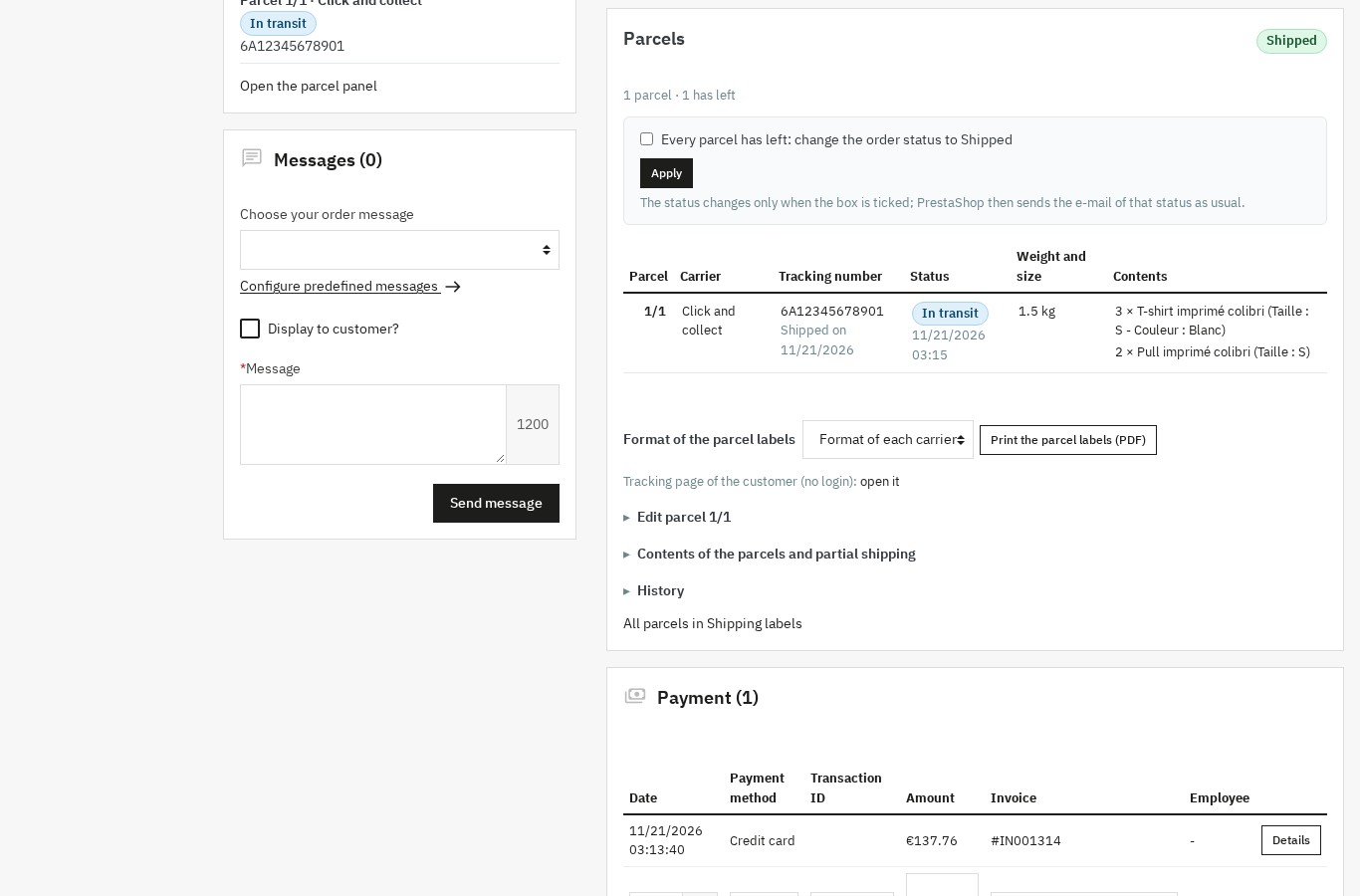 The parcel panel on the order: tracking number, status, contents, label printing and history in one place.
Prepare a non-EU shipment
- Check the customs data of the products in the parcel. The customs dashboard lists what is missing.
- Open the parcel and its customs details.
- Choose the contents type, the Incoterm and the invoice type, or leave the automatic choice.
- Fill the declared value and the currency if the product value is not the right basis.
- Generate the CN22 or CN23 and the commercial or proforma invoice.
- Read the document, complete the missing fields and sign it.
- Print it with the carrier label and give it to the carrier.
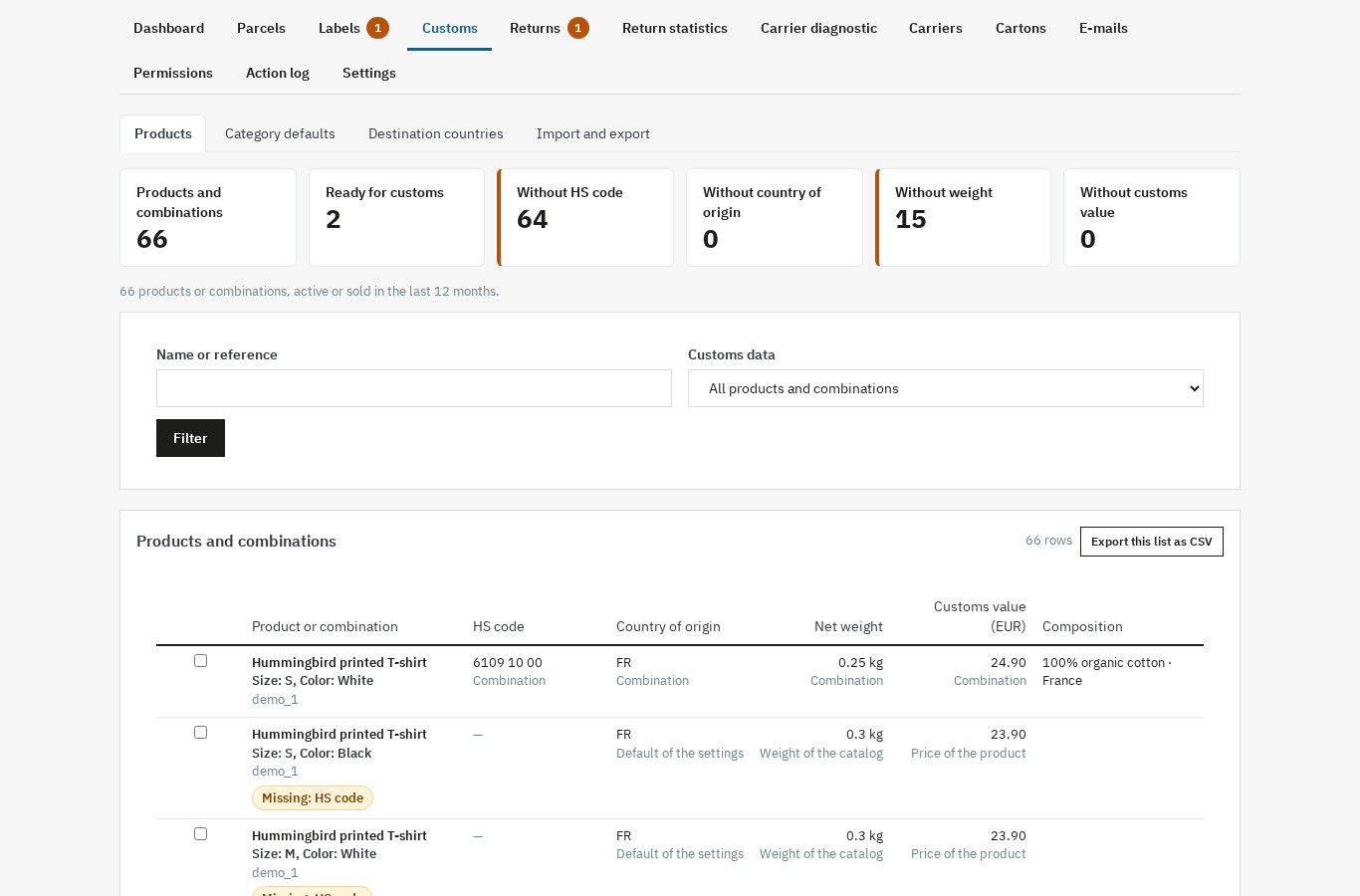 The customs dashboard shows missing HS codes, origins, weights and values, and lets the merchant fill them in bulk.
Handle a return
- The customer opens the return portal from the signed link of the order, in the order follow-up or on the tracking page.
- They choose the items and quantities, give a reason and attach photos or documents.
- The request appears in Returns with the status Waiting for a decision.
- Open the request, read the comment and files, then accept or refuse with a reason.
- If accepted, add the return label, the return carrier and the return tracking number.
- When the parcel arrives, record it as received; the customer receives the receipt e-mail.
- Choose the resolution: exchange order, store credit, or the native PrestaShop refund.
Import tracking statuses
- Export the parcels as CSV to get the expected columns.
- Fill the status, date and location for each parcel from the carrier's report.
- Import the file, map the columns and run the dry run.
- Read the line-by-line report, fix the rejected lines, then apply the import.
- Check the parcel histories and the dashboard counters.
Print the day's labels
The Labels screen is the packing table's queue. Filter by order, carrier, date or print state, tick the labels to print, then download the selection as a ZIP or put it in the print queue. The queue can be downloaded as one ZIP and cleared; each download is counted, so a reprint remains visible in the history. The module's own parcel labels can be printed in a single PDF from the order or from the label screen.
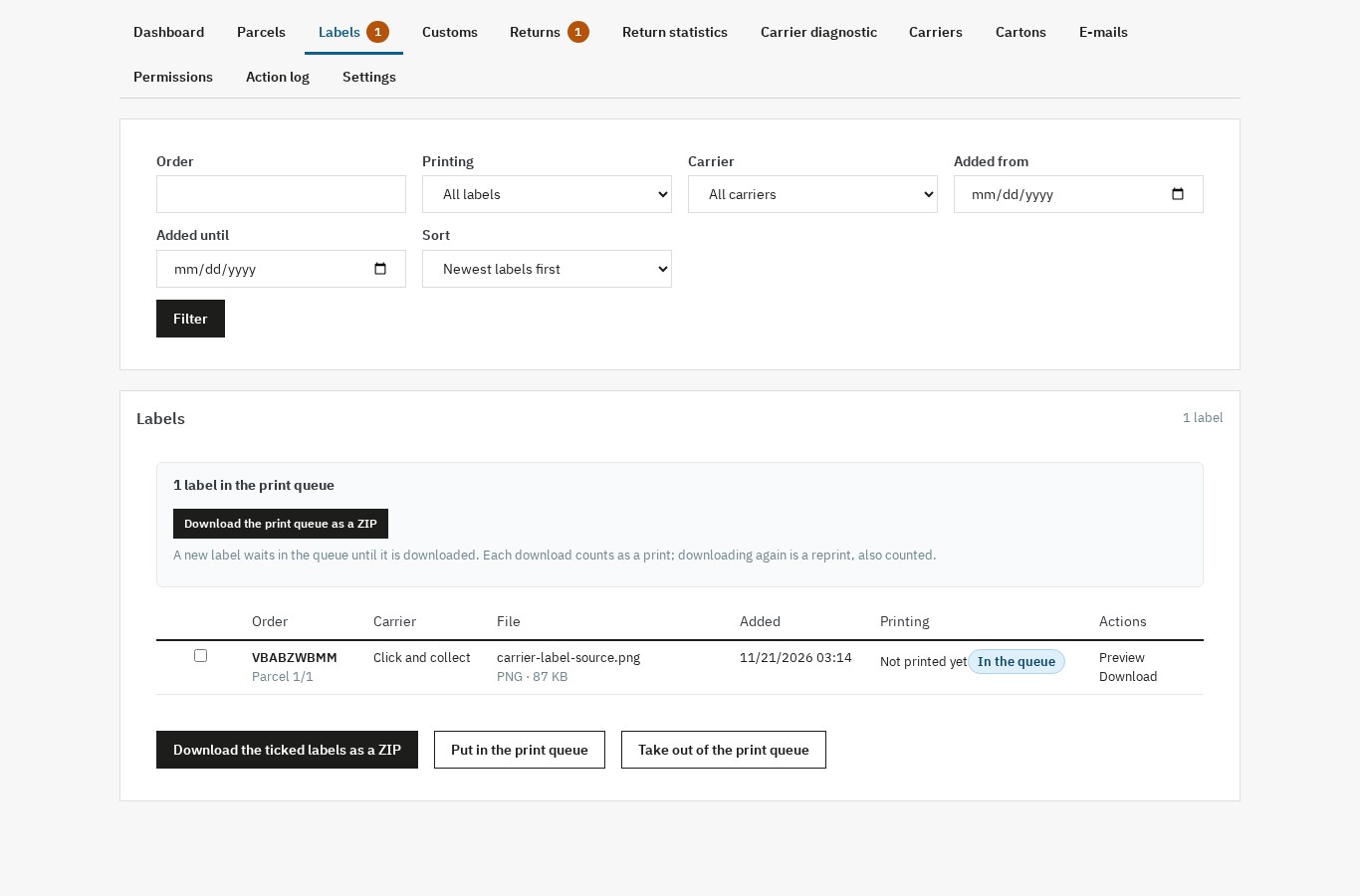 The label list and print queue: order, carrier, file, print count, ZIP download and queue actions.
Review the month
The dashboard and the return statistics give the month's picture: parcels without tracking numbers, late parcels, returns to decide, return rate, share of returned items, reasons, products and carriers. Export the lists as CSV for the accountant, the carrier or the next team meeting.
Use cases
A shop that splits orders
A clothing shop receives an order for four items, but one size is on backorder. It creates a first parcel with three items, imports the carrier label, enters the tracking number and sends the shipping e-mail. Two weeks later, the remaining item arrives; the shop creates a second parcel on the same order, imports the second label and sends the second e-mail. The customer tracking page shows both parcels and their own history, and the order only moves to the shipped status when the merchant ticks the box.
A shop selling outside the European Union
A workshop sells handmade parts to the United Kingdom, Switzerland and the United States. The HS codes, origins and weights are entered once in the product sheets; the customs dashboard shows the products that still miss a value or an origin. For each parcel, the module prepares the CN22 or CN23 and the commercial invoice from the contents, with the Incoterm and the EORI number. The merchant checks the form, signs it and prints it with the carrier label.
A shop with regular returns
A shoe shop receives size-related returns. The customer opens the return portal from the tracking page linked in the order e-mail, selects the pair and the reason, and attaches a photo of the box. The merchant accepts the return, adds the return label bought from the carrier, and sends the acceptance e-mail. When the parcel arrives, it is recorded as received. The merchant chooses a store credit for the customer, and the return statistics show that size issues are the first reason of the quarter.
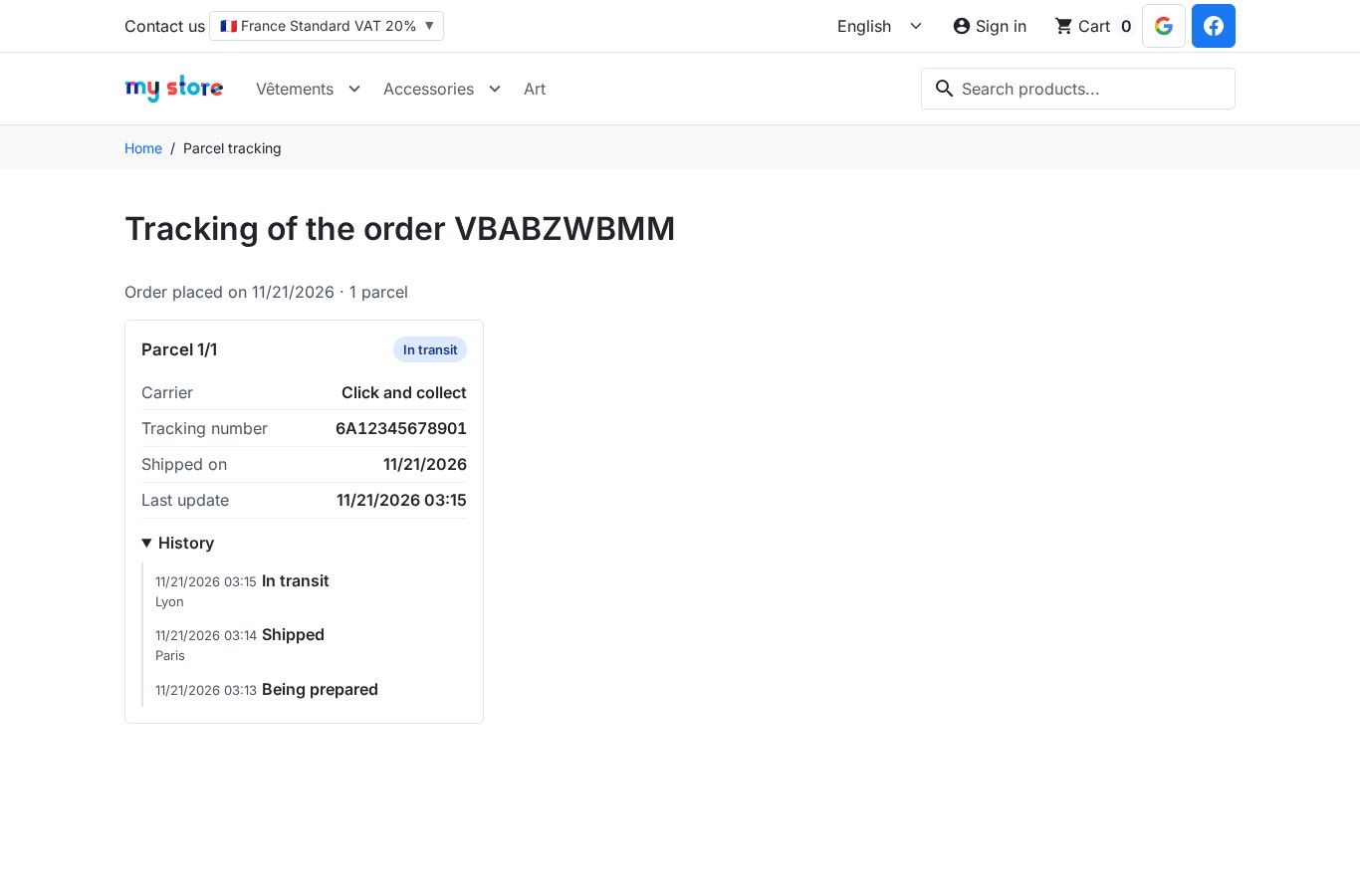 The customer tracking page: parcel status, carrier, tracking number and history, without an account.
A multi-carrier agency
An agency manages several shops with different carrier contracts. The carrier diagnostic explains why a carrier disappears from the checkout after a cart change, the shipment dashboard shows the parcels without a tracking number, and the action log records who changed a parcel, a label or a return. Permissions limit each employee to the screens they need.
Requirements and limits
Compatibility
The module is compatible with PrestaShop 1.7.8, 8.0+ and 9.0+, including PrestaShop 9.1 with the native shipment split enabled or disabled. It requires PHP 7.4 or later. The customer tracking page and the return portal follow the active theme, Classic or Hummingbird. The interface is available in French, English, Spanish, Italian and Polish. The module works in multistore, with parcels, settings and documents scoped to the shop.
PrestaShop 9.1's native shipment split is a recent feature. A shop that enables it should test a complete shipment on a staging copy before using it in production, especially if another module also manages shipments.
Limits
- No label purchase, no rate comparison, no carrier API and no real-time tracking.
- No relay points, pickup networks, marketplaces, picking lists or shipping costs by postcode.
- No PDF merge of imported carrier labels: bulk download is a ZIP; only the module's own parcel labels can be combined in one PDF.
- Refunds and credit slips stay on PrestaShop's native path; the module offers an exchange order or a native store credit.
- Customs documents are prepared from shop data. The merchant checks and signs them and remains responsible for the declaration. The module does not provide legal, tax or customs advice.
- The carrier diagnostic reproduces PrestaShop's native availability rules. It does not ask the carrier why a service is unavailable.
- The carton suggestion needs product dimensions and weights. When they are missing, it says so and falls back to weight only.
Files, data and permissions
Imported labels, return files and generated documents are stored in a protected folder outside public access. The tracking page and the return portal use signed links, the customer's return-label download link expires after seven days, and the signing secret can be renewed. Access to the module's screens is controlled by employee profile rights, and the action log records changes with the employee, the object and the action.
Retention settings control how long label files, return files and the action log are kept. A customer's return data can be erased on request, and the module can delete its data when it is uninstalled if the merchant chooses so. Back up the shop before uninstalling.
FAQ
Does the module buy carrier labels?
No. The merchant keeps buying labels from the carriers, under the shop's own contracts. The module imports the PDF, PNG, JPG or ZPL files, files them by order and parcel, counts them for printing and downloads them as a ZIP. It does not replace a carrier account or a label-buying platform, and it does not compare rates.
Is the tracking updated in real time?
No. No carrier API is called. Statuses are entered by hand or imported from a CSV file, with a dry run and a line-by-line error report. The customer page shows the recorded history and the carrier's tracking link, which remains the reference for the transport.
Do I need a carrier account or an API key?
No. The module works with the labels and tracking numbers the shop already has. The tracking link reuses the native carrier URL, with the tracking number in place of the @. Nothing is sent to a carrier or a third-party service.
Which PrestaShop versions and themes are supported?
PrestaShop 1.7.8, 8.0+ and 9.0+, including 9.1 with the native shipment split enabled or disabled. PHP 7.4 or later. Customer pages follow the active theme, Classic or Hummingbird. The interface is available in five languages.
How does splitting an order into several parcels work?
Create a parcel, choose the quantities per order line, and the module computes what remains to ship. Each parcel has its own carrier, tracking number and status, and one shipping e-mail can go out per parcel. On 9.1, when the native split is enabled, the module reads native parcels and can take one over; otherwise it keeps its own record. The order status is only proposed once every parcel has left, and never without a ticked box.
Are the CN22 and CN23 legally valid?
The module prepares the forms from the product data, but it does not certify them and does not replace customs, tax or legal advice. Thresholds and statements vary by destination and value; the CN22/CN23 threshold is configurable per country, with no legal value imposed. The merchant must check every document, sign it and remain responsible for the declaration.
What happens without a valid license?
The module disables itself: its screens and actions are no longer available. Parcels, labels, customs data and returns are kept. After renewal, opening the configuration page enables the module again, with no data to enter a second time.
Does the module handle refunds?
No. Refunds and credit slips stay on PrestaShop's native path. From an accepted return, the module offers a zero-price exchange order or a native store credit, with quantity and stock checks. It does not create a refund or a credit slip in PrestaShop's place.
Does the module merge the carrier PDFs?
No. PDFs imported from carriers are not merged: bulk download produces a ZIP, and the print queue prepares them for the next bulk download. Only the parcel labels generated by the module, in A4 or 10 × 15 cm, can be combined in a single PDF.
Does it work with multistore and several employees?
Yes. Parcels, settings and documents follow the selected shop, with a shop selector in the interface. Permissions are set per employee profile, with View, Ship, Customs, Returns and Configure rights, and every action is written to the action log.
Can the customer e-mails be edited?
Yes. The shipping, acceptance, refusal and receipt e-mails have templates editable per language, with a preview, a test send and an optional copy to the merchant. The messages are sent in the order or customer language.
Support
The module is published by Wepresta. For an installation question, a configuration problem or a bug, use the contact form on the module page. Include the PrestaShop version, the module version, the steps that lead to the problem, the exact message displayed and, when relevant, a screenshot without customer data.
Before contacting support, check the module's configuration page, the action log and the PrestaShop error log. The documentation covers installation, first configuration and daily use; the FAQ answers the most common questions.
Discover the module and its plans
Changelog
Version 1.0.0
- Create one or more parcels per order, with carrier, weight, dimensions, shipping date, tracking number, status and internal note.
- Assign quantities per order line, compute the remaining quantity and ship an order in several parcels.
- Read PrestaShop 9.1 native shipments when the native split is enabled, and keep a parcel registry when it is disabled.
- Propose the order status change when every parcel has left, never without a ticked box, with an optional partially shipped status.
- Import PDF, PNG, JPG and ZPL carrier labels per parcel, with protected storage, preview, replacement, deletion and an action log.
- Download ticked labels as a ZIP, manage a print queue with a print counter and reprint a document.
- Generate a parcel label PDF in A4 (1, 2 or 4 per page) or 10 × 15 cm, with a Code 128 barcode of the tracking number or reference.
- Configure each native carrier without duplicating it: cut-off time, transit time, label format, default carton, instructions and tracking URL.
- Validate tracking numbers by pattern and length, warn about duplicates and optionally copy the first number to the order.
- Check the recipient address and information before creating a parcel, with a warning or a block per carrier.
- Offer a customer tracking page through a signed link, with parcels, carrier, tracking number, status and history.
- Send one shipping e-mail per parcel, editable per language, with manual resend and an optional copy to the merchant.
- Update tracking statuses by hand or by CSV import with column mapping, dry run and line-by-line errors, and export shipments as CSV.
- Store customs data per product and combination: HS code, origin, net and gross weight, value, composition and Made-in statement.
- Prepare CN22 and CN23 declarations, commercial and proforma invoices, with automatic document choice, missing-data alerts and a configurable threshold per destination country.
- Show a customs dashboard with missing HS codes, origins, weights and values, and fill the data in bulk.
- Extend PrestaShop's native return with a translated reason, customer files, return label, carrier, tracking number, received date and merchant note.
- Offer a customer return portal through a signed link, with acceptance, refusal and receipt e-mails in the customer's language.
- Create a zero-price exchange order or a native store credit from an accepted return, with quantity and stock checks.
- Show return statistics by period, reason, product and carrier, with CSV export.
- Explain carrier availability for an order or a simulated cart, based on PrestaShop's native rules.
- Show a shipment dashboard with orders to ship, parcels without tracking numbers, labels to print, parcels in transit, late parcels and returns to decide.
- Suggest the smallest compatible carton, check the largest dimension and display the empty-space ratio.
- Work in multistore, in five languages, with permissions per employee profile and an action log.
- Keep parcels, labels, customs data and returns when the license is not valid, and enable the module again after renewal.
- Run on PrestaShop 1.7.8, 8.0+ and 9.0+ with PHP 7.4 minimum, with the Classic and Hummingbird themes.

Related articles
Shipping labels and parcel tracking in PrestaShop
An order leaves in three parcels, carrier labels pile up in a downloads folder and tracking numbers live in a spreadsheet. The module gathers parcels, labels, customs…