B2B Quote Requests: negotiate prices and turn them into orders - Module PrestaShop

A complete quote journey inside your shop: request with or without an account, priced proposal and PDF, counter-offers, cart and team follow-up, with no re-typing.

New Version 1.1.0 1.7.8 8.0+ 9.0+ 5 languages 🇫🇷 FR 🇬🇧 EN 🇪🇸 ES 🇮🇹 IT 🇵🇱 PL
  • A “Request a quote” button on the product page and on the cart, with or without a customer account
  • A negotiated price or discount per line, a PDF, attachments and free shipping
  • A conversation with counter-offers, the history of every proposal and scheduled reminders
  • Quotes created in the back office, assigned, approved above an amount and exported to CSV
  • Compatible with PrestaShop 1.7.8, 8.0+ and 9.0+
Not sure yet? Try it free for 24 hours — no credit card required.
Features

Everything you need, nothing you don't.

Every step is recorded and visible, for the customer and for your team.

A button, with or without a customer account

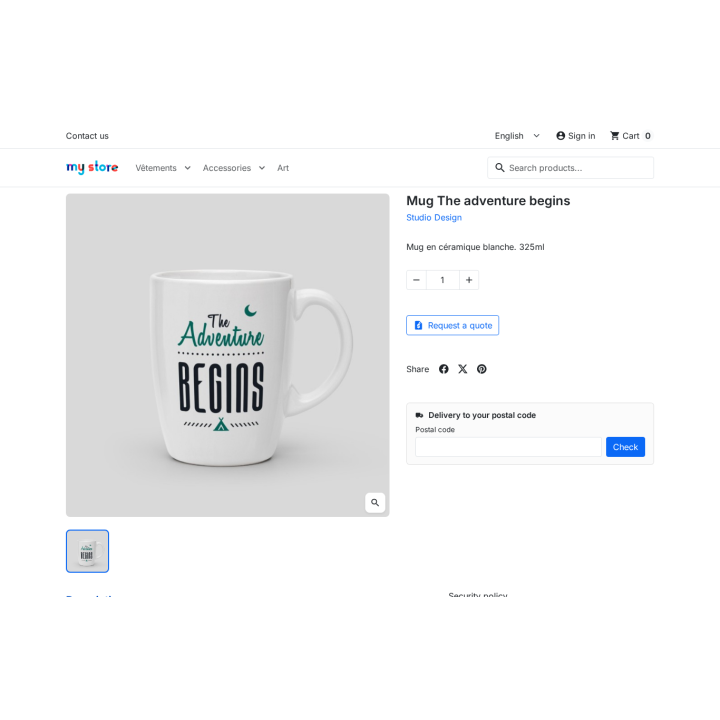
“Request a quote” sits under “Add to cart” and on the cart page, for the allowed groups. A visitor can request a quote without an account and follow the proposal through a signed link.

A short form, files included

The customer adjusts quantities, gives their company, VAT number and requirements, and attaches plans or photos. The quote keeps a unique reference and a full history.

A price, a discount, a target price

Negotiated price excluding tax or a discount per line, the customer’s target price alongside, free shipping: tax-excluded and tax-included totals are recomputed with the shop’s tax rules before sending.

A PDF for every proposal

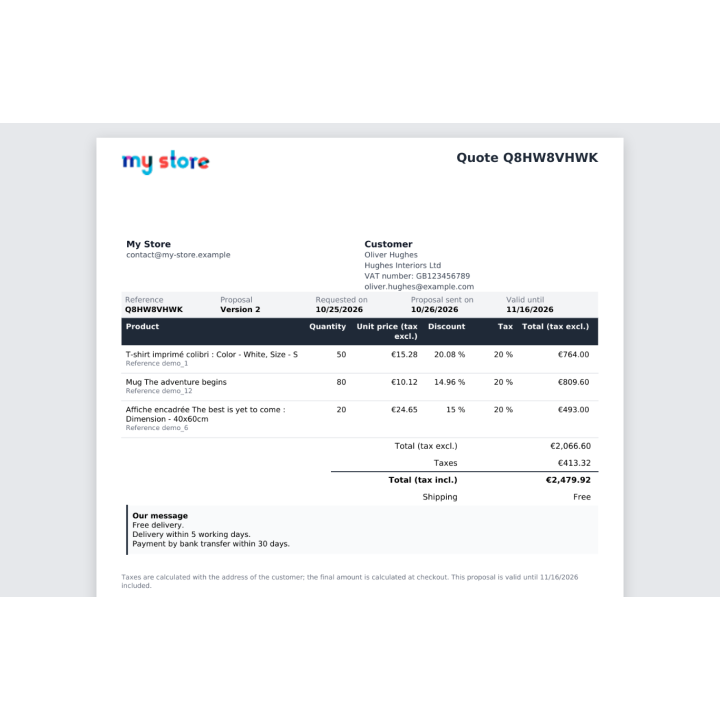
Every sent proposal becomes a kept revision, with its PDF: the customer downloads it from the quote or the signed link, you find it in the back office, and it goes out with the e-mail.

Counter-offers and conversation

The customer replies, proposes a target price per line and attaches files; you answer from the back office. Every exchange and every proposal version stays in the history.

Acceptance fills the cart

In one click, the quoted products and quantities join the cart at the negotiated prices, with free shipping when it was granted. The customer orders with the usual carriers and payment methods.

Every quote tracked, assigned, exported

Six statuses, filters, an assignee, internal notes, approval above an amount and CSV export: every quote is tracked without leaving the back office.

Reminders and alerts

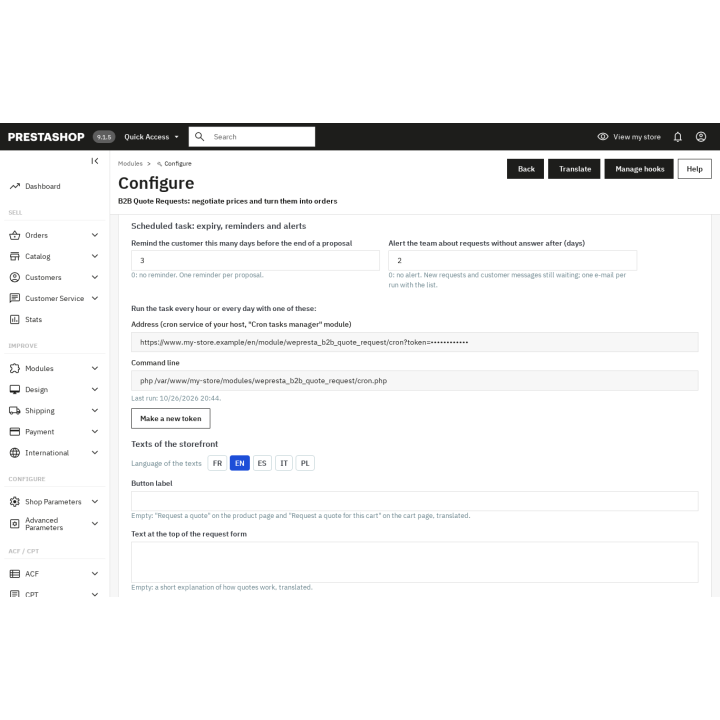
A scheduled task expires overdue quotes, reminds customers before the validity date and alerts the team about pending requests. E-mails go out in the customer’s language.

description Full description expand_more

Your B2B quotes arrive by e-mail: give them a home in your shop

A business customer asks for a price for a few pieces, then for a much larger quantity. The request comes by phone or e-mail, the price is negotiated in a thread, and the order is typed into the back office by hand. In between, the agreed price is lost, the customer orders at the catalogue price, or nobody knows whether the quote was accepted.

B2B Quote Requests puts that journey inside your PrestaShop shop: the customer requests a quote from the product page or the cart, you answer with a negotiated price per line and a validity date, and their acceptance puts the products in their cart at the negotiated prices, ready to order. Every step leaves a trace: status, history and e-mails.

A button where the customer is

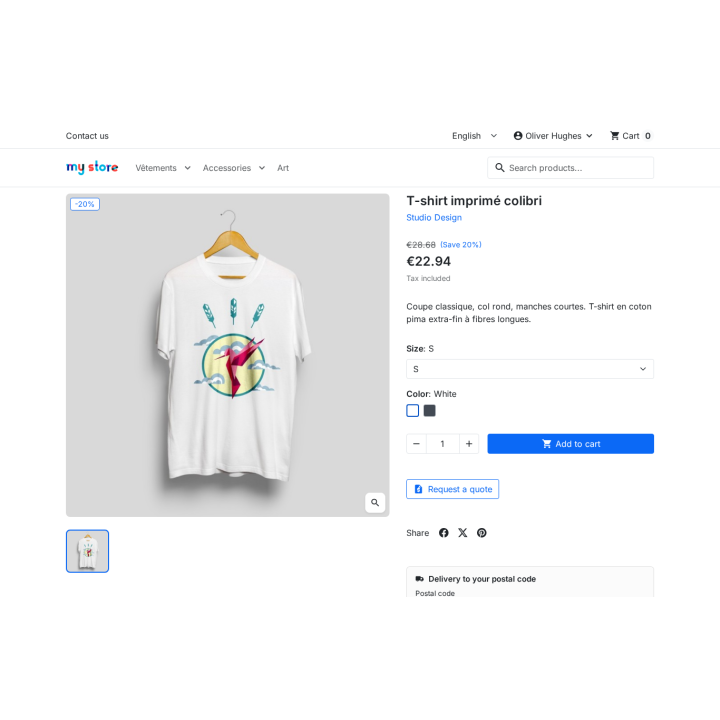
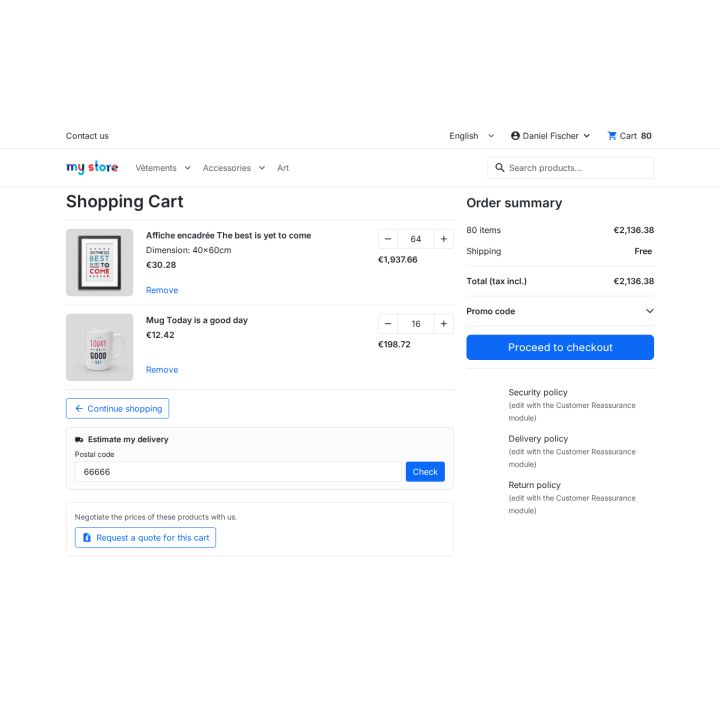
On the product page, the “Request a quote” button sits under “Add to cart” and carries the selected combination and quantity. On the cart page, an equivalent button turns every cart line into a single request. You choose the allowed customer groups: your business customers see the button, your retail customers need not.

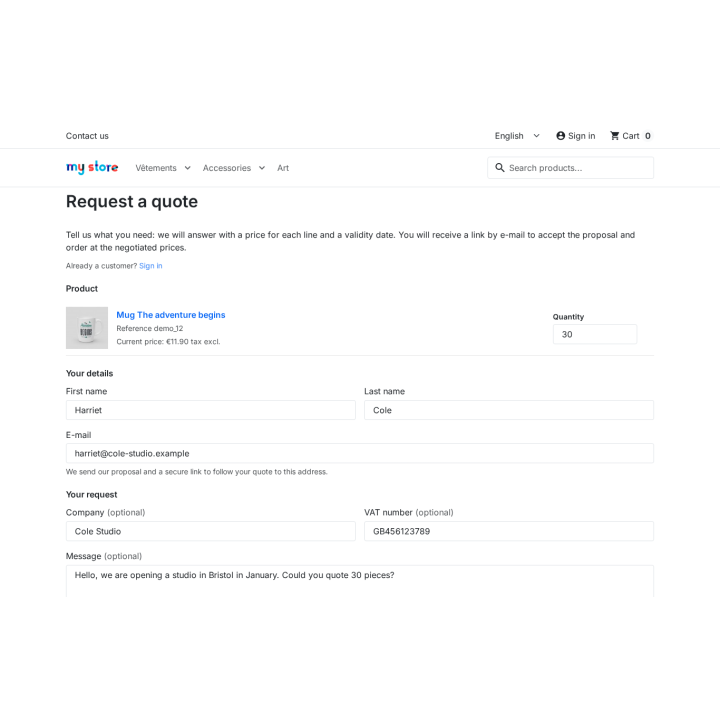
A visitor who is not signed in can request a quote without creating an account, when you enable that option: they enter their first name, last name, e-mail, company and VAT number, receive the proposal by e-mail and follow it through a signed link. An “Already a customer? Sign in” link keeps the account path, and they can create their account when ordering.

A short form, with or without an account

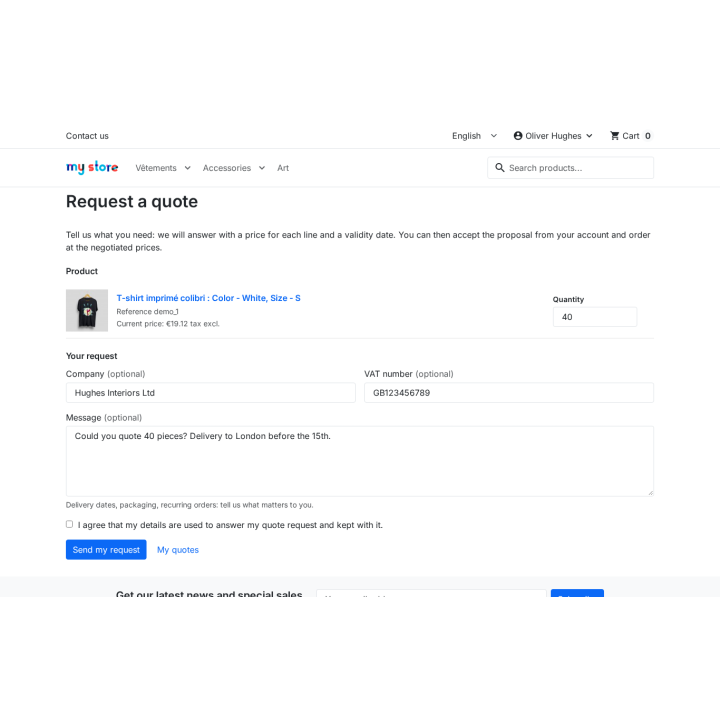
The form shows the products, the reference, the catalogue price excluding tax and the quantity. From a product page the customer adjusts the quantity; from the cart, the quantities are carried over as they are, with a link to change the cart. They can add their company, VAT number and a message — expected lead time, packaging, recurring orders — and, when attachments are enabled, plans, photos or a specification (PDF, image, CAD, office file or archive, up to five files). A consent box, an anti-spam check and a security token protect the submission. The quote receives a unique reference and arrives in your back office with the status “New”.

A proposal with a negotiated price per line

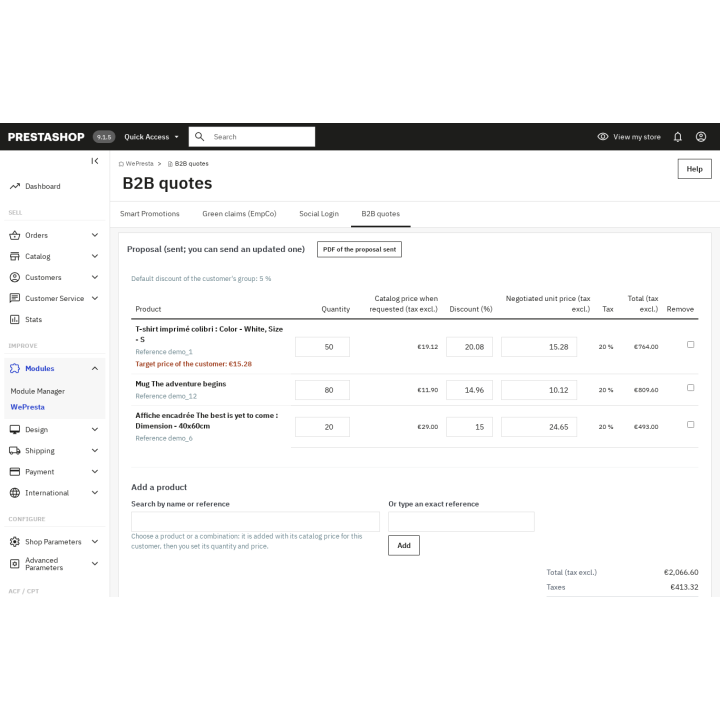
In the back office, the quote page shows the catalogue price at request time. You enter the negotiated unit price excluding tax of each line, or a discount percentage, the validity date and a message for the customer. You can offer free shipping: it is applied by a native cart rule on acceptance. Tax-excluded totals, taxes and tax-included totals are recomputed with the shop’s tax rules and the customer’s address before sending. A “Recalculate” button checks the amounts without sending anything.

The proposal goes out by e-mail in the customer’s language, with a PDF attached and a link to their quote. The status becomes “Proposal sent”, and the history records the date and the author. Every sending becomes a kept revision: the customer finds the earlier proposals and their PDFs, and you keep a record of every agreed price.

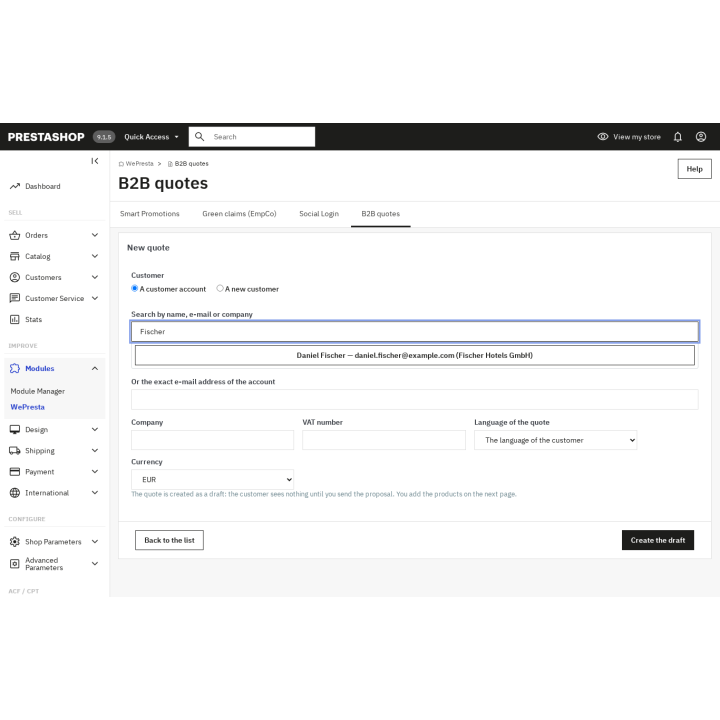
You can also create a quote on the shop’s initiative: “New quote” picks an existing customer or a new contact, adds products, quantities, a discount and a negotiated price, then saves a draft or sends the proposal. Lines can be changed until sending, up to 100 lines.

Acceptance fills the cart at the negotiated prices

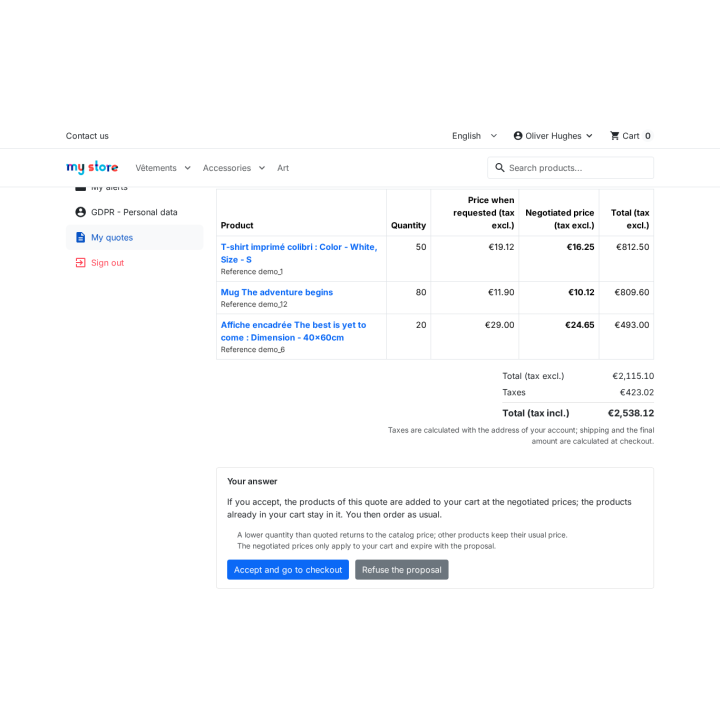
From their account or their signed link, in “My quotes”, the customer reads the proposal and accepts or refuses it, with an optional reason. On acceptance, the quoted products and quantities are added to their cart with the negotiated price of each line, set as a native specific price bound to this cart and this customer; free shipping is applied by a native cart rule. Products already in the cart stay. The customer then orders as usual, with the shop’s carriers and payment methods.

The negotiated price applies to this cart only. A quantity below the quoted one returns to the catalogue price; above it, the negotiated unit price stays. Other products keep their usual price, and an expired or already processed proposal can no longer be accepted.

A conversation, not a dead end

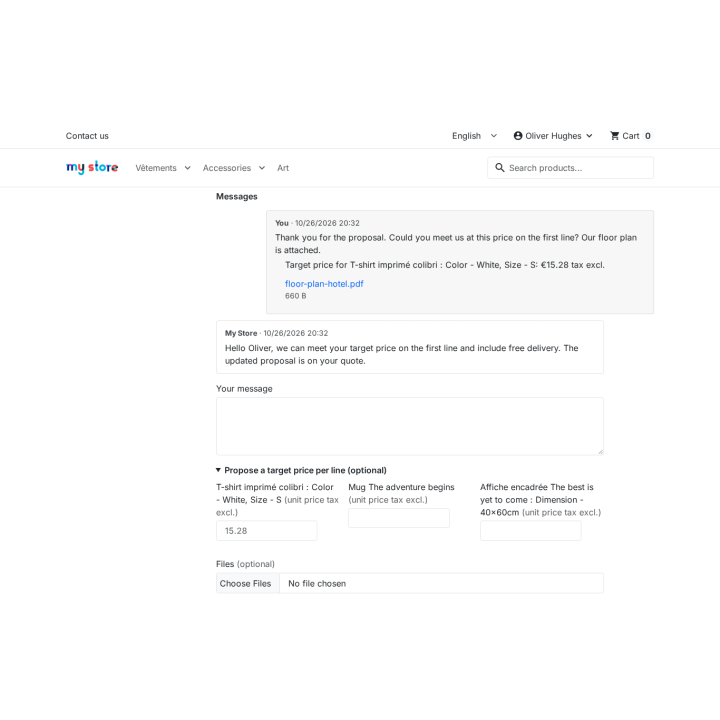
The customer can reply from the quote page: a message, a target price per line and files. You answer from the back office, your team receives a notification and unread counters point to the quotes waiting for an answer. Every counter-offer and every proposal sent stays in the history: the customer can accept the current proposal while you prepare the next one. A scheduled task, which you enable when you want, expires overdue proposals, sends reminders before the validity date and alerts the team about requests waiting for an answer.

Every quote followed from start to finish

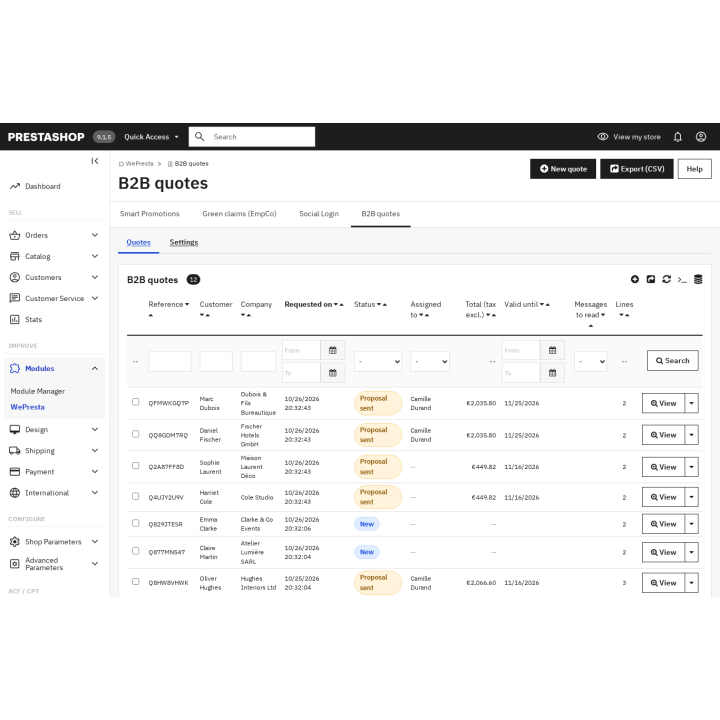
The quote list filters by status, customer, company, date, reference and assignee, and sorts on every column. It exports to CSV with the current filters, one row per quote line. Each quote has six statuses:

  • Draft: the quote is prepared by the shop and stays invisible to the customer;
  • New: the request has just arrived;
  • Proposal sent: the customer has received a price and can answer;
  • Accepted: the products are in their cart at the negotiated prices;
  • Refused: the customer declined the proposal, with an optional reason;
  • Expired: the validity date has passed; a new proposal is still possible.

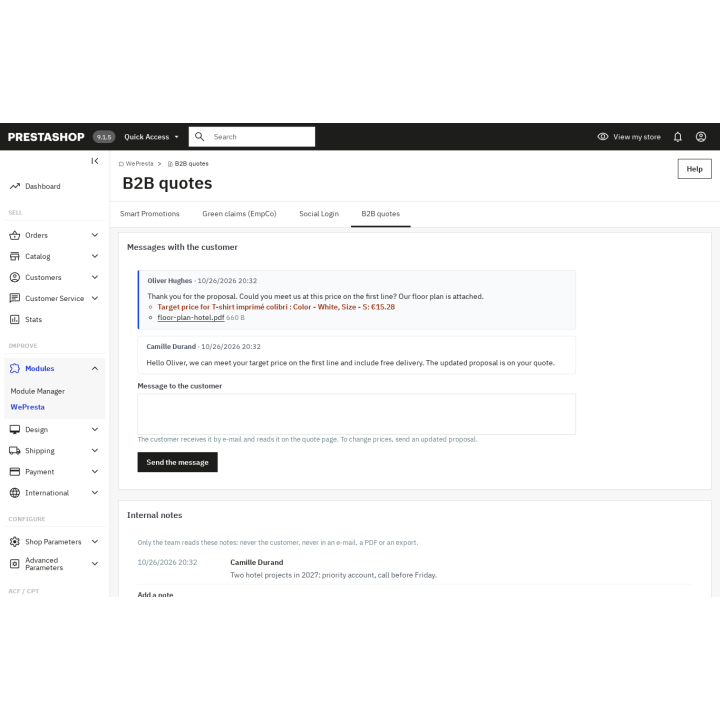
The quote page shows the customer’s details, their message, the conversation, the files, the lines, the proposal revisions, the cart and the resulting order, then the full history. You can assign the quote to a salesperson, add internal notes — never shown to the customer — and, above an amount you set, have the proposal approved by a manager before it is sent. The journey’s e-mails cover the acknowledgement, the proposal with its PDF, the signed link sent to the visitor, messages, reminders and alerts for your team. The recipients are configured in the settings.

Common use cases

  • A wholesaler negotiates volume: they ask for a price on a large quantity, you answer with a per-line price and a validity date, they accept and find the products in their cart.
  • A craftsman prepares a building site: they fill their cart with several references, request one quote for the whole cart, attach their plans, then accept the proposal covering each line.
  • A visitor compares before registering: they request a quote without an account, receive a signed link, discuss quantities, accept and create their account when ordering.
  • A sales team gets organised: a salesperson prepares a quote, assigns it to a colleague, adds an internal note and has a large discount approved by a manager; the CSV export feeds the sales follow-up.

Settings and data

You enable or disable requests, choose the customer groups, the button locations, the default validity (30 days), the notification recipients and the shop texts in five languages. You set quotes without an account and the link lifetime, attachments and messaging, the PDF attached to the proposal, the default discount of each customer group, approval by a manager, catalog mode (groups, categories, products) and the scheduled task, with its address and delays. In multistore, each shop has its own quotes and settings. On uninstall, quotes are kept by default unless you choose to delete them; they are deleted with the customer account.

What the module does not do

Free shipping is the only shipping concession: PrestaShop has no native way to set a shipping price for one cart, and other orders follow the shop’s carriers and rates. Negotiated prices stay bound to the cart created on acceptance: a later order starts again at catalogue prices. Payment uses the methods installed on the shop and payment terms are not included. Catalog mode hides prices and replaces “Add to cart” on the storefront, without touching the cart or checkout. Approval is a single threshold by the profiles you choose, not a multi-level circuit, and the scheduled task is optional: both only run when you configure them. Sales targets per employee are not part of the module.

Requirements

PrestaShop 1.7.8, 8.0+ or 9.0+, PHP 7.4 or later, Classic and Hummingbird themes. Interface and e-mails in English, French, Spanish, Italian and Polish. No external service is needed: e-mails go through PrestaShop and payment uses the methods already installed. A customer account stays optional: enable quotes without an account to open the form to visitors.

Stop re-typing your quotes: let your business customers request, negotiate and order in one place.

Comparaison

Why choose us?

See how we compare to the most common alternatives on the market.

Feature Addons
Transparent pricing
Lifetime updates included
Direct developer support
PS 1.7, 8 & 9 compatible
Standardized clean code
Multi-store ready
No hidden renewal fees
Included Not included Partial / Not guaranteed
Preview

Discover the module in images.

The customer sees the negotiated price of each line and accepts in one click from “My quotes”

The customer sees the negotiated price of each line and accepts in one click from “My quotes”

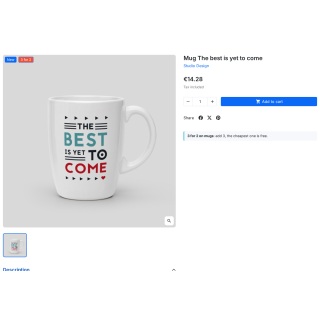
A “Request a quote” button under “Add to cart”, with the selected combination and quantity

A “Request a quote” button under “Add to cart”, with the selected combination and quantity

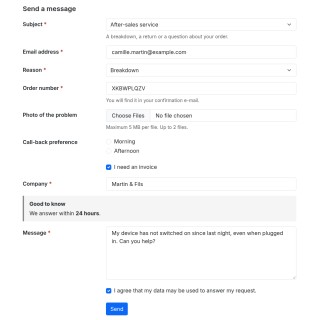
A short form: quantity, company, VAT number and message, linked to the customer account

A short form: quantity, company, VAT number and message, linked to the customer account

Every quote at a glance with its assignee and new messages; the filtered list exports to CSV

Every quote at a glance with its assignee and new messages; the filtered list exports to CSV

A price or discount per line, the customer’s target price, free shipping and totals computed like the cart

A price or discount per line, the customer’s target price, free shipping and totals computed like the cart

From the cart, one quote request for all its lines

From the cart, one quote request for all its lines

A visitor requests a quote without an account: name, e-mail, company, VAT number and message

A visitor requests a quote without an account: name, e-mail, company, VAT number and message

The customer replies with a target price per line and files; the shop answers in the same thread

The customer replies with a target price per line and files; the shop answers in the same thread

One conversation per quote with the customer, and internal notes the customer never sees

One conversation per quote with the customer, and internal notes the customer never sees

The proposal as a PDF with the shop logo, negotiated prices, totals and validity, attached to the e-mail

The proposal as a PDF with the shop logo, negotiated prices, totals and validity, attached to the e-mail

A quote prepared by the shop for a customer account or a new contact

A quote prepared by the shop for a customer account or a new contact

Catalog mode: prices hidden and “Request a quote” instead of “Add to cart” for chosen groups, categories or products

Catalog mode: prices hidden and “Request a quote” instead of “Add to cart” for chosen groups, categories or products

Scheduled task: overdue proposals expire, customers are reminded, the team is alerted; delays to choose

Scheduled task: overdue proposals expire, customers are reminded, the team is alerted; delays to choose

Support

FAQ

Find answers to frequently asked questions about this module

No, not necessarily. A signed-in customer uses their account; when you enable quotes without an account, a visitor sends the request with their name and e-mail and follows the proposal through a signed link. They can create an account at checkout, and the quote then joins it.

Open the quote, enter a negotiated price excluding tax or a discount per line, choose the validity date, add a message and free shipping if agreed, check the totals and send. The customer receives the e-mail with the PDF and the status becomes “Proposal sent”.

The products and quantities join their cart at the negotiated prices, through native specific prices bound to that cart; free shipping is applied by a native cart rule. The status becomes “Accepted”, the team is notified, and the order follows the shop’s carriers and payment methods.

The validity date is chosen on each quote, 30 days by default. Expiry is checked on opening and acceptance; a scheduled task can also expire overdue quotes, remind customers before the date (3 days by default) and alert the team about pending requests (2 days). Nothing runs until you schedule the task.

Yes. Lines can be added or removed, quantities changed, and each sending creates a revision the customer can compare; the current proposal stays acceptable while you prepare the next one.

Yes. “New quote” creates a draft for an existing customer or a new contact, with products, quantities, a discount and a negotiated price. The draft stays invisible to the customer until the proposal is sent.

Yes. Every sent proposal has a PDF attached to the e-mail and downloadable from the customer page and the back office. Customers can attach plans, photos or specifications (five files, chosen types and size), served as downloads only.

Yes, when messaging is enabled. The customer writes a message, can propose a target price per line and attach files; you answer from the quote page and the team receives a notification. Every exchange and every revision stays in the history.

Only free shipping can be granted, through a native cart rule applied at acceptance. PrestaShop has no native per-cart shipping price, so the module does not set a fixed shipping amount; other orders keep the shop’s carriers and rates. The proposal message can state any delivery condition.

Yes, with catalog mode: choose groups, categories or products, hide prices and replace “Add to cart” with “Request a quote”. The cart and checkout are never changed, so a customer with a negotiated cart can still order.

Yes. Assign a quote to an employee, add internal notes the customer never sees, require approval above an amount by chosen profiles, and export the filtered list to CSV, one row per quote line.

PrestaShop 1.7.8, 8.0+ and 9.0+, PHP 7.4+, Classic and Hummingbird themes, multistore with quotes and settings per shop, interface and e-mails in five languages. Without an active license, the storefront and the scheduled task keep working; the back office asks for activation.

5-minute installation · Full documentation included

Lifetime license
One-time payment, updates included for life.
Choose your license
No commitment · Cancel in 1 click from your account
Instead of --€/year if purchased separately

You might also like

Loading...