B2B Net Terms: credit limits, receivables & payment reminders - Module PrestaShop

Give your business customers payment terms, follow exposure customer by customer and collect invoices without leaving PrestaShop. The module follows and collects; you decide.

New Version 1.0.0 1.7.8 8.0+ 9.0+ 5 languages 🇫🇷 FR 🇬🇧 EN 🇪🇸 ES 🇮🇹 IT 🇵🇱 PL
  • Payment terms per customer, per group or by default: due on receipt, net 15/30/45/60/90, end of month
  • Credit limit and exposure checked before every order, without ever blocking upfront payment
  • Partial payments across one or more invoices, settlement discount through a native credit note
  • Automatic reminders before and after the due date, aging report and PDF customer statement
  • Compatible with PrestaShop 1.7.8, 8.0+ and 9.0+
Not sure yet? Try it free for 24 hours — no credit card required.
Features

Everything you need, nothing you don't.

From terms per customer to the customer statement: one place to grant credit, control it, collect and remind.

Terms per customer and per group

Due on receipt, net 15/30/45/60/90, end of month or days end of month: each customer or group can have its own terms, otherwise the shop default applies. The screen always shows where the value comes from, and the calculated due date appears on the order, the confirmation, the invoice PDF and the customer account.

A credit limit that holds

Exposure combines unpaid invoices, uninvoiced term orders and pending requests, each amount converted at the rate stored on its order. Above the limit, “Pay on terms” is hidden with your message or replaced by an approval request; the customer can always pay upfront and the other payment methods stay untouched.

An approval for sensitive orders

A first term order or an over-limit order: the order is held, your team receives a request and the customer is informed. An authorised employee approves or refuses with a note; the decision, the exposure and the limit at that moment stay in the log. A refused order moves to the state you chose, and the customer can order again and pay another way.

Payments recorded on native invoices

Record a full or partial payment against one or several invoices, allocated to the oldest due date or manually. The module writes into PrestaShop’s native payments, shows the remaining amount per invoice and per order, and can undo a receipt as long as no credit note is attached to it. The settlement discount becomes a native credit note in one click.

Reminders that stop by themselves

The schedule is set before and after the due date, with a text per level and per language. Only the latest level that has come due is sent, and everything stops as soon as the invoice is paid, cancelled or in dispute. An escalation can alert your team and suspend the customer’s payment on terms; manual sending, a test e-mail and a log are available.

Aging report, statement and customer account

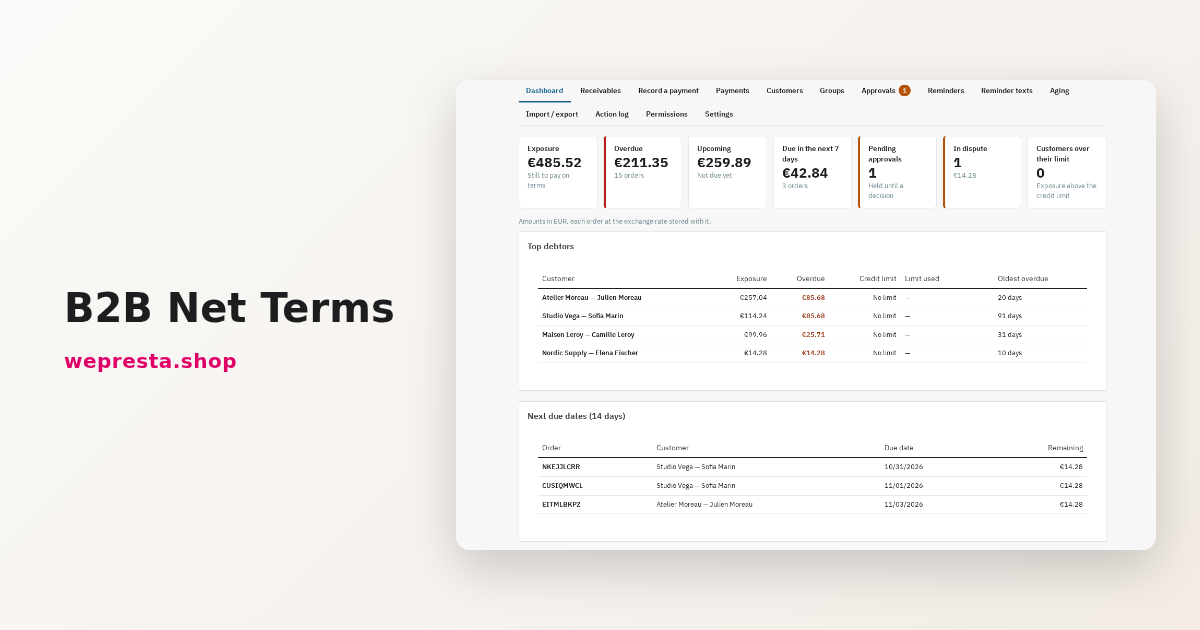
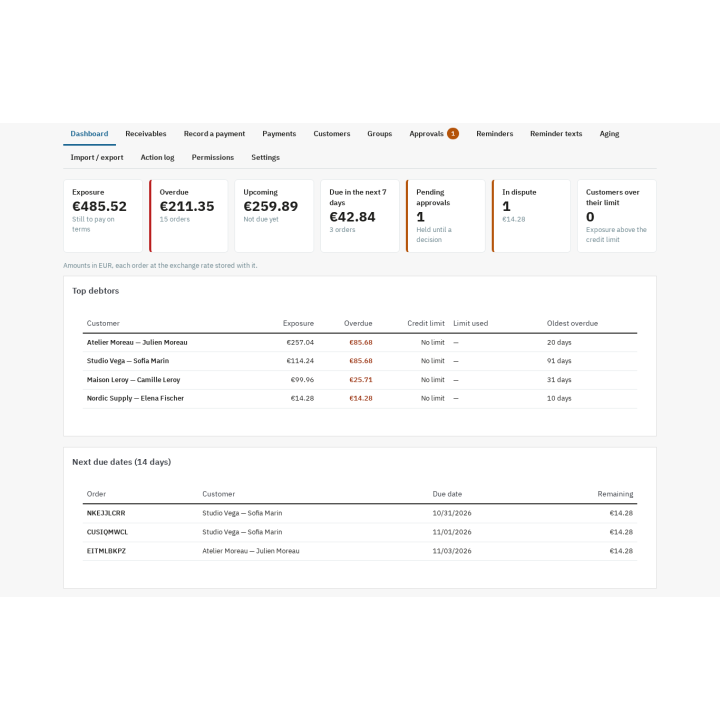
The dashboard shows exposure, overdue amounts, upcoming due dates and top debtors. The aging report groups receivables into 0-30, 31-60, 61-90 and over 90 days, with CSV export, and the PDF statement summarises invoices, credit notes and payments over a period. On the customer side, “My invoices” gives the due date, remaining amount, status and invoice PDF, in the current shop only.

description Full description expand_more

B2B payment terms without the spreadsheet

In B2B, giving 30, 45 or 60 days is part of the deal. Yet in PrestaShop those terms often live in a spreadsheet: credit limits are forgotten, exposure is only visible at month end and reminders go out when someone remembers. Invoices pile up, customer risk is hard to measure and hours are spent copying due dates.

B2B Net Terms brings that work into the back office. It applies payment terms per customer, per customer group or by default, calculates the due date of every order, checks exposure before granting a new delay, records payments against PrestaShop’s native invoices and sends reminders automatically. It adds an aging report, a PDF customer statement and a “My invoices” page in the customer account.

The module follows and collects what PrestaShop already knows: orders, invoices, payments and credit notes. It keeps no parallel ledger, takes no payment online and does not rate a customer’s creditworthiness.

Clear terms, visible exposure

For each customer you choose the mode and the number of days: due on receipt, net 15, net 30, net 45, net 60, net 90, end of month, or a number of days end of month. The effective value is shown with its origin — set on the customer, inherited from their default group or taken from the shop default — so no term is applied by surprise.

  • A due date on every order, calculated from the order date or the invoice date, and shown on the confirmation, the order, the invoice PDF and the customer account.
  • A credit limit per customer in the shop currency: exposure combines unpaid invoices, term orders not yet invoiced and orders awaiting approval, each amount converted at the rate stored on its order.
  • A check before every order: above the limit, the “Pay on terms” method is hidden with a message you write, or an approval request is offered. The customer can always pay upfront, and the other payment methods are never touched.
  • A settlement discount: for example 2% within 10 days, shown on the invoice and in the customer account, with the native credit note created in one click when the payment arrives in time.

Collect without a parallel ledger

A payment can cover one or several invoices, in full or in part. You allocate it to the oldest due date or invoice by invoice; the module shows a preview before you confirm, then writes the payments into PrestaShop’s native tables. The remaining amount is recalculated per invoice and per order, and payments entered from the order page or by another module count the same way.

The settlement discount becomes a native credit note, with the right amount and the right split across the lines, without refunding any quantity and without moving stock. Note that PrestaShop’s order page still shows “not paid” next to the invoice, because PrestaShop never deducts credit notes from an invoice; the remaining amount calculated by the module is the one that counts.

Remind at the right time, without thinking about it

The reminder schedule is set before and after the due date. By default: 3 days before, then 1, 7, 15 and 30 days after, with the last level escalating. Each level has its own text, in every language of the shop, with variables for the order, the invoices, the due date and the remaining amount.

  • Only the latest level that has come due is sent; the earlier ones are marked as skipped.
  • Reminders stop as soon as the invoice is paid, cancelled, refused or marked as in dispute, and orders without an invoice are never reminded.
  • An escalation alerts your team and can suspend the customer’s payment on terms until they pay.
  • Manual sending, a test e-mail, a send log and the invoice PDF as an attachment are available.

See where the money is

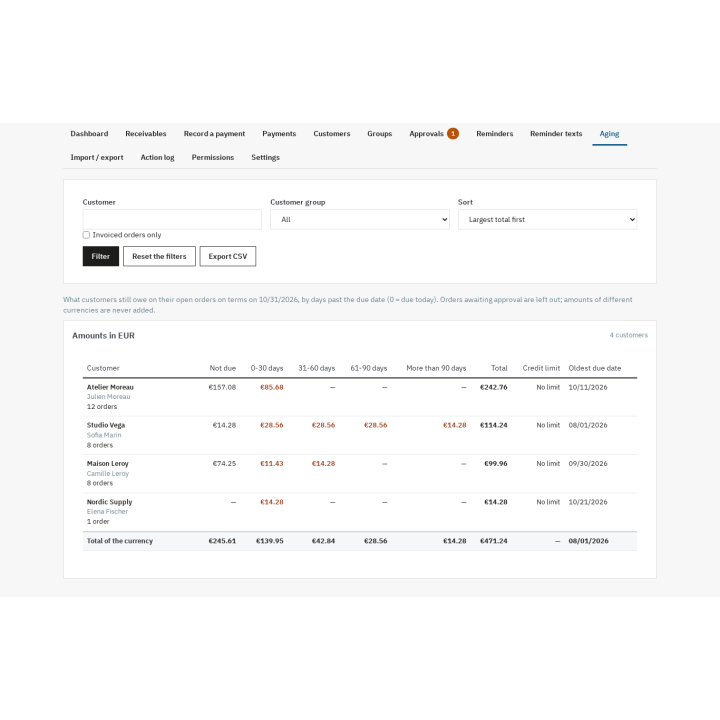
The dashboard brings together exposure, overdue and upcoming amounts, pending requests and top debtors. The aging report groups receivables into 0-30, 31-60, 61-90 and over 90 days, per customer and per currency, with CSV export. The PDF statement shows invoices, credit notes and payments over a period, with the opening balance, the closing balance and the items still open.

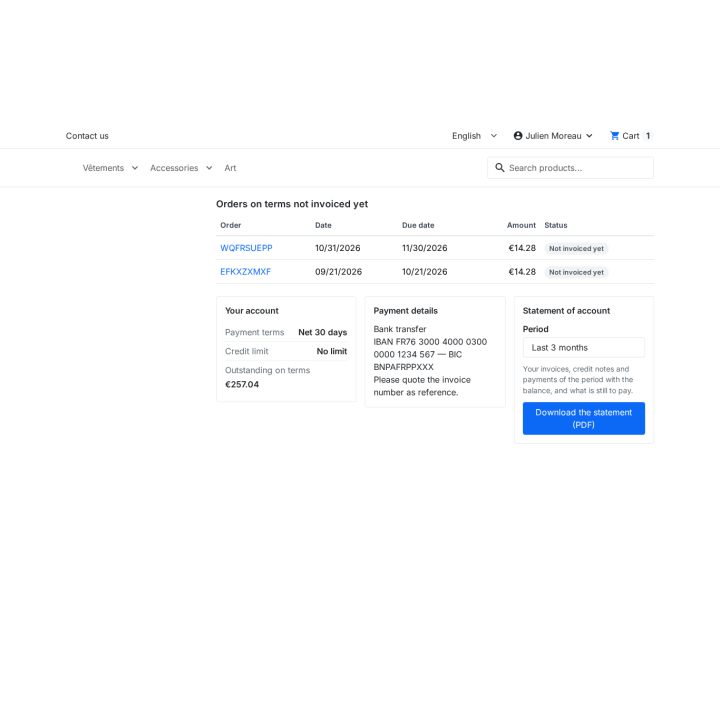
In their account, your customers find “My invoices”: due date, amount, remaining balance, status, invoice PDF and payment details. Each customer only sees their own invoices, in the current shop.

Which shops is it for?

The module is made for small and medium businesses, wholesalers and distributors that invoice business customers at 30, 45 or 60 days, including mixed B2B/B2C shops. It becomes useful from several term orders a month, when a spreadsheet no longer keeps track of exposure and reminders.

It also works in multistore: terms and limits shared or per shop, exposure calculated per shop, and the portal in the right shop. The interface, e-mails and PDFs are available in French, English, Spanish, Italian and Polish, on the Classic and Hummingbird themes without changing the theme.

Requirements and limits

  • PrestaShop 1.7.8, 8.0+ or 9.0+; PHP 7.4 or later.
  • PrestaShop invoicing must be enabled; reminders need an invoice and a scheduled task (URL with a token, or command line).
  • No third-party account: e-mails use the shop’s mail settings and PDFs use the native generator.
  • The module takes no payment online, charges no card and makes no SEPA direct debit: collecting the money remains the job of your payment modules.
  • No general accounting, bank reconciliation, VAT return, credit rating or legal collection. Late-payment interest is informational, calculated pro rata on the days at the rate you enter, disabled by default and never added to the order.
  • Without an active licence, payment on terms, payments, credit notes, the customer account and statements keep working; reminders and changes to the settings wait for renewal.

Comparaison

Why choose us?

See how we compare to the most common alternatives on the market.

Feature Addons
Transparent pricing
Lifetime updates included
Direct developer support
PS 1.7, 8 & 9 compatible
Standardized clean code
Multi-store ready
No hidden renewal fees
Included Not included Partial / Not guaranteed
Preview

Discover the module in images.

Exposure, overdue and upcoming amounts for every customer on terms, on one dashboard

Exposure, overdue and upcoming amounts for every customer on terms, on one dashboard

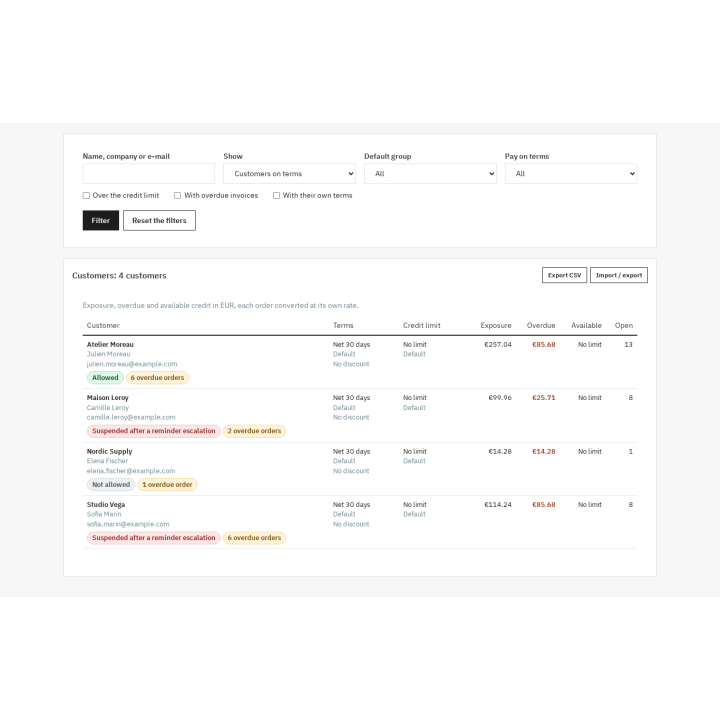
Each customer’s terms, credit limit, exposure and available credit, with where each value comes from

Each customer’s terms, credit limit, exposure and available credit, with where each value comes from

Receivables grouped by age, so collections start with the oldest invoices

Receivables grouped by age, so collections start with the oldest invoices

Customers see their term orders, exposure, your payment details and can download their statement

Customers see their term orders, exposure, your payment details and can download their statement

Support

FAQ

Find answers to frequently asked questions about this module

No. It records the payments you receive by bank transfer, cheque, cash or any other method, in PrestaShop’s native payment tables. Card payments and SEPA direct debits remain the job of your payment modules.

No. It is an additional method, offered only to allowed customers, and the other methods are never hidden or changed. A customer over the limit or suspended can always pay for the order upfront. You can also follow orders paid with another method selected in the settings.

From PrestaShop’s native orders, invoices, payments and credit notes. The module keeps no parallel ledger: it recalculates the remaining amount from those tables, including payments entered from the order page, by another module or by an ERP.

Depending on the setting, “Pay on terms” is hidden with a message you write, or the order becomes an approval request. In both cases the customer can continue with another payment method, and you can grant an exception by raising their limit from the approval screen.

You enter a rate and a delay; the discounted amount and the deadline appear on the invoice PDF and in the customer account. If the recorded payment arrives within the delay and leaves exactly the discount, the module offers to create the matching native credit note, split across the lines without refunding any quantity. PrestaShop’s order page still shows the invoice as unpaid because PrestaShop does not deduct credit notes; the module’s remaining amount is up to date.

Yes, provided the module’s scheduled task runs (URL with a token or command line) and the licence is active. The default schedule sends 3 days before, then 1, 7, 15 and 30 days after the due date; you can change it, edit the texts per language and send manually. Invoices that are paid, cancelled or in dispute receive nothing more.

Yes. The “My invoices” page in their account shows the due date, amount, remaining balance, status, invoice PDF and your payment details, with tabs for to pay, paid and all. They can download a PDF statement for a period from there. Each customer only sees their own invoices, in the current shop.

Yes. Terms and limits can be shared across shops or set per shop, exposure is always calculated per shop and the portal opens in the right shop. Settings, messages and reminders are configured shop by shop.

Without an active licence the module does not disable itself: payment on terms, payments, credit notes, the customer account, statements and panels remain available; reminders and changes to the settings wait for renewal. On uninstall, your native orders, invoices, payments and credit notes are never touched, and the module’s data is kept unless you tick its deletion.
No. It follows due dates and payments and helps you chase them; it keeps no general accounting, does no bank reconciliation or VAT return and gives no legal advice. Late-payment interest is informational, calculated at the rate you enter and disabled by default: check the wording and the rate that apply to your business with your accountant.

5-minute installation · Full documentation included

Lifetime license
One-time payment, updates included for life.
Choose your license
No commitment · Cancel in 1 click from your account
Instead of --€/year if purchased separately

You might also like

Loading...