Supplier restocking: reorder points, purchase orders & receiving - Module PrestaShop

Compute restocking needs from thresholds and incoming stock, prepare supplier purchase orders and update stock on receipt. It computes and prepares; you decide.

New Version 1.0.0 1.7.8 8.0+ 9.0+ 5 languages 🇫🇷 FR 🇬🇧 EN 🇪🇸 ES 🇮🇹 IT 🇵🇱 PL
  • Finds products below their reorder point and computes the quantity to order, incoming stock and safety stock included
  • Prepares and sends supplier purchase orders as a PDF, in the supplier’s language, with status tracking
  • Receives full or partial deliveries line by line, with discrepancy, reason and immediate stock update
  • Handles supplier returns, purchase cost and purchasing reports by supplier and by product
  • Compatible with PrestaShop 1.7.8, 8.0+ and 9.0+
Not sure yet? Try it free for 24 hours — no credit card required.
Features

Everything you need, nothing you don't.

One place to see what is missing, order from the right supplier, send the order and record the delivery — with no third-party account and no warehouse to configure.

The right quantity, at the right time

The dashboard combines available stock, incoming quantities from open orders and your thresholds. The suggested quantity never falls below safety stock and is rounded to the supplier’s minimum order quantity and pack size. Products are ranked by urgency, with a daily e-mail alert.

From a need to a purchase order

Select the lines to order: they are grouped by supplier and added to the open draft or to a new one. You can also create an order manually. Tax-excluded and tax-included totals are recalculated by the server, the reference is automatic, and minimum order value and free-delivery threshold are flagged without ever blocking.

Sent in the supplier’s language

The order downloads as a PDF and leaves by e-mail from the shop, with your details, the supplier’s references, quantities and totals. CSV export is available, or simply mark it as sent if you use another channel. Reprint, resend and duplicate are included.

Receive without breaking stock

Enter received quantities line by line, even for a partial delivery. A discrepancy or over-delivery requires a reason; available stock is updated immediately with a stock movement. The remaining quantity can be closed when the supplier will not deliver the rest.

Returns and costs under control

A supplier return is entered from a received order, with quantities, reason, stock movement and a return slip PDF. On receipt, the purchase cost follows the last cost or the weighted average cost, or stays unchanged; the cost history is kept per product.

Purchases you can steer

Purchases by supplier and by product, stock value at purchase cost, average receiving lead time: every report exports to CSV. Four rights per employee — view, create, send, receive — and an action log. In multistore, each shop keeps its own thresholds, stock and receipts.

description Full description expand_more

Stop discovering a stock-out after the order is paid

Every shop that holds stock knows the scene: a product drops below its reorder point without anyone noticing, a customer orders, and the shortage only appears when the parcel is being prepared. Thresholds live in a spreadsheet, purchase orders leave by e-mail, and nobody knows what is already on its way. The result is duplicate orders, quantities that ignore the supplier’s minimum or pack size, and deliveries written into PrestaShop by hand.

Supplier restocking brings that work into the back office. It computes what to order from your thresholds, the available stock and the stock already on order, prepares the purchase order, sends it to the supplier as a PDF and updates stock on receipt, partial deliveries included. It works on PrestaShop’s simple stock: no warehouse to configure and no third-party account to open.

The module computes and prepares; you decide. No order is placed, sent or received automatically.

Know what to order, without ordering twice

The Restocking dashboard follows every tracked product and combination. The suggested quantity starts from the target stock, removes the available stock and the incoming stock of open orders — drafts included —, never falls below the safety stock, and is rounded to the supplier’s minimum order quantity and pack size. Products are ranked by urgency: out of stock, below safety stock, below the reorder point, covered by incoming deliveries or sufficient.

  • Tiles and filters show what to order, what is out of stock, below safety stock, covered by incoming stock, in an open purchase order or late.
  • A daily e-mail alert and a filterable list of products below their threshold; no restocking order is triggered on its own.
  • Thresholds per product and per combination: reorder point, target stock, safety stock, restocking disabled, with CSV import and export to equip an existing catalogue.

From a need to a purchase order

From the suggestions, select lines: the module groups them by supplier and creates one draft per supplier, or adds them to the draft already open. You can also create an order manually. Each line carries the quantity, unit cost excluding tax, discount and tax rate; the tax-excluded and tax-included totals are recalculated by the server. The reference is automatic (for example PO-2026-00042) and the exchange rate is frozen when the order is sent.

  • Several suppliers per product and per combination, with a preferred supplier, a supplier reference, a cost, a minimum order quantity, a pack size and a lead time.
  • Useful warnings that never block: the supplier’s minimum order value, free-delivery threshold, a quantity below the minimum or outside the pack size, an inactive product.
  • A draft can be filled by the optional daily generation, supplier by supplier, with validation before sending. Nothing is sent automatically.

Send it to the supplier, in their language

The purchase order downloads as a PDF and can be sent by e-mail from the shop with the PDF attached; the supplier receives it in their language, with your details, their references, quantities, costs and totals. You can also export the order as CSV, or mark it as sent if you pass it on through another channel. A sent order can be reprinted, resent or duplicated for the next restock.

Receive accurately, even partially

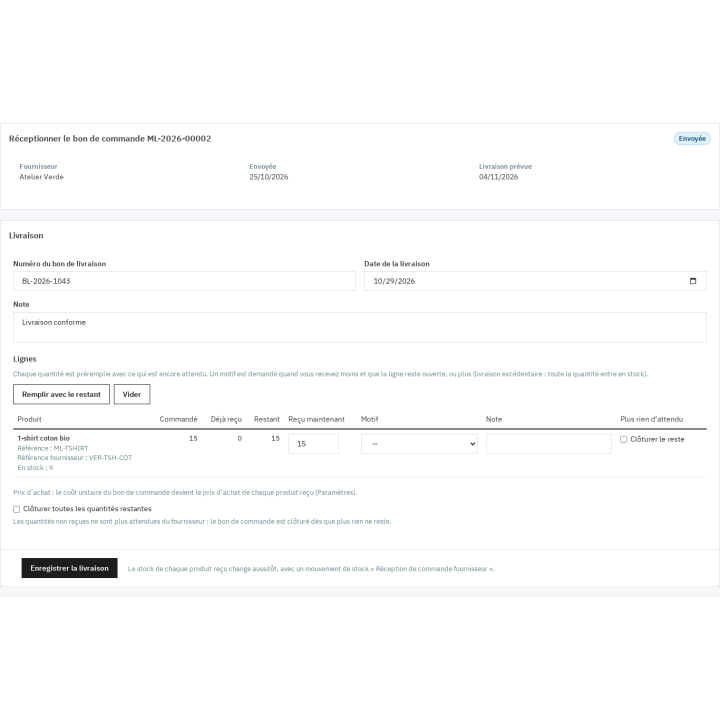
On delivery, enter the quantities received line by line. The module accepts a partial receipt, an over-delivery and a discrepancy, with a required reason when the quantity differs from the remaining one. Available stock is updated immediately, with a “Supplier order receipt” stock movement. You can close the remaining quantity of a line or of the whole order when the supplier will not deliver the rest.

  • The purchase cost can be updated to the last cost or to the weighted average cost, or left unchanged; the cost history is kept per product.
  • A supplier return is entered from a received order: returned quantities, reason, stock movement and a return slip PDF.
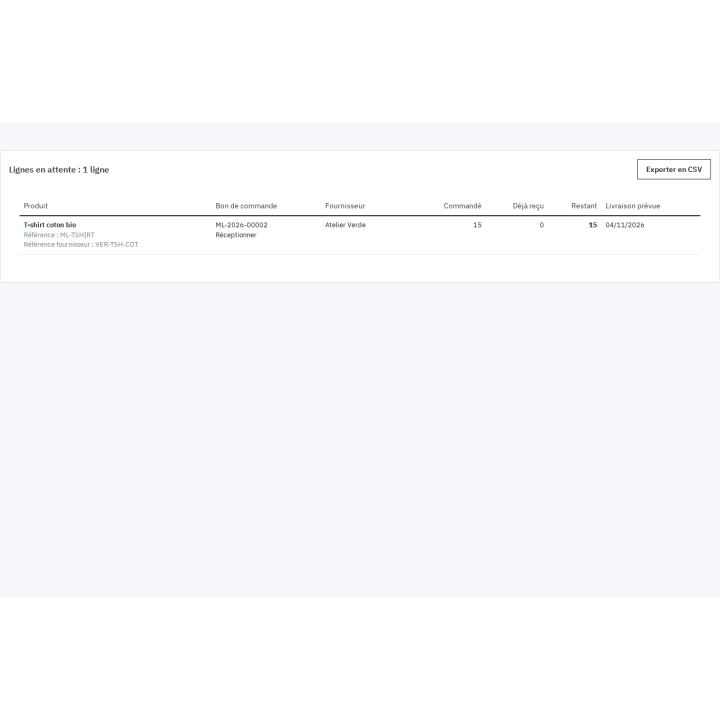
  • A late, partially received or remaining order stays visible in the open lines, with its expected delivery date.

Steer purchases and access

Reports give purchases by supplier and by product over a period, the stock value at purchase cost and the average receiving lead time, with CSV export. Each employee can be given a view, create, send or receive right, and the action log keeps track of changes. In multistore, thresholds, stock, orders and receipts belong to the right shop; suppliers can be shared or specific to a shop.

Which shops is it for?

The module is made for shops that hold and replenish stock: fashion and shoes, food, garden, pet supplies, DIY, bookshops, parapharmacies, electronics, craft supplies. It is especially useful to one-to-five-store businesses that still order from suppliers by e-mail or spreadsheet and do not use PrestaShop’s Advanced Stock Management. Agencies can set the same thresholds shop by shop.

Requirements and limits

  • PrestaShop 1.7.8, 8.0+ and 9.0+; PHP 7.4 or later.
  • Back office only: no theme change, Classic and Hummingbird work without adaptation. Interface in English, French, Spanish, Italian and Polish; PDFs and e-mails in the supplier’s language.
  • PrestaShop’s simple stock. Products managed by Advanced Stock Management warehouses cannot be received through the module; packs and virtual products are restocked through their products.
  • No EDI or supplier API connection, no supplier invoice or accounting, no demand forecasting, no dropshipping, no supplier portal, no barcode scanning and no SMS.
  • Without an active license, pages remain readable and deliveries already expected can still be received; other changes wait for renewal.
Comparaison

Why choose us?

See how we compare to the most common alternatives on the market.

Feature Addons
Transparent pricing
Lifetime updates included
Direct developer support
PS 1.7, 8 & 9 compatible
Standardized clean code
Multi-store ready
No hidden renewal fees
Included Not included Partial / Not guaranteed
Preview

Discover the module in images.

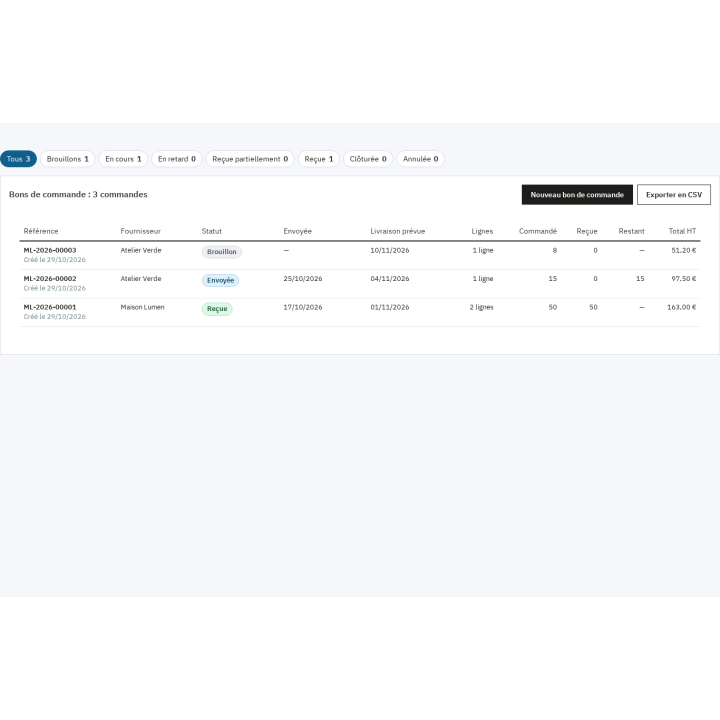
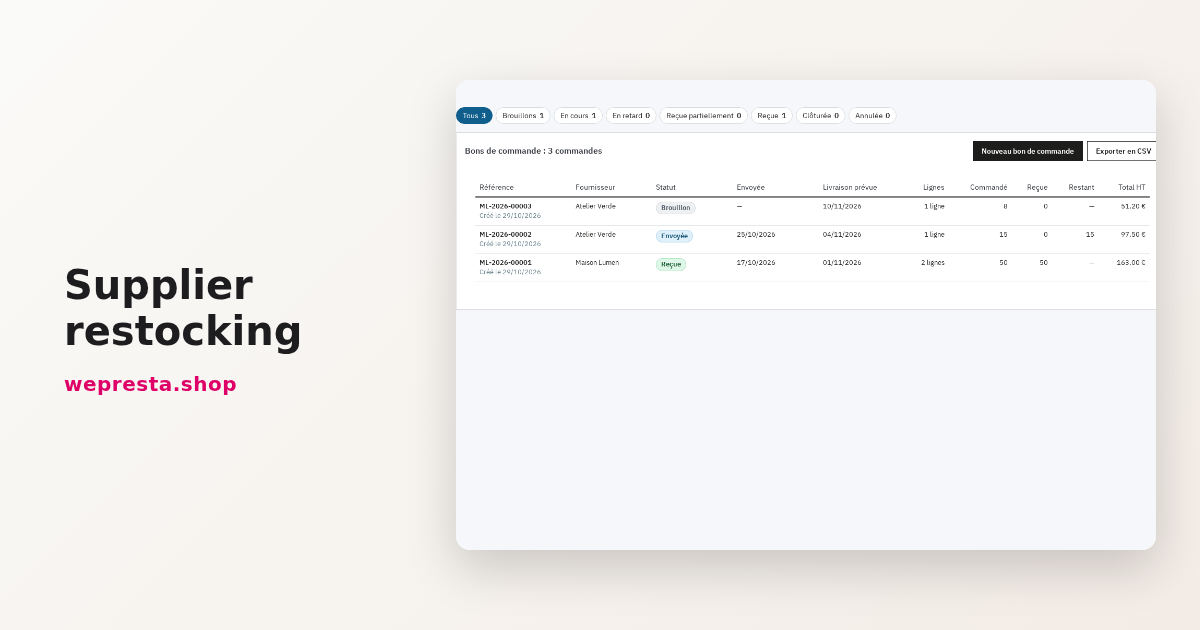
All purchase orders and their status at a glance: draft, sent, received, late

All purchase orders and their status at a glance: draft, sent, received, late

Receive a delivery line by line and update stock in the same form

Receive a delivery line by line and update stock in the same form

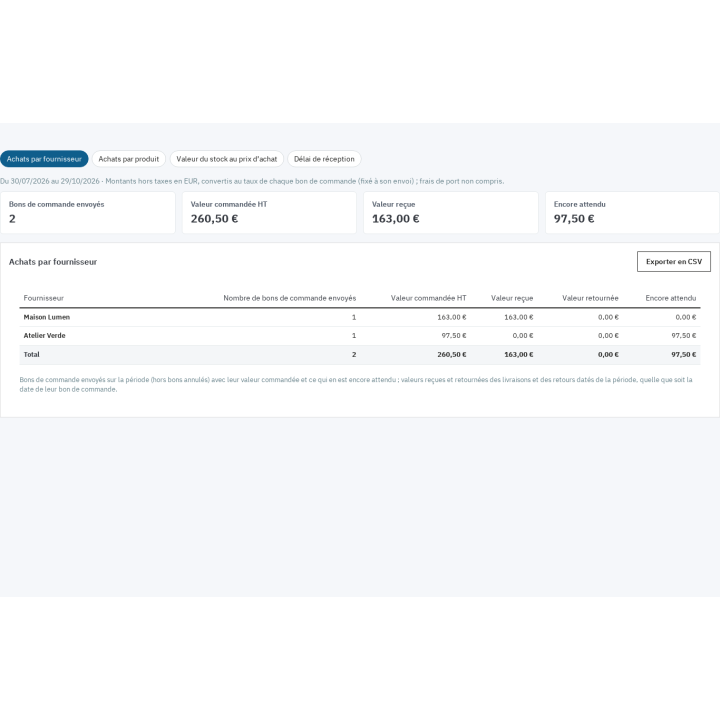
Purchases by supplier over a period: ordered, received, returned and still outstanding

Purchases by supplier over a period: ordered, received, returned and still outstanding

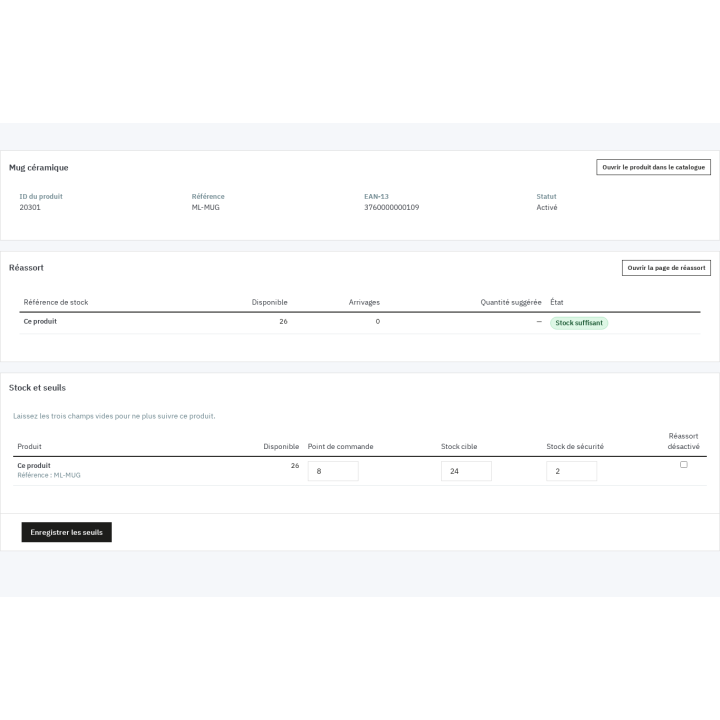
Reorder point, target stock and safety stock set right on the product, with the suggested quantity

Reorder point, target stock and safety stock set right on the product, with the suggested quantity

Every outstanding line with its remaining quantity and expected delivery date, ready to be chased

Every outstanding line with its remaining quantity and expected delivery date, ready to be chased

Support

FAQ

Find answers to frequently asked questions about this module

No. It computes the suggested quantity and can prepare draft purchase orders, supplier by supplier, but nothing is sent without your validation: no e-mail, no supplier order. The promise is the same everywhere, on screens, the PDF and e-mails: the module computes and prepares, a person decides.

No. The module works on PrestaShop’s simple stock, with no warehouse to configure. Products whose stock is managed by Advanced Stock Management warehouses remain visible but cannot be received through the module: their stock is managed elsewhere. Packs and virtual products are restocked through their products.

It starts from the target stock (or the reorder point when no target is set), removes the available stock and the incoming stock of open orders — drafts included, so nothing is ordered twice —, never falls below safety stock, and is rounded to the supplier’s minimum order quantity and pack size. A product is suggested only when it is at or below its reorder point and something remains to order.

Yes. Each product and each combination can have several supplier links, with supplier reference, unit cost excluding tax, currency, minimum order quantity, pack size, lead time and a preferred supplier. The preferred supplier is suggested by default on the dashboard and in automatic generation. Suppliers are those of your PrestaShop catalogue, enriched with their ordering details.

You enter the quantity actually received line by line. A discrepancy or over-delivery requires a reason (short delivery, damaged, wrong item, over-delivery, other). Stock is updated with the received quantity and the remaining quantity stays tracked. You can close a line or the whole order if the supplier will not deliver the rest; the order then becomes “Partially received” or “Closed”.

Yes, according to the chosen setting: last cost, weighted average cost, or no change. The cost used is the order’s unit cost, after discount and converted into the shop currency. Each update leaves a history entry with the old and new cost, the received quantity, the stock before and the employee.

Yes. Thresholds, stock, orders, receipts and returns belong to one shop, and receiving updates the stock of the order’s shop. Suppliers can be shared between shops or specific to some of them. Alert, automatic generation and PDF settings are stored per shop.

Four separate rights: view (open pages, download PDFs and CSV, read reports), create (suppliers, links, thresholds, imports, drafts), send (send, resend, mark as sent, cancel a sent order) and receive (receipts, closings, returns). Super administrators have every right. The action log keeps the author and date of each change.

Without an active license, pages stay readable, PDFs and CSV exports stay downloadable, and deliveries of orders already sent can still be received: the goods arrive whatever happens. Other changes wait for renewal. On uninstall, data is kept unless you tick the option that deletes it.
PrestaShop 1.7.8, 8.0+ and 9.0+, with PHP 7.4 or later. The module is back office only: no theme change, Classic and Hummingbird work without adaptation. The interface is available in English, French, Spanish, Italian and Polish; supplier PDFs and e-mails are generated in the supplier’s language.

5-minute installation · Full documentation included

Lifetime license
One-time payment, updates included for life.
Choose your license
No commitment · Cancel in 1 click from your account
Instead of --€/year if purchased separately

You might also like

Loading...