PrestaShop migration: catalog, customers and orders moved without re-typing - Module PrestaShop

Move a PrestaShop shopโ€™s catalog, customers and orders to a new installation, with an audit, a preview and a rollback.

New Version 1.0.0 1.7.8 8.0+ 9.0+ 5 languages ๐Ÿ‡ซ๐Ÿ‡ท FR ๐Ÿ‡ฌ๐Ÿ‡ง EN ๐Ÿ‡ช๐Ÿ‡ธ ES ๐Ÿ‡ฎ๐Ÿ‡น IT ๐Ÿ‡ต๐Ÿ‡ฑ PL
  • An export kit that runs on the old shop, with nothing to install or activate there
  • Catalog, customers, orders, invoices, stock, SEO URLs and CMS in one encrypted package
  • A full preview before anything is written, then a resumable import that keeps identifiers and addresses
  • Audit report, safety backup, verification and rollback
  • Compatible with PrestaShop 1.7.8, 8.0+ and 9.0+
Not sure yet? Try it free for 24 hours โ€” no credit card required.
Features

Everything you need, nothing you don't.

The module runs on the new shop; the old one only receives the export kit, with nothing to install or activate.

A self-contained export kit

Download the kit, copy it to the old shop and run it over SSH or from a cron job. Nothing is installed or activated there: the script reads the database in a consistent snapshot without stopping sales, and asks for no license.

An encrypted, checked package

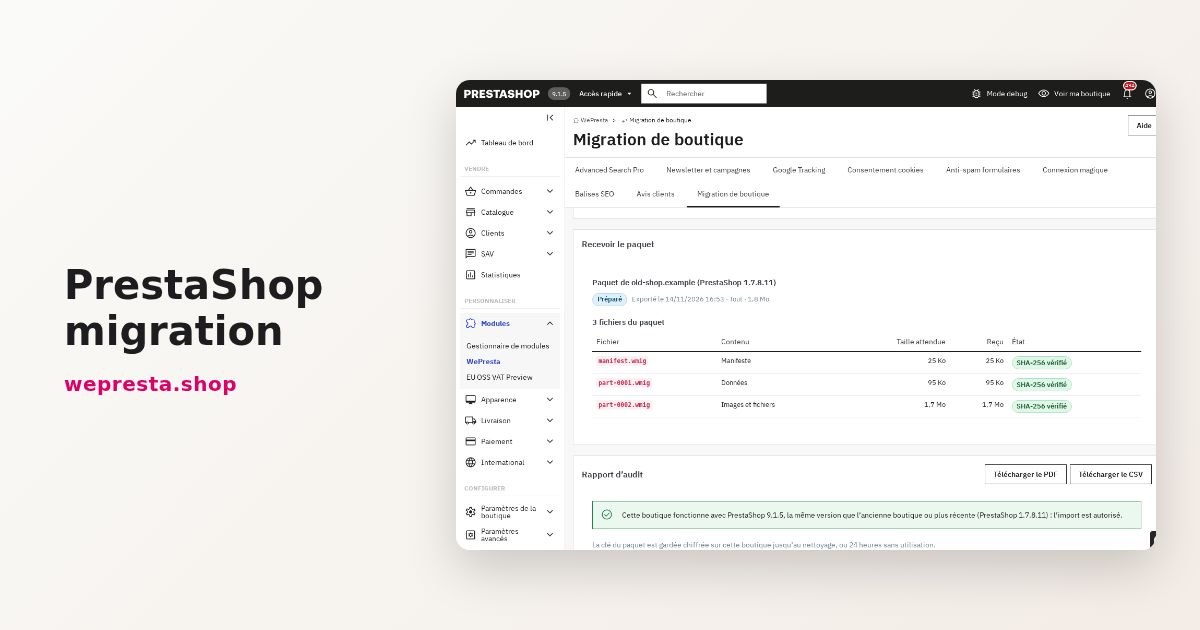
The package is encrypted with AES-256-GCM using your password, split into parts and accompanied by an authenticated manifest. Each part carries its SHA-256 hash: a missing or modified file is refused before import.

An audit before any import

The audit report, on screen, as a PDF and as a CSV, describes the old shop: versions, modules, overrides, non-native tables, e-mail templates, theme and volumes. It states what will be carried, what will not, the modules to replace and the targetโ€™s requirements.

A preview that writes nothing

Before the first import, see group by group the rows to insert, replace, renumber or skip, with examples, the settings that will change, the volume and the estimated duration. Choose the shop and language maps and a strategy per group.

A resumable import that keeps your landmarks

The import runs in batches, in the browser or through the scheduled task, with pause, resume and replay of failed rows. Identifiers, link_rewrite addresses, invoice numbers and bcrypt passwords are kept; conflicts are settled by replacing, renumbering or skipping.

Verification and rollback

A safety backup comes before the first import. Verification compares rows, totals to the cent, stock, images, URLs and HTTP pages; rollback deletes what the import created and puts back what it replaced. A control subset and a differential second pass complete the switch.

description Full description expand_more

Change version or host without re-typing your shop

Moving to a recent PrestaShop version, changing host or taking over a clientโ€™s shop means finding the products, customers, orders, invoices, URLs and content in the new installation. Re-entering everything is slow and loses the history: invoice numbers, indexed addresses, customer passwords. The in-place update does not always fit either: a theme or modules written for an older version may not follow, and the operation is hard to undo.

PrestaShop Migration moves that data into a new installation, with checks at every stage. The module is installed on the new shop. An export kit, run from the command line on the old shop, writes an encrypted package. You read an audit report, see a preview of what will be written, import in resumable batches, compare both shops, and can roll the import back.

An export with nothing installed on the old shop

The kit downloaded from the module holds a script and its libraries. Copy it to the old shopโ€™s server, ideally outside the web folder, then run php export.php over SSH or from a cron job that calls PHP. Nothing is installed or activated on that shop, and the script asks for no license.

  • A consistent read: the script boots PrestaShop and reads the database inside one consistent snapshot. InnoDB tables are not locked, so the old shop keeps taking orders during the export. Tables using another engine are read under a lock and reported in the audit.
  • Supported sources: PrestaShop 1.7.8.0 to 9.x. The script refuses a 1.6 shop, an unsuitable PHP version or a missing extension with a clear message.
  • Read-only: it never writes to the old shopโ€™s database. The package, its log and its state stay in the output folder.
  • Resumable: the image and file phase stops at the requested time limit and continues on the next run. An export stopped during the data phase starts that phase again with a new snapshot on the next run; only the image and file phase resumes where it stopped.

An encrypted package, checked part by part

The package is encrypted with AES-256-GCM and a password chosen by the merchant, at least 12 characters and never stored. It is split into parts of adjustable size. Each part carries its SHA-256 hash and an authenticated manifest: an incomplete package, a modified one or a wrong password is refused before anything is imported. The data stays between the two shops; the โ€œCatalog onlyโ€ option produces a package with no personal data.

An audit and a preview before writing

Once the package is received and unlocked, the audit report is available on screen, as a PDF and as a CSV. It describes the old shop (PrestaShop, PHP and database versions, installed modules, class and controller overrides, non-native tables, custom e-mail templates, theme, multistore, volumes) and states what will be migrated, what will not and why, the modules to replace before opening, and the requirements of the target version. It also checks that the new shop is not older than the old one.

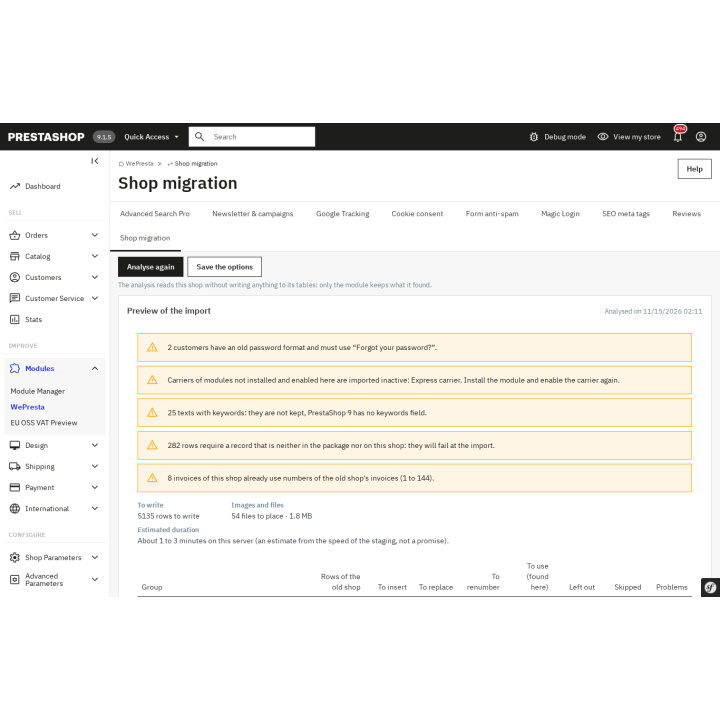
The preview is read group by group: rows to insert, replace, renumber or reuse as duplicates, rows left out or failed, with examples and the settings that will change. It gives a volume and an estimated duration. Nothing is written to the shopโ€™s tables during this analysis. You choose the shop and language maps, then a strategy per group: replace, renumber or skip an identifier that is already taken; reuse, copy or skip a natural duplicate.

An import that keeps identifiers, URLs and invoices

Imported records keep their identifiers and link_rewrite: product, category, CMS page, brand and supplier addresses, as well as invoice, delivery slip, credit slip and return numbers, stay the same. Customer passwords stored with bcrypt are carried as they are: the customer signs in with the existing password. Legacy password formats, which the new shop cannot verify, are counted in the preview and the report; the customer uses โ€œForgot your password?โ€.

The import runs in resumable batches, in the browser or through the scheduled task. You can pause it, resume after an interruption and replay failed rows from their log, which exports to CSV. Original images are placed at the new shopโ€™s paths and thumbnails are regenerated in its themeโ€™s formats.

Verify, undo, finish the switch

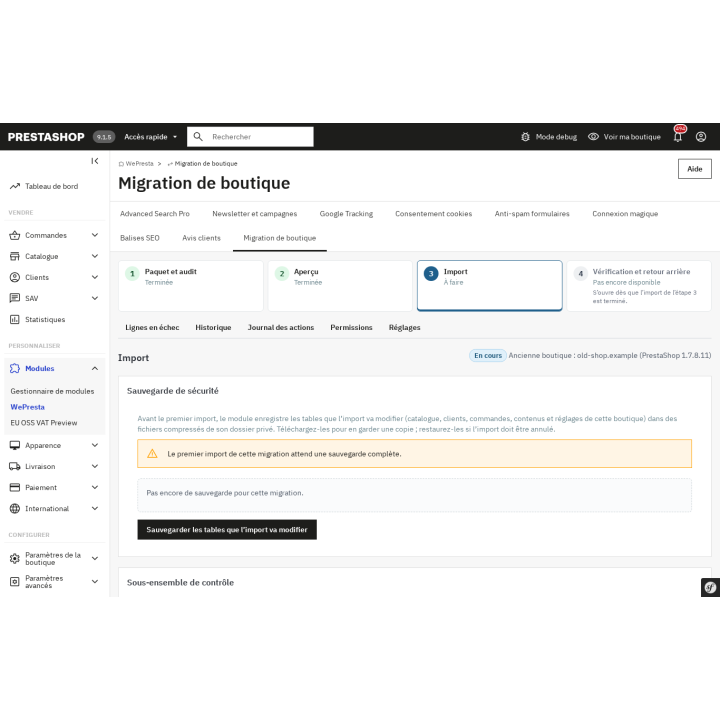
Before the first import, the module saves a safety backup of the tables it will change; it can be downloaded and restored. After the import, the verification compares both shops: rows per table, order totals excluding and including tax to the cent, stock quantities, presence and hash of images, URL count, HTTP status of key pages and the back-office order page. The final report comes as a PDF and a CSV.

Rollback deletes what the import created, puts back the records it replaced and the files it moved, and keeps the records a newer order needs. A control subset validates the mapping on a small volume before the full transfer. A differential second pass then carries the orders, customers and products created or changed on the old shop since the first export. The redirect plan downloads as CSV, Apache rules and Nginx rules.

Which shops is it for?

The module is made for shops moving to a recent version while keeping their history, for shops changing host or domain, and for agencies taking over a clientโ€™s shop. It is designed for live shop catalogs and for hosts that offer SSH access or a cron job that calls PHP.

Requirements and limits

  • Source shop PrestaShop 1.7.8.0 to 9.x; target shop PrestaShop 1.7.8, 8.0+ or 9.0+, never older than the source. PHP 7.4 or later for the module, within the PHP range each PrestaShop version supports.
  • The old host must offer a command line or a cron job able to call PHP. Without one, the export cannot run from that server.
  • No in-place upgrade: the data is moved into a new installation of the target version.
  • Third-party module data is not carried. Product Comments reviews, GDPR consents and newsletter subscribers are carried only when the matching module is installed and enabled on the new shop. Theme, e-mail templates, employees, permissions, domains and SSL are not migrated; copied settings are limited to a list tied to the migrated data.
  • Abandoned carts, connections, search statistics and logs are not migrated.
  • Customer passwords in bcrypt format are kept; legacy formats require the customer to reset the password.
  • Interface and reports in English, French, Spanish, Italian and Polish. The module adds nothing to the storefront.
  • The license is checked on the target shop. Without a valid license, the module disables itself: no kit, import, verification or rollback can run; packages, the mapping table, the backup and the logs are kept, and an interrupted import resumes after renewal.

Prepare the new shop, check what came across and stay in control until it opens.

Comparaison

Why choose us?

See how we compare to the most common alternatives on the market.

Feature Addons
Transparent pricing
Lifetime updates included
Direct developer support
PS 1.7, 8 & 9 compatible
Standardized clean code
Multi-store ready
No hidden renewal fees
Included Not included Partial / Not guaranteed
Preview

Discover the module in images.

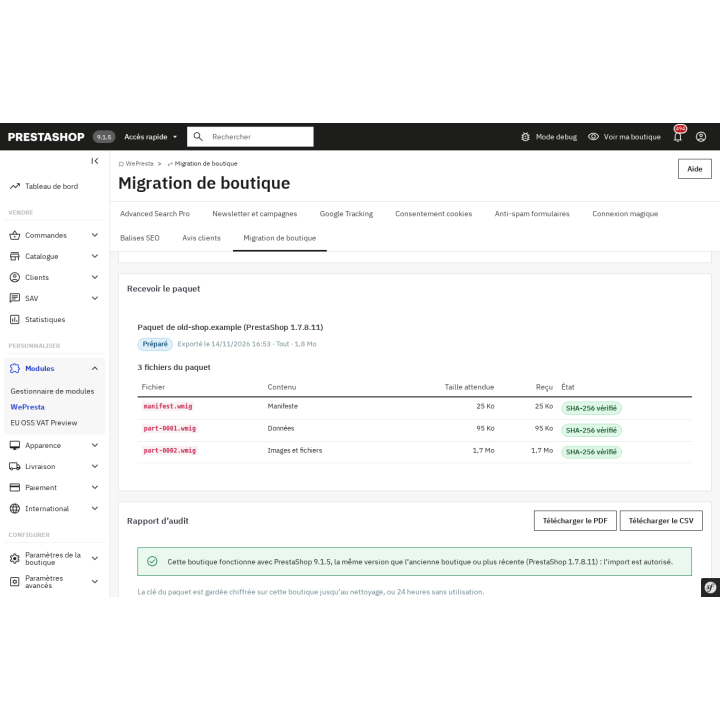
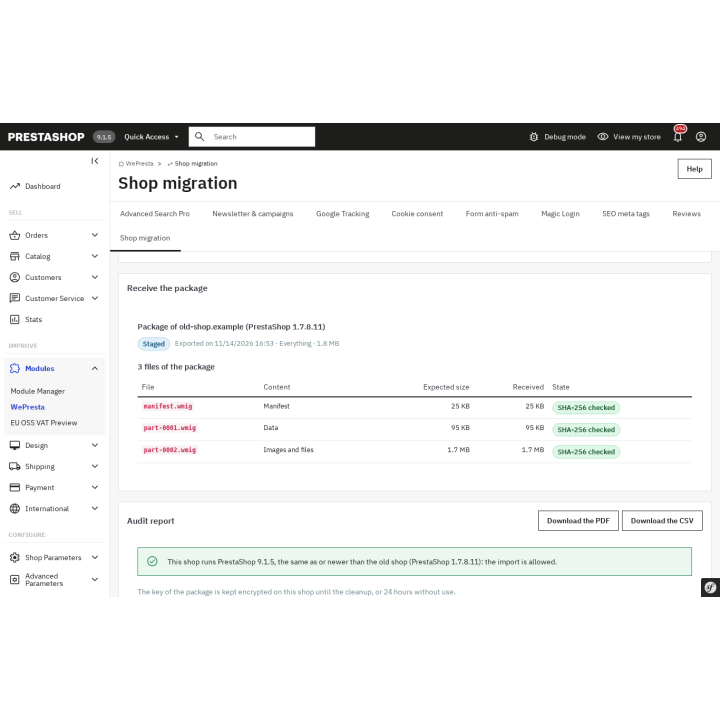
The package from the old shop is received and its files checked before anything happens.

The package from the old shop is received and its files checked before anything happens.

The package from the old shop is received and its files checked before anything happens.

The package from the old shop is received and its files checked before anything happens.

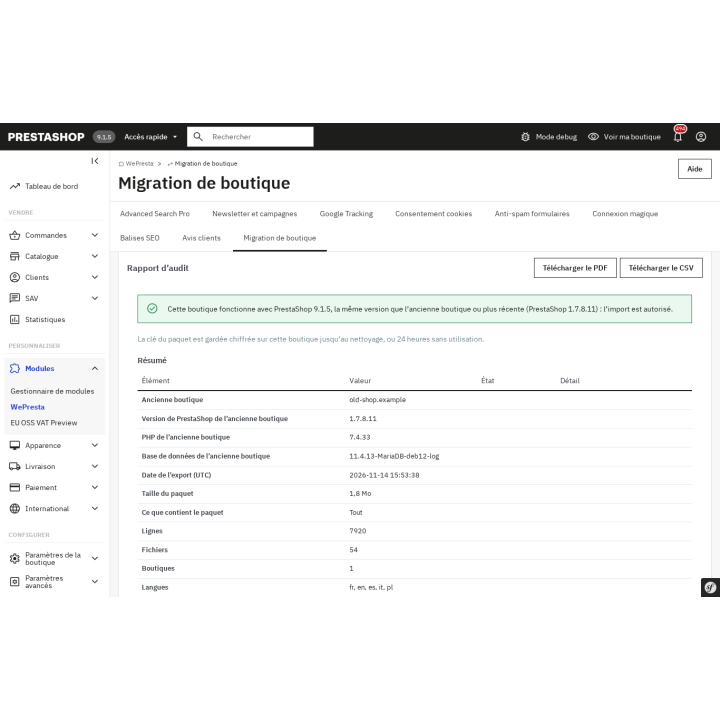
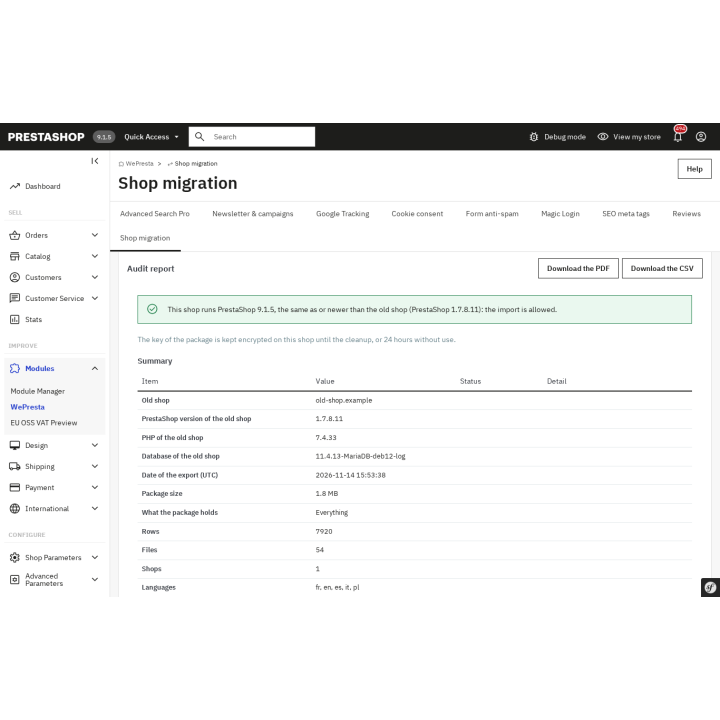
The audit report compares the two shops and states the version rule before the import.

The audit report compares the two shops and states the version rule before the import.

The audit report compares the two shops and states the version rule before the import.

The audit report compares the two shops and states the version rule before the import.

A safety backup of the tables the import will change is taken first, and can be restored.

A safety backup of the tables the import will change is taken first, and can be restored.

The preview shows what will be written, moved and skipped, before the import runs.

The preview shows what will be written, moved and skipped, before the import runs.

Support

FAQ

Find answers to frequently asked questions about this module

No. It moves data into a new installation of the target version. In-place upgrades and file migration between versions are not part of what it does.

The source shop must run PrestaShop 1.7.8.0 or later, up to 9.x. The target must run 1.7.8, 8.0+ or 9.0+, and never be older than the source. The module requires PHP 7.4 or later, within the range supported by the installed PrestaShop version.

The catalog (products, combinations, categories, brands, suppliers, attributes), customers and their addresses, orders with invoices, delivery slips, credit slips and returns, stock, carriers, tax and price rules, CMS pages, URLs and images. Reviews, GDPR consents and newsletter subscribers follow when the matching native module is installed and enabled on the new shop.

Data owned by third-party modules, the theme, e-mail templates, employees and their permissions, domains, SSL, abandoned carts, connections, statistics and logs. Copied settings are limited to a list tied to the migrated data. A 1.6 shop is not accepted.

Yes. The script reads a consistent snapshot: InnoDB tables are not locked and the shop keeps selling. Tables using another engine are read under a lock and reported. Orders placed after the export are picked up by the differential second pass before the switch.

Yes if the password is stored with bcrypt: it is carried as is. Passwords in a legacy format cannot be verified by the new shop; they are counted in the preview and the report, and the customer must use โ€œForgot your password?โ€.

The package is encrypted with AES-256-GCM and a password of at least 12 characters that you choose and that is never stored. The key is derived with PBKDF2-HMAC-SHA256, each part carries a SHA-256 hash and the manifest is authenticated. An incomplete or modified package is refused before import. The โ€œCatalog onlyโ€ option avoids carrying personal data.

Yes. The export runs from a command line or a cron job able to call PHP. Without one, the script cannot run on that server and the module cannot retrieve the data.

The import runs in batches and records its progress. You can pause and resume it, or restart it through the scheduled task. Failed rows are listed, export to CSV and can be replayed individually.

Yes. A safety backup of the modified tables is saved before the first import; it can be downloaded and restored. Rollback deletes the records the import created, puts back the ones it replaced and keeps the records a newer order needs.

5-minute installation · Full documentation included

Lifetime license
One-time payment, updates included for life.
Choose your license
No commitment · Cancel in 1 click from your account
Instead of --โ‚ฌ/year if purchased separately

You might also like

Loading...