SEO errors: complete store audit, broken links and fix plan - Module PrestaShop

Crawl your store like a search engine, fix the errors that matter and share the result with your client. The module audits and fixes; you set the order.

New Version 1.0.0 1.7.8 8.2+ 9.0+ 5 languages ๐Ÿ‡ซ๐Ÿ‡ท FR ๐Ÿ‡ฌ๐Ÿ‡ง EN ๐Ÿ‡ช๐Ÿ‡ธ ES ๐Ÿ‡ฎ๐Ÿ‡น IT ๐Ÿ‡ต๐Ÿ‡ฑ PL
  • Crawls your store like a search engine: home page, sitemap, internal links and catalog, without JavaScript
  • Runs 124 SEO checks across 19 families and ranks every issue by severity, page and element
  • Turns findings into a fix plan prioritized by traffic, with each status confirmed by the next crawl
  • Fixes on the spot (404s, redirects, addresses, robots.txt) and publishes the new-content RSS feed
  • Compatible with PrestaShop 1.7.8, 8.2+ and 9.0+
Not sure yet? Try it free for 24 hours โ€” no credit card required.
Features

Everything you need, nothing you don't.

One place to see what holds your SEO back, decide what to fix and prove it: crawl, fix plan, fixes and client report.

A full crawl, no JavaScript

The module starts from the home page, the sitemap, internal links and the catalog, and reads the HTML as served. One crawl per shop and language, with a dated history and a comparison with the previous one: new issues, fixed, persistent, reopened.

124 checks in 19 families

Links and redirects, external links, indexability, canonical URLs and variants, HTTPS and domain, titles, descriptions and headings, duplicate and thin content, images, structured data, social tags, hreflang and languages, sitemap, robots.txt, HTML performance indicators, internal linking, content and readability, 404 log, redirect rules and RSS feed. Every issue points to the page and the element concerned.

A prioritized fix plan

Severity (critical, important, minor), impact, effort, status and notes. The priority score grows with the traffic imported from a Search Console CSV export, and the next crawl checks the fix.

The fixes in the same place

404 log with suggested targets and one-click redirects, redirect manager with loop and chain checks, addresses without identifiers for products, categories, brands and CMS pages.

Dashboard, exports and client report

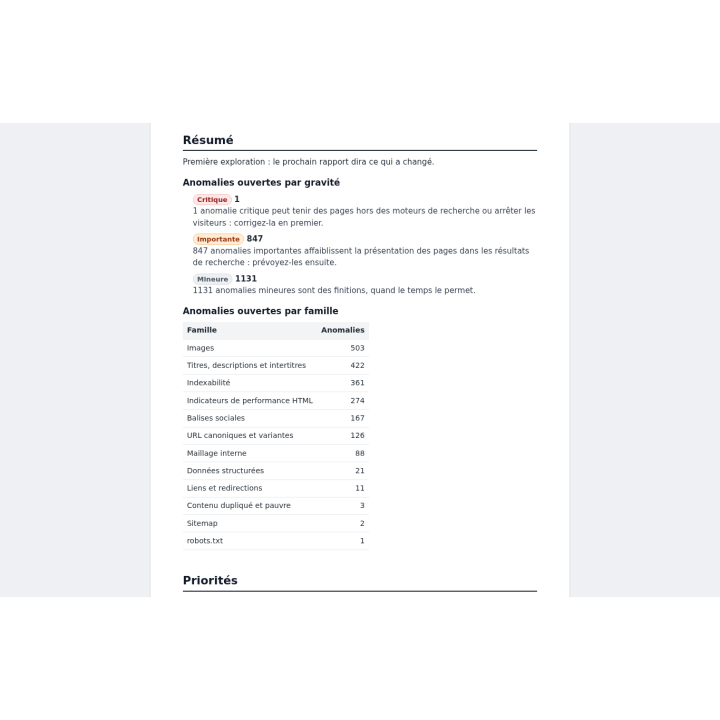
Counts by severity and by family, the evolution of the last twelve crawls, CSV and JSON exports, a printable client report with your logo, in the report language.

Scheduled crawls and RSS feed

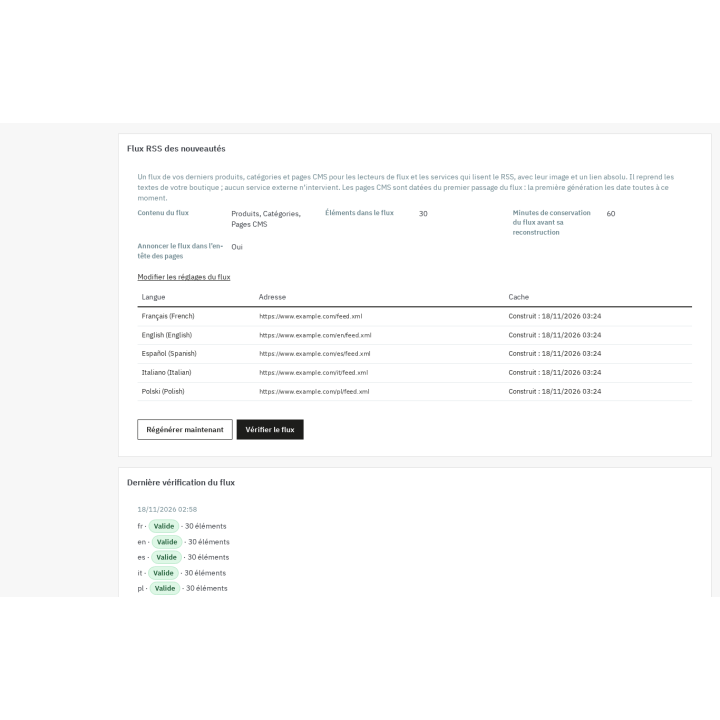
Every day, every week or every month, in the shop time zone, with the report by e-mail. The RSS feed publishes new content per language.

description Full description expand_more

SEO errors do not show up in the back office

Product pages, categories, brands, CMS pages and blog posts: a PrestaShop store quickly holds hundreds of addresses. Some return a 404, repeat another pageโ€™s title, point their canonical tag to an address that no longer exists, show an image without alternative text or miss a social tag. None of this is visible on screen: you have to read the page source, the sitemap, robots.txt and the redirects. Doing it by hand, page by page, takes days โ€” and the catalog changes before you finish.

A crawler and a fix plan

SEO errors crawls your store the way a search engine bot does: home page, sitemap, internal links and catalog, reading the HTML as served and without running JavaScript. Every issue is recorded with its severity, its address and the element concerned, then filed in a single fix plan.

The module does not stop at diagnosis. It keeps the 404 log and suggests a target for each address, serves redirects before the page is rendered, gives products, categories, brands and CMS pages addresses without identifiers, edits robots.txt and publishes an RSS feed of new content. Fixing happens in the same back office as the audit.

124 checks in 19 families

  • Links and redirects: broken links, chains and loops.
  • External links: broken or unreachable outgoing links.
  • Indexability: tags and headers that keep a page out of the index.
  • Canonical URLs and variants: duplicate addresses, parameters, case and trailing slash.
  • HTTPS and domain: mixed content, HTTP references, ports and duplicate hosts.
  • Titles, descriptions and headings: length, uniqueness and presence.
  • Duplicate and thin content: similarity between pages and content that is too short.
  • Images: alternative texts and image attributes.
  • Structured data: JSON-LD.
  • Social tags: Open Graph and Twitter Cards.
  • Hreflang and languages: language alternates, codes and return links.
  • Sitemap: presence, consistency and addresses.
  • robots.txt: rules and blocks.
  • HTML performance indicators: page weight and element counts, not Core Web Vitals.
  • Internal linking: internal links and the way pages connect.
  • Content and readability: sentences, paragraphs and keywords.
  • 404 log: addresses still requested and not handled.
  • Redirect rules: loops, chains and missing targets.
  • RSS feed: feed validity.

A fix plan that empties itself

Each issue gets a severity โ€” critical, important or minor โ€” and a priority score that grows with the traffic of the page, imported from a Search Console CSV export. The plan also shows impact, effort, the page and the element, a status (to fix, in progress, fixed, ignored), notes and history. The next crawl checks the fix: an issue that has disappeared moves to fixed, and an issue that comes back reopens.

Fix without leaving the module

404 log and redirects

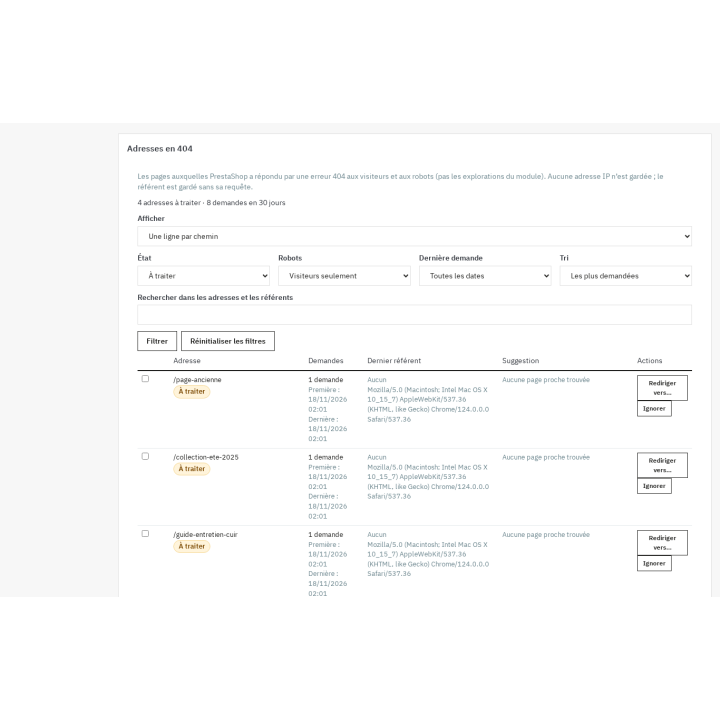
The 404 log records requested addresses that do not exist, without keeping the visitorโ€™s IP address, and suggests a nearby page. A redirect takes one click. The redirect manager accepts exact rules and regular expressions, in 301, 302 or 303, with priorities and loop and chain checks. Rules are served before the page is rendered and can be imported or exported as CSV.

Addresses without identifiers

For products, categories, brands and CMS pages, the module offers addresses without identifiers, easier to read for visitors and search engines. A dry run shows collisions before applying, old addresses answer with a 301 and a restore puts the original configuration back.

robots.txt under control

The robots.txt editor shows a preview, tests an address against the rules, keeps versions and restores a previous one. If PrestaShop regenerates the file, the module detects it and offers to restore your version.

Sharing the results

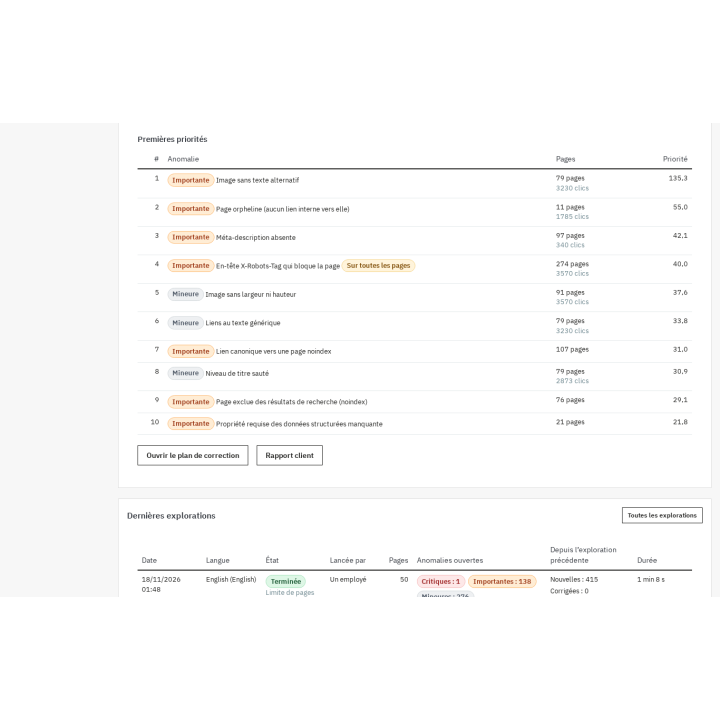
The dashboard sums up the latest crawl of each language: counts by severity and by family, first priorities, the evolution of the last twelve crawls and alerts. Issues export to CSV or JSON. The client report is generated in the report language, with your logo, and can be printed or saved as PDF. On multistore, every shop and every language has its own crawl, and the shops of a group can be compared. A scheduled task runs crawls every day, every week or every month in the shop time zone and sends the report by e-mail. The RSS feed publishes new content per language.

Who it is for

  • Merchants who want to know what is wrong with their SEO without opening the browser console.
  • Agencies that audit a store, fix it and hand the client a printable report.
  • Owners of several shops who need one crawl per shop and language, and a comparison between shops.
  • Teams that want the storeโ€™s 404s, redirects and robots.txt in the same place as the audit.

Requirements and limits

PrestaShop 1.7.8, 8.2+ and 9.0+; versions 8.0 and 8.1 are not supported. PHP 7.4 or later. No external account or API key is needed. The crawl runs on your server: with the default settings, expect about 1,000 pages in 10 to 20 minutes; without a scheduled task it only continues while the module page stays open. The module does not measure Core Web Vitals, does not generate meta tags, structured data or sitemaps, and does not rewrite alternative texts for you: it checks them and tells you what to fix. Without a valid license the module disables itself: redirects are no longer served, the 404 log stops, the RSS feed answers with a 404 and addresses without identifiers revert to PrestaShopโ€™s format, but the data is kept and everything comes back when the license is validated.

Comparaison

Why choose us?

See how we compare to the most common alternatives on the market.

Feature Addons
Transparent pricing
Lifetime updates included
Direct developer support
PS 1.7, 8 & 9 compatible
Standardized clean code
Multi-store ready
No hidden renewal fees
Included Not included Partial / Not guaranteed
Preview

Discover the module in images.

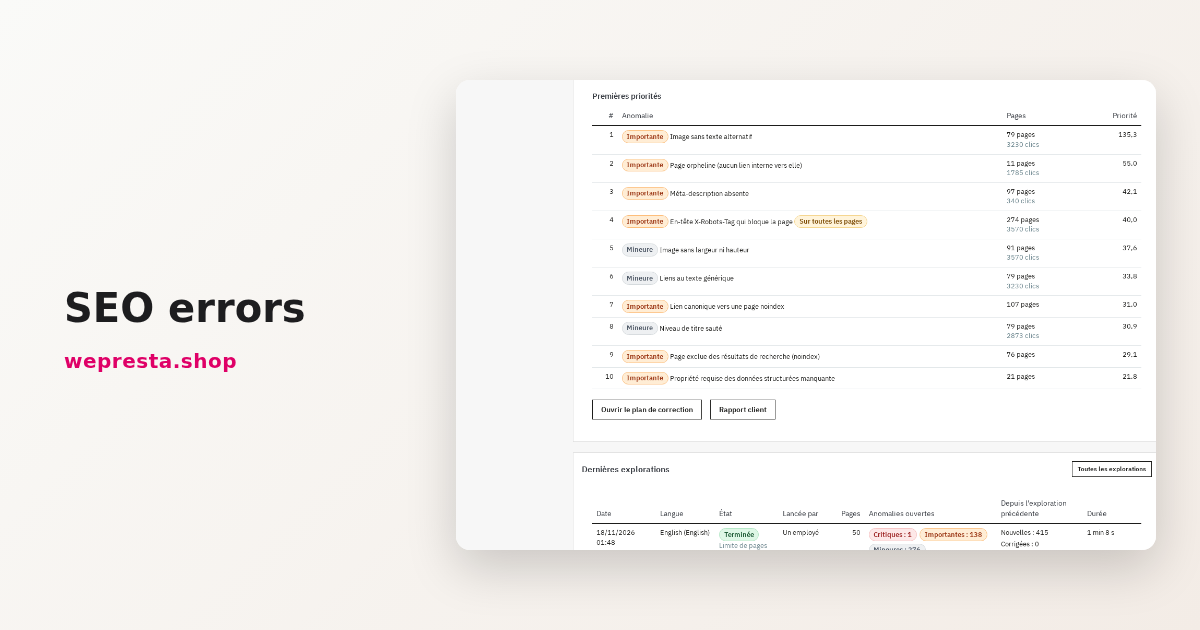
Errors ranked by priority, with severity, number of pages and clicks for each page

Errors ranked by priority, with severity, number of pages and clicks for each page

The client report sums up issues by severity and by family, ready to print

The client report sums up issues by severity and by family, ready to print

One RSS feed per language, with its build date and a validity check for each address

One RSS feed per language, with its build date and a validity check for each address

404 addresses become useful redirects in a few clicks

404 addresses become useful redirects in a few clicks

Support

FAQ

Find answers to frequently asked questions about this module

No. It reads the HTML as served and never writes to pages, product sheets or categories. Its only writes concern the 404 log, redirect rules, address configuration, robots.txt (with versions and restore) and the RSS feed; no page is modified. No meta tag and no text is rewritten automatically.

No. The module opens no external account and asks for no API key. Traffic prioritization uses a Search Console CSV export that you import: the expected headers are pre-filled, and you can import a file without a connected account.

No. The HTML performance family looks at what the page contains and how heavy it is, not at Googleโ€™s field data. Core Web Vitals and real speed need a dedicated tool; the module does point out heavy pages and heavy elements.

The crawl runs on your server. With the default settings, expect about 1,000 pages in 10 to 20 minutes, within a default cap of 2,000 pages that you can change. Without a scheduled task it continues while the module page stays open; with the scheduled task it runs in the background. The delay between requests and the concurrency are settings.

Yes. One crawl is made per shop and language, with its own history and comparison. The shops of a group can be compared in a dedicated view, and crawl settings belong to each shop.

PrestaShop 1.7.8, 8.2+ and 9.0+, with PHP 7.4 or later. Versions 8.0 and 8.1 are not supported.

The module disables itself in the shops concerned: redirects are no longer served, the 404 log stops, addresses without identifiers revert to PrestaShopโ€™s format and the RSS feed answers with a 404. Tables, settings and data stay in place, and everything comes back when the license is validated.
No. It checks the existing tags and reports what is missing, but generates no titles, descriptions, JSON-LD or sitemap. Companion modules from the same range, such as SEO Meta Automator and Schema Pro, cover that generation.

Yes, if you enable it. By default the crawl checks internal links and redirects; external link checking is an option that starts disabled, because it makes the crawl longer and leaves the shopโ€™s domain. Private and reserved addresses are refused.

The interface, the fix plan and the e-mail report exist in French, English, Spanish, Italian and Polish. The client report is generated in the report language, and a multilingual shop gets one crawl per language.

5-minute installation · Full documentation included

Lifetime license
One-time payment, updates included for life.
Choose your license
No commitment · Cancel in 1 click from your account
Instead of --โ‚ฌ/year if purchased separately

You might also like

Loading...