- Are Google rich results guaranteed?
- Can I keep another SEO module?
- Do I need a GTIN for every product?
- How do I update from an earlier version?
Schema Pro
Help search engines understand your products, variants and store with configurable Schema.org structured data. Schema Pro brings product information, business identity, navigation, shipping and returns together, with tools to inspect the generated data and find catalog gaps.
View the module and available offers
Installation and first checks
- Back up the shop, then upload the licensed ZIP through Modules > Module Manager. For an existing installation, use the module update process; do not uninstall to upgrade.
- Activate your license and open Configure. Select one shop in multistore, enable the required schema types and complete the Organization details.
- Map variants and review source. Enable shipping or returns only after entering rules that match the public conditions and all products concerned.
- Preview a simple product and a product with combinations. Compare price, currency, stock and language with the visible page, then inspect the live HTML and test a public URL.
- Run the catalog diagnostic and correct genuine gaps. Clear the module cache after configuration changes and check other markup sources for duplication.
Compatibility
PrestaShop 1.7.8, 8.2+ and 9.1+ (8.0, 8.1 and 9.0 not supported); PHP 7.4 minimum, using a PHP version supported by your PrestaShop installation. The back office is available in English, French, Spanish, Italian and Polish. Product and FAQ data use the selected shop and language. In multistore, select one shop before editing. Check your theme and any other structured-data or review module together on a test shop.
Configuration in five tabs
General
select the schema types, native markup replacement and cache. Save this section independently.
Organization
enter the factual identity of the store and its public contact information.
Products
configure variants and attribute mapping, review source, real promotion expiry, shipping and return rules. Keep auto for the actual promotion end date when available; do not invent an expiry date.
Group combinations with hasVariant, variesBy and productGroupID. For example, a T-shirt’s color and size variants can carry their own reference, price, availability and image. Map your attribute groups to color, size, material, pattern or gender. A configurable limit bounds output size, with selected and default combinations included first.
Specify a destination country, currency, shipping cost, handling time and transit range. A blank cost is not interpreted as free shipping; enter zero only when that is your real policy. This common rule must apply to the products concerned. It does not calculate carrier prices or customer-specific delivery costs.
Configure returns independently of shipping: country, permitted return period, finite or unlimited window, or returns not accepted, shipping fees paid by the merchant or buyer, return method and policy URL. The values must match your published terms; the module does not determine your legal obligations.
FAQ
select a page, enter complete question/answer translations, then order and activate the entries. Editing one language preserves the others.
Associate translated questions and answers with a product, category, CMS page or exact custom URL. Search by page name, order entries and activate them individually. The questions must already be visible on the associated page: this module publishes structured data, not a storefront FAQ block. Google no longer displays FAQ rich results.
Audit
preview a named product, run the active-catalog diagnostic, filter findings and export CSV.
Find a product by name, choose the language and currency, and inspect its generated JSON-LD. Open the public page or Google Rich Results Test for further checks. The catalog diagnostic processes active products in small batches and separates errors, recommendations and optional information. Export the findings to CSV to organize corrections. An absent manufacturer-assigned GTIN is not automatically an error. This diagnostic is not a Google certification or a complete theme-conflict detector.
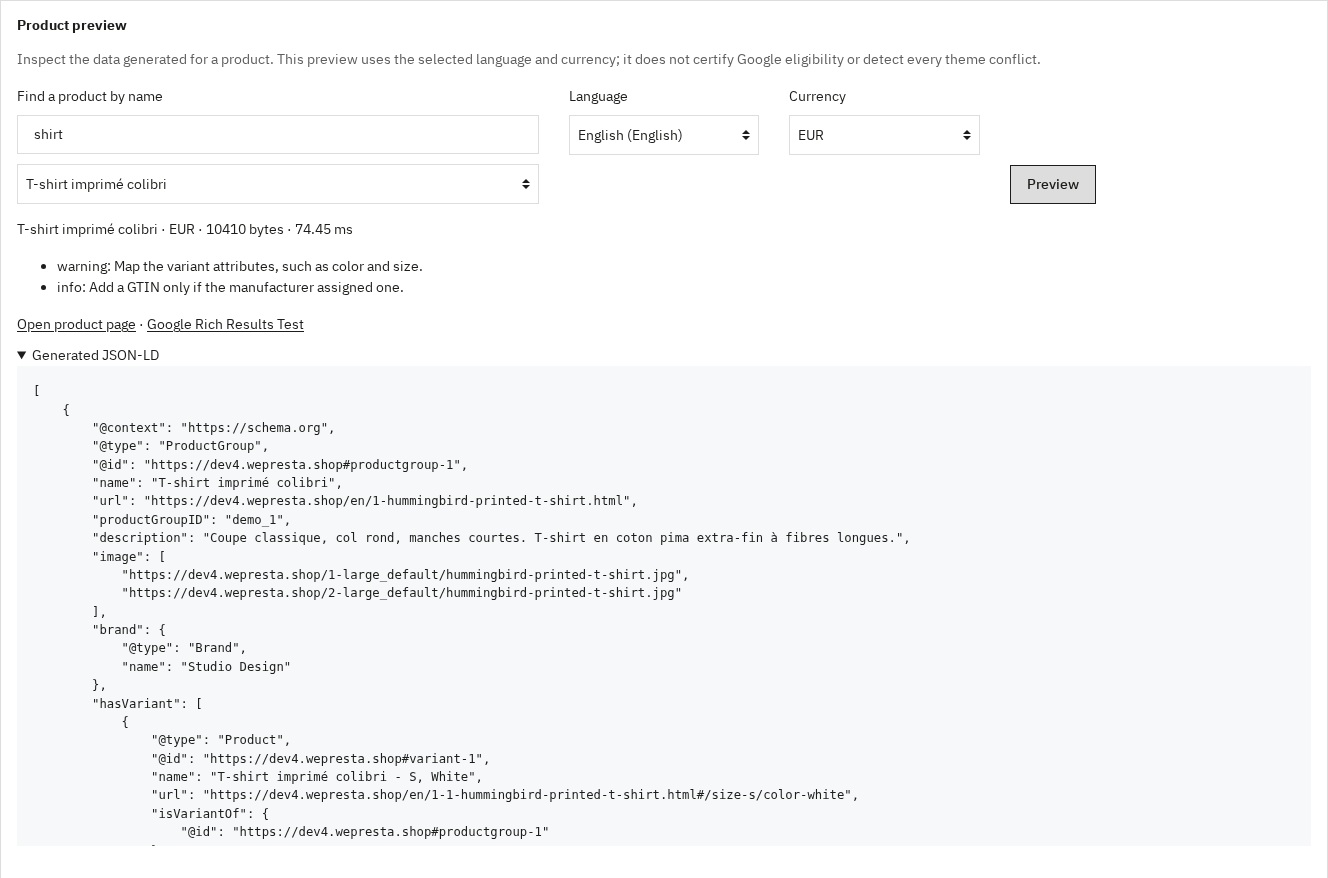 Product preview in the selected language and currency
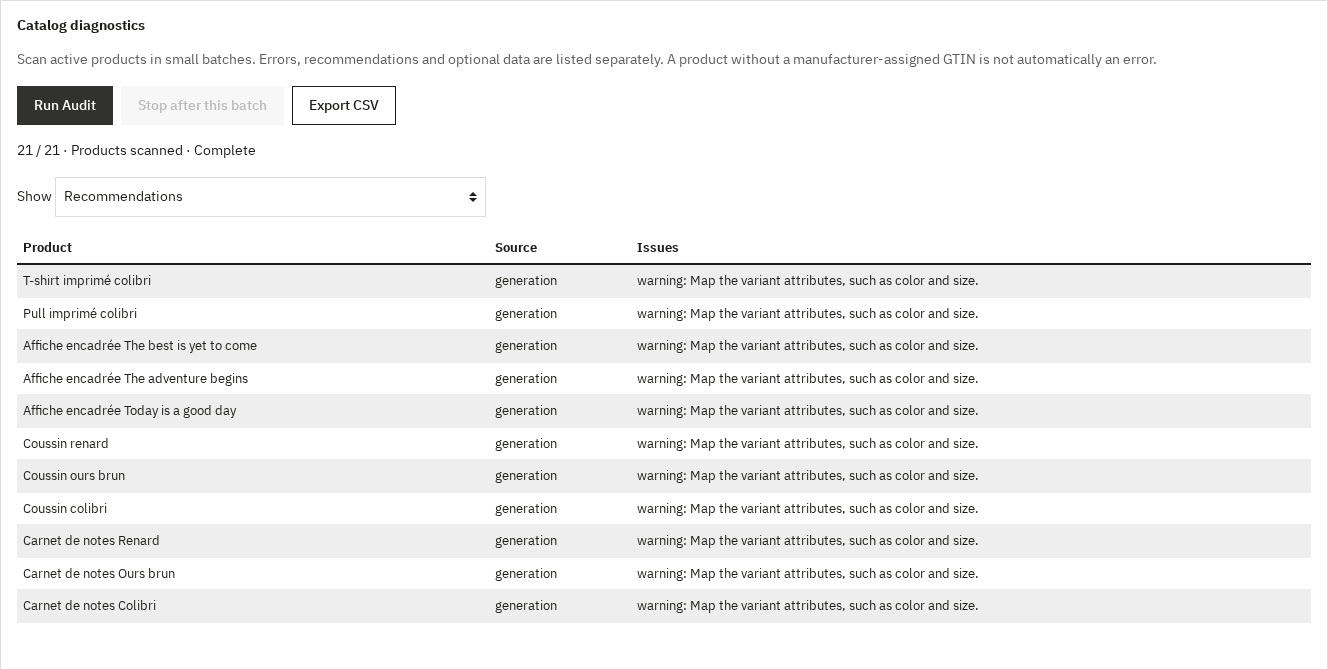 Catalog diagnostic with actionable findings and CSV export
Performance and theme integration
Reusable data and static pages can be cached for up to one minute. Product prices and stock are calculated live; relevant edits and the Flush Cache button invalidate cached data. Variant image and stock reads are grouped to reduce repeated database work. Actual cost depends on the catalog and configuration; no universal response time is promised. The module adds JSON-LD without storefront CSS or JavaScript. It can replace recognized native JSON-LD templates while preserving unknown third-party markup, so check the final page for duplicates after installation.
Questions before purchase
Are Google rich results guaranteed?
No. Google decides whether to display them, even when a validation tool accepts the markup. FAQ rich results and the sitelinks search box are no longer displayed. Keep the information accurate and consistent with visible content.
Can I keep another SEO module?
Yes, if its features do not duplicate the same structured data. Native replacement covers recognized PrestaShop templates; inspect markup added by your theme and other modules separately.
Do I need a GTIN for every product?
Only use a valid identifier assigned to that product. Never invent one to remove a diagnostic message. Optional information and errors are presented separately.
How do I update from an earlier version?
Back up first and update through Module Manager. Settings and FAQ entries are migrated without uninstalling. Recheck each shop, translations, shipping currency, return country and legacy values flagged for review.
Troubleshooting
If no data appears, check that the module, license and relevant schema type are active, then clear the module and PrestaShop caches. If data is duplicated, inspect the theme and other generators. For unexpected offers, compare the selected language/currency, visible prices and purchase settings. An empty preview or incomplete scan is not a successful diagnosis: retain the message and consult the PrestaShop logs.
Support
Use your WePresta customer area for support. Include the PrestaShop/PHP versions, affected URL, configuration section, CSV findings and relevant logs, with private data removed. License duration, site allowance and optional support follow the offer selected on the product page.
Changelog
2.0.0 — 2026-09-21
- Support for PrestaShop 1.7.8, 8 and 9 with PHP 7.4 minimum.
- Independent, validated configuration saves and shop-specific editing.
- More accurate prices, stock, identifiers, variants and real promotion expiry.
- Product preview with name search, language and currency selection.
- Batched active-catalog diagnostics, severity filters and CSV export.
- FAQ search and ordering, preserved translations and safer multistore edits.
- Explicit shipping costs and currency, with independently configured returns.
- Bounded cache, grouped variant reads, repaired logo and native back-office controls.
Version 1.0.0
- Full JSON-LD generation: Product, ProductGroup, Organization/LocalBusiness, WebSite, BreadcrumbList, FAQPage, CollectionPage
- ProductGroup + variants support (
hasVariant,variesBy,productGroupID) - Shipping (OfferShippingDetails) and returns (MerchantReturnPolicy) policies referenced via
@id - PrestaShop attribute mapping to Schema.org properties
- Built-in audit with scoring and CSV export
- Smart cache with automatic invalidation
- Modern back office (Symfony controllers), multistore and multilingual support