An order leaves in three parcels: two items are in stock, the third is on backorder. The labels bought from the carrier pile up in a downloads folder, tracking numbers are retyped into a spreadsheet, the CN22 is filled in by hand, and the customer asks which parcel is stuck. In PrestaShop, the order knows one carrier and one tracking number: splitting, customs and returns are handled somewhere else.
Shipping labels and parcel tracking brings those tasks into the back office, order by order. You create one or more parcels, import the labels you already obtained from your carriers, validate tracking numbers, generate customs documents and follow customer returns. The module needs no carrier account and no API key: it works with the documents and numbers you already have.
A shipment record for each order
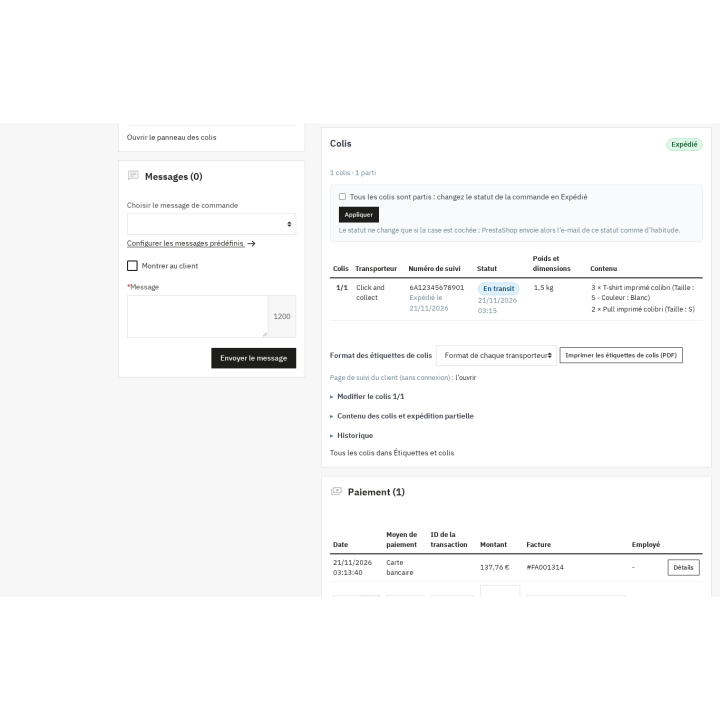
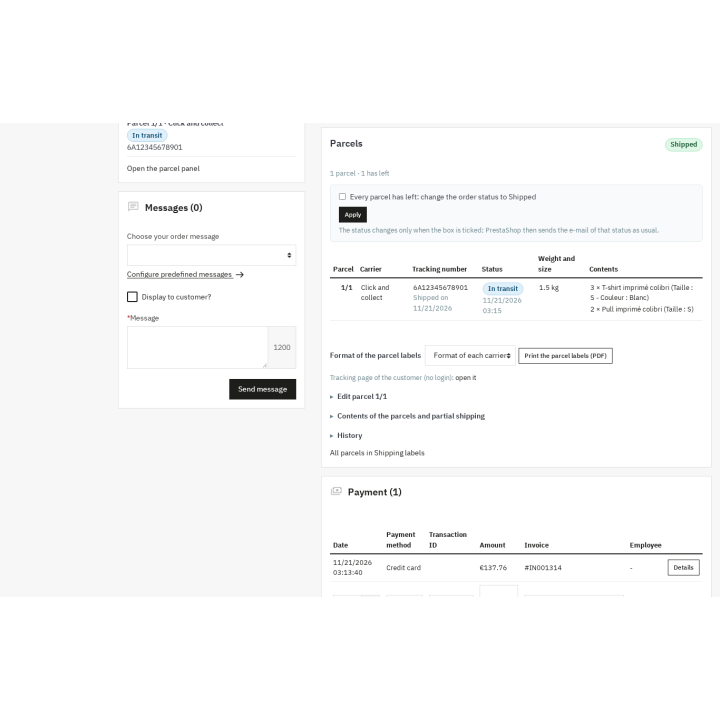
Each order gets a shipment record with one or more parcels. For each parcel, you set the carrier, weight, dimensions, shipping date, tracking number and an internal note. The status follows the real lifecycle: Prepared, Shipped, In transit, Delivered, Returned or Lost. A timestamped history keeps every change.
Contents are assigned line by line: you choose the quantities actually packed in each parcel, and the module computes what remains to ship. An order can therefore leave in several shipments without losing track of the items already sent. On PrestaShop 9.1, when the native shipment split is enabled, the module reads native parcels and can take one over instead of imposing a second record; it also works when the native split is disabled.
When every parcel has left, the module can offer to move the order to the shipping status chosen in the settings. Nothing changes unless the box is ticked: PrestaShop then applies its status and sends its own status e-mail as usual. The Offer the status Partially shipped option covers partial shipments.
Labels: import, find, print
You buy your labels from your carrier as before. The module accepts them per parcel in PDF, PNG, JPG or ZPL, with file type and size checks. Files are kept in protected storage outside public access, and every addition, replacement or deletion is logged.
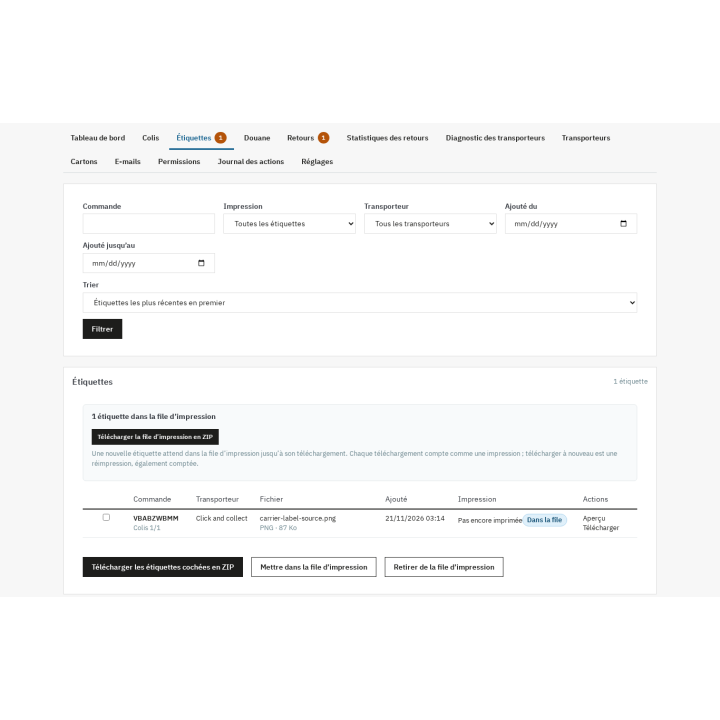
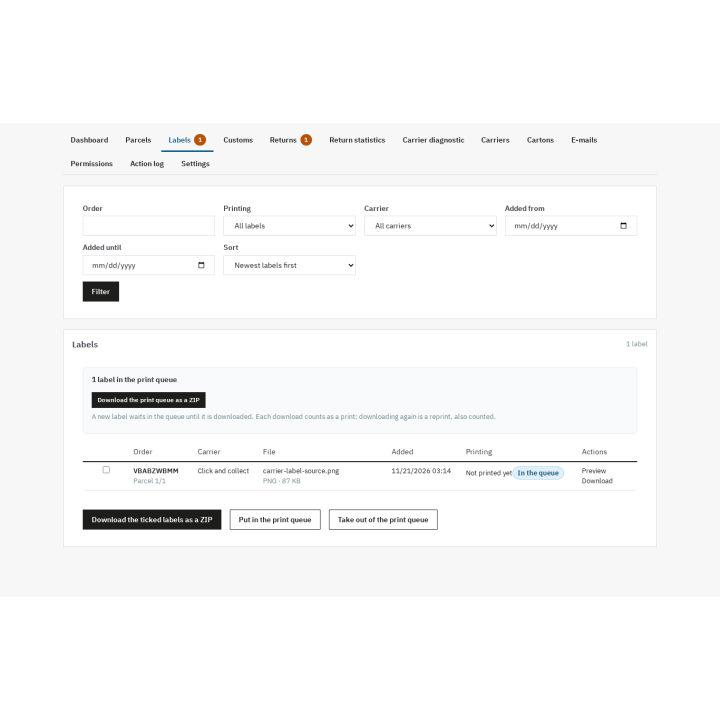
The label list shows the order, carrier, file, date added and number of prints. You can download the ticked labels as a ZIP, put them in the print queue or take them out. Each download of the queue counts as one print; downloading again is a reprint, also counted.
The module also generates its own parcel label PDF: sender, recipient, order reference, parcel number (1/3), weight and a Code 128 barcode of the tracking number or reference. Choose A4 with 1, 2 or 4 labels per page, or 10 × 15 cm, and print several labels in a single PDF. This is an identification label: it does not replace the carrier document, which remains necessary for transport.
Customs: prepare the right documents
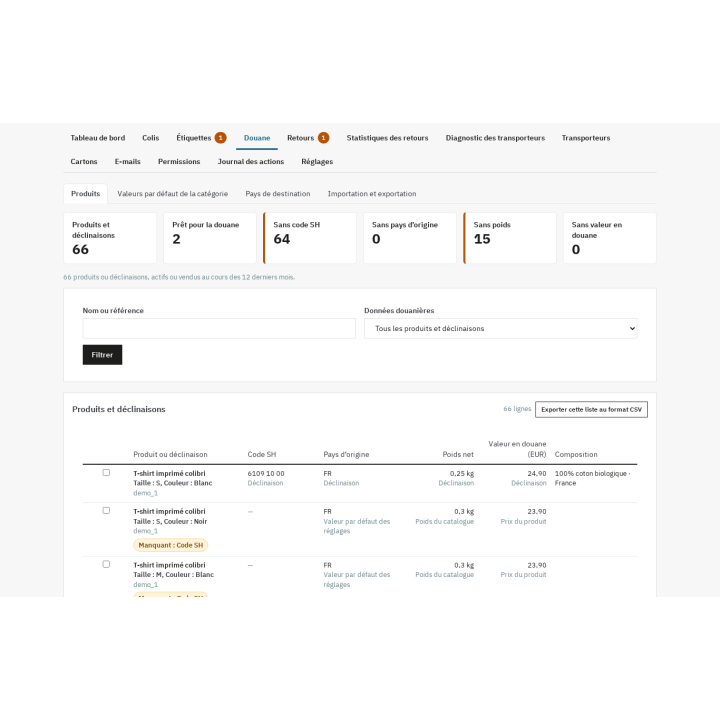
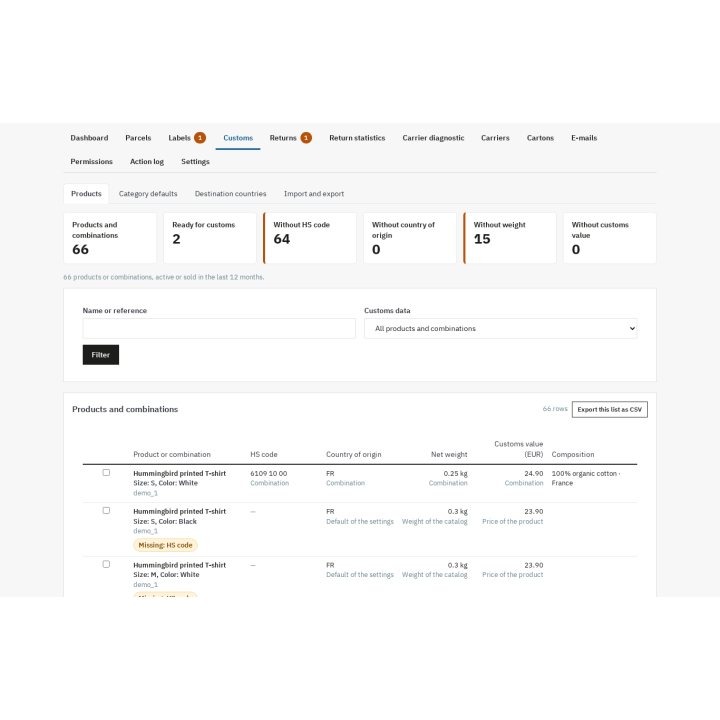
For each product or combination, you enter the HS/CN code, country of origin, net and gross weight, customs value, composition and Made-in statement. Values can be inherited from the category, typed in manually or imported from a CSV file, then exported for review.
The customs dashboard shows at a glance the products without an HS code, origin, weight or value, along with the number of products ready for customs. Ticking rows lets you fill the missing data in bulk without opening each product page.
From a parcel's contents, the module prepares the CN22 or CN23 declaration, the commercial invoice or the proforma, depending on the destination country and value. The relevant fields are carried over: items, quantities, weights, values, currency, HS codes, origin, Incoterm, EORI and VAT numbers, signatory. The CN22-to-CN23 threshold is configurable per destination country; the module does not impose a legal value. Missing data raises an alert and can block printing, depending on the carrier setting.
These documents are prepared from your data. They are neither a customs certification nor legal or tax advice: you must check every form, sign it and remain responsible for the declaration.
Returns: from the customer portal to the exchange
The module extends PrestaShop's native return instead of creating a second circuit. Each request gets a structured, translated reason, the customer's comment and their photos or documents. You can add the imported return label, the return carrier and tracking number, the received date and your internal note.
The customer requests a return from a portal reached through a signed link, without an account: they choose items and quantities, give a reason and attach their files. You accept or refuse the request with a reason, then record the parcel as received. Acceptance, refusal and receipt e-mails go out in the customer's language, with templates editable per language.
From an accepted return, you can create a zero-price exchange order or grant a native store credit linked to the return, with quantity and stock checks. Refunds stay on PrestaShop's native path. Return statistics are read by period, reason, product and carrier, with a CSV export; the return rate is the returned units divided by the shipped units of the period.
Customer tracking, e-mails and statuses
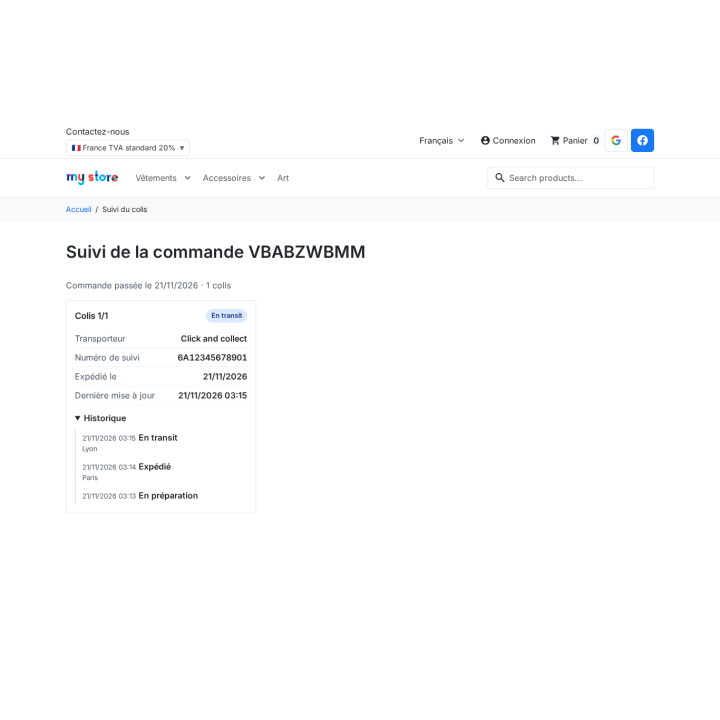
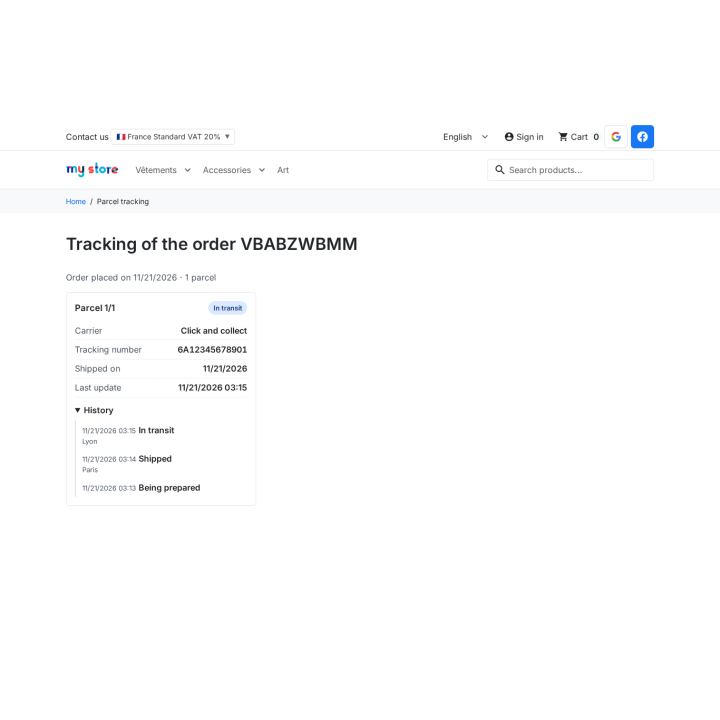
The customer follows their parcels from a page reached through a signed link, without login. They see the order's parcels, carrier, tracking number, shipping date, status and history. Only the relevant customer's data is shown; the secret that signs the link can be renewed.
A shipping confirmation e-mail goes out for each parcel, in the order language, with the tracking link. The template is editable per language, the send can be repeated manually and a copy to the merchant is available. One e-mail per parcel, so the message stays clear when an order leaves in several shipments.
Tracking statuses are updated manually or imported from a CSV file, with column mapping, a dry run before import and a line-by-line error report. No carrier API is called: the module does not pretend to know the parcel's state in real time, it records what you enter or import and offers the carrier's tracking link.
Diagnostic, dashboards and cartons
The carrier diagnostic answers the question "why is this carrier not offered?". For an order, or a simulated address and cart, every carrier is listed with the exact reason it is not available: disabled, outside the zone, no weight or price range, cart outside the ranges, customer group, shop, module carrier without a price. The diagnostic relies on PrestaShop's native rules and contacts no carrier.
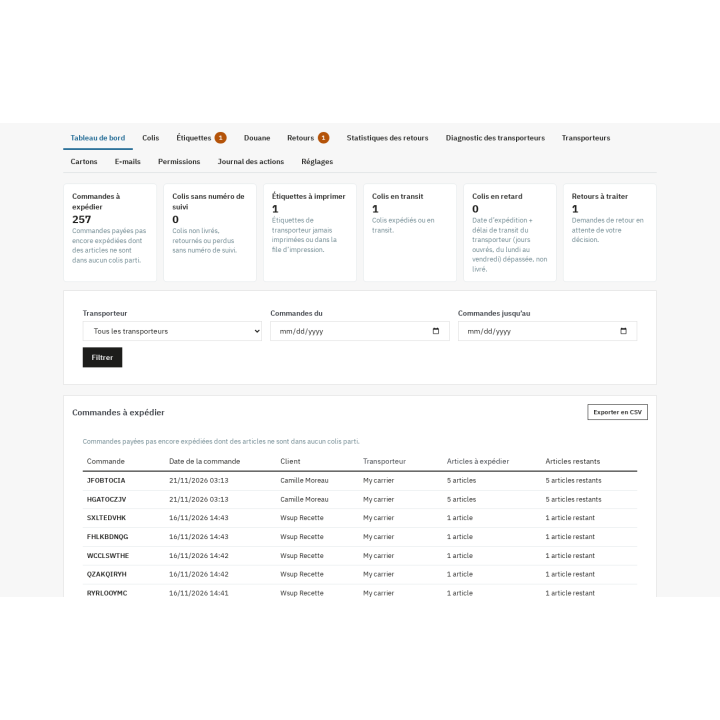
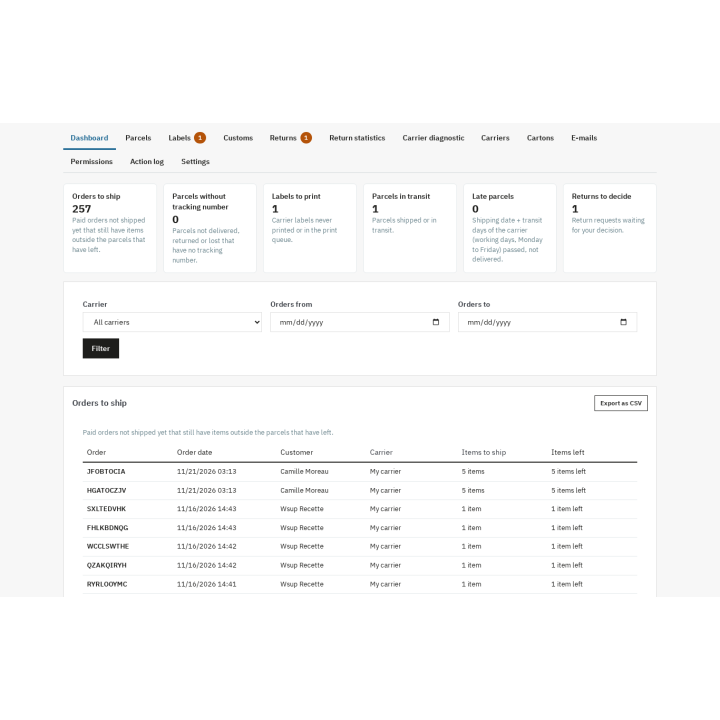
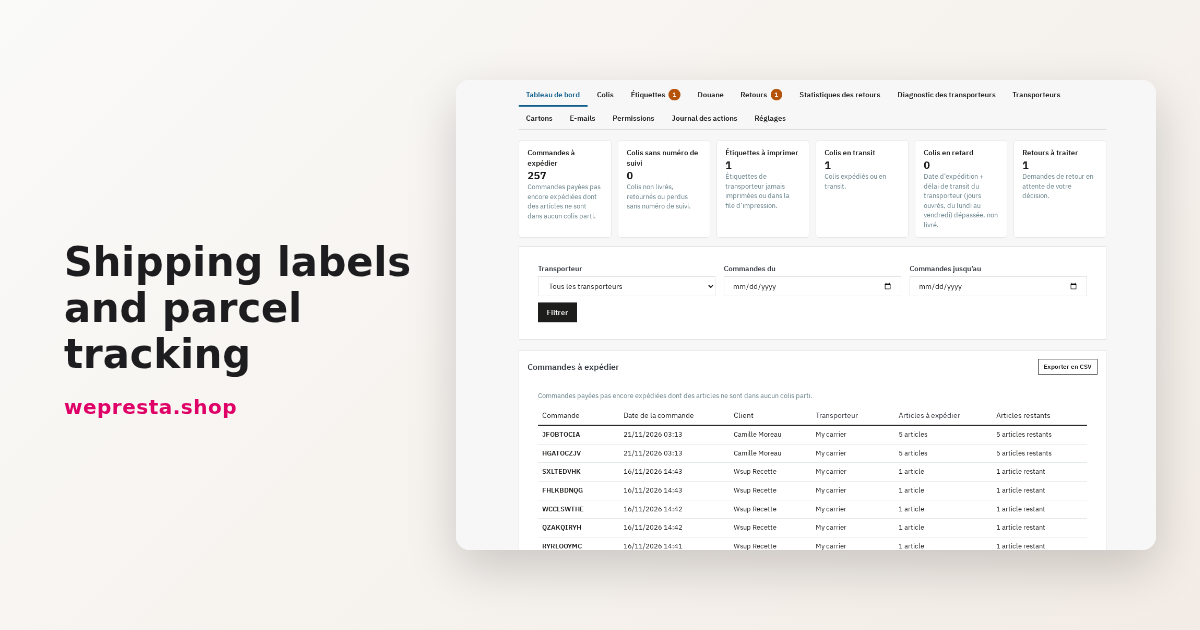
The dashboard gathers orders to ship, parcels without a tracking number, labels to print, parcels in transit, late parcels according to the carrier's transit time, and returns to decide. Lists can be filtered, sorted and exported as CSV.
The carton library describes each carton: name, inner dimensions, maximum weight and cost. For a given set of items, the module suggests the smallest compatible carton by volume and weight, checks the largest dimension and displays the empty-space ratio. When product dimensions are missing, a clear notice says so and the suggestion uses weight only.
Installation and first configuration
Install the module from the Module Manager, then activate your license on the configuration page. Fill in the sender address, the signatory of the customs forms and the default parcel contents. Create your cartons, then set each carrier: cut-off time, transit time, label format, default carton and instructions. Choose the address and tracking-number rules, then the e-mail templates.
After that, the order page shows the parcel panel. You create the shipment, assign the items, import the label, enter the tracking number and send the customer e-mail. The dashboard then drives the day.
What the module does not do
- It does not buy labels or compare carrier rates: you keep obtaining them through your contracts.
- It does not track parcels in real time through an API: statuses are entered or imported, and the carrier link remains the reference.
- It does not handle relay points, marketplaces, picking lists or shipping costs by postcode.
- It does not issue refunds: refunds and credit slips stay on PrestaShop's native path. The exchange creates a zero-price order and the store credit is a native voucher.
- It does not merge imported carrier PDFs: bulk download is a ZIP. Only labels generated by the module can be printed together in one PDF.
- It does not certify customs declarations and does not replace legal, tax or customs advice.
Requirements and compatibility
The module is compatible with PrestaShop 1.7.8, 8.0+ and 9.0+, including PrestaShop 9.1 with the native shipment split enabled or disabled. It requires PHP 7.4 or later. The back office does not depend on a theme; customer pages follow the shop theme. The interface is available in French, English, Spanish, Italian and Polish. The module supports multistore: parcels, settings and documents follow the shop. Permissions are set per employee profile, with an action log.
Who it is for
For shops shipping a handful of parcels a day, with one or more carrier contracts, that want a shipment record inside PrestaShop without paying for an account-based platform. For shops selling outside the European Union that must prepare customs documents without retyping product data. And for shops that receive returns and want to handle them in the same place as orders.
The module runs with a valid license. Without a license it disables itself and keeps parcels, labels, customs data and returns; it is enabled again after renewal by opening the configuration page.