An order is confirmed, a parcel leaves, an account is created: each of these moments sends an e-mail that the customer reads before coming back to the shop. PrestaShop ships these messages with a translations screen and two mail themes; changing the logo, composing a button or placing an order summary means editing the HTML and TWIG files of the theme. Merchants without a developer are left with e-mails that do not look like their shop.
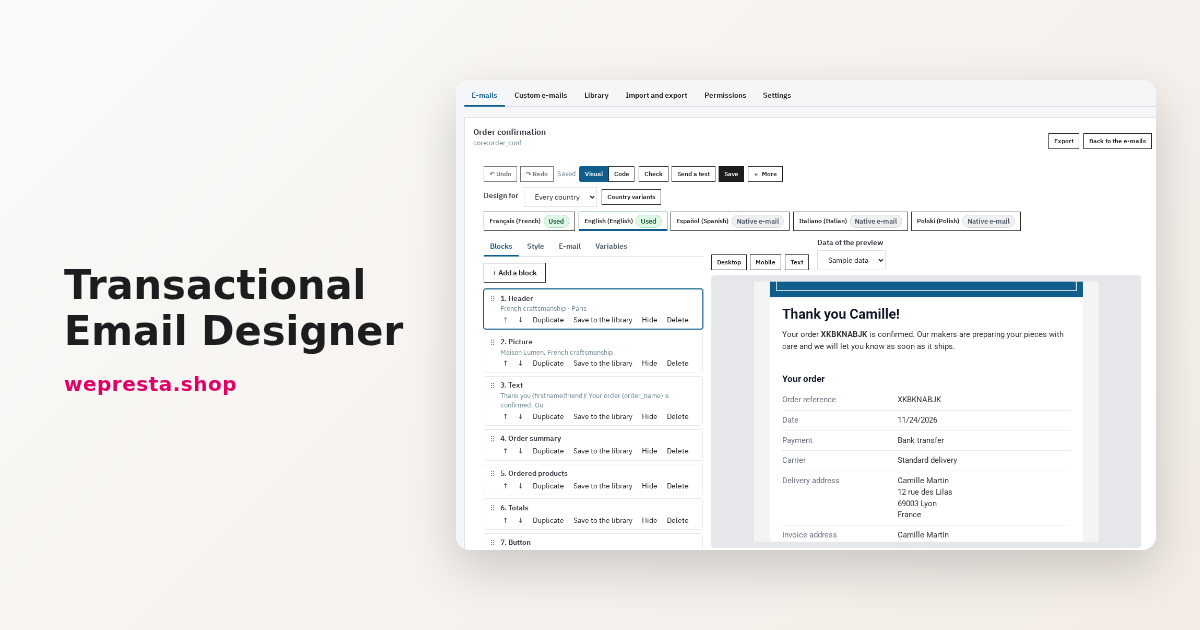
Transactional Email Designer adds a visual block editor for these messages to the back office. You compose a header, texts, pictures, buttons, the order summary and ordered products, totals and a footer; you set the colors and the font; you preview the result on a real order, a real customer or a real cart, on desktop and mobile; you send a test before the real send. The module works on PrestaShop’s native templates and on those of your installed modules, without changing a single core file: the design is applied at send time, and the original template stays intact.
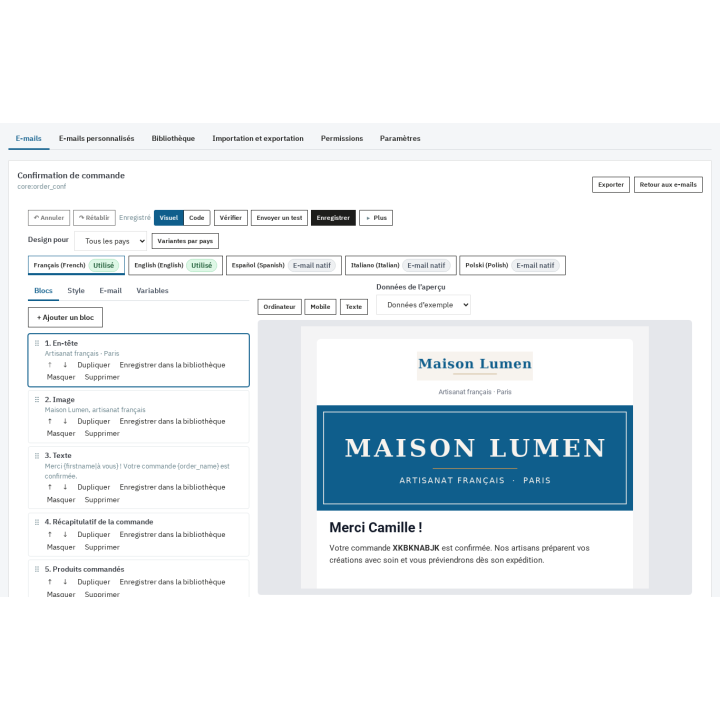
A block editor, no HTML required
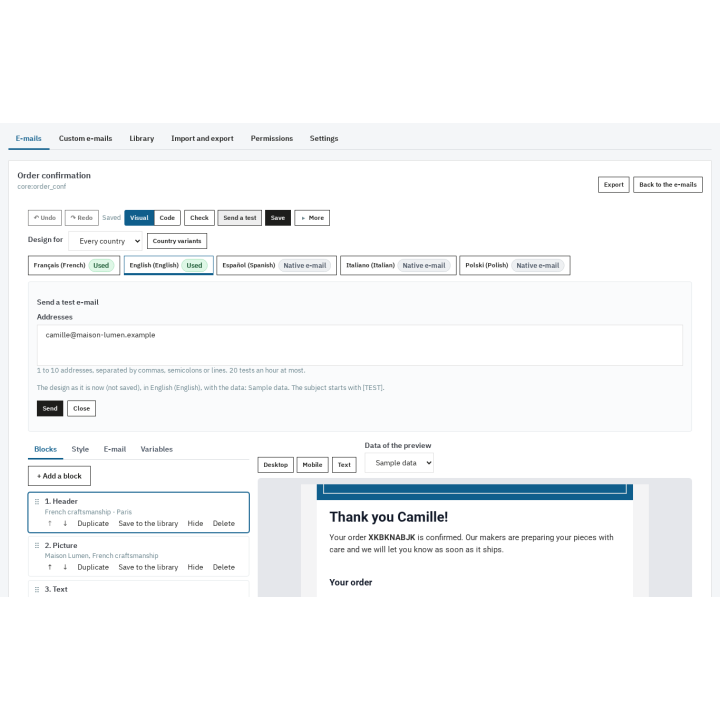
The editor offers a dozen blocks: header with the shop logo, text, picture, button, order summary, ordered products, totals, separator, spacer, social networks, footer and an HTML block for special cases. Each block can be added, moved by drag and drop or with the arrows, duplicated, hidden and deleted. Undo and redo cover the whole editor state, including texts, subject and preview text.
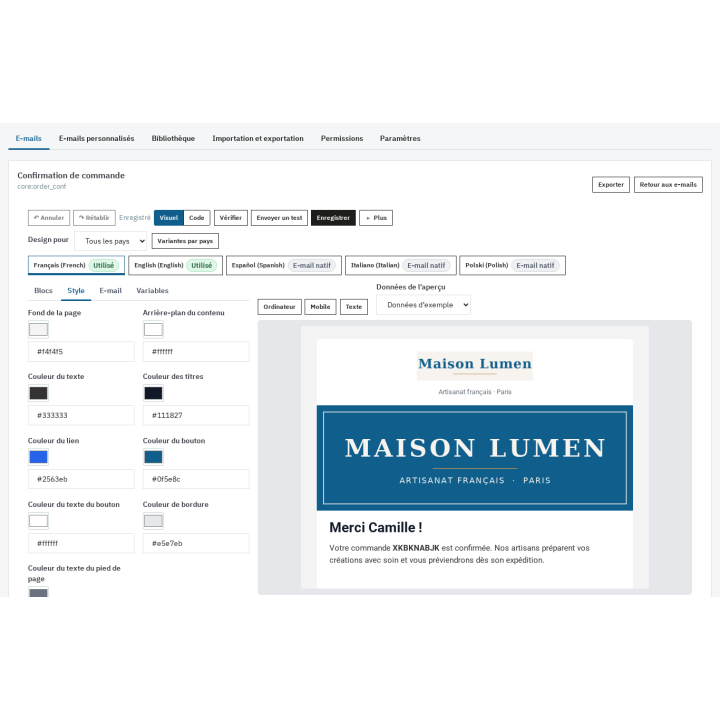
- The Style panel sets the colors (page and content background, text, headings, links, buttons, borders, footer), the e-mail width, corner radii, logo size and typography.
- Twelve open-license fonts are hosted by your shop, with no call to Google at send time, plus a fallback font for mail clients that do not show web fonts.
- A layout and a style can be applied to one e-mail, to all its languages or to every e-mail of the shop, with a confirmation and a revision before each change.
Every transactional e-mail in one place
The dashboard lists the templates your shop really has: PrestaShop’s native e-mails, those of your installed modules and those replaced by a mail theme. For each one you see its origin, the languages covered by a design, the last change and its state: native, customized, update available or draft. Filters find an e-mail by origin, state, category or language.
You also create custom e-mails from a design or a blank page, with the variables of an order, then send them by hand from the order page, to the customer or to another address. Every manual send is logged, and the log follows PrestaShop’s GDPR tools: it is exported and erased with the customer’s data.
See the result on a real order
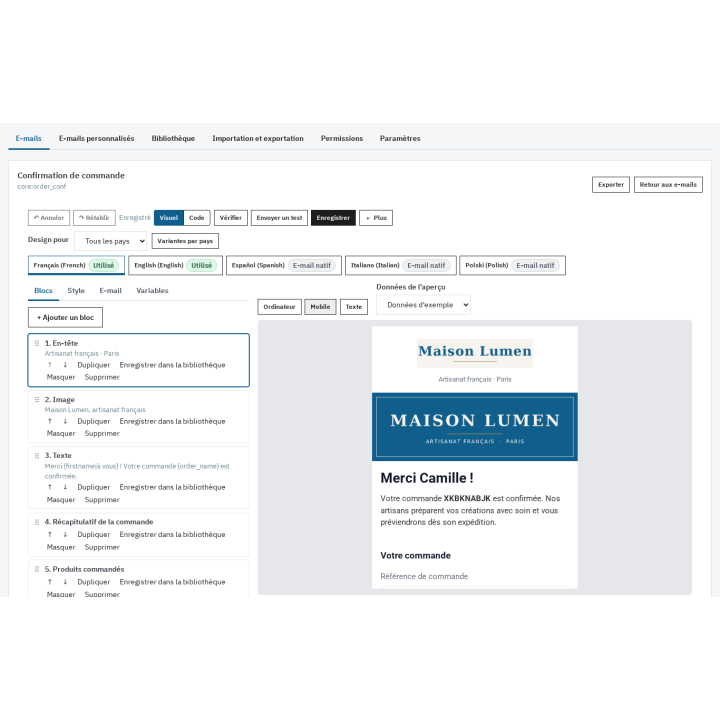
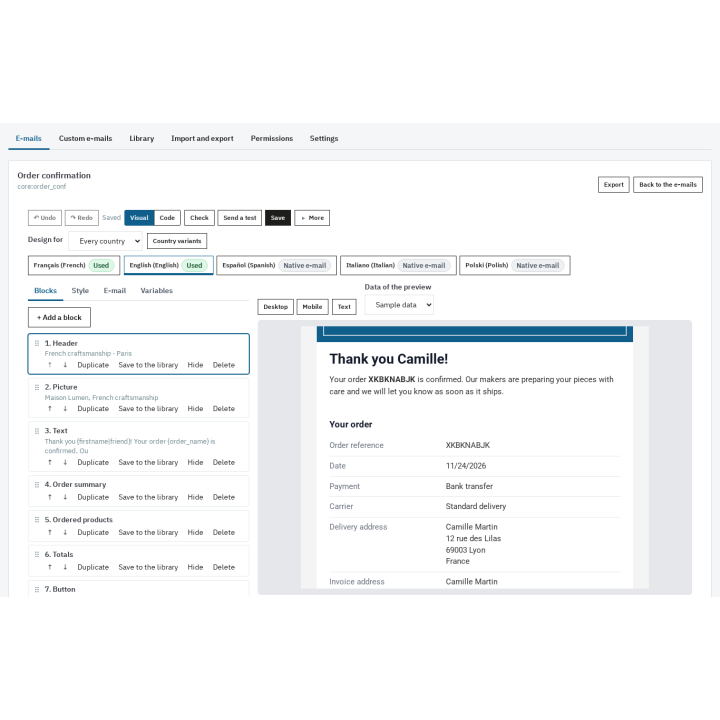
The preview is not a frozen sample. Choose a source: sample data, an order, a customer or a cart. The module fills the variables with real values (name, address, products, totals, carrier, tracking number), shows the e-mail at 600 px as on a desktop and at 390 px as on a phone, and flags the variables it cannot fill: those PrestaShop provides only at send time and those it knows nowhere.
The test e-mail is built from the current editor state, without saving it, and goes to 1 to 10 addresses with a subject prefixed [TEST]. It touches neither the shop’s real e-mails, nor its templates, nor its saved designs. Twenty tests per hour at most.
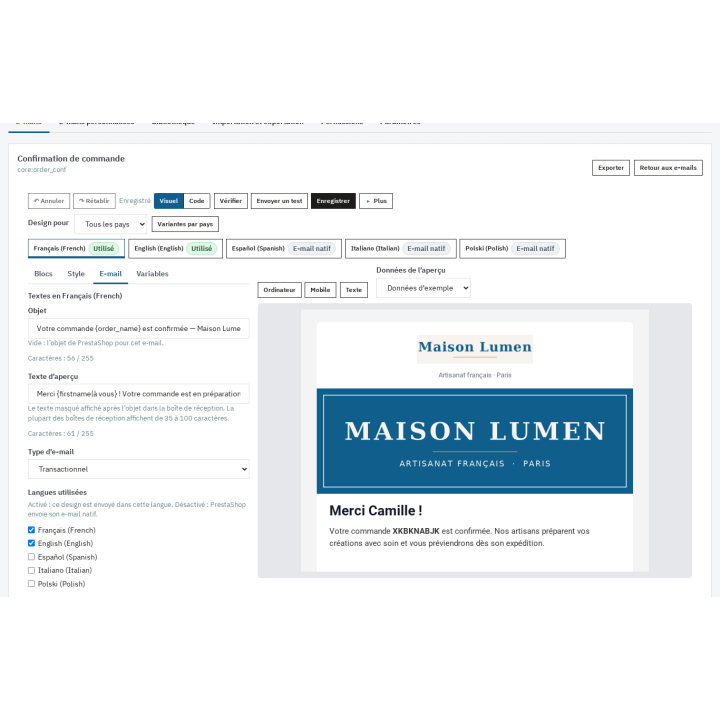
Subject, preview text and text version, in every language
The subject and the preview text (the preheader shown after the subject in the inbox) are written per language, with variables and a fallback value. An empty subject keeps PrestaShop’s own. The text version is generated automatically from the blocks or written by hand, and both are checked before saving.
The design is shared by the languages; texts, subject, preview text and text version belong to each one. You design once, copy the layout to the other languages, translate in the editor and switch each language on separately: a language that is off keeps receiving PrestaShop’s native template. A translation view shows the texts of the source language beside the target language.
Twelve ready-made designs and a block library
Twelve complete designs are included and translated into the five languages: order confirmation, shipping, account created, password, invoice, refund, review request, contact, cart, welcome, reminder and newsletter signup. Each one starts from the shop logo, uses the variables of its message, places the button of the useful link and adds the order blocks where they make sense. The library also offers six ready-made blocks (help box, order tracking button, social links, legal footer, thank-you note, highlight box) and saves your own blocks so you can reuse them from one e-mail to the next.
A quality check before every save
Before saving, the module checks the design and blocks the errors that would break the e-mail: a required variable missing, an empty or invalid link, an empty text version, a missing unsubscribe link on a marketing e-mail, a syntax error in code mode, a text/background contrast below 3:1. It warns without blocking for a contrast between 3:1 and 4.5:1, a picture without alt text, a width above 600 px, an unknown variable, HTML above 102 KB or a 1 × 1 px picture that looks like a tracking pixel. Each point is tied to its language and its block, and a click opens the block concerned.
Variants per delivery country
For order-related e-mails you can create a variant per delivery country: the order confirmation for a customer in Switzerland can differ from the one for a customer in France, with its own texts, colors and languages. A country belongs to one variant only, and a country without a variant receives the common design. At send time the module reads the country of the order’s delivery address and picks the variant that covers the e-mail’s language, otherwise the common design, otherwise the native template.
Back to the native template, and template updates
No template file is modified: the design is applied at send time. The original template of each language is kept, and “Restore the native template” applies to one e-mail, one language or the whole shop. Every save creates a revision you can preview and restore; twenty revisions per design are kept by default, a number you can set from 5 to 100.
When a PrestaShop or module update changes a template you have customized, the dashboard flags it and offers a comparison between the old native template, the new one and your design, with the variables added or removed. You choose to keep your design or to adopt the new native template; nothing is replaced without your decision.
From one shop to another: import, export and multistore
A design is exported as a JSON file with its variants, texts, settings and the pictures it uses, then imported into another shop or another installation. The import analyzes each design, matches languages and countries by their code, lists what is missing and never replaces anything without an explicit confirmation. In multistore, each shop keeps its own designs, variants and settings; employee rights are set per profile.
What the module does not do
- It changes neither sending nor deliverability: e-mails still leave through the SMTP server or the service configured in PrestaShop, with your SPF, DKIM and DMARC settings.
- It tracks neither opens nor clicks and adds no tracking pixel.
- It does not manage marketing campaigns, subscriber lists or segments: designs serve transactional e-mails and the custom e-mails sent from an order.
- It does not produce PDF invoices or delivery slips, which remain those of PrestaShop and your invoicing modules.
- It does not guarantee an identical rendering in every mail client: Outlook ignores rounded corners and web fonts, Gmail does not show web fonts, and the module provides tables, inline styles and a fallback font for these cases.
- It does not cover a module that would send its e-mails without going through PrestaShop’s native send, nor a module that would replace the content after it.
Requirements and compatibility
The module is compatible with PrestaShop 1.7.8, 8.0+ and 9.0+, with PHP 7.4 or newer. The GD extension is needed to upload pictures into designs; the DOM, JSON and mbstring extensions serve the code check and the text version. The interface is translated into French, English, Spanish, Italian and Polish, and the twelve designs are provided in these five languages; another shop language receives the English texts and is left to translate. It works with classic front themes and with both PrestaShop mail themes, because the whole e-mail is replaced at send time. No external service is called at send time: fonts are hosted by the shop. A valid WePresta license is still required.
Who it is for
For shops that want order e-mails in their own image without a developer: logo, brand colors, tracking button, a summary that reads well on a phone. For agencies and freelancers who take over several shops and want to reuse a design from one installation to another. And for multilingual or multistore shops that need the same message, declined per language and per delivery country.
The module works with a valid WePresta license. Without a valid license it disables itself: your e-mails go back to PrestaShop’s native templates and the editor, previews and test e-mails are no longer available; your designs, revisions, pictures and settings are kept. Activate or renew the license on the configuration page: the module is enabled again and your designs are used again.
Support and documentation
The module guide and answers to common questions are in the WePresta documentation. For personal help, open a ticket on the wepresta.shop/support page.