- A passport page for every product
- Fill in a passport from the product page
- Documents, characteristics and certifications
- All your passports at a glance
- Categories and default values
- Economic operators
- Import and export in CSV
- QR codes ready to print
- On the product page
- Passports that last
- What is a digital product passport (DPP)?
- Is the passport already mandatory for my products?
- What can a passport contain?
- How do I create passports for many products?
- How do I print the QR codes?
- What happens to printed QR codes if I delete a product or stop my license?
- Does it work with PrestaShop 1.7.8 and 8.0+?
- Can I fill in the passports from a spreadsheet?
- Does the module slow my product pages down?
- How do I update from version 1.0?
- Does it work in multistore?
- Are the passport pages indexed by search engines?
- Does the passport help with the GPSR?
Digital Product Passport (DPP) on PrestaShop: create, fill in and print your passports
The Digital Product Passport (DPP) gives each product a set of information that a customer reaches by scanning a code on the product or its packaging: composition, origin, durability, repair, care, end of life and documents. The European Ecodesign for Sustainable Products Regulation (ESPR, Regulation (EU) 2024/1781) makes it the information tool of the products it covers.
Digital Product Passport (DPP): QR code & public page creates these passports in your PrestaShop shop: a public page in every language, a printable QR code and structured data for each product, with the tools to fill them in for a whole catalogue. This guide explains how to install it, create your first passports and use it every day.
Key points:
- A passport page for every product, in every language of the shop, opened by a printable QR code
- Everything a passport can hold: composition, durability, repair, care, safety, end of life, indicators, characteristics, certifications and documents
- The economic operators: manufacturer, importer and EU responsible person, entered once
- A whole catalogue at once: categories, default values and CSV import with a simulation
- QR codes that last: their address never changes, even for a product you stop selling
Discover the module and its plans
Overview
The ESPR has been in force since 18 July 2024. The information a passport must contain is set product group by product group by delegated acts of the European Commission, and each act applies after a transition period. The Commission’s working plan lists, among the first groups, textiles, furniture, tyres, mattresses, iron and steel, and aluminium. Until the act for your products is published, the passport is a way to inform your customers, and preparing your data early saves time later.
The module is designed for PrestaShop merchants who want to publish this information now, in every language of their shop, without building pages by hand. It provides the structure the regulation describes (a unique identifier per product, an address reached by a QR code, the information and the documents, structured data) and fields free enough to follow the requirements of your sector. It does not replace legal advice: check the act that concerns your products.
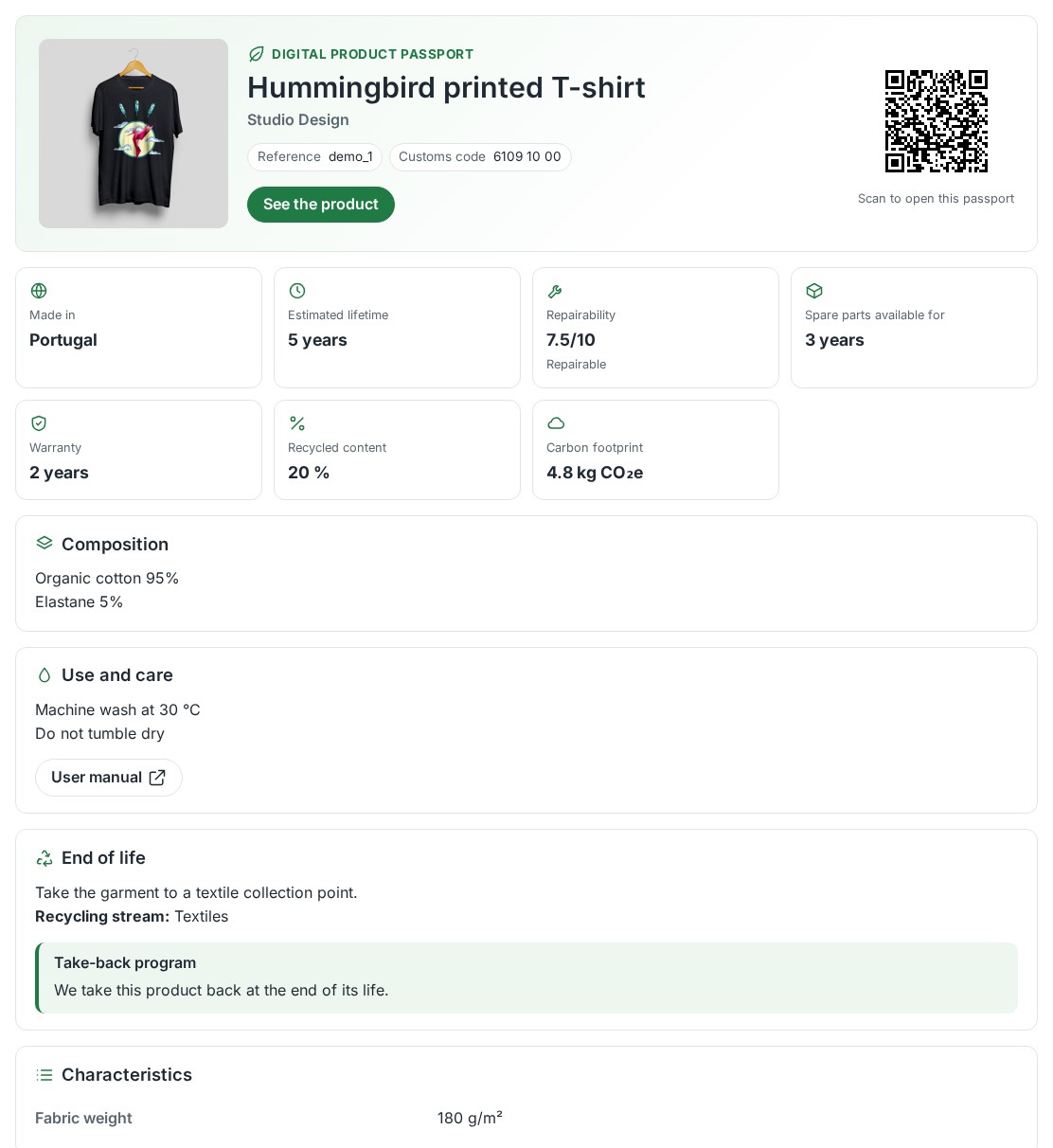 The passport page your customers open with the QR code
Features
A passport page for every product
Each passport has its own address, for example /en/dpp/<identifier>, in every language of your shop. The page shows the picture of the product, a link to the product page, the key facts (country of manufacture, estimated lifetime, repairability, spare parts, warranty, recycled content, carbon footprint, energy class) and the sections you filled in: composition, use and care, safety, end of life, characteristics, labels and certifications, documents and the operators who answer for the product. Customers can print it, and a link gives its data in JSON-LD.
The page is easy to read on a phone. It is not indexed by search engines by default, because it repeats the product page, and it carries a canonical address.
Fill in a passport from the product page
The Product passport tab of the product page holds every field of the passport, on the old and on the new PrestaShop product page. It shows the completeness of the passport and what is still missing. Texts are entered for each language with the language buttons, and the passport is saved with the product or with its own button. A wrong value, such as a web address without https://, is shown in red next to its field.
The tab also gives the QR code of the product, to download in SVG or PNG, and the address it contains.
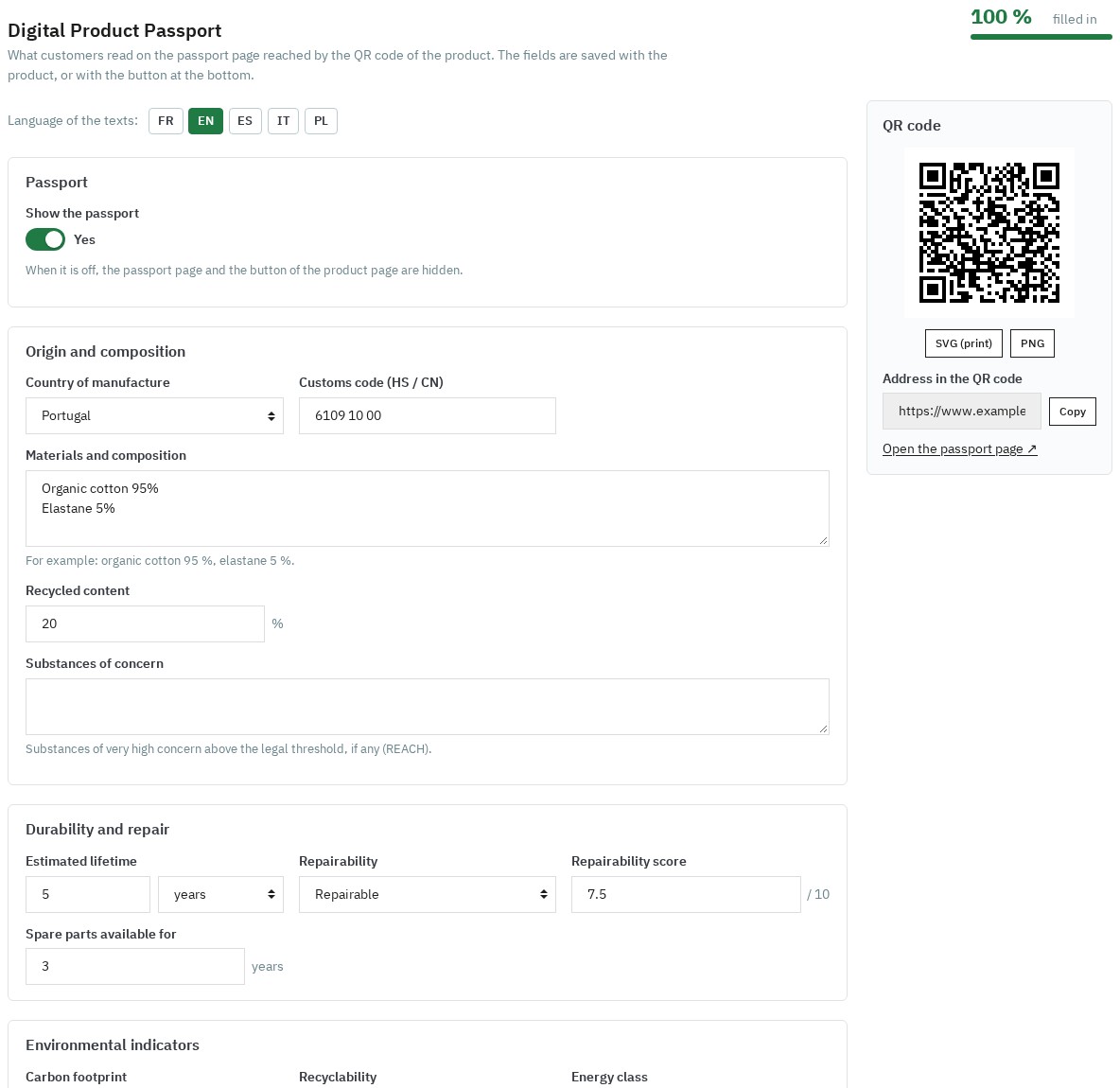 The passport filled in from the product page, with its QR code
Documents, characteristics and certifications
Attach to each passport the documents your customers may need: user manual, declaration of conformity, certificate, technical sheet, safety data sheet or another document (PDF, JPEG, PNG or WebP, 10 MB at most). Each document has a kind, a title in each language and a position; the files are stored outside the module folder and served by the passport page.
Add your own characteristics, such as “Fabric weight: 180 g/m²”, and the labels and certifications of the product (GOTS, OEKO-TEX® STANDARD 100, EU Ecolabel, FSC®, Fairtrade, CE and others, or a label of your choice) with their number, validity date, verification link and document.
All your passports at a glance
The Passports page lists the passports of the shop with their completeness, their category and their last change. Quick filters show the incomplete, complete, hidden or archived passports. Select passports to show or hide them, or to download their QR codes as a ZIP file.
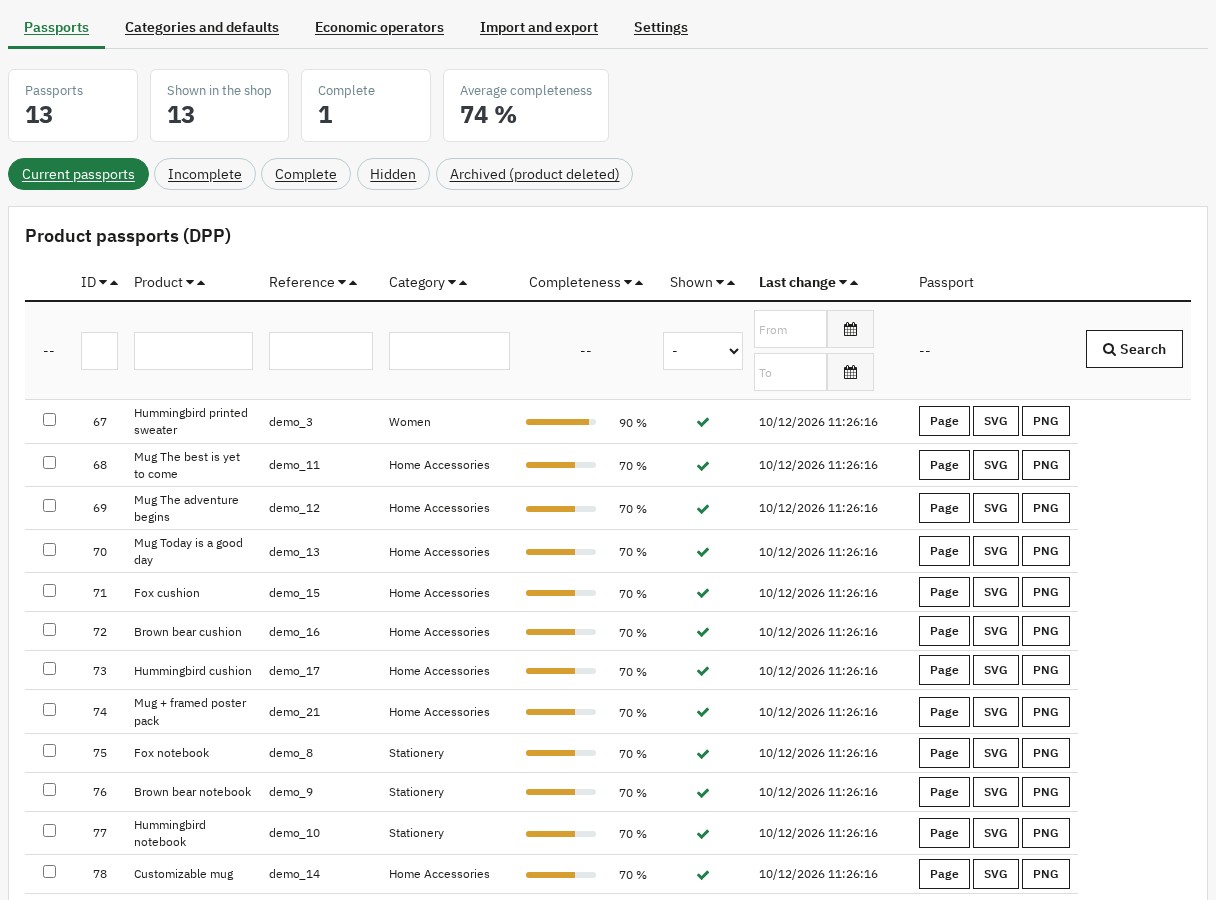 Every passport and its completeness at a glance
Categories and default values
On Categories and defaults, tick the categories whose products get a passport. A category covers its sub-categories. The products of these categories without a passport are counted on the Passports page, where Create their passports creates them in batches. A product that later enters one of these categories gets its passport when it is saved; the passport of a product that leaves them is hidden, not deleted.
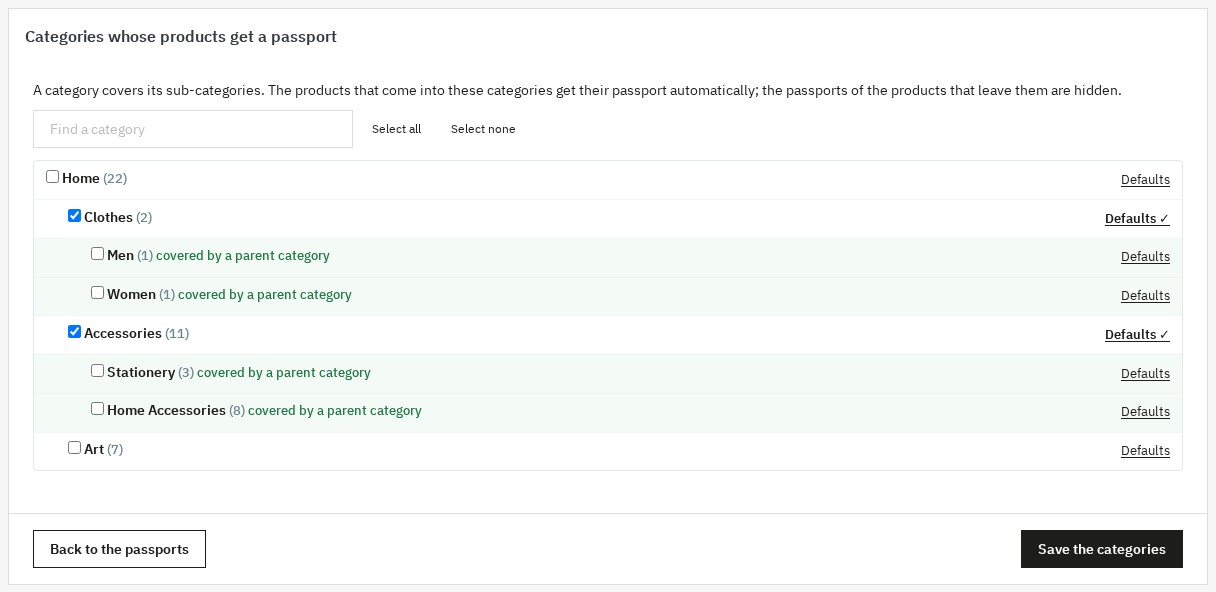 The categories that get a passport, sub-categories included
Enter once the values products share, for the whole shop or for a category: country of manufacture, warranty, lifetime, care instructions, sorting, take-back, recycling stream and more. They fill the empty fields of every new passport; the nearest category wins over its parents and over the shop. Save and fill the empty fields of the existing passports applies them to the passports already created, without replacing what you entered.
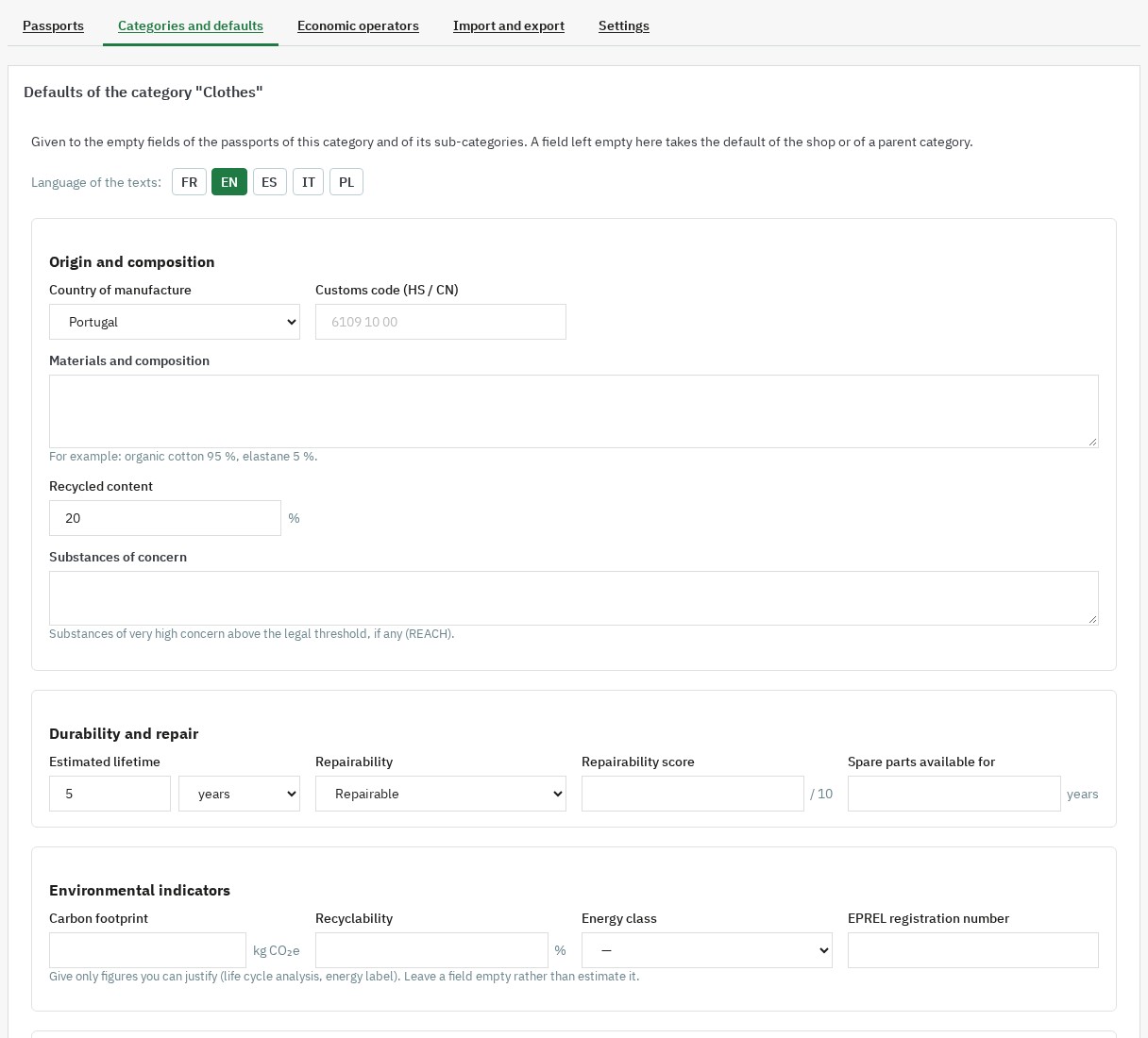 Values shared by a category, entered once
Economic operators
On Economic operators, enter the manufacturer, the importer and the EU responsible person once: name, address, country, e-mail, phone, website and identifier (EORI, VAT or registration number). Choose the default operators of the shop and the manufacturer of each brand; a passport can name its own operators. They appear on the passport page with their contact details.
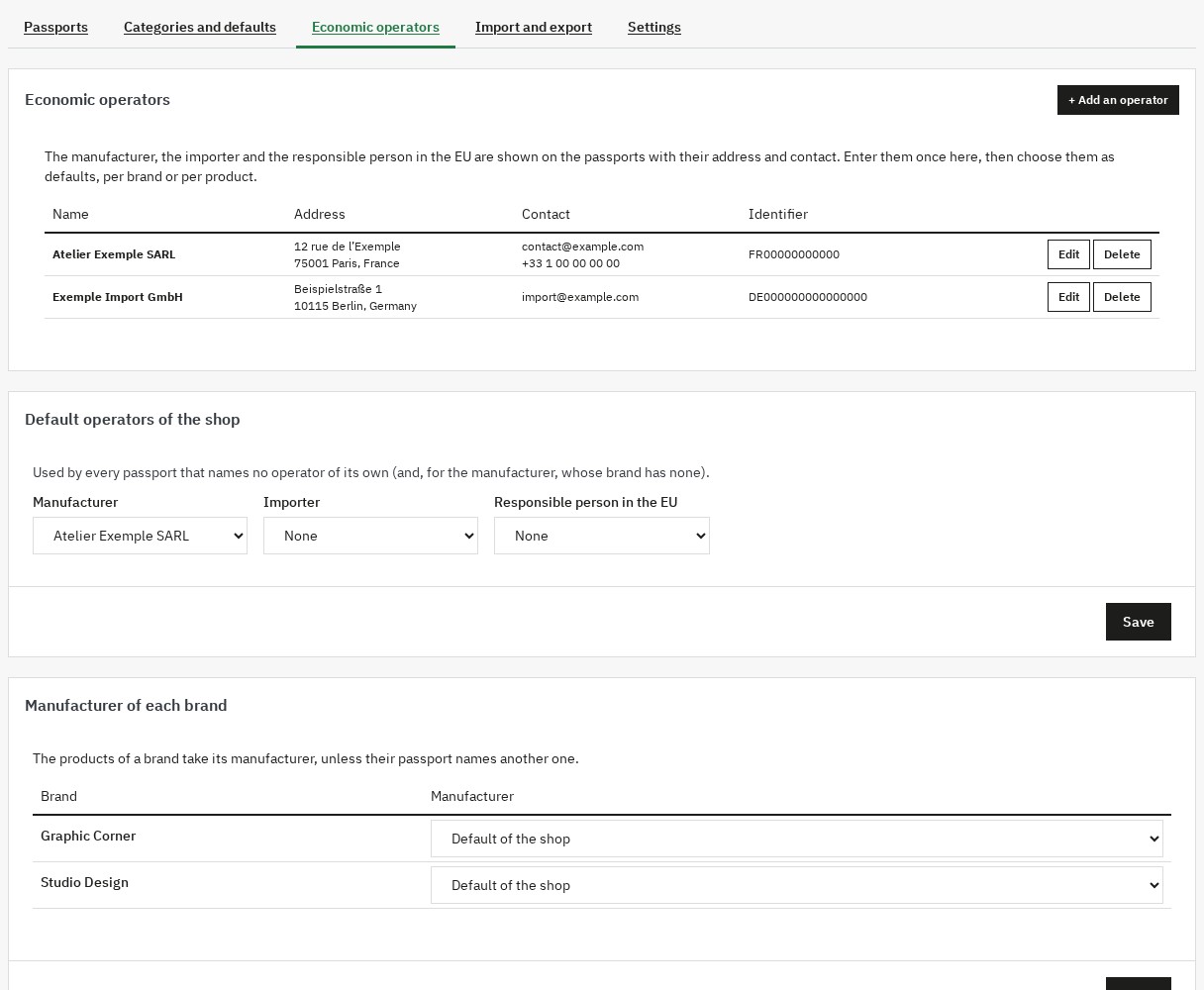 Manufacturer, importer and EU responsible person, entered once
Import and export in CSV
Import and export gives a CSV file with one line per product and one column per field and language. It opens in Excel, LibreOffice or Google Sheets and also serves as a backup. Complete the cells, save the file in CSV and import it: each line is found by the id_product column, otherwise reference, otherwise ean13. The import is first simulated: lines read, passports to create and to update, and the lines with a problem, with the reason. Nothing is saved before you apply it.
- A column absent from the file changes nothing; an empty cell empties the field.
- Texts have one column per language, ending with its code:
fr,en,es,it,pl. - Characteristics and certifications: one entry per line in the cell, parts separated by
|. - 20,000 lines at most per file.
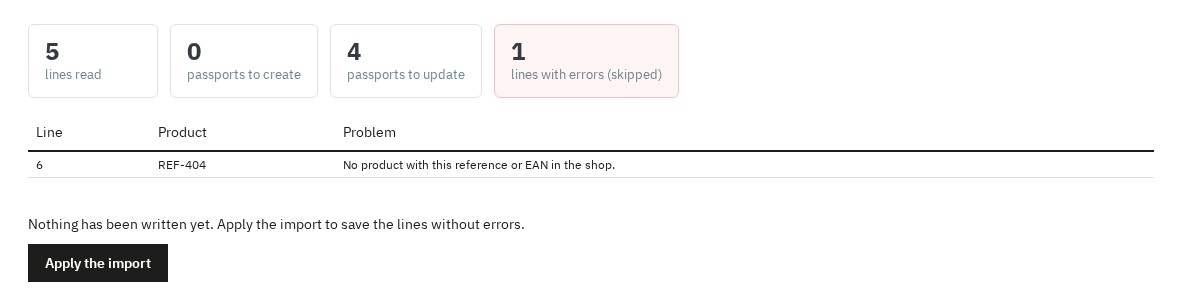 A CSV import checked line by line before it is applied
QR codes ready to print
The QR codes are generated by the module, without any external service. Download them in SVG (vector, for printers) or in PNG from 512 to 4096 pixels, one by one from the product tab or for a selection as a ZIP file named by reference or EAN, with an index file. In the settings, choose the error correction level (higher for labels that get rubbed) and the language of the page they open.
The address of a passport never changes: a QR code printed today keeps opening the same passport.
On the product page
A Digital product passport button leads from the product page to its passport, and a Product passport tab sums up its key facts. Both can be switched off in the settings. The button costs a single database query after the first display, without any write.
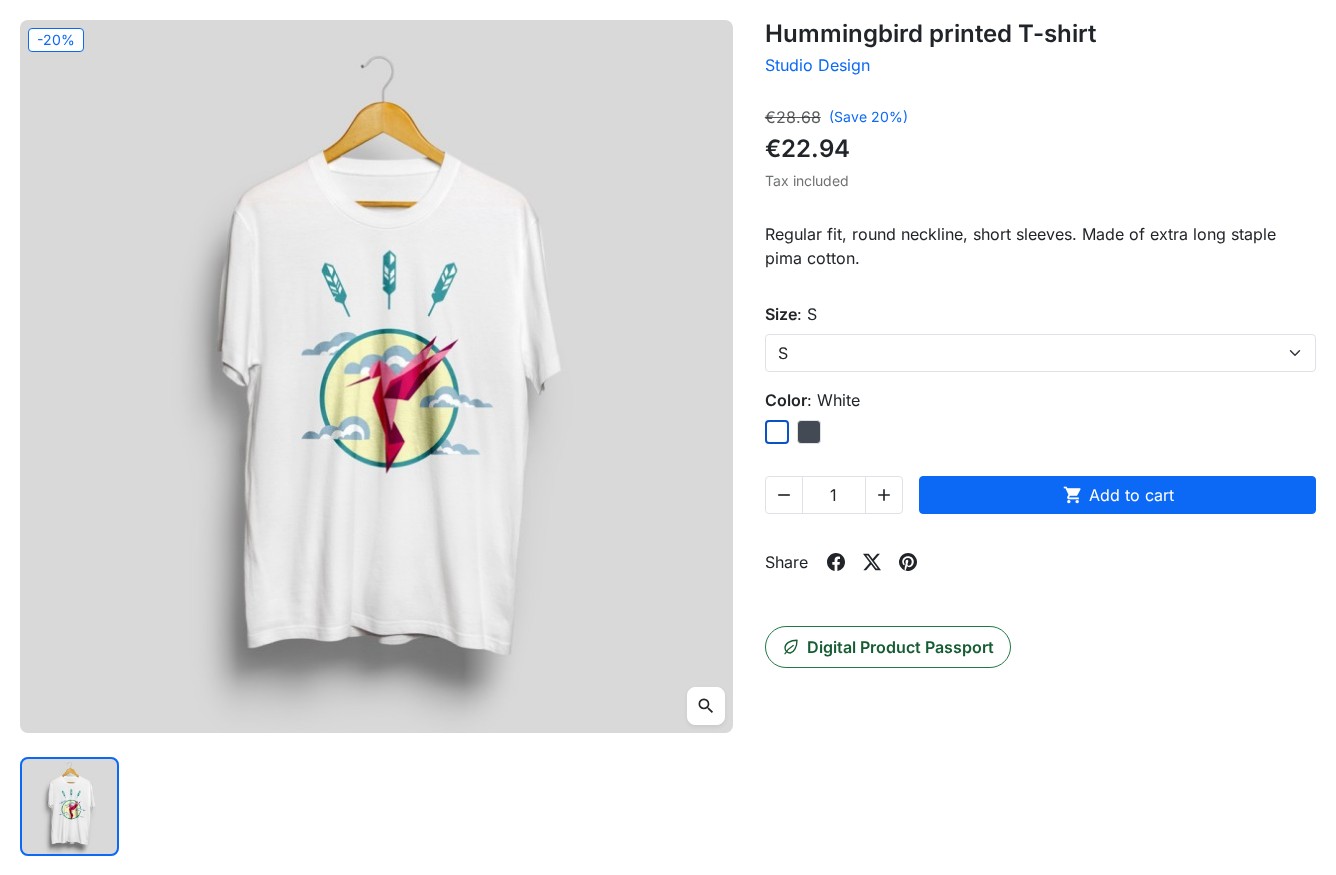 A “Digital product passport” button on the product page
Passports that last
- Deleted product: its passport is archived with its name, reference, EAN, manufacturer and picture; the page states that the product is no longer sold. Delete it for good from the list if you want.
- License not renewed: the passport pages, their data and documents and the product button stay online; the administration waits for the renewal. The module never switches itself off.
- Uninstallation: passports, documents and settings are kept unless you tick the option to delete them.
Installation
- Download the module from your customer account.
- In your back office, go to Modules > Module Manager and click Upload a module.
- Select the ZIP file; PrestaShop installs the module.
- Click Configure and enter your license key. The pages of the module open from the navigation of the configuration page, or from the menu Modules > Product passports (DPP) (WePresta > Product passports (DPP) on PrestaShop 9).
Getting started
- Categories and defaults: tick the categories whose products get a passport and save.
- Defaults of the shop: enter what all your passports share, for example the warranty and the recycling stream.
- Economic operators: add your manufacturer and, if you import products, your importer or EU responsible person, then choose them by default.
- Passports: click Create their passports; the passports are created in batches.
- Open a product: complete its Product passport tab, then click Open the passport page to see the result.
- Download the QR codes and add them to your labels or packaging.
Configuration
- Product page: show the button and the summary tab.
- Passport page: show the QR code, the identifier of the passport and the operators; let search engines index the pages (off by default).
- QR codes: error correction level, language of the page opened by the QR code, size of the PNG files. Draw the QR codes again empties their cache after a change.
- Data: delete the passports and their documents when the module is uninstalled (off by default).
- Diagnostic: PrestaShop and PHP versions, PNG images and ZIP files available, document folder writable, number of passports.
Requirements
- PrestaShop 1.7.8, 8.0+ or 9.0+
- PHP 7.4 or later, with the GD extension for PNG QR codes and the Zip extension for ZIP files
- Interface in English, French, Spanish, Italian and Polish; passports in every language of the shop
- Multistore: each shop has its own passports
Updating from version 1.0
Install version 2.0 over version 1.0 from the module manager. The identifiers, addresses and QR codes of your passports, their data and their documents are kept; the documents are moved out of the module folder. Then check your passport categories, and switch on the summary tab of the product page in the settings if you want it.
FAQ
What is a digital product passport (DPP)?
It is a set of information about a product (composition, origin, durability, repair, care, end of life, documents) that a customer reaches by scanning a code on the product or its packaging. The European Ecodesign for Sustainable Products Regulation (ESPR, Regulation (EU) 2024/1781), in force since 18 July 2024, makes it the information tool of the products it covers. The module gives each product its passport: a public page in every language of your shop, a printable QR code and structured data.
Is the passport already mandatory for my products?
Not yet for most products. The ESPR sets the required information product group by product group, through delegated acts adopted by the European Commission, and each act applies after a transition period. The Commission’s working plan lists, among the first groups, textiles, furniture, tyres, mattresses, iron and steel, and aluminium. Gathering your data now saves time when the act for your products is published. The module helps you prepare and publish your passports; it does not replace legal advice.
What can a passport contain?
Country of manufacture and customs code, composition and substances of concern, estimated lifetime, repairability and its score, spare parts, warranty and its conditions, care and user manual, safety instructions, sorting, take-back and recycling stream, environmental indicators (recycled content, recyclability, carbon footprint, energy class and EPREL number), your own characteristics, labels and certifications, documents, and the economic operators. Every text exists in each language of your shop.
How do I create passports for many products?
Choose the categories whose products get a passport (a category covers its sub-categories), enter the values they share once in their default values, then create the missing passports in batches from the list. A product that later enters one of these categories gets its passport when it is saved. For the remaining data, export the passports in CSV, complete the file in a spreadsheet and import it.
How do I print the QR codes?
Download the QR code of a product from its tab in SVG (vector, for printers) or in PNG up to 4096 pixels, or select passports in the list to get a ZIP file named by reference or EAN, with an index file. The QR codes are generated by the module, without an external service, and their address never changes.
What happens to printed QR codes if I delete a product or stop my license?
They keep working. A deleted product leaves an archived passport with its name, reference, EAN, manufacturer and picture, and the page states that the product is no longer sold. Without an active license, the passport pages, their data and their documents stay online; only the administration waits for the renewal.
Does it work with PrestaShop 1.7.8 and 8.0+?
Yes: the module is compatible with PrestaShop 1.7.8, 8.0+ and 9.0+, with PHP 7.4 minimum. The passport tab appears on the old and on the new product page.
Can I fill in the passports from a spreadsheet?
Yes. The export gives one line per product and one column per field and language, and opens in Excel, LibreOffice or Google Sheets. The import finds each product by its id, reference or EAN, simulates the changes line by line and saves nothing before you apply it. A file can hold up to 20,000 lines.
Does the module slow my product pages down?
No. After the first display, the button of the product page costs one database query, without any write, and the styles of the module load only on the pages that show a passport.
How do I update from version 1.0?
Install version 2.0 over version 1.0 from the module manager. The identifiers, addresses and QR codes of your passports, their data and their documents are kept. Then check your passport categories, and switch on the summary tab of the product page in the settings if you want it.
Does it work in multistore?
Yes. Each shop has its own passports, categories and default values, and each passport address belongs to its shop.
Are the passport pages indexed by search engines?
Not by default: a passport page repeats the product page, which is the page that should rank. The pages carry a canonical address, and you can allow their indexing in the settings.
Does the passport help with the GPSR?
The General Product Safety Regulation (Regulation (EU) 2023/988), which applies since 13 December 2024, asks online sellers to give the manufacturer and, when needed, the EU responsible person, with their contact details, and the warnings and safety information of the product. The passport page shows these operators and the safety instructions you enter.
Support
For any help, contact us from your WePresta customer account or by e-mail at mail@wepresta.shop, according to the support option of your plan.
Changelog
Version 2.0.0
New
- Fill in the passport from the product page, on the old and the new product page of PrestaShop.
- Attach documents to each passport: notices, declarations of conformity, certificates and safety sheets, with a title in each language.
- Enter the manufacturer, the importer and the EU responsible person once, then use them by default for the shop or a brand.
- Add your own characteristics, such as the weight of a fabric.
- Give environmental indicators: recycled content, recyclability, carbon footprint, energy class and EPREL number.
- Show labels and certifications with their number, validity and verification link.
- Follow every passport and its completeness in a list, with actions on a selection.
- Set default values for the shop and for each category, sub-categories included.
- Export the passports in CSV and import them after a simulation.
- Download print-ready QR codes in SVG or PNG, one by one or as a ZIP file.
- Show a summary of the passport in a tab of the product page.
Improvements
- The passport page shows the product picture, a link to the product and a print layout.
- The QR codes are generated by the module, without an external service.
- Passports stay online when the license is not renewed.
- The passport of a deleted product is archived instead of being deleted.
- Product pages stay fast: no write and only the styles they need.
- The module works with PrestaShop 1.7.8, 8.0+ and 9.0+ and PHP 7.4 or later.
Fixes
- The country of manufacture offers every country, not only those of the shop.
- A passport category also covers its sub-categories.
- Line breaks, durations and dates appear in the language of the visitor.
- The structured data of the passport page are valid.
- The Print button prints the passport.
- An unknown passport answers “page not found”.
After the update: your passports, their addresses and QR codes, their data and documents are kept. Check your passport categories, then switch on the summary tab of the product page in the settings if you want it.
Version 1.0.0
- Initial release of the Digital Product Passport module
- Dashboard with real-time statistics
- DPP category management with selective activation
- Form integrated into the PrestaShop product page
- Responsive public page with dynamic QR code
- JSON-LD export compliant with Schema.org
- Native multi-language and multi-shop support
- Three display templates: Detailed, Compact, Minimal
